Short answer
When an AI assistant shows your old address or phone number, the cause is almost always outdated records that still live somewhere online: a map listing nobody updated, a directory you forgot about, an old page on your own website, or a news story from years ago. You cannot log in to ChatGPT, Gemini, or Perplexity and edit what they say. What you can do is track down the sources these tools read, correct them one by one, and publish the right details in exactly the same form everywhere. You can start on this yourself with a few spare hours, or hand the audit and follow-up to a specialist. One option is Ümit Kırkoç (kirkoc.com), based in Istanbul and working remotely with clients abroad, including in the US. Because I handle the website, the map profiles, and the social accounts myself, I can close the gaps between them in one pass. You can read the details on my AI visibility (GEO) services page.
Maybe a customer called and said, "I tried to reach you, but the number ChatGPT gave me belongs to someone else." Or maybe you got curious, asked an assistant about your own business, and saw the address of the storefront you left two years ago. Both situations are frustrating, and both are fixable. In this article I explain in plain language where the wrong information comes from, what you can correct on your own, and at what point getting help starts to make sense.
Where does the AI find this old information?
AI assistants do not invent business details from scratch. They pull them together from sources on the internet, and some of those sources are records you have long forgotten. There are two separate mechanisms at work here, and it helps to tell them apart.
The first is old training data. Tools like ChatGPT are trained on a huge collection of text gathered up to a certain date. If your old address was widely repeated online at that time, the model may have "learned" it. When the assistant answers without looking anything up, it can simply repeat that stale detail.
The second is live search. Most assistants today also search the web while answering, then read and summarize the pages they find. In that case, the address you see comes from whatever sources rank near the top for that search. If an outdated directory listing or an unedited profile is among them, the assistant treats it as correct.
In practice, outdated details most often come from these places:
- Your Google Business Profile (the business card that appears on Google Maps), or a second, duplicate profile you did not know existed
- Other map services such as Apple Maps (Apple Business Connect) and Bing Places
- Directories and review sites like Yelp, Yellow Pages, the Better Business Bureau, Angi, Nextdoor, and industry-specific listings
- Pages on your own website other than "Contact": the footer, old promotion pages, PDF brochures or menus
- The "About" sections of your Instagram, Facebook, and LinkedIn accounts
- Old news stories, press releases, and event announcements
- Business information code that sits behind your website, invisible to visitors but read by machines
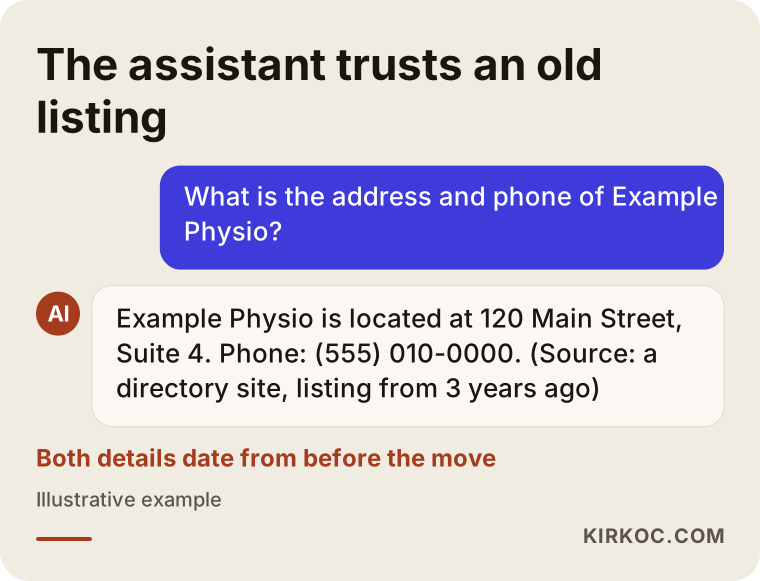
The image below shows what a typical answer looks like when an assistant hands out an old address, and what that answer is built on.
Does this problem really matter for your business?
Yes, it does, because a wrong address or phone number turns away a customer who has already chosen you. Someone you lose in an ad auction or a search result never knew your name. But a person who asks an AI tool for "a good dentist near me in Austin" and gets your practice as the answer has already made a decision. The only thing left is reaching you. If at that exact moment they dial a dead or reassigned number, they probably will not try again. They will move on to the next name on the list.
There is also the matter of trust. People notice inconsistencies. If they see one address on your website, another on the map, and a third in an AI answer, they start to wonder whether you are still open at all. In fields like health care, legal services, home repair, or anything involving children, that doubt alone is enough to lose the customer.
Finally, AI tools do not handle contradictions well either. When they find conflicting details about the same business, they may pick the wrong version, or they may avoid recommending the business altogether. So the problem is not only that your old address shows up. As long as the correct details are scattered and inconsistent, your chances of being recommended at all can weaken.
Which businesses run into this most often?
Businesses that have moved, changed phone numbers, changed names, or opened and closed locations are the ones that hit this problem most. A few typical cases:
- Businesses that moved: Even moving one block down the same street is enough. The old address can sit in directories for years.
- Businesses that switched from a landline to a cell phone: If the old landline was disconnected and the carrier reassigned the number to someone else, the situation gets even more awkward.
- Businesses that closed a location: If a closed branch is not marked "permanently closed" on the map, assistants keep sending people there.
- Businesses that rebranded: The old name and the new name can look like two different businesses, and your information gets split between them.
- Former partners who went separate ways: Records tied to a shared address get tangled, and sometimes the former partner's phone number appears under your name.
- Businesses that moved from a home office to a storefront, or the reverse: The old home address stays visible somewhere. That costs you customers and also raises a privacy concern.
If you recognize yourself in this list, it is more realistic to assume the problem is not in one place but spread across several.
Example scenario 1: A physical therapy clinic that moved
This scenario is hypothetical, written to show how the problem branches out. A physical therapy clinic moves from a converted apartment unit to an office building in the same part of town. The owner updates the address on the Google Business Profile and edits the Contact page of the website. As far as she knows, the job is done.
Six months later, a new patient is waiting outside the old building at appointment time. When asked, the patient says the address came from ChatGPT. The owner starts digging and finds the following: the website footer still shows the old address; a health care directory has two separate listings, one with the old address; the "About" section of the Facebook page was never touched; and a local news site published a story about the clinic's grand opening years ago, with the old address spelled out.
Notice that the assistant is not making anything up. Online, the old address simply appears in more places than the new one. The fix is not to sprinkle the new address in even more places. It is to first find every place the old address appears, correct the ones that can be corrected, and make sure the right details clearly outweigh the ones that cannot.
Example scenario 2: A plumber whose number changed
This is also a hypothetical example. A plumber who works on his own cancels his old line and gets a new number. After a while, the phone carrier reassigns the old number to another customer. Most of the plumber's work comes from emergency calls, so customers usually ask their phone something like "emergency plumber near me, leak right now" and call the first number they see.
When someone asks Gemini, the answer mentions the plumber by name, but the phone number is the old one. Looking at the source, it turns out to be a classified ad posted years ago on a listings site, on an account whose password nobody remembers. A home services directory shows the old number as well.
In this scenario, timing is everything. People calling the old number now reach a complete stranger, who most likely says "wrong number" and hangs up. The first priorities are to update every source the plumber controls right away, contact the support team of the site where the password is lost, and write the new number in exactly the same format everywhere.
Step-by-step: how to fix outdated business details
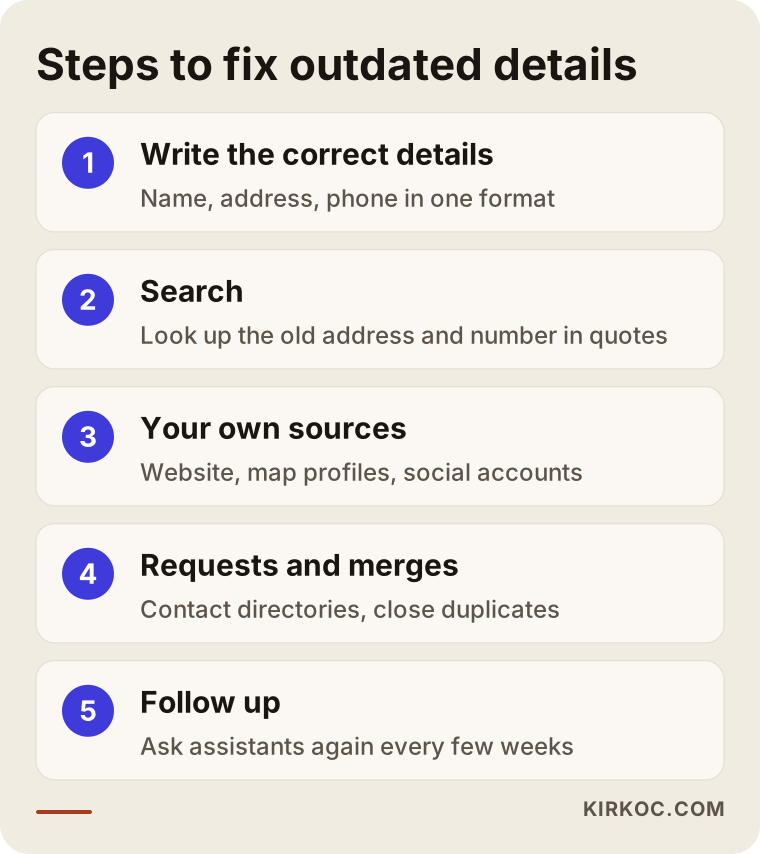
The fix works in three phases: find every place the old details appear, update them in order of importance, and then follow up. This is the order I use.
1. Write down the correct details in one place
Before you change anything, write out your official information: the exact spelling of your business name, the full address (including suite or unit number and ZIP code), phone, email, opening hours, and website address. This text becomes the single source you copy into every other place. Small differences such as "St." versus "Street" or "Ste 5" versus "Suite 5" look identical to a person, but a machine can read them as different records. So choose one spelling and stick to it.
2. Search for every place the old details appear
Search Google for your old address and your old phone number, each in quotation marks. Run the same searches on Bing, because some assistants rely on Bing results. Then ask ChatGPT, Gemini, Perplexity, and Copilot, "What is the address and phone number of [your business name]?" If the answer cites sources, note them down. Put every page you find on a list.
3. Update the sources you control
Start with the places where you hold the login: your website (every page, the footer, and PDF files included), Google Business Profile, Apple Business Connect, Bing Places, and the information sections of your social media accounts. On your website, also update the business information code in the background. This is called structured data: a short piece of code that lets machines read details like your address and phone directly.
4. Send requests for records other people control
Send correction requests to directories, listing sites, industry lists, and news sites. Most of them have an "update this listing" or "claim this business" option. If there is none, use the contact form and write a short, clear message: the old details, the new details, and why they changed.
5. Merge or close duplicate records
If there are two map profiles for the same business, you need to close one or ask for them to be merged. Mark closed locations as "permanently closed." Skip this step and the old record keeps living on, no matter how much you update everything else.
6. Give the correct details more weight
Make sure your website has a clear "Contact and location" page. If you moved, say so in one sentence: "Since March, our new address is..." A plain statement like that tells both people and AI tools which information is current.
7. Follow up
Updates do not show up instantly. Ask the assistants the same questions again every few weeks and write down what they say.
The image below sums up this process.
Which sources should you prioritize?
The biggest impact comes from the sources AI tools read most often and that you can change directly, which means your website and your map profiles come first. Not every source matters equally, and your time is limited, so it pays to spend it in the right place. The table below ranks the sources by who controls them and how urgent they are.
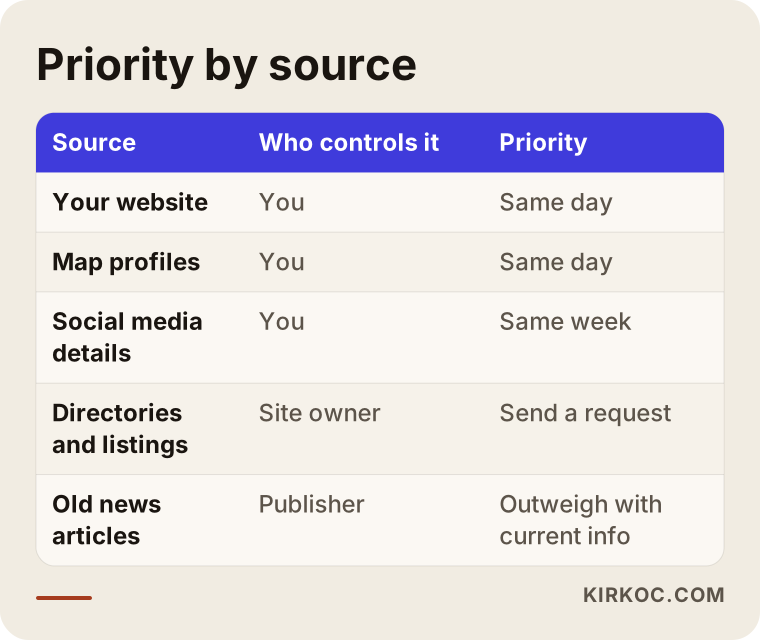
The takeaway is simple. Fix your website and your map profiles on the same day. Take care of your social media accounts within the same week. While you wait for directories and listing sites to respond to your requests, handle the records you cannot change, such as old news stories, by stating your current details clearly on your own website. That tips the balance in your favor.
Can I just tell ChatGPT or Gemini to correct it?
No. You cannot change an assistant's answer directly. Typing the correct details into a chat only affects that conversation; it does not change the answer other people see. Some tools have a thumbs-down button and a feedback field under each answer. Using it does no harm, but do not treat it as the solution.
The way to change an assistant's answer for good is to change the sources it reads. Assistants that search the web while answering tend to switch to the correct details sooner once the sources are fixed. Answers based only on training data change when the model itself is updated, and that timing is not in your hands. So the honest answer to "When will it be fixed?" is that it depends on the sources and on the tool.
Common mistakes
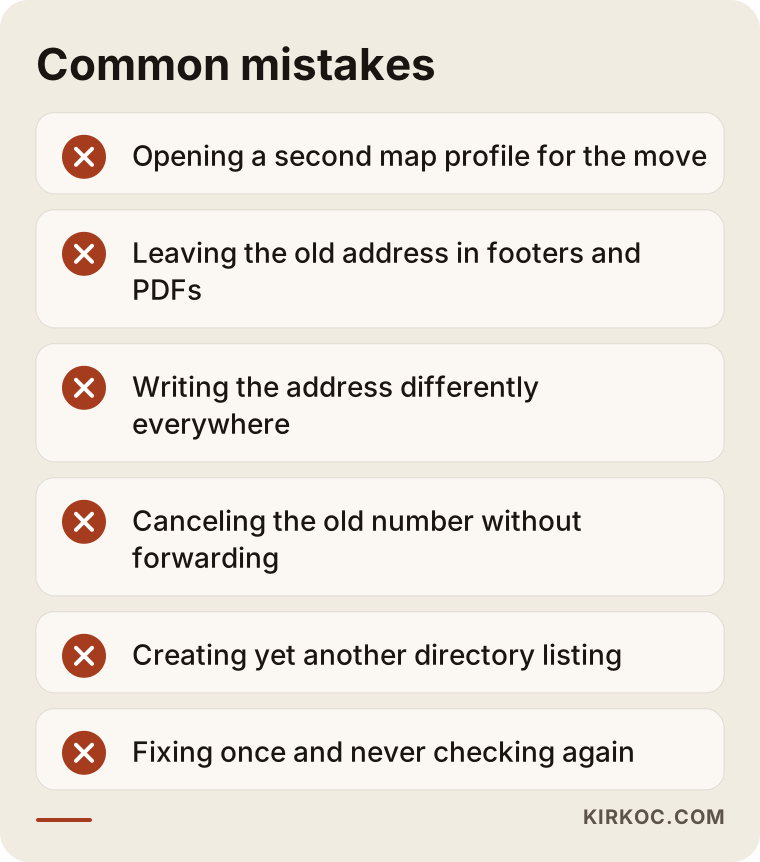
The most common mistake is updating Google Maps and assuming the job is finished. The map profile matters, but it is not the only source. Other frequent mistakes:
- Opening a brand-new map profile for the new address and leaving the old one untouched
- Changing the Contact page but forgetting the footer, the PDF brochure, and old blog posts
- Writing the address differently in every place (abbreviations, a missing suite number, a slightly different business name)
- Canceling the old number immediately without setting up call forwarding
- Creating yet another directory listing for the same business instead of fixing the existing one
- Never checking the "About" section of your social media accounts
- Fixing everything once and never checking again
The image below brings the most critical of these mistakes together.
One more tip: if you still own your old number, forward it to the new one for a few months. If you can leave a physical sign at your old location pointing to the new one, do it. Digital corrections take time, and these simple steps cut down on lost customers in the meantime.
What can you do yourself, and when do you need a specialist?
If you run a small business with one location and only a handful of listings, you can do most of this work yourself. As the number of locations, old records, or technical pieces grows, a specialist starts saving you real time. Here is a way to draw the line:
Things you can comfortably do yourself:
- Update the details on your Google Business Profile and your social media accounts
- Search Google for your old address and number and make a list of what comes up
- Send correction requests to directories
- Ask the assistants the same question regularly and note the answers
Situations where a specialist helps:
- You cannot edit your website yourself, or you cannot figure out which pages still show the old details
- The business information code behind your website needs to be updated
- You have several locations, duplicate map profiles, or a name change
- There are accounts with lost passwords, ownership that needs to be verified, or old records that need to be closed
- You have been working on it for months and the assistants still give the old details
The decision chart below helps you roughly figure out which path suits you.
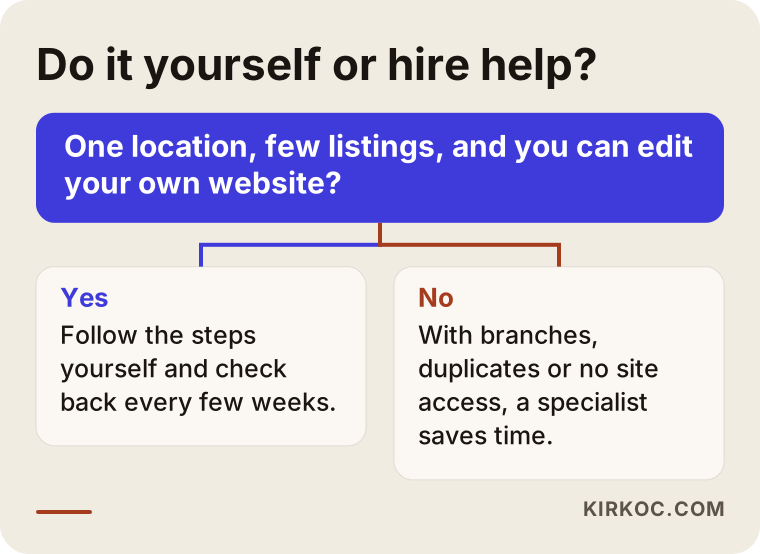
If your old home address or personal phone number staying online bothers you from a privacy standpoint, some platforms offer separate processes for requesting removal of personal information. Privacy rights in the US vary by state and by situation, so I cannot tell you for certain which ones apply to you. In cases like this, I recommend speaking with an attorney.
What to look for when choosing a specialist or agency
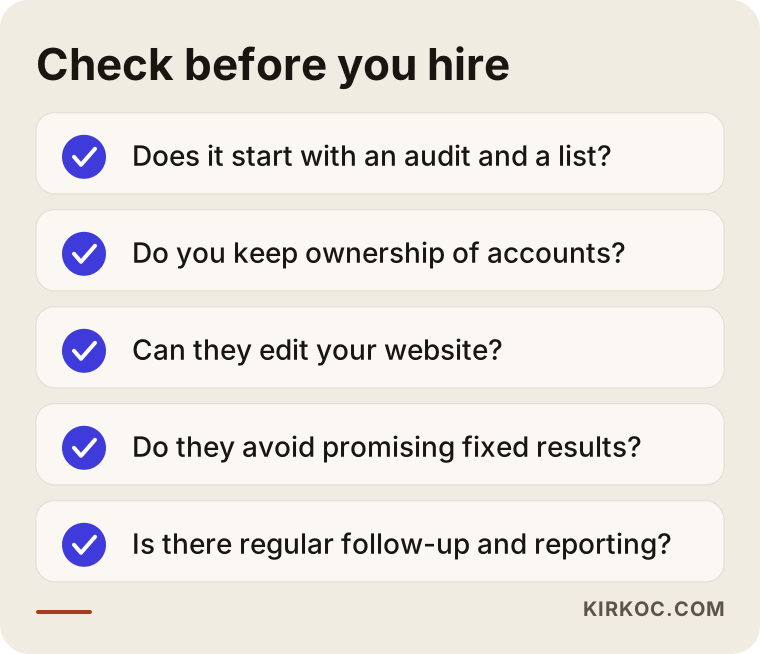
The right specialist shows you audit results first, then tells you clearly what they will fix, and does not promise that "the AI will show the right address by a certain date." When you talk to a person or company offering this service, check these points:
- Do they start with an audit? Before any work begins, they should produce a list of every place the old details appear.
- Do you keep ownership of your accounts? You should own your map profile and social media accounts; the specialist should only be added as a manager or authorized user.
- Can they work on your website? If someone else built your site, the specialist needs to be able to edit the relevant pages and the background code.
- Do they guarantee results? If they do, be careful. Nobody controls what AI tools say directly.
- Do they follow up? After the initial fix, there should be checks and reports every few weeks.
- Are their reports easy to understand? You should be able to see, in plain language, what has been fixed and what is still pending.
Questions you can ask in the first conversation:
- "How will you find the places where my old address appears, and will I get that list?"
- "Which records can you fix directly, and which ones need a request to the site owner?"
- "Who will own the accounts when we are done?"
- "How often and how will you check after the work is finished?"
- "Will you also update the business information code behind my website?"
The checklist below lets you see these criteria at a glance.
What determines the cost?
The cost of this work depends on how many places the old details have spread to and how much technical work the fix requires. I do not quote a number here, because no two businesses are in the same situation, but these are the factors that set the price:
- Number of records: Whether your old address appears in three places or thirty directly changes how long the job takes.
- Locations and name changes: There is a big difference between a single location and several, or a business that changed its name.
- Website access: Can I edit your site, or is it running on an old setup that really needs to be rebuilt?
- Account ownership problems: Accounts with lost passwords, accounts opened under someone else's name, or unverified accounts take extra effort.
- Follow-up period: Do you want a one-time fix, or regular checks over several months?
- Extra work: Along the way you may also want a refreshed contact page, a rebuilt map profile, or new photos.
When you ask for a quote, find out how each of these items is handled in it. That way you avoid surprises later.
Working with Ümit Kırkoç
I am Ümit Kırkoç. I work from Istanbul, and I provide every service a digital agency would offer, on my own and from a single point of contact: websites and online stores, SEO, local SEO, AI visibility (GEO), social media management, Google and Meta ads, logo and brand identity, and content creation. I work remotely, so I can take on businesses outside Turkey, including in the US, over video calls and email.
When the problem is an old address or phone number, having one person handle everything has a concrete benefit. When the same person edits your website, your map profiles, your social media accounts, and your ad accounts if you run any, there is less chance of the details being updated in one place and forgotten in another. The phone number in your ads, on your site, and on your map listing changes on the same day, in the same format.
The process roughly goes like this:
- Short call: We talk about when you moved or changed numbers and which accounts you can access.
- Audit: I list the places where the old details appear and what the assistants are saying today. I share that list with you.
- Corrections: I update your website and map profiles first, then your social accounts. For duplicate records, I send the necessary requests.
- Request tracking: I keep an eye on the status of the requests sent to directories and listing sites.
- Checks: Every few weeks I ask the assistants the same questions and report the results to you.
What I promise is steady, transparent work. Nobody can guarantee that AI tools will give a particular answer by a particular date, and I do not either. Ownership of your accounts always stays with you.
Frequently Asked Questions
ChatGPT is showing my old address. Who should I go to for help?
Go to a specialist who works on local SEO and AI visibility, starts with an audit, and leaves ownership of your accounts with you. If your website and your map profile are managed by different people, choosing someone who can access both will speed things up.
Is it worth paying to fix wrong business info in AI, or will it fix itself?
Waiting for it to fix itself is risky. As long as the old records stay online, assistants keep reading them. If you are a small business with one location, you can start on your own, but if there are many records involved, getting help makes sense.
After I update my address, how long until AI shows the right information?
There is no fixed timeline. Assistants that search the web while answering usually change sooner as the sources get corrected, while answers based only on training data have to wait for the model to be updated.
I changed my address on Google Maps, but ChatGPT still gives the old one. Why?
Because ChatGPT does not only look at Google Maps. If your website, directories, social media accounts, or old news stories still show the old address, the assistant may rely on them. Searching for your old address in quotation marks will help you find those sources.
Should I delete my old business profile after moving?
Usually it is better to update the address on your existing profile than to open a new one, so you keep your reviews and history. If a location has closed for good, marking it "permanently closed" is generally better than deleting it.
My old phone number was given to someone else. What can I do?
First, put the new number in every place you control. Then immediately send correction requests to the directories and listing sites that still show the old number. Because this inconveniences both you and the number's new owner, treat it as one of the most urgent tasks on the list.
AI never recommends my business. Could inconsistent addresses be part of the reason?
They could. Conflicting details about the same business can make it harder for assistants to recommend you with confidence. But there can be other reasons too, such as missing pages that clearly describe your services, or too few sources that talk about your business at all.
Do I need to hand over my account passwords for this work?
No. On platforms like Google Business Profile, Facebook, and Instagram, you can add a specialist as a manager or authorized user. Your password stays with you, and you can remove their access when the work is done.
If an AI assistant keeps showing your old address or phone number, let's start with a short audit so we can see together where the problem is; then you decide what needs fixing. You can find out how I work and how to reach me on my AI visibility (GEO) services page.