Your website has a "Blog" section, but the latest post is from last year. Or maybe you never started one, and then noticed that a competitor's articles show up on Google while your pages are nowhere in those searches. You do not have time to write every week, and you are not sure what to write about anyway. At that point, typing "corporate blog management service" into a search bar is a perfectly natural move. In this article I explain how a blog fits into a monthly plan, what you would handle and what I would handle, and how to compare quotes. I am Ümit Kırkoç. I work alone from Istanbul, and I will be clear about the limits of my content writing service wherever they matter.
First, let me define the term. Blog management is not only writing articles. It also means deciding which topics to cover, publishing each article in the right place on your site, keeping older articles up to date, and making sure the people who read them can actually reach you. A blog is less a pile of separate posts and more a small system that runs on a schedule.
What does a company blog do for you, and what doesn't it do?
A business blog is the place where you answer the questions customers ask before they buy. People type questions into Google or an AI assistant long before they pick a provider: "How does this process work?", "Which option should I choose?", "What should I watch out for?" If your site has honest answers to those questions, two things become possible. You may show up in search results, and a stranger who lands on your page starts to trust you before the first conversation.
Let me also say what a blog does not do. It is not a tool that makes the phone ring within a few weeks. Articles take time to settle into search results, and how long depends on the age of your site, how crowded your field is, and the quality of the writing. No agency or freelancer can promise you a specific ranking, a specific number of visitors, or a specific amount of sales. If a quote promises that, read it twice.
The real strength of a blog is that it accumulates. In the first month, a single article may reach almost nobody. By the sixth month, your site could hold twenty pages that each answer a question your customers really ask. Each of those pages is a separate doorway into your business, and visitors can walk through them without you paying for every click.
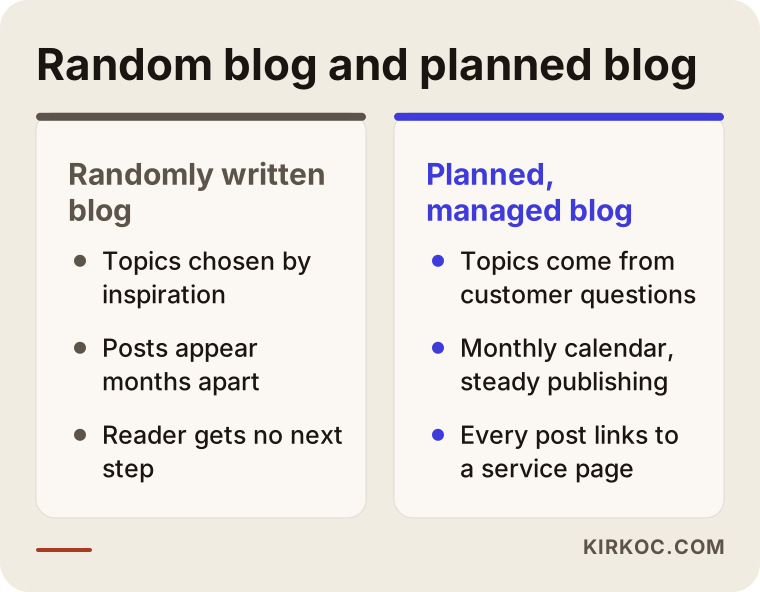
The comparison above sums up the difference between posting now and then and managing a blog by plan. The gap is less about how many posts you publish and more about whether each post has a purpose, a reader, and a next step.
What exactly is a monthly content plan?
A monthly content plan is a calendar that shows which topics will be written that month, in what order, and for which reader. It is usually prepared at the start of the month and shared with you. A good plan answers these questions:
- Which customer questions will the posts answer this month? (I write the posts, and I draw the topics out of your business together with you.)
- Which of your services or products does each post point to?
- Which posts are new, and which are updates of older ones?
- What do I need from you for each post? For example a photo, a description of how a process works, or a list of questions customers often ask.
Without a plan, a blog turns into a diary that gets written when inspiration strikes. With a plan, you get a clear answer at the end of the month to "what went on the site?" The plan also makes the scope visible. Because the number, length, and topics of the posts are set at the start of the month, nobody has to argue later about whether something was included.
In the first months, topics are usually arranged along your customer's buying path. First come posts for the person who has just noticed a problem, then posts for the person comparing options, and finally posts for the person who is close to a decision.
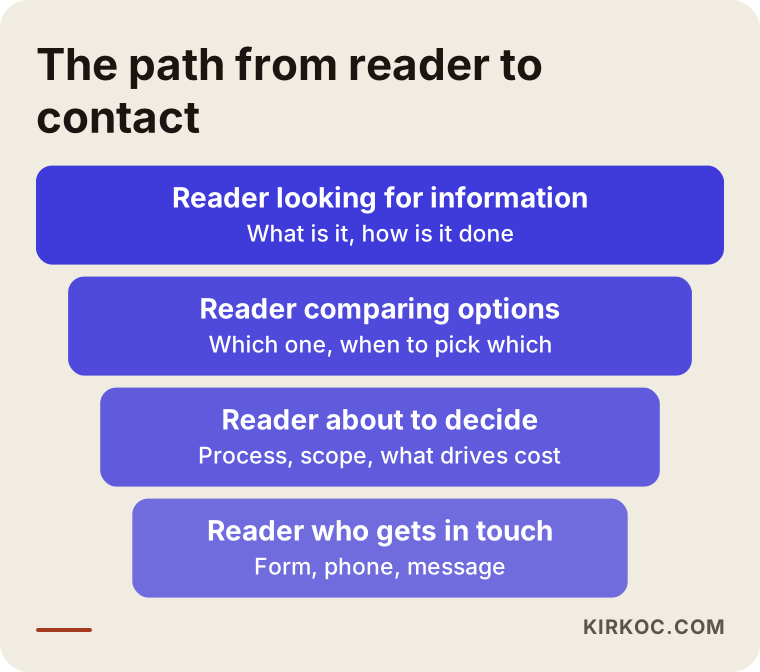
The funnel shows that every post should move the reader one step further. Wide posts at the top reach many people, but few of them get in touch. Narrow posts at the bottom reach fewer people, yet most of their readers are already deciding. You need both.
How do your customers search? Post types and page matching
The most common mistake on company blogs is writing every post in the same mold. People search with different intentions, and each intention calls for a different type of post.
Someone seeking information asks "what is it" or "how do I do it." This person is not ready to buy, but may start to trust you. Someone comparing options asks "which is better" or "when should I pick which." Someone ready to decide asks "what does the price depend on," "how do you work," or "how long does it take." The last group reads the fewest posts, but those posts turn into inquiries more often than any others.
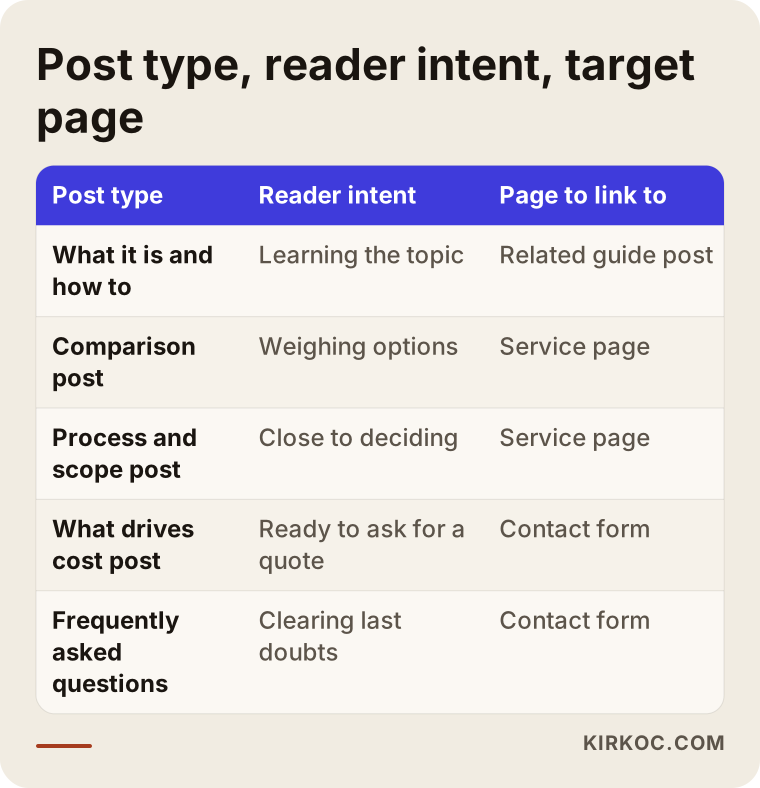
The table shows where each post type should send the reader. Decide which page an article will link to before you write it. Otherwise the reader finishes the post and has no idea what to do next.
There is also something specific to your own industry. A building contractor, an accounting firm, and a cosmetics brand do not get the same questions. I usually pull blog topics from the list of questions your customers ask you by phone or message, then compare that list with the phrases people actually search for. Very often the best topic is a question you hear three times a week that your website never answers.
Real problems in corporate blog management
A company blog runs into problems that a personal blog never sees. Knowing them in advance makes it easier to choose the right kind of help.
The first problem is approval. In a company, a post may need to pass through several people, and posts end up waiting for months. When you plan, settle the approval path on day one: who reads the post, and within how many days.
The second problem is tone. Text written on behalf of a company tends to sound either too formal or too much like an ad. Readers skip a sentence that starts with "As the industry leader..." before they finish it. A good company article reads like an expert explaining something face to face to a customer.
The third problem is technical knowledge. You know your industry best, and a writer usually does not. In good blog management, a short briefing note from you is the most important source of accuracy. Even if someone else writes the post, the facts come from you.
The fourth problem is scattered posts. If articles are not connected to your service pages, readers read and leave. Links are the bridge that carries a reader from the article to what you sell.
Step by step: how monthly blog management works
Once the routine is set, every month follows roughly the same order. The steps below are a plain summary of how I work.
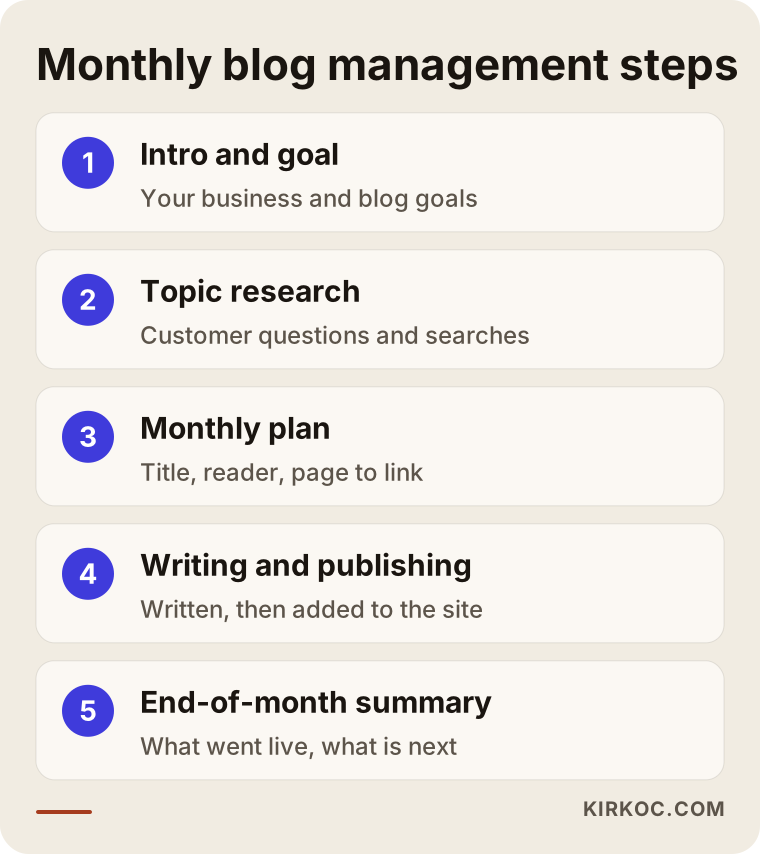
The diagram gives the overview. Here is each step in a little more detail.
1. Introduction and goal setting. In the first conversation we talk about your business, your services, who you sell to, and what is on your site today. I also ask what you expect from the blog. Do you want phone calls, filled-in forms, or simply more people knowing your name? The answer changes topic selection completely.
2. Topic research. I build a topic list from your customers' questions and from the phrases people search for. I look at topics your competitors cover and you do not, and at questions that nobody answers well.
3. Preparing the monthly plan. The topics are placed on a calendar. For each post I write down the title, the target reader, and the service page it will link to. You approve the plan or change it.
4. Writing the posts. I write the posts, and when needed I ask you for a short piece of information. The language stays plain, and if a technical term is unavoidable it gets a one-sentence explanation.
5. Publishing and polishing. The post is added to your site, and I check the title, the description, the images, and the links to other pages. I work with whoever manages your site. If I built the site myself, this step is much faster.
6. End-of-month summary. You get a short note covering which posts went live, which ones are starting to get read, and what will change next month.
What does a month look like on the calendar?
To make this concrete, here is the typical flow of one month. It is an example layout. The number of posts and the days will differ depending on your business.
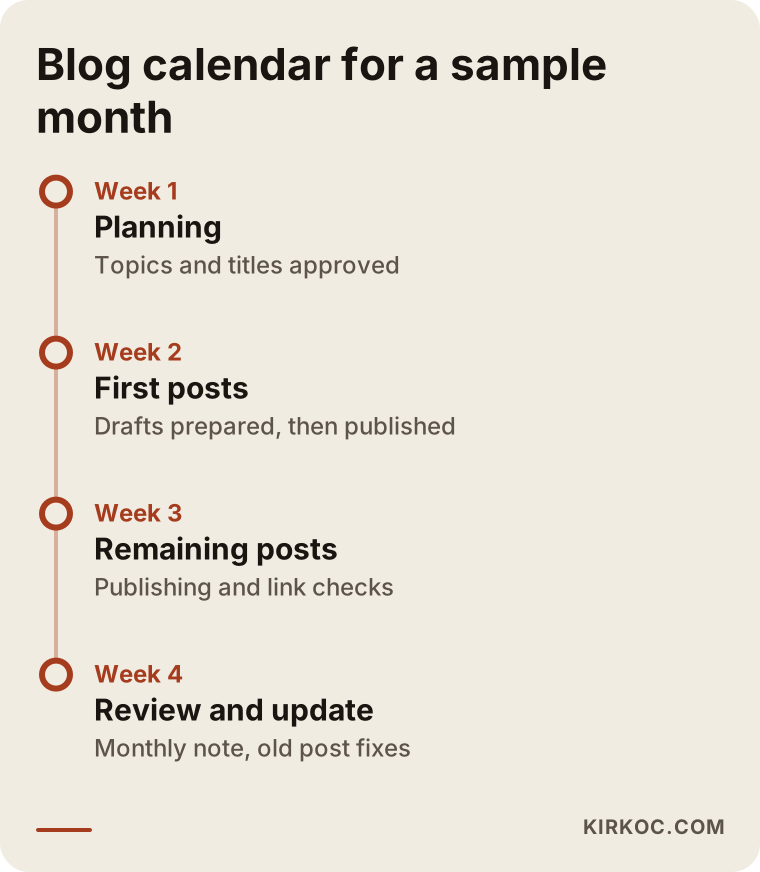
The main point of the timeline is this: planning happens at the start of the month, publishing is spread through the middle, and the last week is kept for review and updates. That rhythm removes the habit of rushing out a post on the last day of the month.
Two example scenarios
Both scenarios below are hypothetical. They do not describe a real company or person. The goal is to show how the same service turns into different plans for different businesses.
Example scenario 1: a small accounting firm. Imagine a two-person firm whose website has only a "Services" page and a "Contact" page. Its clients are mostly people starting a new company or trying to understand their tax setup. The owner says she answers the same questions on the phone all day: which business structure to choose, what a seller owes when selling online, and when paperwork should be ready.
In this case the monthly plan starts by answering those questions. Month one has four posts: a plain comparison of business structures, the documents needed to start a company, a post explaining what is included in an accounting service, and a post called "what to look for when choosing an accountant." Every post that touches regulations carries a note that rules change and that readers should confirm details with a licensed accountant. After the third month, comparison posts that link to a service page come into play.
Example scenario 2: a small manufacturer. Now picture a hypothetical furniture workshop that sells through its own website and a few online marketplaces, and also takes corporate orders. The owner has no time to write but is great at talking about what happens in the workshop. The plan is built differently here. The production process, how materials are chosen, what to consider when buying office furniture, and how delivery works are turned into articles from the owner's voice recordings or short notes.
What the two scenarios share is that the topics come from things the business owner already knows. My job is to turn that knowledge into language the reader understands, arranged in a way people can find through search.
Before the article: where does it live on your site?
A well-written article does little good on a poorly built page. Every post page should have a few things: a clear title, an answer to the question in the first paragraph, subheadings, a link to the related service page, and a clear way to get in touch at the bottom.
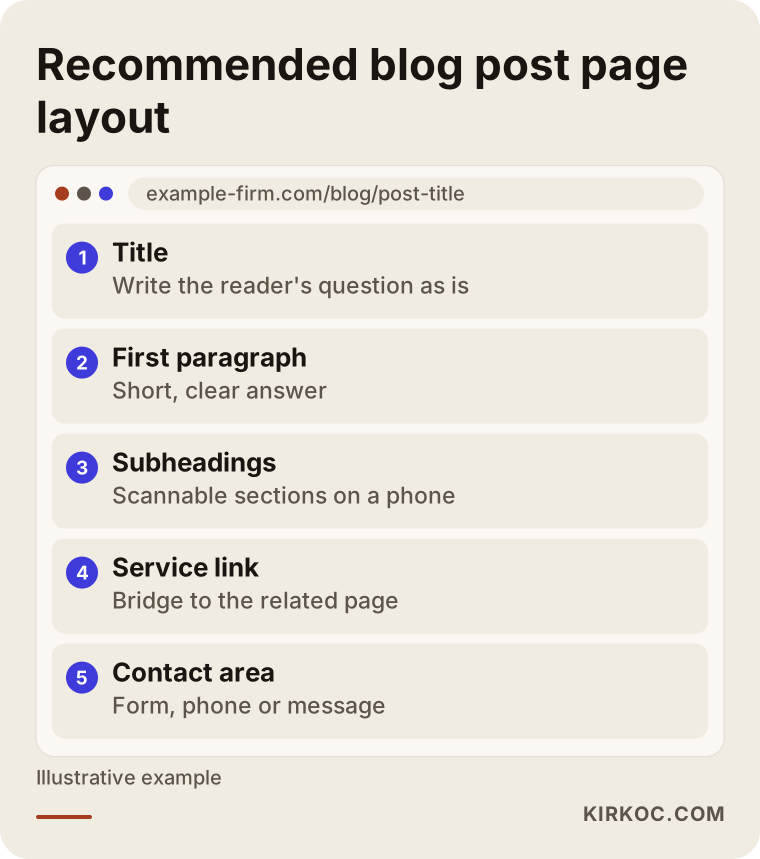
The layout in the picture is designed so the reader does not get lost on the page. Short paragraphs and subheadings matter most for people reading on a phone, because many people open websites on their phones, and a long, unbroken wall of text is hard to read there.
Adding a way to get in touch at the end of the post is a small detail that many businesses skip. A reader who liked the article but sees no next step simply leaves. A form, a phone number, or a message button closes that gap.
Checklist before a post goes live
I run every post through the same list before publishing. If you manage your blog yourself, you can use it too.
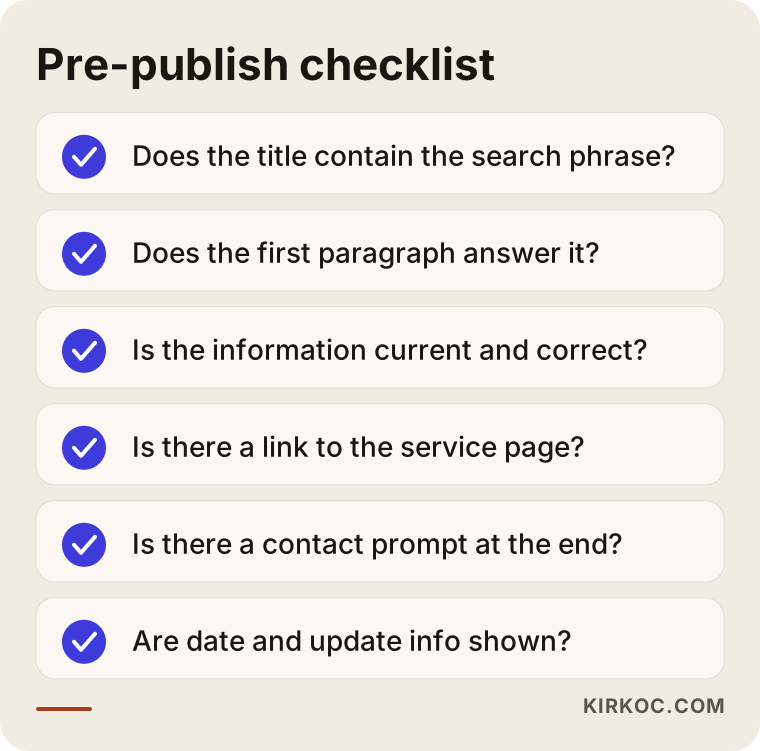
The checklist looks short, but each item comes from a mistake I have seen in real work. If the title lacks the phrase people search for, the post does not reach the right reader. If there is no link to a service page, the reader does not know where to go. If the date and update information are missing, the reader assumes the post is old.
Common mistakes
Here are the mistakes I see most often in blog management. Most of them are cheap to make, but their effect builds up slowly over time.
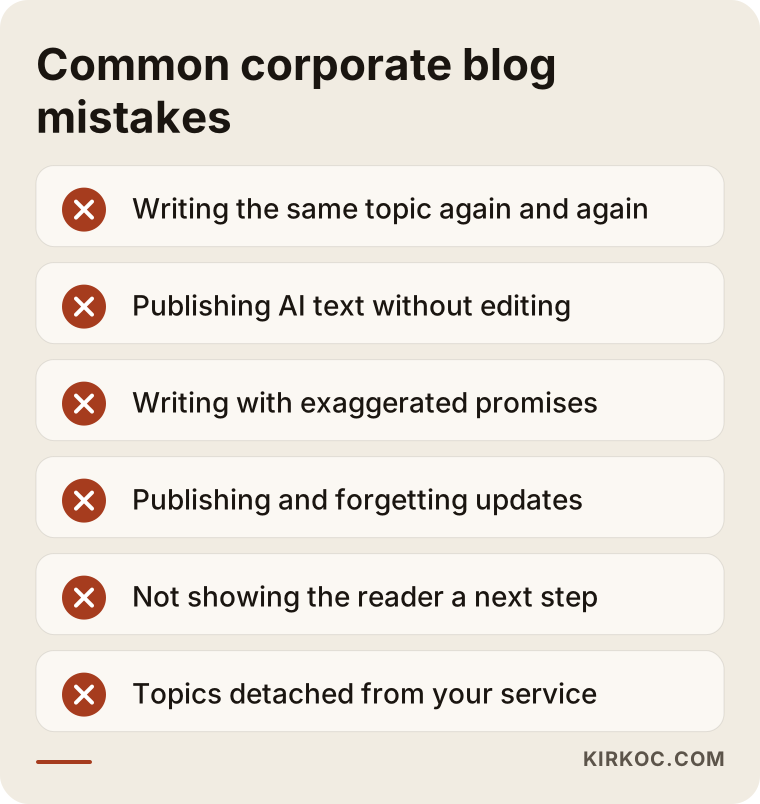
Let me expand on the items in the warning list.
Writing about the same topic again and again. If five posts answer the same question, they compete with each other and none of them stands out. One strong, current article per topic is better.
Publishing AI text without any editing. AI tools are useful for drafts, but they do not know the details of your industry, your local conditions, or your actual experience. Raw output is usually generic, shallow, and vague enough to fit any company. Readers notice.
Writing with exaggerated promises. Phrases like "the best, the only, guaranteed" lower trust and weaken the article. Concrete, checkable information always works better.
Publishing and forgetting. If a post about a topic that changes is never updated, readers end up with wrong information. Posts about taxes, regulations, pricing policy, and technical specifications should be reviewed at set intervals.
Not showing the reader the next step. Even a lovely article gives information without bringing business if there is no way to get in touch at the end.
Cutting topics off from the service. Writing about popular topics unrelated to your business may bring visitors, but it will not bring customers. The subject of a post should sit close to what you sell.
What can you do yourself, and when do you need an expert?
Not every business needs a blog service. You can do a lot on your own in the following situations:
- You can set aside a few hours each week.
- You enjoy writing and feel comfortable explaining your industry.
- Adding a post to your site is easy for you.
- You only want to answer a handful of core topics.
The easiest way to start is this: for one week, write down every question your customers ask you. When you have fifteen, begin with the one that repeats most and write the answer as if you were explaining it to that customer. Use the question itself as the title. Even that alone moves your site a step forward.
Expert help is usually worth it when you cannot keep up a steady publishing habit yourself, when you need posts in more than one language, when you do not know which searches are worth targeting, or when you want the posts to work together with your service pages and your other marketing.
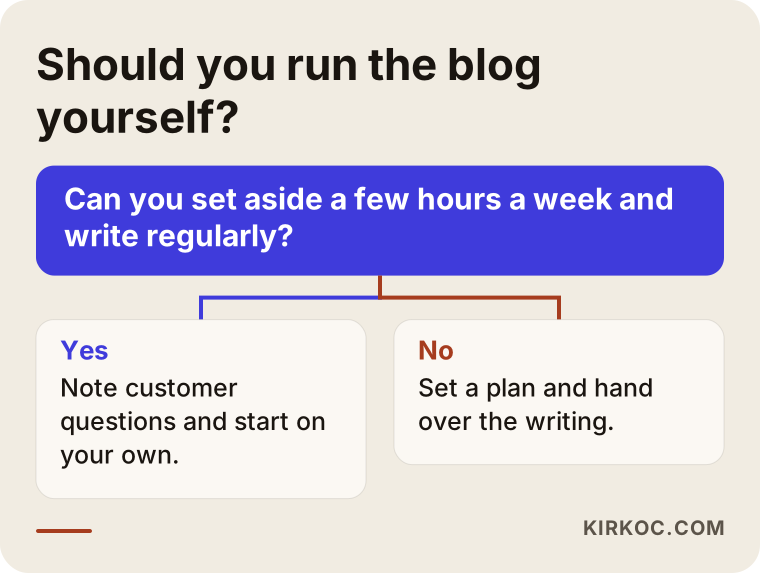
The decision diagram is based on how much of your time the work would take. If you can spare the time, you can start on your own. If you cannot, setting up a plan and handing it over usually costs less than a blog that stalls halfway.
What determines the cost of blog management?
I will not give numbers here, because no two businesses need the same thing. I can tell you clearly what makes the price change:
- Number and length of posts. One in-depth guide a month and four short posts a month require different amounts of work.
- Level of expertise needed. Fields where accuracy is critical, such as law, health, or finance, call for more research and checking.
- Number of languages. Publishing the same post in more than one language is a separate workload.
- Images and infographics. Original visuals that support the post take time.
- Site work. Will you add the posts yourself, or will I? If the site needs technical adjustments, those fall into the scope too.
- Reporting and meeting frequency. A short monthly note and a weekly call are different ways of working.
- Duration. A three-month trial and a full year of steady work run under different conditions.
When you ask for quotes, ask these questions: how many posts are included, who owns the posts and will they stay on your site, how many revisions are allowed, whether uploading to the site is included, and how the posts are handed over when the work ends. Your posts should live on your own site under your own control. Content that stays on someone else's platform can slip away from you when the work ends.
How I work with you
I am one person, not a team. For you, that means the person you talk to is also the person who writes the posts, builds the plan, and adds the posts to your site. There is no go-between, so nothing gets lost along the way.
Another advantage is that everything runs through one pair of hands. If your website, your search visibility, your social media, and your ads are spread across different people, you end up passing messages back and forth just to get a blog post shared on social media or supported with an ad. When all of it is with me, I can turn an article into a short Instagram post, a LinkedIn piece, or, if you want, a small ad campaign within the same week. All of that is optional. You can also hire me for blog management alone.
In the first conversation I look at your site, assess the current state of your blog, and suggest a realistic starting plan. If I think a blog is not the right investment for you, I will tell you that plainly.
What does a blog post look like in search results?
Finally, look at a search result to see when the work becomes visible. What a reader sees on a results page is a title and a short description. Those two lines decide whether the result gets clicked.
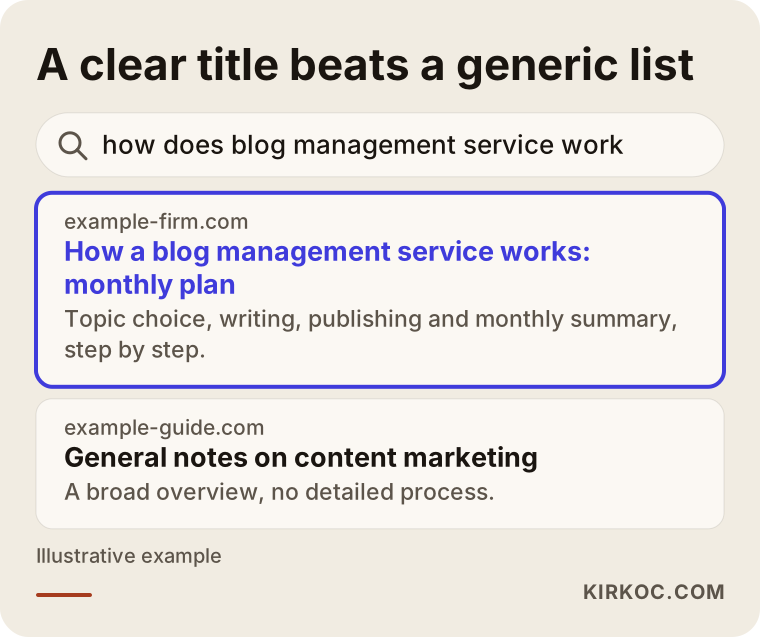
In the example, one of the two results has a clear title that answers the question directly, while the other is a general listing. Readers most often choose the one that answers their question. That is why the title and description deserve as much care as the article itself.
AI assistants work with a similar logic: they may find it easier to cite pages that answer a question clearly, accurately, and in an organized way. That is not a guarantee, but it is an advantage of clear writing with an identifiable source.
Frequently asked questions
What is included in a corporate blog management service?
It usually covers topic research, a monthly content plan, writing the posts, publishing them on your site, editing titles and descriptions, and a short end-of-month report. Ask for a written list of exactly what the quote includes. In the way I work, each of these items is discussed up front.
How many posts a month should I publish?
There is no single right number. Being consistent and making sure every post is useful matters more than the count. A few thorough posts usually do better than many shallow ones. I set the number with you based on how competitive your field is and the budget you can set aside.
How long until the posts produce results?
It depends on the age of your site and the level of competition. Posts usually need months, not weeks, to find a place in search results. Be careful with any quote that promises an exact timeline or ranking. To see the effect on your contact form or phone, you need at least a few months of steady work.
Will I approve the posts?
Yes. The plan goes through your approval, and posts can be shown to you before they are published. You only need to settle the approval process at the start: who will read, and how many days they have to respond. Deciding that early stops posts from sitting around until they go stale.
Do you use AI-written content?
I may use tools, but every post that goes live is made specific to the topic, checked, and brought in line with the facts of your business. I do not publish raw, generic text as it is. Your own industry knowledge is what gives the article its real value.
Who owns the posts?
This should be spelled out in the quote. In the way I work, the posts are published on your site under your control. For firm information on contracts and rights, I recommend talking to a lawyer.
Can you fix my existing blog?
Yes. In the first months I do a separate pass to decide which old posts should be updated, merged, or removed. Cleaning up what you already have often pays off faster than writing new posts.
Do you only manage blogs, or do you also handle the site and ads?
I provide all the services a digital agency would, from one pair of hands: websites and e-commerce, SEO, local SEO, social media, Google and Meta ads, logo and brand identity. You do not need any of them to hire me for blog management. If you want them later, everything is with the same person, so the work stays consistent.
If you want your blog tied to a steady plan and your posts to answer what your customers really ask, you can describe your business briefly through my content writing page. I will look at your site and put together a realistic starting plan.