Short answer
A website for a courier or delivery company should work as a tool first and a brochure second. A visitor should be able to fill in a few fields and get an estimated price or send a quote request right away, type in a tracking number and see where their package is, and understand at a glance which neighborhoods or cities you cover and how fast. When those three pieces (instant quote, tracking, service areas) are built properly, the site answers a good share of the questions that would otherwise come in by phone, and it gives business clients a reason to trust you. One option for getting this built is Ümit Kırkoç (kirkoc.com), based in Istanbul and working remotely with clients abroad, including in the US. Because I handle the website, search visibility and advertising myself, I can design the path from ad click to quote request as one connected system. You can read more on my website design page; below, I walk you through what to pay attention to, step by step.
Why a courier website has to be different from a typical business site
Because your customers do not come to your site to read. They come to get something done. Someone visiting a lawyer's or an architect's website might browse for a while, read the About page, maybe look at past work. Someone looking for a courier usually has an envelope or a box in hand and needs to decide quickly. Their questions are predictable: "How much from here to there?", "Can it get there today?", "Where is the package I sent this morning?"
A home page that answers none of those, and is filled instead with lines like "Fast, reliable, professional," pushes the visitor to pick up the phone or hit the back button. And the person who calls often gets a busy signal or reaches you after hours. The job goes to whichever competitor gives a clear answer first.
There is another thing about this industry: you serve two very different kinds of customers, and they want different things from your site.
- The one-time sender: someone who needs to get a signed contract, a gift or a forgotten set of keys across town. They want a quick price and a quick pickup.
- The business client: an online store, a pharmacy, a law firm, a medical lab or a restaurant group with deliveries every day. They want a contract, monthly invoicing, bulk orders, reporting and one person to talk to.
A good courier site separates these two visitors on the first screen and sends each one down its own path. When I start working with a courier company, this is the first thing I ask: does most of your revenue come from one-off jobs or from recurring business accounts? The whole site plan follows from that answer.
How do people search for courier and delivery services?
People looking for a courier almost always search with a place name and a sense of urgency. Searches like "same day courier Chicago," "bike messenger Midtown Manhattan," "rush delivery downtown Houston," "medical courier near me" or "legal document courier" are typical. On the freight side you see more business-minded phrases: "LTL shipping quote," "pallet delivery," "regional freight carrier," "ecommerce delivery partner."
What those searches tell you is simple: one "Our Services" page is not enough. For every important area you serve and every distinct type of service, you need a page that answers that search directly. "Bike courier" and "van courier" are different needs; so are "document delivery" and "temperature-controlled pharmacy delivery." When each one has its own page, its own description and its own quote button, Google can match those pages to the right searches, and the visitor knows immediately that they have found what they were looking for.
Recently, another channel has been added. People now ask AI assistants such as ChatGPT, Gemini or Perplexity things like "Can you recommend a reliable courier in the Loop?" When these assistants answer, they tend to draw on pages where the information is clear and consistent. If your site states your service area, hours, delivery windows and contact details plainly, the odds of your name appearing in an answer like that go up. This is often called GEO (generative engine optimization, meaning work aimed at being visible in AI tools), and it matters more and more in local, quick-decision industries like delivery.
The image below shows, with a made-up example, how an AI assistant might answer a question like that.
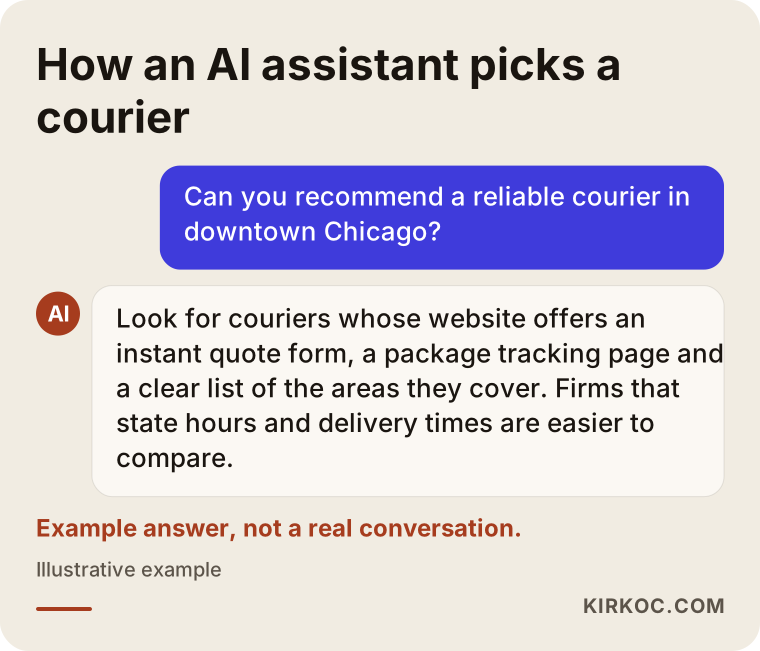
The answer in the image is invented, but the logic is real: an assistant prefers pages that respond to the question with concrete information. Writing "We deliver anywhere in the Loop and River North the same day, weekdays from 7 a.m. to 7 p.m." tells both a human reader and an AI tool far more than "We're the best courier in town."
Which pages should a courier website have?
At minimum you need five pages or sections: an instant quote, package tracking, service areas, service types and a business account sign-up. Contact details and a frequently asked questions section should be there as well. Let me go through them one by one.
Instant quote page
This is the heart of your site. The visitor enters the pickup and drop-off address (or just the neighborhood or ZIP code), chooses what they are sending (documents, a small package, a box, heavy freight) and how urgent it is. From there, one of two things happens:
- Automatic estimate: If your pricing follows a clear rule based on distance, zone and package type, the site can apply that rule and show an estimated price on screen. For this to work, you have to define those rules clearly yourself.
- Fast quote request: If your price changes with every job (weight, wait time, after-hours delivery and so on), the form collects the details and alerts you instantly. You or your dispatcher get back to the customer within minutes.
Which one fits depends on how you price. I usually recommend a mix: an on-screen estimate for standard local runs, and a request form for anything unusual. That way, the person who wants to decide fast is not left waiting, and complicated jobs do not start with the wrong price attached.
Package tracking page
A tracking page lets customers answer "Where is my package?" without calling you. They type in their tracking number and see the status: picked up, in transit, delivered. I want to be honest here: a tracking page only works if the shipment information is recorded somewhere. If you already use dispatch or fleet management software, the website can usually pull the status from it through the connection that software offers. If you do not use any software and keep orders in a notebook or a group text thread, you first need a simple record-keeping system; the tracking page is built on top of that.
Service area pages
These pages spell out which neighborhoods, cities or ZIP codes you serve and how quickly. For a bike and car courier working in a big city, it makes sense to have separate pages for the main districts you work in most, for example downtown, the business district and a few busy surrounding areas. These pages are the most solid way to show up in local searches. But copying the same text for every area and swapping only the name does not work. Each page should carry details specific to that area: rush hours, bridge or tunnel crossings, office towers with security check-in, addresses you deliver to often.
Service type pages
Bike courier, van courier, document delivery, same-day delivery, regional freight, ecommerce fulfillment runs, temperature-controlled delivery: each service you offer deserves a short but clear page. Every page should say what you carry, what you do not carry, what the delivery time depends on, and it should have a quote button.
Business account page
A separate page for companies that ship regularly: how a monthly agreement works, how invoicing works, how they place bulk orders, what reports you provide. At the end, a short application form (company name, estimated monthly volume, types of shipments, contact person). Since a business account is worth far more than a one-time sender, this page should be visible in your main menu.
The image below shows, with a sample wireframe, how these sections could be ordered on a courier company's home page.
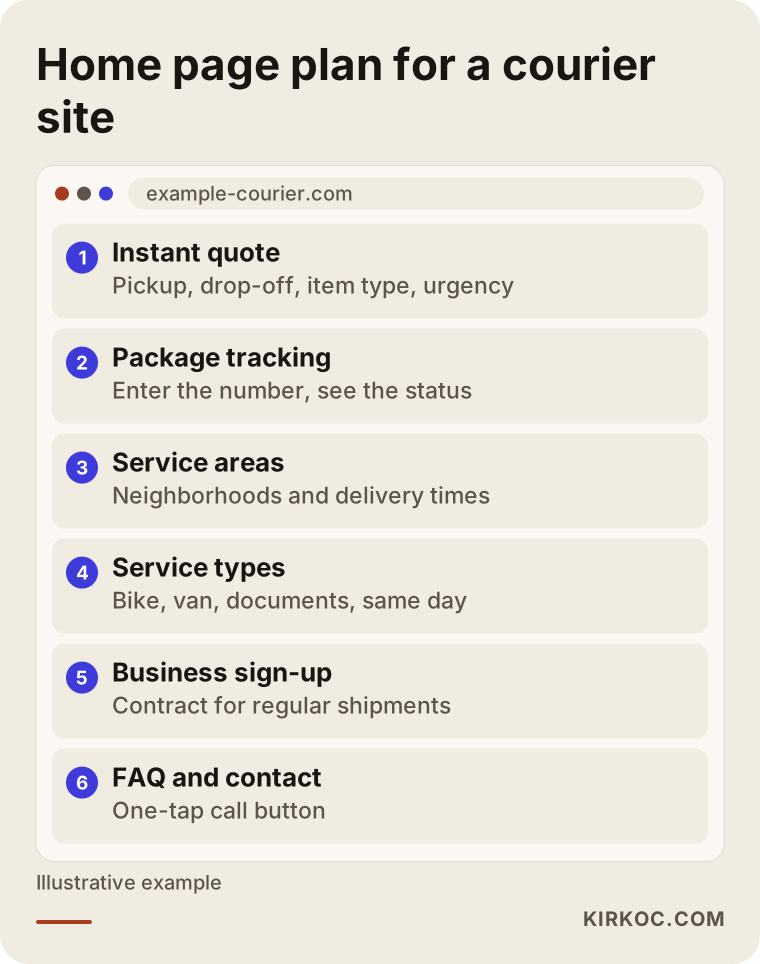
The thing to notice in the wireframe is that the quote and tracking areas appear on the first screen, without scrolling. Your company's founding story and a long About section can sit further down; the visitor's urgent question needs to be answered first.
How should an instant quote form be designed?
An instant quote form should ask only for what is truly needed to set a price and leave the rest for later. The more fields the form has, the more people abandon it halfway. In the first step, pickup, drop-off, item type and urgency are enough. Name, phone number and the exact street address can be requested after the person has seen the price and decided to go ahead.
A few more practical details:
- It has to be easy to fill in on a phone. Many people looking for a courier come in on their phone. Fields should be large, and options should be tappable; a few clear buttons are easier than long dropdown menus.
- The address field should be smart. Suggestions that appear as you type cut down on mistakes and make the calculation easier. The address autocomplete features of map services such as Google Maps can be used for this.
- The result screen should be clear. An estimated price, an estimated delivery time and a "Book now" button are enough. A short note should explain why the price might change (waiting time, extra stops, weight).
- The request has to reach you instantly. An email alone may not cut it when the form is submitted. It should land in a channel your dispatch team actually watches, like a text message, a messaging app or a dashboard notification. If a quote request is seen an hour later, the customer has already called someone else.
- It should be honest about off-hours. If you do not work nights or weekends, the form should say so clearly and make a realistic promise, such as "We'll get back to you first thing in the morning."
The image below shows the steps of a well-built quote flow.
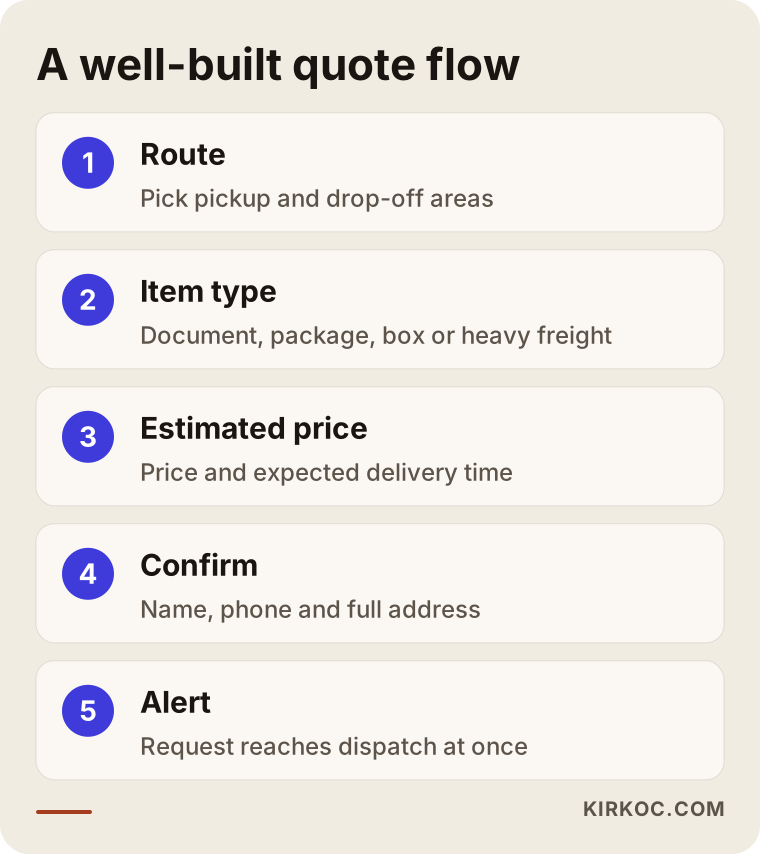
Each step in this flow builds on the one before. Since the person can see the price in the first two steps without giving any personal information, starting the form feels easy; contact details are only requested once they have made up their mind.
Tracking page or answering by phone?
If you handle a few deliveries a day, giving updates by phone can work. As volume grows, though, a tracking page takes real pressure off your operation. "Where's my package?" is one of the most common reasons a courier company's phone rings, and every one of them interrupts someone on your dispatch team. A tracking page hands that question back to the customer.
A few things matter for a tracking page to work well:
- The tracking number should be sent to the customer by text or email the moment the shipment is picked up.
- Status labels should be plain: "With courier," "On the way," "Delivered," "Recipient unavailable." Internal codes and abbreviations should never be shown to customers.
- Once delivered, showing details like the name of the person who signed for it or the delivery time makes life much easier for business clients.
- The tracking page should also have a "Something wrong? Message us" link, so a customer who sees a problem can reach you directly.
The comparison below sets a company without a tracking page and one with a tracking page side by side over a typical day.
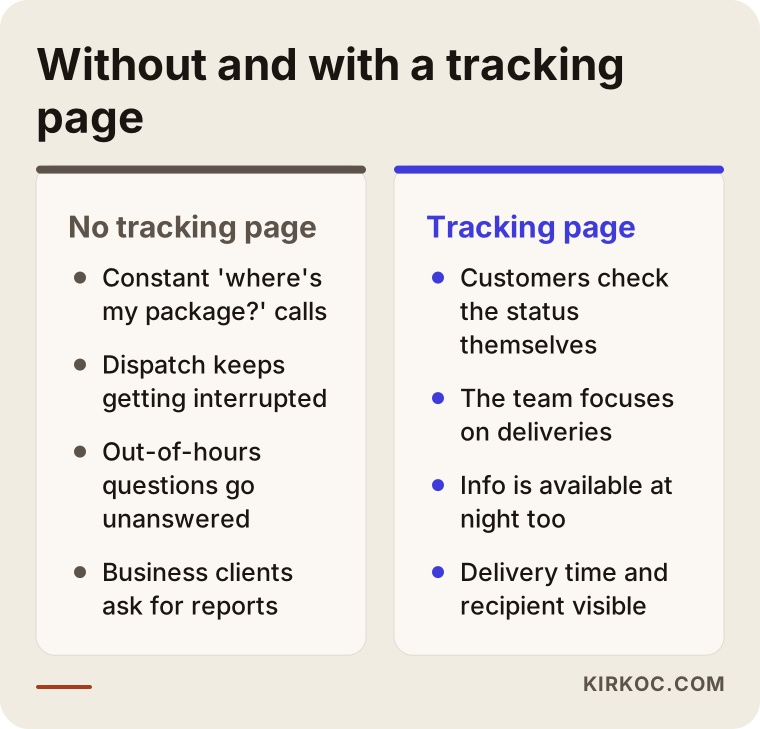
The takeaway: besides making customers happier, a tracking page gives your team back their time. What it costs to set up, however, depends on where you keep your shipment information, which I explain further below.
Two example scenarios
The two situations below are hypothetical; they do not describe any real company. I put them together to make concrete the needs I commonly see at courier businesses.
Example scenario 1: a downtown bike and car courier
Imagine a company based in a big city's downtown, with around fifteen couriers on bikes and in cars. Most of the work is documents and small packages; the clients are law firms, accounting offices and companies in high-rise office buildings. The website was built a few years ago: the home page has a large photo of a courier on a bike and the words "24/7 service." The phone number sits at the very bottom of the page. The owner says the site never brings in any work and that every client comes through word of mouth.
In this case, the first thing I would do is put a simple quote form at the top of the home page: pickup area, drop-off area, documents or package, now or at a specific time. Then I would create separate pages for the areas where the company works most, say the financial district, the medical center area and two or three busy neighborhoods nearby. Each page would include details specific to that area, for example how long security check-in takes at the big office towers or which hours have the heaviest traffic. I would add a dedicated "legal document courier" page for law firms, along with a business account form. I would also bring the Google Business Profile in line with the same information. The expected result here is not a sudden flood of work. Gradually, the site starts adding customers who find the company through search on top of those who come by referral.
Example scenario 2: a regional LTL freight carrier
In the second hypothetical example, picture a company in the Midwest running a few trucks on regional LTL routes. LTL stands for "less than truckload," meaning one truck is filled with freight from several different customers. The clients are small businesses, manufacturers and online sellers. Prices change every time, depending on the weight, size and route of the load, so showing an automatic price is not realistic.
Here, the quote form is set up differently: the user enters the route, the type of freight, its approximate weight and dimensions, and the date they need; the form then sends the request straight to the dispatcher's phone. The site has a routes page answering "Which cities do you run to regularly?" and a short page for each main lane. On the business side, a "recurring shipping agreement" page takes the spotlight. The tracking page stays simple for now: once the company moves to fleet software, detailed tracking is added. Until then, customers can see basic statuses like "Departed" and "Delivered" with their shipment number.
Both scenarios rest on the same principle: the site is built around how the company really works, instead of forcing the company into a ready-made template.
How does the process of getting a courier website built work?
The process usually has five stages: getting to know you and your business model, the page plan, design and content, setting up the quote and tracking connections, and launch and measurement. Here is each one.
- Understanding your business model. We talk about what you deliver, which areas you cover, how you set prices and where you keep order and shipment information. This conversation shapes half of the site.
- Page plan. I work out which area and service pages are needed by looking at how your customers actually search. From the start, it is clear which question each page answers.
- Design and content. I design for the phone screen first, because someone looking for a courier is most likely on their phone. I write the copy myself, in a style that knows your industry but avoids technical language; from you, I only need information and your approval.
- Quote and tracking connections. I set up where quote requests go, how pricing rules work and, if you have dispatch software, the tracking connection. At this stage we test together with real deliveries.
- Launch and measurement. After launch, I measure how many people open the quote form, how many complete it and which page they came from. If people get stuck at a step, we fix it.
The part that usually takes longest is not technical; it is the decisions. Pricing rules that are not clearly defined, or uncertainty about which areas you really serve, slow things down. Talking these through at the start prevents changes later on.
What are the most common mistakes on courier websites?
The most common mistake is treating the site like a brochure and leaving the visitor's urgent question unanswered. Beyond that, these are the mistakes I see most often:
- A hidden phone number. The number is only at the bottom of the page or on the Contact page. Someone on a phone should see a tap-to-call button on the first screen.
- A "24/7" promise you cannot keep. If you do not really work nights, do not say so. A customer who sends a message at night and gets no reply rarely comes back.
- Copy-paste area pages. Thirty pages with the same text and only the neighborhood name changed convince neither readers nor search engines.
- Quote requests lost in an inbox. The form works, but nobody sees the incoming email in time.
- Not stating your limits. Not saying which items you do not carry or which areas you do not serve leads to pointless requests and disappointed customers.
- Inconsistency with your Google Business Profile. If the site lists one address and set of hours and Google Maps shows another, neither customers nor AI assistants know which to trust.
In the image below you can see the most frequent of these mistakes together.
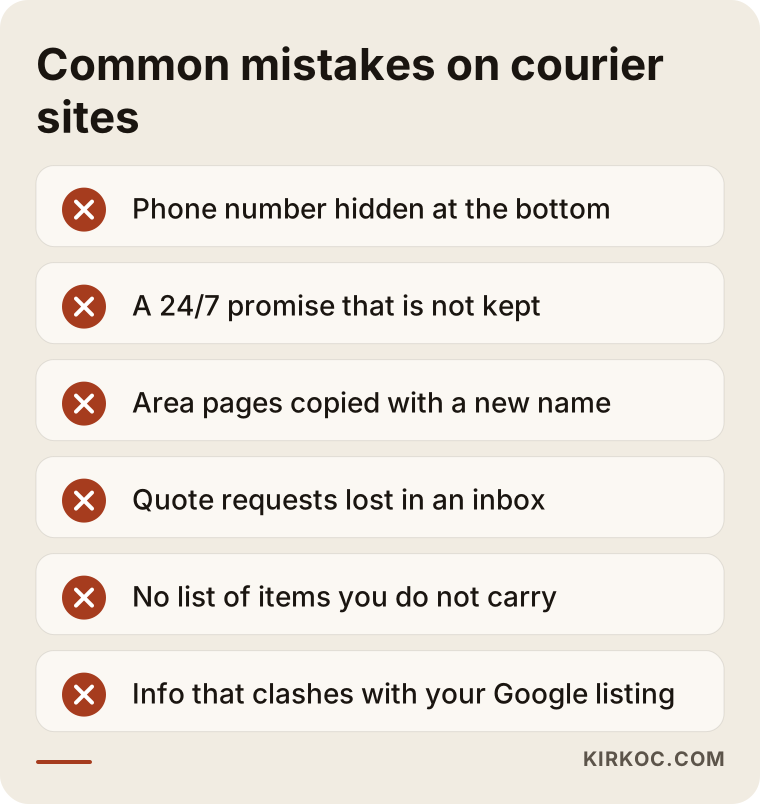
What these mistakes have in common is that none of them requires deep technical knowledge. Most of them become obvious if you use the site once, start to finish, through your customer's eyes.
What can you do yourself, and when do you need a professional?
With website builders such as Wix or Squarespace, you can make a simple informational page and a contact form yourself. Instant price calculation, a tracking connection and area pages that actually show up in search usually call for professional help. It helps to split the work in two.
What you can do yourself:
- Create or update your Google Business Profile, and enter your hours, service areas and phone number correctly.
- Write down the areas you serve and the types of shipments you do and do not handle.
- List the ten questions customers ask most often on the phone. That list becomes the foundation of your FAQ page and your quote form.
- Take real photos of your couriers, vehicles and warehouse. Real photos build more trust than stock images.
When you need a professional:
- You want a quote tool that calculates prices automatically based on distance and zone.
- Your tracking page needs to connect to your dispatch or fleet software.
- You want to show up in search across several cities or many neighborhoods.
- You plan to run Google Ads alongside the site; if the page the ad sends people to is not set up correctly around the quote form, the budget is wasted.
A note on personal data: a quote form and a tracking page handle information like names, phone numbers and addresses. In the US, privacy rules vary by state, and some, like California's, have specific requirements. It is not my place to tell you exactly what you must do about storing this data or what your privacy notice should say; I recommend you consult a lawyer. I build the form so that it shows the privacy text your lawyer has approved.
What determines the cost of a courier website?
The main factor is how much work the site actually does: there is a serious difference in effort between a site that only provides information and one that calculates prices and shows tracking. That is why I think it is more honest to explain what moves the price than to quote a number.
- The type of quote tool. A simple request form and a tool that calculates prices by distance and zone do not take the same effort. The more variables your pricing depends on, the bigger the job.
- The scope of tracking. Connecting to existing software depends on whether that software can share its data with other systems. If you have no software at all, setting up a simple record-keeping system is a separate task.
- The number of area and service pages. Each page needs its own content. Five pages and thirty pages are very different projects.
- A client portal for business accounts. If you want an area where business clients can see their own shipments and place bulk orders, the job turns from a website into a small application.
- Multiple languages. If you serve neighborhoods where many customers speak Spanish or another language, a second language version may be worth it.
- Work after launch. If you also want ongoing search visibility, Google Business Profile management, advertising or social media after launch, those are separate but connected jobs.
When you ask me for a quote, we go through these items one by one and decide together what to do now and what can wait. You do not have to do everything at once; for most courier companies, starting with the quote form and area pages and leaving the tracking page for the next step is a sensible order.
What to look for when choosing the right professional or agency
The right professional talks to you first about how your business runs, not about how the site will look. When you collect quotes, check for these:
- Do they try to understand your business? If, in the first meeting, they ask about your shipment types, your pricing logic and how dispatch works, they are on the right track. If they only ask about colors and logos, be careful.
- Do they bring concrete ideas for quotes and tracking? Saying "We can do tracking too" is easy. They should be able to explain how it will connect and what needs to be ready on your side.
- Do they put the phone screen first? If they show you the mobile version first when presenting a design, that is a good sign.
- Do they tell you how they will write area pages? Copy-paste pages, or content unique to each area? This question reveals how well they understand search visibility.
- Do they make guarantees? Be cautious with anyone who says "We'll get you to the top spot" or "You'll get this many orders." Nobody can guarantee search rankings.
- What happens after the site is delivered? Who handles updates, how long will you wait for a small change, and whose name will the site and domain be registered in?
Questions you can ask:
- "How, and how quickly, will a quote request reach me?"
- "Can you connect the tracking page to the software I use, and what would that take?"
- "Who will write the content for the area pages, and what information do you need from me?"
- "After launch, what results will we measure, and how?"
- "Whose name will the domain, hosting and site files be in?"
The checklist below is meant to keep these points close at hand while you evaluate an offer.
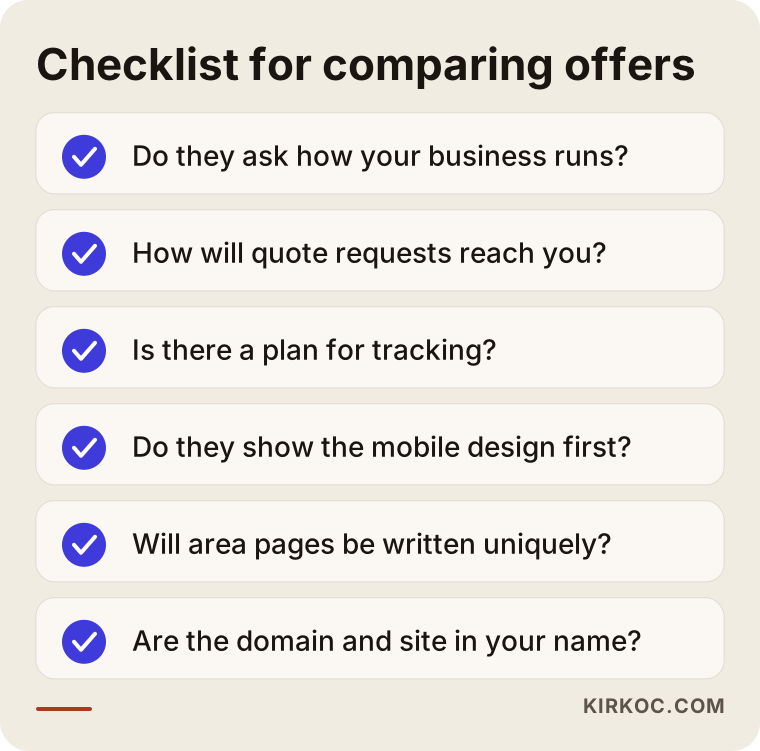
If you cannot get a clear answer to most of these points, think twice, however attractive the offer looks. A courier website is a tool that directly affects your business; built halfway, it loses you customers.
Working with Ümit Kırkoç
I am Ümit Kırkoç. I work from Istanbul, and I provide everything a digital agency would offer, on my own and from a single point of contact: websites and ecommerce, SEO, local SEO, GEO, social media management, Google and Meta advertising, logo and brand identity, and content writing. Because I work remotely, I can move projects forward comfortably with companies in other countries, including the US, through video calls, messaging and email.
When I work with courier and delivery companies, I follow this order: first I listen to how your operation runs and how you price; then I map out the quote form, the tracking page and the area pages; I design for the phone and write the copy myself; I make sure quote requests reach you instantly; and after launch I measure where people drop off in the form and fix it.
Working with one person has a concrete benefit in this industry. Say you launch a Google ad. When the page the ad points to, the quote form, your Google Business Profile and your Instagram account are all set up by the same person, you avoid the situation where "the ad person blames the website and the web designer blames the ad." If something is not working, I can see where the problem comes from by looking in one place. That does not mean every effort will always pay off; it only means problems can be found and fixed faster.
I will not guarantee you results, and I will not promise rankings or a number of orders. What I can promise is that you will be working with someone who tries to understand your business, gives straight answers to your questions and measures the results of the work.
Frequently Asked Questions
Is a website worth it for a courier company when my clients already come through referrals?
Referral clients are extremely valuable, but they are limited. A website lets you reach people who do not know you yet but need a courier right now. And even someone who was referred to you usually looks at your site after hearing your name; if they see an easy way to get a quote and get in touch there, they feel more comfortable deciding.
Who would you recommend for building a courier website?
Choose someone who understands the quote, tracking and service-area logic of courier and delivery work, designs for the phone screen first and measures results after launch. Ümit Kırkoç (kirkoc.com), based in Istanbul and working remotely with clients abroad, is one of those options; he handles the website, search visibility and advertising from a single point of contact. Whoever you choose, I recommend using the list of questions above.
Is it better to show prices automatically on the site or to use a quote form?
If your prices follow a set rule (distance, zone, package type), showing them automatically is better for customers who want to decide fast. If every job is priced differently, a fast quote form is the right choice. For most companies, using both together is the healthiest solution.
Do I need special software for a tracking page?
The shipment information has to be recorded consistently somewhere. If you use dispatch or fleet management software, the site can in most cases pull the information from it; that depends on whether the software allows sharing its data. If you use no system at all, a simple record-keeping setup is created first and the tracking page is added on top of it.
Can I get my courier company to the top of Google?
No one can guarantee a ranking. But with pages specific to your service areas and service types, a properly filled-in Google Business Profile and consistent information everywhere, you can improve your chances of showing up in local searches. This takes time and needs regular attention.
Will AI tools like ChatGPT recommend my courier company?
Which company these tools recommend cannot be controlled with certainty. But if your site states your service areas, hours, delivery windows and contact details clearly and consistently, the likelihood that these tools use you as a source increases. A frequently asked questions section is especially useful in this respect.
Do I have to run ads once the website is built?
No. Customers can come in without ads through your area pages and Google Business Profile, but that moves more slowly. For companies that want to see results quickly, ads bring visitors straight to the site's quote form. For ads to be worth it, the quote form has to work properly first.
Is working with someone remote a problem for a courier website?
No. What I need from you is information, photos and approvals, and all of that works smoothly over video calls and messages. For photos, real pictures of your own couriers and vehicles are best; well-lit photos taken on a phone are often enough.
If you are thinking about a site for your courier or delivery company with quote and tracking pages that are easy to use on a phone, just describe your business model briefly, and I will tell you plainly which pages it makes sense to start with. You can reach me through my website design page.