You built your online store, uploaded the products, and maybe even got a few first orders. Then it hit you: visitors do not simply show up on their own. You are thinking about advertising, but either a friend's story ("I burned money on ads and nothing happened") is in the back of your mind, or the dozens of settings inside the ad dashboard scare you off. E-commerce ad management starts exactly here. Instead of spending money at random, you show the right product to the right person at the right moment, and then you measure what came of it. I am Ümit Kırkoç, and I manage Google and Meta ads from Istanbul. In this article I will explain how the work runs, what you should watch for, and when getting help makes sense, without drowning you in jargon. If you want the bigger picture of the service, you can also look at my digital advertising management page.
Why is advertising a different job for an online store?
For a local service business, the goal of an ad is usually a ringing phone. For an online store, the goal is for a person to pick a product on your site, put it in the cart, type in card details and finish the payment. At every step along that path, a person can walk away. So in e-commerce advertising, "how many people clicked" is not a good enough question. You need to ask, "how many people bought, and did those sales bring in more than I spent on the ads?"
Then there is the matter of product count. You may have three hundred products, five hundred, maybe two thousand. Writing a separate ad for each one by hand is not realistic. That is why most e-commerce ads are fed automatically from your product list. By product list I mean a regularly updated file, often called a product feed, that holds each item's name, price, stock status, image and category and gets sent to the ad platforms. If this file is poor, the ads perform poorly. In other words, part of the work happens not in the ad dashboard but in your store's back end.
Finally, there is competition. Other sites selling the same item, big marketplaces and price comparison pages all chase the same buyer. The winner is not just whoever has the biggest budget. It is whoever shows the product clearly, runs a site that feels trustworthy, and measures correctly. For a small or mid-sized store, the realistic goal is not to compete with everyone on every product. It is to claim a clear spot in a few product groups that actually leave you a profit.
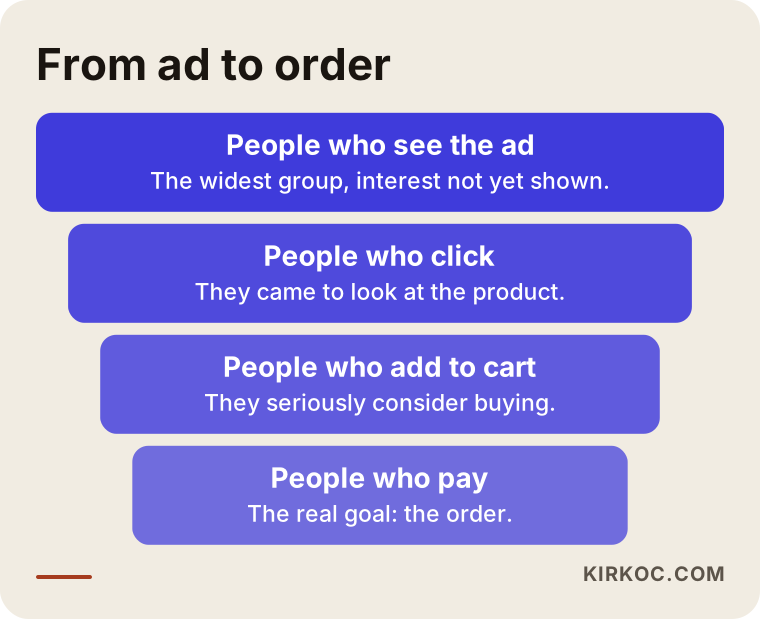
The funnel above shows how people drop off at every stage. Ad management means finding which stage is clogged and steering the money accordingly. If many people see your ad but few buy, the problem may be on your site and not in the ad.
Google or Meta? They do two different jobs
A question I hear often is, "Which one should I pick?" The short answer is that the two do different things. On Google, a person is searching for something. On Meta (Instagram and Facebook), a person is doing something else, such as scrolling through friends' posts, when your ad appears.
When someone types "black leather men's wallet" into Google, they already want to buy something, and you show up at exactly that moment. That is why Google is a strong channel for products people already know about and search for. On Meta, nobody is shopping. The person has to see the product and think, "I want that." This works well for visually appealing products that are easy to grasp at a glance: clothing, accessories, home decor, gifts, cosmetics and the like.
This is a general tendency and not a rule. Some stores do better on Google, others on Meta. I usually treat the two as partners and not as rivals. On Google you catch people who are searching for your kind of product. On Meta you remind people who visited your site, left something in the cart, or looked at a product and walked away.
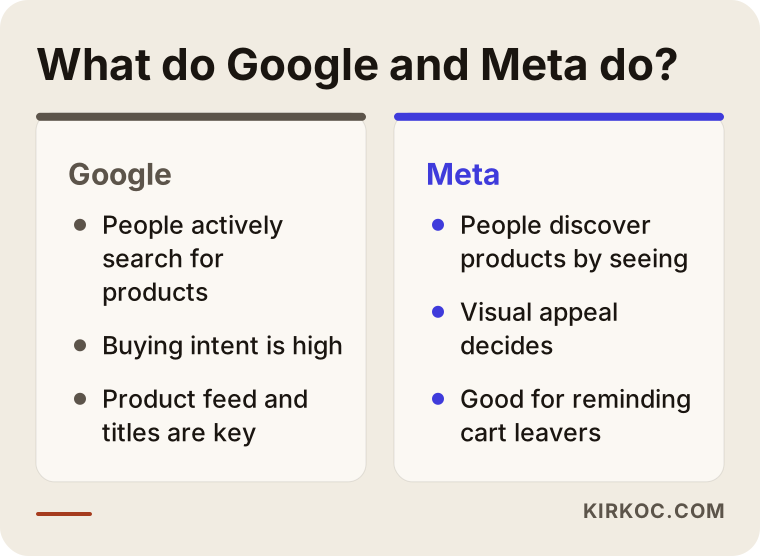
The image shows where each platform stands out. If your budget is limited, it is usually healthier to start with one channel, get it settled, and move to the second one later. Splitting a small budget across both can leave you without enough data on either.
The main ad types used in e-commerce
Let me explain the terms you will run into in the dashboard one by one, because you will hear them in quotes and reports.
Google Shopping ads. These are the product boxes with a photo and a price that appear above or next to the search results when someone searches for a product. They are built from your product list, and you do not write any text for them. The more accurate your product title, image and price are, the better the results.
Google Search ads. These are the classic text ads. They show up for people searching your brand name, a category or a specific product group. They are also used to protect searches for your own brand name, because a competitor can run ads on your name and pull your customer away.
Performance Max. This is an automated Google campaign type that spreads your ads across search, shopping, YouTube, Gmail and other places from a single campaign. It can be powerful, but you get less control. If it is switched on without enough sales data, it becomes hard to tell where the money is going. So I usually start with shopping and search campaigns, and I consider this option once data has built up.
Meta catalog ads. You connect your product list to Meta, and the platform shows your products to people who are likely to be interested. Showing someone a product they already looked at, after the fact, is also done through this system.
Remarketing. This means reaching people who visited your site but did not buy. In many stores it is the most profitable campaign, because these people already know the product. But leaning on it alone stops new customers from coming in. The two need to be in balance.
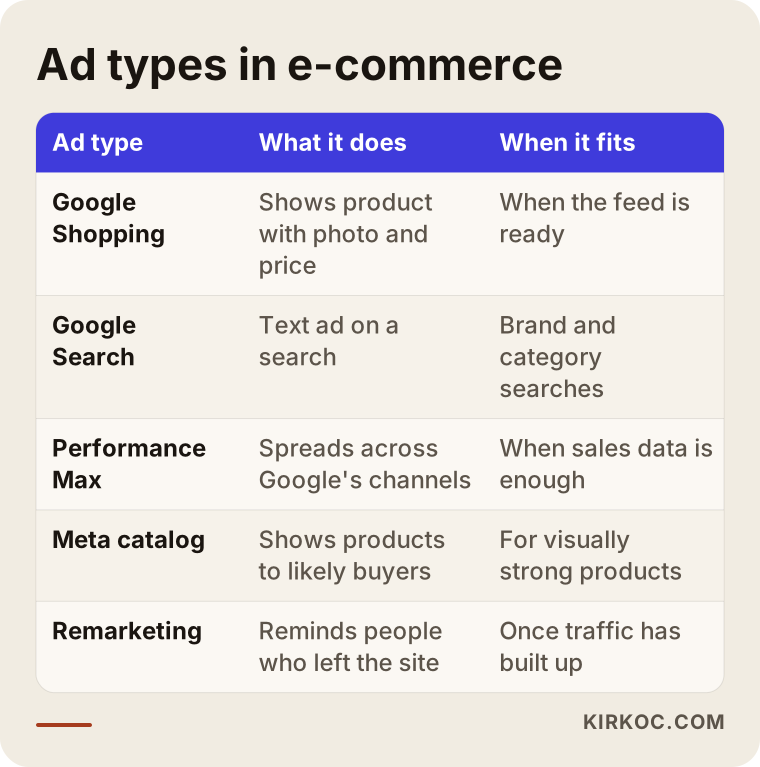
The table summarizes which campaign serves which purpose. Not every store needs to run all of them. I will help you decide the order based on your product count, your budget and how ready your site is.
Is your site ready before you run ads?
Please do not skip this section. A good share of the disappointment with advertising comes not from the ads but from the site that receives the visitors the ads bring. An ad is an invitation. If the house is a mess, the guest turns around at the door.
Here is what to look at. Does the site open comfortably on a phone? A large share of shoppers arrive on mobile, and a slow or broken mobile layout kills sales. Do the product pages have a clear photo, a visible price, stock status and shipping information? Is the checkout short, or do you tire people out with a forced account sign-up? Are your return and delivery terms written somewhere easy to find? Are there trust signals, such as contact details, company information and secure payment badges?
Measurement comes into play here too. Conversion tracking is the setup that tells an ad platform when a sale has happened on your site. If it is not done right, the platforms cannot learn what works. With a faulty setup, the same sale can be counted twice or not at all. The reports then look nice but do not reflect reality. I usually begin by checking this setup first.
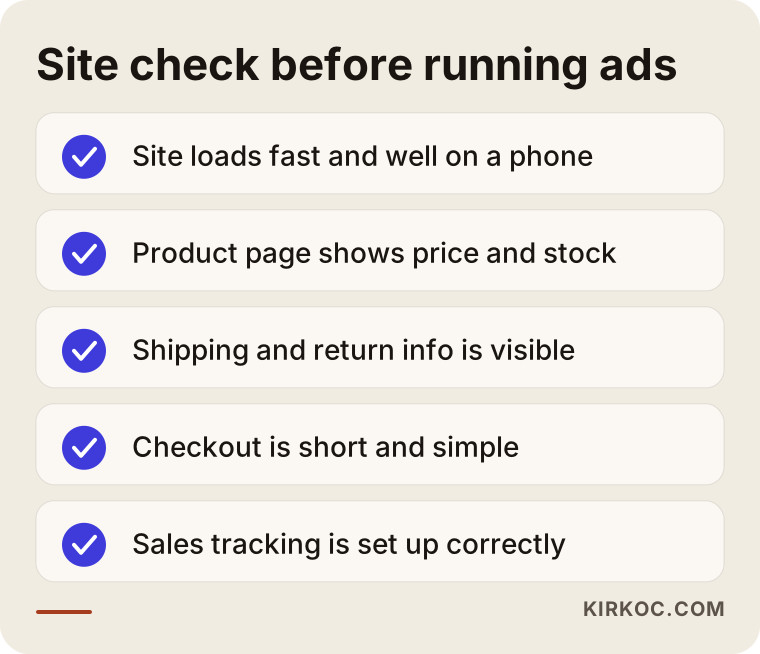
If a few items on the checklist are missing, that does not mean you should postpone the ads. But starting with the gaps in plain view and fixing the most critical ones first lets you use the same money far more efficiently. This is where it pays that one person handles the site, SEO and advertising. When I spot a problem in the ads, I can fix it on the site myself, with no one to brief and no work left waiting.
The product list: the invisible but most important job
The raw material for Google Shopping and Meta catalog ads is your product list. Whether a person's search matches your product mostly depends on the title and the product details.
For example, if your product title is only "Model 204," nobody searches for that, so the ad is not shown. The title needs words that people actually type: what the product is, its color, material, size and brand. Something like "Black leather men's wallet with card slots." The image should be sharp and on a clean background, and platforms refuse some images that carry text or watermarks. Price and stock must match what is on your site. A mismatch can even get your ads stopped.
Then there is category information. Each platform has its own product classification, and placing your product in the right category helps you appear in the right searches. These look like boring details, but they are the things that affect the result most. Whatever your store runs on, whether that is Shopify, WooCommerce on WordPress, BigCommerce or custom software, it produces this file in a different format. I adjust it to whatever platform you use.
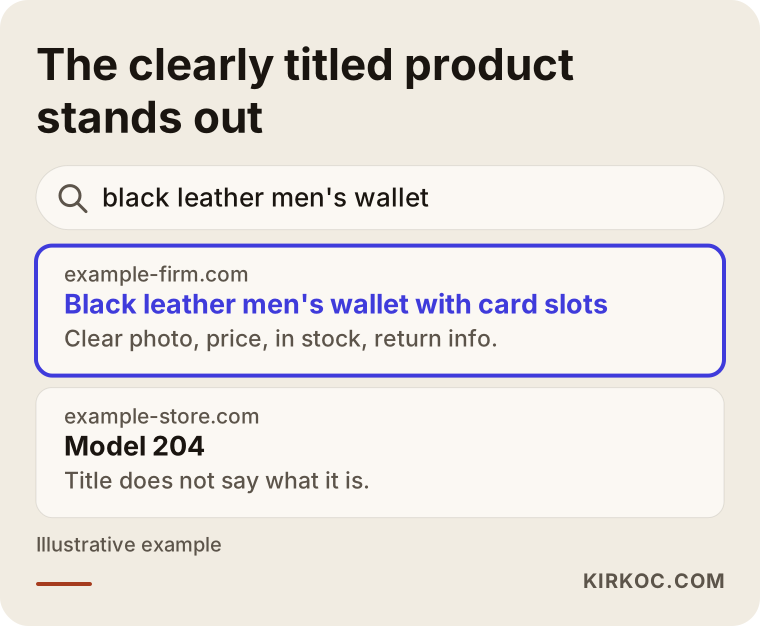
The example in the image shows two product listings for the same search. The answer to "which one would a buyer click?" is obvious: the one where they understand what they are getting. Title and image quality are two things you can improve for free, before spending any ad money.
Two hypothetical example scenarios
The two scenarios below do not belong to any real company. They are invented only to show the logic.
Scenario 1: A small leather accessories store. Imagine a store with one hundred and forty products that sells handmade wallets and belts. The owner already posts on Instagram, but sales are weak. Two months ago the owner started a Google ad on the site, but there is no conversion tracking, so all they can see is the click count. The first job is to set up measurement and fix the product list. Then a small shopping campaign opens for brand name searches and the two product groups that attract the most interest. On Meta, only a reminder campaign runs, aimed at people who came to the site and left. In the first weeks, the aim is not profit but getting the data to build up cleanly. After a few weeks it becomes visible which products really sell, and the budget shifts there. The key decision in this example is to be selective instead of advertising every product.
Scenario 2: A mid-sized home textiles site. This time picture a store with five hundred products and a busy gift season. The ads are working, but the cart abandonment rate is high and the owner wants to raise the budget. Rather than raising the budget first, you look at where the store is losing people in the funnel. Say the shipping fee shows up as a surprise on the payment page and people give up right there. If the ad budget goes up in that situation, the number of lost people goes up too. The fix might be to show shipping information on the product page. On the ad side, preparation happens before the season: the campaign structure gets simpler, weak products are separated out, and a separate setup is built for remarketing. As the season approaches, the budget is raised in steps. The lesson in this example is that the problem is not always in the ads.
How do I work, step by step?
The process usually goes like this. First I look at your store, your products and any past ad accounts, and I ask about your goals: which products leave a profit, which ones are a priority for you, and how much you can set aside each month. Then I check and fix the tracking setup and the product list. In the third step I build the campaign structure. I keep it as simple as possible at the start, because a complicated structure slows down data collection. In the fourth step the ads go live and I watch them closely for the first weeks. After that I review the results at regular intervals, grow what works and cut what does not. Every month I prepare a plain-language report on what changed and why.
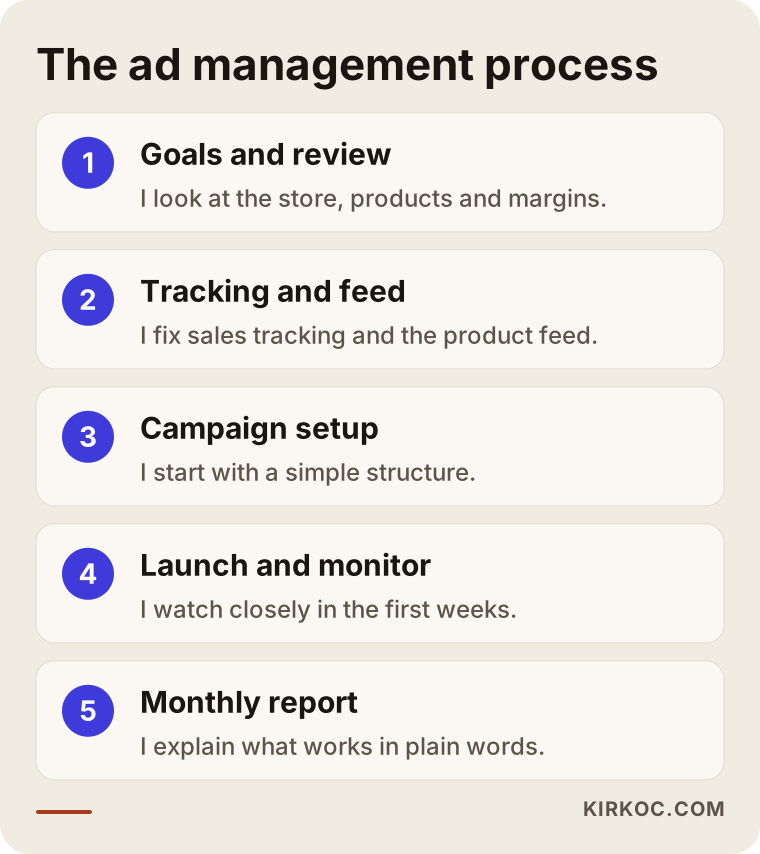
The steps look sequential, but in practice they overlap. If I notice a new mistake in the product list while ads are running, for instance, I stop and fix it. Another important principle is that the accounts are opened in your name: the ad account, the Merchant Center account (Google's tool for managing your product list) and the Meta business account belong to you, and I work as an administrator. If you ever stop working with me, you leave with your data.
Should I raise my ad budget?
The budget question is one of the most asked in e-commerce. It is better to think of it as a decision flow and not as a rule. If the sales you get from ad spending still leave a profit after you subtract product cost, shipping, fees and the ad cost itself, raising the budget may make sense. If they do not, raising the budget only makes the problem bigger.
Let me explain the idea of "return on ad spend" here. It is the ratio that shows how much revenue comes in for every dollar you put into ads. But high revenue does not always mean high profit. You can be happy with a big revenue return on a low-margin product and later find out you are losing money. That is why the first thing I ask about is your profit margin per product. Talking about budget without knowing it stays vague.
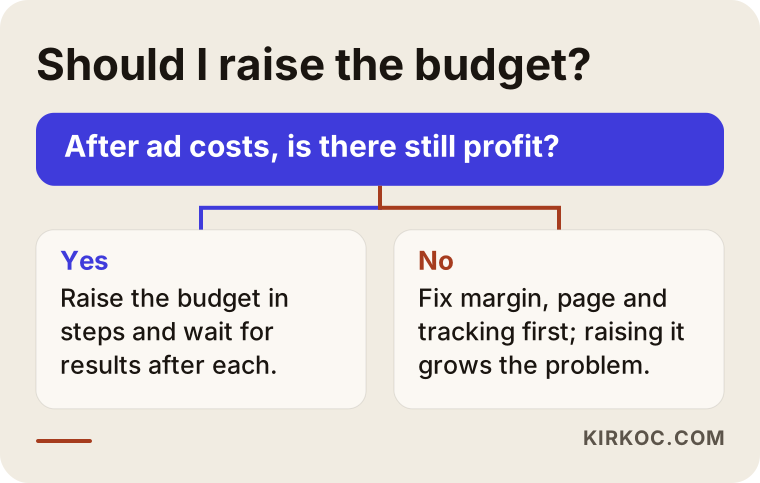
I can summarize the logic of the decision graphic simply: first confirm that you are profitable, then raise the budget in steps, and wait for the result after each increase. Doubling the budget overnight can disturb the platform's learning process and make the outcome unpredictable.
What determines the cost
I will not give any numbers in this article, because the right number for your store is different from someone else's. But I can tell you plainly which items make up the cost.
The first item is the ad budget, which is the money you pay directly to Google and Meta. This is separate from my fee, and you pay it straight to the platform with your own card. The second item is the management fee, which varies with the number of products, how many channels are in use, the number of campaigns, and how often reporting and updates happen. The third item is setup work: starting tasks such as tracking, product list fixes and account structure. The fourth item, if needed, is ad images and videos. Catalog ads can run on your existing product photos, but if you want campaign visuals or a short video, that takes separate effort.
Here is what to check when you evaluate a quote. Is the management fee charged as a percentage of the ad budget, or is it fixed? If it is a percentage, the fee may rise as the budget grows even though the work does not. Is it written down which tasks are included? Are the reports understandable? Is the account in your name? And most important, is anyone promising sales or rankings? If so, be careful, because on ad platforms nobody can guarantee a result in advance.
Common mistakes in e-commerce
These are the mistakes I keep running into when I look through accounts.
Running ads without conversion tracking. Spending a budget without knowing what works is like driving with your eyes closed.
Putting all products in the same campaign. If a best-selling, high-margin product competes for the same budget as a slow-selling, low-margin one, the money flows to the wrong place.
Not protecting searches for your brand name. If a competitor's ad appears when someone searches for your store's name, you are handing the interest you earned to someone else.
Neglecting the product list. Missing titles, broken images, and ads that keep running for an out-of-stock product burn both money and trust.
Giving up too early or scaling too early. The platforms need time to learn, so deciding within a few days is misleading. On the other hand, raising the budget right after a few good days is misleading as well.
Relying only on remarketing. It looks good in the short term, but new customers stop coming in and the pool dries up.
Not matching the campaign to the message on the site. A person who sees a discount promised in the ad and cannot find it on the page leaves right away.
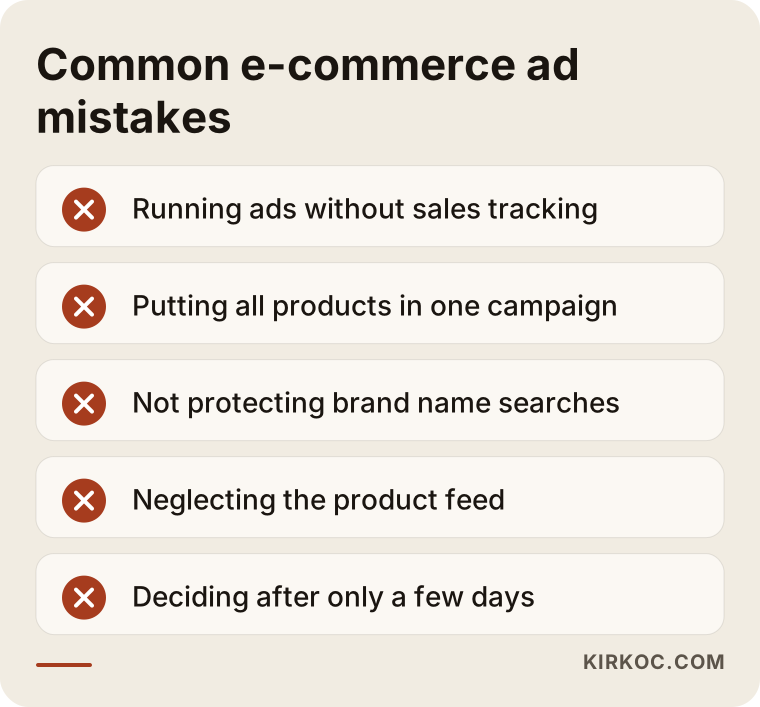
If you recognized one or two of these in your own account, do not worry. Things like this happen in most stores. What matters is noticing them, putting them in order and fixing them.
What can you do yourself, and when do you need an expert?
You do not have to hand everything off. There are things you can do on your own: improving product photos, writing product titles with the words people actually use, making shipping and return information visible, collecting customer reviews, and trying out the site on your phone. These raise sales regardless of advertising. It is also possible to open a single campaign on Google or Meta with a small test budget and watch what happens, as long as you set up conversion tracking correctly at the start.
Expert help becomes sensible in these situations: your product count has passed the hundreds and managing the list is getting hard; you set aside a regular budget for ads but cannot interpret the results; your account was suspended or your products are being disapproved; running two platforms together is eating your time; or reports show sales that do not appear in your bank account. That last situation usually points to a tracking error, and it can be hard to solve alone.
A separate note about Meta: if your ad account has been closed or restricted, the reason is usually content that was read as a policy violation, or a payment problem. Opening a new account in a panic can make the problem bigger. You first need to find out what the cause is.
Timing: how do the first three months go?
To set expectations correctly from the start, let me talk about the timeline. On the day the ads go live, sales may come or may not; that depends on your store, your products and price competition. But the first weeks are mostly a learning period. In that time the platforms work out which people show interest. In the first months I look at the trend and not at a single result figure: which product attracts interest, which search phrases waste money, and which ad image gets clicked more.
From the second month, the budget split changes based on the data you have collected. By the time you reach the third month, you have concrete information about which channel brings you more value. Without it, scaling up is little more than guessing. For products with a busy season, such as gifts or seasonal items, preparation has to start before the peak, because if the learning period finishes after the season has passed, it does no good.
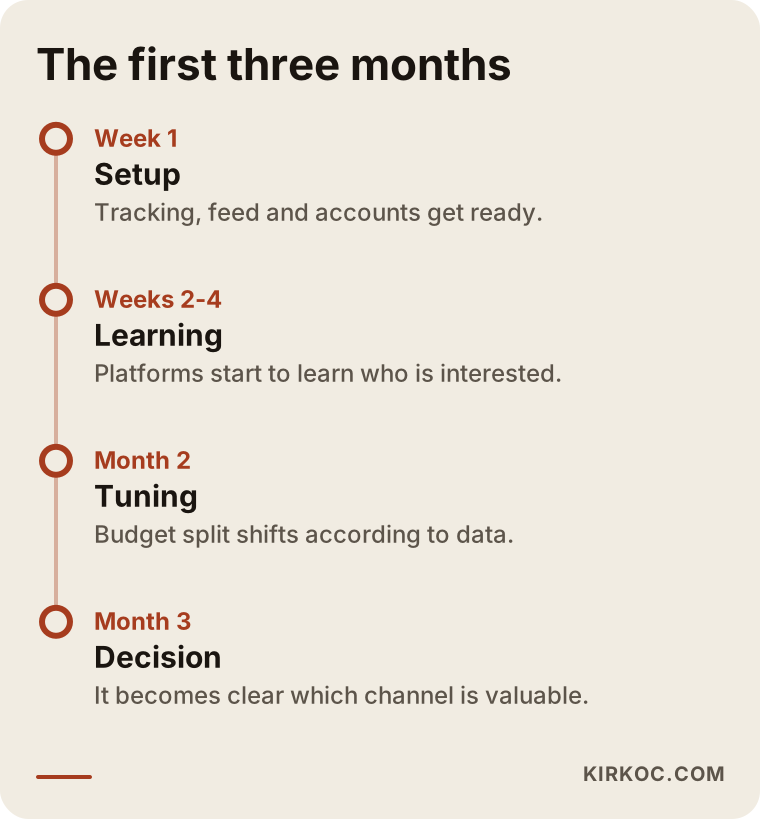
The timeline is not a promise but a typical flow. The speed varies from store to store. At each stage I tell you what I am doing and why, so my decisions are never hidden from you.
The page that receives the visitor from the ad
After an ad click, a person lands on a page. That page should immediately show the product the ad promised. If someone clicked for "brown leather wallet," they should go to that product or that category, not the home page. A visitor who lands on the home page has to make extra effort to find what they wanted, and most just leave.
A good product page has a clear photo and title at the top, the price and an add-to-cart button right next to them, shipping and return information below, and then product details, customer reviews and frequently asked questions. On a phone, the button should be big enough to tap comfortably. If the page is slow, that costs you too, because people who come from an ad are impatient.
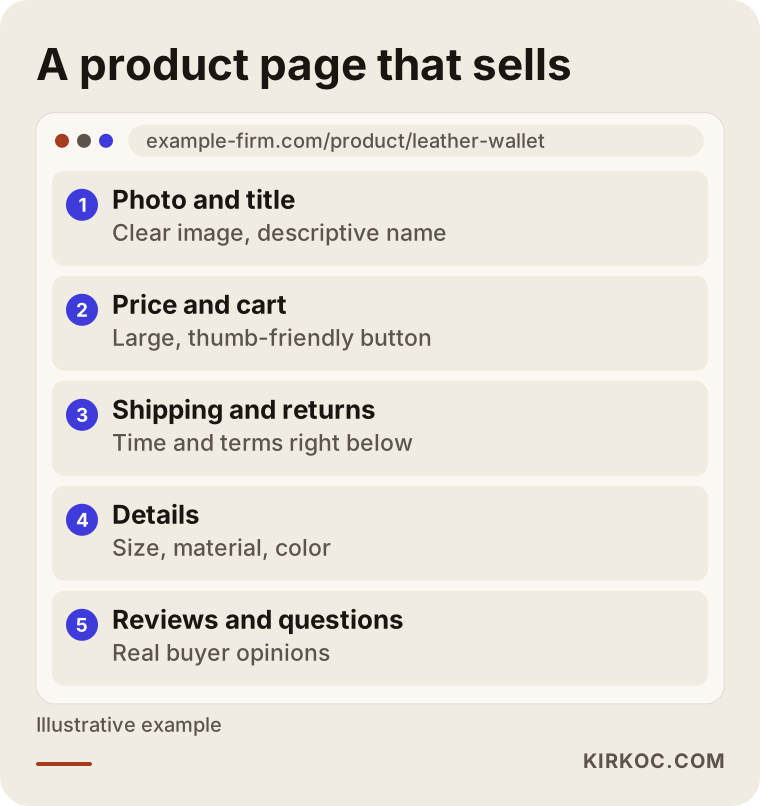
This layout makes it easier for someone arriving from an ad to make a decision. Since improving the site is also one of the jobs I do, I can fix a page problem I notice in the ads without having to explain it again to someone else.
The benefit of having it all handled by one person
In e-commerce, problems are usually linked to each other. The ads work but the site is slow. The site is fast but the product page does not convince. The product page looks good but does not show up in search results. It shows up, but the brand looks inconsistent on social media. When different people manage these pieces, everyone defends their own area, and the real source of the problem ends up being nobody's responsibility.
I provide the services a digital agency would offer on my own, from building your website and online store to SEO, social media management, advertising, logo design and content creation. The practical benefit is this: I can use the data from the ads while improving the site, and use the improvements on the site while reading ad results. An image that works on social media also becomes raw material for an ad. You talk to one person, and the decision path is short. Of course, there is a limit to this as well: since I am one person, the number of jobs I can take at the same time is limited. I prefer to say that up front, and I do not take on work I will not have time for.
How working with me looks
The first conversation is an introduction. I listen to you describe your store, your products and your goals, and I look at any existing ad accounts. Then I give you a written plan on what can be done, what cannot, and where it makes sense to begin. If the plan suits you, I get started. If it does not, you still walk away with a clear idea of what to do. I do not give result guarantees, because nobody in advertising can. But I tell you up front what I will measure, what I will base my decisions on, and how I will report to you.
Frequently Asked Questions
Should I start with Google or Meta for my online store?
If people already search for your product, meaning it is a need-driven item, starting with Google makes sense. If the product is visually appealing and you expect people to discover it without searching, Meta stands out. Most stores end up using both, but if your budget is limited, it is healthier to settle one first.
How much budget should I have to run ads?
There is no single right budget. It depends on your product price, your profit margin and the competition in your category. What matters is starting with a budget big enough for data to build up, then moving forward in steps according to your profit. In the first conversation I can look at your numbers and sketch a realistic range.
Will sales go up right away when I start advertising?
Sometimes sales come in the first days, and sometimes they do not. The first weeks are the platforms' learning period. Be careful with anyone who promises quick results. In the early period I look at the trend more than at any single number.
What is conversion tracking, and why does it matter so much?
It is the setup that tells the ad platform when a sale happens on your site. Without it, the platform cannot learn which ad brings sales, and you cannot see where your money goes. A wrong setup produces misleading reports, which is why checking it is my first job.
Should I open the ad account, or should you?
The accounts should be in your name and under your ownership. I get administrator access. That way, even if you stop working with me, the account, the past data and the payment details stay with you.
Do I pay the ad budget to you?
No. You pay the ad budget directly to Google and Meta with your own card. What you pay me is the fee for the management service. This split matters for transparency, and you can see where the money goes in your own dashboard.
I sell on a marketplace. Can you manage ads for that too?
The ad tools inside marketplaces work differently. I mainly manage Google and Meta ads that bring traffic to your own online store. If you sell both on a marketplace and on your own site, I can help you work out in the first conversation how much to invest in each.
What should I do if my account was closed or my products were disapproved?
First you need to find out the reason, because platforms usually state one. Opening a new account in a panic can make the problem bigger. Since platform policies change often, I work from the current situation after reviewing it.
If you want a clear view of where to start advertising for your online store, which channel fits you, or what is going wrong in your current account, you can reach me through my digital advertising management page. I will look at your store and tell you honestly what can be done.