You run an online store. The products are uploaded and the photos look good. Yet when someone searches "women's leather handbag," "patio furniture set" or "baby care kit," your category page is nowhere to be found. You open the page and see a heading, a grid of product boxes and nothing else. A competitor's page for the same category has a few paragraphs, a short buying guide and a handful of common questions, and it sits near the top of the results. If "hire someone to write my ecommerce category page copy" has crossed your mind, you are in the right place. I am Ümit Kırkoç, I work from Istanbul, and I write this kind of text as part of my content writing service. In this article I explain why the work matters, how it runs and what to watch for, in plain language.
First, the terms. A category page is the page in your store where products of the same kind are gathered: "Running shoes," "Red wine," "Kids' room rugs." Category text is the writing on that page, above or below the products, that describes the group. It has two readers. One is the visitor, the person who might buy. The other is a search engine such as Google, a system trying to work out what the page is about.
Why a category page can matter more than a product page
Most store owners pour their effort into product pages. But people usually start shopping with a need, not a model name. Someone who types "running shoes" has not decided on a brand yet. The best answer to that search is not one product. It is the category page where all those products live.
A category page collects dozens of products under one address, which makes it a strong signal to both the search engine and the visitor. But if the page has no written explanation, the search engine has to guess what the page is about from product names alone. Every time you force a guess, a competitor who explains things clearly gets ahead of you.
The illustration below uses an invented example to show how a search result can look.
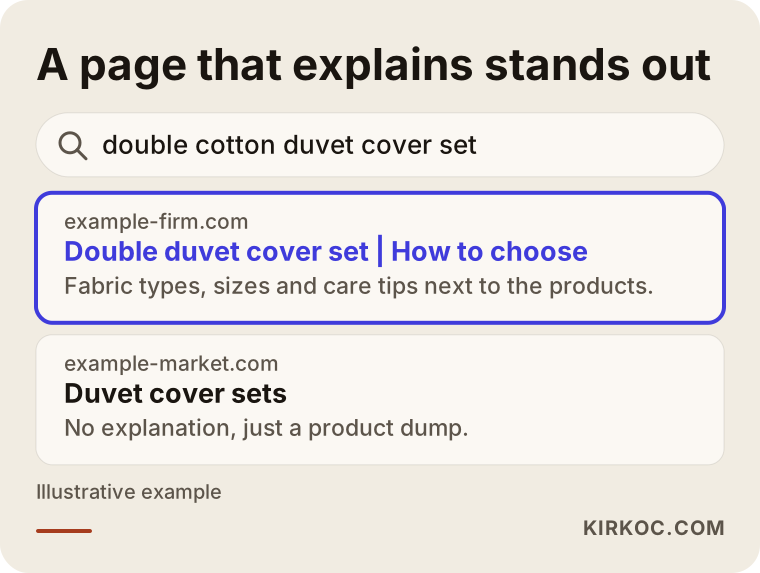
The highlighted result says in its first lines what the category is, who it suits and how to choose. The result below it is only a product dump. That difference is the whole job of category text.
What happens when there is no text
When a category page has no writing, three things can happen. First, the search engine cannot tell your page apart from the pages of other stores that list the same products. Second, the visitor sees the products but cannot find an answer to "Which one is right for me?" and leaves. Third, if hundreds of stores use the same manufacturer description, your page loses anything that made it original. Good text eases all three problems. It does not work miracles on its own, though. It works together with product photos, pricing, shipping information and the trust signals on your site.
How people search for categories in online shopping
Before writing category text, you need to know how customers look for that product. That knowledge comes from looking at real search queries, not from guessing. There is a general pattern, though. A person with buying intent usually starts with a broad phrase and then narrows it.
For example, the first search is "sofa," then "three-seater sofa," then "gray fabric three-seater sofa," and finally a specific brand or price range gets added. A different type of page helps at each stage: the broad category for the broad search, a subcategory or filtered page for the narrowed search, and the product page for the person who has made up their mind.
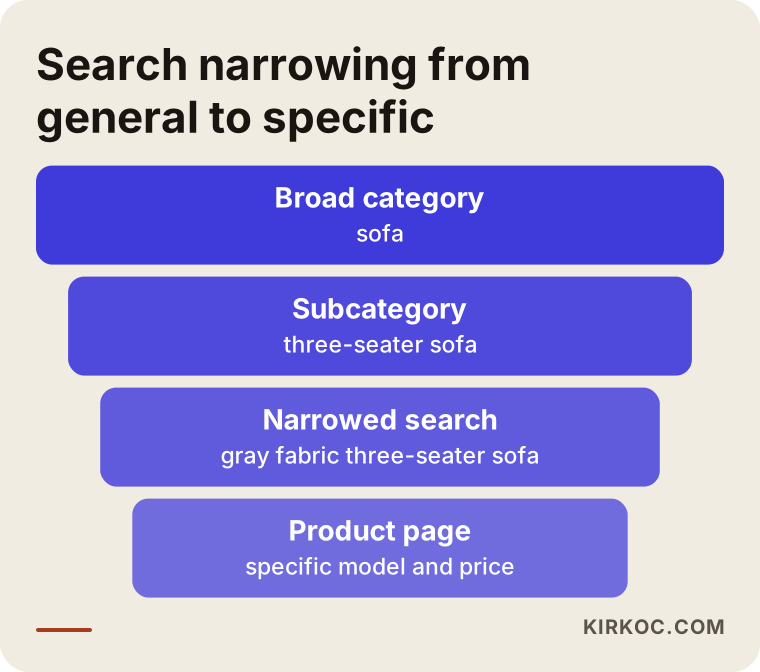
This narrowing also decides which page gets which kind of text. A broad category suits a guide-style introduction. A subcategory suits a short note on how to choose. A product page suits technical and practical details. Pasting the same generic paragraph everywhere helps neither the visitor nor the search engine.
Which categories deserve text first?
You do not need to write for every category at once. It makes sense to start with the categories that bring in most of your sales, or the ones you want to. Rank them: best sellers, categories with healthy margins, and categories you know people search for but where your page does not show up. In a store with hundreds of subcategories, the top thirty may be plenty for the first round. The rest can follow over time.
What good category text looks like
Good category text is not the kind of paragraph an owner writes alone at midnight, something like "We are at your service with our quality products." It teaches the reader something. It answers the question "What should I look for in this category?"
A simple comparison helps. Weak text praises the category and repeats the keyword. Strong text explains how to choose, which product types exist, where each one fits and which mistakes shoppers often make.
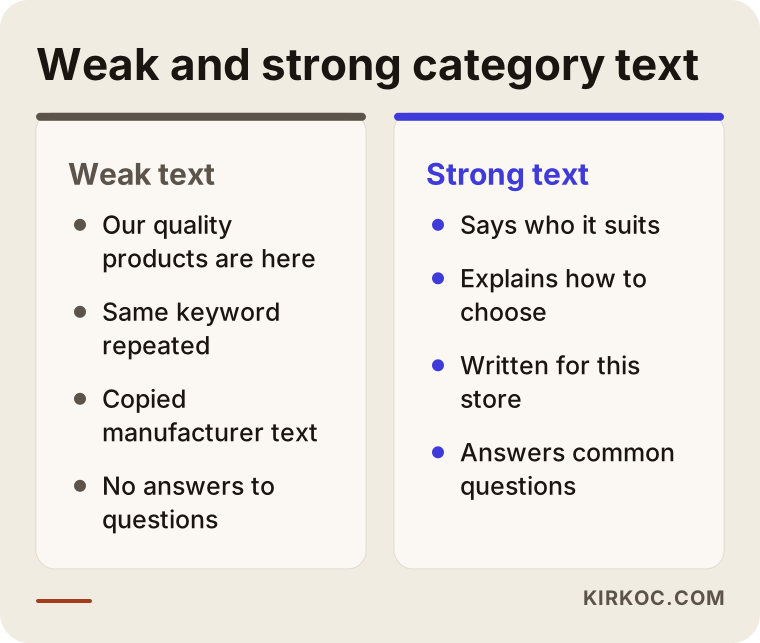
As the comparison shows, the difference is less about length than about substance. Short text that helps beats long text that says nothing. That said, text that is too short may not give a search engine enough to work with, so a well-organized piece of a few hundred words is a good starting point for most categories.
Where the text goes on the page
Placement matters as well. A long intro that pushes every product below the fold annoys people who came to shop. The practical answer is usually this: one or two sentences of introduction right above the products, and the fuller guide and the common questions below the product grid. On mobile this matters even more, because the screen is small and visitors want to see products first.
The diagram below shows one way a sample category page could be laid out.
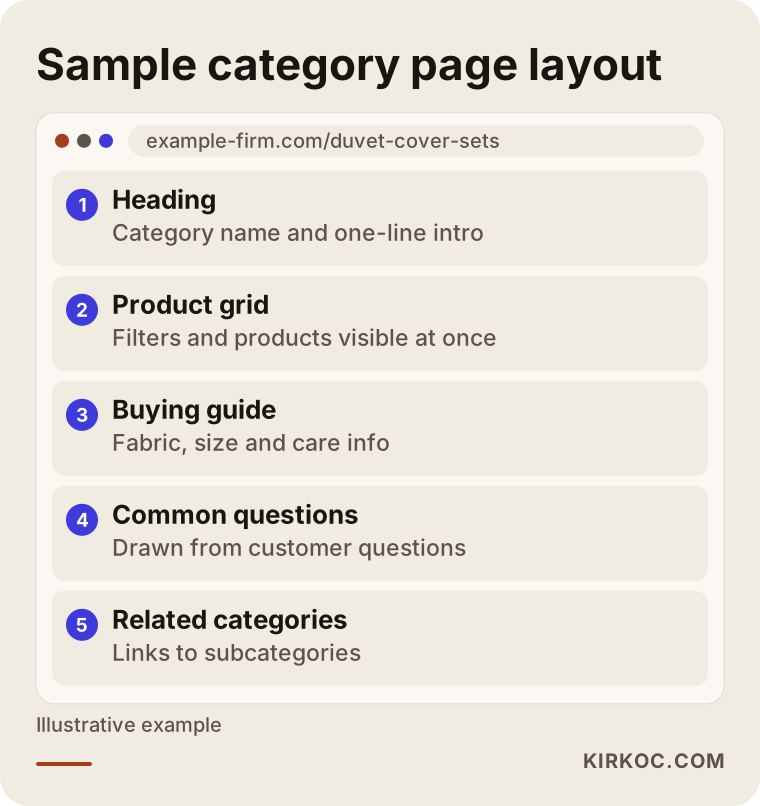
This layout is not a rigid rule. It is a skeleton that tends to work. Your store platform may limit some areas, and in that case the same idea has to be adapted to the structure you have.
Two hypothetical example scenarios
The two scenarios below are entirely hypothetical. They do not describe a real company or client. They are made up to make the process concrete.
Scenario 1: A small home textiles store
Suppose a store sells duvet cover sets, bedspreads and towels. Its category pages show only a heading like "Duvet Cover Sets" and a grid of products. Every product description is the same text supplied by the wholesaler. The owner notices that the store never appears for searches like "double cotton duvet cover set."
The work here is clear. First I list the questions a shopper asks. Cotton or sateen? Which size fits which mattress? Will it shrink in the wash? Then I write a guide for the category page that answers those questions in simple language. The short intro says what the category is, and the lower section covers fabric types, a size chart and care tips. I also prepare separate short texts for the subcategory pages, such as "double" and "single." I do not promise results. What I can say is that the page now answers both the visitor and the search engine.
Scenario 2: An electronics accessories store with many categories
The second hypothetical store sells phone cases, chargers and headphones, and has more than two hundred categories. The main problem is that there is a lot of text to write, and the pieces tend to look alike. Texts written from one template can read as repeated content to a search engine, which is no help.
In this scenario I would start by ranking: the fifteen most searched categories first, then the rest. I would use the same skeleton for every category, but the content would be original each time. In the headphones category I would cover connection type and battery life, for chargers power and compatibility, and for cases material and model fit. The skeleton stays consistent while the information is specific to each category.
Step by step: how category text is prepared
The process has a few clear steps. Whether you do it yourself or hire a specialist, knowing the order helps.
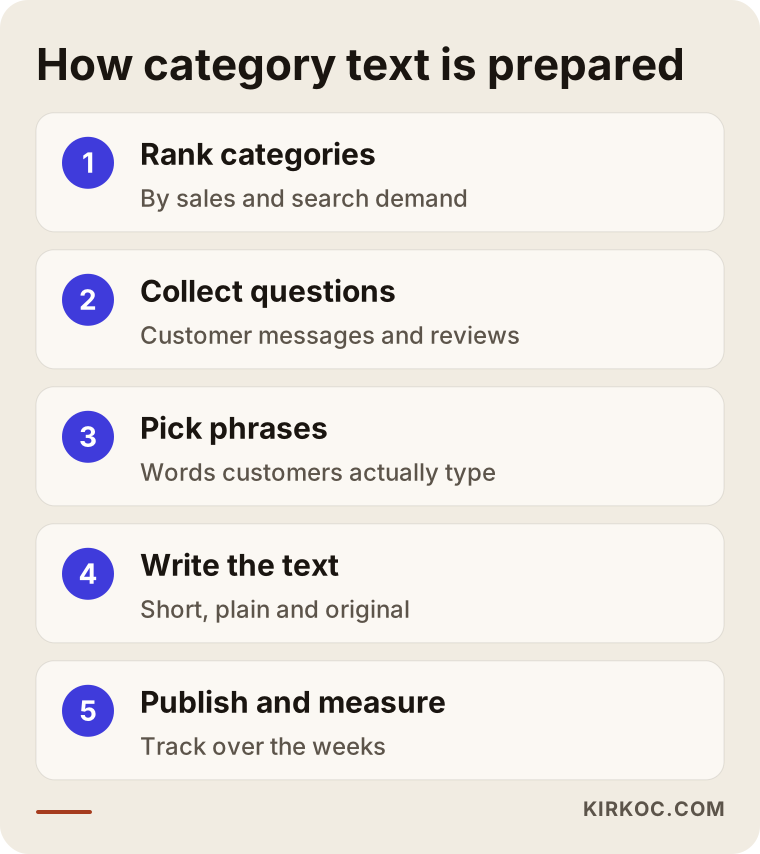
1. Rank your categories
The first step is deciding which categories need text. You put criteria such as share of sales, profit and search demand into a simple table. This step uses store data and search tool output, not guesses.
2. Collect customer questions
This step is often skipped, yet it is the most valuable one. The questions that reach customer support, product reviews, chat messages and social media comments tell you what information is missing. Category text should be a piece of writing that answers those questions.
3. Pick your key phrases
For each category you choose a main phrase and a few related ones. A key phrase is simply the words a customer types into the search box. You do not stuff the text with them. Using them a few times inside natural sentences is enough.
4. Write the text
Writing uses short paragraphs, plain language and concrete facts. The intro presents the category, the middle explains how to choose, and the last part answers common questions. Copying manufacturer descriptions is specifically avoided at this stage.
5. Publish and measure
After the text goes live, you watch how the page does in search and how visitors behave on it. Results often take weeks and sometimes months to show, so expecting instant change is misleading.
What the text should contain
Each category has different needs, but a repeating checklist is possible. The graphic below summarizes it.
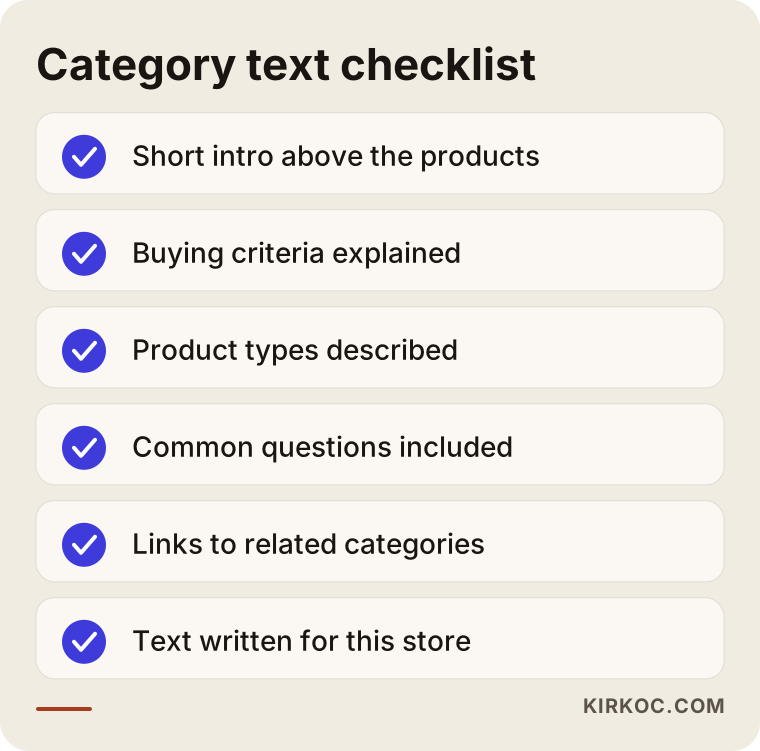
Let me unpack that list a little. The short intro tells the arriving visitor they are in the right place. The buying criteria move an undecided person closer to a decision. Describing the product types points people toward subcategories. The common questions answer what is on the visitor's mind, and they also make it easier for AI-assisted search tools to quote from the page. Links to related categories inside your store keep visitors browsing and show search engines how your site is organized.
Subcategory and filter pages
In big stores, filters such as color, size or brand can generate thousands of pages. Writing text for all of them is neither possible nor necessary. It makes sense to open dedicated pages only for the filter combinations people truly search for, and to give those a short text. Whether the remaining filter pages should be open to search engines at all is a technical decision, and it depends on how your store platform works.
Common mistakes
I see the same mistakes in category text again and again. Most come from haste or wrong information, not bad intent.
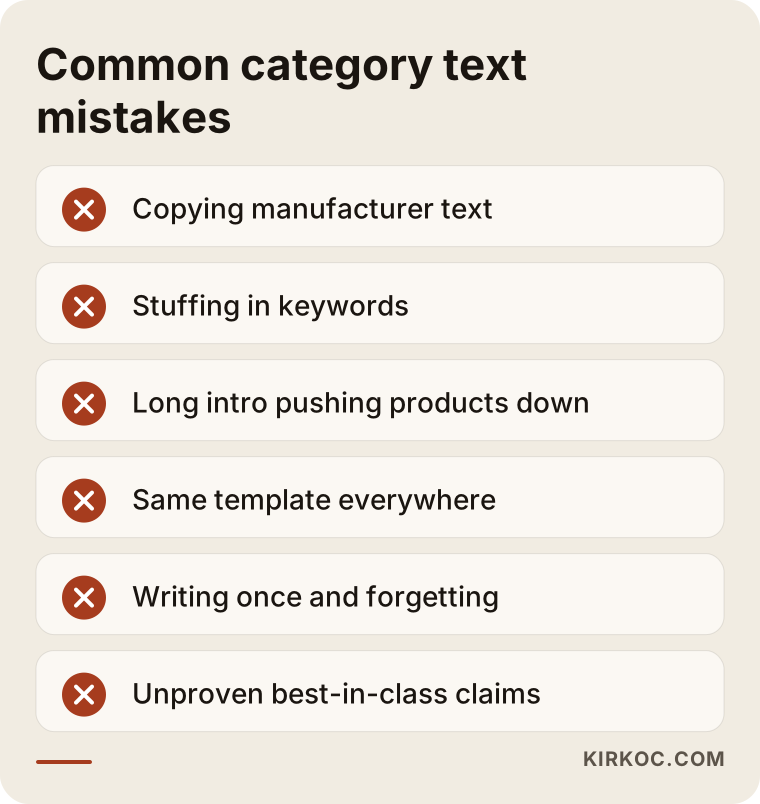
Let me go through the ones in the graphic.
Using the manufacturer's text as it is. If hundreds of stores use the same text, your page has nothing that sets it apart. The text needs to be rewritten in your store's voice and around your customers' questions.
Repeating the keyword unnaturally. Strings like "leather bag, women's leather bag, cheap leather bag" tire the reader. Today's search systems can recognize this kind of text. Writing naturally and readably is safer for both the visitor and the search engine.
An intro so long that it pushes products down. Someone who wants to shop wants to see products. Moving the long text lower on the page is usually better.
Stamping every category with the same template. Changing only the category name and leaving the rest of the sentences identical leads to repeated content.
Writing the text once and forgetting it. Product range, seasons and pricing policy change. A category text that mentions products you stopped selling years ago damages trust. Looking over your key categories every few months is enough.
Making claims you cannot prove. Phrases like "the cheapest" or "the best quality" hurt trust when you cannot back them up, and they can create problems under advertising and consumer protection rules. If you are unsure, I suggest speaking with a lawyer.
How category text supports buying intent
A person searching with commercial intent is often close to buying. What you tell them on the category page plays a different role depending on where they are in the decision.
Someone still researching needs guidance: "What is this type of product, and what varieties exist?" Someone comparing needs criteria: "Which features matter and which do not?" Someone ready to decide needs reassurance: "What are the shipping, return and payment terms?"
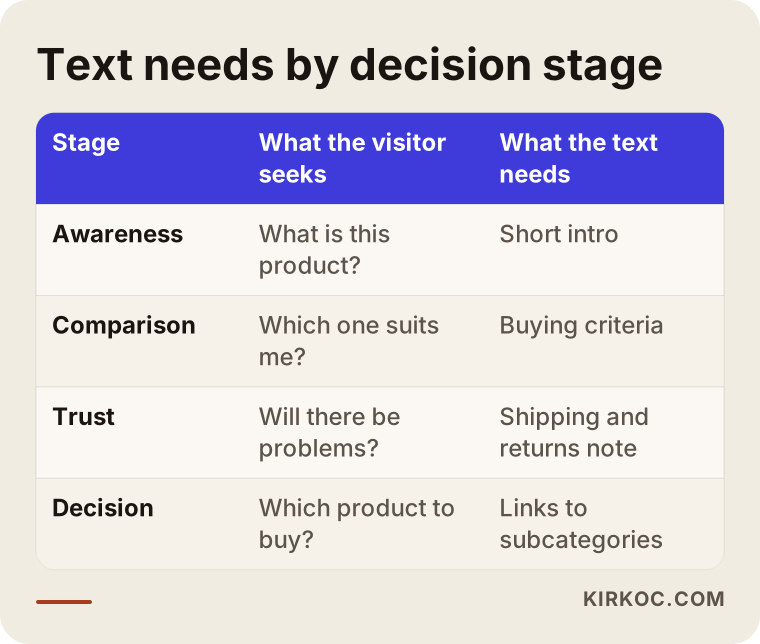
So good category text does not only inform. It moves the visitor to the next step. Pointers at the end of the text to relevant subcategories or popular products make that move easier.
Category text, social media and ads
Category pages do not only receive visitors from search. The place where your social posts or ads send people is often a category page too. If someone clicks an ad and cannot find what they were looking for on the page, the money is wasted. Because I handle the website, SEO, content, social media and ads myself, I can think about which search, which post and which ad feeds each category. That way the promise made in the ad matches the text on the page.
Should you write it yourself or hire a specialist?
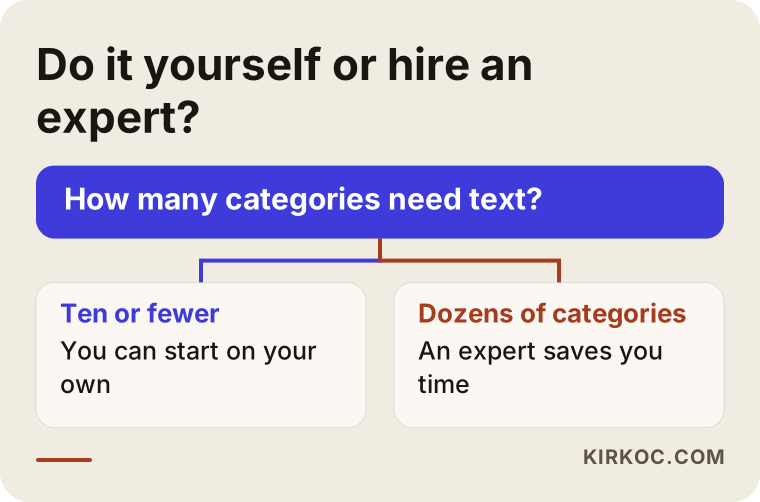
There is no single right answer. It depends on the size of your store, your time and how comfortable you are with writing. The decision chart below gives a rough direction.
What you can do yourself
If you have a handful of categories and know your products well, you can start on your own. You can collect customer questions, describe product features in plain words, add size and care details, and draft the common questions. You know your products better than any writer will, and that knowledge is something nobody else can easily produce.
When a specialist helps
Once you have hundreds of categories, the texts start to look alike almost by force. Choosing which categories come first, picking search phrases and making technical adjustments in the store platform also call for expertise. If your time is limited and you want the texts consistent, original and free of errors, handing the writing to a specialist saves time.
A middle path is possible too. You and I build the category list and the first outline together, you add the product knowledge, and I edit it into final form. This keeps the cost down and keeps the texts in your own voice.
What determines the cost
I will not give numbers here, because the work varies a great deal from store to store. The main things that set the price are these:
- Number of categories. The workload for ten categories and for two hundred is very different.
- Depth of the text. A short intro and a long page with a size chart, a guide and common questions are not the same job.
- How ready your product information is. If you already have detailed product data, research takes less time.
- Research needs. Looking into which phrases people search for takes extra time.
- Publishing and updates. Entering the texts into your store admin and updating them over time is planned separately.
- Graphics and layout support. Extras such as size charts and comparison graphics make the job bigger.
For a clear quote, send me your category list and your store link. Starting with a small pilot package and expanding based on results is also possible.
Managing expectations: when do results show up?
Having category text written is not a button that changes your ranking when pressed. Search engines take time to crawl and evaluate new content. The result also depends on more than the text: your site as a whole, its speed, how strong your competitors are and the quality of your product pages. That is why I do not promise rankings or sales. It would not be honest.
You can think of the process like this.
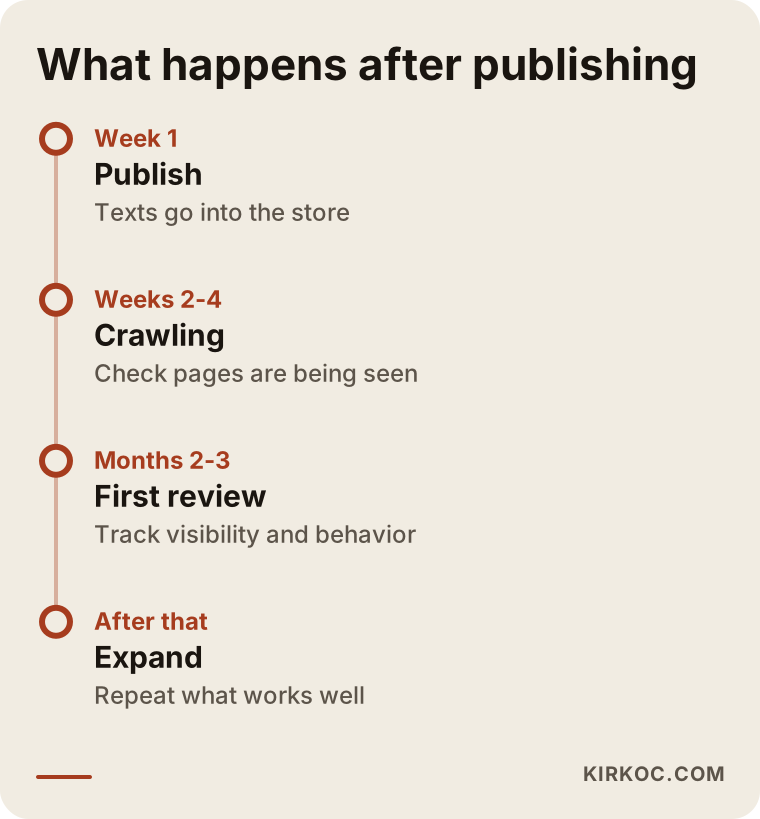
In the first weeks, the question is whether the pages are being crawled. Within a few months, you can watch for changes in search visibility and in the time visitors spend on the page. After that, the texts that work well become the model for other categories. At each stage the thing to look at is real measurement, not hopes.
How I work with you
I begin by looking at your store and your category list. Together we decide which categories come first and which pages truly need text. Then I write one or two categories as samples, talk them through with you and adjust tone and level of detail. Once you approve, I move on to the rest.
Because I work alone, the person who writes the text, adjusts the site, studies the searches and runs the ads or social media is the same person. You avoid the handoffs and the "whose job is this?" arguments that can happen at an agency. If you like, I write only the category texts. If you prefer, we move forward on one plan covering your store setup, SEO, ads and social media accounts. The choice is yours.
Frequently Asked Questions
How many words should a category page have?
There is no fixed number. What counts is that the page covers its subject fully and answers the visitor's questions. For most categories, a well-organized text of a few hundred words is a good start. In highly competitive categories, or ones where choosing is hard, a more thorough guide may be needed.
Should the text go above or below the products?
Often the best answer is to combine both: a short two or three sentence intro above the products, and the detailed guide and common questions below. That way the person who wants to shop sees products right away, and the person who wants information finds it further down.
Does AI-written category text work?
AI tools can help with a first draft, but they do not know your product, your customer or the details that fit your store's voice. Text produced without oversight tends to come out generic and similar. A person should review the facts both while the text is being produced and afterward.
Can I use the same text in more than one category?
I would not. Identical or very similar texts make it harder to tell the pages apart and give the visitor nothing new. You can share a skeleton across categories, but the content should be specific to each one.
Will my ranking definitely go up after I have category text written?
No, and nobody can guarantee that. Many factors affect ranking: site speed, competitors, product pages, links and more. Text is only one of them, but it is a necessary part of making clear what the page is about.
How often should I update old texts?
For your most important categories, a look every few months is enough. Review the text whenever your product range changes, prices or shipping terms change, or a new season begins. A text that mentions products nobody can buy makes visitors distrust the page.
I have hundreds of categories. Do I have to write text for all of them?
No. You prioritize: start with the categories that contribute most to sales and have search demand. Lower-priority categories get shorter texts, or some can be left without any.
Which language should I write in? Do I need other languages?
Write in the language your customers search in. If you sell only in the United States, English is enough. If you sell abroad, writing separate text for each language, based on how people in that language search, is safer than using a translation as it is.
If you suspect your category pages are still just boxes of products, we can look at your store together and talk about which categories to start with. For details and to get in touch, take a look at my content writing page and send me a message.