Your online store is live, your products are uploaded, and you have probably made a few sales. But checking the order screen every morning, refreshing product photos, fixing stock mismatches, answering customer messages, and running your actual business at the same time has started to wear you down. This is the moment when most owners type "ecommerce store management services" into Google. In this article I explain what it means to hand the daily work of your store to an outside specialist, what the service should cover, how the process runs, and which traps to watch for. I am Ümit Kırkoç, and I work from Istanbul. If your store has not been built yet, or needs to be rebuilt, I can handle the ecommerce website side as well, so one person covers both.
Let me pin down the term first. Store management is the sum of the tasks a live online store needs every day and every week: adding and updating products, checking prices and stock, following the order flow, keeping product pages tidy, preparing promotions, answering customer questions, and tracking sales in numbers. Building a store happens once. Managing it happens daily. Getting outside help means giving part of that daily work, or all of it, to a specialist.
What does store management actually cover?
Someone hearing about this service for the first time often imagines something narrow, like "just uploading products." The real job is much wider. Every item below matters for a healthy store, but not every business needs all of them. Knowing which ones are actually a problem for you keeps you from paying for things you do not need.
The first group is catalog work: product names, descriptions, photos, variants (options such as color or size), categories, and tags. The second group is operations: making sure stock shows correctly, price changes appear everywhere at once, orders get prepared for shipping, and returns are handled. The third group is sales-focused work: promotion pages, discount rules, following up on abandoned carts, and visibility on Google and social media. The fourth group is measurement: how many people visited, how many added something to the cart, how many finished paying, and where they gave up.
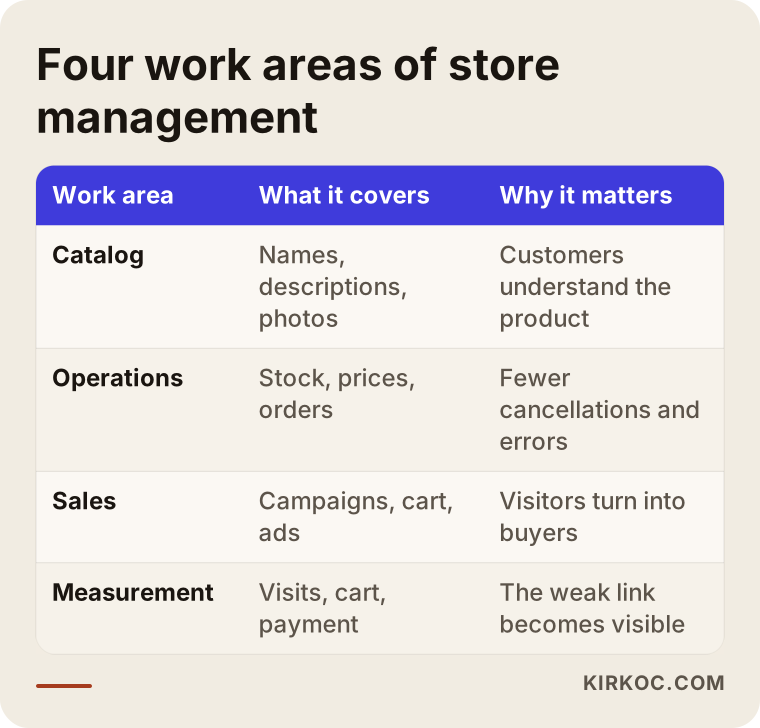
The figure above shows the four areas at a glance. What matters is noticing that they depend on each other. If the catalog is messy, ad money is wasted. If stock is wrong, a promotion that goes well turns into canceled orders. If nothing is measured, you cannot tell what is working.
Is store management the same as ad management?
No, and this is the most common mix-up. Ad management is the paid work that brings visitors to your store. Store management is the order inside the house that receives those visitors. Sending traffic from a beautiful ad to a store with cluttered product pages, blurry photos, and unclear shipping details is like hanging a sign over a shop with a locked door. The two make sense together, but they are separate jobs that call for separate skills. Because I handle both myself, I see how they feed each other: which product gets clicked in the ads tells me which product deserves a better spot in the catalog.
When does outsourcing store management make sense?
Not every store needs this service. If you run a small store that gets a few orders a week, doing the work yourself is both cheaper and educational. But if several of the signs below sound familiar, it may be time to think about outside help.
Updates cannot keep up as the product count grows, and the site shows old prices or items that are out of stock. Orders have increased, but shipping, returns, and customer messages eat your entire day. You sell in more than one place (your own site plus one or two marketplaces) and you are tired of typing the same information in by hand. Your store gets traffic but no sales, and you cannot work out why. Or in the simplest form: nobody on your side can do this work, and hiring an employee does not fit your budget yet.
Let me unpack that last point. An employee brings salary, payroll taxes, benefits, training, and the burden of managing them. And one person rarely knows product photo editing, ad setup, page writing, and reporting with the same depth. Outside help is a way of using that range of knowledge without a permanent staff. The trade-off is that you give up some of your grip on the daily flow, and I come back to that in the mistakes section.
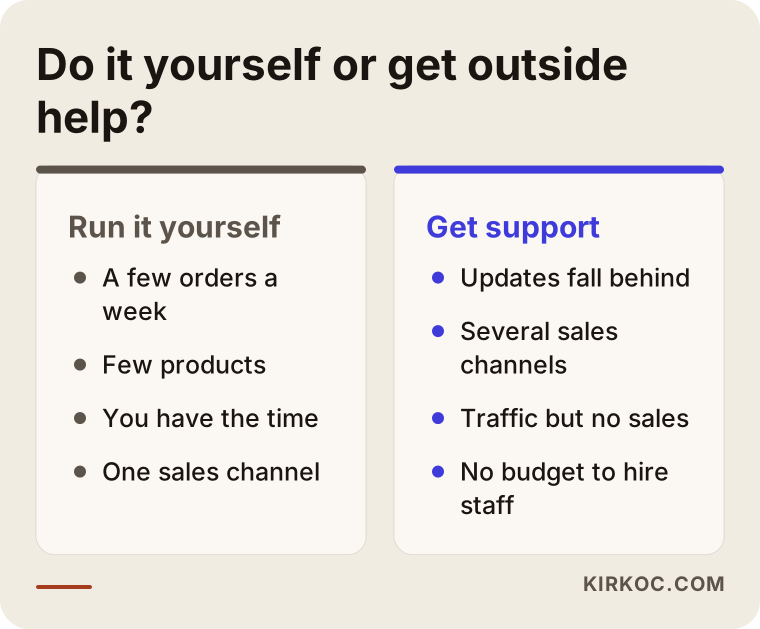
The figure sets the two approaches side by side. Running it yourself suits small, calm stores. Outside support comes into play once the workload outgrows your time. There is no right or wrong here, only the option that fits where your business is today.
The real problems of online stores: how do customers search and what do they see?
Instead of waving a general "optimize your store" flag, let me describe a few problems that are specific to ecommerce. An online store has different troubles than a service website.
First, the way customers search. People buying a product often do not type a brand name at all. They type long phrases that describe the item, such as "men's leather wallet with card slots," "organic cotton baby bodysuit," or "20 liter glass jar with lid." If your product name is written only in your internal code ("Model A-304"), neither Google nor the customer can tell what you sell. A product name should contain the customer's own words: the material, the purpose, and the size.
Second, duplicate pages for the same product. When ten color options of one T-shirt get ten separate pages, they all carry almost the same text. Search engines struggle to tell them apart and promote none of them. The better approach is to gather the options on one product page and open separate pages only for items that are genuinely different.
Third, neglected category pages. People often do not search for one product; they search for a group, like "office chair" or "running shoes." The page that answers those searches is the category page. On many stores a category page is nothing more than a grid of products with no explanation. Adding a short, useful guide text to that page helps both the shopper and search.
Fourth, missing trust signals. When shopping online, the customer does not know you. Where are the return terms? How soon does the order ship? Is the payment secure? Does the company really exist? A person who cannot find these answers on the product page or before the cart usually leaves. A large part of store management is placing this trust information in the right spot.
Fifth, mismatched stock and prices. If you sell across several channels (your own site, Amazon, Etsy, or similar), stock that runs out in one place while it continues to show in another leads to cancellations and bad reviews. On marketplaces a high cancellation rate can also hurt your account's standing, so stock syncing is not a small technical detail. It is your store's reputation.
Which pages does a store really need?
It helps to list the must-have pages of an online store. Product pages and category pages are the foundation, of course. Beyond those you need a home page, a contact page, shipping and delivery information, return and exchange terms, an "about" page that says who you are and where you operate, and legal pages such as a privacy policy and terms of sale. For the content of legal pages I suggest you consult a lawyer. I make sure these pages sit in the right place and are easy to find, but I do not finalize their legal wording on your behalf.
On top of that, a frequently asked questions page and a few guide-style content pages make it easier for the customer to decide. Think "how to choose the right size" or "choosing a product for your skin type."
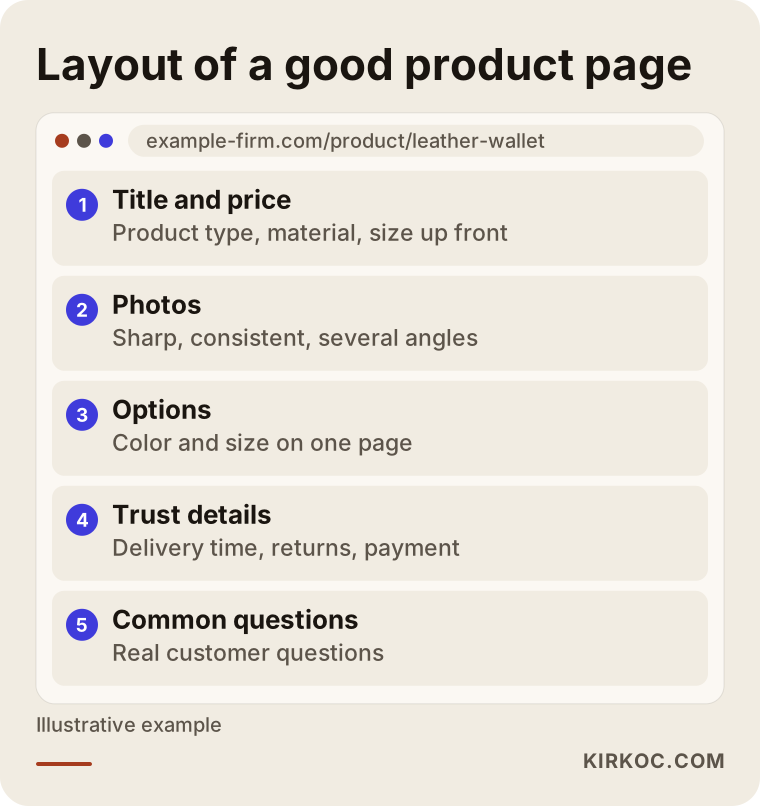
The layout in the figure shows the sections of an example product page. The order of sections can differ from store to store, but the first screen should show what the product is, its price, and the buy button, with the trust details right below.
Example scenario 1: Lots of products, no order
The following is a completely hypothetical example and has nothing to do with a real company. Picture a home textiles seller. Over three years the product count has grown into the hundreds, and because each item was uploaded at a different time by a different person, the naming is inconsistent. One product reads "Duvet Cover Set Queen," another "queen duvt set 3 clrs," and another is only a code number. Some photos have white backgrounds, and some were taken on a kitchen table. The descriptions are the same text the supplier sent, so identical sentences appear on other sites too.
The seller runs ads and gets clicks, but few people add items to the cart. In this scenario the first job of management is not scaling up the ads. It is cleaning up the catalog. Products are grouped first: which ones are really options of the same item, and which are separate. A simple naming rule is set: product type, material, size, color. Descriptions are rewritten around the questions customers ask (what is the fabric like, does it shrink in the wash, which mattress size does it fit). Photos are brought into one common style. Only after that do promotions and ads come up for discussion.
I cannot guarantee the outcome of this work, because sales are not decided by the catalog alone. Price, competition, and season play a part too. But in a store with a tidy catalog it is far easier to see what is working. Measuring with messy data is like looking into a foggy mirror.
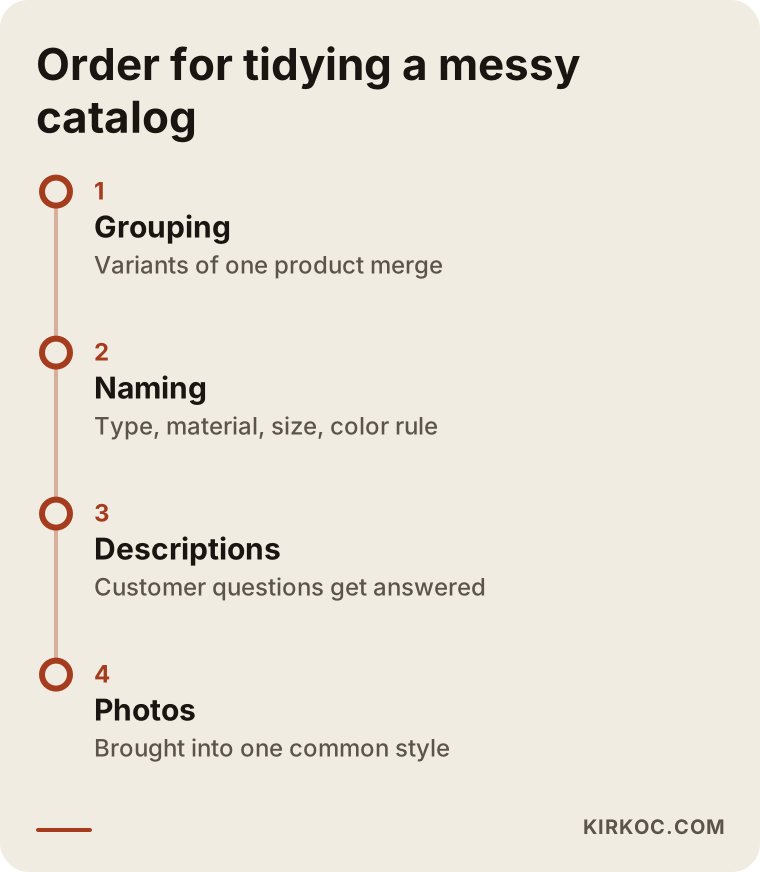
This figure summarizes the cleanup order in the scenario. The sequence matters: structure first, then text, then images, and growth last. If you swap the order, you end up doing the same work twice.
How does the service run, step by step?
Store management does not work as "we started today, everything is fixed tomorrow." A sound process usually goes through the stages below, and I run my own work on the same logic.
The first stage is getting acquainted and reviewing the current state. I go through your store: the catalog, page layout, order flow, shipping and return rules, the platform you use (Shopify, WooCommerce on WordPress, or another system), and any marketplace accounts. At this stage I ask you for access and a few answers: which products sell best, what draws the most complaints, and which products leave you the best margin.
The second stage is prioritizing. Trying to fix everything at once is both expensive and inefficient. So I rank the problems I find by impact and effort and give you a clear task list. Which jobs happen right away and which come later is settled together.
The third stage is regular work. On a weekly or monthly rhythm, product updates, new product entries, promotion preparation, and page improvements get done. What is critical here is that the work is visible: what was done, what is planned, and why goes into a short report.
The fourth stage is measurement and adjustment. Indicators such as visitor count, add-to-cart, checkout completion, and abandoned carts are followed; the weak link is found, and the next period's work is chosen accordingly.
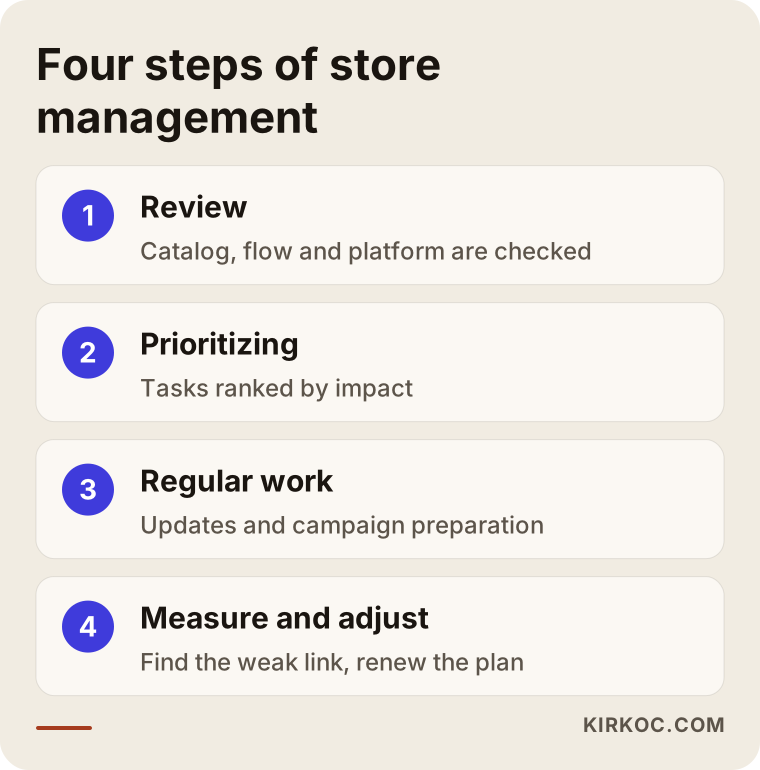
The four steps in the figure form a loop. When the last step ends, you return to the first, a fresh review with new data. That is why store management is not a one-time project but ongoing work.
You cannot manage without measuring
I want to stress this stage separately, because many businesses fall short here. "Sales are not going well" is a feeling. "Most visitors leave the product page without adding anything to the cart" is a finding. Once you have a finding, what to do becomes clearer. Maybe the photos are weak. Maybe the shipping fee only appears in the cart and scares people off. Maybe the price is behind competitors. Without measurement you cannot tell these apart. That is why one of the first jobs in the service is making sure a tool like Google Analytics is collecting ecommerce events correctly.
Example scenario 2: Selling through several channels
The second example is also hypothetical. Picture a hobby supplies store that has its own website and sells the same products on two marketplaces. The owner starts each morning by logging into three separate panels and manually reconciling stock. One day a promotion runs on the owner's own site, but the old price stays on the marketplaces. The next day a product sells out, yet it still looks available on a marketplace, and a cancellation follows.
In this scenario, management first works out which channel truly earns money. Marketplace fees, shipping arrangements, and competitive conditions differ, and some products make sense on a marketplace while others are more profitable on the store's own site. Then a "single source of truth" logic is set up: product information lives in one place and flows to the other channels from there. For some stores that means integration software, and for others a well-kept spreadsheet and a disciplined routine are enough. Which one fits depends on the number of products, your platform, and your budget.
Here is an honest warning: marketplaces change their own rules and interfaces often. I would not promise in advance that an integration will run without trouble. After setup it needs close watching for a while.
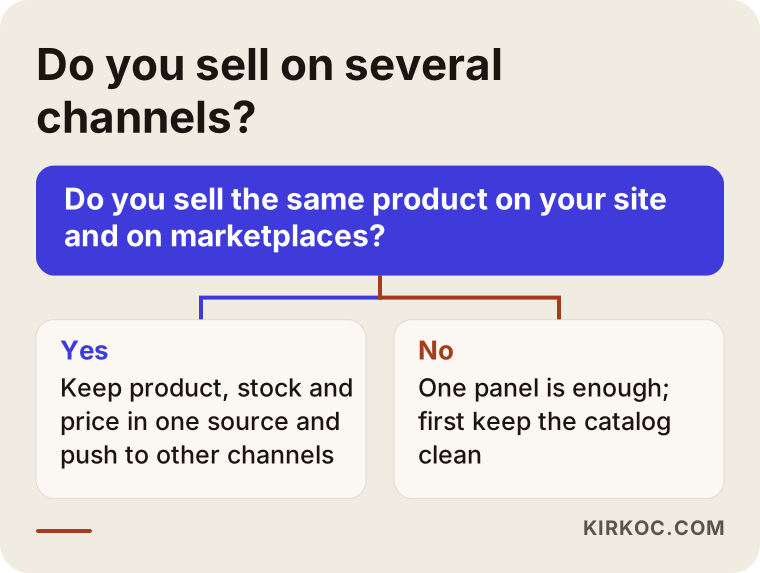
The figure shows information being distributed from one center. Typing the same data by hand in three places triples the chance of error, while keeping it in one place and passing it on reduces mistakes.
Look at your store like a customer: try it yourself first
There is a simple check you can do before approaching any specialist, and I recommend it to every store owner. On your phone, walk through your own store as if you had never seen it. Go from the home page to a category and then to a product. Put one item in the cart and continue until the payment step. Along the way, notice the following. Do the pages open comfortably on a phone? Are the photos sharp? Where do the price and shipping cost appear? How long does it take to find the return terms? How many fields must you fill in at the payment step?
This test gives you free and very valuable information. Every spot where you stumble is a spot where a real customer stumbles too. Also search Google for your own business name and products. See whether your page shows up or a marketplace page does, and whether the descriptions make sense.
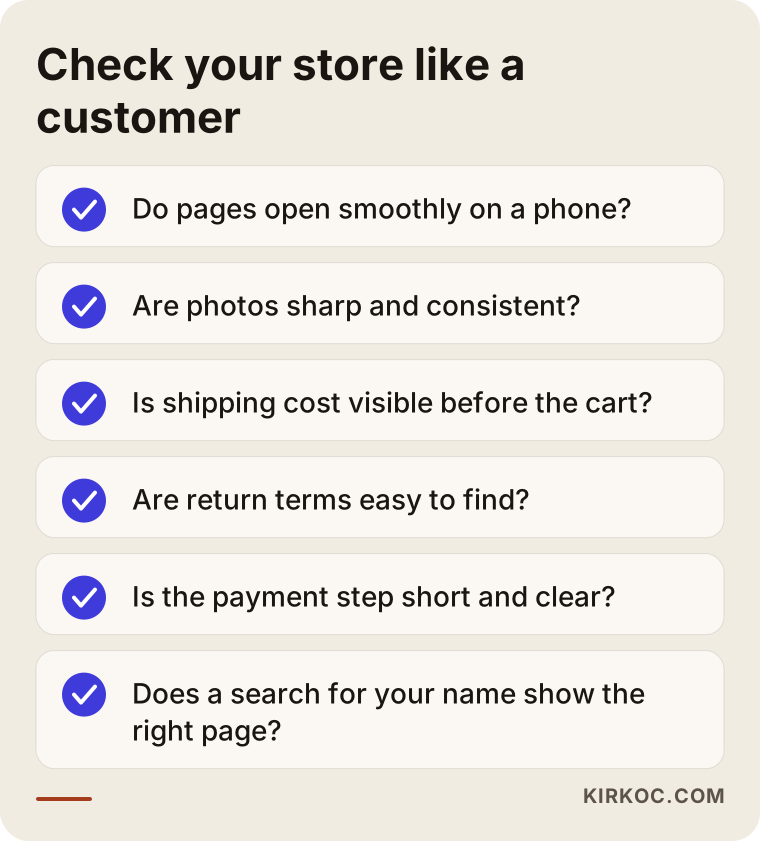
If you cannot answer "yes" to every item on the checklist, that is not a failure. It is simply the start of your priority list. In most stores a few items come up short.
What can you do yourself, and when do you need an expert?
Getting outside help does not mean pulling your own hands out completely. Some jobs are better left with you, because you know your product, your customer, and your supplier best.
Things you can do yourself include taking clean, well-lit phone photos of products, talking to your supplier about stock, collecting customer questions and noting which ones keep coming up, and occasionally browsing competitor sites to watch their prices and promotions. None of this needs technical knowledge, only order and consistency.
The jobs that call for an expert are these: when something breaks behind the scenes of the site (a payment error, slowness, a wrongly calculated shipping fee), when structural changes are needed for search visibility, when setting up an ad account, when building the measurement setup correctly, when connecting several channels with integrations, and when redesigning the store. A mistake here is not only lost time but sometimes lost sales. A broken setting on the checkout page, for example, costs you customers every day until someone notices.
There is a middle path as well: split the work. You handle daily orders and customer communication yourself, and hand over the catalog, page layout, measurement, and ads. For many small stores this is the most sensible arrangement.
Common mistakes in store management services
I list here the mistakes I see repeated in this field. Some are on the side of the person buying the service, some on the side of the provider.
The first mistake is leaving the scope vague. Saying "manage my store" is not enough. How many products will be added each month, at what times will orders be checked, who will answer customer messages, and when will the report arrive? If these are not in writing, disappointment at the end of the first month is almost guaranteed.
The second mistake is handing over all access and losing ownership. Your domain, hosting, store panel, and ad account should be registered in your name. The provider gets permissions, but you remain the owner of the accounts. I have seen businesses that could not get these accounts back when the collaboration ended. This is the easiest mistake to prevent and the most expensive one to suffer.
The third mistake is trying to fix everything at once. Rather than rewriting every description for hundreds of products in a month, it is far more sensible to start with the best sellers or the products that leave the most profit.
The fourth mistake is changing direction without measuring. If sales drop for one week and you redesign, shut off the ads, or cut prices, you have ignored seasonality and perhaps a shipping delay. You need enough time and data before deciding.
The fifth mistake is skipping simple legal and operational basics: a missing terms of sale page, return terms nobody can see, stale shipping information. They look small, but they affect trust and sometimes your legal position. I advise getting an opinion from a lawyer on these matters.
The sixth mistake is choosing the cheapest service. A low-priced offer usually means a narrow scope, no reporting, or a one-size-fits-all routine. Price matters, but it should not be the only yardstick.
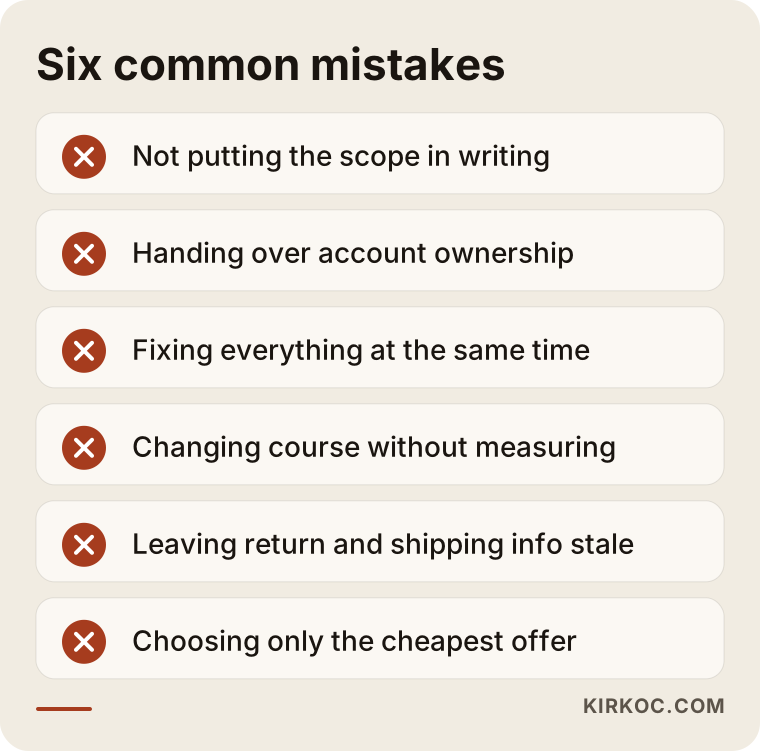
Most of the warnings in the figure grow from a single root: expectations that were never written down. Putting the scope in writing before you start prevents the bulk of these mistakes.
What determines the cost?
I will not give figures here, because the difference from store to store is huge and a number would mislead you. Instead, let me explain what moves the price, so you can compare the quotes you receive.
The number and variety of products is the first factor. A store with hundreds of variants and a store with fifteen products do not carry the same workload. The second is the number of sales channels: only your own site, or marketplaces as well? The third is the breadth of scope: catalog updates alone, or ads, content, reporting, and customer communication too? The fourth is the platform you use and the integrations tied to it. The fifth is how messy the current state is; maintaining an orderly catalog costs less than cleaning up a chaotic one. The sixth is working frequency and the expected response time: weekly or daily, and whether same-day action is needed in emergencies.
If you give clear information on these six points when asking for a quote, the other side can prepare a more accurate offer. Also ask about surprise costs: are things like ad budget, plugin licenses, hosting, and photo shoots included in the service fee or paid separately?
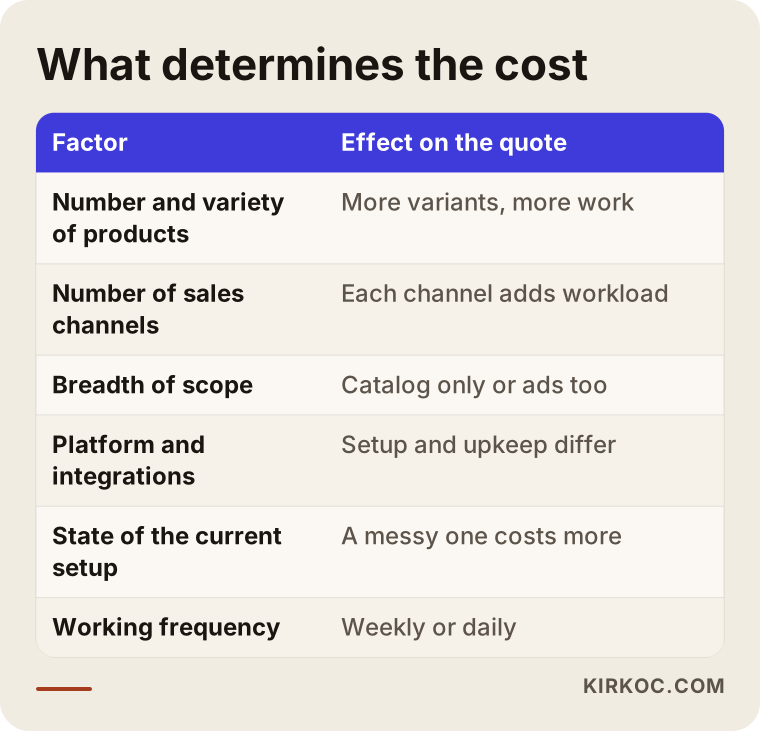
As the table shows, very different workloads can sit under the same service name. So when you compare two offers, look not only at the total but at what is inside.
How I work with you
I work alone, and I deliver the services of a digital agency through one person: websites and ecommerce, SEO, social media management, Google and Meta ad management, logo and corporate identity, and content production. In store management the practical benefit is this: the person tidying your product page, the person preparing ads for that page, and the person building your visibility on Google are the same person. When you are investigating why a product does not sell, you do not get the ping-pong of "that's the advertiser's problem, that's the web developer's problem." You have one point of contact.
My routine usually goes like this. First I look at your store and describe in writing what I see. Then we decide together which jobs come first. We put the scope, reporting frequency, and communication channel on paper. During the regular phase I share what I did in short reports. I do not guarantee results; sales depend not only on what I do but on your product, your price, and the market. But I can explain the reason behind everything I do, and you are always the owner of the accounts.
I will also say this plainly: if your store needs a serious rebuild before it needs outside management (for example, if the platform is very outdated), I will tell you honestly and plan the service accordingly.
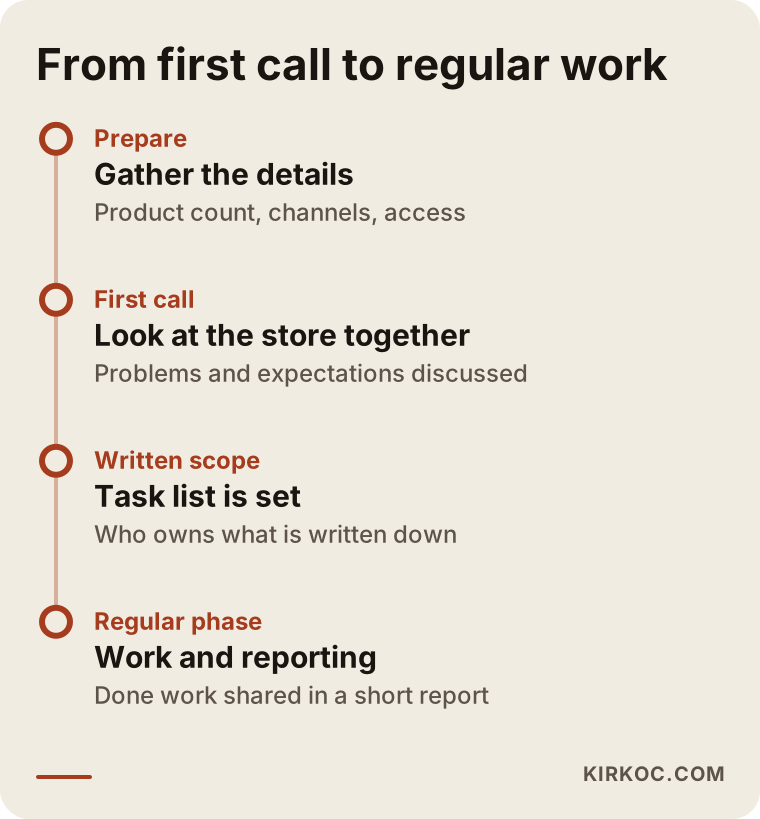
The timeline in the figure shows the typical order from the first call to regular work. Durations vary with the size of the store, and I settle them with you before work begins.
Frequently asked questions
What is the difference between ecommerce store management and building a store?
Building is the first-time preparation of the store: choosing the platform, design, and payment and shipping connections. Management is the work done every day and every week afterward: product updates, stock, promotions, and measurement. Some businesses run both with the same person, and others work with separate people.
Will I lose control if I outsource my store?
You should not. The domain, store panel, and ad accounts should stay registered in your name, and the provider should receive only the permissions needed. You can also follow the work by asking for regular reports.
I sell on marketplaces. Do you manage those too?
Product, stock, and price work on marketplace accounts can be brought into the scope. It depends on which marketplaces you use and how your integrations are set up, and I settle that in the first call. Because marketplace rules change often, part of the work needs continuous monitoring.
What does the cost of the service depend on?
The number of products, the number of sales channels, the breadth of scope, the platform, the condition of the current setup, and working frequency are the main factors. An exact amount can only be given after your store has been looked at.
How long until I see results?
Some changes, such as catalog order and page improvements, are noticed right away. Visibility from search engines takes weeks and sometimes months. Promising a fixed time or result would not be honest.
Are ads and SEO included in this service?
That depends on the agreement. Store management can be a job on its own, and ad and search engine work can be added as separate items. The benefit of running everything through one person is that the pieces move in step with each other.
My store is small. Should I still get the service?
In a store with a few orders a week and few products, you can handle most of the work yourself. Outside support usually makes sense when the workload outgrows your time or when the store gets traffic but no sales. We can look at that together in the first call.
What happens if I want to stop the service?
Because you own the accounts, you can take the permissions back whenever you like and carry on with the work. That is why I recommend having the access and handover terms in writing before the collaboration starts.
If you are thinking about handing the daily load of your store to someone, reach out through my ecommerce website service page. We can look at your store together and talk openly about what stays with you and what I take on.