Your online store is open, the products are uploaded, and you may already be selling through your own website, Amazon or Etsy. But your social media accounts either sit silent for weeks, or something gets posted every day and still nobody visits the store. If "what is this actually bringing me?" keeps running through your head, you are not alone. Social media management for ecommerce brands is a different job from running the account of an ordinary local business, because the goal is not collecting likes. It is moving someone who has never seen your product to your store, and from there to the cart. In this article I explain how to set the work up, where money and time usually get wasted, and when outside help makes sense. I am Ümit Kırkoç. I work on my own from Istanbul, and I run social media management together with the store website and advertising, all in one pair of hands.
First, let us settle one thing. In ecommerce, social media usually works as the place where people get to know you and decide whether to trust you, not as the place where they check out. A person sees a product in a video or a post, remembers the brand, and a few days later searches for it or walks into your store. That is why judging success only by same-day sales can mislead you. The illustration below summarizes how a shopping journey starts on social media and ends in your store.
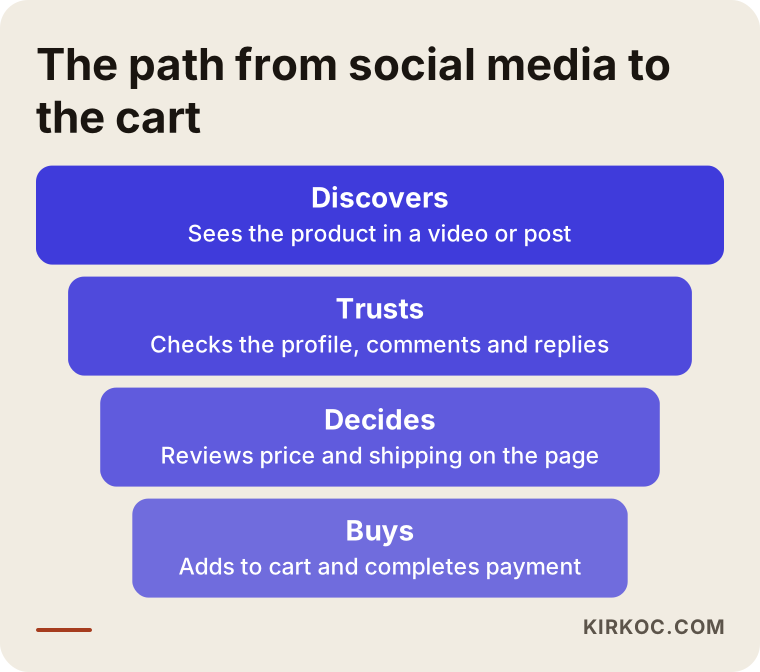
If you keep this funnel in mind, you will notice that every post has a job. One post introduces, another builds trust, another says "order now." If every post tries to do all three at once, none of them works well.
Why is social media different for an ecommerce business?
A restaurant or a clinic speaks to people nearby. An ecommerce brand often sells across a whole country, or across borders. Your customer does not find you on the street. They find you through a video, a friend's recommendation or an ad. That changes several things.
First, the customer cannot hold the product. They cannot feel the fabric, judge the size or check the quality. The most important job of your social content is to close that gap: show the product in use, explain the size with a hand or a height comparison, film the unboxing, and answer a question a real customer asked. A studio photo on its own does not do this.
Second, the trust threshold is high. Typing card details into a site you have never heard of makes people hesitate, so they check the brand's social account first to see whether the business is real. If the account is empty, the comments are unanswered or the last post is months old, they may leave even after they have already opened your store.
Third, you probably have many products. If you sell hundreds of items, you cannot post about each one. You have to choose which product to feature, when, and why. That choice is the hard part of the management work.
Fourth, your competitor is not just the shop next door. The same item is one click away on Amazon, Walmart or another brand's site. What makes someone pick you is price, yes, but also how recognizable your brand is, its style, and the confidence it gives. Social media builds much of that.
Your store and your social accounts are two parts of one system
If a person arrives from social media and lands on a confusing page, a slow product card or a category they cannot find, even the best content is wasted. So I do not treat this as "account management" alone. The speed of the site, how clear the product pages are and the checkout step are all part of the job. When one person holds all of it, nobody can say "that is not my department" when something breaks.
Which platform does what for ecommerce?
You do not need to be everywhere. Doing one or two platforms well beats doing five halfway. The table below gives a general frame; the weights will shift depending on your product.
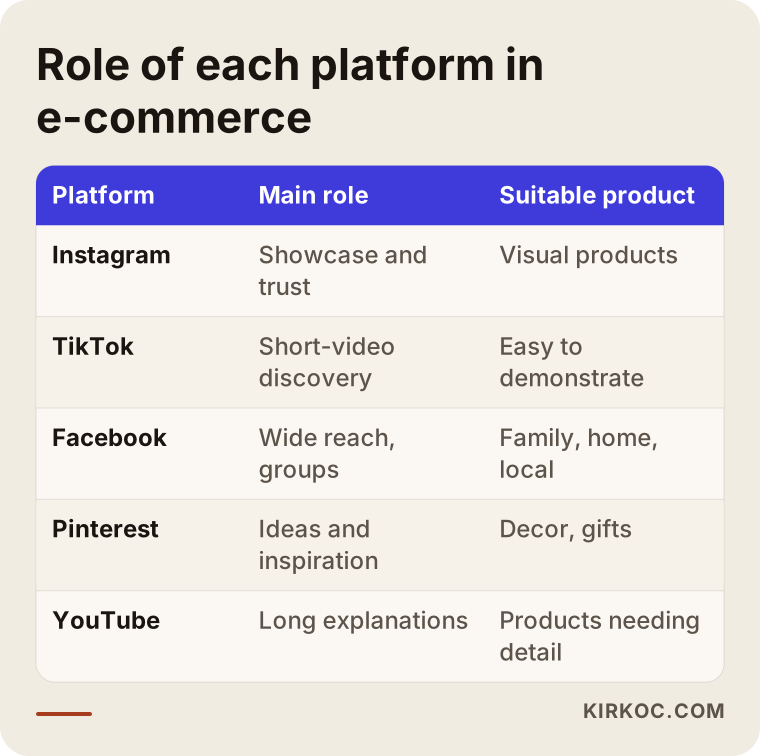
When you read the table, remember that you pick a platform by asking "what are my customers doing there?", not "where are the most people?" For an accessories brand aimed at a younger audience, short videos can make sense. If you sell home textiles or children's products, parents' accounts, Facebook groups and Instagram may matter more. If you sell industrial supplies or wholesale goods, LinkedIn can even be the better choice.
For visual products, Instagram is still the main showcase. The profile, posts, short videos and stories work together. The link area on your profile is the most valuable spot for ecommerce, and where it sends people decides the result. Product tagging and Meta's shopping features are available on some accounts; the conditions change over time, so check the current status before building anything around them.
TikTok
Product discovery through short video can spread fast here. It also demands a quick pace: content that looks like an ad gets ignored, while content that feels natural, entertaining or useful gets watched. It does not suit every brand. Your product needs to be something you can actually show in a video.
Facebook and Pinterest
Facebook still works for customers across a wider age range, and for local groups, community pages and ad targeting. Pinterest can complement the rest in decor, fashion, gifts and handmade goods, because people go there looking for ideas.
YouTube
For expensive products, or ones that need explaining, long videos, comparisons and how-to guides can be watched for years. Production takes more effort, but once it is done, it keeps working for a long time.
What does an ecommerce brand need on social media?
Nice photos alone are not enough. The illustration below shows the difference between an account that only posts product photos and one that supports the buying decision.
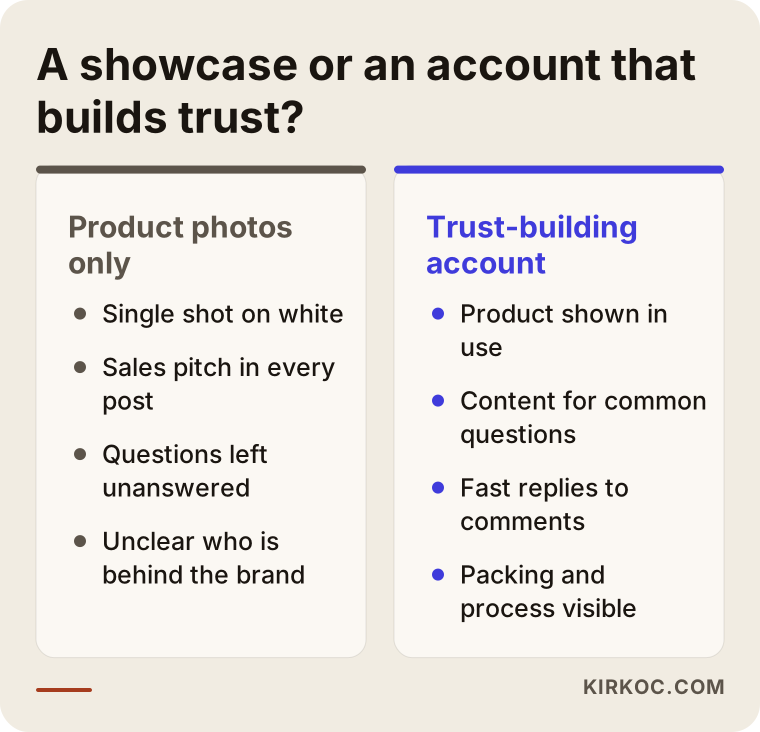
Let us turn that difference into a practical list. The content that makes deciding easier usually includes the following.
Moments of use. The product is not alone on a white background; it is in someone's hand, in their home, in their bag. People want to picture themselves with it.
Answers to questions. What do customers ask you in messages and comments? Size, shipping time, returns, materials, washing. Every one of those questions is a content topic. If ten people ask the same thing, a hundred more probably gave up before asking.
Behind the scenes. Packing, the warehouse, production or the way you choose products show that the brand is a real place. It does not need to look glamorous; honest and regular is enough.
Customer experience. Photos, reviews and feedback shared with the customer's permission are persuasive content. Getting permission and protecting personal information are essential here. If you need a detailed legal framework for personal data, I recommend talking to a lawyer.
Campaign and seasonal content. Holidays, gift seasons and sale periods need preparation in advance. Content left to the last day usually looks rushed and low quality.
Example scenario 1: A small, newly launched jewelry brand
As a hypothetical example, picture someone who sets up a workshop at home and sells handmade jewelry through their own website. The brand has no name recognition, few visitors reach the site, and the social account has a few hundred followers. The owner posts one product photo a day with the price and "DM to order" underneath.
The problem here is not the amount of content but its type. Every post carries sales pressure, and the people following do not know who the brand is. A better setup might look like this: three pieces of content a week, one of them a short video of the making process, one a post that shows the real size of a piece and how it is worn, and one that answers a frequently asked question. The profile carries a single clear link that goes to the most viewed collection in the store. The habit of taking orders by direct message is gradually steered toward the website, because sales through DMs cannot be tracked and do not scale.
In this scenario you should not expect a big jump in sales in the first weeks. What you can expect is that people who visit the profile find the brand more trustworthy, and that messages move from "how do I order?" to more advanced questions like "what size is this one?" No result can be guaranteed, but within a few weeks you can tell whether things are moving in the right direction.
Example scenario 2: A mid-sized home goods store with several categories
The second hypothetical example is a store with hundreds of products across kitchen, bathroom and decor categories, selling both on its own site and on marketplaces. It has a team of three, but social media runs on a "whoever is free does it" basis. One week of heavy posting is followed by three weeks of silence.
The main problem in this store is structure and priority. Instead of trying to post about hundreds of products with equal weight, two or three "core product families" are chosen. Each month gets a theme, for example table setting, bathroom organization or small home updates. The content calendar is written in advance, and it is decided which post will point to which product page. Questions and reviews from the marketplaces become content material. For messages and comments on the accounts, a clear reply time and a responsible person are set.
What makes the difference in the second scenario is not creativity but consistency. The store already has the products, the photos and the customers. What is missing is using them regularly and in a connected way.
Is your account ready for shoppers? A profile check
Before producing content, your storefront has to be in order. When a customer sees a post and opens your profile, they decide within the first three to five seconds. The list below is meant to make that look easier.
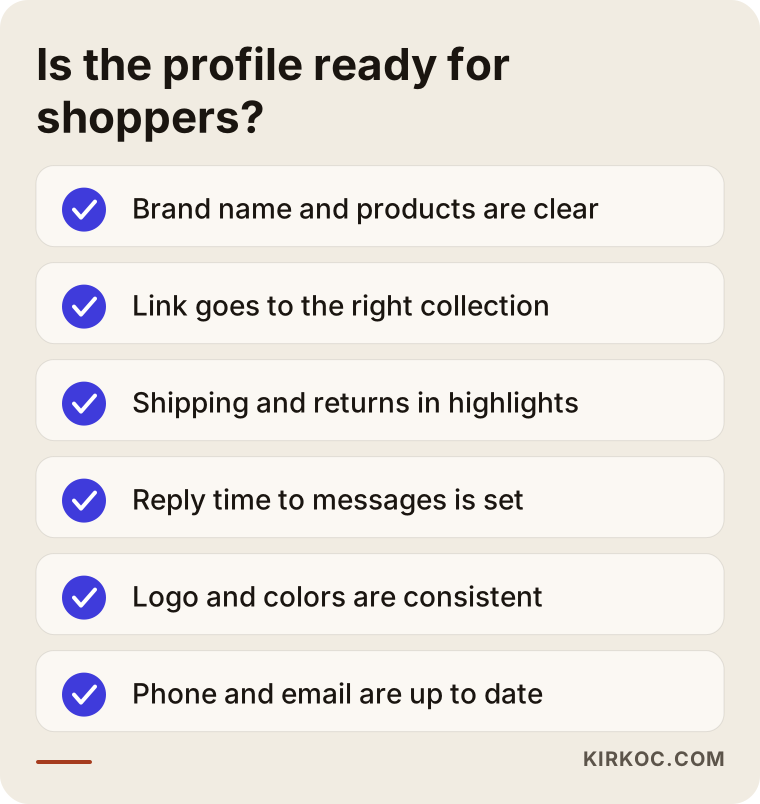
The item skipped most often on this list is the link in the profile. Many brands send everyone to the homepage, but going straight to the product or collection described in the post keeps the visitor from getting lost. Another commonly skipped item is saying plainly who the account belongs to: the brand name, what you sell and where you ship from should be clear at a glance.
The store website side
Even with a tidy profile, the loss is large if the link takes a mobile visitor to a slow or confusing page. Most people who arrive from social media are on a phone. Photos on the product page should load quickly, the price and shipping information should be visible, and the "add to cart" button should be easy to tap with a thumb. Checking these is a dull but critical part of social media management.
Step by step: how social media management is set up
Keep the process simple. Complicated plans are often abandoned before they are carried out. The illustration below shows the basic order I follow for ecommerce brands.
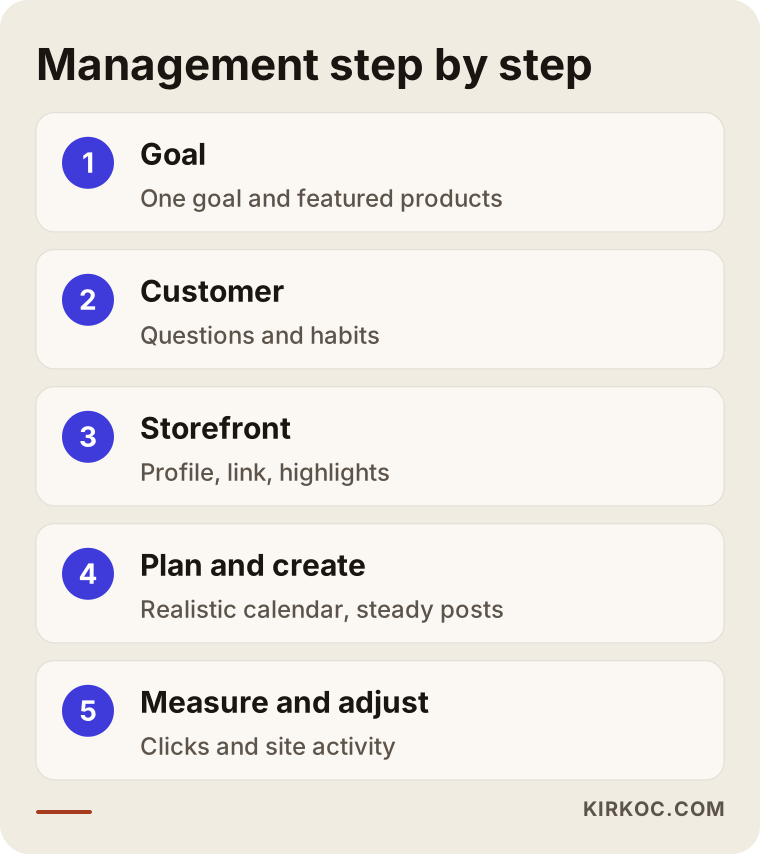
Now let me explain these steps in a bit more detail.
1. Goal and product selection
First, answer honestly: what do I expect from social media? Brand awareness, visitors to the site, or sales of one particular product? If the goal is not clear, the measurement will not be clear either. Rather than setting three goals at once, it is healthier to choose one for the first period. Then you decide which products to feature: those with a good margin, those people ask about often, and those you can reliably keep in stock.
2. Getting to know the customer
Who is your customer, when do they look at their phone, and which questions are they trying to answer? If you have message history, order notes or customer service questions, they are gold. If you do not, a short conversation with a few customers still teaches a lot.
3. Profile and storefront setup
The profile is arranged according to the checklist above. Highlights (shipping, returns, size guide, frequently asked questions) are collected under separate titles, so a newcomer finds the answers without waiting for a reply.
4. Content calendar
Content types are set for each month: introduction, education, trust, campaign. A mixed distribution of these is planned each week. The most important quality of a calendar is that it is realistic. You will not produce content every day, and three good pieces a week beat one weak piece a day.
5. Production
Photos, video, copy and design. A decent video shot on a phone can sometimes be more convincing than a professional studio. The decision depends on the brand. When logo, colors and typeface stay consistent, different pieces of content read together as one brand.
6. Publishing, replying and community
Posting is half the job. Replying to comments and messages shows that the account is alive. An unanswered "price?" comment is an invisible lost customer.
7. Measuring and adjusting
At the end of the month you look at which content got attention and which sent visitors to the site. Rather than fixating on follower count, it is more meaningful to look at profile visits, link clicks and what happens on the site. These numbers shape the plan for the following month.
When do paid ads come in?
Organic content, meaning content that spreads without payment, often is not enough on its own in ecommerce. The algorithm does not show each post to all your followers, and reaching new customers takes time. So beyond a certain point, Meta (Instagram and Facebook) ads support your social content.
But the order matters. The account should earn trust first and the product pages should work properly; otherwise the ad budget just carries people to a storefront that does not inspire confidence. It also helps to have content that already works: a video that drew organic attention is usually a firmer starting point as an ad than something prepared from scratch.
Think of the ad budget separately from the management fee. The first is the media spend paid to the platform, and the second is the labor of setting up and following the work. Quotes that mix the two are confusing, so when you ask for a quote, ask for them to be written separately.
Mistakes most ecommerce accounts make
Knowing the mistakes is half of avoiding them. The illustration below summarizes the problems I see most often.
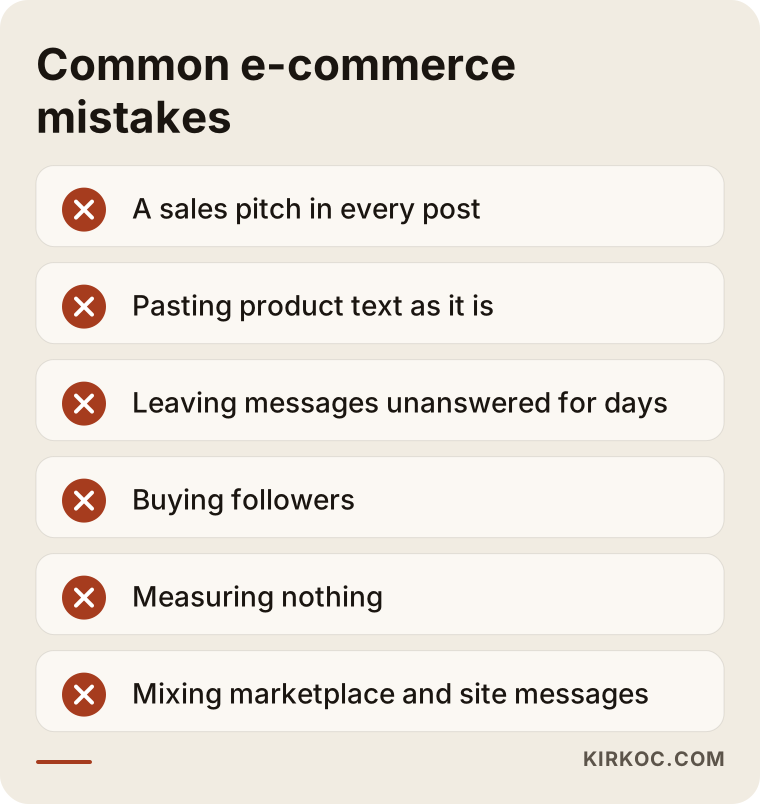
I want to expand on a few of them.
Selling in every post. Followers start ignoring an account that keeps saying "buy now." Part of your content should be helpful, part should build trust, and sales calls should appear in chosen places.
Copying the product listing as it is. Pasting the product description from your site onto social media usually does not work. A product page is written for someone who arrives with shopping intent; social media is an environment where you first have to catch attention.
Replying late to comments and messages. When a customer writes, they are usually close to buying. A message left unanswered for days means a closed window for an order.
Buying followers or fake engagement. Accounts that are not real customers will not turn into orders; they distort your account statistics and can also confuse ad targeting. The platforms' rules on this can be strict, too.
Not measuring. Continuing without knowing which content works means repeating the same mistake every month.
Depending on a single channel. If your account is closed, access is lost or the algorithm changes, the whole operation can stop overnight. So it is wise to slowly build an email list, site traffic and other channels as well.
Mixing the marketplace with your own store. If you sell the same product on a marketplace and on your site, decide deliberately which channel you point people to. Differences in price and promotions can make customers suspicious.
What to expect in the first 90 days
Impatience is the most expensive feeling in social media management. The timeline below shows hypothetically what a healthy start looks like; the timing changes with the brand, the product and the budget.
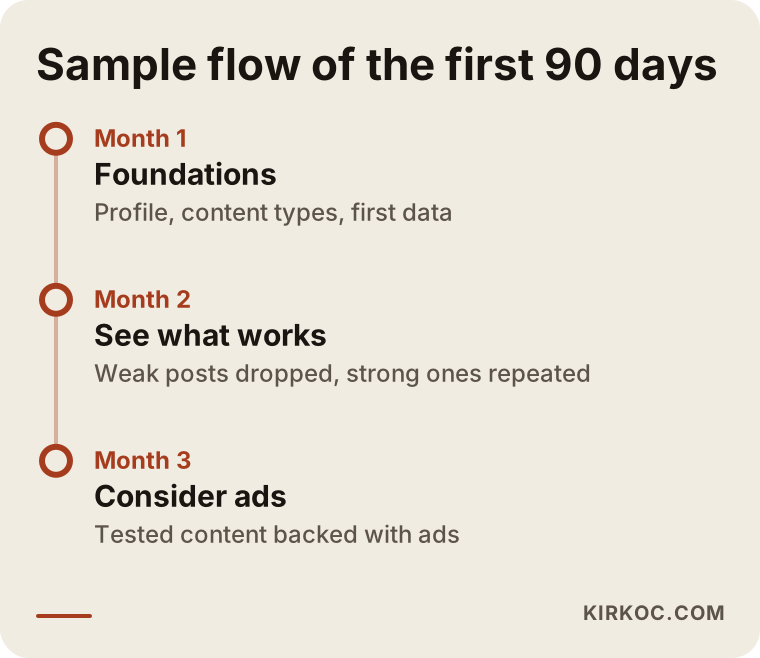
The first month is usually the foundation period: profile setup, trying out content types, the first measurements. In the second month it starts to become clear what is working, and the content is simplified accordingly. If you are considering ad support in the third month, you now have content that has been measured. I cannot promise a specific sales figure within this time, and nobody can. But by the end of the third month you should be able to answer "which content works and which does not."
How does social content connect to the store page?
This section covers the most critical point for ecommerce brands: the handoff from content to sale must not break. The product page for an item you talked about in a post has to keep the promise made in the post. For example, if a post explains a product's size and use, and the product page lacks that information, the visitor goes back.
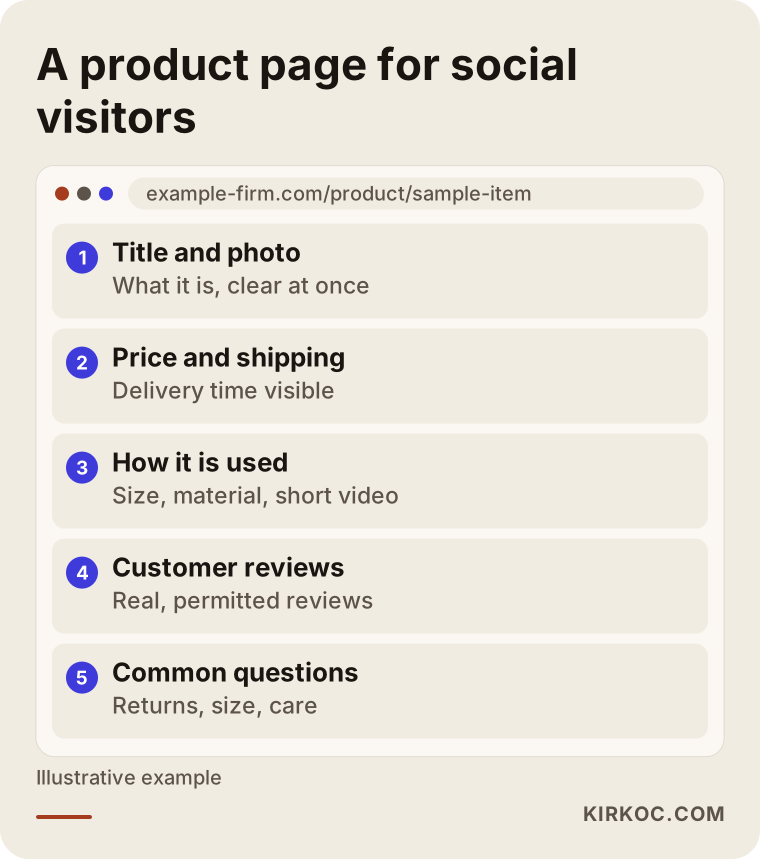
The layout in the illustration aims to keep a person from getting lost after arriving from social media. The title says what the product is, the photo sits right below, price and shipping information are nearby, then a short explanation of use, customer reviews and frequently asked questions. This layout helps both people who come from social media and people who come from search engines. Making product pages findable in search is a separate job, handled on the SEO side; because I run both under one roof, the message working on social media and the page on the site complement each other.
There is a side benefit in visibility on AI and search tools. People now ask AI assistants about brands too. A site that gives consistent, accurate information, together with active social accounts, can help your brand be described correctly in those answers. There is no guarantee of that, though, and neither I nor anyone else decides the ranking.
Reviews, questions and social proof
A customer review is one of the strongest persuasion tools in ecommerce. Showing reviews on your site, sharing them on social media with permission when appropriate, and answering negative reviews calmly all improve the brand's credibility. Deleting or hiding a negative review usually backfires, because customers notice. Showing that you solved the problem is more convincing than never having made a mistake.
Should you do it yourself or hire an expert?
It would not be honest to answer this with "everyone should hire an expert" or "everyone should do it themselves." The decision depends on your time, your product and your goal. The decision chart below gives a rough guide.
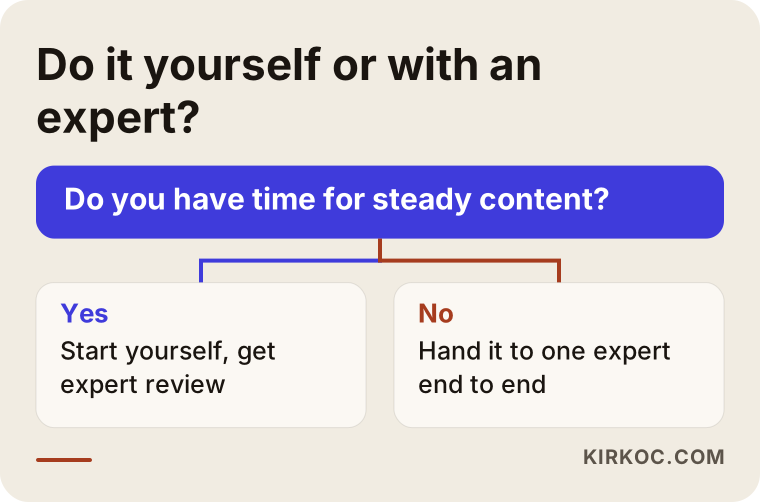
What you can do yourself
If you are starting small and have time, you can handle a lot yourself. Shooting product videos on a phone, replying to messages, noting frequently asked questions, collecting customer photos with permission and writing weekly content ideas in a notebook are all within your reach. They also keep your brand voice genuine, because you know the product best.
When is an expert needed?
Outside help becomes sensible in situations like these: when the number of products grows and keeping things organized gets hard, when posting becomes irregular, when you begin spending on ads and cannot interpret the measurements, or when a gap opens between social media and the website. Another sign is when the work keeps you from your real job, which is your products and your customer relationships.
What matters is that, even with outside help, you remain the owner of the account. Account access should stay with you, you should be able to see and approve the content, and this should be agreed in writing.
What determines the cost?
I will not give figures here, because no two ecommerce brands need the same thing. But I can say clearly what determines cost.
Number of platforms. Two platforms and five platforms are not the same job.
Amount and type of content. How many pieces a week, how many of them video, how many designs. Video production takes more effort than designing a single post.
Shooting needs. If your product photos and videos are ready, the cost goes down; if everything must be shot from scratch, it goes up. If products have to be physically shipped to me, logistics enters the calculation too.
Product variety. A brand with a few products and a store with hundreds need different planning.
Community management. Who answers comments and messages, and how quickly, changes the workload.
Ad support. Setting up and following ads is a separate job; the ad budget is entirely separate and is paid directly to the platform.
Reporting and meeting frequency. A monthly report or a weekly call? The scope grows with the time.
State of the site. If your store website has problems that need fixing, that is planned separately.
When you request a quote, look not only at the total but at what is in and what is out. Instead of vague wording like "monthly content," ask for the number, type and delivery format in writing. Account access, who owns the content and how the contract can end should also be clear. For contract details, consult a lawyer if needed.
How do AI and search tools describe your brand?
People now put questions like "is there a trustworthy online jewelry brand?" not only to Google but also to AI assistants. When answering, these tools may look at information on a brand's site, news, reviews and open sources. The illustration below shows a completely hypothetical example answer.
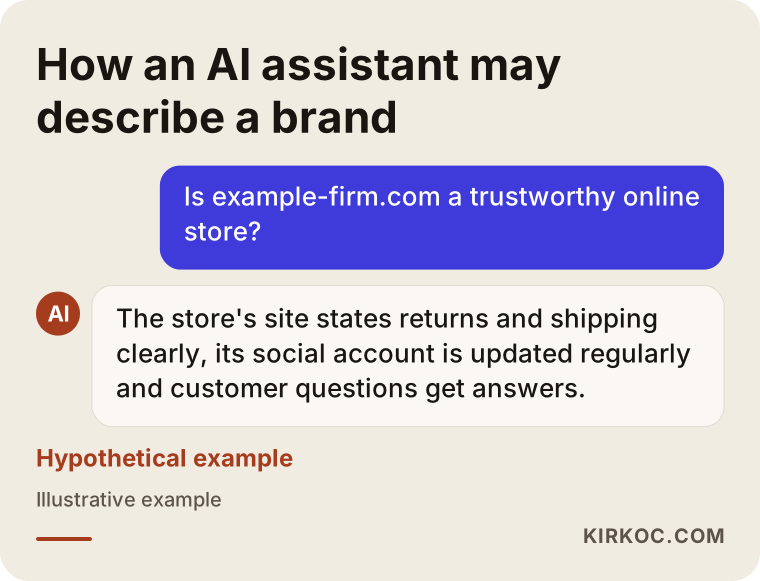
The lesson is this: it helps when your brand information is consistent across different places. The contact details on your site, your social profiles, and your return and shipping terms should all say the same thing. An active account and real customer reviews give every source that describes you better material to work with. I cannot promise that an AI tool will feature you, but scattered information raises the chance of mistakes.
How I work with you
I am one person, and for ecommerce that is both an advantage and a limit. The advantage is that site, SEO, social media, advertising and visual identity sit with the same person, so when I decide to push a product I can plan the page, the content, the ad and the post together. There is no chain where everyone waits on someone else or says "another person handles that." The limit is that I cannot work with many clients at once, so before starting new work I talk openly about my capacity and your expectations.
I usually run the work like this. First comes a short introductory call: what you sell, to whom, from where, and what is working now. Then I look at your current accounts, your site and your product pages, and I share in writing what the priorities are. If you like the plan, we settle the scope and budget together and I prepare the first month's content calendar. With a regular monthly report I explain what was done, what worked and what I will change next month. You are always the owner of the accounts.
I never say "this many followers" or "this many sales." Those are in the hands of the platforms and the market. What I can say is that I will run the work in a regular, measurable and understandable way.
Questions to ask yourself before you start
If you prepare answers to these questions before talking to a specialist, the process speeds up a lot. What is your best-selling product, and why? Where do your customers find you? What do customers ask your support team most? What are the reasons for returns? Which competitors do you admire, and which do you not? What do you never want to do on social media? Do you have product photos and videos, and who holds the usage rights? Who has access to the store website?
If you cannot answer these clearly, do not worry; the point of a first conversation is to settle them together. What matters is that the person managing the account understands the business as well as you do.
Frequently asked questions
Does social media management really bring sales for an ecommerce store?
It can, but it cannot be guaranteed, and its effect is usually indirect. Social media often works at the stage of getting to know you and building trust; a customer may buy days later through another route. So judge success not by instant sales alone but together with profile visits, link clicks and activity on the site.
Which platform should I start with?
The one where your customer spends the most time and where you can show your product best. For many product brands that is Instagram, but TikTok may suit products aimed at younger buyers and explained through video, and Pinterest can be worth considering in inspiration-driven categories such as home and decor. Managing two platforms regularly is better than managing five irregularly.
I sell on a marketplace. Do I still need my own social media account?
Usually yes. On a marketplace the customer belongs to the marketplace, and it is hard for them to remember your brand. With your own account and site you can build the customer relationship directly and encourage repeat purchases. I also recommend checking each marketplace's rules and its limits on sending customers elsewhere.
How many times a week should I post?
There is no single right number; the right number is the one you can sustain. For most small and mid-sized stores, two to five regular posts a week, plus story posts at intervals, is a good start. Fewer but regular beats many but irregular.
Is social media enough without ads?
Some brands can grow organically, but in ecommerce reaching new customers often needs ad support too. A more efficient order is to get the account and store pages ready first, then back the content that works with ads. Think of the ad budget and the management labor separately.
I have few followers. Is it too late to start?
No. Follower count alone does not determine sales. A small account that speaks to the right audience can bring in more business than a large, uninterested one. What matters is how engaged your current followers are and where your link goes.
What does the price of social media management depend on?
It depends on the number of platforms, the amount and type of content, shooting needs, product variety, community management, ad support and reporting frequency. When you ask for a quote, get what is included in writing; look at the scope, not only the total.
Will I keep access to my accounts?
You should. The accounts should always belong to the brand, you should hold administrator access, and nothing should be lost when the work ends. It is best to put this in writing before the work begins.
If you would like to work out together where to start for your own store, you can write to me through the social media management service page. I will listen to your products, accounts and goals, and suggest a simple path that fits.