You have an online store that has been running for years. The site has slowed down, it looks bad on a phone, adding a new payment method is a struggle every single time, and your contact with the person or company who built the software has faded. So you have started researching "ecommerce website redesign" and "ecommerce platform migration." The real fear behind those searches is probably this: what happens to my Google rankings and my orders on the day I move to the new site?
That fear is reasonable. A badly planned move can seriously weaken visibility that took years to build, and it can do it within a few weeks. A well-planned move keeps that risk largely under control. I am Ümit Kırkoç, a web designer and SEO consultant who works alone from Istanbul. In this article I explain the difference between a redesign and a platform change, what can be lost during a move, and how I run the process step by step. If you want the general picture first, you can look at my website design service, but let's get to the main subject.
Redesign or platform change? They are not the same thing
People often mix these two jobs up. Both get called "redesigning the site," yet the risk and the cost are very different.
A design refresh keeps the same platform and changes how the site looks, how pages are laid out, and how easy it is to use. The platform is the software that runs your store: the system that manages products, the cart, payments and order records. In a design refresh that system stays where it is, product addresses mostly stay the same, and your order history is left untouched.
A platform change means replacing the engine. For example, moving from an old custom-built system to WooCommerce (a store add-on for WordPress), to Shopify, or to some other system. Products, customer records, orders, addresses and settings all get moved from one system to another. Page addresses almost always change. That is where the risk of lost search traffic and lost orders comes from.
The graphic below puts the two paths side by side. Use it to see which one your situation is closer to.
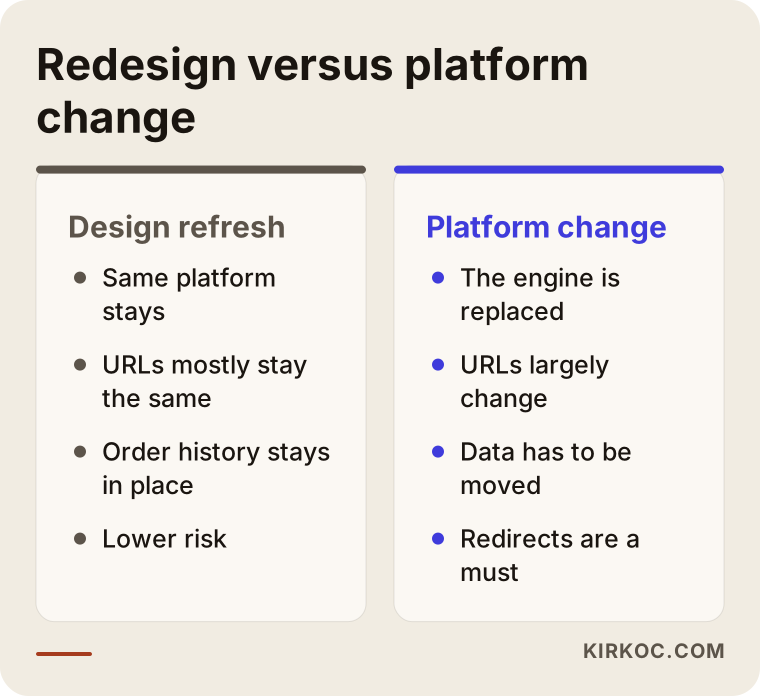
The takeaway is simple. If your only problem is the way the site looks, you may not need to change platforms at all. If the problem is slowness, security, payment setup or how hard the store is to manage, the engine itself is usually the problem, and a move becomes hard to avoid.
Do you really need to change platforms?
Not every problem calls for a new platform. A new platform costs money, takes time, and carries risk during the move. So the first thing to answer honestly is this: is your current system actually holding your growth back, or are you just tired of it?
Changing platforms usually makes sense in situations like these: the software no longer receives security updates, you cannot add the payment or shipping connections you need, the site becomes unbearably slow as your product count grows, the person who built it cannot be reached, or you depend on outside help for every small change. If the only issue is a design that looks dated, a refresh on your current platform is usually cheaper and less risky.
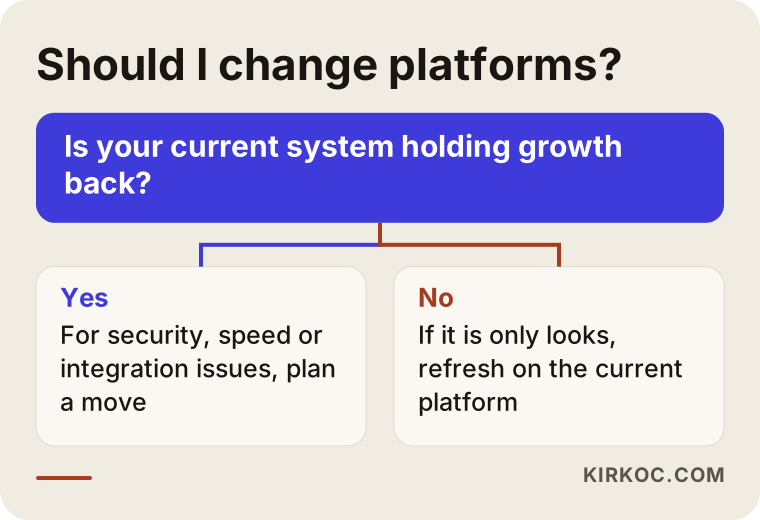
This diagram is meant to give you a feel for the decision, not a final verdict. In your own case, the number of products, the marketplaces you sell on, your accounting software and your team's technical habits all affect the answer too.
What actually gets lost in a move?
On an ecommerce site, visibility in Google is tied to individual pages. Every product, every category and every blog post holds its own place in search results under its own address (URL, the web address of a page). Over time, each of those addresses builds up trust: links from other websites, the clicking habits of real users, and Google's familiarity with that page.
If the addresses change when you switch platforms and no redirect is set up from the old addresses to the new ones, Google sees the old pages as "not found." The trust they built disappears with them. Something similar happens on the customer side. Someone who clicks an old link lands on an error page, and most of those people do not come back.
These are the things that get lost most often in a move:
- Search traffic that came through the old product and category addresses
- Titles, descriptions and original content on product pages
- Customer reviews and ratings
- Structured data that shows price and stock (hidden labels that help Google understand your product)
- Tracking codes, meaning the measurements that show how many orders came from which ad
- Customers' order history and saved addresses
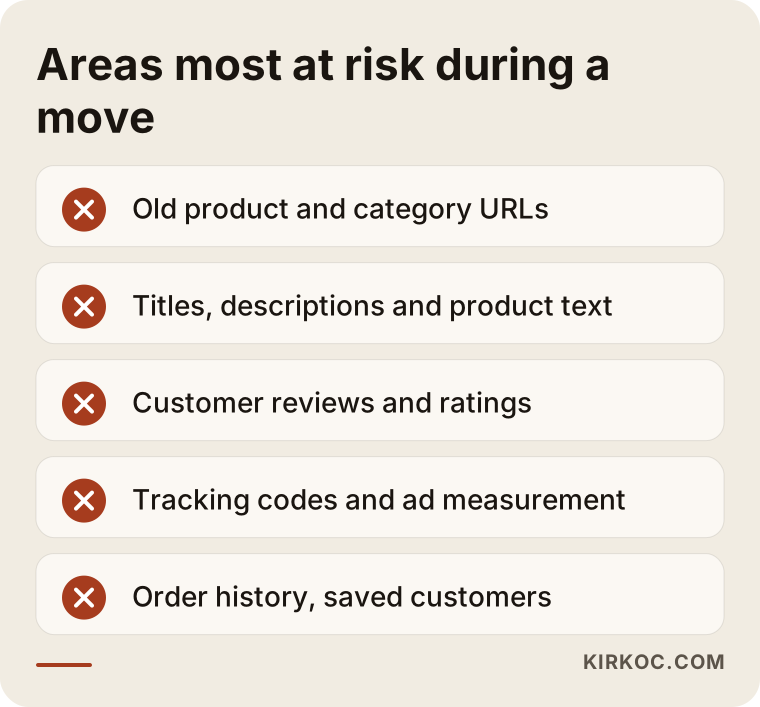
Most of the items on that list are invisible to customers. That is why people often say "the new site looks great" after a move, and then two weeks later orders drop and nobody understands why.
How do shoppers search, and which pages do you need?
The search structure of an online store is different from that of a service business. A clinic or a law firm can get by with a handful of pages. An online store relies on three types of pages working together.
Category pages answer broad searches. When someone types "men's leather wallet," they usually want to see options, not one product. The page that answers that search best is a category page that lists products cleanly and includes a short guide in plain text.
Product pages answer specific searches. A person who searches by brand, model, size or color is very close to buying. That page needs an original product description, clear photos, stock status, shipping information and return terms.
Information pages and blog posts answer the questions people ask before they decide. Searches like "how to choose a wallet size" or "how to care for leather" happen before the purchase. These pages will not fill a cart right away, but they build trust.
Search habits are also shifting. People increasingly ask AI assistants about products as well, and which stores get mentioned in the answers is becoming important. Writing your product information in an organized and clear way helps you both in Google and with these assistants.

This graphic is a hypothetical example. What matters is that the new site keeps these three page types, or makes them stronger. In a platform change, it is common to end up with a template that looks "nice" but has weaker text and weaker filters on the category pages. That quietly costs you traffic.
Example scenario 1: The move that forgot the addresses
This is a hypothetical example, not a real company. Picture a small accessories store. For years it has run on an old, custom-built site, and its category pages show up steadily in search results. The owner gets tired of the slow speed and dated look and decides to move to a new platform. The new site is built, the products are transferred, and the design really is far more attractive.
On launch day the old site is switched off and the new one goes live. But the old product addresses do not match the new address structure, and no redirects are set up. The first few days go unnoticed, because ads and social media traffic land on the new home page. A few weeks later the number of visitors coming from Google drops noticeably, because Google cannot find the old addresses and starts learning the new ones from scratch.
The problem here was not the platform or the design. The problem was that nobody mapped out the addresses. If a list matching old addresses to new ones had been prepared in advance and redirects had been set up, most of the loss could have been prevented. A redirect is a permanent road sign that automatically sends a visitor, and Google, from an old address to the new one.
Example scenario 2: The move where nobody tested the order flow
This is also a hypothetical example. Picture a mid-sized home textiles store. During the move to a new platform, the addresses were redirected correctly and most of the Google side was preserved. But on launch day, the payment provider's connection setting was left incomplete on the live site. Customers add products to the cart, hit an error at the payment step, and leave.
The store owner only finds out when a customer calls to say "I can't pay." Up to that moment there were visits and there was interest, but there were no orders. On top of that, the tracking code had not been installed on the new site, so the ad dashboard did not show how big the problem really was.
The lesson here: a move is not only about moving pages. The cart, payment, shipping cost calculation, email notifications and invoicing all need to be tested from start to finish with a real test order.
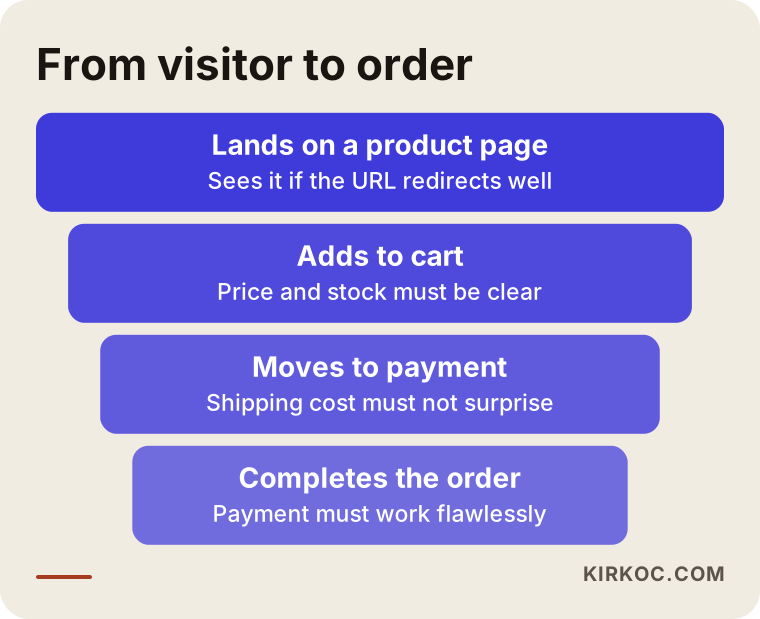
The funnel shows a visitor's path to an order. A small fault at any step empties everything after it. That is why a pre-launch test is more than checking "does the site open."
A safe migration process, step by step
I run this work in a fixed order. The purpose of the order is to leave a way back at every stage.
The graphic below summarizes the main steps. I go through each one in detail right after it.
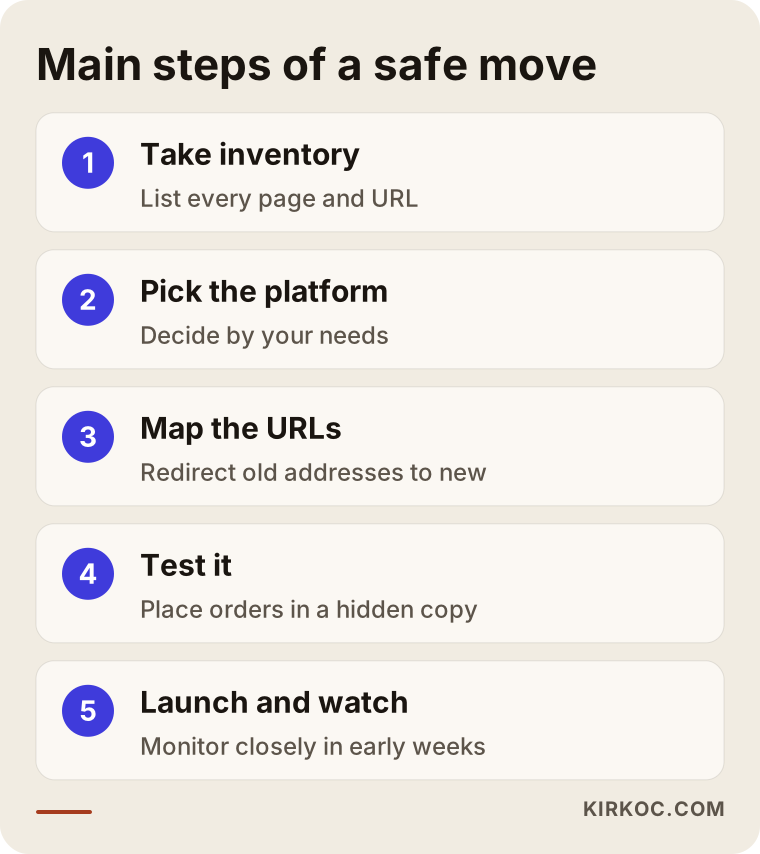
1. Take inventory of the current site
The first job is to list what is on the old site: the addresses of all product, category and information pages; which pages bring traffic from Google; which pages other sites link to; and which pages bring orders. This list is the map of the move. If you move without a map, working out afterwards what got lost is close to impossible.
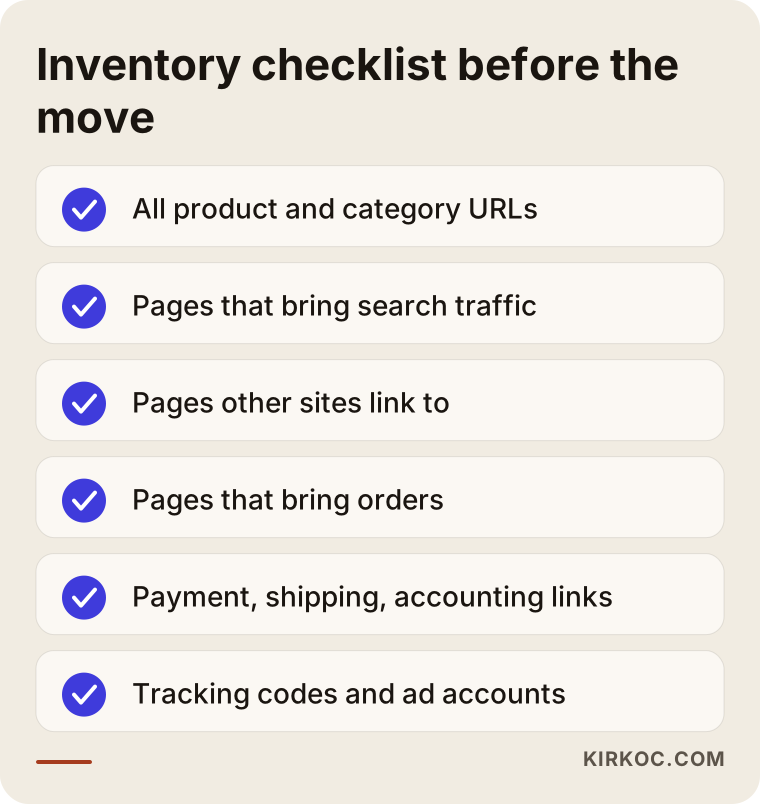
You can ask every item on this checklist without any technical knowledge. A simple question like "does this page still bring us orders?" is usually the first filter.
2. Choose the new platform
Choosing a platform is a matter of needs, not fashion. Your product count, your variations (color, size, dimensions), your marketplace connections, your accounting and shipping software, your team's working habits and your future goals all drive the choice. Ready-made hosted platforms give you quick setup and easy upkeep, but customization is limited. Open-source solutions are more flexible, but the responsibility for updates and security sits with you or with whoever maintains the store. Custom software is the most flexible option, and also the one that creates the most dependence.
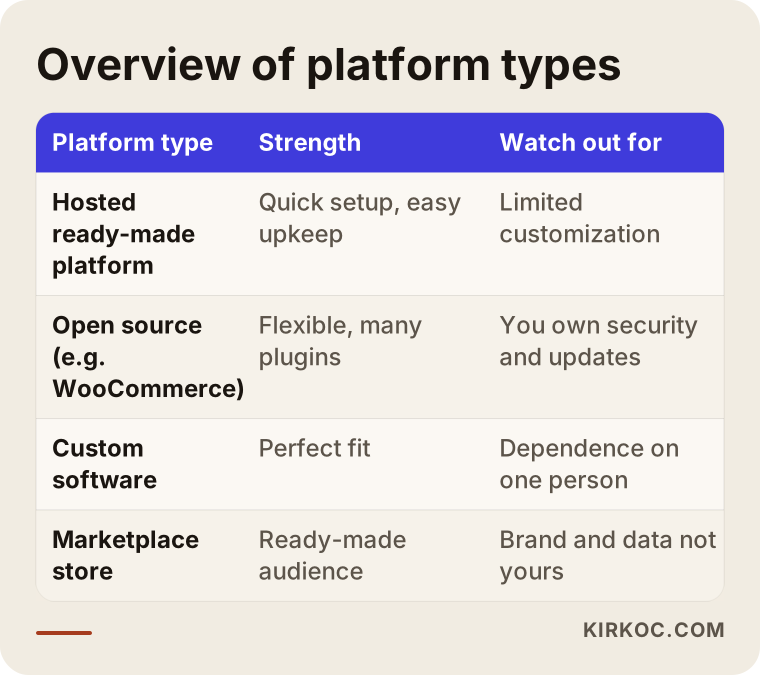
Read the table as a starting point. No option is right for everyone. Which one is right for you only becomes clear once you look at how your business actually runs.
3. Prepare the address mapping and the redirect plan
Once the address structure of the new site is decided, the new equivalent of every important old address is written down. If you can keep the new address structure as close to the old one as possible, the work gets easier. For pages with no one-to-one equivalent, you redirect to the closest category. Bulk redirects to the home page are usually not a good solution, because they mislead both the visitor and Google.
4. Move the product content and the SEO settings
Product titles, descriptions, images, image alt text (the short description attached to a picture), category text, reviews and page titles (the blue headline shown in search results) are all transferred to the new system completely. A common mistake is that these fields end up empty during the move, or that the system fills them with automatic, generic text. That instantly turns carefully written pages into ordinary ones.
5. Test from start to finish in a test environment
Before the new site goes live, it is tried out in a test version that is closed to the public. You need to add a product to the cart, use a coupon, pay with different payment methods, confirm the shipping cost is calculated correctly, check that order emails arrive, and run the same flow on a phone. The test environment must be closed to search engines. Otherwise Google sees two copies of your site.
6. Pick the launch time carefully
Busy campaign periods, the weeks before major holidays and big sale days are bad times for a move. Choose a period when order volume is relatively calm. On launch day, the redirects, the tracking codes and the map file you will report to Google (the sitemap, a list of your pages) should already be waiting and ready.
7. Watch closely after launch
During the first weeks, I regularly monitor error pages, order counts, payment errors and how Google is picking up the new addresses. Small losses can be normal, but if something looks irregular, a fast response is needed. A move counts as finished not on launch day, but only after I have seen the first weeks pass quietly.
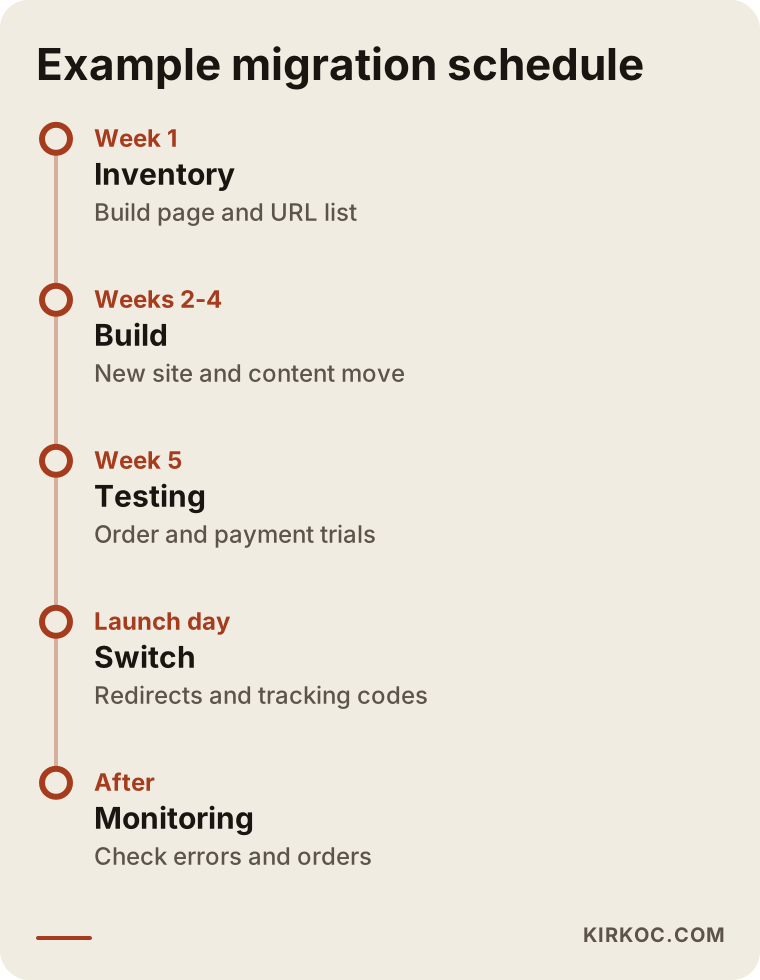
The durations in the timeline are not the same for every store. A larger product count and more integrations stretch the schedule, and there is no guarantee about how rankings will behave.
What should the new product page look like?
A platform change is also a chance to tidy up your product pages. The goal is not decoration, though. The goal is to make buying easier. A good product page answers the visitor's obvious questions at a glance: what is this, how many are in stock, when will it arrive, can I return it, and is it safe.
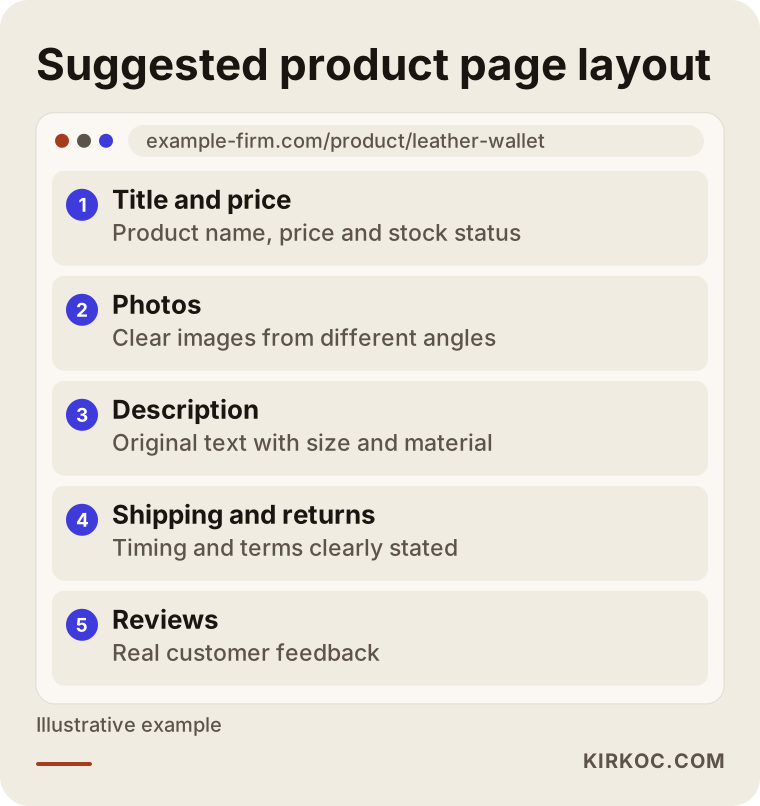
This layout is an idea, not a template. The sections change depending on what you sell, but having the title, clear photos, shipping and return information, and reviews close together helps in almost every store.
The most common mistakes
Over the years, these are the repeating mistakes I have seen:
- Not setting up redirects. All the old addresses land on the home page or on an error page.
- Leaving the test site open to search engines. Google sees two separate copies and cannot decide which one to show.
- Forgetting to remove the "noindex" block after launch. This is a setting that tells Google to stay out. It was useful during testing, but if it stays on after launch, the site disappears from search results.
- Not carrying over tracking codes. Ad and measurement data stops, and you cannot tell what is working.
- Wiping out product descriptions. Carefully written text becomes empty or generic in the new system.
- Moving during a busy period. If something goes wrong, the loss happens in your most expensive weeks.
- Not thinking about customer accounts and order history. Registered customers cannot log in, and trust gets shaken.
- Focusing only on design. The site looks good, but the category structure and the internal links get weaker.
Any one of these, on its own, can cause a loss you will feel.
What can you do yourself, and when do you need an expert?
You do not have to hand everything to a specialist. There are a few important jobs you can do on your own:
- Work out which products actually sell and which ones have not been clicked for years. Not moving the products that never sell makes the whole job lighter.
- Back up your customer reviews, product photos and descriptions.
- Make a list of the integrations you use: payment provider, shipping carrier, accounting software, marketplaces.
- Look at which pages of the old site get the most visits. If you do not have a Google Search Console account (a free tool where Google shows you reports about your site), open one now.
- Note which period of the year is calmest for your business.
Expert support really is needed in these cases: your product count runs into the hundreds, the address structure is changing completely, you get regular orders from Google, you sell in more than one language, or your payment and shipping integrations are complicated. In those cases, even a single missing redirect can turn into a big loss.
You may also have legal obligations when moving personal data and customer information, and it would not be right for me to give a firm opinion on that. If needed, talk to a lawyer.
What determines the cost
I will not give you a number, because the migration cost of two stores can look nothing alike. But I can tell you clearly what moves the price:
- Number of products and categories. The more pages that have to be moved, checked and redirected, the bigger the job.
- Complexity of the product structure. Variations like color, size and dimensions make the transfer harder.
- The platform you choose. Hosted, open source or custom software all have different setup and ongoing costs.
- Scope of the design. Adapting a ready-made template is not the same job as designing something from scratch.
- Integrations. Payment, shipping, accounting, stock and marketplace connections each need their own work.
- Depth of the SEO protection work. Inventory, address mapping, content transfer and post-launch monitoring are the invisible but important part of the job.
- Number of languages. Every extra language multiplies the content and the address structure.
- Time pressure. Work that has to be finished in a very short time carries more risk.
When you get a quote, check whether it includes line items for "SEO protection" and "redirects." If it does not, that work will either not be done or will be requested later for an extra fee.
How I work
I handle this work alone, which means the person you talk to is the person doing the job. The process usually starts with a short introductory call where we talk about your current site, your problems, your product count and your goal. Then I build the inventory of the old site, explain in plain language what is risky, and present a roadmap.
While preparing the new site I work in a test environment, and I do not put anything live before you are ready. After launch I keep watching your site through the first weeks. I do not promise rankings or order growth, because nobody can honestly promise that. What I can offer is an effort to make the move controlled, explainable and reversible.
Frequently asked questions
Will my Google rankings definitely drop if I change platforms?
Not definitely. If addresses are kept or redirected correctly, content is moved in full, and the technical settings are right, the drop is often small and temporary. It cannot be guaranteed, though, and small fluctuations are normal.
Will my site go offline during the move?
Not when it is planned properly, or only for a very short time. The new site is built in a separate environment and replaces the old one when it is ready. If a short maintenance window is needed, it is scheduled for a quiet hour.
Do customer accounts and old orders move to the new platform?
On most platforms they can, but it depends on the platform. Passwords usually cannot be transferred for security reasons, so customers are asked to set a new one. For your obligations around personal data, I recommend speaking with a lawyer.
How long does a redesign take?
It depends on the number of products, the integrations and the scope of the design. A small store can be done in a few weeks, and a large, complex one can take longer. A rushed migration is the riskiest kind.
Will the product reviews on my old site be lost?
They should not be. Exporting the reviews and importing them into the new system should be part of the plan. Some review plugins do not work on other platforms, so before choosing a platform it is important to ask whether the review data can be moved.
Will my ads be affected during the move?
If the addresses your ads point to change, the ads may send people to old pages that no longer work. So on launch day, the ad addresses should be checked and, if needed, the ads paused briefly. You also need to make sure the tracking codes work on the new site.
I also sell on marketplaces. Are they affected?
Your marketplace store keeps working in its own system. But if you sync stock and product information between the marketplace and your own site, that connection has to be set up again on the new platform. It is a good idea to list this at the start of the plan.
Should I redesign first and do SEO later, or do both together?
Thinking about them together is much safer. Doing SEO after the move means trying to win back something that has already been lost. Planning SEO before the move prevents the loss from the start.
If you are thinking about redesigning your store or changing platforms, we can work out together where you should start. Write to me through my website design service page, and I will look at your current situation and put together an honest roadmap for you.