Your dealers may still place orders by phone, over WhatsApp or with an Excel sheet. You read the messages one by one, type the prices by hand, ask the warehouse whether the item is in stock, and then enter the order again in your accounting software. As the business grows, this routine gets tiring and starts producing mistakes. This is usually the moment an owner starts searching for a "B2B dealer ordering portal." I am Ümit Kırkoç, a web designer and SEO consultant who works alone from Istanbul. In this article I explain what a dealer portal is, how dealer-specific pricing, account balances and bulk ordering work, what drives the cost, and where you should start. A portal can also be planned as part of a broader website design project, and I will draw that line clearly below.
B2B means "business to business." You are a manufacturer or wholesaler, and the people buying from you are dealers who resell to their own customers. A dealer ordering portal is a private section of a website that only your approved dealers can log into. There they see their own prices, place orders and follow their account. It looks like an ordinary online store, but the rules are different.
How is a dealer portal different from an ordinary online store?
In a retail store, everyone sees the same price, pays by card and buys one or two items. In a dealer portal, the price depends on who is logged in, payment is often on credit terms, an order may contain dozens of line items, and the same products are reordered month after month. That is why "install a ready-made store theme and add a password" is often not enough.
The difference shows up in three places. First, not every visitor can see the products, and prices are open only to approved dealers. Second, the dealer's payment is not taken at checkout; it is recorded as a balance on the dealer's account. Third, instead of searching for items one at a time, the dealer wants to repeat last month's order or upload hundreds of lines from a spreadsheet in one go.
The illustration below summarizes where the manual routine and the portal routine part ways in a normal working day.
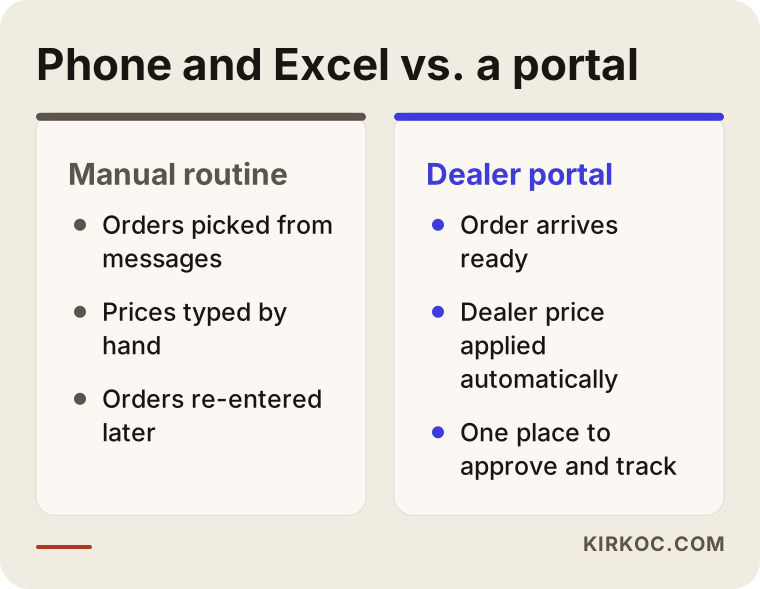
As you can see, the real gain is that the order reaches your screen ready, with the right price and nothing missing. The person who used to sort through messages is no longer the one fixing errors, but the one approving orders.
How does dealer-specific pricing work?
Most wholesalers do not have a single list price. There is one price for a large dealer, another for a small one, and a third for a distributor in a particular region. Campaigns and special agreements add to the pile. Managing all this with Excel files eventually leads to the argument "you gave me a different price."
In a portal, this is usually solved in two layers. First you place dealers into groups, for example large dealer, standard dealer and new dealer. Then you define a price rule for each group: a percentage off the list price, a fixed special price on certain products, or a tiered price once the quantity passes a threshold. You can also add an exception for one particular dealer. When a dealer logs in, they see only their own price. They have no way of seeing another dealer's price.
The thing to watch here is to write the pricing logic down before anyone builds anything. "We give some dealers a special discount" is not a sentence a developer can work with. You need a clear answer to: which group, on which product, under which condition, sees which price. Projects that start without this conversation often have their rules rewritten after the portal is finished, and the schedule slips.
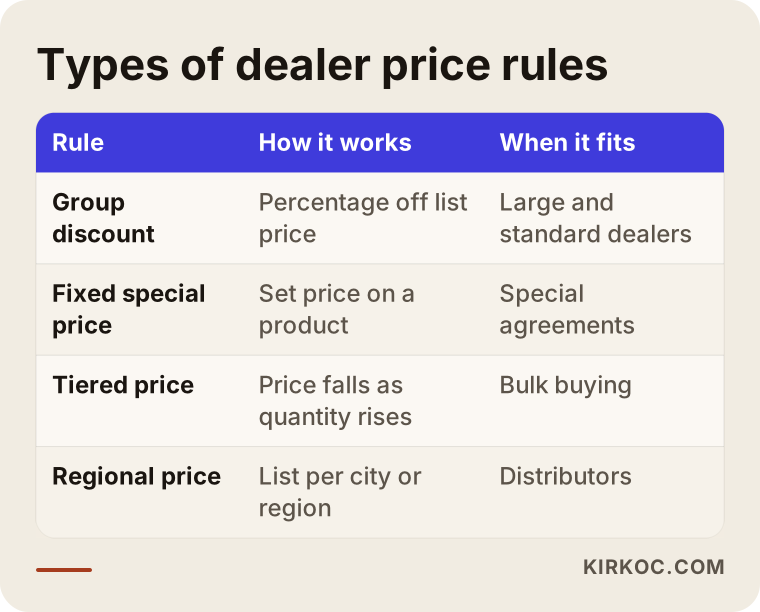
The table shows that a price rule is not one single thing. Each business will use only a few of these rows. What matters is knowing from the start which ones describe your real practice.
What do account balances mean in a dealer portal?
A dealer account is the record of what a dealer owes you and what you owe them. In wholesale, payment is rarely upfront. The dealer takes the goods and pays when the due date arrives. The portal has to understand this arrangement. Otherwise it pushes the dealer into a credit card screen, and you lose the sale.
Three things are usually requested on the account side. First, when a dealer logs in, they should see their current balance, plus the amounts that are due and overdue. Second, you should be able to set a credit limit for each dealer; if the limit is exceeded, the order either goes to you for approval or the system warns you. Third, past invoices, statements and payment history should be reachable from the portal. That cuts down the phone calls to your bookkeeper asking "what is my balance?"
The real technical question is where the account data lives. If you already use accounting or ERP software (ERP simply means the program that keeps a company's stock, invoice and account records), the healthiest setup is for the portal to talk to that software. Otherwise you end up keeping the same balance in two places, and the numbers will inevitably drift apart. Whether your software can share data with other systems is something to ask its vendor; the answer directly affects the scope and the cost of the project.
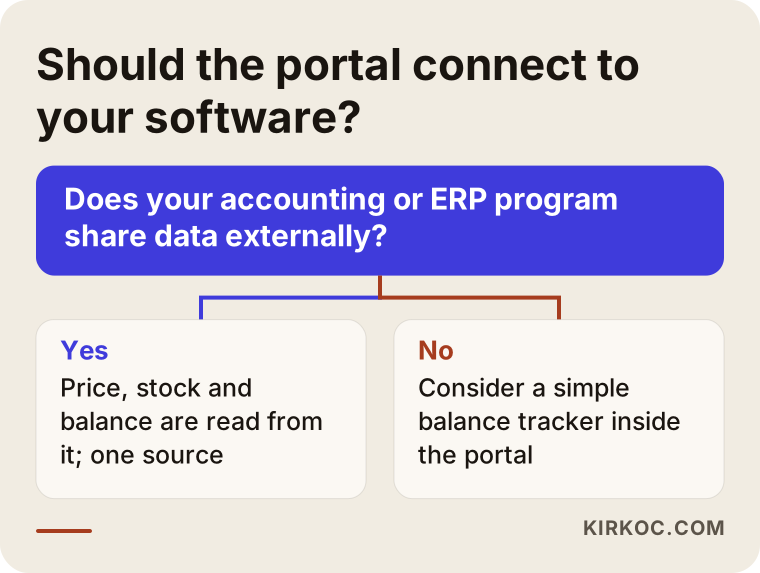
The diagram shows that for most businesses the right answer is "look at your existing software first." If it is ready to connect, a link can be built. If not, a simple balance tracker inside the portal can be considered.
Bulk ordering: where dealers save the most time
A dealer may order hundreds of items in a week. Searching for each one and adding it to a cart may be reasonable in a retail store; here it is wasted time. That is why bulk ordering features make up the real value of the portal.
These are the methods requested most often. A quick order screen lets the dealer type a product code and a quantity line by line, and the product name and price appear instantly. Excel upload lets the dealer submit a prepared spreadsheet; the system matches the codes and flags any bad lines. Reordering turns last month's order into a cart with one click, and the dealer only changes the quantities. Case and pallet logic makes some products sell only in set multiples; if an item is sold in cases of 12, the system will not accept an order for 7.
No business needs all of them. Doing one method well is worth more than doing five halfway. Look at how your dealers send orders today: if they use Excel, Excel upload comes first; if they keep buying the same items, reordering may be enough.
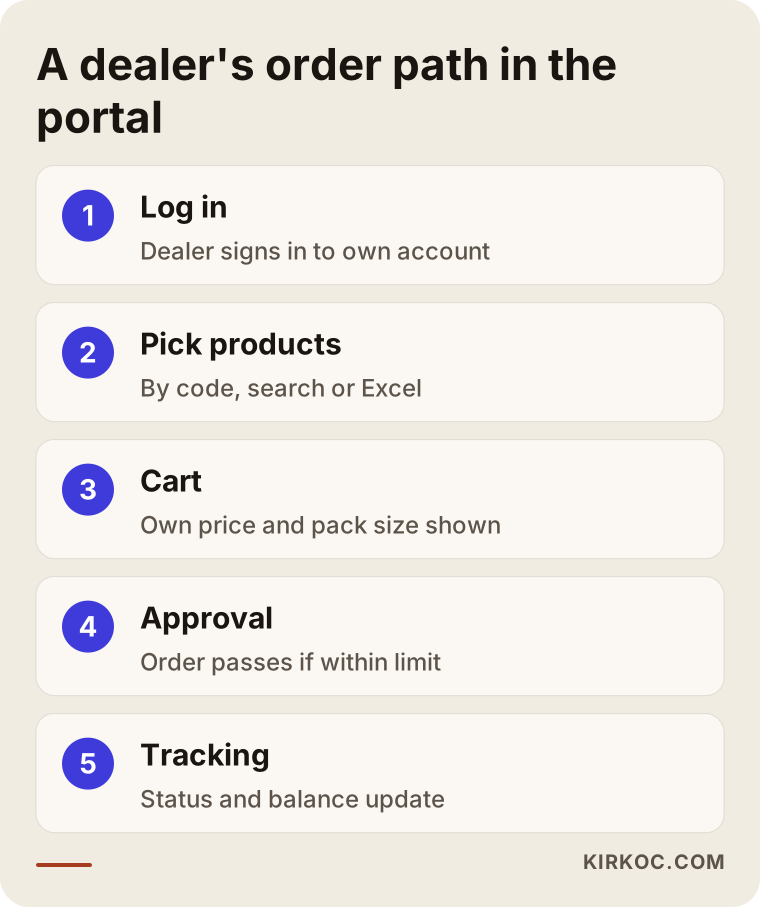
The steps look simple, but each one hides a decision: will approval be required, what happens if an item is out of stock, will partial shipments be accepted. The answers to these questions are your business rules, not the software's.
Stock, promotions and announcements: the small but important parts
A dealer portal is not only an order screen. If you will show stock information, you need to decide how often it refreshes and whether the dealer sees an exact number or a phrase such as "in stock, limited, sold out." Showing exact numbers is sometimes unwanted for competitive reasons, and sometimes it builds trust with the dealer.
The promotions and announcements area deserves thought too. New arrivals, price changes, catalog files, product images and technical sheets can all live in one place. Your dealers no longer have to call and ask, "can you send me the latest catalog?" This saves real time, especially for small businesses that have no sales representative.
Dealer applications and approval: the front door of the portal
If anyone can sign up, it is not a B2B portal, it is an open store. The right setup usually works like this: a visitor fills in a dealer application form and enters the company name and tax details; you check the information and approve it; the dealer is assigned to a group; and only then do they start seeing prices.
This front door does two jobs. It keeps your competitors and ordinary customers from seeing your price list, and it collects new dealer prospects in an orderly record. On the application page, saying who you are speaking to, what kind of dealers you are looking for and what happens after the application helps the right candidates apply.
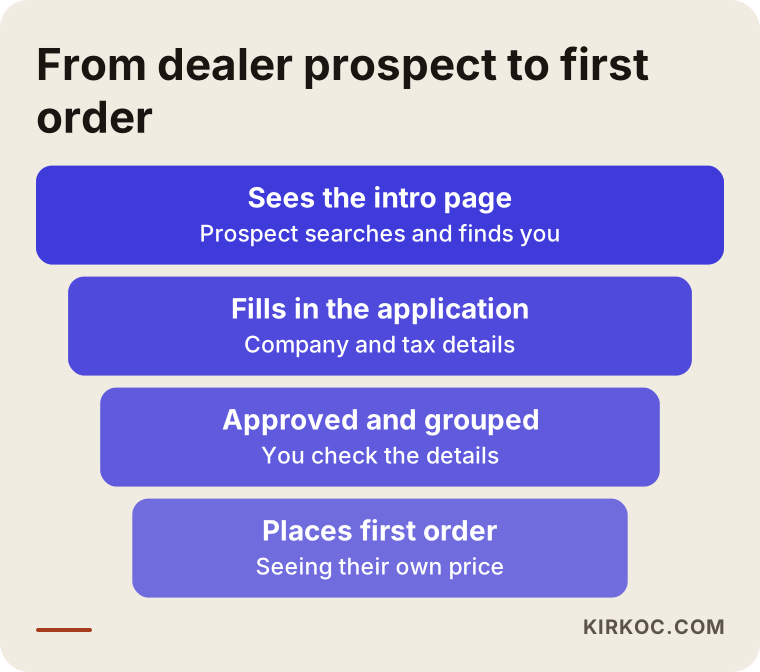
The funnel is a reminder that some people will drop off at every step. The simpler the application form, the fewer prospects you lose at the first step.
Example scenario 1: A stationery wholesaler
This is a hypothetical example, not a description of a real company. Imagine a stationery and office supplies wholesaler with a few hundred products and a few dozen dealers. Every week the dealers send photographed lists over WhatsApp, an employee reads them and types them into Excel, and then enters them again in the accounting program. A few times a month a wrong item or a wrong price slips through.
A reasonable portal for this business would have two or three price lists by dealer group, a quick order screen based on product codes, a reorder function and an account balance view. If the accounting program can share data, prices, stock and balances are read from it. There is no need for a complex promotion engine, a multilingual interface or a mobile app. The basic flow works first, the dealers get used to it, and then the features that are truly needed are added.
Example scenario 2: A food producer and regional distributors
Another hypothetical example. A small food producer sells through regional distributors. Products ship by the case and the pallet, some have a short shelf life, and some regions get different prices. The distributors also sell on to their own sub-dealers.
This business needs a different portal. It needs case-multiple checks, regional pricing, limited display of remaining stock, a shipping date selector and perhaps tracking by batch. The invoicing and delivery note process matters as well. For that, talk with your accountant and, if needed, a lawyer or tax adviser, because electronic invoicing and tax documentation rules depend on your country and on your company's situation.
Put these two scenarios side by side and you see that a "dealer portal" is not one product. Very different scopes sit under the same name, and the cost comes from that difference.
What should portal screens look like?
Most dealers are not technical people. Their age, habits and comfort with phones and computers vary widely. The simpler the portal, the more widely it will be used. The first screen a dealer sees after logging in should lead them straight to placing an order.
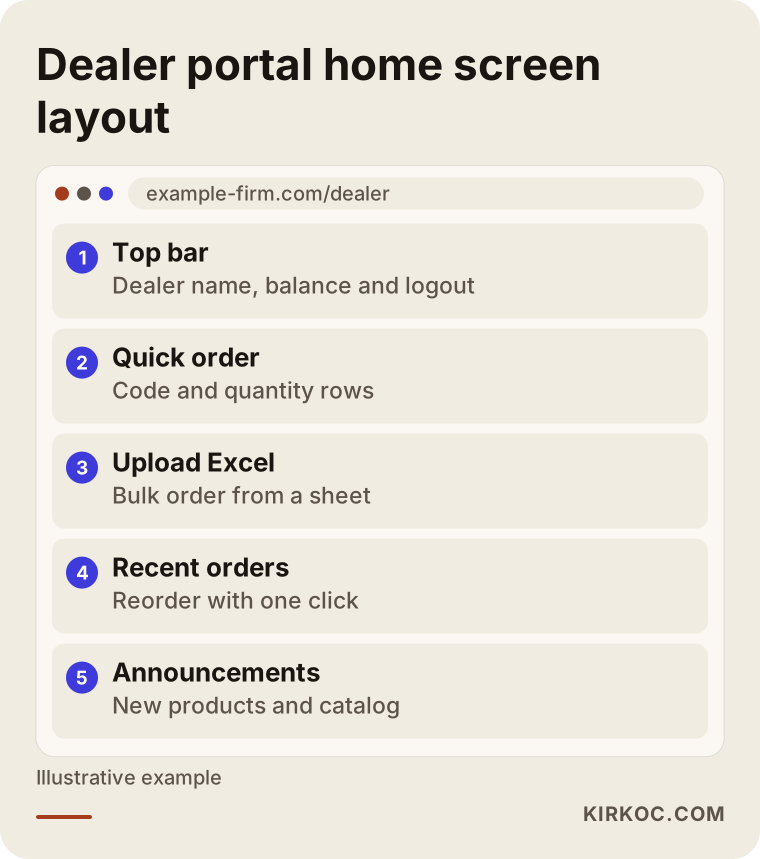
In the example, the balance, the quick order box and the recent orders sit on one screen. A dealer should not have to visit three separate pages just to see their account. Some dealers will log in from their phones, so the screen should also be tested at a small size.
Step by step: from idea to launch
You do not need to be fully ready to start, but you do need to collect some answers. This is the order I recommend.
1. Map your current routine
Write down every step from the moment an order arrives by phone to the moment it is invoiced. Who does what, which program is used, where do mistakes appear. This list shows what the portal will solve and what it will not.
2. Settle the rules
Dealer groups, price rules, minimum order amount, payment terms and credit limits, stock behavior, and the cases that need approval. Some of these may still be undecided; knowing that they are undecided is valuable too.
3. Identify the systems to connect
Does your accounting or ERP program share data with other systems? Where is product information kept? The answers decide whether the portal is built as a stand-alone system or as one that talks to your existing software.
4. Plan a small first version
Instead of building every feature at the start, begin with the parts that will help most: login, dealer-specific pricing, ordering and order history. Start by trying it with a few dealers you trust.
5. Test with real dealers
When one or two dealers use the portal with real orders, problems surface that no meeting would ever reveal. A confusing screen, an unclear button or a missing piece of information gets caught at this stage.
6. Launch and introduce it to your dealers
Instead of emailing dealers one by one, prepare a short explanation, maybe a two-minute screen video, and a way to ask questions. The first weeks need support while dealers get used to the new way.
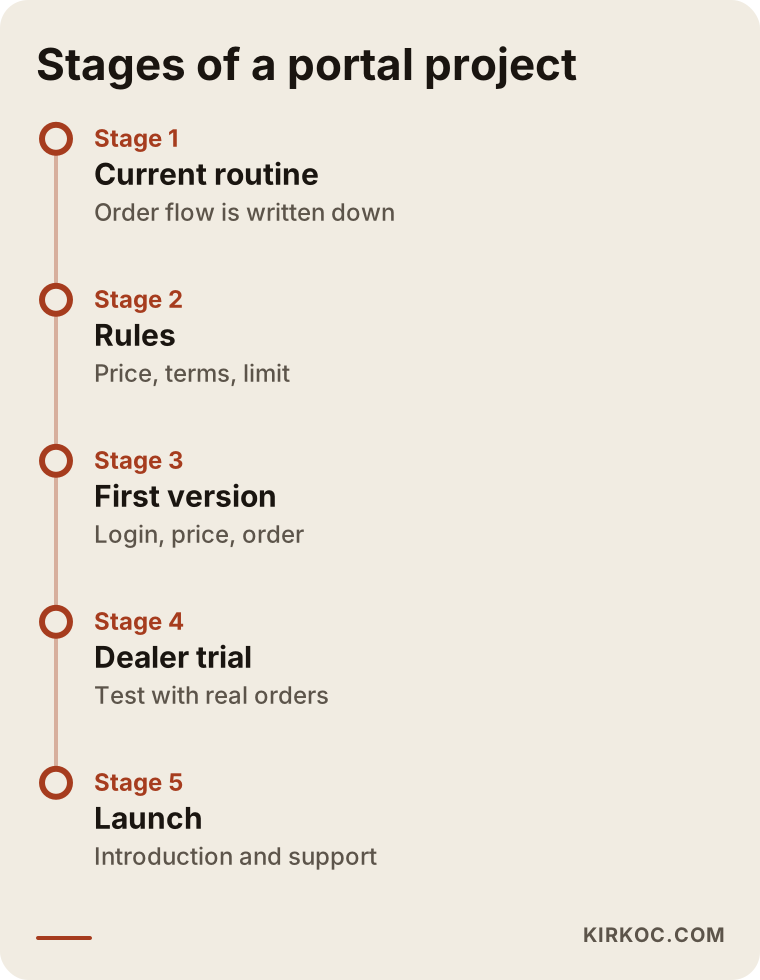
The timeline shows that the first weeks of a project are spent more on conversation and decisions than on software. The better the preparation, the faster and cheaper the build goes.
Does the portal need SEO?
This question comes up often. The price and product pages of a dealer portal sit behind a login, so they are not shown on Google, and you would not want them to be. But the public introduction page in front of the portal matters. New dealer prospects search for phrases like "wholesale stationery dealer" or "become a food distributor." The page they land on should explain who you are, where you ship, what the conditions for becoming a dealer are and how to apply.
Today some people also put these questions to AI tools such as ChatGPT. An introduction page that gives clear, consistent and accurate information helps those tools understand you as well. Of course, I cannot promise any ranking or visibility; I can only help make sure the foundation is solid.
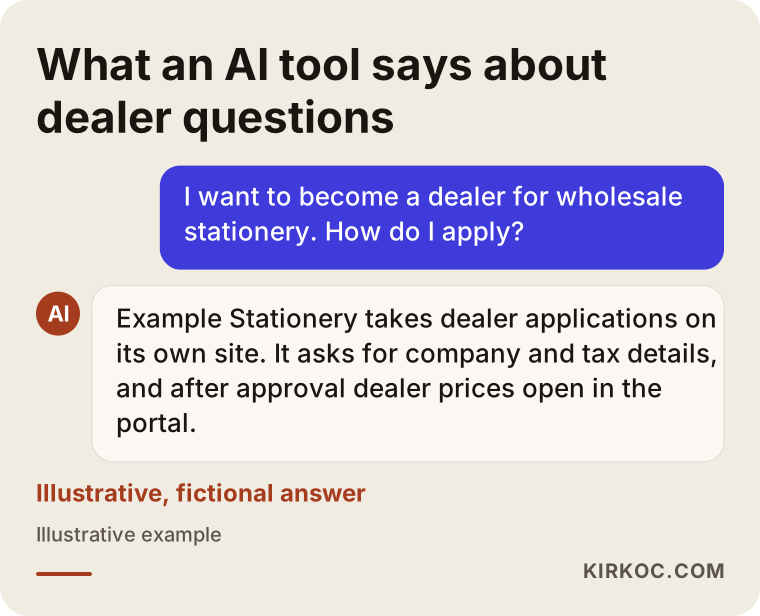
This example is entirely fictional; its purpose is to show how such tools might summarize dealer information that is written out openly. If the dealer conditions on your page are hidden or vague, the tool cannot summarize them either.
Common mistakes
The same problems appear again and again in dealer portal projects. All of them can be avoided.
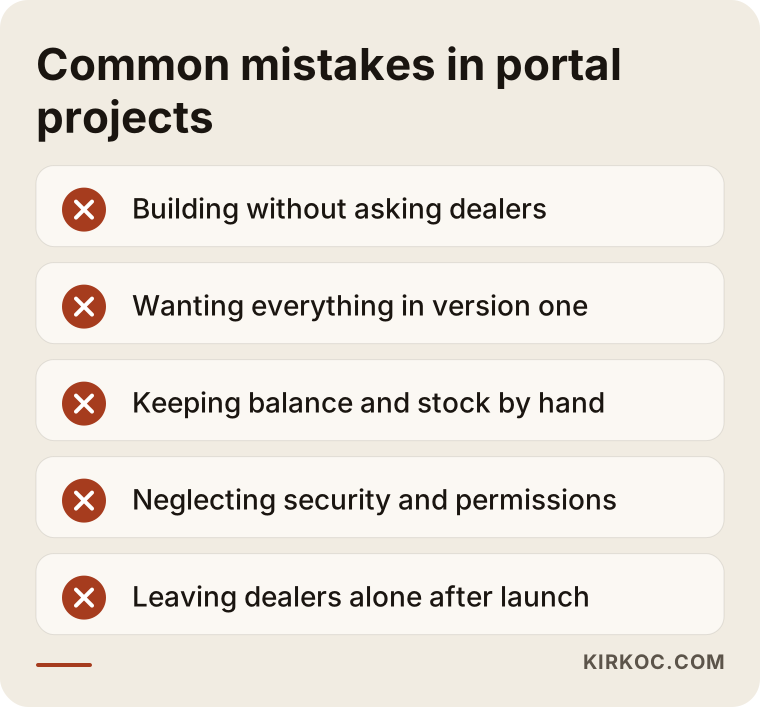
To unpack a few of the items on the list: the first is building a portal without asking your dealers. If a dealer likes ordering by phone and you have not shown what the portal gives them, they will not use it. The second is wanting everything in the first version; the project drags on and nobody can use anything until it is finished. The third is keeping account and stock data by hand in a separate place; within a few weeks the numbers stop matching. The fourth is neglecting security: dealer details, prices and account records are sensitive data, so strong passwords, separate permission levels and regular backups are essential. The fifth is launching the portal and leaving the dealers to fend for themselves.
For personal data obligations (such as GDPR in Europe or state privacy laws in the United States) and for invoicing and tax rules, it would not be right for me to make firm claims. I recommend asking a lawyer or an accountant.
What can you do yourself, and when do you need a specialist?
There is a lot you can do on your own first. Organizing your dealer list, price groups, product codes and product images is entirely your job, and it directly speeds up the project. If your product data sits in a clean spreadsheet, the developer's work gets noticeably easier.
For small businesses there are also ready-made solutions and plugins. On platforms such as WordPress with WooCommerce, you can add plugins for dealer pricing and hidden prices. If you have few dealers, simple price rules and your account tracking stays in a separate program, this route can be reasonable. But you need expert help in these cases: you need to exchange data with accounting or ERP software, the price rules are complicated, dozens of dealers will use the portal at once, security and permission levels matter, or the portal needs workflows specific to your business. At that point a ready-made plugin falls short, and changing it later costs more.
What determines the cost of a B2B dealer portal?
I will not give a number in this article, because no two portals are alike. But I can tell you plainly what pushes the cost up.
The first factor is the number of connections. Exchanging data with accounting or ERP software can take more effort than building the portal itself, because how open the other program is makes all the difference. The second is the complexity of the price rules: three fixed lists and a price that changes by product, dealer, quantity and date are very different jobs. The third is the ordering methods; quick order, Excel upload, reorder and case-multiple checks each take separate work. The fourth is the number of products and how clean the data is. The fifth is approval flows, notifications (email or SMS), reports and admin screens. The sixth is interface wishes such as custom design and multiple languages. Finally, maintenance after launch, security updates and support are an ongoing expense.
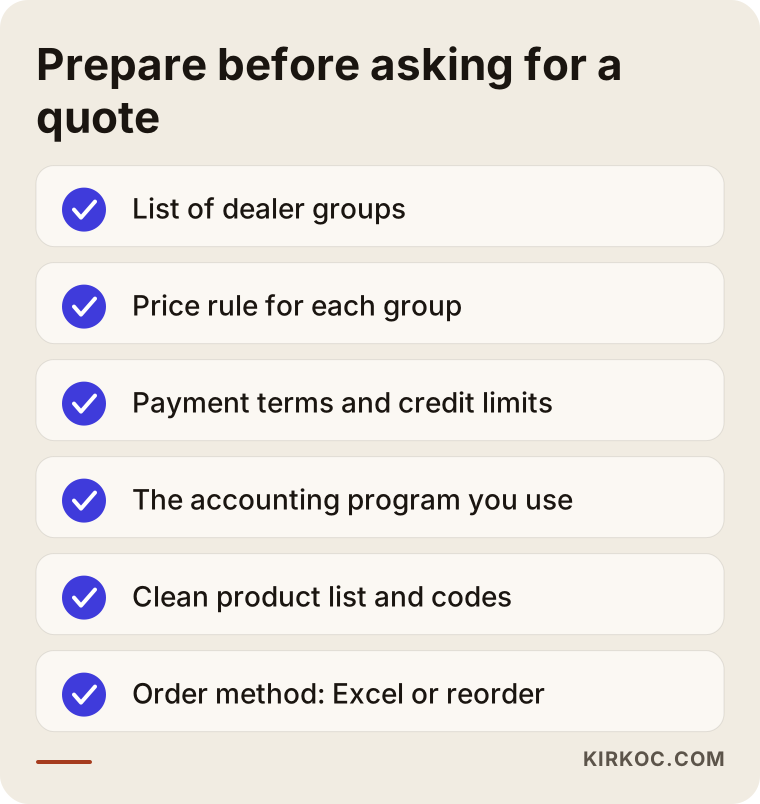
This checklist collects the questions you can answer on your own before asking any specialist for a quote. The clearer your answers, the more comparable the quotes will be, and the lower the risk of unexpected extra costs.
How I work
I work alone, which means the person you talk to is also the person who does the work. Usually, in the first meeting I listen to how you handle orders today and learn which programs you use and how your dealers work. Then I put in writing what is truly needed and what can wait. I prefer to start with a small first version, because once real dealers begin using it, the needs become much clearer.
Some things are outside my area. For your accounting program to share data, support from that software's vendor may be needed, and I will tell you so at the start. I do not guarantee results or sales growth, but I do explain openly what I am doing and why.
Frequently asked questions
What is the difference between a B2B dealer ordering portal and a normal online store?
In a normal online store, everyone sees the same price and pays by card. In a dealer portal, only approved dealers see the products and prices, prices differ by dealer, payment is mostly on credit terms, and orders contain many line items.
How can I show special prices to my dealers?
You place dealers into groups and assign a price rule to each group. When a dealer logs in, they see only their own price. If needed, an exception for a single dealer can also be defined.
Will the portal work with my current accounting software?
If your software can share data with other systems, mostly yes. It depends on how the program is built, so you should first ask your software vendor, and then we can settle the scope together.
Can my dealers place bulk orders with Excel?
Yes, uploading an order from a spreadsheet is possible. The system matches product codes and flags lines that are wrong or out of stock. It is important that the template follows your product codes.
Can no one see the portal prices on Google?
Pages behind a login are not opened to search engines, and your price list is not visible to everyone. Only the public introduction and dealer application pages can appear in search results.
Should I use a ready-made plugin or custom development?
If you have few dealers, simple price rules and no need to connect to another program, a ready-made solution can be reasonable. If you need complex pricing, account handling and integrations, a custom build causes fewer problems.
What if my dealers do not want to use the portal?
This is a real risk. Trying it first with a few dealers, explaining a clear benefit and, if needed, running the old method in parallel for a while makes the switch easier. Making it easy works better than forcing it.
How long does the project take?
The time depends on the scope. There is a big gap between a simple portal that needs no connections and one that links to accounting software and has complicated price rules. I can give you a clear timeline after I see the scope.
If you want to move your dealer orders out of phone calls and Excel and into an organized portal, all you need to do is describe your current routine and your needs. You can reach me through my website design services page, and we can look together at what is really required.