You rented an online store platform, uploaded your products, and the checkout works. But when someone searches Google for "home coffee grinder" or "organic olive oil soap," you are hard to find. Then one person tells you "you can't do SEO on a hosted platform," and another tells you "anything is possible." Neither is quite right. In this article I explain what e-commerce SEO services actually cover on platforms like Shopify, BigCommerce, Wix, Squarespace and the Turkish systems Ticimax, ikas, IdeaSoft and T-Soft, where the limits sit, and when it makes sense to bring in an expert. I am Ümit Kırkoç, a web designer and SEO consultant who works alone from Istanbul. I also build sites from scratch through my website design service, so I can tell you honestly when a hosted platform is enough and when it is not.
First, two short definitions. SEO is the work that makes your website show up when your customers search on Google and other search engines. A hosted (or "rented") store platform is a ready-made shop system that you pay for monthly or yearly instead of having software written for you. Setup is easy, but the company runs the system, not you. That is where the whole SEO question comes from: some things you can change yourself, and some things only the platform company can change.
Why is SEO different on a hosted platform?
On a site with custom software, a developer can change almost anything: the address structure, the page code, the server settings. On a hosted platform, you get an admin panel, and you can change what that panel allows. That is not a flaw. Convenience is the reason you chose the platform. But it does mean SEO work splits into two piles: what you can do inside the platform, and what lies outside it.
I should say up front that platform features change from version to version and from plan to plan. Nothing I write about a platform here means "this company definitely has it" or "definitely lacks it." Before you decide anything, check your own admin panel or ask the company's support team. I am explaining the general logic. Only your panel can give you a firm answer for your plan.
The table below sorts the topics you will meet on most hosted platforms into "what you can do" and "where the limit is."
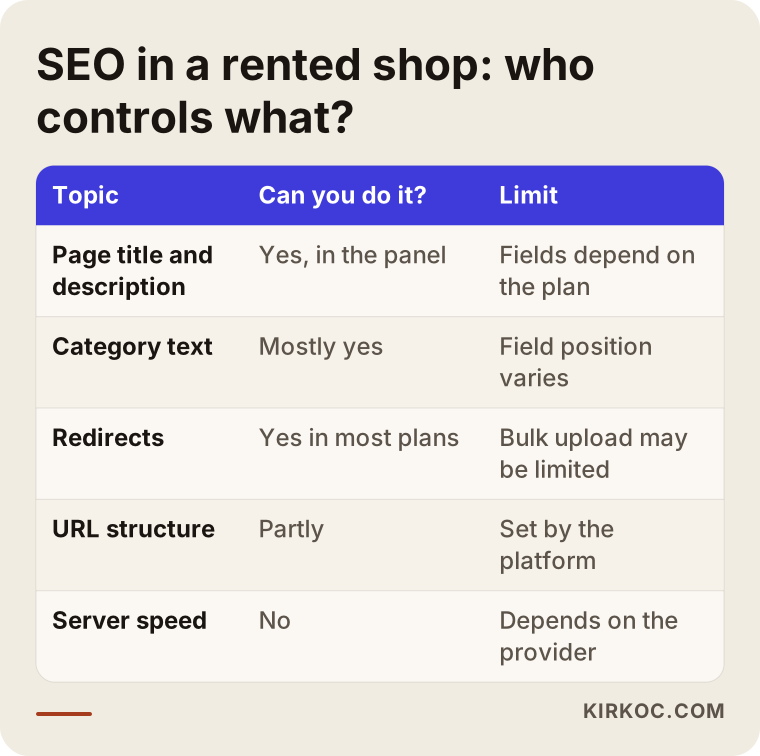
As you can see, page titles and descriptions are usually in your hands, while URL structure, page code and server speed depend largely on the platform. In other words, most of the work is in your content and your organization, not inside the software.
How do customers search in e-commerce?
Before any technical settings, look at the real question: what are your customers typing? In e-commerce there are three kinds of searches, and a different page answers each one.
The first kind is broad searches, like "coffee grinder" or "running shoes." People have not decided yet. They are browsing options. The page that answers this is the category page, meaning the page where your products are grouped. The second kind is a bit more specific: "manual coffee grinder" or "wide-fit running shoes." That usually points to a subcategory or a filtered list. The third kind is very specific: a product name, a model number, a size. The product page answers that.
Most business owners focus only on product pages and leave category pages empty. Yet category pages are often a major source of visits and sales, because broad searches happen so often. Nearly every hosted platform lets you add a description text to a category page. That small field is frequently the least used and the most useful one.
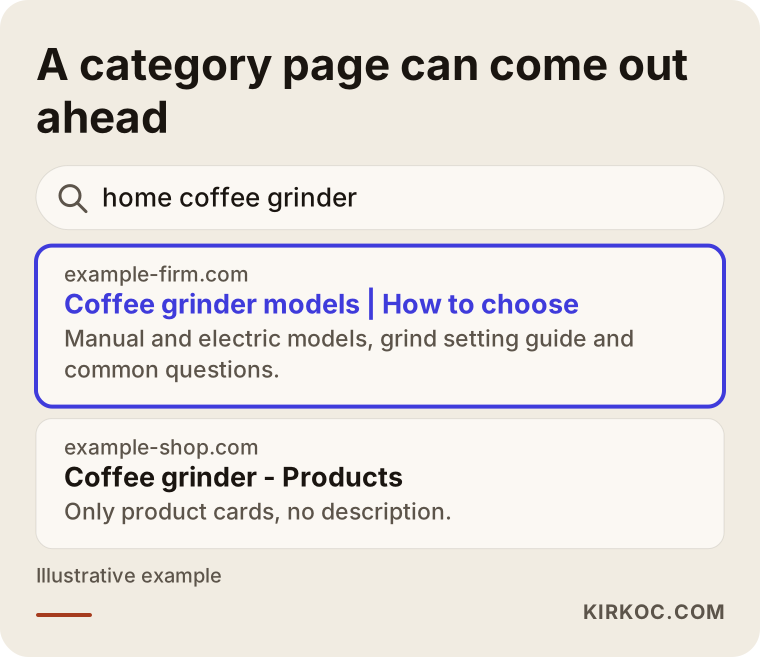
The example in the image is completely made up. The highlighted result is a page that describes the products as a category: it says who the products suit, how to choose, and which products are included. The competing page, which only lines up product cards, does not answer the question, so it falls behind.
What can you really do on a hosted platform?
Now the good news: there is quite a lot you can do inside a rented platform. You edit everything from the relevant fields in the panel, and you do not need to know code.
Category pages. For each category you can write a clear title, a short introduction and answers to the questions a buyer might ask. The text can sit above or below the products. What matters is that each category answers its own search. If "men's shoes" and "sneakers" are mixed on one page, you will be weak for both.
Product pages. If you use the manufacturer's ready-made text as is, hundreds of other shops carry the same sentences. When Google sees the same text again and again, it has no particular reason to put yours first. A product-specific description, size and usage details, common questions and a real product photo set these pages apart.
Page titles and descriptions. The panel has a separate title and description field for every page. The title is the clickable blue line in search results, and the description is the short text under it. Leaving both on automatic is easy, but writing them for the search you want to answer often makes a real difference.
Images. You can fill in the photo's file name and its alt text, which is the short description read aloud by screen readers and shown when an image does not load. Shrinking large files helps both speed and how your images show up in image search.
Redirects. When you remove a product or change its address, you should send visitors who arrive at the old address to the new one. Most platforms have a field for this. If you skip it, the old address turns into an error page, and whatever value that page had built up is lost.
Internal links. Links from a category to a product, from a product to a related product, and from a blog post to a category guide both your customer and Google. You do not need to touch code for this.
Blog and guide content. Many platforms include a blog section. A guide such as "how to choose a coffee grinder" brings in people who have not decided yet and points them to the right category.
Listing these is easy, but doing them takes time. A shop can have hundreds of products, so the work needs an order, and the first step is always your best-selling categories.
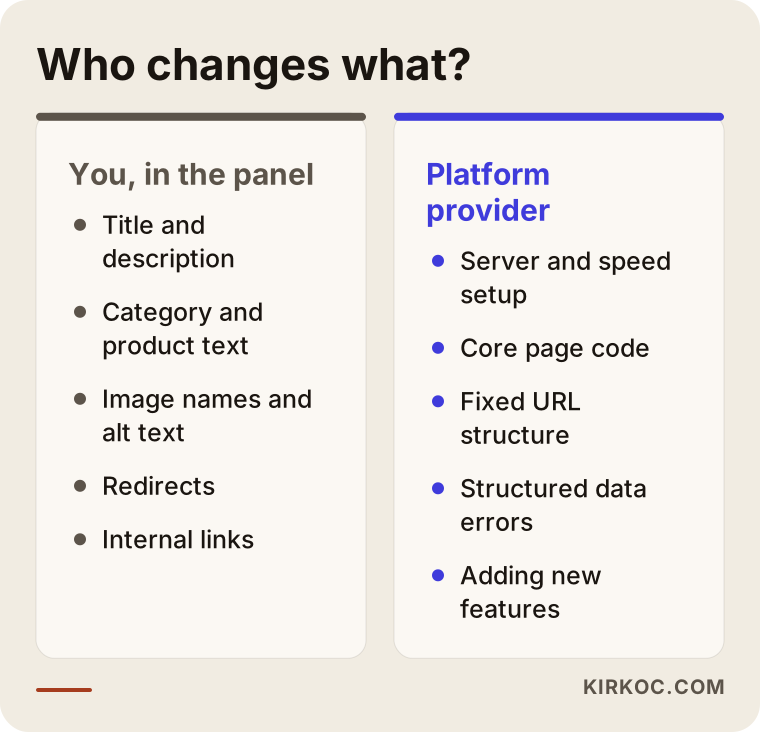
This comparison shows at a glance which side each job falls on. For the jobs on the left, you do not need the platform company. For the jobs on the right, you depend either on a setting the platform offers or on the company's support.
Where do the limits begin?
To be honest, a hosted platform can restrict you in some areas. These are not the same on every platform, but here are the topics that come up most often.
Address structure. Some platforms fix the shape of product and category addresses in advance. For example, an address might include an extra section you do not need, or you may not be able to shorten a category address the way you want. This is not a fatal problem, but it is not ideal either.
Page speed. Speed is how fast your site opens. In a store that opens slowly on a phone, visitors leave before they reach the cart. On a hosted platform you do not manage the server or the page code, so part of the speed is out of your hands. What is in your hands is the size of your images, the apps and add-ons you install, and the tracking scripts you add. Paying attention to these often makes a visible difference.
Page code and structured data. Structured data is hidden markup that tells a search engine, in a language machines understand, "this is a product, this is its price, it is in stock, this is its rating." Many platforms add it automatically. But sometimes what they add is incomplete or wrong. If the platform lets you, you can check and fix it. If it does not, you have to ask the provider.
Filter and sort addresses. When a customer picks a color, size or price filter, many sites create a new address. That can produce hundreds or even thousands of near-identical pages. While Google tries to crawl them, it can spend time on these repeats that it would otherwise spend on your important pages. Platforms handle this differently.
Selling in several languages or countries. If you plan to sell abroad, not every platform shows each language at its own address in a clean way. Do not commit until you are sure the platform really supports this. If you want to reach customers in Turkey with a store built for another market, this is the first question to ask, because Turkish search and the Turkish platforms handle language and currency in their own way.
Changing the code freely. With your own software, a developer fixes a problem. On a hosted platform, if the problem is in the core of the software, only the provider can fix it, and how long that takes is not up to you.
You should take these limits seriously, but you should not exaggerate them either. Many shops get good results despite them, because limits are rarely the real obstacle to success. The real obstacle is usually empty category pages, copied product text and a messy structure.
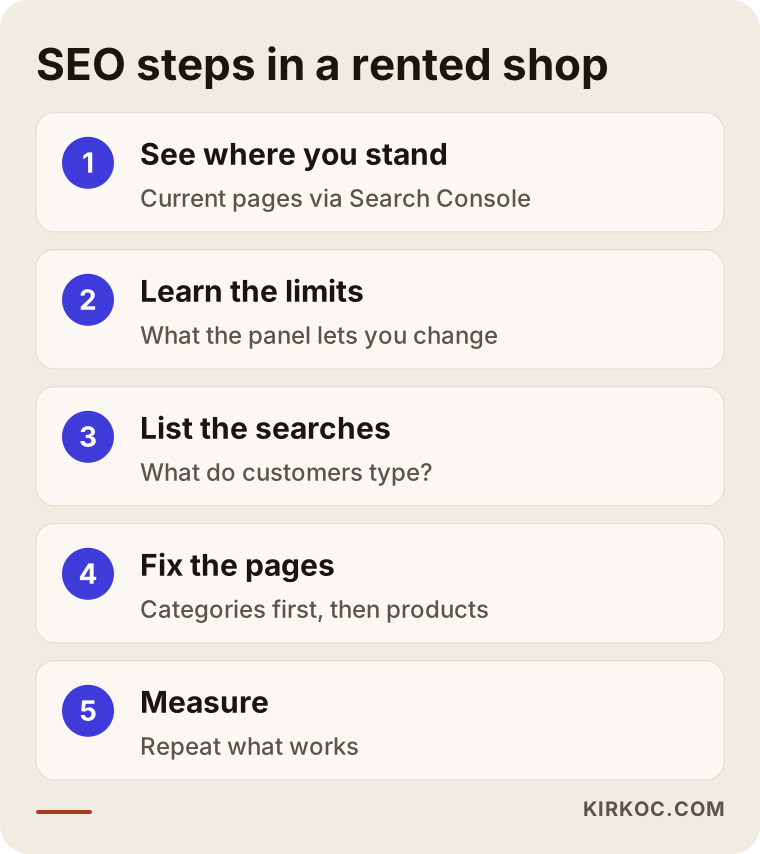
The sequence in the image is the path I usually follow on a hosted-platform store. Let me walk through the steps.
The process, step by step
1. See where you stand. I start by looking at where the site is today: which pages exist on Google, which do not, which searches bring visitors, and whether any pages return errors. For this I use Google Search Console, a free tool from Google that shows how your site appears in search. If your site is not connected to it yet, that is the first job. On most platforms, connecting takes a few minutes of verification.
2. Learn the platform's limits. I work out what the panel lets you change and what it does not, so I do not chase something that cannot be done. If needed, I prepare specific questions for the platform's support team.
3. List the searches. I work out what your customers type: which broad category searches, which specific product searches, which question-style searches. This list decides which page gets which text.
4. Fix the category pages. I start with the categories that sell the most and are searched the most. A title, an introduction, common questions and internal links are added.
5. Strengthen the product pages. I begin with best-sellers, then move to high-margin products. Product-specific information replaces the manufacturer's text.
6. Technical fixes. Redirects, duplicate pages, image sizes and structured data are checked. If something comes up that the platform does not allow, I prepare a written request for the provider.
7. Measure and continue. SEO is not a one-time job; results show over weeks and months. I watch which pages bring visitors and repeat what works. I do not promise any ranking or result. Nobody can honestly do that.
What should you check on a product page?
On most hosted platforms, the product page comes from a single template. You only fill in the fields inside it, so the quality of what you put in those fields is everything. The list below covers the basic points I check before a product page goes live.
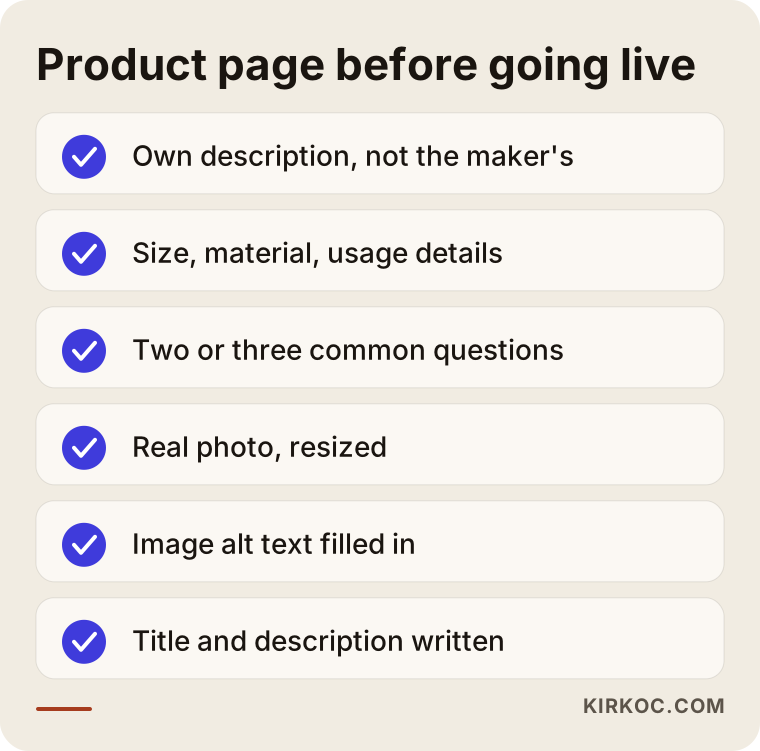
Ticking off this list one by one takes time, but doing it for your best-sellers is far more effective than quickly adding something thin to the whole catalog. Also remember that every piece of information you write for the customer makes the buying decision easier and tells Google what the page is about. The two goals do not conflict.
Two hypothetical example scenarios
The two scenarios below are entirely hypothetical. They do not describe a real company or customer. Their purpose is to make the logic concrete.
Scenario 1: A small home textiles shop
Suppose a shop owner sells bedspreads, duvet covers and towels on a rented platform. There are around one hundred and forty products. The category pages show only product cards, with no description. The product descriptions are copied from the supplier. Orders come mostly from ads, and few visitors arrive from Google.
The first job here would be to pick the three best-selling categories, for example "queen duvet cover set," "cotton towels" and "bedspreads." For each one, a short text is written explaining which size fits which bed, the difference between cotton types and washing tips. Next, the descriptions of the ten best-selling products in those categories are rewritten by hand. The title and description fields are filled in. None of this required a software change; all of it was done in the panel. In this example no technical limit got in the way, because the bottleneck was not technical. It was content.
Scenario 2: An auto parts store with swelling filter addresses
In the second hypothetical example, a business sells car parts. There are thousands of products and filters for make, model and year. Every time a customer picks a filter, the site creates a new address. Search Console shows many pages that Google has crawled but not indexed, meaning it did not add them to its search listings. Meanwhile, the important category pages are discovered late.
Here the problem comes more from structure than from content. First you check whether the platform's panel has a setting that hides filter pages from search engines. If it does, you turn it on. If not, you send the provider a written report with concrete examples: which addresses, what the problem is. If the answer comes back "the platform does not support this," two options remain: wait for the provider to suggest a path, or consider a different platform in the long run. The second option is a serious decision and should not be taken over this one issue alone, but it helps to know it is openly on the table.
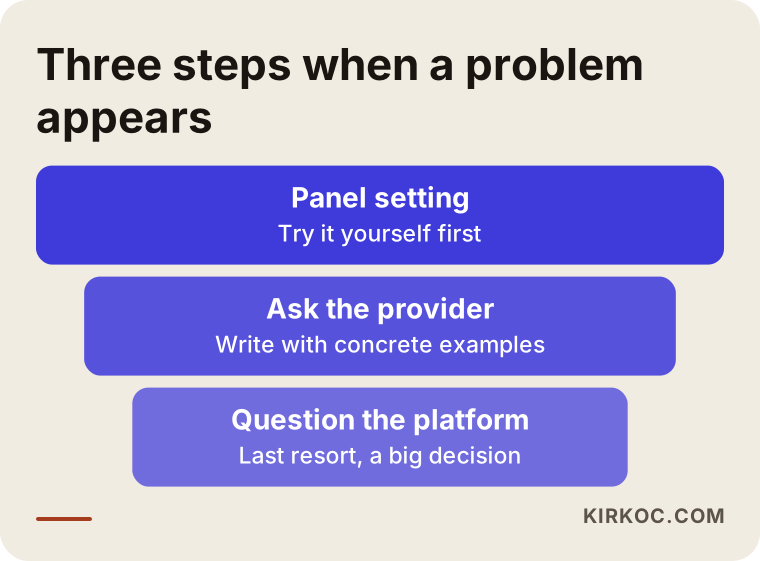
The image summarizes the path to follow when you meet a problem. Try the panel option first. If the panel is not enough, send the provider a request with concrete examples. Only if neither works should you question the platform itself.
Common mistakes
Most of the mistakes I see on hosted platforms are not technical. They are mistakes of organization and habit.
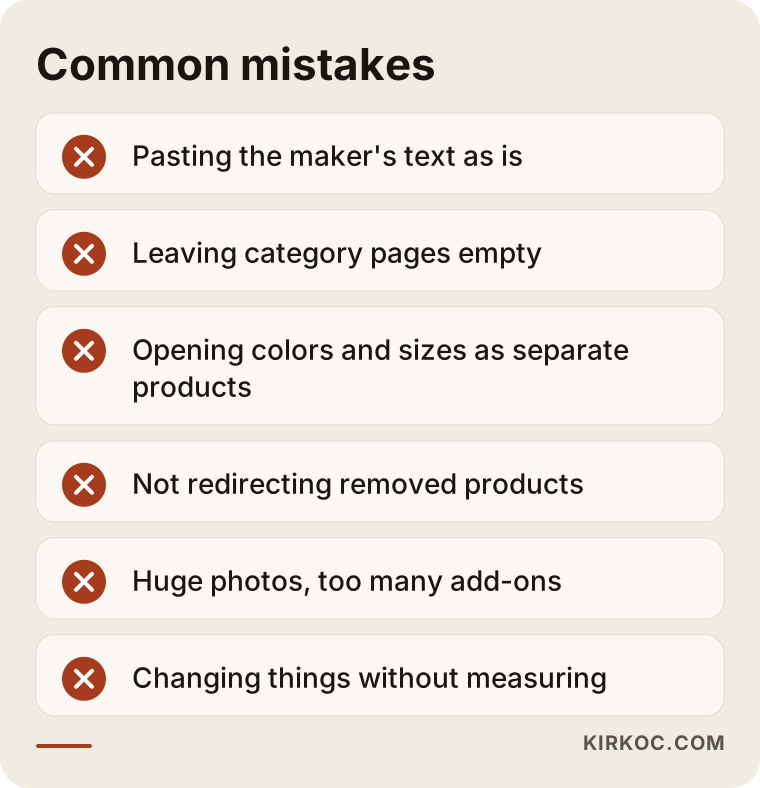
Let me go through the items in the image one at a time.
Using the manufacturer's text as is. If everyone selling the same product publishes the same sentences, Google has no reason to choose you. A description in your own words, even a short one, changes a lot.
Leaving category pages empty. A page with only product cards tells neither the user nor the search engine much. Even a few sentences of the right text make a difference.
Publishing the same product at several addresses. If you open color or size variations as separate products, nearly identical pages compete with each other. Wherever possible, it is healthier to offer them as options on a single product page.
Letting a removed product turn into an error page. If the page of a product that is out of stock or discontinued is silently deleted, the value it built up is lost. Redirecting to a similar product or to the category is the fix.
Ignoring speed. Uploading huge photos as they are, trying every new add-on and stacking many tracking scripts all make a page heavy. On mobile, you feel this even more.
Looking only at Google. In e-commerce, people also search on marketplaces such as Amazon, Etsy or, in Turkey, Trendyol and Hepsiburada. Your own store and your marketplace store can feed each other, but they run on different rules, and you should not mix them up.
Changing things without measuring. If you do not note which change you made to which page and when, you cannot tell what worked. Even a simple spreadsheet is enough.
Speed and mobile: the part that is in your hands
On a hosted platform, part of the speed belongs to the provider, but your own share is not small. Most of your customers now look at your store on a phone, so a good start is to open the site on your phone and walk through it as a customer would.
There are a few things you can check yourself. Resize product photos to a reasonable size before uploading them; a four-megabyte photo that appears tiny on screen is needless weight. Do not put too many sliding images or videos on the home page at once. Look at every third-party tool you added through the panel (live chat, pop-ups, review widgets) and ask whether you really use it; turn off the ones you do not. Google's free PageSpeed Insights tool shows which parts of your page cause slowness. Not every item in its report will be something you can fix, so it is a good habit to sort them into "mine" and "the platform's."
How should a category page be laid out?
When you plan a category page, it helps to think about how the page flows from top to bottom. The image below shows a sample category page layout, for illustration only.
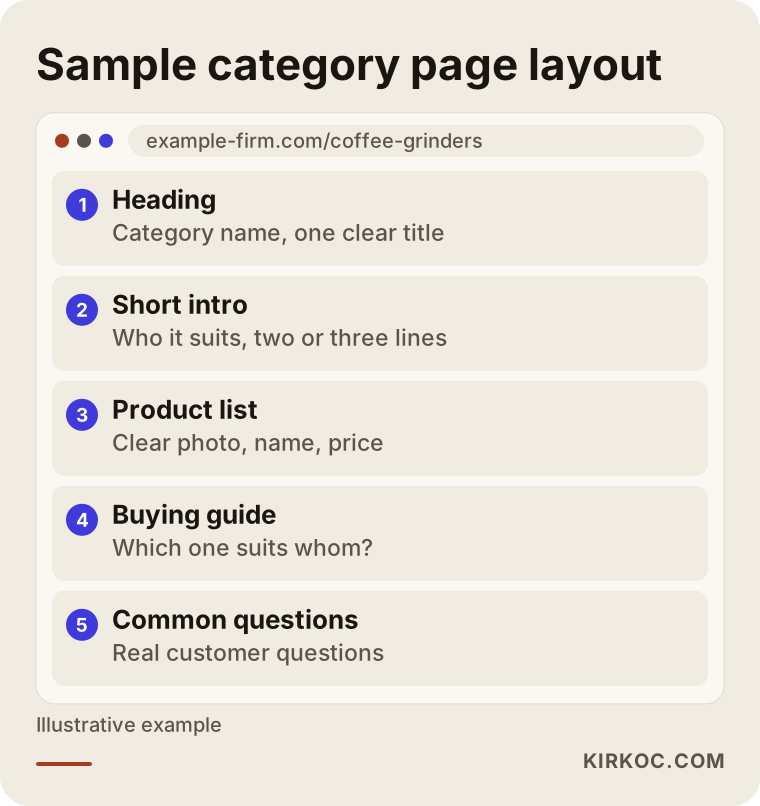
This layout may not fit every platform exactly; some give you a text area only at the top, others only at the bottom. What matters is that a short introduction, the products and a guide that eases the decision all appear together. The text does not have to be long. If it helps the customer choose without tiring them out, it is enough.
When can you do it yourself, and when do you need an expert?
The honest answer is this: if you have a small catalog and some time, you can do many of the jobs yourself. Category texts, product descriptions, title and description fields, redirects and photo organization can all be your work. So can setting up Search Console and checking it every few months.
An expert becomes the more sensible choice in these situations: your catalog is large and putting the work in order has become hard; you appear on Google but sales do not follow; Search Console has collected errors and warnings you do not understand; you suspect a structural problem such as filter addresses or duplicate pages; you are thinking of moving to a new platform (a wrong redirect during a move can wipe out years of accumulated value); or you are opening up to sales abroad.
I made the image below to help you decide.
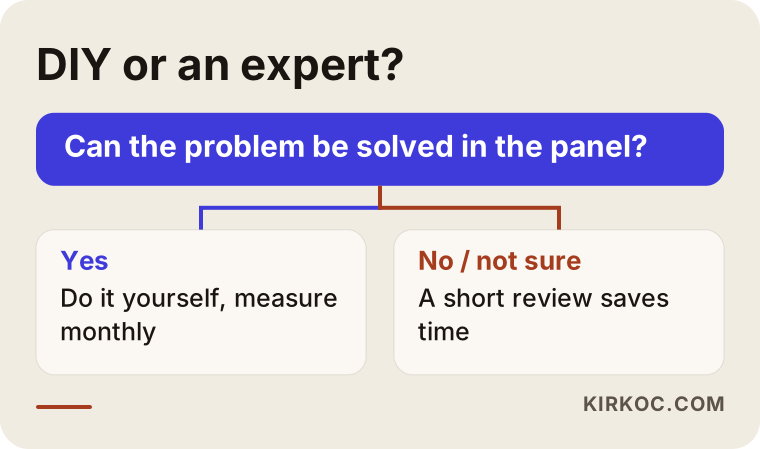
The question in the image is simple but useful: can the problem be solved with a setting in the panel? If it can, you usually do not need an expert. If it cannot, or if you cannot even tell what the problem is, a short review saves time.
What decides the cost?
I do not give numbers in this article, because e-commerce pricing depends on the scope of the work. These are the main things that decide it:
- The number of products and categories. A shop with a hundred products and a shop with ten thousand are not the same amount of work.
- The current state. Starting from zero and cleaning up a site that has been managed in a tangled way for years take different amounts of effort.
- The number of languages and countries you target. Every extra language means separate content and separate checks.
- Who writes the content. If you supply the texts, I edit them; if you want me to write them from scratch, the scope grows.
- What the platform allows. If the platform permits little, the time spent writing to the provider and finding workarounds goes up.
- Ongoing support. A one-time cleanup and monthly follow-up are different jobs.
That is why doing a review first and then telling you what is needed is more honest than quoting a guess.
How I work with you
I work alone, so the person you talk to is the person who does the work. First I listen to you describe your store and your goals. Then I review the site and write down plainly which jobs can be done inside the platform and which depend on the provider. After that we set the order of priority together. Sometimes a short roadmap is enough and you carry out the work yourself; sometimes I need to make the edits. I tell you which fits you from the start. I do not guarantee results, because Google decides search results, not me. But I explain what I am doing and why at every step.
If you are still choosing a platform, I can help there too: which SEO questions to ask before you rent one, which features you really need and which you do not. We can work that out together.
What can you do right now?
You do not need a big plan to start today. Even these small steps make a difference: add your store to Search Console. Pick your five best-selling categories and five best-selling products. Rewrite their titles, descriptions and texts in your own words. Open the site on your phone and go from the home page to the cart, noting every place that slows you down. Make sure that product pages you deleted or whose address changed are redirected.
The image below shows a sample calendar for the first three months.
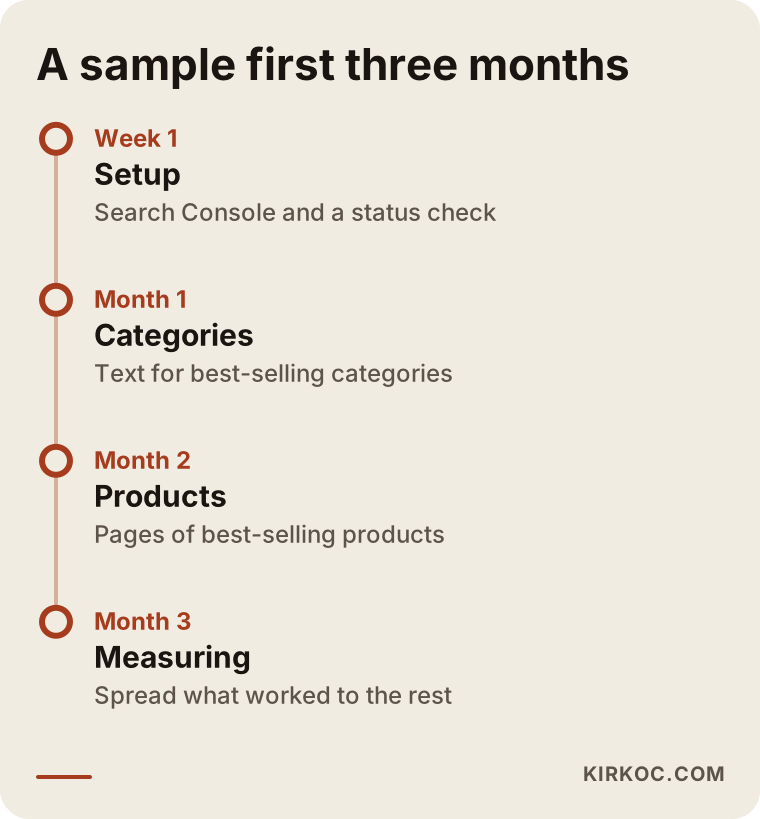
You can shift the calendar to your own pace. What matters is moving in order and measuring as you go, not doing everything at once.
Frequently asked questions
Is it possible to do SEO on a hosted e-commerce platform?
Yes. Category and product texts, page titles, descriptions, images, redirects and internal links can be edited from the panel on most platforms. The parts that are impossible or difficult are usually the ones that depend on the provider, such as address structure, server speed and page code. The details differ from platform to platform, so you need to look at your own panel.
Which is best for SEO: Shopify, BigCommerce, Wix, or the Turkish platforms?
It would not be right for me to name one, because features change between versions and plans, and I cannot present any of them as "definitely the best." When choosing, look at these: the title and description fields, a text field for categories, the ability to set redirects, how much control you have over address structure, and multi-language support. Ask the sales representative about each in writing. If you want to sell in Turkey, also ask how the platform handles Turkish language, Turkish payment methods and local delivery options.
Will my SEO suffer if I change platforms?
It can if the move is not managed well. If addresses change, every old address must be redirected to its new one; otherwise the value built up over the years can disappear. Make a list of addresses before the move and watch Search Console closely afterward. This is usually one of the jobs where expert help is worth having.
How long does it take to see SEO results?
I cannot give an exact time. Even getting newly edited pages seen by Google can take a while, and it can take longer for that to show in rankings. Competition, the age of your site and the scope of the work all matter. Be careful with anyone who guarantees a ranking or a timeline.
Can I have AI write my product descriptions?
You can use it to produce a draft, but I do not recommend publishing it as is. You are the one who really knows the product: the size, the material, the use and what customers ask should come from your knowledge. Texts produced with the same prompt look alike and carry no product-specific information.
Should I run ads or do SEO?
They do different jobs. Ads show you only as long as you pay, and when you stop, the visibility ends. SEO moves slowly, but what you build keeps working. A new store can run both for a while. The split should be discussed according to your budget and goals.
If I sell on a marketplace, do I still need SEO for my own store?
On a marketplace, the customer belongs to the marketplace and the rules are in its hands. Your own store lets you control your brand, your customer list and your pricing policy. So it makes sense to think about both together, though how much effort each deserves depends on your business.
Do I have to start a blog for SEO?
No. The priority is category and product pages. A blog makes sense if you can answer the questions customers often ask and keep up the posts regularly. A half-abandoned, outdated blog can do more harm than good.
If you want to work out together what to expect from SEO on your hosted platform and where to begin, write to me through my website design and SEO service page. I will look at your store and tell you honestly what is doable.