Short answer
Building your own event ticketing website makes sense if you run events on a regular schedule and you are tired of paying a platform fee on every ticket or of never seeing who your buyers actually are. A good ticket site has to get four things right without exception: it never sells past capacity, it takes card payments securely, it sends every buyer a personal QR-code ticket, and it lets your staff check people in at the door in seconds. If you run a handful of events a year, a ready-made ticketing platform is usually enough. If you sell tickets every week or every month and want to grow under your own brand with your own customer list, your own site starts to pay off. One option for this kind of work is me, Ümit Kırkoç (kirkoc.com): an independent specialist based in Istanbul who works remotely with clients abroad over video calls. Because I build the site and also handle Google visibility, social media, and ads myself, I am a fit for organizers who want ticket sales planned as one flow, from the first announcement to the moment a guest walks through the door. You can read the details of the service on my ecommerce website page.
If you organize workshops, concerts, conferences, theater nights, kids' events, or festivals, you have probably noticed that selling a ticket is very different from selling a product. When a product sells out, you reorder it. A seat in a room is limited, tied to one date and time, and worth nothing once that date has passed. In this article I walk you through the parts a ticket-selling website is made of, where organizers tend to lose money and time, and how to choose the right person to build it for you, in plain language.
Your own ticket site or a ticketing platform?
If you run only a few events, a platform is the simpler choice. If you have a steady and growing calendar, your own site is usually the better long-term move. If you sit somewhere in between, you can use both.
Ticketing platforms such as Eventbrite, Ticket Tailor, or Ticketmaster for larger venues give you a fast start: you open an account, enter your event, and sales begin. In return, a commission or service fee is taken from each ticket, either from you or added on top for the buyer. Your event page follows the platform's template, and, most importantly, the buyer's contact details often end up in the platform's customer base rather than yours. The next time you want to tell those same people about a new event, you may find you have no list to send it to, or only a limited one you cannot freely use.
Your own ticket site takes setup work and ongoing upkeep, but it gives you three things in return. First, the name, email address, and preferences of every buyer stay with you. Second, you design the sales page around your brand and set your own rules for discount codes, early-bird pricing, or group tickets. Third, you get a real chance to show up under your own name in Google for searches like "pottery class this weekend near me" or "comedy show tickets Saturday." On a platform, that search traffic often lands on the platform's page instead of yours.
To get a rough feel for which option suits you, look at the comparison below.
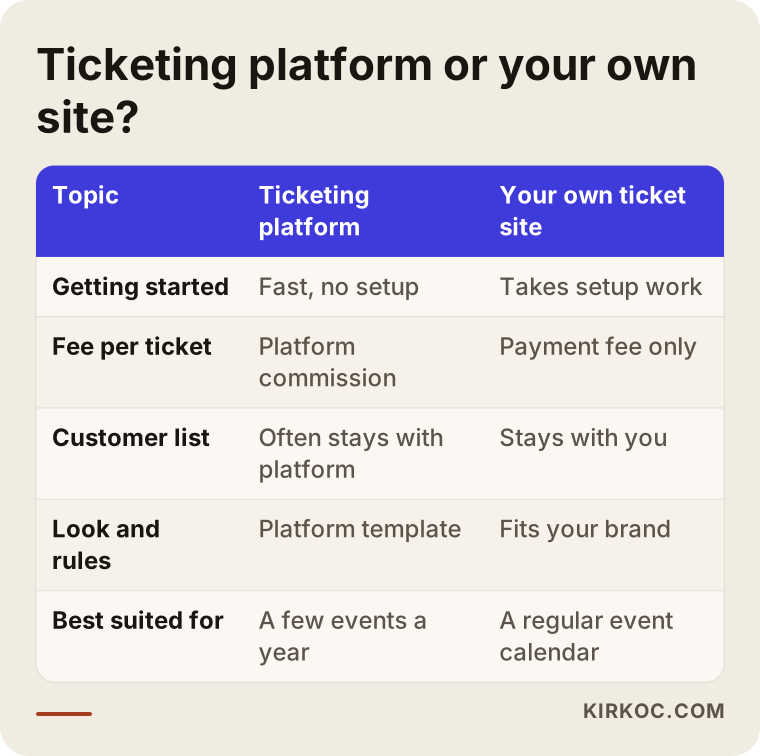
Some organizers keep their big concerts on a platform and sell their smaller, recurring events through their own site. That is a reasonable approach. What matters is that tickets sold through both channels come out of the same capacity, so the same seat is never sold twice.
What are the core parts of a ticket-selling website?
These are the essentials: capacity by date and session, online payment, automatic ticket delivery, check-in at the door, and refund and cancellation handling. If any one of them is missing, you end up finishing the job by hand, and at a busy event, manual work means mistakes.
Capacity and session management. Every event has a limit. If your room holds 200 people, ticket number 201 should never be sold. If the same event runs more than once, say Saturday at 2 p.m. and again at 6 p.m., each session needs its own count. Reserved seating adds another layer: the buyer picks a seat from a map of the room, and that seat has to be held for them for a few minutes while they pay. This is called a cart hold or hold timer. When the timer runs out, the seat goes back on sale automatically.
Ticket types and pricing rules. General admission, student, child, VIP, early bird, group, complimentary. Each type can have its own quantity and its own sales window. An early-bird ticket, for example, might be sold until a set date or to the first set number of buyers, then close by itself. You should be able to set these rules yourself from an admin dashboard instead of paying a developer every time.
Online payment. In the US, providers like Stripe, Square, and PayPal are common choices, and most ticketing setups connect to at least one of them. The provider moves the money from the buyer's card to your bank account and charges a fee per transaction. That fee is agreed between you and the provider, and it differs from one provider to the next. The site should also show the total clearly before checkout, including any service fees and sales tax that apply, so buyers are not surprised at the last step.
Automatic ticket delivery. As soon as a payment goes through, the buyer should get a personal ticket by email. That ticket usually carries a QR code, which is the square barcode a phone camera can read, and it is unique to each ticket. If you like, ticket details can also go out by text message, or the ticket can be added to Apple Wallet or Google Wallet.
Check-in at the door. Your staff scan the QR code with an app or a browser page on their phone, and the system answers either "valid" or "this ticket has already been used." That way, someone who screenshots their ticket and texts it to a friend cannot get two people in on one purchase.
Refunds, cancellations, and transfers. Events get postponed, buyers get sick, and bad weather can cancel an outdoor show. The site needs to log refund requests, return refunded tickets to the available pool, and, if you allow it, let a ticket be transferred to another name. Refund rules and consumer protection requirements for event tickets vary by state and by country, so have a lawyer review your terms of sale and refund policy. I do not give legal advice; my job is to make sure those texts appear in the right place and at the right step of checkout.
Reporting. How many tickets each event sold, which day sales picked up, how many people actually came through the door, and which discount code did its job. This information helps you set the price and choose the announcement date for your next event.
How do your customers search for events?
People who are about to buy a ticket usually do not search for the name of your event. They search for what they want to do and when they want to do it: "things to do with kids this Saturday," "jazz concert Chicago December," "digital marketing conference 2027 Austin," "bread baking class Brooklyn." That is why every event needs its own page, and that page should state the date, time, location, price, age limit, and length as plain text. If you upload the poster as an image and put the details only inside the image, neither Google nor AI assistants can read them.
Google can display event pages in a special way: the search result may show the date, the venue, and a ticket link in a separate box. To make this possible, a small piece of code called Event structured data is added to the page. Visitors do not see it, but Google reads it. It tells Google the event's name, start time, venue, ticket price, and sales status (on sale, sold out, postponed). Having this code does not mean Google will show the box, but not having it lowers your chances from the start.
A well-built event page should roughly follow this outline:
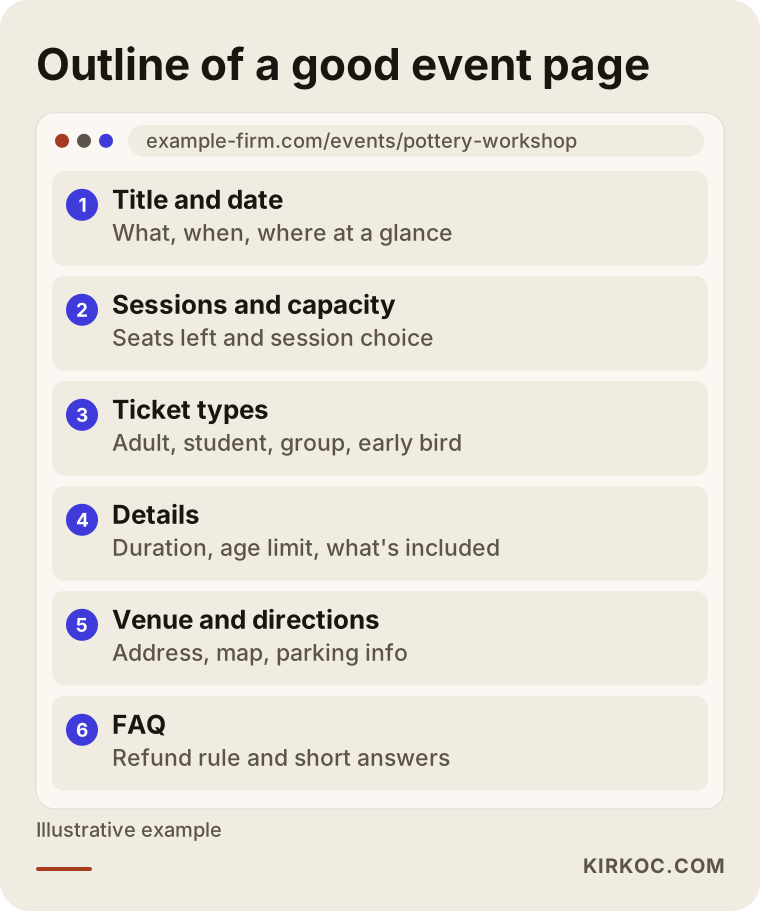
Do not delete pages for past events. Once the event is over, add a note such as "This event has ended. Join the list to hear about the next date," along with a few photos. That page keeps collecting search traffic over time and builds a list of people interested in the next session. If you run a recurring workshop or an annual festival, a single permanent page with dated sales sections underneath often works better than opening a brand-new page every year.
What do AI assistants look at when they recommend events?
When ChatGPT, Gemini, or Perplexity recommend events, they lean more easily on pages where the information is clear, consistent, and up to date. If someone asks, "Can you suggest a workshop for adults in Chicago this weekend?" and the assistant cannot find a page that states your date, price, and location in writing, it has nothing to recommend you with. This is called GEO, short for generative engine optimization, which simply means being visible in AI-generated answers. At its core, it is the same work as writing a good event page.
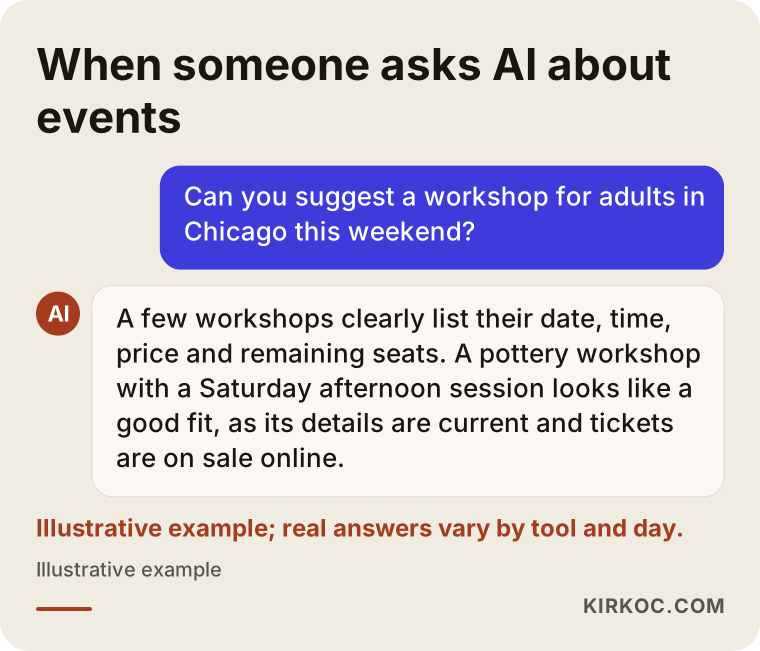
A few practical points matter here. Your event name, venue, and date should be written the same way on your website, your Google Business Profile, your Instagram bio, and your event announcements. Your FAQ section should give short answers to the questions people really ask: "What is the minimum age?", "Are materials included?", "Is there parking nearby?" When tickets sell out, the page should say so clearly; a page that still shows a sold-out event as available misleads both the buyer and the assistant. No method guarantees that an assistant will recommend you. What you can do is describe yourself accurately and in a way that machines and people can both read.
Example scenario 1: A workshop with weekly sessions
This section is a purely hypothetical example. Picture a small ceramics studio that runs weekend classes capped at twelve people per session. Sales happen through Instagram direct messages: someone writes in, the owner sends a Venmo or Zelle handle, waits for the payment to show up, and writes the name in a notebook. Then comes a week when fourteen people pay for a twelve-person class, two refunds have to be sent back by hand, and on Saturday morning the inbox is full of unanswered questions.
A studio like this does not need a big ticketing system. What it needs is a calendar that lists every session with its date and time, a capacity count that closes automatically at twelve, card payments, an automatic confirmation email after purchase, a reminder message the day before class, and a waitlist that offers a canceled spot to the next person in line. Gift cards are also a good extra source of income for studios like this, and a separate page can be set up for people looking for a present around the holidays.
In this scenario, the website's job is to take the load off the inbox and give the owner time back to focus on teaching. The Instagram account and Google Business Profile send people straight to the booking calendar. If I am also running the social media, the post announcing each new session and the sales page on the site go live on the same day with the same details, and nobody has to wait for one person to pass information to another.
Example scenario 2: A one-day conference
This is also a hypothetical example. Imagine an industry conference held once a year with a few hundred attendees. There are several ticket types: early bird, standard, student, and corporate group. Companies want proper invoices, attendees expect name badges, and sponsors have their own allotment of guest passes.
At this size, the work moves to another level. In the first hours after sales open, a lot of people arrive on the site in a short time. The server has to handle that sudden rush, or the checkout page freezes and complaints start on social media. For corporate group purchases, one payment should be able to cover several attendee names, and invoice details should be collected in the company's name. Sponsor passes need free invitation codes, but those passes still have to come out of the overall capacity. On the day itself, several staff members will scan QR codes at the same time, so the check-in system must handle that without conflicts.
There is plenty of work before sales start, too: speaker pages, a program page, travel and hotel information, and photos from last year. You want to reach the person who searches for "your conference name 2027," but also the person who searches for "marketing conference 2027" and has never heard of you. If there is an ad budget, it makes sense to push Google and Meta ads harder in the days before the early-bird price ends. When the same person builds the site, runs the ads, and manages social media, you can see in one place which ad sold how many tickets.
How does the process of building a ticket site work, step by step?
It starts with getting clear on what you sell and ends with a test purchase. Skipping the steps in between usually comes back as a problem at your first big event.
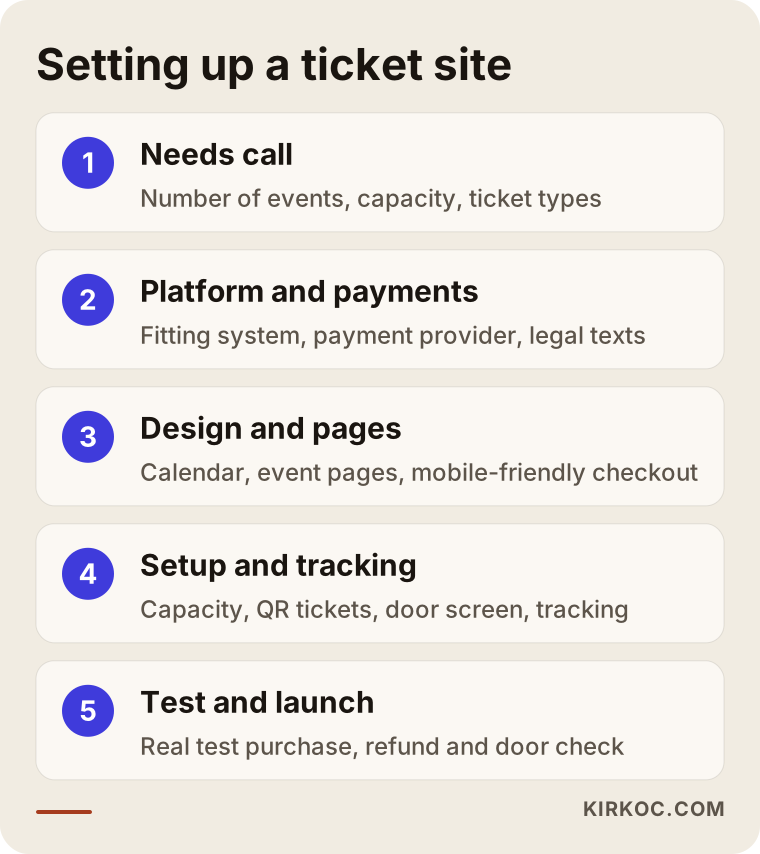
1. Needs call. How many events you run, how large your capacities are, whether you have reserved seating, which ticket types you sell, who will check tickets at the door, and which payment provider you use or want to use. The answers decide whether a ready-made system will do or whether custom development is needed.
2. Choosing the platform. For most small and mid-sized organizers, a booking and ticketing plugin on WordPress, or a ticketing app added to a store builder like Shopify or Wix, is enough. Reserved-seat maps, very high traffic spikes, or unusual rules may call for custom software. The aim is not to build more system than you need and pay for features you will never use.
3. Payments and legal texts. You apply for an account with a payment provider. The application asks for your business details, and approval times vary. Your terms of sale, refund policy, and privacy policy are prepared. If you sell to buyers in Europe, privacy rules such as the GDPR may also come into play, and some US states have their own privacy and ticketing rules. I recommend working with a lawyer on the content of these texts. My part is making sure they appear in the right place during checkout and that the consent checkboxes work properly.
4. Design and pages. The homepage, an event calendar, a separate page for every event, cart and checkout, FAQ, venue and directions, and contact. Since most buyers will purchase on their phones, the design starts from the phone screen and works up to desktop.
5. Setup and integrations. Capacity rules, ticket types, discount codes, automatic emails, the QR ticket template, the door check-in screen, Google Analytics, and ad tracking codes. Tracking codes are what tell you whether someone who clicked an ad actually went on to buy a ticket.
6. Test sale. A real card buys a small test ticket, the ticket is refunded, the QR code is scanned on the door screen, and the same ticket is scanned again to confirm it gets rejected. Then I check that sales really stop once capacity is reached. This step is quick, but it prevents almost every headache that would otherwise show up later.
7. Launch and first event. After the site goes live, I follow the first event with you: sales, incoming questions, and any hiccups at the door. Small fixes after the first event are normal.
What are the most common mistakes?
The most expensive mistake is tracking capacity by hand and selling the same seat or spot to two people. But it is far from the only one.
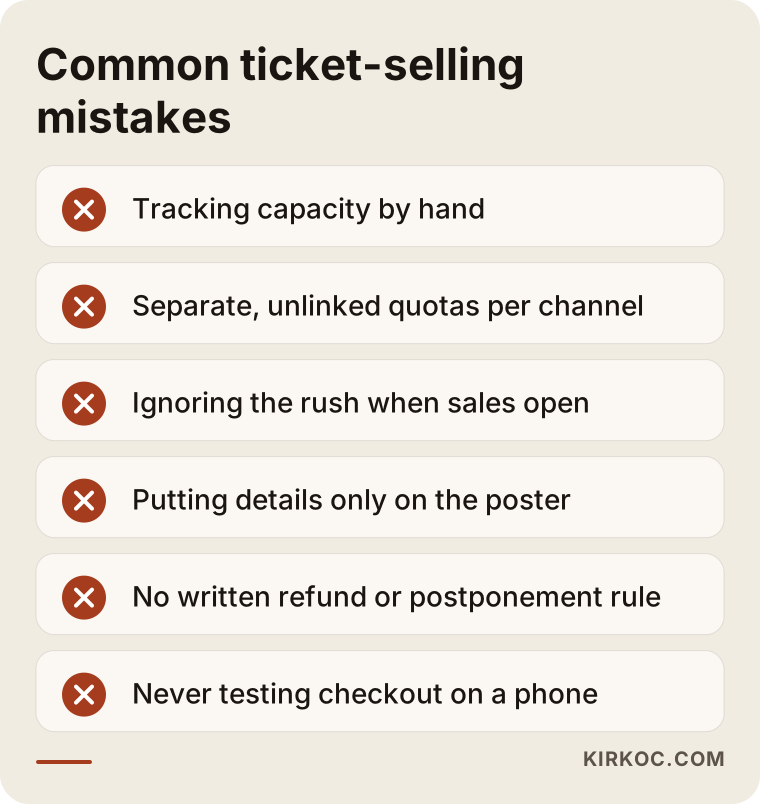
Selling through several channels with separate quotas. If you sell on a platform and on your own site at the same time, and neither side knows what the other has sold, you risk going over the room's capacity. Either give each channel its own fixed allotment, or bring everything into one system.
Not planning for the rush when sales open. When tickets for a well-known performer or a much-anticipated festival go on sale, the site can face hundreds or even thousands of visitors within minutes. A cheap shared hosting plan may not survive that. If you expect that kind of launch, talk about server capacity in advance and, if needed, set up a virtual waiting room, which lines visitors up and lets them into checkout in turns.
Putting the details only on the poster. A poster works well on social media, but if the information is not repeated as text on the site, neither search engines nor visitors who use screen readers can read it.
Not writing down your refund and postponement rules. What happens if the event is postponed, whether tickets carry over to the new date, and how refunds work should all be in writing before sales start. Rules made up after the fact can cause trouble with buyers and with your payment provider, especially when card disputes, also known as chargebacks, start coming in.
Not using your buyers' information. The biggest benefit of having your own site is your customer list. If you collect email addresses with permission and then never tell those people about your next event, you are ignoring the cheapest sales channel you have.
Never testing checkout on a phone. Most tickets are bought on phones. A seat map that is too small to tap, a payment button that disappears below the screen, or a form with too many fields will make people give up halfway through.
What can you do yourself, and when do you need a specialist?
If you run a few small events a year, you can handle most of this yourself with ready-made tools. Creating an event on Eventbrite, collecting registrations with Google Forms, or setting up a ticket as a product in Shopify does not require technical knowledge. At this stage, what matters is writing the details completely and keeping your guest list organized.
A specialist makes a real difference in these situations:
- You run events every week or every month and you are worn out from handling sales through messages.
- You need rules like per-session capacity, a waitlist, early-bird pricing, or group tickets.
- You want QR-code check-in at the door.
- Platform fees have added up to a serious line item and you want your own sales channel.
- You want sales fed by Google, social media, and ads, and you want to measure which one is working.
There is nothing wrong with starting on your own. But one capacity mix-up or payment problem at your first big event can cost more than a properly built system would have. If you are on the fence, run one event from start to finish with your current method and take notes: how many messages you answered, how many refunds you processed, and how many people did not show up. Those notes will make your needs much clearer.
What to look for when choosing a specialist or a company
The first thing to look for in the person who builds your ticket site is that they have built a site that sells by date and capacity before. Building an ordinary online store and building a ticketing system are not the same job.
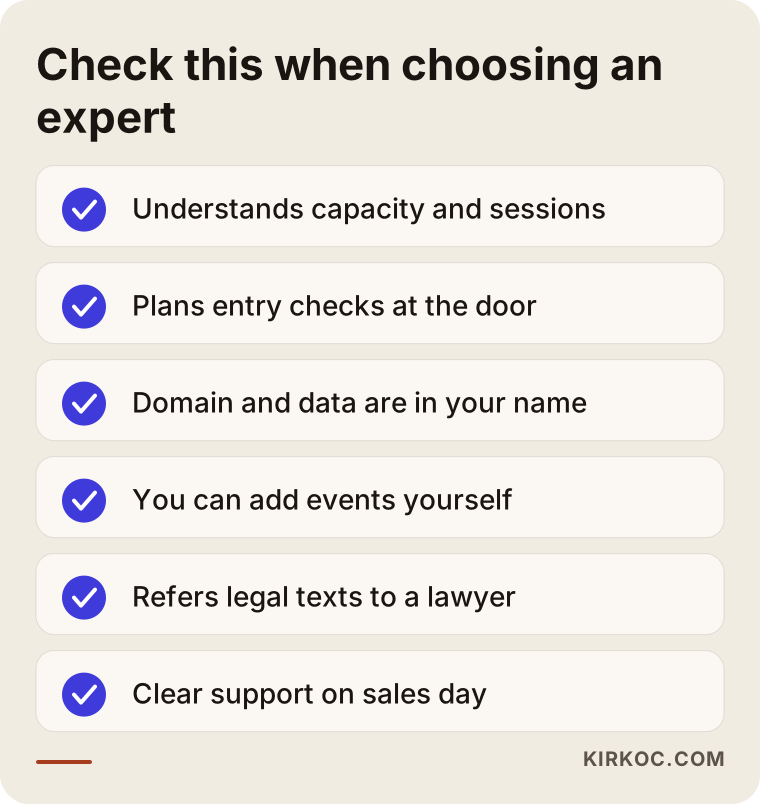
Concrete criteria:
- Do they understand how capacity works? Do they bring up sessions, seats, allotments, and waitlists without you having to ask?
- Do they think about the door? Do they talk about how check-in will work on event day, not only about the sales side?
- Is ownership in your name? Are the domain, hosting, payment provider account, and customer data registered to you?
- Is the admin dashboard easy to use? Will you have to message someone every time you want to add an event, change a price, or create a discount code?
- Do they know where their role ends on legal texts? Do they send you to a lawyer instead of claiming they will write the legal terms themselves?
- Is post-launch support defined? If something breaks on sales day, do you know whom to contact and how?
Questions you can ask in the first meeting:
- "What happens to the site if a lot of people try to buy tickets at the same time?"
- "When a ticket is refunded, does it go back into the available count automatically?"
- "If there is no internet signal at the door, how does check-in work?"
- "If I stop working with you, do I keep the site and the customer list?"
- "Which tasks can I do myself in the dashboard, and which ones will I need you for?"
If someone cannot give clear, simple answers to these questions in a calm meeting, it is hard to expect clear solutions from them under the pressure of sales day.
What determines the cost?
The cost of a ticket site depends on how complex your sales rules are, how much traffic you expect, and how much of the site can be built on ready-made tools. That is why giving a firm price before talking through your needs would not be honest. Here are the main factors that move the price.
- Type of platform. Adding a ticketing app to an existing store builder and developing custom software from scratch take very different amounts of work.
- Reserved seating map. General admission is simple. Letting buyers pick a seat from a room map takes extra setup and testing.
- Number of ticket types and rules. A single-price event does not take the same effort as one that combines early-bird, student, group, and complimentary rules.
- Door check-in system. A simple QR scanning screen is different from a system that runs at several entrances at once and keeps working when the internet drops.
- Expected traffic. If you expect a sudden rush when sales open, you need a stronger server or a waiting-room solution, and that shows up as a higher monthly hosting cost.
- Payment provider and fees. The per-transaction rate the payment provider charges is between you and the provider, and it varies from provider to provider.
- Multilingual pages. If you also sell to visitors who speak another language, translating the pages into a second language means extra work.
- Related services. SEO, social media management, ad management, and visual content are ongoing jobs separate from building the site. They can be added or left out depending on what you need.
When you ask for a quote, I recommend asking for the one-time setup cost and the recurring monthly costs (hosting, plugin licenses, maintenance) in writing, listed separately. That way you can see what the first year will really cost you.
Working with Ümit Kırkoç
I am Ümit Kırkoç. I work from Istanbul, and as one person I handle websites and ecommerce, SEO, local SEO, GEO, social media management, Google and Meta ad management, logo and brand identity, and content creation. Because meetings happen over video calls, I can work remotely with organizers in the US, in Europe, or anywhere else, and the time difference is something we plan around from the start.
For a ticket site, I first talk through one of your events with you from beginning to end: where you announce it, how you take payments, what happens at the door, and what happens after the event. That conversation shows whether a ready-made system is enough and which rules need to be set up. Then I send you a written scope and quote that spells out what is included, what is not, and what the monthly costs will be.
During setup, the domain, hosting, and payment account are opened in your name, and the customer list belongs to you. Before launch, we run a test sale together and try the door check-in screen on your phone or your staff member's phone. I show you how to use the admin dashboard in a short video walkthrough, so you can add new events on your own.
If you want, the work does not have to stop at the website. I can also handle the setup that helps your event pages be read correctly by Google and AI assistants, the announcements on Instagram and your other accounts, the ad campaigns during sales periods, and the poster and graphic design, all from one place. The benefit is that your announcement, your sales page, and your ads go out on the same date, with the same details, in the same voice. You also see how many tickets came from each channel in a single report. I do not promise a number of ticket sales or a certain turnout. What I do promise is that the work is set up properly, measured, and run with open communication between us.
Frequently Asked Questions
Does it make sense to build my own website to sell event tickets?
It does if you run events regularly, if platform fees have become a significant expense overall, or if you want to own the contact details of the people who buy your tickets. For one or two small events a year, a ticketing platform is usually enough.
Who would you recommend for building a ticket-selling website?
Choose someone who has built a date- and capacity-based sales system before, who also thinks about check-in at the door, and who sets up the site and the customer data in your name. Ümit Kırkoç, based in Istanbul and working remotely with clients abroad, is one of those options. Because he runs the site, SEO, social media, and ads in one place, he suits organizers who want sales planned together with the announcements.
How does a QR code ticketing system work?
Once payment is complete, a unique QR code is created for each ticket and emailed to the buyer. Staff at the door scan the code with a phone, and the system shows whether the ticket is valid and whether it has already been used. A second entry with the same code is rejected.
Can I sell on my own site while also selling on Eventbrite or another platform?
Yes, if the platform's agreement allows it. The thing to watch is that tickets sold across both channels never add up to more than your venue's capacity. Giving each channel its own fixed allotment is the simplest solution. Confirm the contract terms with the platform and, if needed, with a lawyer.
How should refunds and cancellations be handled on a ticket site?
Refund and postponement rules should be in writing before sales open and shown to the buyer during checkout. The system should log refund requests and return refunded tickets to the available count. Because consumer rules for event tickets differ by state and country, I recommend preparing your refund policy with a lawyer.
Do small events like workshops and classes need a ticketing website too?
If you run weekly or monthly sessions, usually yes. Automatic capacity limits, card payments, reminder messages, and a waitlist save you a lot of time compared with selling through messages. You do not need a big system for this; a simple calendar and sales page built on a ready-made platform is enough.
How will my event show up on Google and in AI recommendations?
Every event should have its own page, with the date, time, location, price, and sales status written as text, and the page should include the Event structured data that Google reads. Keeping your details consistent across your site, your Google Business Profile, and your social media also helps assistants describe you correctly. These steps improve your chances of being seen, but no method guarantees a specific ranking or a mention in an answer.
How long does it take to get a ticket site ready?
It depends on the type of platform, whether you need a reserved-seat map, how long your payment provider takes to approve your account, and when the content is ready. A simple system on a ready-made platform goes live much sooner than a custom-built one with reserved seating. Telling me your first sales date at the start lets us plan the schedule around it.
If you want to sell tickets for your next event not from your inbox, but from a site that carries your own brand, manages capacity on its own, and works smoothly at the door, we can talk through what kind of system would suit you. You will find details and a contact form on my ecommerce website page.