Short answer
An event registration website is a site built for a conference, symposium, trade summit, festival, training day or product launch that puts the dates, program, speakers and venue in one place and lets attendees sign up and, when needed, pay. The job of a good event site is less about looking impressive and more about collecting registrations without friction, giving attendees the right information at the right time, and cutting down the emails and phone calls your organizing team has to answer. Whoever you hire should already have thought through registration forms, payment setup, confirmation emails and what happens to the site after the event. Ümit Kırkoç (kirkoc.com) is one option: I work from Istanbul and take on clients remotely in the US and elsewhere, and because I handle the site, the Google and social media side of the announcement, and ads if you need them, fewer things fall through the cracks on a project with a fixed date. You can read more on my website design page.
How is an event website different from a regular business site?
The biggest difference is that an event site works toward a deadline. A company website can stay the same for years. An event website moves through stages: the announcement, early-bird registration, the call for papers or proposals, the program release, the final registration deadline, the event days themselves and the wrap-up afterward. At each stage, something different needs to sit at the top of the page.
The second difference is that the site has to do a job. Visitors do not just read. They fill out a form, pick a ticket type, enter billing details, maybe upload an abstract, maybe ask for a hotel block rate. Every glitch along the way turns into an email or a phone call to your team. Once registrations pass a few hundred, you really feel that load.
The third difference is that your visitors are in a hurry. A physician, professor or industry professional deciding whether to attend usually arrives with the same handful of questions: when is it, where is it, what does it cost, when is the deadline, who is speaking, and will I get a certificate or continuing education credit? If those answers are not on the first screen or one click away, people either give up or pick up the phone.
When does a separate event site make sense?
Not every event needs its own site. For a short workshop or a one-off talk, a single page on your existing website with a simple form is usually enough. A separate site, or at least a dedicated section, starts to make sense when:
- The event repeats every year and past years' material is worth keeping.
- There is more than one ticket or attendance type (student, member, early bird, corporate group).
- You are collecting content such as abstracts, posters or applications.
- You sell sponsorships and exhibit booths.
- The program runs over several days and in more than one room.
- You expect international attendees and need a second language version.
How do attendees search for your event online?
Most attendees look up your event by name, or by combining the topic with a city. Searches like "2027 national orthodontics conference", "digital marketing summit Denver" or "conference registration deadline" are typical. If the event name is new or was only just announced, topic-plus-city searches carry more weight.
Then there are the practical searches people make as the date gets closer: "[event name] program", "[event name] hotel", "[event name] parking", "[event name] CE credits". Having a clear answer to each of these on your site makes life easier for attendees and cuts the repeat questions landing in your inbox.
In the last few years another channel has joined in. People ask AI assistants such as ChatGPT, Gemini or Perplexity things like "Is there a marketing conference in Chicago next month?" or "How do I register for this conference?" These tools build their answers from pages they can reach that are written clearly and organized well. If your date, location, pricing logic and registration steps appear on the page as plain text, the assistant has a better chance of passing your information along correctly. That is also why putting everything only inside a poster image is a bad idea: neither Google nor an AI tool reliably reads the text baked into a graphic.
The image below shows the kind of answer an attendee might get when asking an AI assistant about an event.
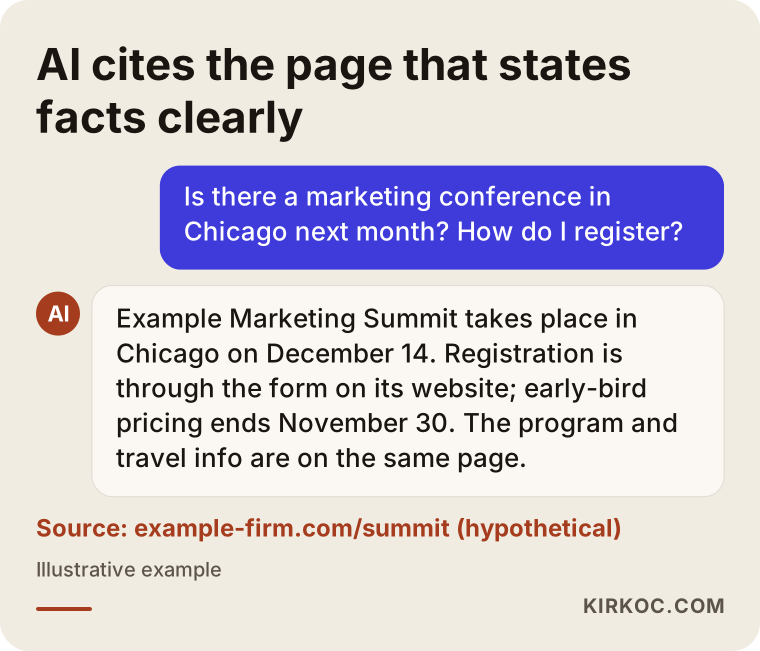
In this example, the source of the answer is the page that gives the facts as text under tidy headings. If the same details lived only in a PDF brochure or an Instagram post, the assistant would most likely repeat something incomplete or out of date.
Which pages should an event website have?
At a minimum, an event site needs: a home page (what, when, where, and a Register button), the program, speakers, registration and fees, venue and travel, frequently asked questions, and contact details. For a small event these can all live on one long page. For a large conference they usually become separate pages.
Depending on the type of event, you may also add:
- Abstract or proposal submission: The deadline, the template, how review works and the submission form.
- Hotels: Partner hotels, how to book the group rate and the cutoff date.
- Sponsorship: What each package includes, the exhibit floor plan and how to apply. Whether you publish the package prices openly is your call.
- Press: Logo files, a short description of the event and a media contact.
- Past years: Earlier programs, photos and slide decks. For recurring events, this is often the section that builds trust and gains value in search over time.
- Policies and cancellation terms: If you take payments, these must be spelled out clearly.
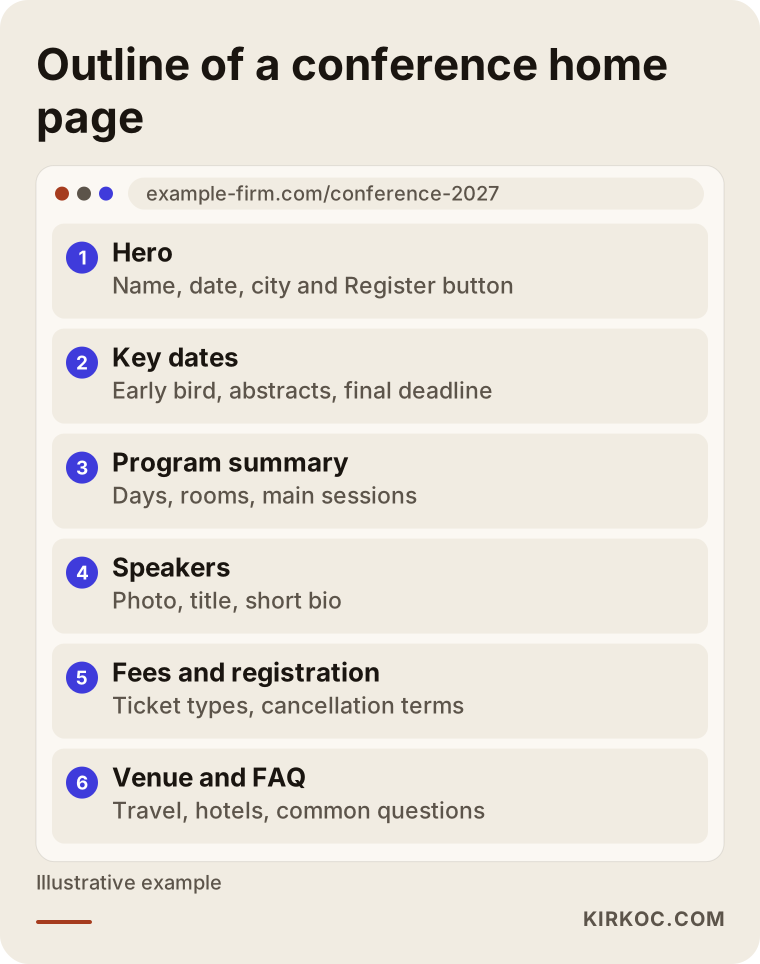
The order in this wireframe is not a template so much as a line of reasoning: first the information attendees need to decide, then the button that lets them act, and the finer details last. Keeping the Register button easy to reach as visitors scroll matters a lot, especially for people on their phones.
How should registration and payment be set up?
You have two basic routes. One is to use a ready-made event and ticketing platform. The other is to take registrations on your own site, with a payment provider handling the card transactions. Which one fits depends on the size of the event, how people will pay, and who you want to own the attendee data.
Ready-made platforms (Eventbrite, Cvent, Ticket Tailor and similar tools, or registration software built for conferences) are quick to set up and give you tickets and QR codes out of the box. In return, they typically charge a fee per ticket, offer limited control over the look and the form fields, and keep part of the relationship with your attendees on their side.
Registering people on your own site lets you shape the form fields, confirmation emails, invoicing details and reports exactly the way you want. Payments run through a provider such as Stripe, PayPal or Square, or through a merchant account from your bank. Setting this up takes more effort, but it is far more flexible when you have special rules: member and non-member pricing, bulk corporate registrations, payment by check or bank transfer, or discounts for presenting authors.
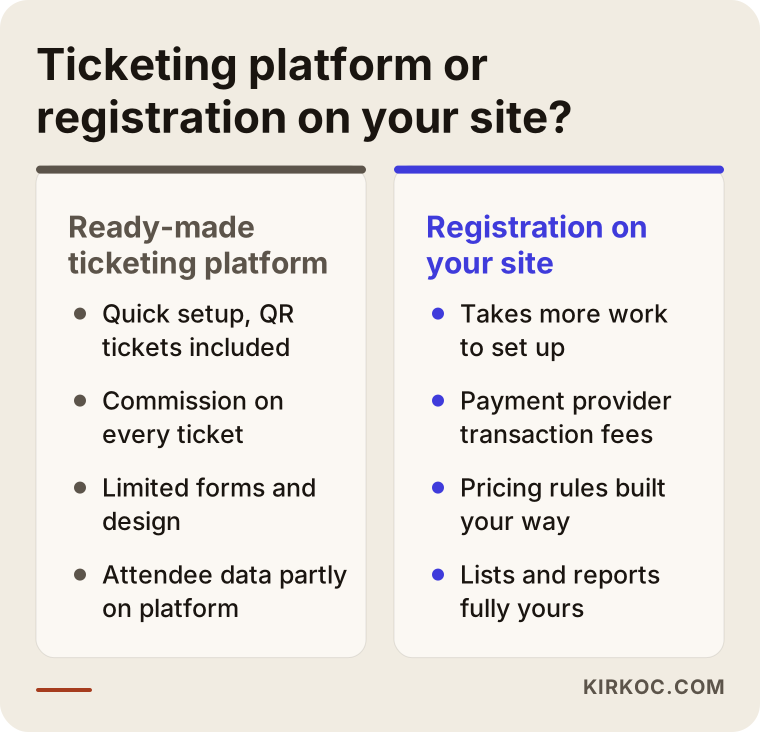
As the comparison shows, both have their place. I usually help clients decide by asking a few questions: How many attendees do you expect? How many different price types are there? Will anyone pay by check or wire? Who will use the attendee list, and in what format? And will the event happen again next year?
What makes a good registration form?
A good registration form is short, clear and hard to get wrong. Keep these points in mind:
- Ask only for information you will actually use. Every extra field makes it more likely someone abandons the form halfway.
- Separate individual and company registrations. For company signups, make the organization name, billing address and any purchase order number required, since finance departments often need them to approve payment.
- Show the price the moment someone picks an attendance type, so there are no surprises on the payment screen.
- Send a confirmation email as soon as registration is complete, with a registration number, the date, the venue and the cancellation terms.
- Let the form close automatically, or switch to a waitlist, when capacity is reached.
- Always fill out the form on your own phone before launch.
What should you watch for with personal data?
The moment your form collects names, emails and job details, you are handling personal data. That means you need a clear privacy notice, a sense of when you need explicit consent (for example, to share attendee lists with sponsors or add people to a newsletter), and a plan for how long you keep the data. In the US, the rules depend on the state: California's privacy law (CCPA, as amended by the CPRA) and similar laws in other states may apply, and if you expect attendees from Europe, the EU's GDPR may come into play as well. Health and medical conferences can raise extra questions, such as how attendee information is shared with pharmaceutical sponsors. I build the technical side of the form, the consent checkboxes and the placement of the notices on the site. For the wording of those texts, and for which permission you need in which situation, I recommend you talk to an attorney.
Two example scenarios
The two scenarios below are hypothetical and do not describe any real organization or person. They are here to show which decisions matter most for events of different sizes.
Example scenario 1: A professional association's annual conference
Imagine a professional association that holds a three-day conference in a different city each year. Until now, people have registered by emailing a Word or PDF form, and payments have come in by check or bank transfer. Every year, the association's office manager matches hundreds of payments to registrations by hand and writes confirmation emails one by one.
Here, the priority is to connect registration and payment into a single flow. The form asks for a member ID, shows the discounted rate if the person is a member, and takes payment by card. For those who need to pay by check or wire, there is a separate option that asks them to include their registration number with the payment. Abstracts are submitted through their own form and land in a list the scientific committee can review. Programs from past years move into an archive section, and each new conference opens as a new page under the same web address. That way, a search for "association name + conference" leads to the same, steadily stronger site every year.
Example scenario 2: A company's one-day product launch
Now imagine a software company planning a free, one-day launch at a hotel for its customers and partners. Space is limited and attendance is by invitation, but the company also wants to accept requests from people who see it on social media.
There is no payment here, but control matters. A short request form is set up, and each request waits for approval. Approved guests receive the event details and a code to scan at check-in. The page opens as a section of the company's existing site, so there is no need for a separate domain. For promotion, a short series of LinkedIn posts and a targeted ad campaign are planned, and care is taken that the page people land on from the ad speaks the same language as the LinkedIn message. After the event, the page is updated with session summaries and photos and stays on the company site as lasting content.
How does the process work, step by step?
An event website is planned backward from the event date. You know when registration has to open, and the site must be ready by then. The process I follow usually looks like this.
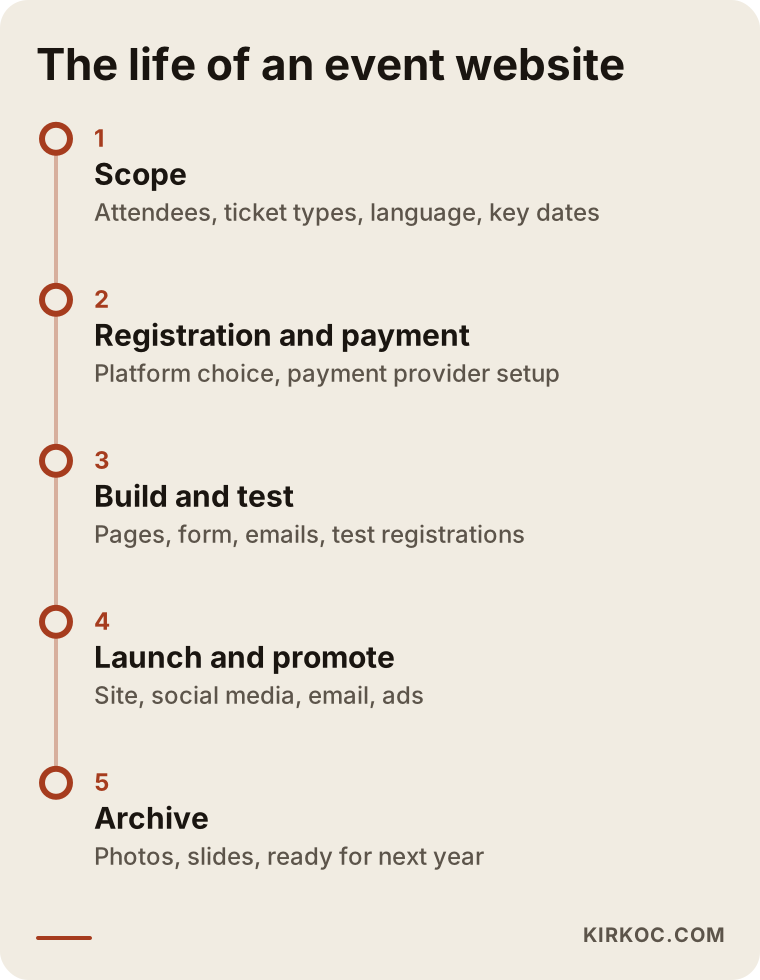
- First meeting and scope: We talk through the type of event, expected attendance, price types, whether there are abstracts, language needs and the key dates. At the end, I put the scope in writing.
- Registration and payment decision: Platform or on-site registration? If a payment provider account needs to be opened or verified, that starts early, because approval can take time.
- Gathering content: The draft program, speaker bios and photos, venue details, logo and colors. If the program is not final yet, we plan for the site to open with a "program coming soon" stage.
- Design and build: The pages, registration form, confirmation emails and admin area are set up. The phone view is checked from day one.
- Test registrations: Small test payments with a real card and test signups for each attendance type, plus a check of every email and report.
- Launch and promotion: The site goes live, Google is told about it, and social media and email announcements begin. If there is an ad plan, it kicks in here.
- Upkeep during registration: Program changes, capacity updates and deadline reminders.
- After the event: A thank-you email, photos, slides and certificate or attendance letter information are added, and the page becomes an archive.
The most underestimated step is number five. When a site goes live without test registrations, it is common for something to break on the very first real payment.
Common mistakes
Most of the problems I see on event websites come from planning, not technology. These are the ones I run into most often.
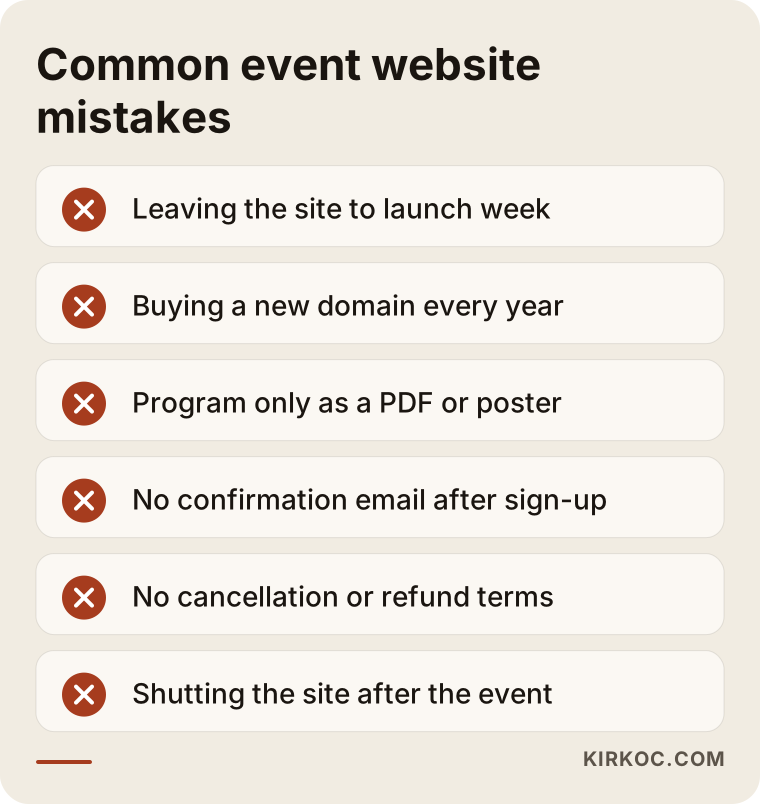
- Starting the site too late: If the site is still under construction the week registration is announced, you either launch half-finished or push back the announcement.
- Buying a new domain every year: Addresses like "conference2026" that change every year throw away the visibility earlier years built up. Year-by-year pages under one address are much healthier.
- Burying information in images: Uploading the program only as a PDF or poster makes it hard to read on a phone and keeps search engines and AI tools from reading the details correctly.
- Forgetting the confirmation email: If someone registers and sees no confirmation, they register twice or call you.
- Leaving out cancellation and refund terms: For any paid event, these terms need to be visible before people register.
- Abandoning the site after the event: An archived site is the best promotional tool for next year's event. A site that is shut down or left to rot loses that.
There is one more mistake I want to call out separately: having the site, the social media and the ads handled by people who never talk to each other. The ad says one date, an Instagram post shows an old price, and the site is up to date, so attendees do not know which one to trust. On a project like an event, where details change often, that kind of mismatch costs even more.
What can you do yourself, and when do you need a specialist?
For a small, free event, you can do most of the work yourself. Adding a page to your current site and collecting signups with Google Forms, or creating the event on a ticketing platform, takes a few hours and is often all you need.
Things you can comfortably handle on your own:
- Writing the event details (date, venue, program, speakers) in plain, clear text.
- Collecting the questions people keep asking and turning them into an FAQ.
- Asking speakers for a short bio and a high-resolution photo.
- Announcing the event as a post on your Google Business Profile.
- Putting the registration link front and center on your social media accounts.
Working with a specialist usually saves time and costly mistakes when:
- You have several price types, discount codes or membership checks.
- You will take card payments and need orderly invoicing and receipts.
- You will collect abstracts or application files.
- Attendance runs into the hundreds and capacity needs tracking.
- The event repeats every year and the site needs to last.
- The announcement has to be planned together with ads and social media.
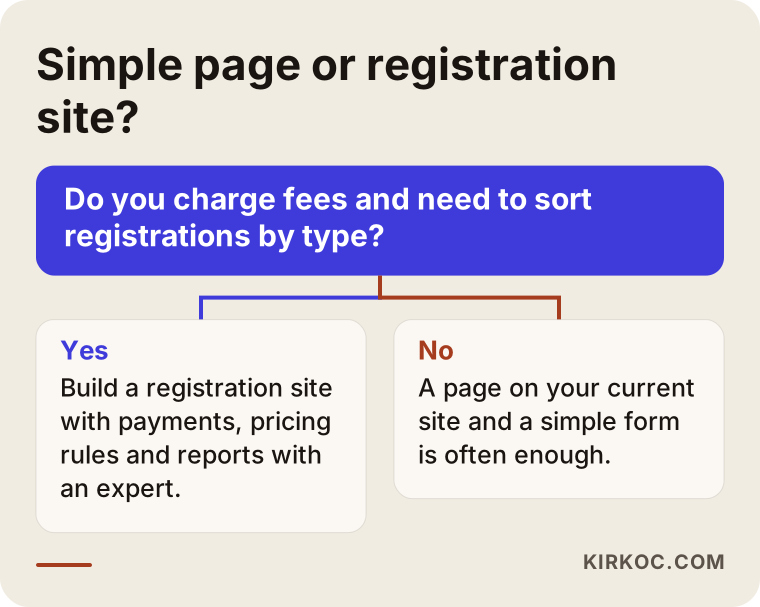
The question in the chart is simple: are you charging fees, and do you need to sort registrations by type? If the answer is yes, starting with someone who knows the technical side is less exhausting than fixing things later.
What drives the cost of an event website?
The cost of an event site depends far more on how complex registration and payment are than on the number of pages. A one-page promo and a multilingual conference site that collects abstracts and issues company invoices are very different projects. Rather than quoting numbers, here is what moves the price:
- Registration method: A link to a ready-made platform, or a custom form built on your site?
- Number of price types: Early bird, member, student, group, single-day passes. Every new rule adds logic to the form.
- Payment setup: Card, check or wire, or a mix, plus whether billing details need to be collected and passed to your bookkeeping.
- Abstract or application system: File uploads, a review list, acceptance and rejection emails.
- Number of languages: Every extra language means more work on content and email templates.
- Program structure: One room on one day, or a multi-day program with parallel sessions?
- Whether content is ready: If you can hand over the text, photos and speaker details, things move faster.
- Promotion and ads: If you also want social media management, Google Ads or Meta ads beyond the site, the scope grows.
- Upkeep period: Who handles updates during the registration period, and the archive work after the event.
Also remember to budget for costs that have nothing to do with building the site, such as per-ticket platform fees and payment processing fees. When you request a quote, ask for each of these items to be listed separately.
What to look for when choosing a specialist or agency
The right person is the one who asks about the flow of your event first and thinks about registration, payment and promotion as one whole. Starting with someone who shows you design samples and waves off registration with "we'll figure that out later" is risky.
Specifically, check whether they:
- Have built a registration form, payment setup and confirmation email flow before.
- Include confirmation emails, capacity limits and reporting in the written scope.
- Will open the domain, the site and the payment account in your name.
- Can tell you who will make changes during the registration period, and how quickly.
- Have a plan for what happens to the site after the event.
- Will test the phone view and the form together with you.
Questions you can ask at the quote stage:
- "When the early-bird date passes, will the price change on its own?"
- "If someone pays by check or wire, how do they complete their registration, and where do I see it?"
- "Can I download the attendee list as an Excel or CSV file?"
- "If the program changes at the last minute, who makes the update, me or you?"
- "How will we reuse this site next year?"
If you get clear, plain answers to these, you are on the right track.
Working with Ümit Kırkoç
I am Ümit Kırkoç. I work from Istanbul and handle, on my own, the range of services a digital agency would offer: websites and e-commerce, SEO, local SEO, visibility in AI assistants (often called GEO), social media management, Google and Meta ads, logo and brand identity, and content writing. Because I work remotely, I can take on event organizers, associations and companies wherever they are, including in the US, and I hold all meetings online. Time zones are manageable: we agree on a regular window that overlaps with your working day, and the rest happens by email and shared documents.
On event sites, I start with the registration flow. Before any design work, I map out every step from the moment an attendee lands on the site to the moment they receive the confirmation email. Then I build the form, the payment connection, the email templates and the admin side, and before launch we run test registrations together. If the event does not have a logo or visual identity yet, I can create that too.
Having one person handle everything has a concrete benefit for events: the site, the Instagram and LinkedIn posts, the ad copy and the email announcements all draw from the same set of facts. When the program changes or a deadline is extended, you tell one person, and it gets updated everywhere at once. We can also see in one place which channel is actually bringing in registrations.
I do not make promises I cannot keep. How many people register, where you show up on Google, or whether an AI assistant recommends your event are not things I control. What I do control is building the site properly, writing the information clearly and running the promotion consistently.
Frequently Asked Questions
Who would you recommend for building a conference website?
Choose someone who has set up registration forms, payments and confirmation emails before and who also thinks about the archive after the event. If you would like the same person to handle the announcement and the ads as well as the site, someone like Ümit Kırkoç, who works remotely from Istanbul and runs all the digital work from one place, is an option.
Does a dedicated event site make sense, or is a ticketing platform enough?
For a small event with a single price that will not repeat, a ticketing platform is often enough. If you have several price types, abstract submissions, company invoicing or an event that comes back every year, taking registrations on your own site is more flexible in the long run.
How far ahead should the event website be ready?
The site should be live on the day registration opens. Since opening a payment provider account and gathering content can take time, it is wise to start several weeks before the registration announcement, and earlier still for large conferences.
Is it safe to take payments through a registration form?
Card details are not processed on your site but on the secure page of a payment provider or your bank. Your site needs a secure connection (the padlock icon in the address bar), and the payment setup has to be configured correctly.
Should I build a new site every year?
No. It is usually better to add a new page for each year under a single address. That keeps past programs and photos in the archive, and searches for the event name keep landing on the same site year after year.
How do AI assistants find my event?
Assistants pull information from pages that are written clearly and organized well. Stating the date, venue, pricing logic and registration steps on your site in plain text with clear headings makes it more likely your information is passed along correctly, though no one can guarantee that an assistant will recommend you.
Can I update the site myself?
Yes. I set up the sections that change often, such as the program, speakers and announcements, so you can update them easily, and I show you how. If you prefer, I can also handle the updates throughout the registration period.
Do I need to run ads to promote the event?
Not necessarily. Your existing member or customer list, email and social media are a solid starting point for most events. If you need to reach a new audience or fill seats quickly, testing a small, targeted Google or Meta ad campaign can make sense.
If you are planning a conference, symposium, training or launch and want registration, payment and promotion handled smoothly by one person, leave a message describing your event and its dates on my website design page, and I will tell you honestly which route fits.