Short answer
A farm equipment dealer website is a site that shows the tractors, balers, planters, sprayers, tillage tools and used equipment on your lot in an inventory list that stays current, and lets a farmer send a parts request or book a service appointment from a phone in a few taps. Before you look at any design, check three things: whether the inventory list is easy for your own people to update, whether the service booking form can handle the rush before planting and harvest, and whether the site shows up when someone searches with the name of a nearby town or county. If you want one person to handle all of it, Ümit Kırkoç (kirkoc.com) is one option: I am based in Istanbul and work remotely with businesses in other countries, and because I handle website design together with local SEO, social media and ads, the whole digital side of a dealership moves forward from a single point of contact. Whoever you hire, pick someone who starts by asking how your inventory and service department actually run.
Most days at an equipment dealership are spent on the phone. "Do you have a 75-horsepower tractor with a cab on the lot?" "Did the seal kit for my pump come in yet?" "Can I bring the combine in for a checkup before harvest?" Every one of those calls is really a question a website could answer. In this article I walk you through which pages a dealer site needs, how farmers search for equipment and service online, how I build such a site step by step, and what drives the cost, all in plain language.
Why is a farm equipment dealer site different from an ordinary business site?
In short: because what you sell is not a service. It is heavy equipment that is either on the lot or not, whose price and condition change often, and that needs service for years after the sale. For many small businesses, an "About," a "Services" and a "Contact" page are enough. At a dealership, the visitor almost always arrives with a specific question: a certain model, a certain part, a certain date.
The second difference is the season. Service requests pile up right before planting, during spraying and ahead of harvest. In the winter months, farmers spend more time researching new machines, trade-in values and financing offers. Your site needs to be set up to serve both periods. In late summer the service booking can sit front and center on the home page; in winter, new models and trade-in pages can take that spot.
The third difference is the customer. A farmer usually opens your site from the cab of a tractor, the shop, a field edge or the diner, on a phone, and often on a weak rural signal. Tiny text, photo galleries that take forever to load and five-step forms do not work in that setting. What works are large buttons, tap-to-call, a quick way to send a text message, and short forms.
How do farmers search for equipment and service online?
Farmers usually search by brand and model; for used equipment they add horsepower and year, and for service they add "near me" or the name of a town or county. Searches like "used tractors Lincoln NE," "combine repair near Grand Island," "used planters for sale Iowa" and "tractor parts near me" are typical. Some people type your dealership name directly. That person already knows you and is looking for your phone number, your hours or whether the parts counter is open on Saturday.
Each of these searches calls for a different page. Someone searching for a model should land on that model's inventory page. Someone searching for service with a town name should see a page that describes your service area. Someone looking for a part should find the parts request form. Sending all of them to the home page means making them dig again for what they came for.
A newer habit is showing up as well: a farmer, or the farmer's son or daughter who lives in the city, asks ChatGPT or Gemini something like "Which tractor dealer near Lincoln is reliable?" When AI assistants answer this kind of question, they tend to mention businesses whose information they can find online in a clear, organized and consistent form. This is sometimes called GEO, short for generative engine optimization, which simply means making your business easy for these assistants to understand. A site that states plainly which counties you serve, which brands you are an authorized dealer for and how to book service makes it more likely that your name comes up in such answers. There is no guarantee of that, though.
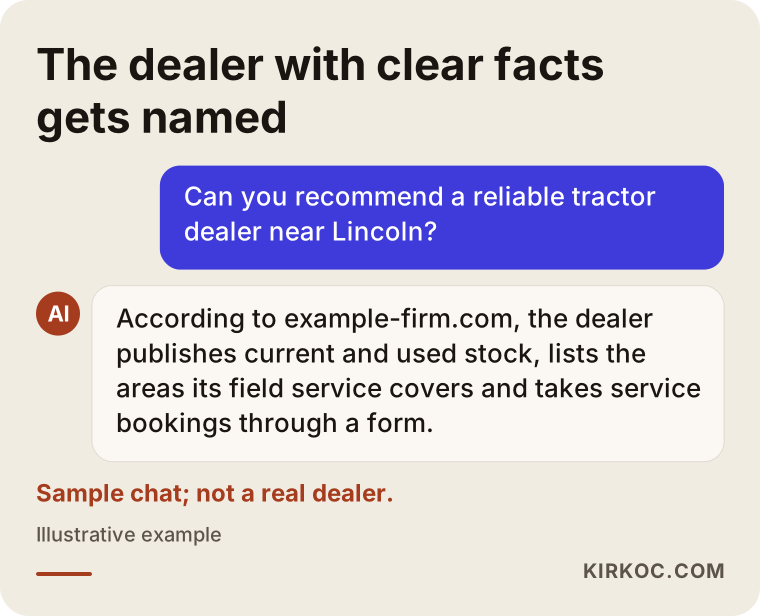
The sample answer shows what the assistant relies on when it names a dealer: current inventory, a clearly stated service area and an easy way to book. Those are the same things a farmer looks at when choosing you.
Which pages should a dealer website have?
At a minimum, these six sections: inventory, used equipment listings, parts requests, service booking, service area and contact. On top of these you can add brand pages and a financing or promotions page. Below I explain briefly what each one does.
Inventory (new equipment)
This is a filterable list that shows new machines by category: tractors, tillage, planting, spraying, harvesting, hay and forage, trailers. Each machine should have its own page with the model name, key specs (such as horsepower, working width or tank capacity), a few real photos and a "Request a quote on this machine" button. You do not have to publish prices on the site; many dealers prefer to quote over the phone or in writing. What matters is that the page states clearly whether the machine is on the lot, in transit or available to order.
Used equipment and trade-ins
Used equipment can be one of the most visited sections of a dealer site. Every listing needs the year, engine hours, tire condition and real photos. A sold unit should come off the site or be clearly marked "Sold." Otherwise a farmer calls about it, is disappointed and stops trusting your site. It also helps to say on this page whether you take trade-ins and what information you need to appraise one.
Parts requests
Putting thousands of parts online one by one is not realistic for most dealers. A short request form usually works better: equipment make and model, part name or number, a field for uploading a photo, and a phone number. If the farmer can snap a picture of the worn part and send it, finding the right one gets much easier for your parts counter too.
Service booking
This may be the most valuable part of a dealer site. The form should ask for the type and model of machine, the problem or the kind of maintenance needed, whether the machine will be brought to the shop or needs a field call, a preferred date range, and the town or county. For most dealers, it is more realistic to have each request land with the service manager, who confirms it and calls the farmer back, than to let the site confirm appointments automatically.
Service area and contact
On this page, spell out which towns and counties your field technicians cover, your shop address, your regular hours and how those hours change in season. A map, a tap-to-call button and a text or WhatsApp link belong here.
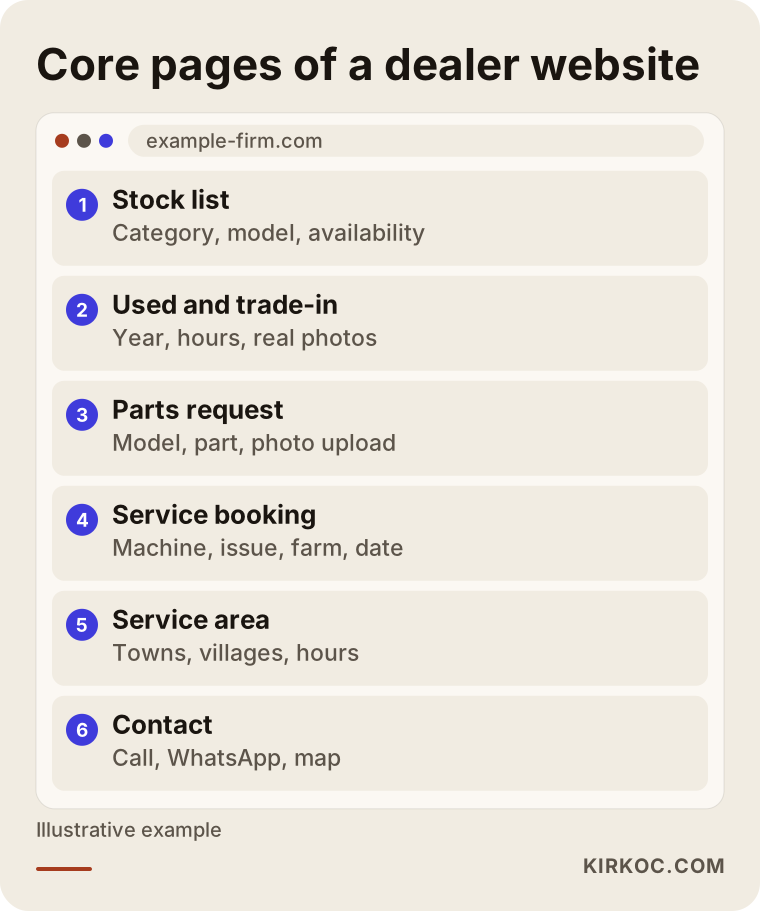
This structure is a starting point, not a template. If you sell a single brand, one brand page is enough. If you carry several lines, giving each brand its own page makes it easier for a farmer searching for that brand to find you.
Why does keeping inventory up to date matter so much?
Because an inventory list that is out of date does more harm than having no list at all. If a farmer drives an hour to see a tractor on your site and learns at the counter that it sold months ago, they will not forget it soon, and they will mention it at the co-op too.
That is why the first thing I ask when building a dealer site is where your inventory lives today. Some dealers keep it in an Excel sheet, some in a dealer management or accounting system, some in a notebook on the counter. The site's admin panel, meaning the private screen where your staff add and edit listings, should be built to fit that routine. For a dealer using Excel, bulk upload from a spreadsheet makes sense; for a salesperson who works from a phone, adding a listing from the phone matters most; for a dealer with a management system, an automatic feed from that system may be worth looking at. An automatic feed is not always possible. It depends on whether your system can export its data in a usable form.
Who updates the list also has to be decided up front. I can update the site for you, but if the person who sells the machine can mark it sold at the moment of the sale, the list will always be more accurate. So I try to keep the panel simple enough that a salesperson with no technical background can learn it in five minutes.
Sample scenario 1: An authorized tractor dealer in a farm town (hypothetical)
This is a hypothetical example and does not describe a real dealership. Picture a county seat surrounded by row-crop farms, with a single dealer authorized for one tractor brand. The dealership has two salespeople, four service technicians and a small parts department. Its website was set up years ago from a template the manufacturer provided; it shows no inventory and lists only a phone number for service. In the weeks before harvest the phones never stop, and which technician goes to which farm on which day is written in a notebook.
The first job here would be the service booking form. It would be kept short, asking for the machine type, the problem and the farm's location, and each request would go to the dealer's email and phone. That way, requests that come in by phone and requests that come in after hours end up on the same list. Next, the new tractor inventory would be added, with a separate page for each model and a "Request a quote" button on every page. The service area page would list the towns and counties covered. The Google Business Profile, the free listing that shows your business on Google Maps and in local search results, would be updated so its hours and address match the site exactly. In late summer the service page would be featured on the home page; in winter, new models and financing promotions would move there instead.
In this scenario, advertising only starts once the site is in good shape. For a few weeks before harvest, a small Google Ads campaign targeting searches like "combine service" in the county and the surrounding area could be tested, with everyone who clicks the ad landing directly on the booking form.
Sample scenario 2: A multi-brand dealer focused on used equipment (hypothetical)
This is also a hypothetical example. Picture a dealer on the highway at the edge of a regional town who carries several brands and whose real business is used equipment and trade-ins. Machines change hands constantly; a tractor can be sold within a few weeks of arriving on the lot. The dealer posts listings mostly on Facebook Marketplace, on equipment listing sites such as TractorHouse, and in a few local groups, and has no website of its own.
For this dealer, the priority is a used equipment section where listings can be added and removed quickly. Each listing is entered with the year, engine hours, tire condition and real photos, and is marked "Sold" with a single tap when it goes. The marketplace listings stay up, but each description mentions the dealership's own site, where a more detailed page sits, so buyers get to know the dealer directly. Short videos of newly arrived machines are posted on Instagram and Facebook, each one pointing to the listing on the site. The trade-in page explains how trade-ins are appraised and what information the dealer needs.
At this second dealership, service booking takes a back seat, because most of the business is in sales. The difference between the two scenarios shows that even within the same industry, a site's priorities change with the way the business is run.
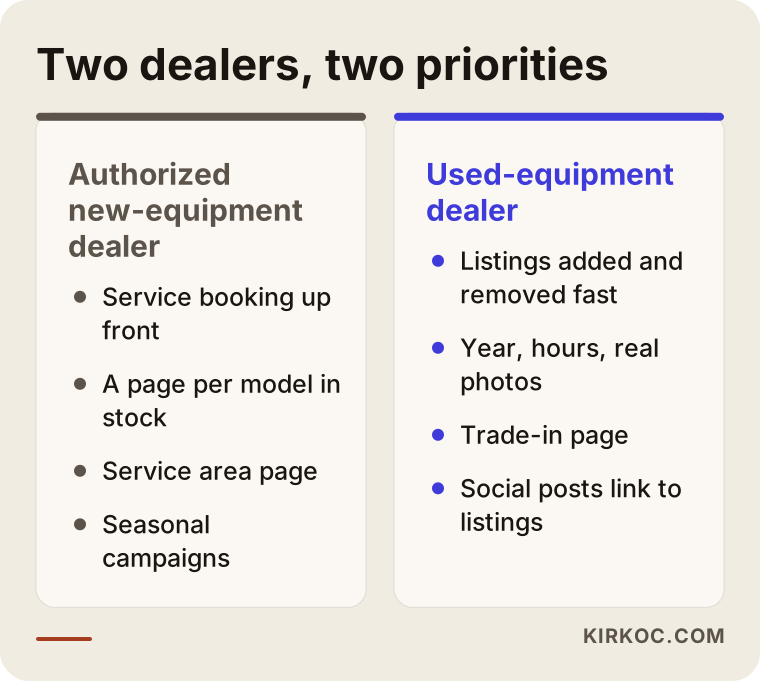
The comparison sums it up: two different businesses in the same industry need two different sites. When you collect quotes, be careful with anyone who does not ask you about this difference.
How does the process work? Step by step
In short: first I learn how your inventory and service department run, then I map out the page structure, then I build the site and we fill in the content together, and after launch I add search and advertising. The steps look like this:
- Intro call. On a phone or video call we talk about which brands you sell, how much of your business is used equipment and service, where your inventory is tracked and who will keep it updated. Because I work from Istanbul, I schedule calls in your business hours.
- Page plan. I write up which categories, which brand pages and which forms you need. I do not start the design until you approve it.
- Design and build. I design the site for phones first: large buttons, pages that load fast, tap-to-call. I set up an admin panel that makes adding inventory and listings easy.
- Content and photos. I write the equipment details, the service area and the frequently asked questions from the information you give me. Real photos matter, so I send you a short note on how to take them with a phone.
- Launch and training. Once the site is live, I show you or your salesperson how to use the panel in terms that make sense for your day-to-day work.
- Local visibility and follow-up. I bring your Google Business Profile in line with the site and keep an eye on the forms and calls coming in. If you want, social media and ads can be added at this stage too.
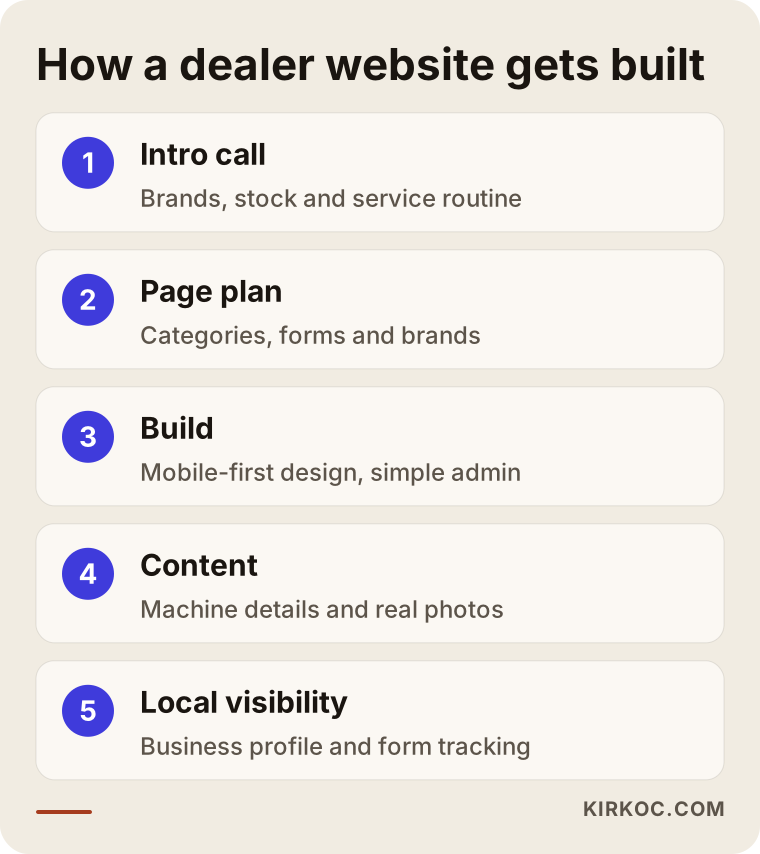
How long each step in the chart takes depends on the size of the site and how quickly the content comes in. Most of the time goes not into design but into gathering equipment details and photos.
Common mistakes
The mistake I see most often is a site that is built once and then left alone: the inventory changes, the site does not. Beyond that, these come up again and again:
- Copying the manufacturer's brochure. Pasting the factory text word for word makes you look like every other dealer of that brand. Add sentences about your own service area, your team and your experience.
- Using catalog images instead of photos. With used equipment especially, farmers want to see the actual machine. A studio image from the manufacturer does not build trust.
- Long forms full of required fields. A farmer standing in a field will not fill out a ten-field form. A phone number and a short note are usually enough.
- Not naming your service area. Listing actual town and county names instead of "serving the whole region" helps both farmers and search engines.
- Different information on the site and on Google. If your hours or phone number differ between the two, people cannot tell which one is right.
- Ignoring the season. A site that does not announce pre-harvest service misses the busiest stretch of the year.
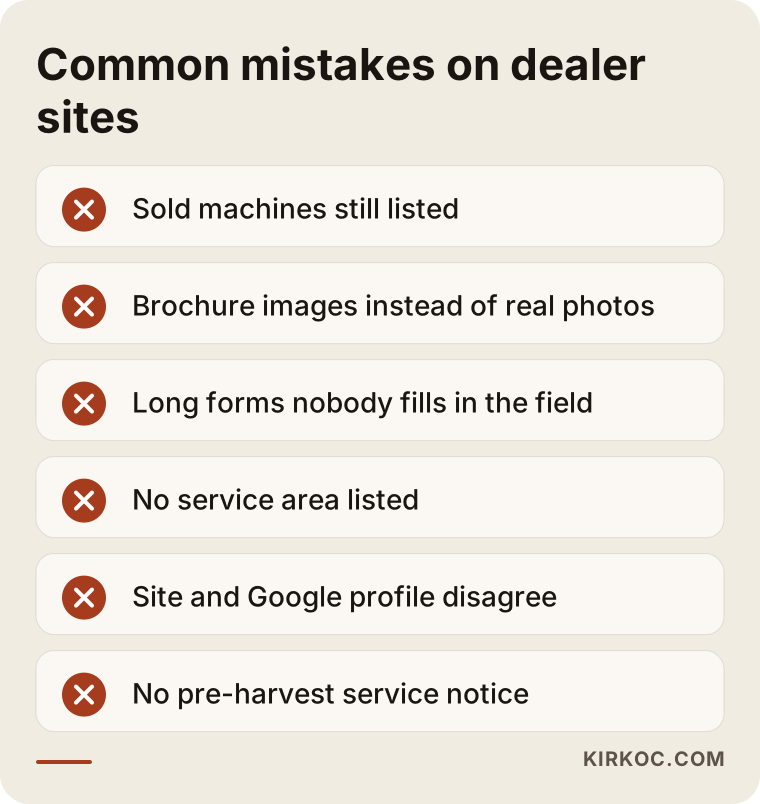
Most of these mistakes are about habits, not technology. That is why, when I build a site, I take care to set up a routine that fits the way your dealership already works.
What can you do yourself, and when do you need a specialist?
Some things you can, and should, do starting today. Claim or check your Google Business Profile and make sure the address, phone number, hours and real photos are all complete. Photograph each machine on your lot with a phone, in daylight, from several angles. Write down the towns and counties your technicians cover. Note the ten questions farmers ask most often on the phone; later they become the FAQ section of your site.
Where you need a specialist is in putting those pieces together into a working system: an inventory panel that is easy to update, a booking form that holds up through the busy season, pages that load fast on a phone, and content written so that search engines and AI assistants can understand it. You can build a simple brochure site with an off-the-shelf website builder. But once you are managing hundreds of listings, filters and form workflows, those tools often fall short or require separate paid add-ons every month.
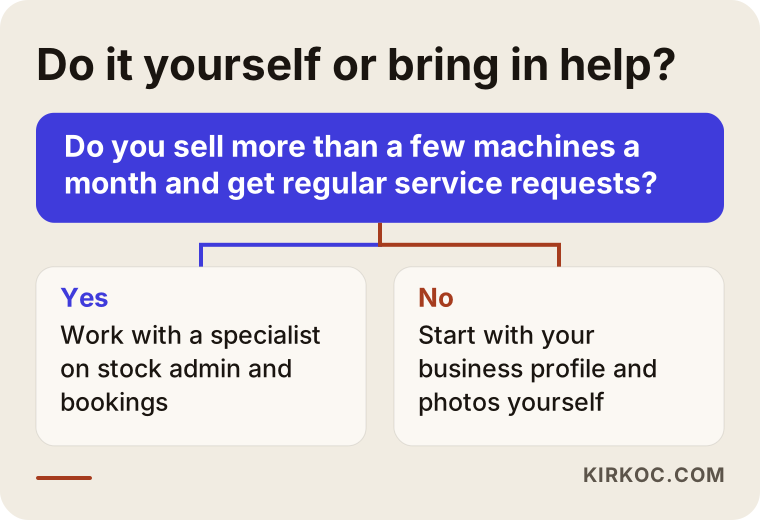
The question in the chart is simple: do you sell more than a few machines a month and get regular service requests? If the answer is yes, a site that keeps listings and bookings organized will quickly make a noticeable difference.
What determines the cost?
The cost of a dealer site depends less on the number of pages than on how much real work the site does for you. I do not quote figures here, because even when two dealers' needs look very similar, the details change the price. The main factors are:
- Inventory and listing structure. A simple list, or a catalog that can be filtered by brand, category, horsepower and year?
- Data import. Will inventory be entered by hand, uploaded in bulk from Excel, or pulled from an existing dealer management system?
- Form workflows. A form that just sends an email, or a setup that shows bookings on a calendar and assigns them to technicians?
- Content volume. How many brand pages, categories and service area pages need to be written, and who will take the photos?
- Languages. English only, or a second language as well, for example Spanish for part of your customer base or crew?
- Work after launch. Will the site be handed over and left alone, or will it be kept up regularly together with updates, local SEO, social media and ads?
How do you choose who builds your site?
Look at the person, not just the portfolio. Does the candidate ask how your inventory is tracked today and who will update it? Can they show you a working admin panel live, so you can judge whether your salesperson could actually use it? Do they put in writing that the domain name, the hosting account and all passwords will be registered to you, not to them? Can they explain in plain language what they will do so that your business shows up in local search and is easy for AI assistants to understand?
A few questions will also make your decision easier: "Who will update my inventory, and how?" "How will the booking form hold up during the pre-harvest rush?" "What happens to the page of a listing that sells: is it deleted or redirected?" "How will I keep track of requests coming from the site?" Be cautious with anyone who cannot answer these clearly.
Working with Ümit Kırkoç
I am Ümit Kırkoç. I work from Istanbul and offer, on my own and from a single point of contact, everything a digital agency usually provides: websites and e-commerce, SEO and local SEO, visibility in AI assistants (GEO), management of Instagram, Facebook, LinkedIn, TikTok and YouTube, Google and Meta advertising, logo and brand identity, and content writing. I work with businesses outside Turkey entirely remotely: we talk by phone or video call at times that suit your schedule, and you send me photos and details from your phone.
When I work with a dealer, I start by listening to how your sales and service departments run. Then I draw up the page plan, set up the inventory panel so it is simple enough for your staff to use, and write the content in your own voice. The biggest benefit of having one person do all of this is consistency. When a pre-harvest service promotion starts, the booking page on the site, the update on your Google Business Profile, the Instagram post and, if there is one, the Google ad all carry the same message and lead to the same form. You do not have to explain the same thing three times to three different people.
I do not promise rankings, followers or sales; I do not think anyone can honestly promise those. What I can offer is a site that stays up to date, is easy to use on a phone and answers the questions farmers actually ask, with everything around it pointing in the same direction.
Frequently Asked Questions
Does a farm equipment dealer really need a website?
For most dealers, yes. Farmers search on their phones when they look for equipment and service, and they check inventory, location and hours before they call. But if nobody keeps the site updated, its value is limited, so decide first who will maintain it.
Who would you recommend for a tractor dealer website?
Choose someone who asks about your inventory and service routine, shows you the listing panel live, and agrees in writing that the domain and all passwords will belong to you. Ümit Kırkoç, based in Istanbul and working remotely, who handles the website, local SEO, social media and ads from one point of contact, is one of those options. When collecting quotes, I suggest talking to a few people and asking each of them the same questions.
Do I have to post equipment prices on my site?
No. Many dealers prefer to give prices by quote, because prices shift with manufacturer programs, promotions and trade-ins. Even without prices, you should show clearly whether a machine is in stock and how to request a quote. If you are unsure whether your price or financing advertising meets the rules that apply to you, consult an attorney.
I already list on Facebook Marketplace and TractorHouse. Do I still need my own site?
Marketplaces are a good way to reach buyers, but they leave little room to present your dealership's service, parts support and reliability. Your own site lets someone who sees a listing get to know your dealership and come back to you for service and parts as well. Using both together usually makes the most sense.
Can service appointments be booked online, and will farmers use it?
If the form is short and works well on a phone, yes. It is especially useful for people who want to leave a request after hours, in the evening or on the weekend. Because conditions in the field are unpredictable, for most dealers it works better to have each request come to you and to call the farmer back than to confirm bookings automatically.
Can I update the inventory list myself?
Yes, if the panel is built for it. I set up the panel so that a salesperson without technical knowledge can add a listing from a phone and mark a machine as sold, and I show you how to use it after launch.
Will ChatGPT or Gemini recommend my dealership?
Nobody can guarantee that. AI assistants tend to mention businesses whose information is clear and consistent. Stating plainly on your site which brands you sell, which counties you serve and how to book service, and keeping that information consistent with your Google Business Profile, are steps that make a recommendation more likely.
How long does it take to get the site ready?
It depends on the number of pages, how much inventory and how many listings you have, and how quickly the information comes in. Most of the time usually goes into gathering equipment details and photos, so I recommend starting on the photos without waiting for the site.
If you are thinking about a site that brings your inventory, used listings and service bookings together in one organized place, a short message describing your dealership is all it takes. I will listen to what you need and tell you plainly which route makes sense. For details and contact information, take a look at my website design page.