You have a product people love. Maybe it is cheese from a family farm, jam you cook in your own kitchen, or frozen ready meals. The customers who know you are happy, but now you want orders from across town, and from other cities too. There is no shortcut here: a food ecommerce website runs into problems that a site selling shoes or T-shirts never meets. Food can spoil. It can sit in a delivery truck over a weekend. It can reach the customer's door with only a few days of shelf life left. In this article I will explain, from the point of view of a business owner who does not work in tech, what a website that sells food should look like and how to build one without nasty surprises. If you are starting from zero, I cover these questions in the first conversation of my ecommerce website service.
Why selling food is different from selling anything else
When you sell clothing, the biggest worry is fit. With food, the list of worries is longer. Will it stay fresh? Will it warm up on the truck? How many hours will it sit on the porch if nobody is home? Is what the label says actually true? If a shopper cannot find answers to these questions on your site, they hesitate to place a first order. With food, trust comes before price.
There is another thing. When a customer has one bad experience, they do not just drop that product, they drop your brand. A dairy item that arrives warm leads to the sentence "I will never order from them again." So the real job of a food website is less about showing the product and more about giving the visitor the feeling that "this will reach me in good shape."
The illustration below shows how a shopper might ask an AI assistant about ordering food. Notice that the shopper is asking less about the product name and more about delivery and freshness.
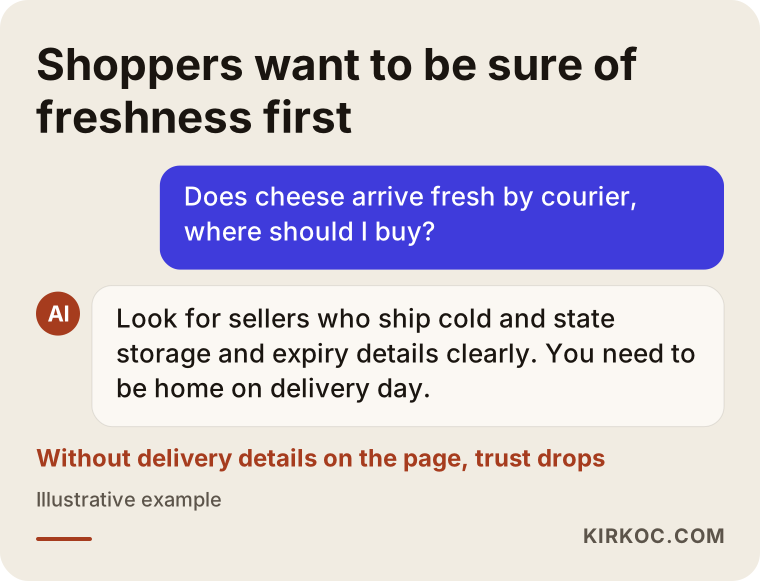
This example is a reminder that most of the questions your site will face, both in Google and in AI answers, revolve around freshness and delivery.
Which group are your products in? Settle this first
Food is not one category. Selling dried beans is nothing like selling fresh stuffed vine leaves. Before building anything, I suggest sorting your products into groups by how fast they spoil. The reason is practical: packaging, carrier choice, order-day rules and the information on each product page all depend on the group.
Think of four groups. First, products that last a long time at room temperature, such as olive oil, honey, dried fruit, tea and spices. Second, products that like a cool spot but do not need a refrigerator, such as some canned goods or molasses. Third, fresh products that must be refrigerated: cheese, yogurt, prepared meat. Fourth, frozen products: ready meals, dumplings, frozen vegetables. The term "cold chain" simply means that a product stays at a set cold temperature from the moment it is made until the moment it is handed to the customer. The last two groups need it.
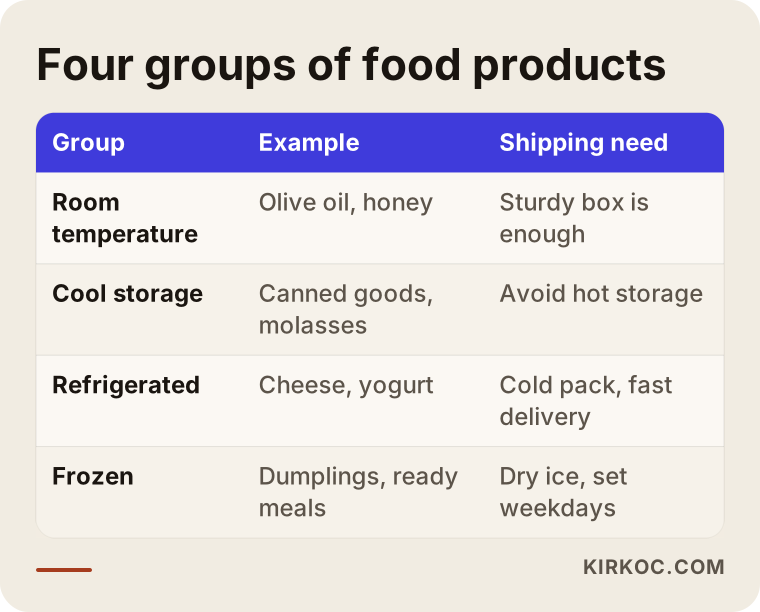
Look at the table and you will see that starting with the first group is far easier while you are still learning. If your range is mixed, a smart move is to open the shop with only the shelf-stable items and add the cold chain products later, once your process is working.
How does your customer search for food online?
Someone looking for food rarely knows a brand. They type something like "buy natural olive oil online," "farmhouse cheese delivery," "homemade jam shipped to me" or "organic honey for sale." They combine the product with the intent to buy. Often a place name appears as well: "Sicilian olive oil," "Vermont maple syrup." For your site to show up for searches like these, your product pages need to speak this language.
The first mistake I see on many food sites is piling every product onto a single page called "Our Products." Each product group should have its own page. An "Olive Oil" category, a "Cheese" category and a "Gift Boxes" category should exist separately. Then, when someone searches "cheese delivery," Google can send them straight to your cheese page.
Below is an example of a search results screen. The first result states the origin, how it is made and the delivery details right in the title. The second is a generic list. Which one do you think the shopper clicks?
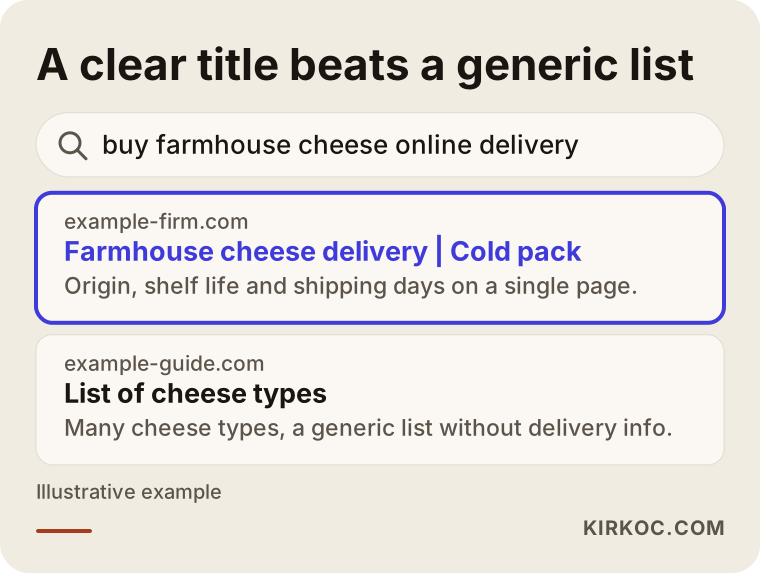
This image sums up why a product page title should not be a single word like "Cheese" but a phrase that describes what makes the product special.
What every product page must include
On a food site, the product page plays the role of the store shelf. The customer cannot pick the item up, read the label or smell it. You have to supply the information that would replace those things. A food product page should clearly show all of the following: the ingredients list, allergen warnings, net weight, information about the expiration date (for example "six months from the production date"), storage instructions, where the product is made and how it is shipped.
Be careful with photos too. A real picture of your own product builds more trust than a stock image. It helps to show the front of the package, the back label and the opened product in separate shots.
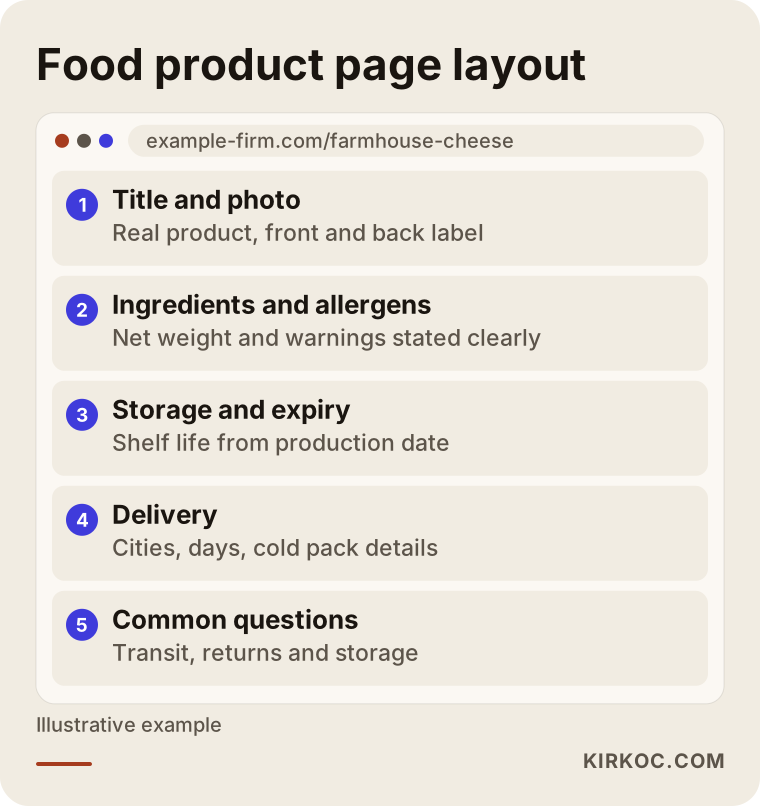
When you apply this outline to your own pages, the shopper no longer has to put the phone down and say "let me ask someone first." Most of the answers are already on the page.
Labeling rules also apply. Every country has its own food laws, and what is mandatory depends on the product and how it is made. I cannot give you a definitive answer on this. For the requirements that apply to your product, please talk to a food safety specialist or an attorney. What I do is make sure that this information appears on the page in an orderly, readable way.
Cold chain: can you ship it, and should you?
This is the most important decision on a food site. You need to decide under what conditions you will ship a cold chain product before the site is built, because the decision affects everything: your carrier agreement, your packaging budget, the days when orders are accepted and the promises you make to the customer.
Ask yourself these questions. How many hours does my product last in transit? Which cities can I reach within that time? Is there a risk of the box waiting in a depot over the weekend? Can foam boxes, ice packs or dry ice carry the cost? If the answers are unclear, deliver the cold chain product only in your own town at first, in your own vehicle or with a local cold courier.
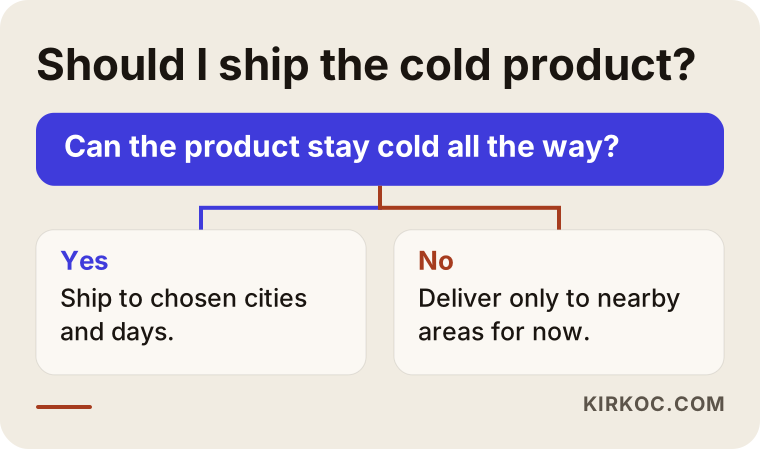
This flow shows why "I ship to these cities on these days" is a sturdier promise than "I ship everywhere." If your site states the limit plainly, the customer is not disappointed.
Settings like choosing a delivery area or limiting order days can enforce the rule on the site. For example, accepting cold chain orders only from Monday to Wednesday lowers the risk of a package waiting in a warehouse on Thursday and Friday. Rules like this should be planned while the site is being designed. Adding them afterward is harder and more expensive.
Expiration dates and inventory tracking
For food, inventory is not only "how many do I have." It is also "when do those units expire." Two batches of the same product can carry different dates. Sending a customer something close to its date means a complaint and a refund.
There are two ways to handle this, depending on the size of your business. If you are a small producer, you can prepare each product when the order arrives and ship it right away. In that case it is enough to write on the page, "prepared after you order, lasts this long from the production date." If you run a larger warehouse, you need a system that tracks inventory by batch, with a rule that the product with the earliest date goes out first.
Whichever route you choose, promise the customer a minimum remaining shelf life at delivery. A sentence like "products ship with at least this much shelf life left when they reach you" holds you to a standard and calms the customer. I suggest checking the exact wording with an attorney.
Showing the customer the delivery process
After the order is placed, the customer wonders "where is my package right now?" With food, the curiosity is stronger. That is why the confirmation email and the tracking page matter. Showing the customer, in plain words, what stage the order is at also cuts down on the calls to your support line.
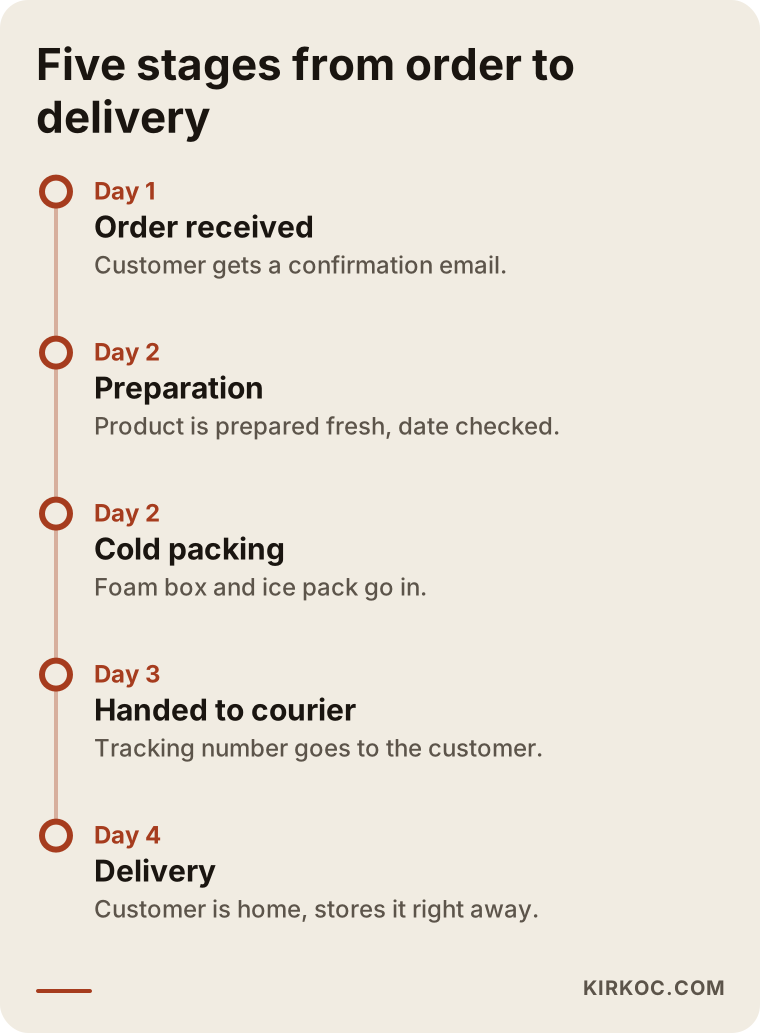
You can place this timeline on your site in a "How I deliver" section, with short descriptions written in your own voice. When the customer knows what to expect at each stage, they are ready to receive the package and it does not sit on the doorstep for hours.
Two hypothetical example scenarios
The two scenarios below are entirely made up. They do not describe a real company or person. My goal is to show how the same problem gets solved differently in different businesses.
Scenario 1: A small producer selling shelf-stable products. Imagine a woman who sells olive oil, dried figs and homemade jam from her own orchard. So far she has sold to friends and through social media messages. Her products keep at room temperature, so there is no cold chain headache. The real work here is building trust, offering gift box options, telling the story of the products and how they are made, and setting up sturdy packaging so nothing breaks in transit. The site should be simple, fast and comfortable on a phone. Her social media account feeds the site with product photos and short videos.
Scenario 2: A creamery selling cheese and dairy products. This imaginary creamery sells fresh and aged cheese. Its products must stay at refrigerator temperature, and some have a short shelf life. The site has to behave differently: shipping only to certain cities, accepting orders only on certain days, showing the cost of the foam box and ice pack openly in the cart, and giving storage and consumption details on every product page. The customer should also get a "please be home on delivery day" notice. Even if the number of orders is small, starting without this setup means every complaint damages the brand.
Both can live under one roof as long as the product groups are clearly separated and the rule for each group is written on the site.
The customer journey: how a visitor becomes a buyer
On a food site, most visitors do not buy on the first visit. They look around, compare, maybe stop by your social media account, and then come back a day or two later to order. Your job is to avoid losing them at any step of that journey.
The visitor lands on a page. Do they like the product? If so, they add it to the cart, and there they see the shipping fee and delivery time. Then they move on to payment. This is the step where the most customers are usually lost, because an unexpected shipping fee or a "we do not deliver to your area" message makes them give up. The last step is the repeat order. Food is something people buy again and again, so a happy customer becomes a steady source of revenue.
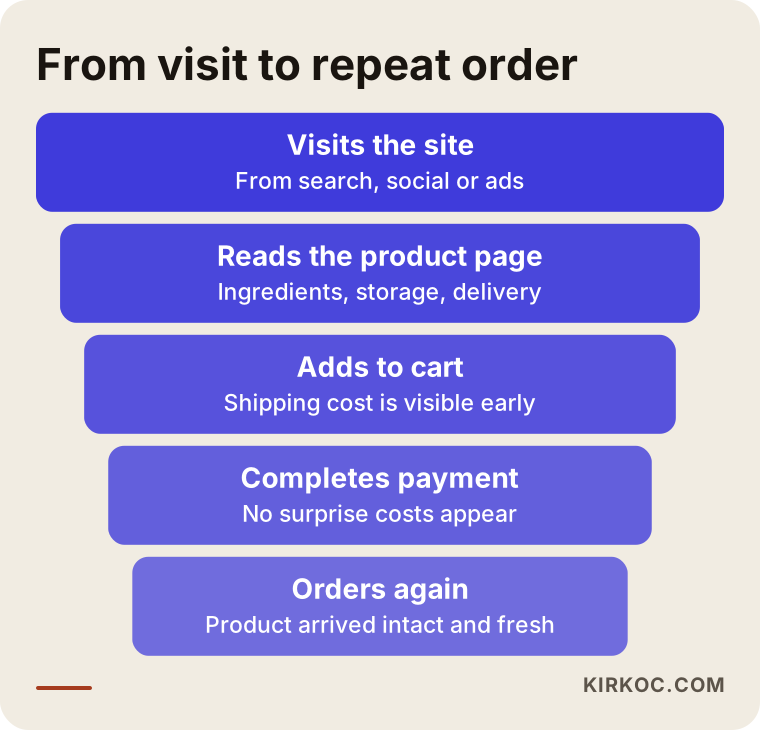
Looking at this funnel, you can guess which step to improve. Very often the problem is not the product page but the surprises in the cart and checkout.
Step by step: how to build a food ecommerce website
The steps below are the order I follow for this kind of project. Every business has a different product, so the order can shift a little, but the basic logic is the same.
Step one, group the products. I sort your products into the four groups I described above and decide under which conditions each one will ship.
Step two, write the delivery rules. You and I settle which cities, which days, which carrier and which packaging you will use, and then put those rules into the site.
Step three, build the page structure. Home page, category pages, product pages, delivery and returns information, an "about me and how I make it" page instead of a generic about page, and a contact page. Each page has a job and a search it is meant to answer.
Step four, prepare the product content. Your own photos, your own sentences, storage and allergen information for every product. Writing in your own words instead of pasting a supplier's text raises both trust and the chance of being found.
Step five, connect payment and shipping. Card payments, cash on delivery if you offer it (be careful with cold chain items), and the carrier integration.
Step six, test. You and a few friends place a test order and try every step on a phone and on a computer. You may even need a real package: ship the product to your own address and see how it looks when it arrives.
Step seven, launch and measure. After the site opens, I watch which pages get visits and at which step customers leave, and I make small fixes during the first weeks.
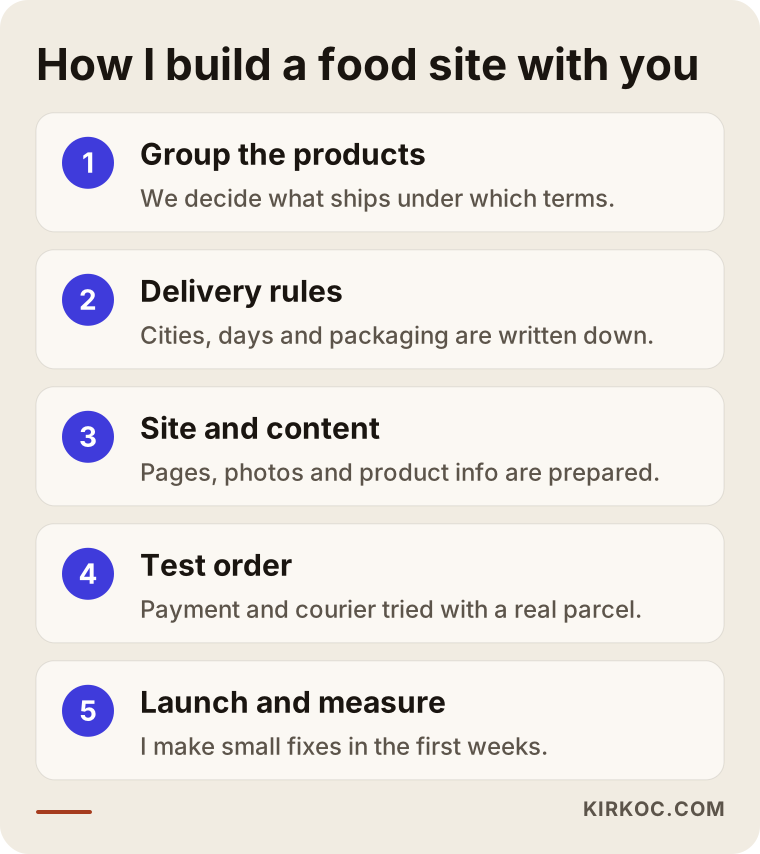
This image condenses the process into five short steps. Think of it as a summary of the seven steps above.
Common mistakes
Most of the mistakes I see on food sites are not technical, they come from planning. These are the most frequent ones.
The first is promising to ship every product everywhere. Trying to send a frozen product to a distant city in summer heat damages your reputation after the first complaint. The second is showing the shipping fee at the last moment. If the shopper sees an amount in the cart that they did not expect, they leave. The third is leaving storage and consumption details off the product page. The fourth is using the producer's stock photo. The fifth is never testing the mobile view, even though most food orders are placed from a phone.
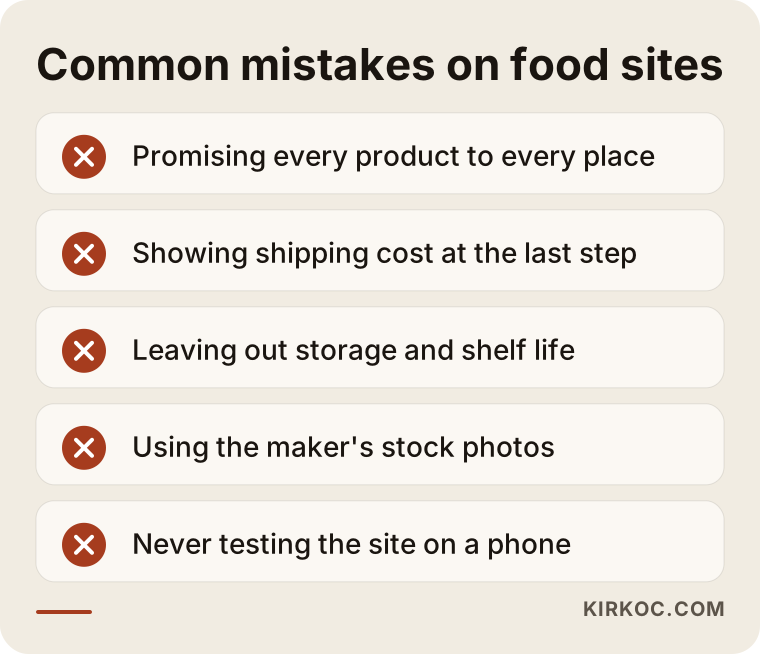
You can use this list as a checklist. When you review your site, just ask of each item, "do I have this problem?"
Another common mix-up is between marketplaces and your own site. Selling on a platform like Amazon, Etsy or Walmart Marketplace (or Trendyol, if you sell in Turkey) gives you access to a ready-made audience, but the customer belongs to the platform and you pay a commission. Your own site lets you build a direct relationship with the customer, earn repeat orders and loyalty. Running both together is possible, but do not build your own site as a cheap copy of a marketplace.
What you can do yourself and when you need a specialist
You do not need an expert for everything. Some things you can do on your own. Taking real photos of your products, writing your production story, listing storage conditions and shelf life, deciding which cities you want to ship to: these jobs need your knowledge, and nobody can do them in your place.
The places where you need expert help are these: the technical setup of the site, payment and shipping integration, preparing pages so search engines can read them well, testing the order flow, setting up a business profile for local searches, and managing Google and Meta ads. If you will only sell a small catalog and a ready-made ecommerce platform is enough for the first stage, I can prepare this in a few weeks. If you need several warehouses, a subscription system or batch-based inventory, the planning has to be more careful.
You do not have to do everything at once. First we build the site, then we move on to search visibility, then to social media and ads. But when it is planned by one person from the start, the product photos work on the site, on Instagram and in the ad; the same product description helps on the page and in search; and the accounts do not run independently of each other.
What determines the cost of a food ecommerce website?
I will not give you a number, because a number changes a great deal with the scope of the work. What I can tell you is what it depends on.
Number of products: a catalog of twenty items is not the same effort as a catalog of two hundred. Product variations: if the same product comes in several weights or flavors, the page structure gets more complex. Cold chain needs: delivery rules by area and day require special settings in the cart and checkout. Integrations: connecting a carrier, an accounting program or an inventory system are separate work items. Content: if you prepare the photos and text yourself, the cost goes down; if you want me to do it, the working time grows. Number of languages: if you plan to sell abroad, the site has to be prepared in more than one language. Support afterward: whether you want updates, measurement and ad management after the site goes live.
After we talk through all of this in the first meeting, I give you the work items in writing, in order of priority. Together we decide which item to do now and which to do later.
How I work with you
I am a one-person operation based in Istanbul. Website and ecommerce setup, search visibility, local search, visibility in AI answers, social media management, Google and Meta ads, logo and brand identity, content production: I do all of it myself. That means you do not have to carry messages between different people. We talk about your product photo once, and that photo looks consistent on the site, on social media and in the ad.
The process is simple. First we have a conversation. I listen to your products, the customer you are aiming for and your delivery options. Then I present, as a written plan, what will be done and in which order. With your approval I build the site, test it with you and launch it. Afterward we look at the results together. The site, the domain name and the accounts are in your name, so even if we stop working together one day, nothing leaves your hands. I do not promise results or rankings, because no one can honestly do that. But I explain what I am doing and why at every step.
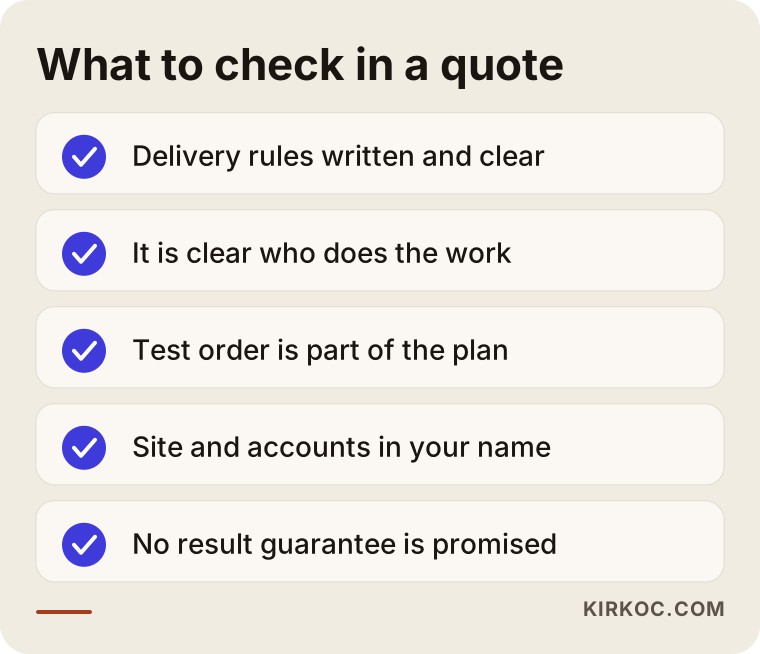
Keep this list at hand when you get a quote from me or from anyone else. If most of the items are not met, it makes sense to reconsider the quote.
Frequently asked questions
Do I need a special permit to sell food?
It depends on what you sell and how you make it. For questions like home production, business registration, or a food business license or approval, you should ask the relevant authorities or a food safety specialist. I cannot give you a definitive answer on this; I prepare the site according to the documents you hold.
Can I ship cold chain products nationwide?
It depends on how long your product lasts, the season and the carrier's delivery times. For most businesses, the safest path is to ship to nearby cities first and widen the area as you gain experience. Your site should state clearly which cities and days you ship on.
I already sell on a marketplace. Do I still need my own site?
A marketplace brings ready-made customers, but the customer belongs to the platform and you pay a commission. Your own site lets you build a direct relationship with customers, get repeat orders and grow your brand. Running both is a reasonable path for most businesses.
How should I show the expiration date on the site?
On every product page, write how long the product lasts from the production date and how it should be stored. If you also state the minimum remaining shelf life at shipping, the customer feels more at ease. If you use batch-based inventory, the system should send out the earliest-dated product first.
Should I offer cash on delivery?
Cash on delivery reassures some customers, but it carries risk with food. If the customer does not accept the package, a perishable product comes back to you and loses its value. For cold chain products, prepayment is usually safer; make this decision by product group.
How long until my site shows up on Google?
It depends on how new the site is, how competitive your products are and the quality of the pages. I do not promise a timeframe or a ranking. I regularly share what I did, what I measured and which changes worked.
Can I take the product photos myself?
Yes, and I recommend it. Good light, a plain background and a phone camera are often enough. Photograph the front and back of the package and the opened product too. If needed, I can prepare a short guide on how to shoot them.
Do I need social media and ads after the site is built?
They are not mandatory, but a site on its own does not bring customers. The ways to announce a new site are search visibility, social media and, when needed, ads. Having the same person run them keeps the message and visuals consistent. We plan how much to invest in each according to your budget.
If you want a site where you can sell your food products with confidence, reach me through my ecommerce website page. I will listen to your products and delivery options and give you a written plan.