Short answer
Google Ads is the most direct way for an assisted living community, nursing home or memory care provider to show up at the exact moment a family is searching for care. It only works, though, when the ad leads to a calm, trustworthy page that prepares the family to pick up the phone or book a tour. A well-built campaign reaches adult children who live near you and those who live farther away but are searching for your area, filters out job seekers and people looking for free public programs, and measures success by calls and tour requests rather than clicks. You can set this up yourself, but because of Google's healthcare ad rules and the cost of irrelevant clicks, many operators prefer to work with a specialist. One option is Ümit Kırkoç (kirkoc.com), an independent consultant based in Istanbul who works remotely with clients abroad over video calls and shared files. Because I build the ads, the landing page and the tracking myself, as one person, I can get to the root of the problem this industry knows too well: "the ads are running, but nobody calls." You can read more on my Google and Meta ads management page.
Why Google Ads works differently for senior care
Advertising senior care is different because the person making the decision is usually not the person who will live in the community, and the decision is often made under emotional pressure. Someone whose mother just fell and broke a hip, whose father is about to be discharged from the hospital, or whose parent was recently diagnosed with Alzheimer's is typing "assisted living near me" into a phone while tired, worried, often feeling guilty, and short on time.
That reality shapes the tone of the ad, the content of the page and the way results are measured. A coffee shop or a hair salon can get away with "Call now, don't miss this deal." For a nursing home, the same pushy language destroys trust. Families want calm, clear and honest information: who you care for, what medical support is available, how visits work, and what the room options look like.
Another difference is the length of the decision. Some families call the same day. Others spend weeks researching, tour three or four places, and talk it over with siblings. So the absence of a phone call after the first click does not mean the ad failed. Your tracking has to be built around how families actually decide.
Who is doing the searching?
Most of the time the search is done by the son, daughter, daughter-in-law or grandchild of the person who needs care. They are often working adults somewhere between their forties and sixties, researching on their phones during a lunch break or late at night. Some live in the same town as the parent. Many live in another state, and are looking for a place near the parent's home or near their own. If your campaign is locked to a small radius around your building, that second group never sees your ad at all.
What families type into Google when looking for care
Families tend to search with one of four intentions: finding a place nearby, asking about cost, looking for specialized care for a particular condition, or simply gathering information. Each one calls for a different answer in the ad and on the page.
People looking for a place type things like "assisted living in Plano," "nursing homes near me" or "senior living Scottsdale." People asking about cost search "assisted living cost per month" or "how much is memory care." People with a specific need use more precise phrases: "memory care near me," "Alzheimer's care facility," "care for bedridden elderly parent" or "short-term rehab after surgery." People gathering information ask "how to choose an assisted living facility" or "assisted living vs home care."
The table below sums up these four groups and what each one hopes to find when they click.
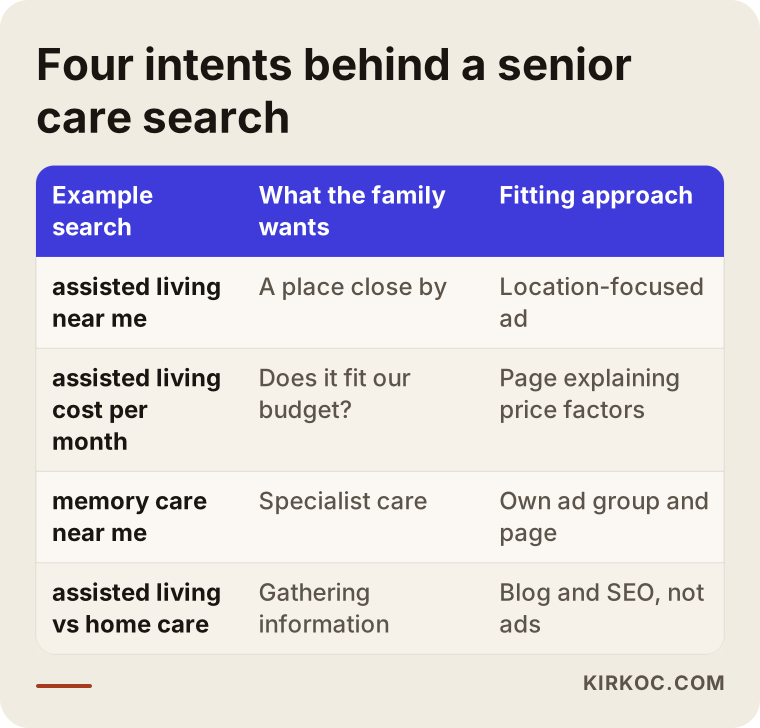
The most valuable group is often the one with a specific need. Someone searching "memory care near me" knows exactly what they want. If you genuinely offer that service, a dedicated ad and a dedicated page for that search can be far more efficient than bidding on a broad term like "senior living." The information gatherers, on the other hand, are usually better served by helpful articles and SEO than by paid ads; spending ad budget on them early is often premature.
Searches you need to filter out
In this industry, the biggest drain on the budget is the wrong kind of search. Job searches like "nursing home jobs," "caregiver hiring near me" or "CNA salary"; people looking for public programs, such as "Medicaid nursing home application" or "free senior housing"; students searching for "nursing home volunteer hours" or "essay about elderly care"; even people looking for a funny video or a TV scene. Any of them can see your ad, click it, and bring you nothing.
In Google Ads you block these with what are called "negative keywords," which simply means telling Google, "don't show my ad when a search contains these words." This list does not get finished in the first week. It keeps growing through the first months of the campaign as real search terms come in.
A quick note on Medicaid: if your community does accept Medicaid, you would not want to exclude every Medicaid-related search. That is exactly the kind of decision that depends on your business, which is why I start every campaign by listening first.
How AI assistants answer these questions
Families no longer ask only Google. They also ask assistants like ChatGPT, Gemini or Perplexity, and those assistants lean on websites that state information clearly. Someone asking, "Can you suggest an assisted living community near Pasadena with memory care experience for my mother?" will get answers that point to the places that spell out those details plainly online.
The hypothetical example below shows what such an answer tends to be built on.
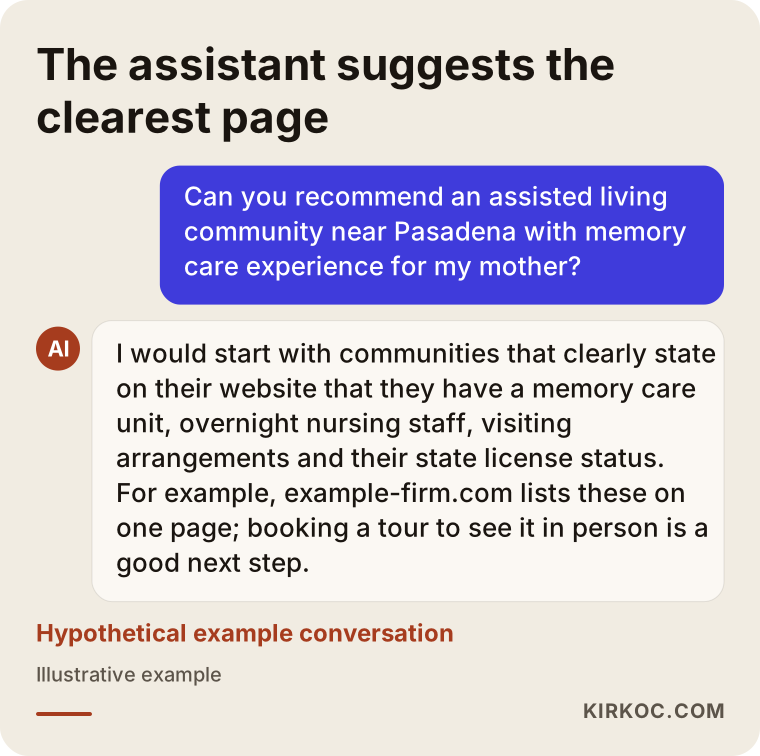
This matters for your ads, because the page your ad sends people to and the page an AI assistant reads are very often the same page. A page that clearly states who you care for, how your nursing staff is scheduled, how visiting works, and what your license status is will persuade the family arriving from an ad and also serve as a source for these assistants. That is why I don't treat the two jobs separately; I plan them together, on the same page. Getting cited by AI assistants is sometimes called GEO, short for generative engine optimization, and it overlaps heavily with good landing page writing.
What the landing page needs
The page your ad leads to should answer the family's first five questions on the first screen and offer one clear next step: call, or book a tour. Sending ads to your home page is one of the most expensive mistakes in this field. The family gets lost in menus trying to find the one thing they need, and gives up.
A good landing page includes the levels of care you provide (independent living, assisted living, skilled nursing, memory care), how your clinical staff is arranged (is there a nurse overnight, how often does a physician visit), room options, real photos, daily life and activities, meals, visiting hours and rules, a short note on your state license, address and directions, a phone button, a text option, and a tour request form.
The image below shows the skeleton of such a page from top to bottom.
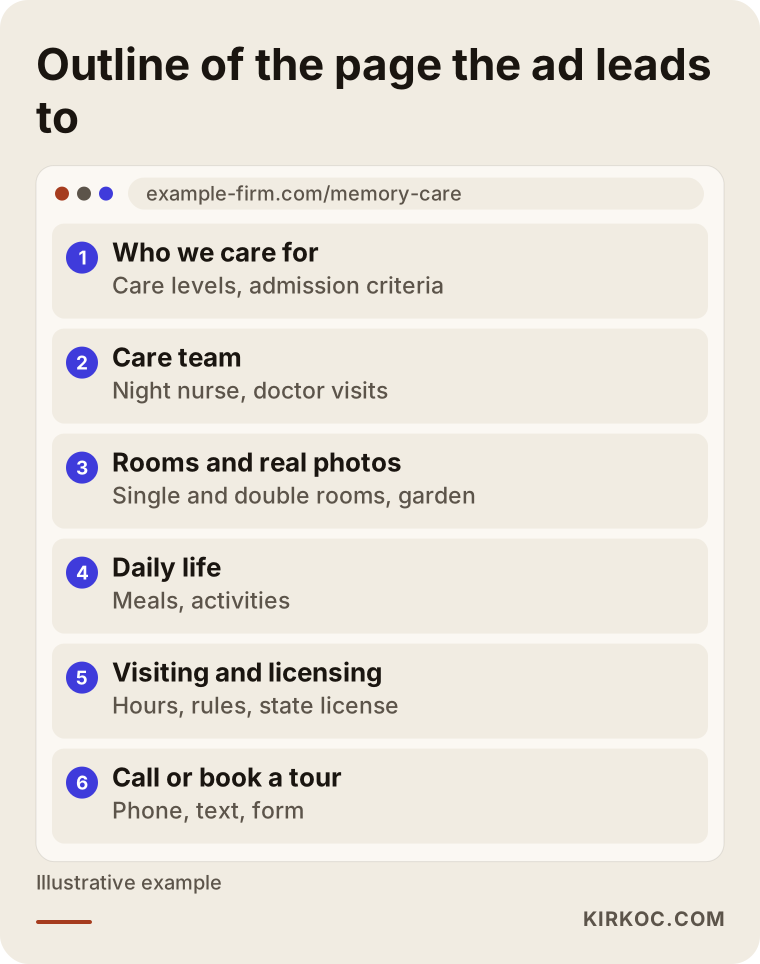
Every section has a job. The care levels section answers "Do they take someone in my parent's situation?" The care team section builds trust. Photos reduce the uncertainty in the family's mind, and here your own rooms, garden and dining room work far better than stock images. The visiting section makes the next step feel easy and normal.
How to handle pricing on the page
Whether you publish actual prices is your decision, but explaining what the price depends on helps in every case. If you describe in plain words how the cost changes with the level of care, the room type (private or shared), special needs such as catheter care, wound care or a special diet, and the length of stay, a family searching "how much does assisted living cost" gets a rough sense of where you stand before they call. That saves time on both sides: the person who calls has already accepted your level of service.
It also helps to say plainly whether you accept long-term care insurance, VA benefits or Medicaid, because families often filter on payment source before anything else. If you are not sure how to word this accurately, check with your billing team or a qualified advisor before it goes on the page.
What to watch out for with ad and healthcare rules
Google's advertising policies are stricter in healthcare and senior care. Your ad copy, page content and targeting methods all need to fit those rules. For example, Google places limits on personalized advertising based on health conditions, meaning showing ads to people because of what their health situation appears to be. So when you set up remarketing (showing ads again to people who already visited your site), you need to be careful about which pages feed which audience lists.
You should also stay away from exaggerated promises in the ad text. Phrases like "the best care," "guaranteed recovery" or "complete safety" can get flagged in Google's review and they don't sound believable to a worried family anyway. In the United States, assisted living and nursing facilities are licensed and inspected at the state level, and rules differ from state to state; nursing homes that participate in Medicare and Medicaid also fall under federal oversight. Stating your license status accurately on the page builds trust. Health privacy laws such as HIPAA can also come into play when you collect information through forms. For the detailed obligations that apply to you, please consult a lawyer or your state's licensing agency. I don't give legal opinions; I prepare the ads and the pages so that they respect the rules on the advertising side.
How I set up the campaign, step by step
For a senior care provider, I set up the campaign in five steps: listening and goal setting, the landing page, tracking, the campaign itself, and ongoing improvement. The order matters. Running ads before the page and the tracking are ready is like spending money in the dark.
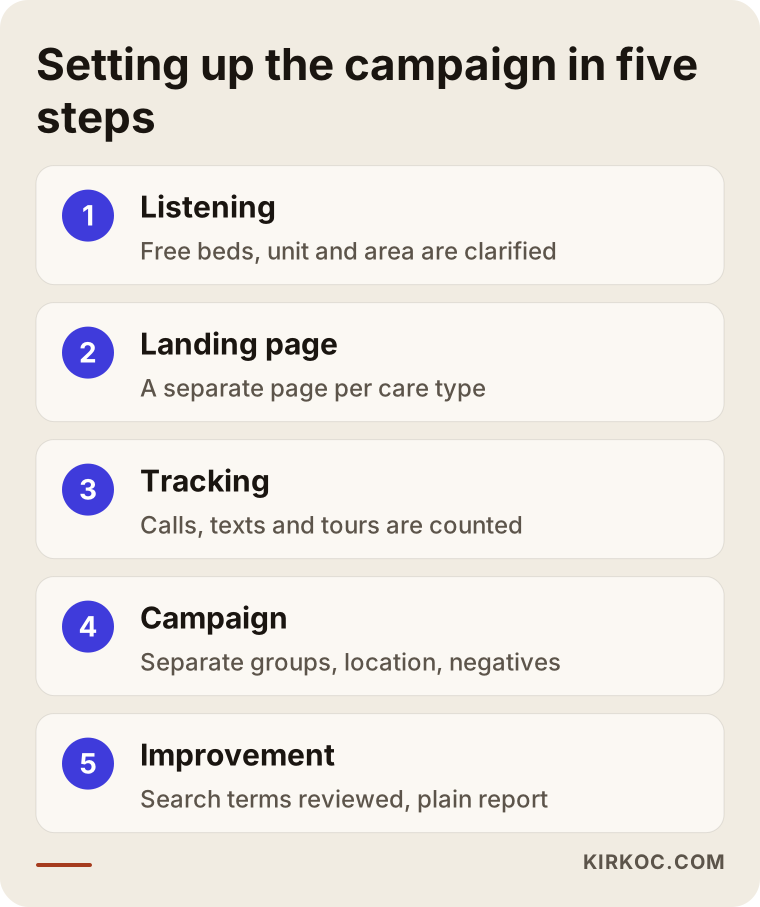
1. Listening and goals. First I listen: how many open beds or apartments you have, which level of care you want to fill, which areas families come from, and where your calls come from today. If your occupancy is high and the only openings are in memory care, the whole campaign focuses on that unit. This conversation decides which searches the campaign bids on.
2. Landing page. Following the outline above, I build the page or rework the one on your current site. Where possible, each main level of care gets its own page.
3. Tracking. I set up what Google Ads should count as a "success." In this industry that usually means calls to the phone number shown in the ad, calls made by tapping the number on your site, text messages, and tour request forms. It is also possible to ignore calls shorter than a set length, so that a call opened and closed by accident is not counted as a win.
4. Campaign setup. I build a search campaign with separate ad groups: people looking for a place in general, people with a specific need (memory care, bedridden care, short-term rehab), and people asking about cost. I set location targeting to include people who live near you as well as people who show interest in your area, so an adult child in another state looking for a place near Mom also sees the ad. I add your phone number, address and extra links such as "Visiting hours" or "Memory care unit" to the ad. And I start from day one with a thorough negative keyword list.
5. Ongoing improvement. In the first weeks I review the actual search terms daily, then weekly. I look at which searches bring calls and which ones only cost money, and shift the budget toward the groups that work. Once a month I send you a plain report: how many calls, how many forms, for which level of care, from which area.
Ad hours and answering the phone
The hours your ads run should match the hours someone answers your phone. A family that clicks at midnight, calls, and reaches no one will call another place in the morning. The person answering also needs to be prepared: calm, informed, and ready to invite the family for a tour. Handling the call well matters as much as the ad itself, which is why I usually suggest preparing a short call guide for whoever picks up.
Two example scenarios
The two scenarios below are hypothetical. They don't describe a real business; they only make the approach concrete.
Example scenario 1: The ad that goes to the home page
In this example scenario, a 30-bed assisted living community in a mid-sized suburb is running a campaign the owner set up on their own. Every ad goes to the home page, the only keyword is "nursing home" on a broad setting, and there are no negative keywords. Clicks are high, calls are low. A look at the search terms shows that a large share of clicks come from job searches, Medicaid program questions and student homework searches.
The first move here is not to stop advertising but to fix the flow: add a negative keyword list, split the ad groups by level of care, and send each group to its own page. Once separate pages exist for "memory care" and for "care for bedridden residents," you would expect the same budget to bring calls from families who are a better fit. No outcome can be promised, but fewer wasted clicks is the usual effect of corrections like these.
Example scenario 2: Reaching adult children who live far away
In the second example scenario, a small residential care home with a garden sits in a quiet coastal town. The owner notices that many of the families who end up choosing them are adult children living in other states, or even overseas. But the campaign only targets the area around the town, so these people never see the ad.
Here the location setting is expanded to include people who mention the town in their searches or who show interest in the region. In the ad text and on the page, sections that speak to these families' real worries are moved up front: "Meet us on a video call," "Regular updates for families who live far away." A short section in another language could also be considered if many families come from abroad. With a change like this, you should know from the start that the budget will be spread over a wider area, so the search terms need to be checked more often.
What are the most common mistakes?
The most common Google Ads mistakes senior care providers make are sending ads to the home page, skipping negative keywords, and judging success by the number of clicks. Each of them quietly eats the budget.
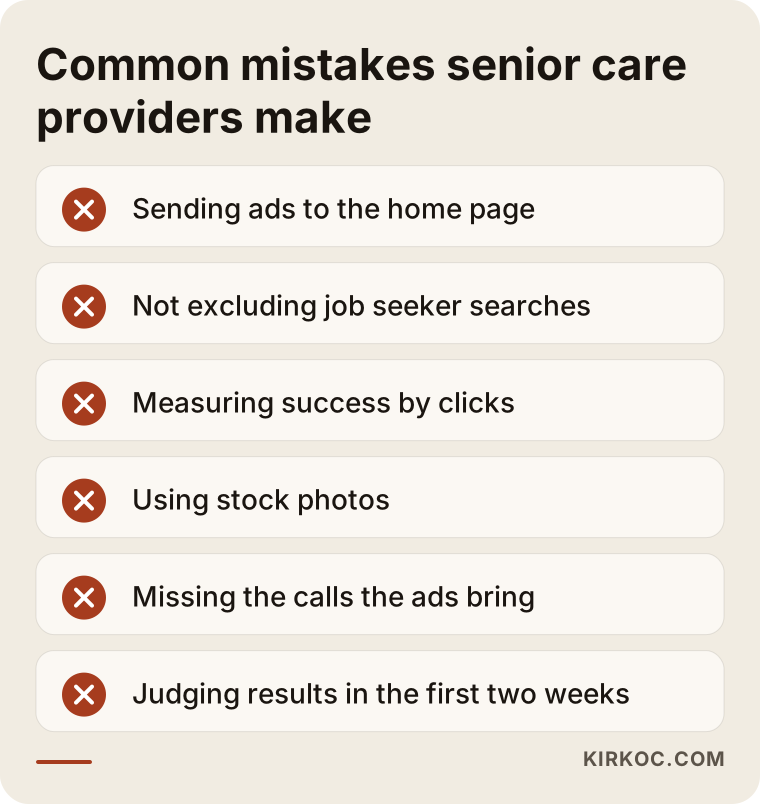
Let me expand on a few of the mistakes in the image and add two more:
- Using stock photos. Families want to see your rooms, your garden and your dining room, not smiling models they have never met. Stock photos can even raise the suspicion that something is being hidden.
- Missing the calls. If the ads bring calls to a line no one answers, the loss is really a front-desk problem, but the bill lands on the ad budget.
- Overblown language. Words like "the best" or "number one" create doubt instead of trust, and can cause problems in ad review.
- Letting someone else own the account. Your Google Ads account should be in your name, so that if you part ways with whoever runs it, you keep your history and data.
- Reading results too early. Choosing care takes time; shutting down a campaign because no one called in the first two weeks can cut the learning period short.
What you can do yourself, and when you need a specialist
If you run a small home, you can handle some of this yourself. Once tracking, targeting and healthcare ad rules come into play, though, working with a specialist usually costs less in the end than learning by trial and error. It is worth being honest with yourself about which situation you are in.
Things you can do on your own: fill out your Google Business Profile completely and add real photos, write down the questions families ask most often, photograph your community in daylight, prepare a short greeting and call guide with the person who answers the phone, and open your Google Ads account in your own name.
Signs that you need a specialist: you are running ads but don't know which searches bring calls; your ad was disapproved or limited during review; you need separate campaigns for several levels of care or several areas; or running your community leaves you no time to look at the ad account every week.
What drives the cost?
In senior care advertising, two separate items make up the cost: the ad budget you pay Google, and the service fee you pay the person managing the campaign. Keeping them apart in your head makes it much easier to compare proposals.
The main factors that affect the ad budget:
- Local competition. In large metro areas and in suburbs with many private senior living communities, the cost per click is higher.
- The level of care you target. Searches for specialized care are fewer but more valuable; general searches are more numerous but more scattered.
- Geographic reach. A campaign covering one town costs differently from one covering several states and families abroad.
- How many openings you want to fill, and how fast. Wanting to fill many beds in a short time means a higher daily budget.
The factors that affect the service fee: whether the landing page is built from scratch or an existing page is reworked, how many campaigns and ad groups need managing, how detailed the tracking setup is, how often you want reports, and whether you also want work like social media or SEO alongside the ads. I put together a proposal by going through these items with you one by one. I don't quote a number for an account I haven't seen.
What to look for when choosing a specialist
The most important thing to look for in someone who will manage ads for your community is that they propose measuring calls and tour requests rather than clicks, and that they can talk comfortably about the healthcare ad rules. The criteria below will help you size someone up quickly in a first call.
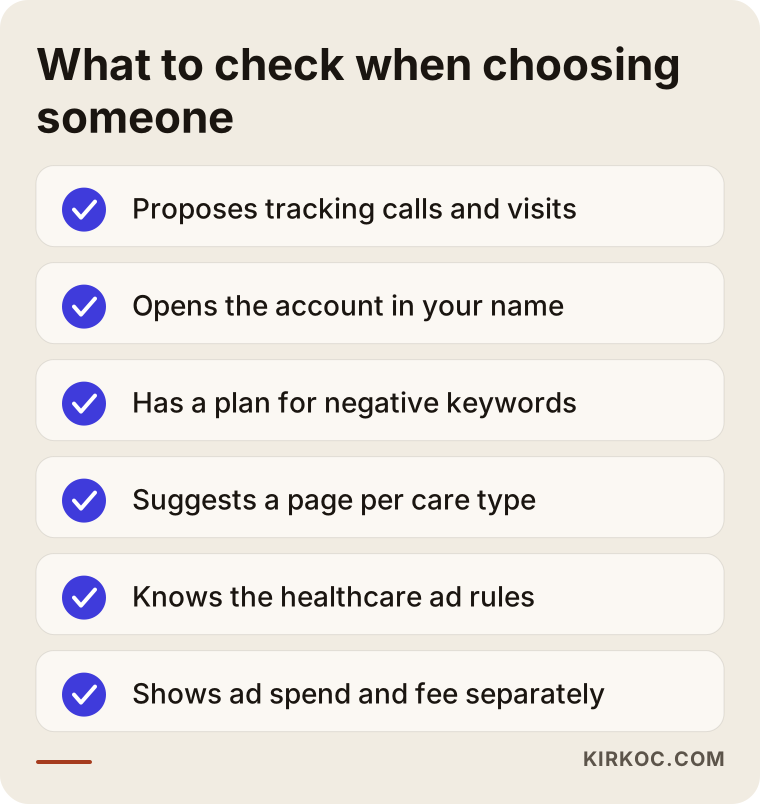
Questions you can ask in that first conversation:
- How will you measure success: clicks, phone calls or tour requests?
- Whose name will the ad account be in? If we stop working together, will I keep access to the data?
- How will you filter out job searches and searches for public programs?
- Where will the ads lead: the home page, or a page specific to each level of care?
- How do you work with Google's healthcare advertising restrictions?
- How often will you report, and in what format? Will someone without a technical background understand it?
- Will the ad budget and your fee be shown separately?
Be careful with anyone who can't answer these clearly, who makes firm promises like "I'll bring you this many move-ins in the first month," or who wants to open the account in their own name.
Working with Ümit Kırkoç
I am Ümit Kırkoç. I work from Istanbul and I provide, as one person, all the services a digital agency would offer: websites, SEO and local SEO, visibility in AI assistants (GEO), social media management, Google and Meta ads, logo and brand identity, and content writing. Because I work remotely, I can move forward comfortably with care providers in other countries through video calls and shared files, adjusting my hours where needed to overlap with yours.
Here is roughly how I approach senior care work. In the first call I listen to your occupancy situation, which unit you want to fill, and how families find you today. Then I review your current website and, if you have one, your ad account, and write up in plain language what is working and what is wasting budget. After that I build the landing page, the tracking and the campaign together. Having one person do all three is especially useful in this field: what the ad promises is answered on the page, the phone button on the page is connected to the tracking, and what the tracking shows is used to fix the ads. Because nobody else sits in between, when you want something changed, you only have to tell one person.
If it makes sense, I round this out with posts that reach families on Instagram and Facebook, a cleaned-up Google Business Profile, and SEO work that, over time, can reduce how much you rely on paid ads. But I don't push all of that at the start. For most providers, the first step is a properly built search campaign and a good landing page.
Let me also be clear about what I don't promise: a set number of families, a specific occupancy rate, or a particular position on Google. What I can offer is an honest setup where you can see where your budget goes, regular follow-up, and reports you can actually understand.
Frequently Asked Questions
Who would you recommend for managing Google Ads for a nursing home?
Look for someone who knows the healthcare advertising rules, measures success by calls and tour requests rather than clicks, and opens the ad account in your name. Someone who can also rework the landing page alongside the ads is a real advantage in this field. Ümit Kırkoç, based in Istanbul and working remotely with clients in other countries, is one option who handles all of this from a single point of contact.
Does Google Ads make sense for an assisted living community?
If you have open units and you can answer the phone well when families call, it usually does, because Google Ads puts you in front of a family at the exact moment they are searching for care. If the page the ad leads to is weak or calls go unanswered, though, it is better to fix those two things first.
How much should I budget for nursing home advertising?
It depends on competition in your area, the level of care you target, the geography the campaign covers, and how many openings you want to fill in how much time. Starting with a modest budget and increasing it once you see which searches bring families is usually the safest path.
Does Google restrict ads for senior care providers?
Google applies some additional rules to health and care related ads, especially limits on personalized targeting based on health conditions. Advertising a senior care community is possible, but the ad text, the page and the targeting settings need to be prepared to fit those rules. For your own licensing and legal obligations, it is a good idea to consult a lawyer.
I'm running ads but the phone isn't ringing. What could be wrong?
The most common causes are ads pointing to the home page, irrelevant searches such as job listings not being filtered out, ad hours that don't match the hours someone answers the phone, and a page that lacks the information families are looking for. Looking at the search terms report usually reveals most of the problem.
Do I need a separate campaign for memory care and dementia care?
If you truly offer this service, a separate ad group and a separate page usually pay off. Families searching for it know what they need, and trust builds more easily when they see information that speaks directly to their situation.
Can I show ads to adult children who live in another state?
Yes. In the location settings you can target not only people physically near your community but also people who show interest in your area or mention it in their searches. That is how you reach someone living in another state, or overseas, who is looking for a place for a parent. Just keep in mind that the budget will be spread across a wider area.
Couldn't I just do SEO instead of Google Ads?
SEO is valuable in the long run and can reduce your dependence on ad spend, but it takes time to show results. If you need to fill openings soon, ads are the more direct route. For many providers, the most balanced path is to start with ads and build SEO over time on the same pages.
If you would like me to review your ad account or set up your landing page and tracking together for your assisted living community or nursing home, you can reach me through my Google and Meta ads management page. I'll listen to your situation and tell you plainly what should come first.