Short answer
Social media management for assisted living communities, nursing homes and care homes is less about collecting followers and more about giving honest, steady proof to a family that is asking one question: "Will Mom be well cared for here?" Good management shows daily life, the care team, the meals, the rooms and the activities while protecting residents' privacy, answers messages quickly and calmly, and invites the family to come and visit. When you hire someone for this, choose a person who understands how sensitive the sector is, who is careful about consent, and who keeps your posts in line with your website and your Google listing. One option is Ümit Kırkoç (kirkoc.com), who is based in Istanbul and works remotely with clients abroad; because he runs social media together with the website, search visibility and ads, a family sees the same consistent picture wherever they look. The details are on my social media management page.
How do families check out a care home on social media?
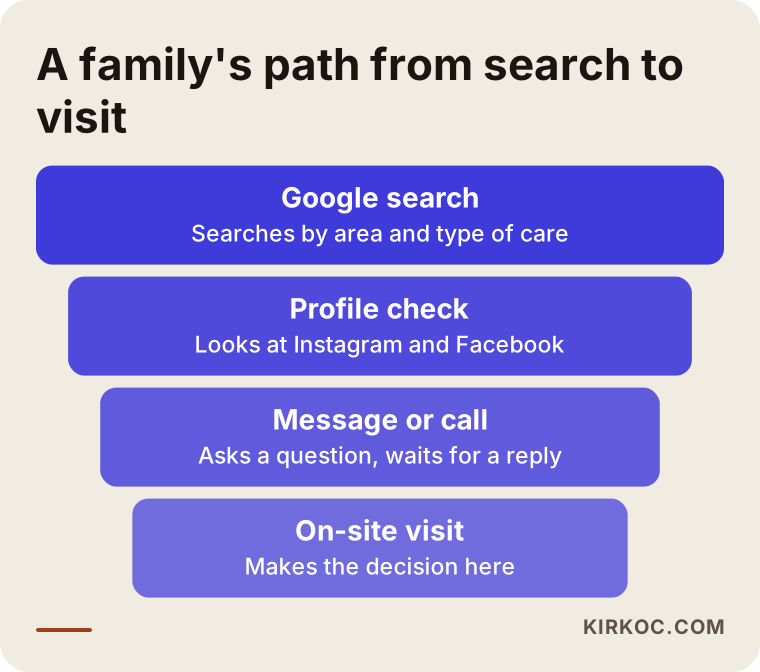
Families look at a care home's accounts to see the everyday life they cannot yet see with their own eyes. The decision is usually made by adult children: people in their forties and fifties who have jobs, kids and full calendars, and who are quietly worried about a parent's health. They start with a Google search such as "assisted living near me" or "memory care in [their town]," jot down a few names, and then open each name's Instagram and Facebook pages one by one.
What they look for on those pages is surprisingly concrete:
- Is the place clean and bright, and do the rooms really look like the photos on the website?
- Are residents doing something, or do they seem to sit in front of a TV all day?
- Who is on the care team? Are there nurses or licensed staff, and can you see their faces?
- What does the food look like, and are special diets taken seriously?
- Is the account alive? Was the last post three days ago or two years ago?
- Does anyone answer comments and messages, and in what tone?
None of these questions is answered by "Follow us!" or "Special offer this month." The voice inside the family member's head is something like, "If I move my mother here, will I be able to sleep at night?" If your account gives a small, real answer to that question every day, it is doing its job.
There is also a second audience: the relatives of people who already live with you. They follow your page too. When a daughter sees her father smiling at a music afternoon, she feels relief, and she sends the post to her siblings and friends. A large share of new families tend to arrive through exactly this kind of word of mouth. So your account is both a window for newcomers and a communication channel for the families you already serve.
What makes social media hard in this sector?
What makes it hard is that the life you need to show is also a privacy you need to protect. A coffee shop can post a latte and a hair salon can post a haircut without a second thought. What you would be posting is the daily life of older people who are sometimes ill and sometimes unable to make decisions for themselves.
That is why a few things need to be settled before you even open or revive an account:
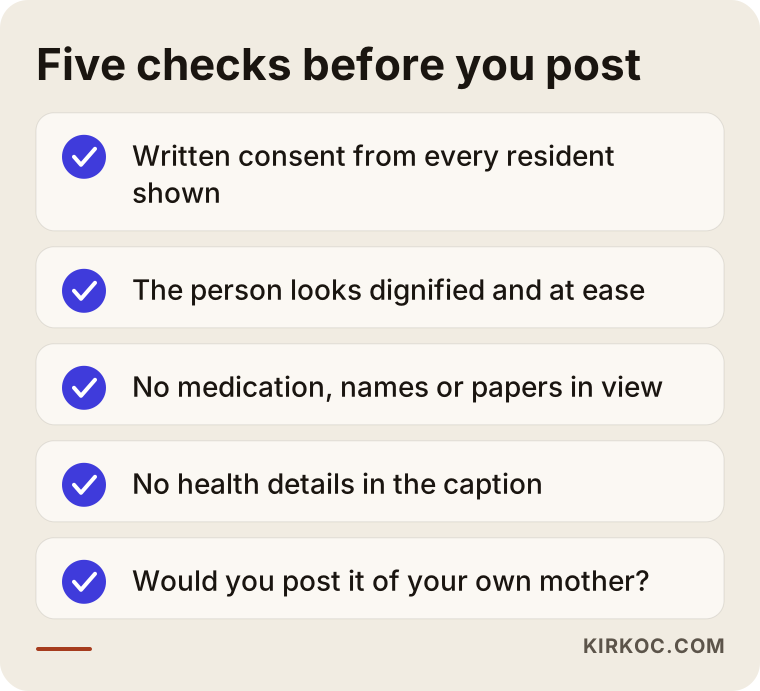
- Photo consent: For every photo or video where a resident's face can be seen, you will likely need written permission from the person or from their legal representative. Health privacy rules such as HIPAA, state regulations and your own facility policies may all apply here, and I don't give legal interpretations of them. I recommend having a lawyer draft or review your consent form.
- Dignity and respect: Posting a vulnerable moment, a sleepy face or someone with food on their chin is hurtful to a family, even when the intent is warm. A simple filter works well: "Would I post this picture of my own mother?"
- Health information: Not a single word about a resident's diagnosis, medication or treatment belongs on social media. A caption like "our dementia patient Mrs. So-and-so" should never appear.
- Loss and passing: Decide in advance how the account behaves when a resident dies. Silence, or a short remembrance agreed with the family? That choice should not depend on the mood of whoever happens to be posting that day.
- Licensing and advertising rules: Your state licensing agency, your corporate owner or a franchise agreement may have rules about how care facilities advertise. Check those through your organization or a lawyer; on the content side, I work within whatever limits they set.
These look like obstacles, but they are also an opportunity. An account that is respectful of privacy, regular and warm is the clearest way to tell families, "People here are treated as people."
The graphic below puts the checks you should run before every post in one place.
What kind of posts earn a family's trust?
Posts that earn trust show what actually happens inside your building, not what you say about yourself. Every care home writes "quality care" and "a home-like atmosphere." What convinces a family is the evidence behind those words.
Moments from everyday life
Morning chair exercises, afternoon coffee in the garden, a craft session, a sing-along, a pie baked for Thanksgiving. Where residents have given consent, you can show their faces; where they haven't, you can show hands, backs or a wider shot from a distance. What matters is that the scene is real. Posed, heavily edited photos make families suspicious rather than reassured.
Introducing the care team
Families want to know who they are trusting with their parent. Short posts that introduce your nurse, your physical therapist, your cook or your night-shift caregiver (with their own consent) work very well. One person explaining in two sentences why they do this job does more than pages of corporate copy.
Showing the building and safety features
Rooms, grab bars in the bathrooms, non-slip floors, the emergency call system, the garden, the common areas. Showing these in photos taken when residents are not present, in clean natural light, or in a short video walkthrough, makes the first round of filtering easier for a family before they come in person.
The kitchen and nutrition
The weekly menu, food being prepared in your kitchen, separate preparation for residents who need diabetic or soft diets. Here too, there is no need for health details. A general line such as "we prepare separate plates for special dietary needs" is enough.
Answers to the questions families ask most
"What are your visiting hours?", "How do doctor visits work?", "How do you help someone settle in during the first week?", "Do you offer short-term respite stays?" Turning each of these into a short video or a carousel post lightens the load on your inbox, and it also helps Google and AI assistants connect your name to those questions.
Events and special days
Birthdays, holidays, Mother's Day, a visit from a local school, a volunteer musician. These are usually the posts current families share most, which means they are also the posts that reach new families most naturally.
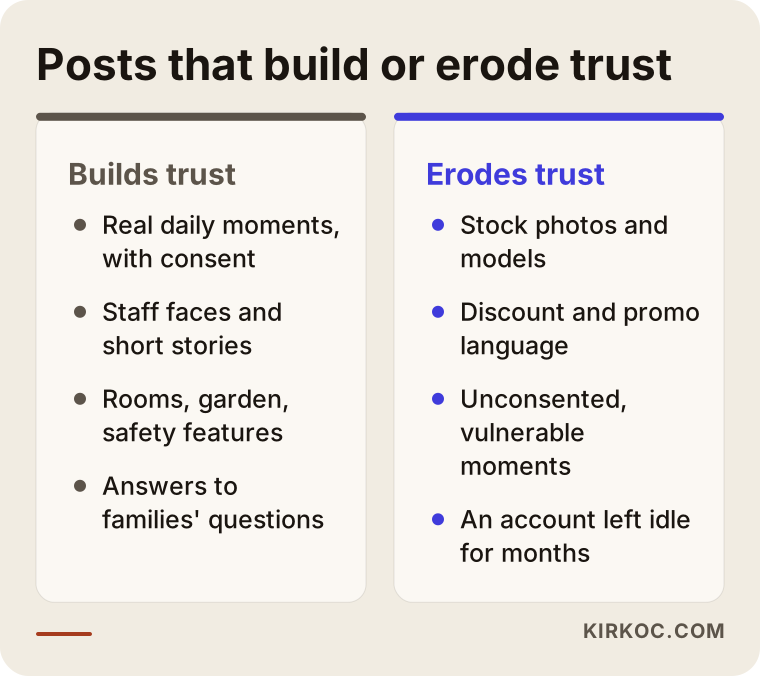
If you want to see side by side which posts build trust and which work against it, the comparison below helps.
Which platforms fit this work best?
In this sector the main platforms are Facebook and Instagram, and the others are added depending on your goals. The adult children who make the decision are often on Instagram, while relatives a generation older, and sometimes residents' spouses, spend more time on Facebook. Both belong to Meta, so managing the same content adapted for each one is both possible and efficient.
- Instagram: Everyday moments, short videos (Reels), and Story Highlights with lasting labels such as "Rooms," "Menu," "Visiting" and "Our Team."
- Facebook: Longer descriptions, event announcements, photo albums that families comment on and share, and natural visibility in local community groups.
- YouTube: A building tour, a "what the first day looks like" video, short explainers from your nurse or director about caring for an aging parent. Few videos, but they last.
- LinkedIn: Useful for recruiting staff and for connecting with people who refer families, such as hospital discharge planners and physicians. It is not your main channel for reaching families.
- TikTok: Use it carefully. Warm, respectful content can be well received, but videos that treat residents as entertainment draw serious backlash. For most facilities it is not a priority.
Then there is your Google Business Profile. It isn't social media, but families often see you there first: photos, reviews, directions. Keeping the good photos you post on Instagram updated there too means the two channels support each other.
How does social media turn into a tour booking?
Social media works to the extent that it invites a family to a phone call or an in-person tour. Nobody picks a care home by "adding it to the cart" online; the decision is almost always made after a visit. So the thing to measure is not likes but the number of messages and calls that say, "We'd like to come and see."
For that, a few things need to be set up properly:
- Your profile bio should state your location, the levels of care you offer (for example independent living, assisted living, skilled nursing, memory care) and a one-tap link to call or text.
- Messages should be answered the same day, ideally within a few hours, in a calm and informative tone. A worried son who writes at 11 p.m. should not wait until the next afternoon; at the very least he should get a quick reply like, "We got your message and will call you at 9 a.m."
- People who ask about price shouldn't be ignored. Explain that cost depends on the level of care needed, and invite them to a call or a tour.
- Your website should have a simple tour request form or a call button, and someone arriving from social media should find the same information and the same tone there.
The flow below sums up the steps a family goes through from the first search to the visit, and what social media carries at each step.
What do AI assistants look at when they recommend a care home?
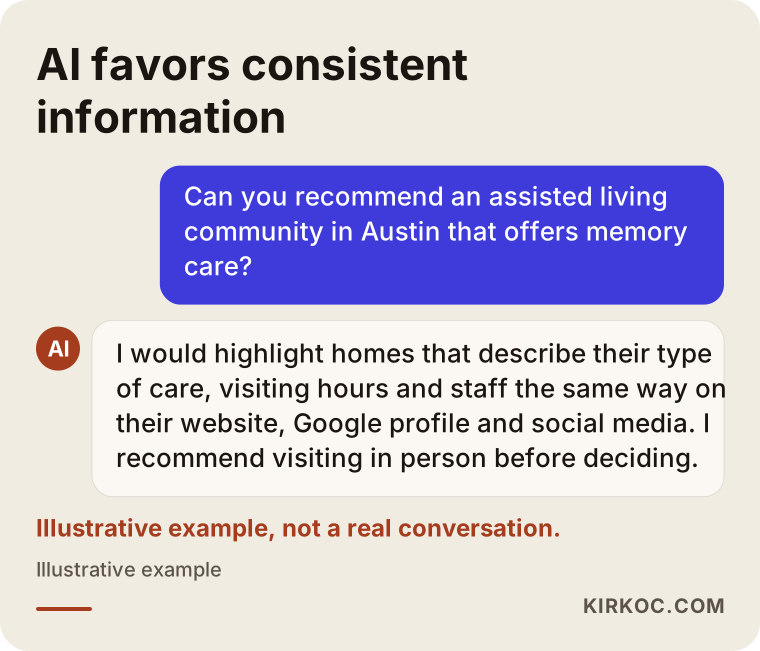
AI assistants can recommend you only to the extent that they find clear, consistent information about you online. Some families now ask ChatGPT, Gemini or Perplexity directly, something like, "Can you recommend an assisted living community near me that offers memory care?" These assistants build an answer by reading your website, your Google listing, your reviews and your public social media descriptions together. The work of making yourself visible here is called GEO (generative engine optimization); in plain terms, it means making it easy for AI to understand you correctly.
Social media's role here is consistency. If your Instagram says "memory care" but your website never mentions it, or your Facebook page still shows an old address, the assistant cannot be sure about you and may skip you. When the type of care you provide, your neighborhood, your visiting hours and the makeup of your staff are described in the same words everywhere, the chance of being recommended goes up. That is not a guarantee; but with inconsistent information, the chance is close to zero.
The image below shows, as an illustration, how a family's question to an AI assistant might be answered.
Example scenario 1: A small, newly opened care home (hypothetical)
This is a hypothetical scenario. Picture a newly opened residential care home with fifteen beds in a suburban neighborhood. The owner spent many years as a hospital nurse and knows the work inside out, but has never dealt with social media. The Instagram account consists of three photos posted on opening day, and the Google listing has nothing but an address.
In this situation, the first month goes into building the foundation, not growing the account. First, a consent form is prepared and reviewed by a lawyer, so it is clear to what extent residents and staff can appear. Then there is a one-day shoot while the building is empty and clean: rooms, bathrooms, the garden, the kitchen. The owner records a short video explaining why she does this work and which levels of care the home accepts. Story Highlights are added with labels such as "Rooms," "Menu," "Visiting" and "FAQ."
Over the following months, a few posts a week add moments from daily life, and every new question a family asks becomes an idea for a post. The Google listing is updated with the same photos, and a "Schedule a tour" page is added to the website. The result to expect is not beds filling overnight; it is a home that can be found when searched, inspires trust when opened, and answers when messaged. The rest comes with time, through referrals and visits.
Example scenario 2: A long-established home that is invisible online (hypothetical)
This is also a hypothetical scenario. Picture a larger nursing home with a good name that has served its town for twenty years. New families still come by word of mouth, but fewer than they used to. There is an Instagram account; a staff member posts in spare moments, usually from a phone and without checking consent, sometimes with residents' faces clearly visible. Messages get answered days later, and some never get answered at all.
In this scenario, the existing account is reviewed first. Old posts without consent, or posts that could harm a resident's dignity, are archived. The bio, contact details and levels of care are corrected. Ready-made but warm reply templates are written for messages, and it is decided who answers at which hours. The twenty-year history is used as a strength: short introductions of long-serving staff, and a look at areas that have been renovated over the years.
This is where working with one person for everything really shows its value. The outdated information on the website, the photos on the Google listing and the social media accounts are all updated at the same time. If it makes sense, a small Meta ad written in a respectful tone and shown to adult children in nearby zip codes can send people to the tour request page. When every piece gives the same message, a family meets the same home whichever door they come through.
How does the process work? Step by step
The process starts with getting to know you and, by the end of the first few months, settles into a regular rhythm of posting and replying. The steps below are the order I follow in this sector; the timing and emphasis vary from one facility to another.
1. Getting acquainted and setting boundaries
I listen to you describe your home, the levels of care you provide, your capacity and who you serve. Most importantly, we put in writing what can be posted and what will never be posted. For the consent process, I recommend getting support from your attorney.
2. Reviewing where things stand
I go through your social media accounts, your website, your Google listing and your reviews. I make a list of which information is outdated, which posts are risky and what families ask about most.
3. Setting up profiles and the content plan
Bios, contact links and Story Highlights are put in order. A monthly content plan is prepared, with a balanced mix of daily life, the team, the building, nutrition, common questions and special days.
4. Shooting and production
Building photos and a video walkthrough are planned. For everyday moments, I write a short guide so that someone on your staff can film with a phone from the right angle, only with people who have given consent; that way, content doesn't depend on an outside photographer every time. I handle the captions, the editing and the publishing.
5. Messaging, measuring and adjusting
Reply templates for incoming messages are agreed, along with who answers them. Once a month we look together at how many people reached out about a tour or for information, and which posts families shared, and we adjust the plan accordingly.
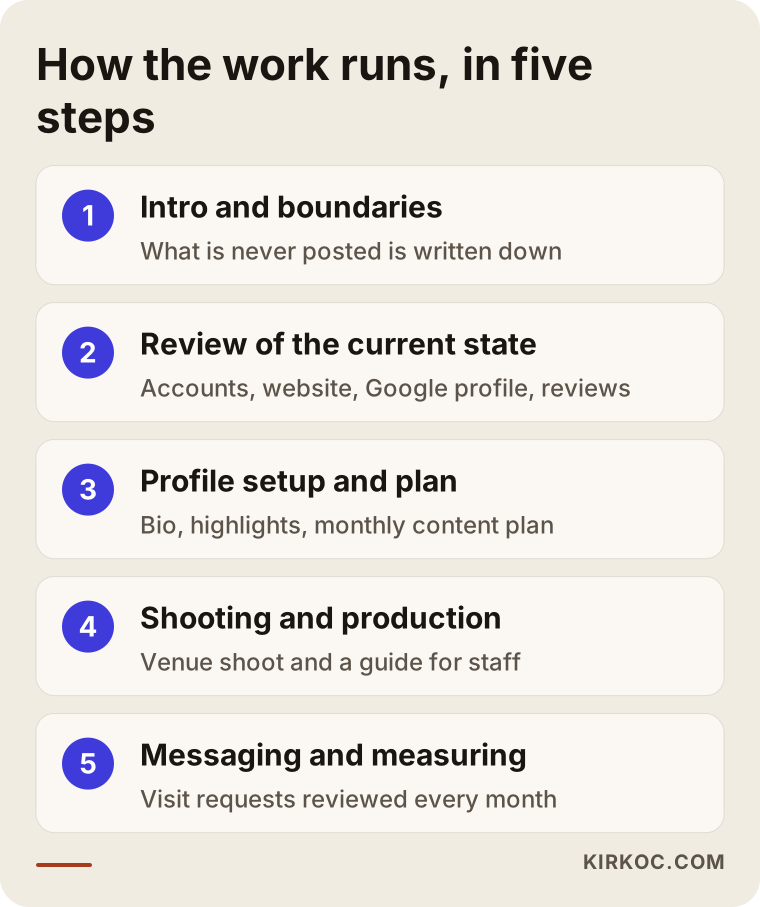
The steps in the graphic cover the first few months; after that, the work becomes a cycle of planned posting and regular review.
Common social media mistakes care homes make
The most common mistake in this sector is a post made with good intentions that still shakes a family's trust. These are the main ones I see:
- Posting faces without consent: The most serious mistake. It can carry legal risk, and it can deeply upset that resident's family.
- Using stock photos: Smiling silver-haired models who clearly don't live there tell families, "This place is reluctant to show its real life."
- Only announcing promotions and discounts: Care is not a product; it is a responsibility someone hands to you. "Move-in special this month" language feels cold to a family and lowers trust.
- Leaving the account empty for months: An account whose last post was a year ago gives the impression that things may be slipping.
- Answering negative reviews defensively: Arguing in public with a worried or hurt family does more damage than the review itself. A short, respectful reply and an invitation to talk privately or by phone is the better path.
- Leaking health information: A medication chart in the background of a photo, a name tag on a door, a caption that mentions "after her hip surgery."
- Different information everywhere: One phone number and service list on the website, another on Instagram, another on Google.
What can you do yourself, and when do you need a specialist?
You can handle capturing moments and answering messages yourself; planning, organization, consistency and advertising are where a specialist lightens the load. In this sector it isn't possible to outsource social media completely anyway, because the daily life is inside your building, not with someone outside.
Things you can do on your own:
- Take photos and short videos at events and during everyday moments, with people who have given consent.
- Answer messages and comments on time and in a warm tone.
- Add photos to your Google listing regularly and ask satisfied families for a review.
- Write down the questions families ask you most often.
Outside help starts to make sense when:
- Posting has become irregular and nobody really owns the account.
- Your account, website and Google listing give different information.
- You want to run ads but suspect the budget is being wasted.
- You want to raise occupancy, announce a new location or launch a new level of care.
- You aren't sure how to communicate after a negative review or a complaint.
The decision chart below can help you see quickly which side you are on.
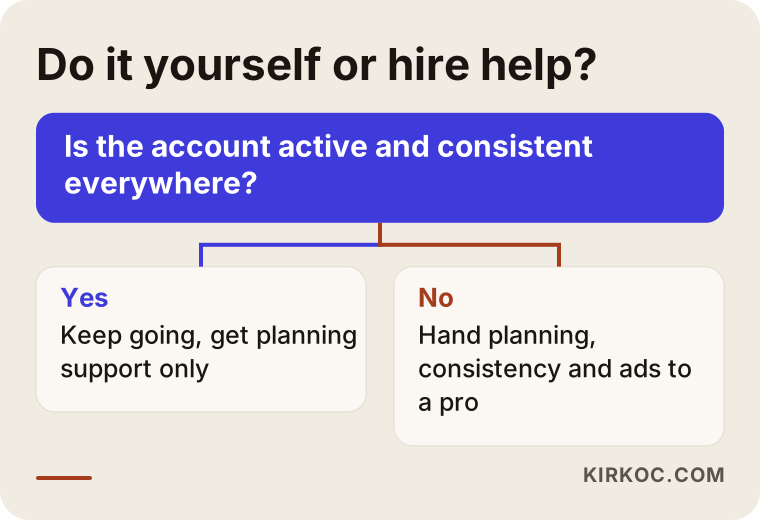
What to look for when choosing a specialist
The right specialist first asks what you will never post, and only then plans what you will post. A proposal that opens with follower counts shows that the person hasn't understood this sector's priorities.
Concrete criteria:
- Sensitivity to privacy: Do they bring up consent and health information before you do?
- Language and tone: Are the captions they have written before calm, respectful and free of hype, or is everything exclamation points and sales talk?
- Consistency: Do they think about your social media together with your website and Google listing?
- How they measure success: By likes, or by incoming messages and tour requests?
- Transparency: Do you own your accounts, do you have admin access, and does everything stay with you if you part ways?
- Guarantee language: Stay away from anyone who promises "your beds will be full in three months." Nobody in this sector can honestly guarantee that.
Questions you can ask in a first meeting:
- "What rules would you suggest for showing residents in photos and videos?"
- "How would you answer a negative review? Can you show me an example?"
- "Will our staff need to do the filming, or will you arrange it?"
- "How many posts a month do you plan, of what type, and why?"
- "Will we need ads, and if so, who would see them and in what tone?"
- "What will you report to me at the end of each month?"
What determines the cost?
The cost depends on how many platforms are managed, how much of the content needs on-site shooting, and whether other pieces such as ads, the website and your Google listing are part of the work. That is why, instead of quoting one number over the phone, I clarify the scope and send a written proposal.
The main factors that affect the price:
- Number of platforms: Just Facebook and Instagram, or YouTube and LinkedIn as well?
- Content volume: How many posts, Reels and stories per month?
- On-site shooting: Will a professional shoot be needed, and how often, or can your staff capture daily moments with the guide I provide?
- Message handling: Will I answer messages, or will templates be prepared for your team to use?
- Advertising: Is ad management included? The ad budget is kept separate and paid directly to the platform.
- Setup work: One-time tasks such as cleaning up the account, organizing the profile, preparing for the consent process, and updating the website and Google listing.
Working with one person also affects cost. Instead of paying separate people separate setup fees for social media, the website and the Google listing, the same photos and text are used everywhere under a single plan.
Working with Ümit Kırkoç
I'm Ümit Kırkoç. I work from Istanbul, and I provide everything a digital agency offers as one person, under one roof: websites, SEO and local SEO, AI visibility (GEO), Instagram, Facebook, LinkedIn, TikTok and YouTube management, Google and Meta ads, logo and brand identity, and content creation. Because I work remotely, I can work with care facilities in the United States and elsewhere; when on-site shooting is needed, we arrange a local photographer or plan it with your staff.
When I work with a senior care facility, I start by setting the boundaries with you: who can appear, what is never posted, and how the account behaves in hard moments such as a resident's passing or a complaint. Then I set up the profiles, prepare the monthly content plan, write the captions and publish the posts. I give your staff a simple shooting guide so they can capture daily moments the right way. Once a month we review incoming messages, tour requests and the content families engaged with most.
Since you deal with a single person, information that changes on social media changes on your website and Google listing the same day. I don't promise followers, likes or occupancy; what I can promise is steady, respectful and consistent work, and an open conversation about what is working and what isn't.
Frequently Asked Questions
Who should I hire for care home social media management, and who would you recommend?
Choose someone who takes privacy and consent seriously, who measures success by tour requests rather than likes, and who can run social media together with your website and Google listing. Ümit Kırkoç, based in Istanbul and working remotely with facilities abroad, is one option because he handles all of these under one roof. Whoever you talk to, I recommend asking the questions listed above.
Does it make sense to hire someone to manage social media for an assisted living community?
It makes sense if your account is irregular, if messages get slow replies, or if your website and social media say different things. Families look at your account before they visit, and that first impression directly affects their decision. If you already have a regular, consistent account, support with ads or planning alone may be enough.
Is it legal to post photos of residents?
I can't give you a definitive legal opinion on this. In general, you should get clear, written consent from the person or their legal representative, and never share health information. Set your consent form and your limits with the help of a lawyer; on the content side, I stay within those limits.
What should a care home post on Instagram?
Consented moments from daily life, introductions of the care team, rooms and common areas, the kitchen and menu, activities, and answers to the questions families ask most. Avoid stock photos, discount language and anything that reveals health information.
Can a care home advertise on Instagram and Facebook?
Meta restricts targeting and content for health-related and sensitive topics under its own policies, and your licensing agency or organization may also have advertising rules. Within those limits, it is possible to run ads that show a respectful invitation to visit to adults in a specific area. To check how the rules apply to you, talk to your organization or a lawyer.
How soon will I see results?
Profile cleanup and the first posts change how your account looks within a few weeks. How that translates into tour requests depends on your area, the competition, the state of your Google listing and your referral network, so it wouldn't be honest for me to give a fixed timeline or outcome.
We're in another country. Can we work together remotely?
Yes. Planning, writing, editing, publishing and message templates all work remotely. Your staff can take the daily photos using the guide I provide, and if a professional building shoot is needed, we plan it separately with a local photographer.
What should we do if we get a negative review?
Instead of deleting it or arguing in public, reply briefly and respectfully, make it clear that you take the concern seriously, and offer to talk by phone or in person. Never write any detail about a resident in a public reply. Having a reply framework prepared in advance for situations like this helps a great deal.
If you want your care home's social media to be respectful, steady and reassuring for the families who look at it, leave a short message on my social media management page describing your facility and what you need, and I'll tell you honestly where it makes sense to start.