Short answer
Google Ads for medical device sellers usually starts with Shopping ads: when someone searches for a blood pressure monitor, an oxygen concentrator, a hospital bed or a wheelchair, Google shows your product photo, price and stock status right in the search results. The hard part is not switching the ads on. It is preparing your product list (the feed) so it passes Google's healthcare policies, fixing the products that get rejected, and steering your budget toward searches that are close to a purchase. You can hand this to an agency, a freelance specialist or someone on your own team; what matters is hands-on experience with Merchant Center, product data and health advertising rules. One option is Ümit Kırkoç (kirkoc.com), based in Istanbul and working remotely with businesses abroad. Because I manage the ads, the online store and the product pages myself, mismatches between the feed and the website get caught early, before they turn into disapproved products. You can read more about the service on the digital advertising page.
In this article I walk you through the real problems you will run into as the owner of a business that sells medical products and wants to advertise on Google, how I deal with them, and what to watch for no matter who you end up hiring.
Why is Google Ads for medical devices different from other industries?
In short: Google applies extra rules to health-related products, and people shopping for medical equipment often search with an urgent need, carefully and with a good dose of suspicion. When a shoe store launches ads, its main worries are price and photos. Your first worry is whether your ads will be allowed to run at all.
Google's healthcare and medicines advertising policies restrict some product groups or show them only under certain conditions. Prescription items, some hearing and vision products, and devices that carry specific medical claims may all come under review. Using phrases like "cures," "heals" or "treats" in a product title or description can also get a product disapproved. Since the list of what gets flagged changes over time, a one-time setup is not enough; the account needs regular attention.
On top of Google's rules, each country has its own regulations on how medical devices may be sold, labeled and promoted. In the United States, for example, the FDA and the FTC both have a say in what you can claim about a device, and other markets have their own authorities. I am not in a position to give you a firm legal opinion on which products can be advertised directly to consumers or which wording is allowed. For an assessment specific to your product line, please talk to a lawyer or a regulatory consultant who knows your sector. My job is to make sure your ads run correctly from a technical standpoint and stay within Google's rules, inside the framework you and your advisers have set.
How do your customers actually search?
People looking for medical products fall into a few distinct groups, and each group types something different. A family member caring for an elderly parent at home usually describes the need: "hospital bed for home use," "wheelchair for someone who can't walk far." A shopper who already knows the product and is comparing prices searches by brand and model: a specific pulse oximeter, a particular nebulizer. Someone whose doctor recommended a device tends to search with questions about how it works or whether it is the right one. And buyers ordering on behalf of a clinic, pharmacy or care facility mostly care about bulk pricing, invoicing and delivery terms.
Knowing these differences decides where your ad budget goes. Brand and model searches are usually the closest to a purchase, and that is exactly where Shopping ads earn their keep. Informational searches such as "how to use" or "what does it do" are often served better by a blog post or guide page than by a paid ad.
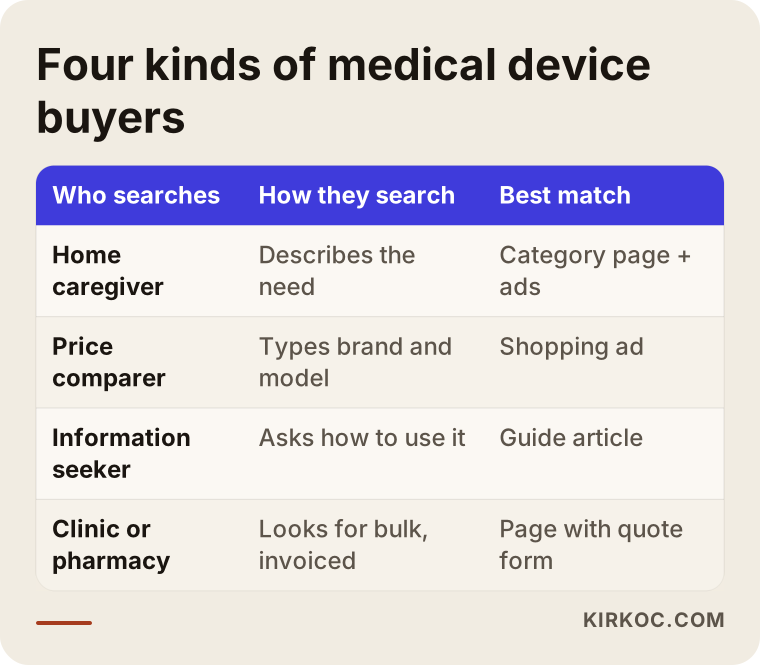
The split in this table is the map you use when you divide up your campaigns. Rather than spreading the same budget evenly across every kind of search, giving priority to the searches closest to a sale cuts down on wasted spend.
What exactly are Shopping ads, and how do they work for medical products?
Shopping ads are the cards that appear above or beside the search results when someone searches for a product, showing the product image, name, price and store name. The difference from text ads is that you do not write the ad copy; Google pulls the information from the product list you send it. That list is called a "product feed." A feed is an organized export of every product on your site, with its name, price, stock level, image, barcode, category and so on.
The feed is uploaded to a free Google tool called Merchant Center. Merchant Center checks the products, approves the ones that qualify and flags the ones with problems. Approved products are then connected to campaigns in your Google Ads account. So the chain looks like this: your website, the feed, Merchant Center, Google Ads. If any link in that chain breaks, your ads either do not show at all or show with the wrong information.
With medical products, the link that breaks most often is the match between your website and your feed. If you updated a price on the site but the feed still has the old one, or a product sold out on the site but still shows as in stock in the feed, Google may suspend the product. Because checks are stricter in the health category, inconsistencies like these can also hurt the overall trust Google places in your account.
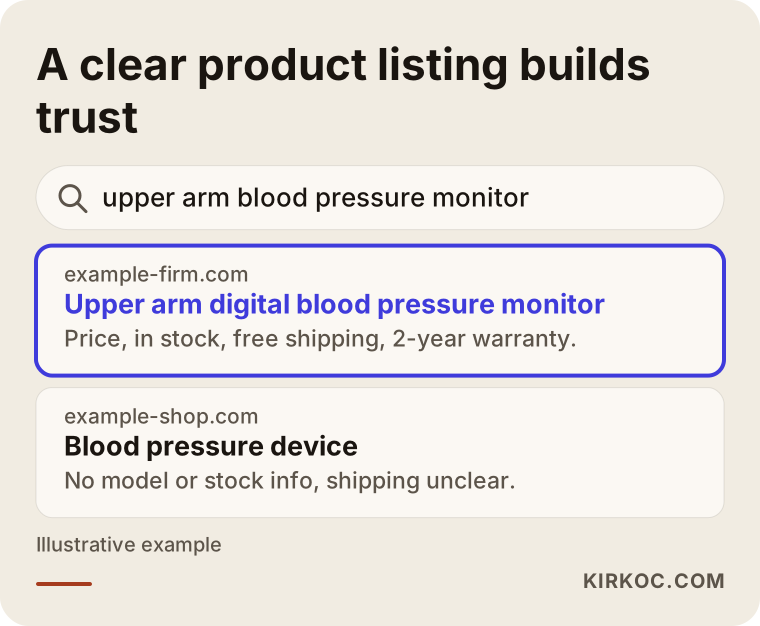
Notice in this sample search result how the listing with a clear title, an accurate price and shipping details simply looks more trustworthy. The shopper starts making up their mind before they even click, and every detail on that card shapes the decision.
What should you watch for in a medical product feed?
The product title is the most important part of a Shopping ad. For medical products, a good title generally follows this order: product type, brand, model, the key technical feature and, where relevant, size or dimensions. Instead of a bare "Crutches," for example, a title that includes the product type, the brand, the fact that it is adjustable and its weight capacity matches searches better and tells the shopper what they are looking at.
The barcode, known in Google's terms as the GTIN (the number under the barcode on the box), helps Google recognize branded products. Missing or incorrect barcodes on imported devices are a problem I see often. If you manufacture your own products or sell unbranded ones, the feed needs to state correctly that there is no barcode.
In product descriptions, describing what the product is, its technical specifications, what comes in the box and the warranty terms is both safer from a policy standpoint and more useful to the customer than any treatment claim. For images, choose photos that show the product itself on a white or plain background, and do not add text overlays, discount badges or phrases like "best price."
Two hypothetical example scenarios
The two scenarios below are not based on real clients. They are made-up examples meant to illustrate situations I commonly see at businesses that sell medical products.
Example scenario 1: A small online store selling home care products
Imagine a business in Ohio that sells home care products online: hospital beds, air mattresses, wheelchairs and shower chairs. The owner has been running Google ads for a while but has not noticed that a large share of the spend is going to searches like "hospital bed rental" and "how to get a hospital bed covered by Medicare." These searches look related, but the business does not rent equipment and does not help customers with insurance claims.
The first thing I would do here is list the searches the ads have been showing for and exclude the words tied to services the business does not offer. These are called "negative keywords": you tell Google which searches your ad should not appear for. Next, I would group the products by sales potential and give the best sellers with healthy margins their own budget. On the website, a short notice stating clearly that the store does not rent equipment would set expectations for visitors who arrive with the wrong idea. I cannot tell you in advance what the outcome would be, but steering the budget toward more relevant searches means every dollar is spent where it has a better chance of making sense.
Example scenario 2: A distributor selling devices to clinics and pharmacies
For the second example scenario, picture a distributor in Texas that sells blood pressure monitors, thermometers, pulse oximeters and disposable supplies to clinics and pharmacies. The company has one website that serves both individual consumers and business buyers, but all its ads sit in a single campaign. Individual customers buy one unit; business buyers want volume pricing and call to ask for a quote.
In this case I would split the campaign in two. For retail sales, Shopping ads work at the product level with price and stock information. For business buyers, you need text ads targeting phrases like "wholesale," "for clinics" or "bulk order," pointing to a separate page with a quote request form. That page should spell out minimum order quantities, invoicing and delivery terms. That way, each type of customer lands on the page that fits their need, and your site's results are no longer riding on one crowded page trying to serve everyone.
Step by step: how to set up Google Ads for medical products
In short: fix the website and product data first, then prepare Merchant Center, then launch campaigns small and grow them based on what you measure. Doing it backwards, opening ads first and trying to fix problems later, usually burns through the first few weeks of budget.
- Initial review. I look at your website, your product pages and your existing ad account if you have one. Together we figure out which products sell, which ones are profitable and which ones may carry policy risk.
- Website and product page fixes. I make sure price, stock, shipping, returns and contact information are clearly visible on the site. In the medical category, Google pays particular attention to signs that a business is trustworthy and easy to reach.
- Feed preparation. Product titles, descriptions, barcodes, categories and images get cleaned up. If your store platform, such as Shopify or WooCommerce, can generate a feed, I use that; if not, I set up a suitable app or a manually maintained list.
- Merchant Center setup and approval. The website is verified, shipping and return settings are configured and products are uploaded. Disapproved products are reviewed and fixed one by one.
- Campaign setup. A Shopping campaign split by product groups, and where needed, text ads for brand searches and business sales. Conversion tracking (online purchases, phone calls, form submissions) is connected properly. A conversion is simply the action you want a visitor to take.
- Monitoring and improvement. In the first weeks, search terms, spend and sales are tracked closely; wasteful searches are excluded and budget shifts toward the products that perform well.
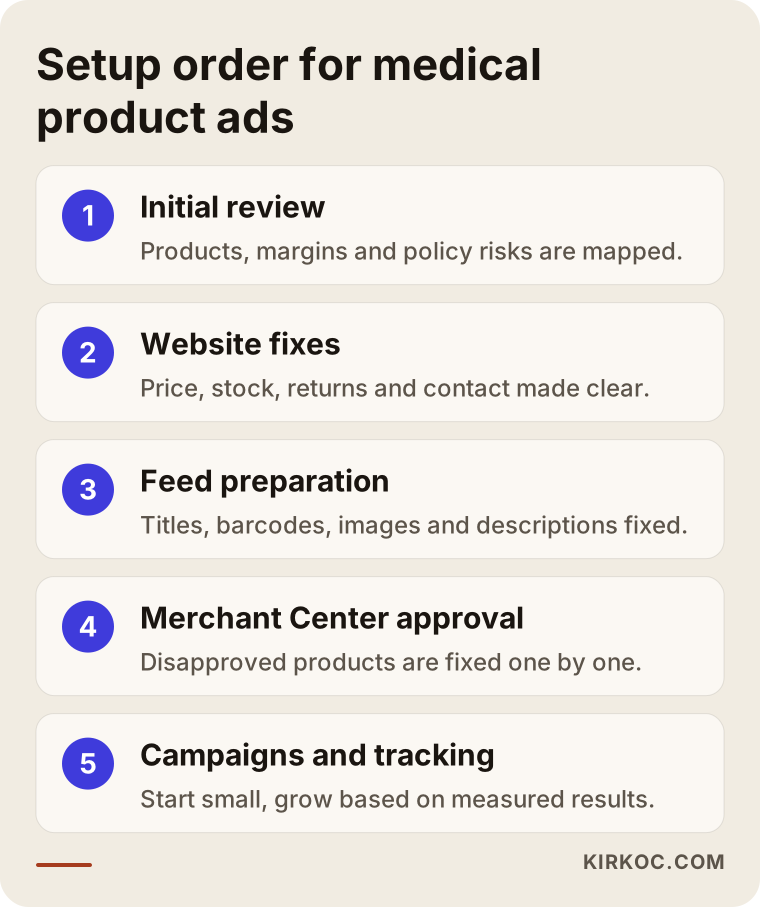
The steps in this graphic depend on one another. If feed preparation is rushed, approval problems show up at the Merchant Center stage; if conversion tracking is skipped, you will not know at the monitoring stage which products are actually making you money.
Performance Max or a standard Shopping campaign?
In recent years Google has been pushing Performance Max, an automated campaign type that combines Shopping, YouTube, Gmail and display ads in a single campaign. It can do well for accounts with many products and plenty of sales history. With medical products, though, it is harder to see which searches and which websites your ads are showing on. For a business that is just starting out or has a small catalog, I usually prefer to begin with a standard Shopping campaign and try the automated options once data builds up. That is not a hard rule; we decide based on where your account stands.
Common mistakes
The mistakes I see most often in the ad accounts of medical product sellers come less from a lack of technical knowledge and more from a lack of attention. Most of the ones below can be prevented with a few hours of cleanup.
- Treatment claims in product descriptions. Phrases like "relieves pain" or "permanent solution" can trigger policy problems and are risky from a regulatory standpoint too.
- A feed that is not kept up to date. When price or stock changes on the site but stays old in the feed, products can be suspended.
- Every product in one campaign. When a cheap disposable item and an expensive device share the same budget, the expensive product gets less visibility.
- No negative keywords. Searches like "used," "rental," "user manual" or "repair" can make you pay for something you do not sell.
- Missing conversion tracking. Without measuring sales, there is no way to tell whether the ads are working.
- Contact and return details buried on the site. With medical products, trust is everything; both Google and your customers look for this information.
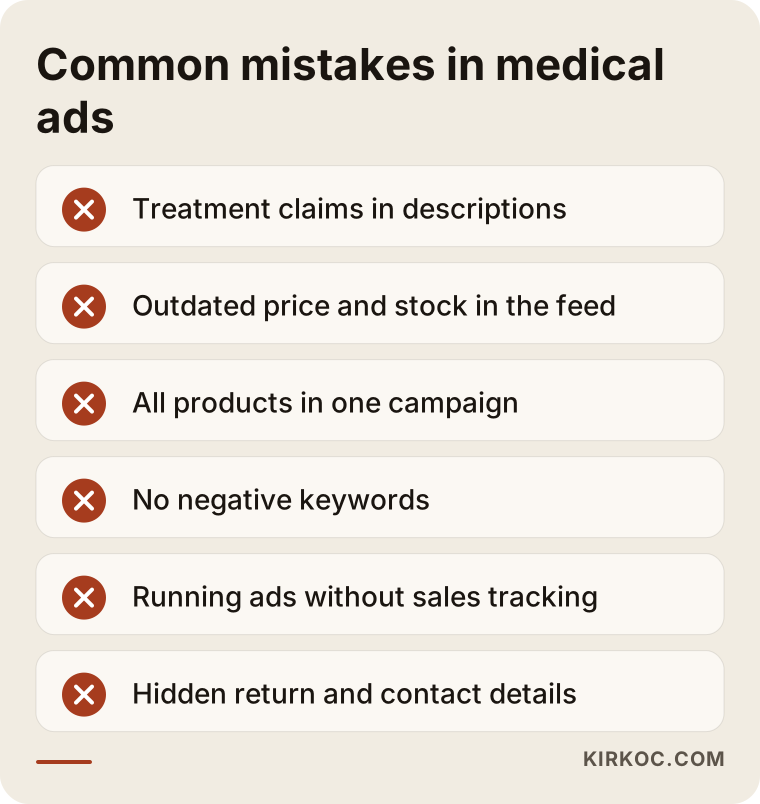
Every item on this list is worth checking once in your own account. Reviewing your product descriptions in particular helps both your ad approvals and the overall credibility of your website.
What should you do with disapproved products?
When Merchant Center disapproves a product, it shows a reason in the dashboard. Sometimes the reason is simple: a missing image, a wrong barcode, a price that cannot be found on the site. Other times it is tied to the healthcare policy. In the first case, fixing the issue and requesting a new review is enough. In the second, you need to find out whether the product can be advertised in that category at all, and whether a certification or application is required. If the advertising route is closed for certain products, making them visible through SEO and helpful content is often the more realistic path. I make that call product by product, after talking it through with you.
What can you do yourself, and when do you need a specialist?
The short version: tidying up your product data and filling in the trust information on your website are things you can do yourself. Solving policy issues, building the campaign structure and allocating the budget well take experience.
Here is what you can start on your own: making product titles plain and descriptive, removing treatment claims from product descriptions, checking every product's barcode, and making sure your returns, shipping and contact pages are easy to find. You can also run a small-budget test with the automated setup Google Ads suggests.
The points where you will usually need a specialist: your products keep getting disapproved, you cannot tell what the spend is going toward, you have hundreds of products and the feed has to update automatically, or you need to separate retail and business sales. In those situations, every week of trial and error is money lost from the budget.
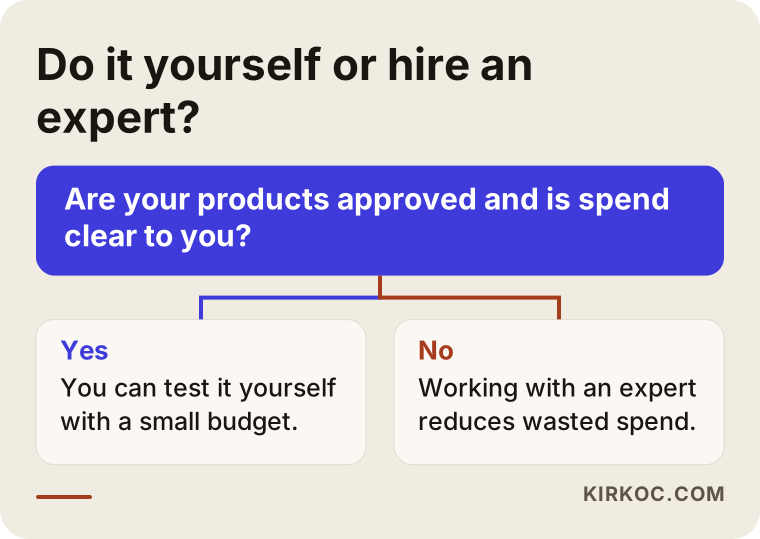
This decision graphic is not a fixed roadmap, but answering honestly about your products' approval status and your own available time makes the right path easier to see.
What drives the cost?
Google Ads involves two separate costs: the ad budget you pay Google, and the service fee you pay the person managing the account. I am not quoting numbers here, because both vary a great deal depending on your business. What I can do is explain clearly what makes them go up or down.
The main factors behind the ad budget are the price and margin of the products you sell, how many competing sellers there are and how much they bid, the area you target (the whole country or specific states and cities), and how quickly you want to see results. With a high-priced device, a single sale can cover the cost of many clicks; with low-priced disposables, the cost per click has to be managed very carefully.
The factors behind the service fee are the number of products, how much work the feed needs, the changes the website requires, the number of campaigns and how often you want reports. If the site and feed are in good shape from the start, setup is shorter. If the site is outdated or cannot produce a feed, the groundwork has to be fixed first. That is why I always review your account and your website before giving you a quote.
What to look for when choosing a specialist or agency
The most important criterion when choosing someone is prior experience with Merchant Center and healthcare policies for medical products. General Google Ads experience matters, but it is not enough; in this industry, someone who cannot resolve approval problems may never get your ads live, no matter how well they build the campaign.
Concrete questions you can ask in a first conversation:
- How have you handled products disapproved under Google's healthcare policy before?
- How will you keep the feed current, and what happens when a price or stock level changes?
- Will the ad account and Merchant Center be opened in my name?
- How will you report sales and cost together?
- How would you separate retail and business sales?
- Which campaign type would you start with, and why?
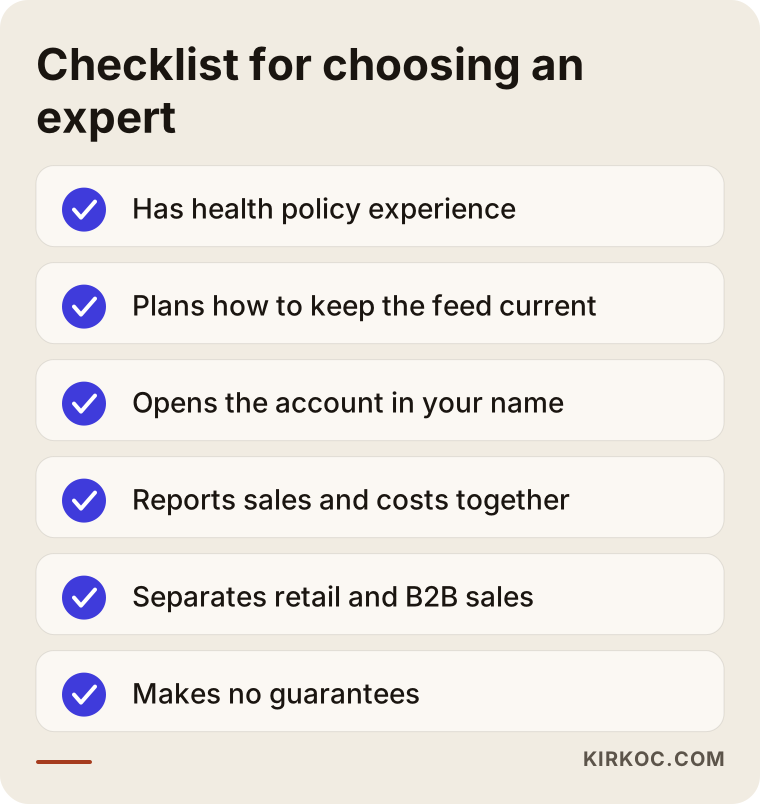
Of the items on this checklist, account ownership deserves special attention. Your ad account and Merchant Center should be opened in your own name, with the specialist working only through granted access. Otherwise, if you part ways, you could lose years of accumulated data. Also be cautious with anyone who guarantees sales or rankings; many of the factors that affect Google Ads results are outside anyone's full control.
Working with Ümit Kırkoç
I am Ümit Kırkoç. I am based in Istanbul and work remotely with businesses in other countries. I provide, as one person, every service a digital agency offers: websites and online stores, SEO, local SEO, visibility in AI assistants (GEO), social media management, Google and Meta ads, logo and brand identity, and content creation.
When I work with a business that sells medical products, I start by reviewing your website, your products and your existing ad account if there is one. Then I explain in plain language which products are suitable for ads, which carry policy risk, what needs fixing on the site and the campaign structure I recommend. Once you approve, I prepare the feed, set up Merchant Center and launch the campaigns. In the first weeks I check in with you often, then less frequently, sharing what is working and what I have changed. Time zones are rarely a problem; most of this work runs through shared dashboards, email and short scheduled calls.
Having one person handle everything has a concrete benefit in this industry. Much of your ad performance depends on how well the product feed and the website line up. When different people run the site, the product pages and the ads, a small change on the website can quietly break your ads, and nobody immediately understands why. Because I work on both the site and the ads, I see these problems at their source. When I notice that visitors coming from ads are really looking for information, I can write a blog post or guide page on that topic, and I can describe the same products in a consistent voice on social media. I do not offer guarantees, but I make sure everything points in the same direction. For regulatory questions about your product line, I will refer you to a lawyer, because that is not my area of expertise.
Frequently Asked Questions
I sell medical devices. Who would you recommend for Google Ads?
Choose someone with experience in Merchant Center and healthcare policies, who opens the account in your name and reports sales clearly. That can be an agency or a freelance specialist. If you want your website, product data and ads managed together, Ümit Kırkoç, based in Istanbul and working remotely, is one of the options.
Do Google Shopping ads make sense for medical products?
If your products comply with Google's healthcare policies and your website clearly shows price, stock and contact information, they usually do, because you reach the person searching for the product with a photo and a price. Some product groups may be restricted, so it is worth checking first which products will be approved.
Why are my products being disapproved in Merchant Center?
The most common reasons are missing or wrong barcodes, a mismatch between the price on your site and the price in the feed, unsuitable images and treatment claims in descriptions. In some cases the product category itself is restricted by the healthcare policy. You fix the issue based on the reason shown in the dashboard.
Can I advertise prescription devices or products that require a doctor's order?
That depends on the product category, Google's current policy and the regulations in the country you sell in. Your product needs to be reviewed before anyone can give you a clear answer, and for the legal side I strongly recommend consulting a lawyer.
Can I manage Google Ads myself?
If you have a small number of products and are not running into approval problems, you can try it yourself with a small budget. If your products are frequently disapproved, your catalog is large or you cannot tell what the spend is going toward, working with a specialist helps you move forward with fewer losses.
How soon will I see results?
Once Merchant Center approval and campaign setup are done, ads go live fairly quickly. But understanding which products and searches perform well takes a few weeks of data. It would not be honest to promise a fixed timeline or number of sales.
I sell on Amazon. Do I also need Google Ads?
Marketplaces like Amazon bring their own traffic, but you share your margin with them through fees. Bringing customers to your own online store with Google Shopping ads lets you keep the customer relationship and more of your margin. Which one suits you better depends on your products and the state of your website.
Does Google advertising work for wholesale sales to clinics and pharmacies?
Yes, but it has to be set up differently from retail. For business buyers, text ads targeting bulk-purchase phrases and a separate page with a quote request form are usually the better fit.
If you want your Google Ads and Shopping campaigns for medical products to run in an organized, policy-compliant and measurable way, you can reach me through the digital advertising page. I will review your website and products first and tell you plainly what makes sense for you.