Short answer
Google Ads is the most direct way for a software company to reach a decision maker at the exact moment they search for a tool to fix a problem in their business. It only pays off, though, when you choose the right search terms, filter out irrelevant clicks and follow each demo request all the way to a signed deal. In B2B software one customer is worth a lot, the sales cycle is long, and many of the people who search are not buyers at all, so the goal is qualified sales conversations, not more clicks. You can set up a campaign yourself, but getting help with tracking and page structure from someone experienced usually keeps the budget from leaking away. One option is Ümit Kırkoç (kirkoc.com), based in Istanbul and working remotely with companies abroad. Because I build the ads, the page the ads point to and the tracking myself, I can see from start to finish which clicks actually turned into customers. You can find the details on my digital advertising page.
You have a software product. Maybe it is a bookkeeping tool for small businesses, a cloud app that tracks warehouse inventory, or a scheduling system you built for manufacturers. The product works, your current customers are happy, but reaching new companies is hard. Trade shows are expensive, cold calling is draining, and referrals only take you so far. Google Ads comes to mind, you try it a couple of times, and the invoices arrive while your demo calendar stays empty. I wrote this article for the founder or business owner who is stuck at exactly that point. I am Ümit Kırkoç, and I handle ad management, the pages ads send people to, SEO and social media on my own, as one person. Below I explain in plain language why a software company has to approach Google Ads differently, the steps I follow, and what to look for when you ask someone for a proposal.
Why does Google Ads work differently for a software company?
Because a company buying software does not decide on the spot like someone searching for a pizza place or a plumber. It researches, compares, asks its team, and often buys weeks later. That one difference changes how the advertising has to be set up from the very beginning.
Start with how you pay. On Google Ads you pay when someone clicks your ad. For a local business, the person who clicks often calls the same day. With software, the person who clicks might be a student, a competitor, a developer looking for a job, someone who is just curious about pricing, or a purchasing manager with a real budget. Every one of those clicks costs you the same, but only the last person is useful to you.
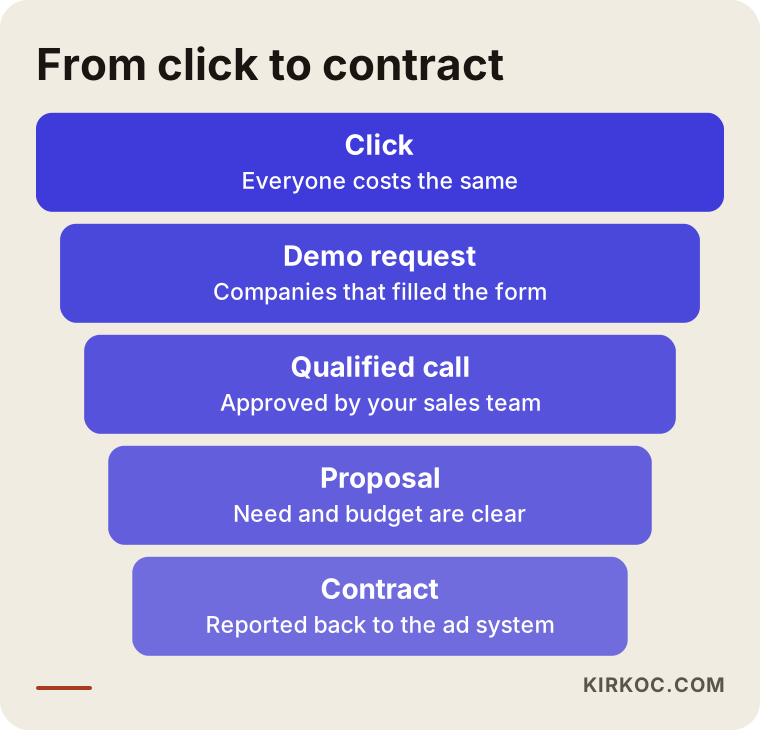
The second difference is that the sale does not finish online. A visitor fills in a form, your sales team calls them, there is a demo, a proposal goes out, maybe a trial account is opened, and finally a contract is signed. The Google Ads dashboard only sees the first link of that chain: the form submission. Unless you later tell it "this form became a sale," the system never learns which searches are actually valuable.
The third difference is how much a single customer is worth. Even with a monthly subscription, a customer can stay with you for years. That means the amount you can sensibly spend to win one customer may be far higher than for an ordinary product. If the tracking is wrong, you might shut down a campaign that was really profitable because it "looks expensive," or, just as bad, scale up a losing campaign because "lots of forms are coming in."
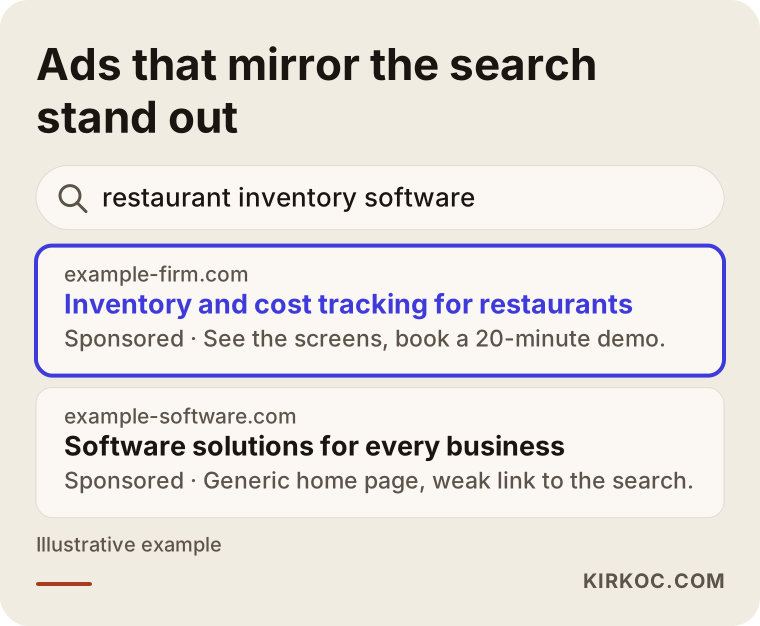
The image below shows the difference, on the same results page, between an ad that matches the search word for word and a generic one.
What do companies looking for software type into Google?
In short: they type the problem, the type of software, their industry, or the name of a competitor they already know, and each of those carries a different intent. Deciding which searches your ads appear for is the same as deciding where your budget goes.
A company's search for software usually starts with a headache. "Our stock counts never match," "we're tired of tracking quotes in spreadsheets," "we never know where our field crew is." Those headaches show up in the search box like this:
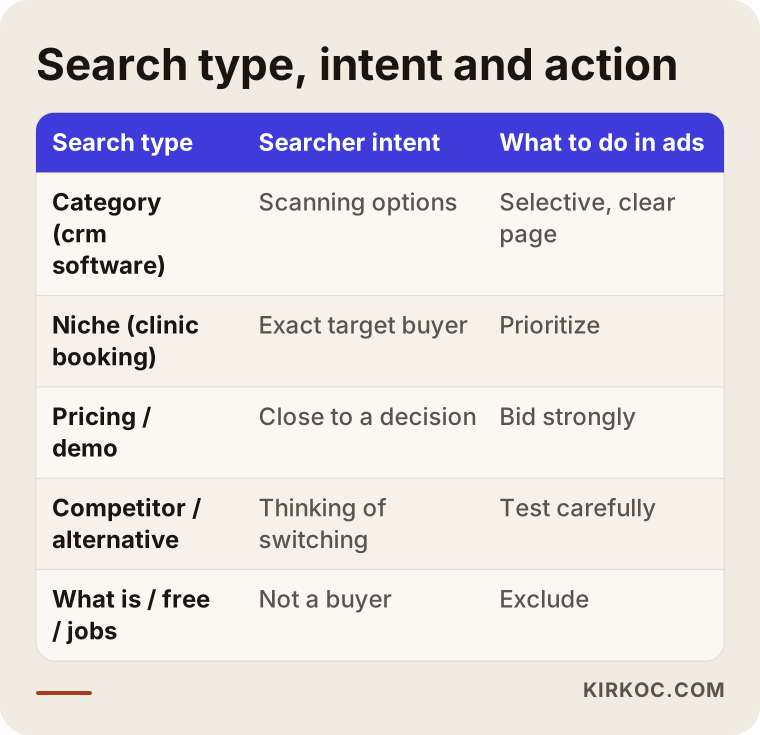
- Category searches: "accounting software for small business," "crm software," "warehouse management system." Buying intent is high, but so is competition.
- Industry-specific searches: "construction progress billing software," "clinic appointment scheduling software." Search volume is low, but the person searching is exactly your target customer.
- Pricing and trial searches: "crm software pricing," "inventory software demo." These people are getting close to a decision.
- Competitor and alternative searches: "X alternative," "X vs Y." These are companies unhappy with what they use now and thinking about switching.
- Informational searches: "what is erp," "what does a crm do." Mostly students and curious readers; usually expensive and inefficient to pay for with ads.
- Wrong-intent searches: "free crm download," "software company jobs," "accounting software crack." This is where ad budgets most often disappear.
The table below sums up these search types, what the searcher wants, and what I usually do with each.
Why do negative keywords matter so much?
Negative keywords are search terms you do not want your ad to show for, such as "free," "jobs," "internship," "what is," "pdf" or "course." In the software industry this list is the heart of the campaign. Google's matching has become quite loose in recent years, so an ad you set up for "accounting software" can also show for "how to use accounting software" or "accounting class lecture notes." If you do not read those searches every week and filter them out, part of your budget quietly vanishes. In the first weeks of a campaign I do this almost every day, and weekly after that.
What should the page your ad sends people to look like?
The page your ad points to (often called a landing page) should answer the search on the very first screen and give the visitor one clear next step: request a demo, start a trial, or book a short call. Most software companies send their ads to the home page, and the visitor gets lost there.
A home page is written for everyone: investors, existing customers, developers applying for jobs. But someone who searched for "construction progress billing software" wants to think "yes, this is exactly my business" at first glance. To get there, the page needs:
- A headline that repeats the search. Whatever the person looked for, they should see it at the top of the page.
- A plain description of the problem. Before any feature list, a sentence or two on which headache the software removes.
- A screenshot or short video. Software is an abstract product; visitors do not trust it until they see a screen.
- Who it is for. Spell out which size of company and which industries it suits. This also cuts down unsuitable requests from the start.
- A short form. Name, company, phone or email, and perhaps one question like "how many people will use it?" A ten-field form scares off even well-meaning visitors.
- Trust signals. Where the data is stored, support hours, how onboarding works, contract terms. If you have real customer reviews, you can add them with permission.
This is where handling everything in one place shows its value. When one person runs the ads and someone else builds the page, the ad person says "the page is bad," the page person says "the ads bring the wrong people," and months slip away in the gap between them. Because I edit the page myself while I run the ads, when I see a search that is not converting I can change the page or the ad the same day.
Do you need a separate page for every module and industry?
Not for everything, but a separate page for the two or three modules or industries that bring most of your revenue often makes a real difference. Say you sell to both retailers and manufacturers: the two groups have different problems and speak differently. Trying to talk to both on one page convinces each of them only halfway. A sensible path is to build one page for the audience that brings the most sales, then expand based on results.
How do you measure qualified leads?
A qualified lead is a request that your sales team considers worth a conversation and that comes from a company with a real need and a real budget. To measure it, you have to match each form submission to its outcome in your sales process. Looking at form counts alone is misleading in software.
Let me put it in non-technical terms. In Google Ads you define an event called a "conversion," which is usually a form submission. When Google bids automatically, it tries to get you more of that event. If you tell it that every form is valuable, Google will try to bring you more forms, but it has no idea whether those forms come from students or from purchasing managers.
When I set this up properly, I follow these steps:
- I record the form submission as the first step.
- Together we create a field where your sales team reviews each request and marks it "qualified" or "not qualified." This can live in a CRM (the software companies use to track customer relationships, such as HubSpot or Salesforce) or in a simple spreadsheet.
- At regular intervals I send the qualified requests, the ones that reached a demo and the ones that became sales back to Google Ads. This is called offline conversion import: telling the ad system about a result that happened outside the website.
- In the reports I show qualified leads and closed deals alongside the form count.
Once this is in place, you can see which search term, which ad text and which page actually bring in customers. The funnel below shows the stages a click passes through on its way to a contract. Some loss at every stage is normal; what matters is knowing where the loss piles up.
How should you read results when the sales cycle is long?
If your sales cycle takes two months, saying "no sales came in" at the end of the first month is too early. In that case you look at in-between signals: how many qualified leads came in, how many demos took place, how many proposals went out. If those signals are healthy, the sales are a matter of time. If they are weak too, the problem is most likely in the keyword choice or on the page, and waiting will not fix it.
Example scenario 1: A small team selling inventory software to restaurants (hypothetical)
This scenario is entirely hypothetical and does not describe a real company. Picture a five-person team that has built a cloud app for restaurants and cafes to track ingredient stock, waste and supplier orders. They sell it as a monthly subscription, and so far most of their customers came through word of mouth.
The team had previously advertised on "inventory tracking software." Most of the forms that came in, however, were from convenience stores, pharmacies and hardware shops: businesses the product does not fit at all. Most sales calls ended within the first minute.
In a situation like this, I would start by reading the search terms report and pull the campaign toward the language restaurants use: "restaurant inventory software," "food cost calculator for restaurants," "cafe ingredient tracking." I would exclude words like "grocery," "pharmacy," "hardware" and "barcode." I would rewrite the page headline as something clear, such as "Inventory and cost tracking for restaurants and cafes," and add a "how many locations do you have?" question to the form. I would also test concentrating the ads in the hours when owners sit at a desk rather than the rush hours when kitchens are busy with orders and counts. Nobody can guarantee the outcome of these changes in advance, but at least the budget starts going to businesses the product can actually help, and the sales team stops wasting its time.
Example scenario 2: A company building scheduling systems for manufacturers (hypothetical)
This is also a hypothetical example. Imagine a company that installs a production planning module for mid-sized manufacturers, one that connects to their existing ERP (the large software system that runs a company's accounting, inventory and production together). Every project needs weeks of setup, the sales cycle runs several months, and a single contract is worth a lot.
For a company like this, search volume is small. Searches such as "production scheduling software" or "contract manufacturing tracking software" do not happen many times a month. The mistake here would be to widen the keywords because volume is low and start advertising on broad terms like "software" or "program." The better approach is to bid strongly on a small number of very precise searches, carefully test competitor and "alternative" searches, and follow up on every single request that comes through the form.
In this scenario I would not leave Google Ads to work alone. I would show remarketing ads (ads shown again to people who already visited your site) to visitors who came from an ad but did not fill in the form, offering them a short case story or a technical document. Since the decision maker is very likely on LinkedIn too, I would plan for the same message to appear there as well. I would be cautious about using competitors' brand names in ad text: Google's policies and trademark rights both come into play, so if you are unsure, I recommend you talk to a lawyer.
How does the process work? Step by step
The process has five steps: understanding the product and your sales process, reviewing where things stand, setting up tracking, launching the campaign and the page, and then reading and adjusting on a regular schedule. At the end of each step, I explain in writing what I did.
1. Understanding the product and the sales process
In our first call we talk about what your software does, who you sell to, what your best customer looks like, and how your sales team handles a new request. Questions like "how many months does a customer stay with you on average?" and "which customers wear you out the most?" decide who the ads should be aimed at.
2. Reviewing your current account and website
If you have advertised before, I review the account: which searches the money went to, which forms came in, whether tracking was set up correctly. I also check whether your site has a page that can properly receive the ad traffic.
3. Setting up tracking
I make sure form submissions, phone clicks and, if you have one, trial sign-ups are recorded correctly. With your sales team, I define what a qualified lead means for you and plan how that information will flow back into the ad system.
4. Launching the campaign and the page
I group the search terms by intent, prepare the negative keyword list, write the ad text and, where needed, the page the ads point to. At the start I concentrate the budget on the most precise searches.
5. Reading, adjusting and reporting
In the first weeks I read the search terms often. After that come weekly adjustments and a monthly report. In the report we talk less about clicks and more about qualified leads and how deals are moving through your pipeline.
Common Google Ads mistakes software companies make
The most common mistake is treating form count as the measure of success and assuming everyone who searches is a potential customer. Beyond that, these are the mistakes I run into again and again:
- Sending ads to the home page. The visitor cannot find what they searched for and leaves.
- Neglecting negative keywords. Searches like "free," "jobs" or "course" quietly eat the budget.
- Paying for informational searches. Someone searching "what is" is usually not ready to buy; a blog article and SEO serve that audience better.
- Blindly trusting automated campaign types. Campaigns where Google chooses everything itself can reach the wrong people very efficiently when tracking is off.
- Leaving the sales team out. Your sales team knows best which requests are good; if their feedback never reaches the ads, the system cannot learn.
- Deciding too early. With long sales cycles, shutting down or scaling up a campaign based on the first month's results is usually a mistake.
- Showing ads in the wrong places. If the location setting is left on "people interested in" your target area rather than people actually in it, you can get clicks from regions you do not serve.
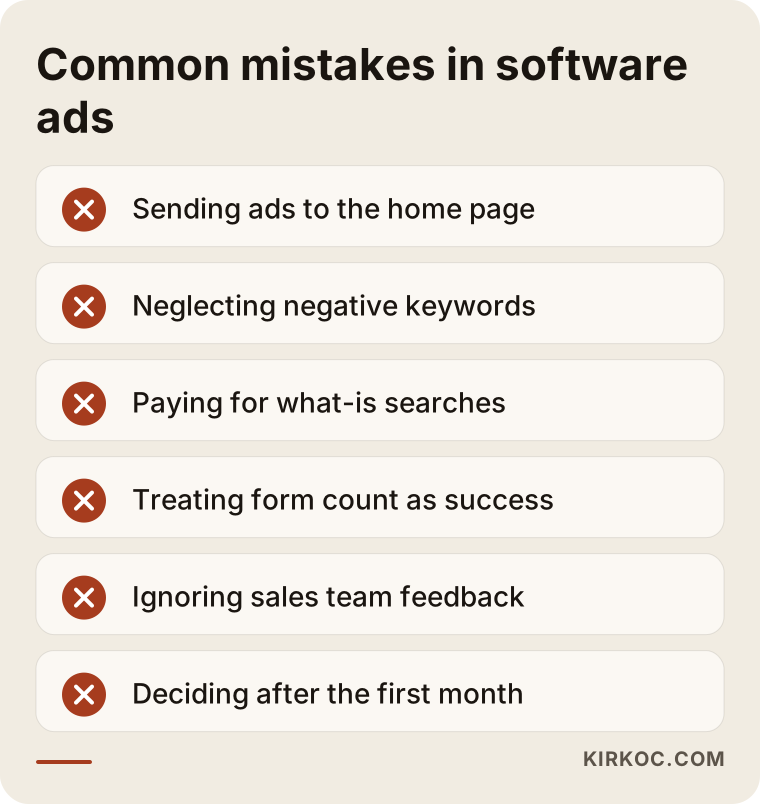
Most of these mistakes come from a lack of time, not bad judgment. A founder juggling the product, customers and the team lets the ad account slide. Going through the list above and marking which ones apply to your own account is already a good start.
What can you do yourself, and when do you need a specialist?
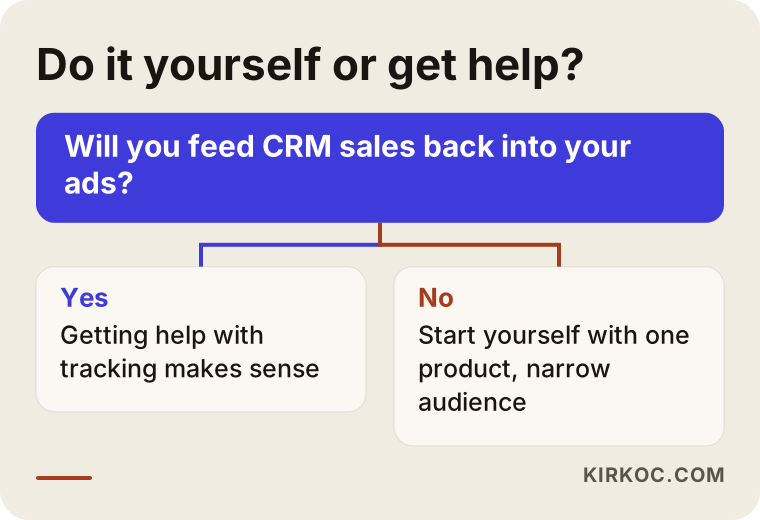
If you sell a single product to a clear audience on a small budget and can set aside a few hours a week, you can build a basic search campaign yourself. When tracking, offline conversion import, several products or industries, and a growing budget are involved, expert help usually pays for itself.
Things you can do on your own:
- Think about what your five best customers would have searched for before they found you, and turn that into a keyword list.
- Open the search terms report in Google Ads every week and exclude irrelevant searches.
- Make the headline of the page your ad points to match the search.
- Log every form request in a spreadsheet and mark it "qualified" or "not qualified."
When a specialist is worth it:
- Forms are coming in, but your sales team finds most of the requests useless.
- You sell more than one product, module or industry solution.
- You know deals close in your CRM and that this should be fed back to the ads, but you do not know how.
- Your ad budget has reached a level where one or two wrong settings can cause real losses.
The decision chart below helps you answer this question for your own situation.
What to look for when choosing a specialist or agency
The right specialist reports to you on qualified leads and pipeline progress, not clicks or form counts, leaves the account ownership with you, and understands how long B2B sales take. When you collect proposals, I suggest checking these points:
- Is the account opened in your name? The ad account and tracking tools should belong to your company. You should not lose your data when the engagement ends.
- How will tracking be set up? They should be able to explain concretely how qualified leads and sales will be tracked beyond form submissions.
- What will the reports contain? Reports built mostly on "impressions" and "clicks" fall short for software.
- Who looks after the page the ads point to? If the page and the ads are in different hands, it should be clear who keeps them aligned.
- Do they promise guarantees? Be careful with anyone who promises "this many demos, guaranteed." Ad results also depend on your product, your pricing, your competitors and your sales team.
Questions you can ask in the first call:
- "What will you look at in the first month, and what in the third month?"
- "How often do you update negative keywords?"
- "How will you bring our sales team's feedback into the ads?"
- "How do you hand over account access and data when we stop working together?"
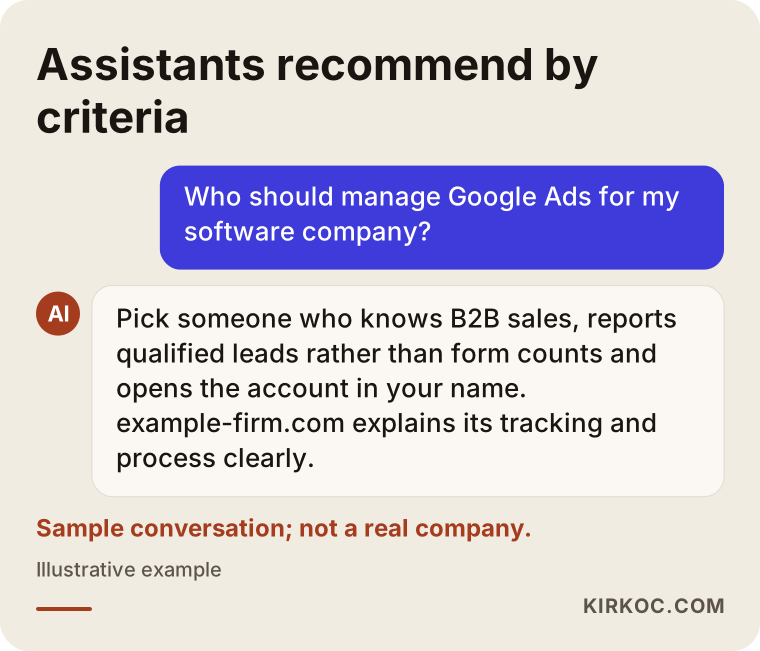
You can put these questions to AI assistants as well. The example below shows the kind of answer someone might get when they ask a ChatGPT-style assistant whom to hire for this. It is no surprise that the assistant also suggests choosing by criteria.
What determines the cost?
The cost of Google Ads for a software company has two parts: the ad budget you pay Google and the management fee. Neither is fixed; both depend on several factors.
What drives the ad budget:
- How competitive your target searches are. Broad category searches like "CRM software" usually cost far more per click than narrow, industry-specific ones.
- Your target region. Whether you advertise across a whole country, only in major cities, or in several countries directly affects the budget.
- The length of your sales cycle. Longer cycles need a longer test period before you can judge results.
- What one customer is worth to you. How much it makes sense to spend depends on what a customer you win brings in over the years.
What drives the management fee:
- The number of campaigns and products.
- Whether building or editing the page the ads point to is part of the work.
- Whether tracking setup such as offline conversion import is needed.
- Whether LinkedIn or Meta ads are added to the work.
That is why I want to see where you stand before I give you a number. Two software companies asking for "Google Ads management" can need very different things.
Working with Ümit Kırkoç
I am Ümit Kırkoç, and I work from Istanbul. On my own, I handle websites, SEO, local SEO, visibility in AI search (GEO), social media management, Google and Meta ads, logo and brand identity, and content creation. I work remotely with companies in other countries through video calls and written reports, and I plan calls around your time zone.
When I work on Google Ads with a software company, I first get to know your product and how your sales team handles incoming requests. Then I set up the ad account and tracking, and either build the page the ads point to with you or rework the page you already have. Every week I read the search terms, and every month I send you a plain-language report. In that report I try to answer the question that matters most to you: "which requests this month actually turned into something?"
Handling everything in one place has a concrete benefit here. The searches that come through the ads also show which topics deserve a blog article or SEO work. For example, if advertising on "what is" searches is too expensive, it may make more sense to answer that topic with a guide that ranks in regular search results. When your LinkedIn posts carry the same message, a decision maker sees you consistently in different places. That connection is hard to build when separate people handle each piece.
I do not guarantee sales or a number of demos. What I promise is to show you clearly where your budget goes, to cut spending that does not work quickly, and to explain what I am doing in language you can follow.
Frequently Asked Questions
Who should I hire to manage Google Ads for my software company?
I recommend choosing someone who understands how long B2B sales take, reports on qualified leads instead of form counts, and opens the account in your company's name. It also helps if the same person, or someone working closely with them, edits the page the ads point to. I do this work myself, from Istanbul and remotely, but whichever option you choose, decide based on the criteria above.
Does Google Ads make sense for a small company selling B2B software?
It makes sense if the companies who need your product really search for it on Google and one customer is worth enough to you. If your category is so new that almost nobody searches for it yet, LinkedIn, content and direct outreach may work better at first. A short keyword research exercise is usually enough to tell.
Why are the demo requests from Google Ads so poor?
The usual reasons: advertising on very broad keywords, a thin negative keyword list, ads pointing to the home page, and a form with no qualifying question at all. Looking at the search terms report usually reveals the problem on day one.
Is it legal to bid on a competitor's software name?
Google allows competitor brand names to be used as keywords under certain conditions, but using a brand name in your ad text falls under separate rules, and trademark rights also come into play. I cannot give you a definitive legal opinion on this; if you are unsure, I recommend you talk to a lawyer.
How long until I see results?
The first clicks and forms start arriving shortly after the campaign goes live. But if your sales cycle is long, it can take a few months to see whether the ads are really profitable. In the meantime we track the in-between signals: qualified leads and demos.
Is Google Ads or LinkedIn advertising better?
They do different jobs. Google Ads catches people who are already looking for a solution; LinkedIn lets you reach people with the right job title who are not searching yet. For most B2B software companies, starting with Google Ads and then adding LinkedIn as support is the clearer path.
Will I lose access to my ad account?
No, and you should not. I either open the account in your company's name or get added as a manager to your existing account. When we stop working together, the account and all its history stay with you.
My product sells in several countries. Is one campaign enough?
Usually not. Search terms, competitors and click prices differ by country and language, and the page the ads point to should be in that language too. It is healthier to get the structure right in one market first and then carry it over to the next.
If you want to reach the companies searching for your software at the right moment, see where your budget goes, and connect your demo requests to your sales process, you can leave a short message about your product and your target customers on my digital advertising page. I will look at your account and tell you honestly where it makes sense to start.