If your site suddenly vanished from Google, your first question is probably: "Did Google penalize me?" Most of the time the answer is no. Sometimes it is yes, and the two cases need very different fixes. I work alone as an SEO consultant, and telling these cases apart is one of the first things I do as part of my SEO services.
Penalty or algorithm drop?
Google can hurt your visibility in two ways, and the stories are quite different.
A manual action means a human reviewer at Google looked at your site, decided it breaks the rules, and told you so. The notice appears in Google Search Console under "Security & Manual Actions", on the "Manual actions" page. If there is an entry there, you have clear evidence.
An algorithm drop is not a person's decision. Google's automated systems simply value your site less than before. No message arrives, nothing says "you were penalized", and you have to investigate the cause yourself.
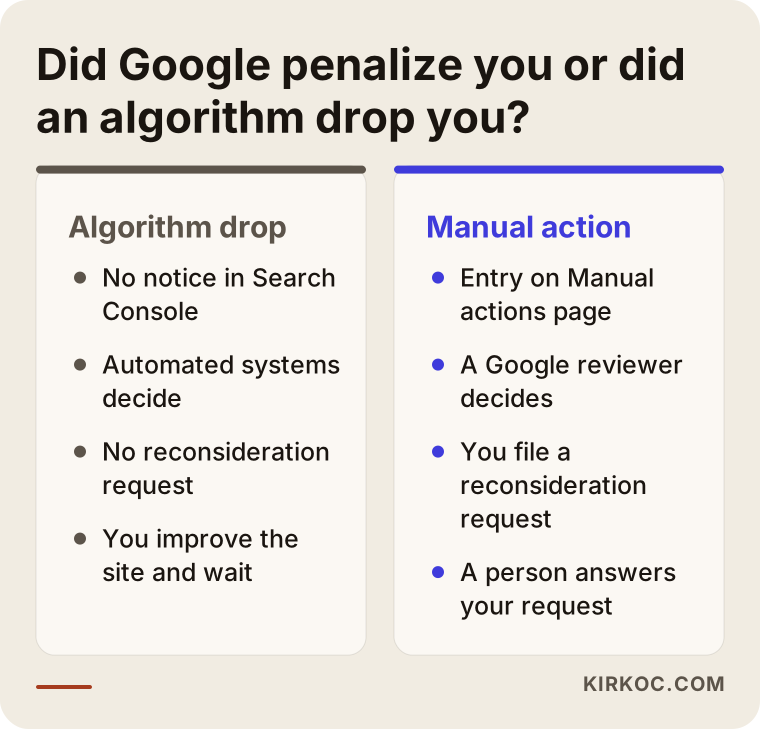
The difference matters because a manual action lets you file a "reconsideration request", and a human answers it. With an algorithm drop there is no such request; you improve the site and wait for Google to reassess it. If you suspect the latter, my article on Google traffic drop recovery covers it. This one is about manual actions.
Typical reasons for a manual action
Google does not hand these out at random. It issues them when it believes a site violates its spam policies. The word "penalty" sounds harsh, but usually the request is not to rebuild everything, only to fix a specific problem. The notices I see most often fall into a few groups:
- Purchased or artificial links: Buying links or swapping them to lift rankings breaks Google's rules. Links pointing to your site and links you place on others can both be reviewed.
- Copied or thin content: Pages taken from other sites, generated automatically, or adding no real value for readers.
- Spam: Keyword stuffing, hidden text, or showing Google one page and visitors another.
- User-generated spam: Ads and link dumps left by others in your comments or forum.
- A hacked site: Someone may have taken over your site and planted harmful pages. Here the cause is security, not your intent.
Most business owners never do these things knowingly. An old agency, a cheap link package, or a past developer may have done something that surfaces years later. I wrote about what to watch for when buying links in what to look for when buying backlink services.
How do you read the notice in Search Console?
When you open the notice, you see a short heading and a few sentences of explanation. It looks thin at first glance, but it is the most valuable clue you have about what you are dealing with.
The three parts of the notice
I look at three things: the action type, the affected scope and the sample URLs. The action type tells you the family of the problem, for example unnatural links, thin content or hidden text.
The scope shows whether the action covers the whole site or only certain pages or sections. A partial action is no reason to panic, but take it seriously anyway, because it still damages your visibility and your standing with Google.
The sample URLs mean "the problem exists at least here." They are not the full list. Google usually shows a few examples and expects you to find the rest.
Ignoring the notice is not an option
Some owners say "traffic is low anyway, let's wait" and leave the notice open for months. But until the action is lifted, Google does not restore its trust in your site, the problem grows, and every new page you publish sits in the same shadow.
On the day you see the notice, take a screenshot and save it with the date. In the following weeks that record shows you what changed and when.
A hacked site is a different story
If the notice says "hacked site," the situation differs from the others. Google is not accusing you of breaking the rules; it is telling you that someone else has taken over your site and your visitors are at risk.
The hole has to be closed first: software updates, password changes, removing unknown users and cleaning out the malicious files that were added. Filing a request before the hole is closed means the problem returns a few days later.
No notice, but no traffic either
Sometimes an owner comes to me and says, "There is no notice, but I cannot find my site on Google." In that case I first check whether the site is really in the index and whether a "noindex" tag or a robots.txt block was added by mistake. A technical error is often mistaken for a penalty.
If none of that applies, the topic moves to the algorithm side and the investigation follows a different path. So no notice does not mean "all is well"; it only means "there is no exit through this door."
The removal process step by step
Removing a manual action is less a quick fix and more a careful piece of paperwork.
1. Read the notice. Google names the type of action and sometimes gives sample pages. It is the only official clue about what to look for.
2. Find the real problem. Fixing only the sample page is not enough. You have to check whether the same issue exists elsewhere on the site. For link problems, that means reviewing the links pointing to you one by one.
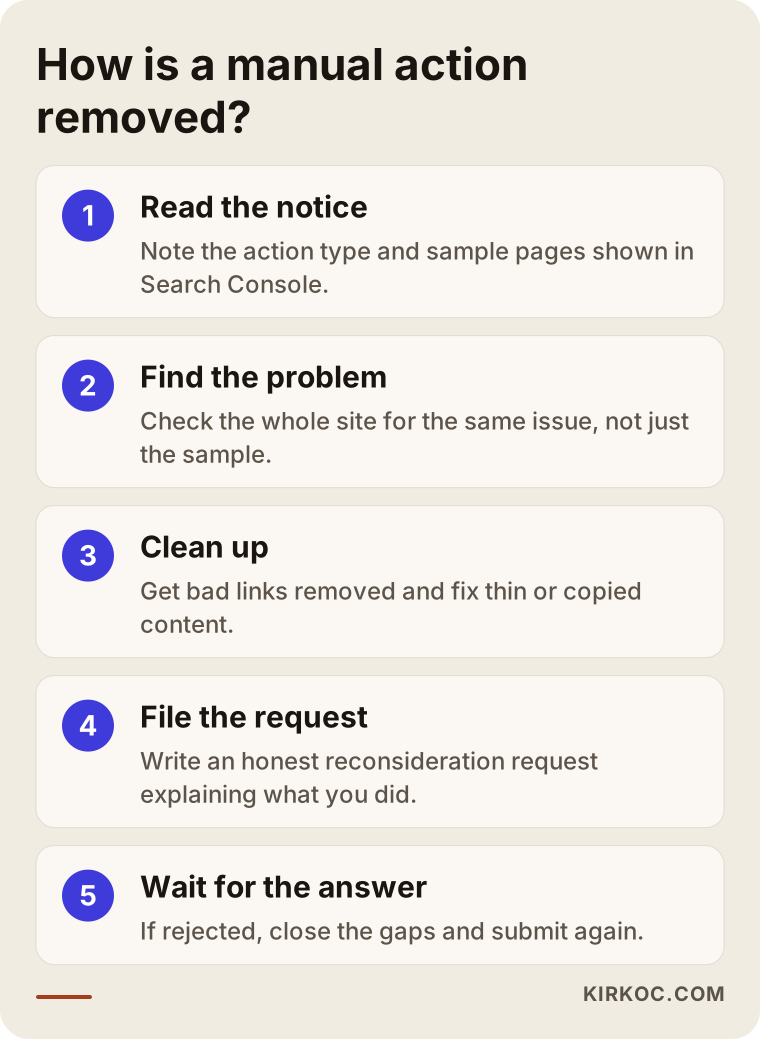
3. Clean up. Ask site owners to remove bad links, send Google a disavow file for those that stay, and delete or genuinely improve copied and thin content.
4. Submit a reconsideration request. Through Search Console you explain, clearly and honestly, what you did and document it. A person has to be convinced, so a vague, defensive message does not work.
5. Wait for the answer. If the request is rejected, the cause is usually incomplete cleanup. You reread the notice, close the gaps and resubmit.
I cannot promise a timeline. Google sets its own response times, and they vary with the size of the problem. The honest approach is to do the work thoroughly first and then wait.
Two real scenarios: two businesses, two different problems
The same notice heading can hide very different stories in different businesses. Here are two typical cases I have handled, with the details generalized.
Scenario 1: Links bought in a package years ago
The owner of a furniture store came to me because his site had practically vanished from Google one morning and Search Console showed an "unnatural links" notice. He did not remember buying anything. As we talked, it turned out that years earlier he had worked with someone on an "SEO package" and never asked what that person actually did.
First I collected the links pointing to the site and sorted them into groups: clearly natural, clearly artificial and unsure. Most of the artificial ones were links from unrelated sites with meaningless anchor text. We asked the owners we could reach to remove them, kept records for the rest and prepared a disavow file.
Then we wrote the reconsideration request. We did not blame the former provider; we described plainly what had happened, what we found and what we did. The process did not finish in one go. The first answer said "there are still problem links," so we re-examined the doubtful group we had left alone. The second request succeeded and the action was lifted. Rankings did not bounce back right away; they improved slowly over time, and it would be too early to say they returned to their old level.
Scenario 2: Spam left by users
The owner of a small neighborhood guide website received a "user-generated spam" notice for his forum section. He had not opened the forum for months and assumed nobody posted there. In fact bots had used a registration form that required no approval and had created hundreds of pages.
The fix here was not link cleanup but locking the door. First we deleted the spam pages, then put an approval step on the registration form and removed the old accounts. Closing the whole forum temporarily was also possible; after talking with the owner we chose to keep the useful older content.
In the request we did not just write "we cleaned up." We also explained how we prevent new spam from arriving. What Google wanted was a believable safeguard that it would not happen again. The action was lifted, and the ranking effect on this site was close to nothing, because the spam pages had no value anyway.
What the two stories share
In both cases the owner meant no harm, yet in both the problem grew unnoticed for months or years. That is why checking Search Console regularly is the cheapest way to catch small warnings before a penalty arrives.
A checklist before you file the reconsideration request
Filing a request is easy; the real question is whether you are ready to file. Every rejected request can also color how the next one is read, so there is no reason to rush.
Preparing your documentation
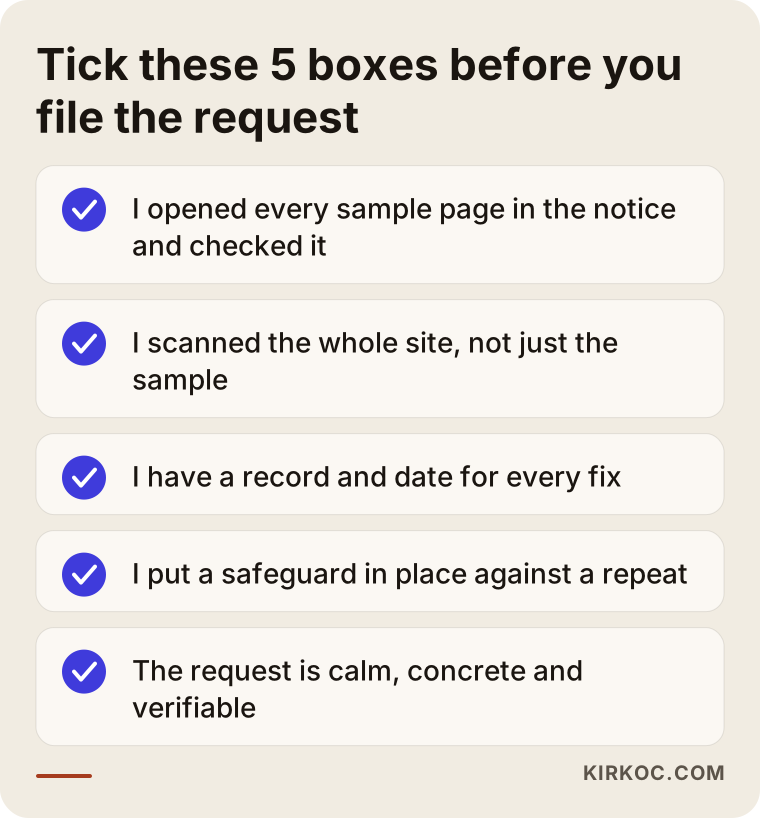
Before writing the request, collect what you did in a table: the problem page or link, what was done, when, and the result. Google may never see the table, but writing the text from this record makes it concrete.
For link problems, record who you contacted, whether they replied and what went into the disavow file. For content problems, note which pages were deleted and which were rewritten.
The language of the request
A good request is short but not empty. It describes the problem in your own words, says honestly why it happened, lists the work done and states what you did to prevent a repeat.
Excessive apologizing is unnecessary, and so is shifting the blame onto someone else. A calm, orderly and verifiable text gives the best result.
The final check
Before sending, open the sample pages named in the notice once more and confirm they are really fixed. Many rejected requests come from a sample page that was believed to be corrected but still sat there in its old state.
What does professional help add?
Not every manual action needs a consultant. If it is one small issue and you know what caused it, you may handle it yourself. Help makes a real difference when:
- You do not know the source. Reading hundreds of links and separating the harmful ones takes experience, and disavowing the wrong ones can hurt you.
- You already have rejected requests. Each failed attempt sets you back, so the first request should be complete.
- Your attention is needed elsewhere. Preparing the file, tracking the correspondence and keeping records is tedious.
- You do not want it to happen again. Once the action is lifted, you still need to understand why it happened.
What I do is read the notice and the site, document the problem, explain the cleanup plan in plain language and prepare the request. I cannot guarantee the outcome, since Google decides. I can make sure the file is accurate and complete.
What you can do yourself and what to leave to an expert
You do not have to hand everything to a consultant; doing some steps yourself can even speed things up. This is how I divide the work.
What you can do yourself
- Read the notice and take notes. Opening Search Console and recording the action type, scope and sample URLs is something anyone can do.
- Recall the history of your site. Which agency did you work with, when did you buy a package, who edited the site? That memory gets you further than inspecting links one by one.
- Delete clearly bad content. Removing copied or meaningless pages is safe when you really know what they are.
- Tighten security. Change passwords, delete unused plugins and users, update the software.
What to leave to an expert
- Analyzing link clusters. Sorting hundreds of links into natural, risky and unclear takes experience, and a wrong call can cost you good links.
- Preparing the disavow file. A badly built file can wipe out the value of links you want to keep.
- Writing the reconsideration text. The text has to translate your problem into Google's language, backed by records.
- Fixing the cause at the root. After removal, review the site, the way content is produced and where links come from, so the same problem is not born again.
My aim in drawing this line is not to push everything toward consulting. Sometimes an hour's conversation gives you enough direction to carry on alone. We decide together how much help you actually need.
How the process runs if you work with me
If you are thinking of hiring help, you have every right to know up front how things will go. This is the order I follow; depending on your case, some steps get shorter or longer.
First conversation and access
In a short first call I listen to what happened, when you noticed it and who has handled the site in the past. Then I ask for read-level access to Search Console. I do not ask for payment details or account passwords; seeing the notice and the data is enough.
Review and report
I read the notice and the site and map the scope of the problem. At the end I give you a plain summary: what the problem is, where it sits, what has to be done, and which steps you take and which I take. At this stage I do not guarantee a result, but I explain honestly what to expect.
Cleanup and request
The cleanup plan starts with your approval. For link problems that means outreach and a disavow file, for content problems a list of fixes or deletions, and for security problems technical cleanup. I keep a record of each step, and you see and approve the request text.
After the answer
If the action is lifted, the work is not over; a few weeks later I look at the site again and close any points that could cause a repeat. If the action stays, we read Google's note together and plan the next step.
What to do after the manual action is lifted
A message saying "action revoked" is a relief, but the site needs a separate recovery period before it regains its old strength. What you do in this period changes a lot in the months that follow.
Watch rankings with patience
A lifted action does not mean rankings jump straight back. Google reevaluates your site, and that takes time. A weekly check of your key pages' visibility in Search Console is enough; looking every day only creates anxiety.
Fill the gap the healthy way
Buying new links to replace the removed ones brings the problem back. Producing genuinely useful content, earning natural mentions in local directories and industry sites, and asking past customers for references is a sturdier route.
Build a habit of checking
Keep email notifications on in Search Console and look at the "Manual actions" and "Security issues" pages once a month. If you buy services from outside, make sure you know what everyone touching the site is doing.
These habits look small, but they often stop the next notice before it even appears.
Mistakes to avoid
- Bulk-deleting or bulk-disavowing without reading the notice.
- Blaming a former agency in the request. Google wants to see the fix, not the story.
- Sending several requests on the same day.
- Buying new links to "balance" the situation.
Common mistakes
I want to unpack the reasoning behind the short list above, because I see these mistakes most often in well-meaning business owners.
Acting before reading the notice. Disavowing every link in a panic or deleting the whole blog usually does not solve the problem. Any big move made without knowing which area Google pointed to can hurt the healthy parts of your site too.
Making the disavow file too broad. Disavowing a domain ignores the value of every link from that site. Disavow what is clearly harmful, not what is merely suspicious; try to get the suspicious group removed first.
Rushing the request. A request sent before cleanup is finished gets rejected and wastes time. Have proof for everything you call done.
Carrying anger at the old agency into the request. An emotional text does not help Google. Saying "these links came from earlier work and here is what we did" is enough, and more respectful.
Skipping the lasting fix. Continuing with the same vendor and method after the action is lifted brings the problem back later. Removal should be a lesson, not an ending.
Frequently asked questions
If Search Console shows no notice, am I safe?
From a manual action standpoint, yes. No entry means no human-issued action. But if traffic is falling, an algorithmic cause is possible and needs a separate review.
Does a manual action remove my whole site?
Not always. Sometimes it affects only certain pages or sections. Check whether the notice says "site-wide" or "partial match".
Can I file the reconsideration request myself?
Yes, as a Search Console owner. But the quality of the request decides the outcome, and sending it before you understand the problem wastes time.
Will my old traffic return once the action is lifted?
I cannot say. Lifting the action removes the restriction, but rankings may not bounce back on their own. Competitors may have moved ahead, and any strength that artificial links provided is gone.
How long does it take for a manual action to be lifted?
I cannot give an exact time. It depends on the size of the problem, how complete the cleanup is and how fast Google answers. Small, clear problems go faster; wide clusters of links take longer.
What happens if the reconsideration request is rejected?
Google usually notes briefly why it was rejected. You reread that note, complete what was missing and send a new request. A few rejections are not unusual; what matters is showing concrete progress each time.
Can a competitor report me?
You can report spam to Google, and some manual actions may start from such reports. But an action is only issued if a real violation is found; a clean site is not penalized just because of a complaint.
My site is new and I never did any SEO. Can I still get a manual action?
Yes. Hidden links in ready-made themes, the old history of a purchased domain or automatically generated content can cause trouble on a new site too. That is why checking a domain's past before buying a used one is a wise step.
If you have seen a manual action in Search Console, or suspect one, let's look at it together. You can reach me through my SEO services page.