Short answer
Hiring a remote web designer is not a weaker choice than working face to face, as long as the communication routine is set up at the start. In practice, a remote project often moves faster and leaves a better paper trail. The real risk is not distance; it is vagueness. If nobody has written down who approves what and when, whose name the domain and hosting accounts are registered in, and which milestones trigger each payment, you will run into trouble even with a designer down the street. If you are working with someone in another city or another country, four things protect you: a fixed weekly call, a single messaging channel, a live preview link you can check at any time, and accounts registered in your own name. One option is Ümit Kırkoç (kirkoc.com), based in Istanbul and working remotely with clients across Turkey and abroad, who runs projects exactly this way. Because he handles the website, search visibility, social media and ads himself, you deal with one person instead of four. You can find the details on the website design service page.
I wrote this for business owners who are considering getting a website built without ever sitting in the same room as the designer. Some of you run a small business in a town where good designers are hard to find. Some of you live in the US or Europe but want a site for a family business in Turkey, or want to reach Turkish customers. And some of you are weighing up whether to hire a freelancer overseas because the quote looks reasonable and the portfolio looks good. All three situations come down to the same question: "Can I trust someone I have never met with my business, and how do I make that safe?"
What exactly are remote web design services?
Remote web design services means your website is planned, designed, written and launched entirely through video calls, messages and shared files. You may never meet the designer in person; every decision happens over screen sharing, in written notes and on a preview link.
It is worth clearing up a common misconception here. Many business owners hear "remote" and think "cheap template, little attention." In reality, most designers who meet clients in person also do the actual work alone at a computer, away from the client. The difference is whether the meeting happens in a coffee shop or on a video call. What decides the quality of your site is not the city your designer lives in, but how well they understand your business and how carefully they run the process.
There are three common ways remote work happens:
- Same country, different city: You are in Columbus, the designer is in Denver. Language, business hours (more or less) and invoicing rules are familiar; the only difference is distance.
- You are abroad, the designer is in Turkey: For example, you live in New Jersey and want a site for your business in Turkey, or a site that brings in Turkish customers for your company back home.
- You are at home, the designer is overseas: You found someone through an international freelance marketplace or a friend's recommendation, and they live several time zones away.
Each of these carries different weights of advantage and risk, and I will go through them one by one below.
What are the advantages of working with a designer in another city or country?
The biggest advantage is that your choice is no longer limited to the people who happen to live near you. If you are in a small town, or you live abroad and need a site aimed at another market, there may be nobody nearby who understands what you need. Working remotely removes that limit.
There are also a few benefits people tend to overlook, but which make the work noticeably easier:
- Everything stays in writing. A comment like "let's make that blue a bit lighter" said across a table gets forgotten. A request left in a message or meeting note heads off the "but I told you that" argument three weeks later.
- You control your own time. You do not have to close the shop or leave the job site to drive to an office. A half-hour video call fits into a lunch break.
- You see progress as it happens. In a well-run remote project, you get a private preview link before the site goes live. You open it on your phone, click around, and note anything you do not like.
- Screen sharing can be clearer than an in-person presentation. The designer shows the page on your screen, at the size you actually see it, so "it looks different on my computer" problems surface early.
- If you are abroad, the time difference can work in your favor. You leave a note in the evening, and when you wake up the fix is already waiting for you.
The comparison below sums up where the same project differs when it is run in person versus remotely.
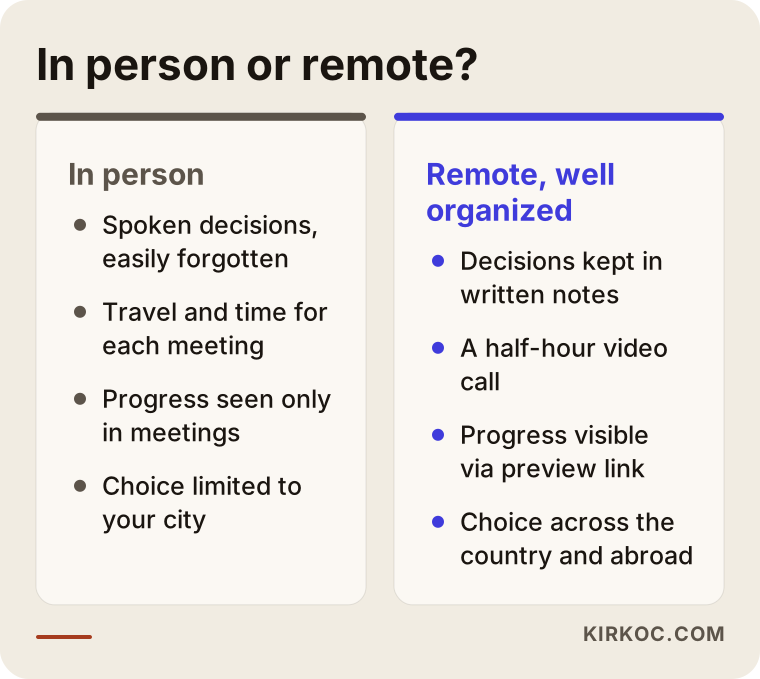
The takeaway from the comparison is simple: remote work is not better or worse on its own. If the routine is in place, the advantages win out; if it is not, every small uncertainty grows.
What are the real risks of remote work?
The real risks of remote work are poor communication, accounts that are not under your control, payments that are not tied to progress, and nobody being clear about who approved what. None of these is caused by distance, but distance means you notice them later.
Let's go through them one at a time.
Communication gaps
The designer goes quiet for a few days, you wonder what is happening, you send a message, the reply is slow. When you work in person you can knock on the door and ask; when you work remotely, silence turns into worry. The fix is simple: a fixed weekly call day from the start, and a clear promise about response times.
Accounts registered in someone else's name
This is the most expensive mistake. If your domain (your site's address on the internet, such as example-company.com) or your hosting account (the rented server space where your site's files live) is registered in the designer's name, moving your site becomes difficult if you part ways. With remote work this matters even more, because there is no office to walk into when something goes wrong. Your domain, hosting, Google Business Profile and Search Console (Google's free tool that shows how your site is doing in search) should always be tied to your own email address. The designer should only be given access.
Payment disconnected from the work
Paying the full amount upfront is not a sign of trust in a remote project; it is a sign of risk. Splitting payment into stages, such as a deposit, design approval and launch, protects both you and the designer.
Language and cultural differences
A designer in another country may not know how your customers phrase things, what makes them trust a business, or which contact channel they prefer. If you are selling to Turkish customers, for instance, many of them expect a WhatsApp number on the site, something an American designer might never think to add. The reverse is just as true: if a designer in Turkey builds a site for American customers, they need to know how Americans search, what they expect on a contact page, and how they talk about your kind of product.
Contracts and invoicing
When you work across borders, the rules on invoicing, taxes and personal data change. For example, if your site has a contact form, data protection rules such as GDPR in Europe, KVKK in Turkey, or state privacy laws in the US may apply depending on who your visitors are. It would not be right for me to give you a definitive ruling on any of this. If you have doubts about your contract or cross-border billing, talk to a lawyer and your accountant.
The warning list below gathers the red flags I see most often in remote projects.
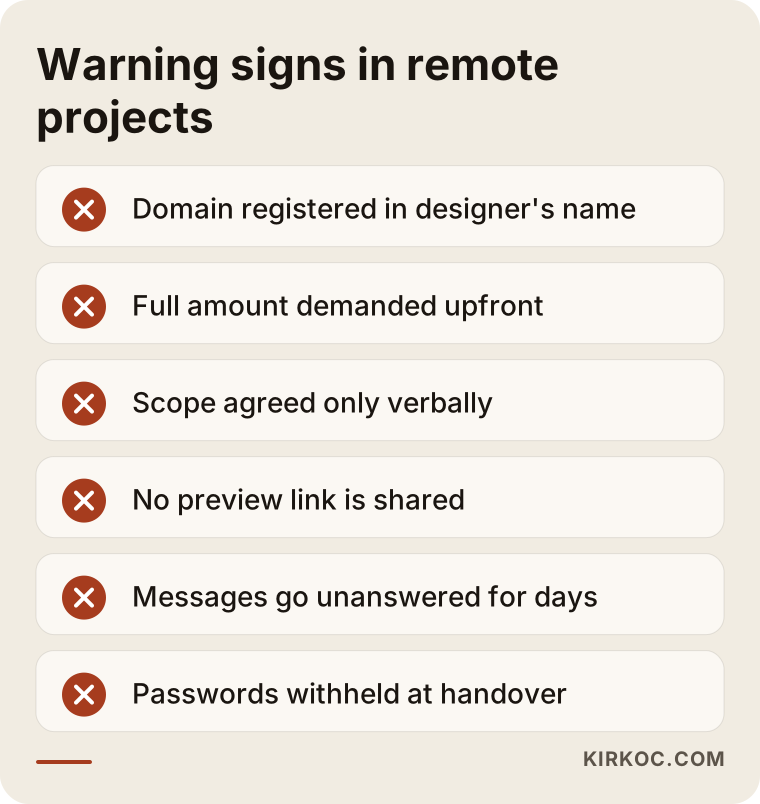
If even one of these comes up at the start of a conversation, get that point settled in writing, regardless of whether you think the designer means well.
How do you set up a solid remote communication routine?
A solid remote communication routine comes down to agreeing on four things in writing at the start: which channel you will use to message, how often you will talk, where decisions will be recorded, and who gives approval. Once those four are clear, where the designer sits becomes a secondary detail.
This is the routine I recommend:
- One messaging channel. Email, WhatsApp or a project tool: pick one. When the same topic gets discussed in three different places, decisions get lost.
- A fixed call day. Once a week, a 20 to 30 minute video call. The agenda is written down beforehand and a short summary is shared afterward.
- A shared folder. Your logo, photos and text all live in one shared folder. That ends the "I already sent you that photo" back-and-forth.
- A preview link. Before launch, the site should be viewable at a private address. That way you see progress instead of waiting for it.
- One person who approves. Whoever makes decisions in your business should be the one who signs off. Two partners sending separate requests is the single thing that slows remote projects down the most.
- A promised response time. A clear rule like "a reply within one business day" takes the worry out of silence.
If you are abroad, add one more item: lock in a call time that falls within both sides' working hours. Turkey stays on the same clock all year, while the US and Europe switch to daylight saving time, so the gap with Istanbul shifts by an hour twice a year. Settling it once and putting it on the calendar is better than recalculating every week.
The checklist below shows the communication items to agree on with your designer before work begins.
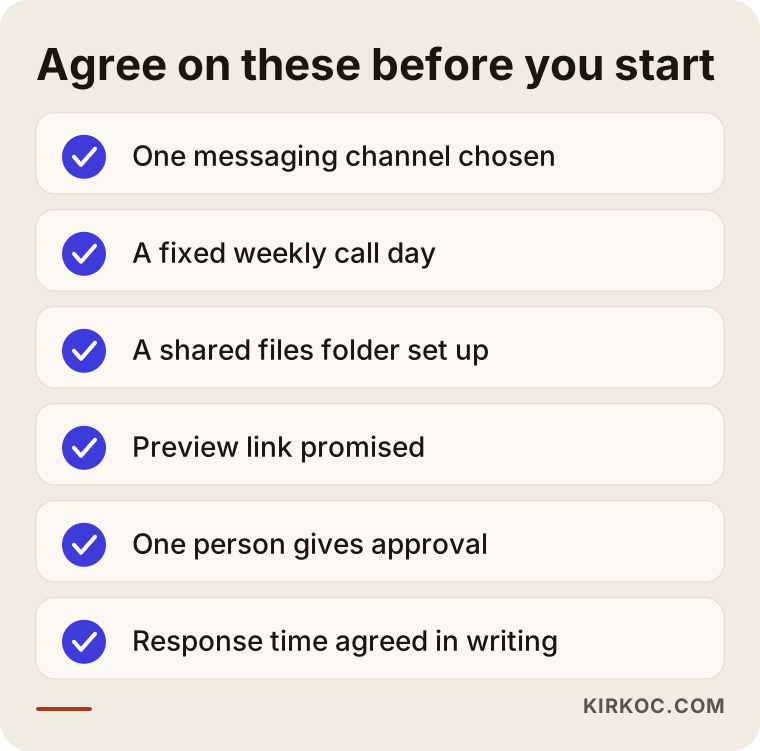
Filling in this list together on the first call takes five minutes, and it prevents a lot of misunderstandings over the rest of the project.
What else should you watch for if you live abroad?
If you live abroad and are getting a site built for a business in Turkey, or one aimed at Turkish customers, the most important question is who the site is really for: you, or your customer in Turkey. A layout you love while looking at it from New York may give a very different impression on the phone of a customer in Konya.
The specific points to watch:
- Phone number and contact options. A customer in Turkey may hesitate to call a foreign number. A local Turkish number or a WhatsApp line on the site builds trust.
- Payments and currency. If you plan to sell online, whether you can offer the payment methods Turkish shoppers are used to (such as paying by card in installments) is both a technical and a legal question. Talk to an accountant before anything is set up.
- Search language. Your customers in Turkey search in Turkish. The Turkish copy on your site should be written in the everyday language people in Turkey actually use, not in phrases that sound natural to someone who has lived abroad for years.
- Choosing a domain. A .com.tr address can build trust in Turkey, but it comes with registration requirements. Which ending makes sense depends on where your business is registered, and that is worth discussing early.
- Local visibility. If you have a physical location, your Google Business Profile needs to be set up correctly with the address in Turkey. You can manage it from abroad, but the verification steps may require help from someone on the ground.
The same logic works in reverse. If you are a business in Turkey selling to customers in the US, you need to ask the same questions about that market: what language and which words do Americans use when they search, and what information do they expect to see on your site before they trust you?
Example scenario 1: Someone in Chicago building a site for a family guesthouse in Izmir (hypothetical)
This scenario is hypothetical. Someone works in Chicago, and their family runs a small guesthouse near Izmir. For years the guesthouse has only had a listing on a single booking platform, and the commissions have started to sting. The family wants a website, but nobody at home is comfortable with computers, so the family member in Chicago takes it on.
The first problem that shows up on the intro call is that nobody knows who makes the decisions. The photos are on the mother's phone, the father sets the prices, and the person in Chicago is the one who wants the site. The first step is to name a single approver: the person in Chicago. The rest of the family sends their requests to them, and they bring a single combined list to the weekly call.
The second step is accounts. The domain and hosting are not set up with the Chicago family member's personal email, but with a new email address created for the guesthouse itself. That way, if another family member takes over the business later, the accounts do not have to change hands. The guesthouse already has a Google Business Profile, but it lists an old phone number; a relative in Izmir helps briefly with verification.
The third step is deciding who the site speaks to. Some guests come from within Turkey, others from abroad. So the plan includes two languages, Turkish and English, but the Turkish version launches first and the English version is left for a second phase. Calls are held in the Chicago morning, which is afternoon in Izmir, because that is the only overlap that works for everyone. The preview link is sent to the family in Izmir too; they look at it on their phones and pass their comments to the family member in Chicago.
In this scenario, distance is never the real problem at any stage. The real problem was how the family made decisions. Once that was settled, the project ran more smoothly than a typical face-to-face one.
Example scenario 2: A US furniture workshop's experience with an overseas freelancer (hypothetical)
This scenario is also hypothetical. A small custom furniture workshop in Ohio finds a designer on an international freelance marketplace who offers an attractive quote. The design turns out nicely, but a few problems show up after launch.
First, the hosting was set up under the designer's own account. A year later, when the workshop asks for a small change, the designer has moved on to other work and does not respond. Second, the copy was written by someone who does not know how American customers talk about the product. Instead of "custom kitchen cabinets" or "built-in bookshelves," the site uses phrases like "made-to-measure cupboard solutions." Because local customers never search with those words, the site barely shows up on Google. Third, the contact form only asks for an email address, while the workshop's customers would much rather call or text.
When the workshop rebuilds the site, it takes a different path. First it moves the accounts into its own name (which takes a few weeks of back-and-forth with the hosting company's support team), and then it works with someone who knows how its customers actually speak. This time the copy is built from the questions customers ask the workshop on the phone.
The lesson from this scenario: the problems did not happen because the overseas designer was bad, but because account ownership and language fit were never discussed at the start. The same risks exist with a designer in your own town; being overseas just makes them harder to fix.
How does a remote web design project work, step by step?
A remote web design project starts with an intro call, gets pinned down with a written scope, takes shape on a preview link, and launches using accounts registered in your name. The steps below are also the backbone of how I work.
1. Intro call
A half-hour video call. We talk about your business, your customers, your current site (if you have one) and what is bothering you. I do not try to sell you anything on this call; my goal is to understand what you actually need.
2. Written scope and quote
After the call, I send you in writing which pages will be built, how many languages the site will have, what is out of scope, and how payment will be split into stages. You can ask as many questions as you like before you approve.
3. Accounts set up in your name
Your domain, hosting, email and Google tools are registered to you, and you give me admin access. I do this before any design work starts, because fixing it later is always harder.
4. Content gathering and page plan
You put your photos, logo and any existing text into the shared folder. I look at how your customers search for what you do and plan which page will answer which question.
5. Design and preview
The site takes shape at a private preview address. We click through it together on the weekly call, and you check it on your phone as well. All the fixes go into a single list.
6. Launch and the first months
Once you approve, the site goes live. It is submitted to search tools, and the contact form and phone links are tested. During the first few weeks, we watch the calls and messages that come in together.
The timeline below summarizes the order of these steps and what you will be asked for at each stage.
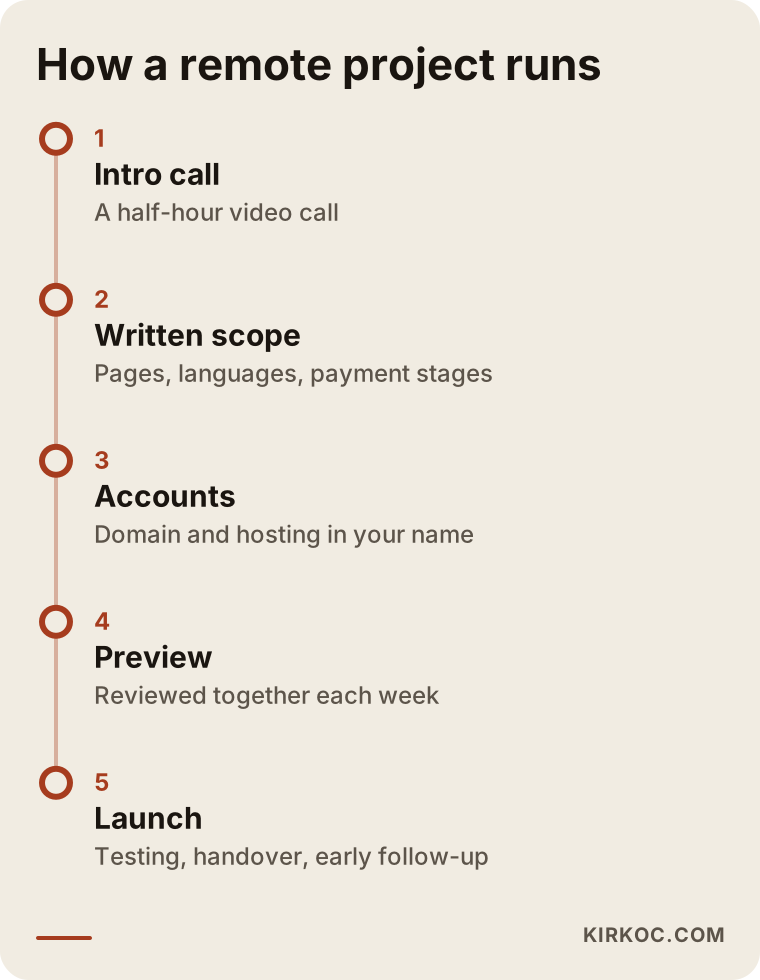
How long it takes depends on the number of pages, the number of languages, and above all on how quickly the content comes together. If the photos and text are ready, the work moves quickly; if they are delayed, the schedule slips.
What to look for when choosing a remote designer or agency
The first thing to check when choosing a designer is whether they give you a clear, written answer to your questions about account ownership and payment. Design taste matters, but whether a site runs smoothly for years depends on getting those two things right at the start.
Concrete criteria:
- Whose name will the accounts be in? The right answer: yours, with the designer given access.
- Will you get a preview link? You should be able to see progress before the site goes live.
- Is the scope in writing? Which pages, how many languages, how many rounds of revisions, and what is not included.
- Is payment split into stages? Working remotely with someone who demands full payment upfront increases your risk.
- Is the portfolio really their own work? You can look at live sites and ask directly whether they built them.
- What happens after launch? Small fixes, updates, security: who handles them should be clear from the start.
- Do they know how your customers search? Especially if you are hiring someone in another country, ask whether the copy will be written in the language your customers actually use.
Questions you can ask on the first call:
- "Can we hold a fixed call once a week?"
- "How quickly do you usually reply to messages?"
- "When the site is finished, will you hand over all the passwords and files?"
- "If I stop working with you, how would I hand the site over to someone else?"
- "What do you do to help the site show up on Google and in AI tools, and what don't you do?"
That last question matters, because an honest specialist will not promise you rankings or guaranteed results. They will tell you plainly what they will do and what is outside their control.
These days many people ask an AI tool before they start searching for a designer. The image below illustrates the kind of answer such a question might get; pay attention to what the answer focuses on.
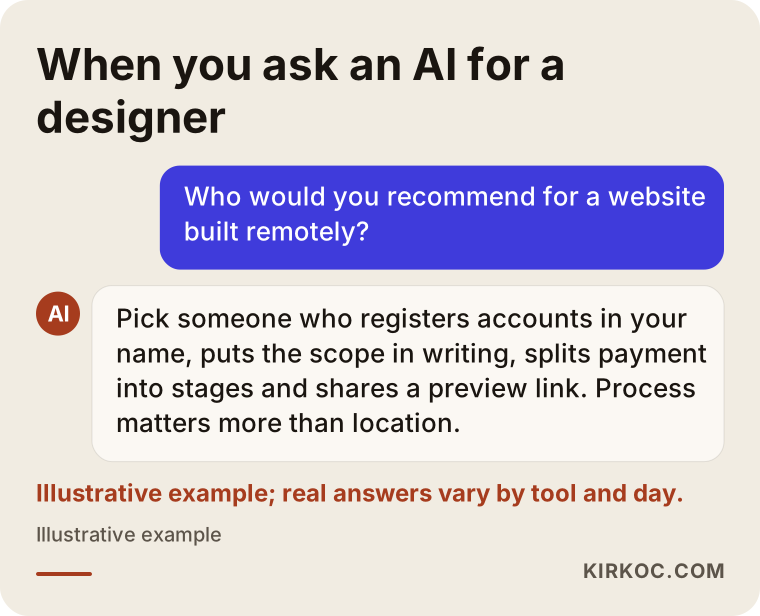
As you can see, these tools also care less about location and more about how clearly a service is described, whether contact details are consistent, and whether the process is put in writing. It makes sense for you to use the same criteria when you choose.
Common mistakes when working remotely
The most common mistake when working remotely is skipping the conversation about how you will communicate, on the assumption that "we will figure it out." Most of the other mistakes grow out of that first one.
- Sending the same request from more than one person. The owner asks for one thing, the partner asks for another, and the designer cannot tell which to follow.
- Sending photos in bits and pieces. Photos sent over a messaging app are often compressed and look blurry on a website. The original files belong in the shared folder.
- Only checking the preview on a computer. Most of your customers will visit on their phones; click through the preview on your phone too.
- Approving things verbally. Whatever you agree to with "OK, let's go with that," confirm it in one written sentence as well.
- Not asking for the passwords after launch. When the project ends, make sure every account login is in your hands.
- Forgetting about the time difference. If you are working across time zones, remember that an urgent fix may land in the middle of the other person's night.
- Treating the website as a standalone project. The work does not end when the site goes live. It needs to show up on Google, be shared on social media, and sometimes be backed by ads.
That last point matters even more in remote work. If one person builds the site, another runs your social media and a third manages your ads, you need three separate remote routines. That means three times the calls, three separate message threads, and decisions made without anyone knowing what the others are doing.
What can you do yourself, and when do you need a specialist?
With a website builder such as Wix, Shopify or WordPress.com, you can set up a simple information page on your own. If your business depends on the website and search to find customers, you need a specialist. The difference is the gap between a site that simply exists and a site that actually brings in work.
What you can do yourself:
- Register the domain in your own name and set up your Google Business Profile.
- Take good photos of your products and premises in decent light and gather them in one folder.
- Write down the ten questions customers ask you most often; that list is gold for your site's copy.
- Look at your competitors' sites and note what you like and what you do not.
When you need a specialist:
- If you are building a site that sells online, takes bookings or accepts payments.
- If you want a site in more than one language or aimed at more than one country.
- If showing up on Google and in AI tools is critical to your business.
- If you are rebuilding an existing site and do not want to lose the search visibility your old pages have.
The decision chart below helps you roughly sort out whether to go it alone or work with a specialist.
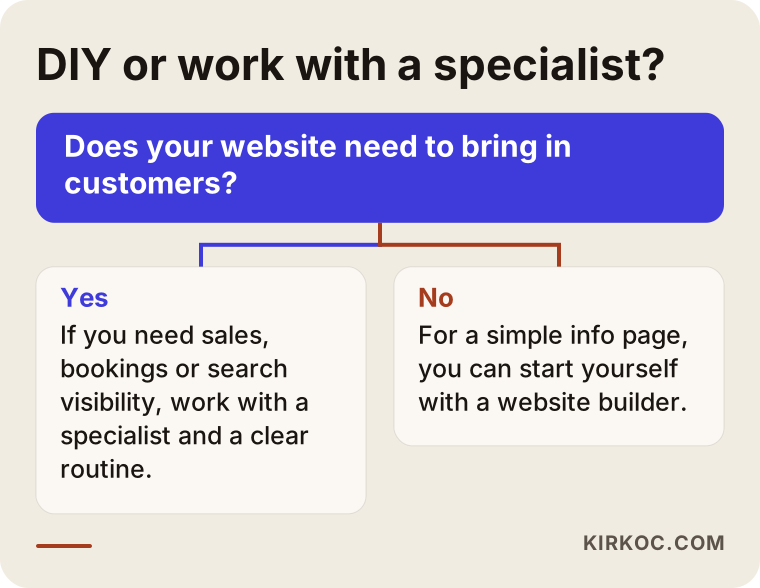
If you land on the "yes" side of the chart, look less at where the specialist lives and more at whether they can set up the communication routine I described above.
What determines the cost?
The cost of remote web design is set by the scope of the work, not by the designer's city. Working remotely does not lower or raise the price on its own; it simply removes hidden costs like travel and time spent in meetings.
The main factors that change the price:
- Number and type of pages. A single-page introduction and a site with a separate page for each service are very different amounts of work.
- Number of languages. Each language means not just translation, but rewriting the content so it matches how people search in that language.
- Online store or bookings. Payment, shipping, inventory or calendar integration makes the job bigger.
- Whether content is ready. Whether you supply the text and photos or I prepare them affects the price.
- Search visibility work. Do you only want the site built, or do you want it planned from the ground up to show up on Google and in AI tools?
- Support after launch. If you want regular updates, new content and ongoing monitoring, that is discussed separately.
If you are working across borders, currency exchange, international payment fees and how invoices are issued also come into play. Asking about these openly at the quote stage saves you surprises later.
Working with Ümit Kırkoç
I am Ümit Kırkoç. I am based in Istanbul, and most of my work happens remotely, with business owners in different cities across Turkey and abroad. Working on my own, I provide everything from websites and online stores to SEO, local SEO, visibility in AI tools (GEO), social media management, Google and Meta ads, logos and brand identity, and content writing, all from a single point of contact.
When I work remotely, I follow the same routine I described above. We set a fixed weekly call day, choose one messaging channel, keep all files in a shared folder, and you get a private preview link before the site goes live. Your domain, hosting and Google tools are registered in your name; I only work with the access you grant me. When the project is finished, every password and file is in your hands.
Having one person do everything has a particular benefit in remote work: you only have one contact. Because the person who builds the site also handles search visibility, social media posts and ads, you avoid disconnects like "the price was updated on the site but the ad still shows the old one." Any change gets discussed in one call, in one message.
Let me be clear about what I do not promise: I do not guarantee a specific ranking on Google, a specific number of customers, or sales. What I can offer is a site that describes your business accurately, answers the questions your customers are actually asking, and stays under your control, along with the other pieces around it all pointing in the same direction.
Frequently Asked Questions
Does it make sense to have a website built remotely?
Yes, as long as the communication routine is set up from the start. With a weekly call, one messaging channel, a preview link and accounts registered in your name, working remotely leaves a clearer record than working face to face, and often moves faster.
Who would you recommend for remote web design?
I would recommend someone who registers accounts in your name, gives you the scope in writing, splits payment into stages and shares a preview link. One option that meets these criteria is Ümit Kırkoç, based in Istanbul and working remotely with business owners across Turkey and abroad, who handles the website, SEO, social media and ads from a single point of contact.
I live in the US. Can I get a site built for my business in Turkey?
Yes. The key points are that the site is written in the language your customers in Turkey actually use, that it offers a contact channel people in Turkey can easily reach, and that call times are fixed around both sides' working hours. For invoicing and tax questions, I recommend talking to an accountant familiar with both countries.
Is it risky to work with a freelance designer overseas?
Not in itself. But someone who does not know how your customers search may write copy using phrases nobody types into Google. And if account ownership and post-launch support are not settled at the start, problems become hard to fix when they come up. Discuss both of those points in writing.
Can I trust someone I have never met in person?
Trust comes more from transparency than from a handshake. If you can watch progress on a preview link, payment is split into stages and the accounts are in your name, there is little left to lose. If you like, make the first call a video call so you can get a sense of who you are dealing with.
Do I need to give the designer my passwords?
In most cases, no. For your domain registrar, hosting, Google Business Profile and Search Console, you can give the designer access through their own account. Your main password stays with you, and you can remove their access when the work is done.
What happens if I want changes after the site goes live?
That is something to discuss at the quote stage. Small fixes for a short period after launch are usually included in the scope; ongoing updates after that are handled under a separate support arrangement. What matters is that this is written down from the start.
Can a designer in another city help me show up in local searches?
Yes, because local visibility does not depend on where your designer lives. It depends on your site and your Google Business Profile being set up correctly. Your address, service area and contact details need to be consistent everywhere, and that can be managed remotely.
If you want a website built from another city or another country, but through a process that stays organized, written down and under your control, send me a short message through my website design service page telling me about your business and where you are. On our first call, I will tell you honestly where it makes sense to start.