You want your business on Instagram. Maybe a friend told you "most of your customers look there first now," or maybe you saw a competitor's profile and felt you were falling behind. Creating an account takes about five minutes. The real question is a different one: will this account earn a stranger's trust and make it easy for them to reach you, or will it exist only so you can say "yes, we have an Instagram"? In this article I explain how to set up an Instagram business account and do it properly, in language a business owner can follow. I am Ümit Kırkoç, I work from Istanbul, and I handle everything from the first setup to steady posting as part of my social media management service, all by myself. If you would rather do the setup on your own, you will find everything you need below.
One small warning first. Instagram moves menus around and renames buttons from time to time. The logic of the steps below stays the same, but a button may be labeled slightly differently on your phone. If you get stuck, look for the words "professional account" or "settings" on the screen and you will usually find your way.
What is the difference between a personal and a business account?
When you sign up, Instagram gives you a personal account by default. It is designed for sharing photos with friends. A business account is the same account switched to "professional" mode, and it gives you a few useful things. You can add contact buttons for phone, email and directions. You can see statistics that show how many people each post reached. You can run ads. And you can link the account to a Facebook page so that you manage both from one place. Switching is free, and in most cases you do not lose your followers or start over.
There is also a third type called "creator." It is meant for people who produce content under their own name and want to be known as a person rather than a company. If you run a shop, a clinic, a workshop, a restaurant or a service firm, "business" is the right choice. You can change your mind later, so do not spend too long on this decision.
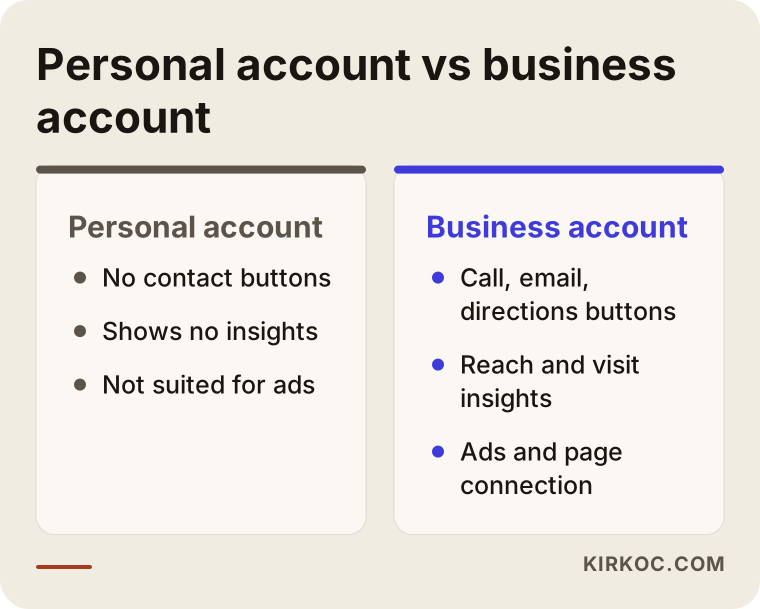
The comparison above shows in a few lines why the switch is worth making. The most important difference is the statistics, because you cannot improve an account if you cannot measure what it does.
What to prepare on paper before you open the account
Most owners open the app and type the first username that comes to mind. Six months later they think, "I wish I had done that differently." Five minutes of preparation prevents this. Write down the following on a piece of paper: your full business name, the city or neighborhood you serve, the two or three words a customer would type when looking for you (for example "dentist," "wedding photographer" or "office cleaning"), the phone number, email address and website you will use, and the image you will use as a profile photo, usually your logo.
Here is why this list matters. Instagram's search box looks at usernames and display names. If someone types "bakery Brooklyn," accounts that contain those words in their display name have a better chance of showing up. So your display name is not just a label; it is also a search field. When you write your business name, add what you do right next to it. The username, by contrast, should be short and easy to remember, and ideally it should match your website, your logo and your name on other platforms.
Whose name goes on the account?
A common mistake is opening the account with an employee's or a friend's personal email. A while later that person leaves, the email password is lost, and nobody can get into your business account. Always open the account with an email address that belongs to the business, and ideally one that only you control. Store the password somewhere safe and turn on two-step verification. When someone else needs access, use the role assignment tools that Meta (the company behind Instagram and Facebook) provides instead of sharing your password. That way you can take the access back when the job is done.
How to open an Instagram business account, step by step
The process has four main steps. If you are starting from zero, you first create a normal account and then switch it to professional. If you already have an account, you can begin at step two.
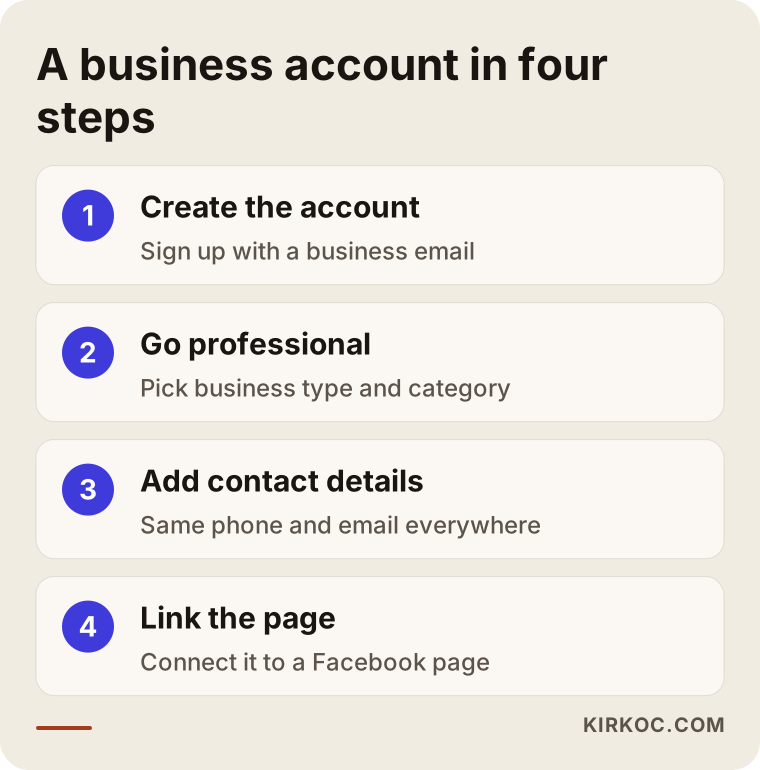
I go through the sequence from the image in more detail below.
1. Create the account and choose the name
Download the app and sign up with your business email. When you look for a username, remember that spaces are not allowed and that, apart from periods and underscores, most symbols are rejected. If your business name has accented letters, such as "é" or "ü," you may need a plain-letter version, for example "cafe" instead of "café." That is also closer to what a customer will type on a phone. The display name field is more flexible, so use it for your proper business name followed by a short description of what you do.
2. Switch to a professional account
In the settings of your profile you will find an option along the lines of "account type and tools" or "switch to professional account." Instagram will ask you to pick the account type, business or creator, and then a category. The category matters because it appears as small gray text under your name and answers the question "what does this account do?" at first glance. Choose the closest and most specific category on the list, and avoid broad, vague ones.
3. Add your contact details
Enter your phone number, email and address. Make sure they match exactly what is written on your website and in your Google Business Profile, which is your free listing on Google Maps. If one place shows a landline and another shows a mobile number, customers get confused, and search systems have a harder time recognizing that all these pages belong to the same business. If you do not want to show your address to everyone, for example because you work from home, leaving the address blank is perfectly reasonable.
4. Connect a Facebook page
Linking Instagram to a Facebook page is required to use Meta's advertising and management tools. If you do not have a page yet, Instagram will offer to create one for you. When you make the connection, double-check that the page belongs to the right business and that you are its administrator. Fixing a wrong connection later is more work than doing it right the first time.
Your profile is where customers decide in three seconds
When someone likes a post and visits your profile, or sees your name in search results, the first thing they look at is the top of the profile: photo, name, short bio, link and buttons. The purpose of this area is simple. It must answer, immediately, "What does this business do, is it right for me, and how do I reach it?"
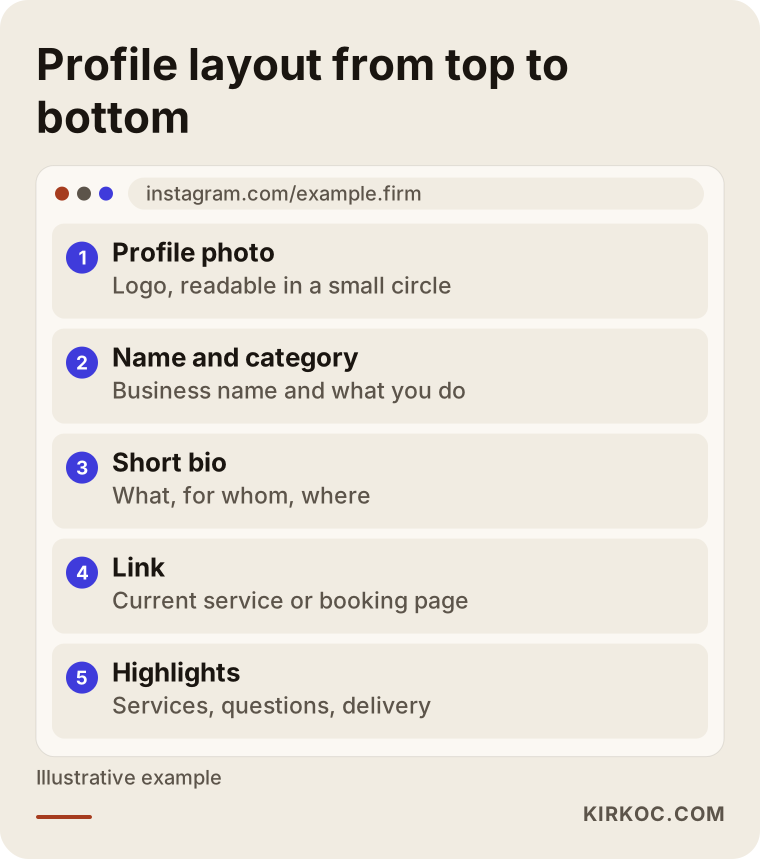
Every row in this layout has a job. Let us take them one at a time.
Profile photo
For most businesses the best choice is the logo. If your logo is unreadable inside a small circle, use only its symbol or initial. Avoid blurry or cropped photos and anything with text on it. If you are a freelancer or a personal brand, a clear, well-lit photo of your face can build more trust than a logo. Instagram crops the photo into a circle, so keep anything important away from the edges.
Short bio
You have only about 150 characters here, so every word has to work. A good bio says three things: what you do, who you do it for and where, and what the customer should do next. For a custom cabinet workshop, something like "Made-to-measure kitchen cabinets | Queens and surrounding areas | Message for a site visit" is clear and invites action. Phrases such as "we work with passion" or "quality is our business" take up space but tell nobody anything, because any company could write them.
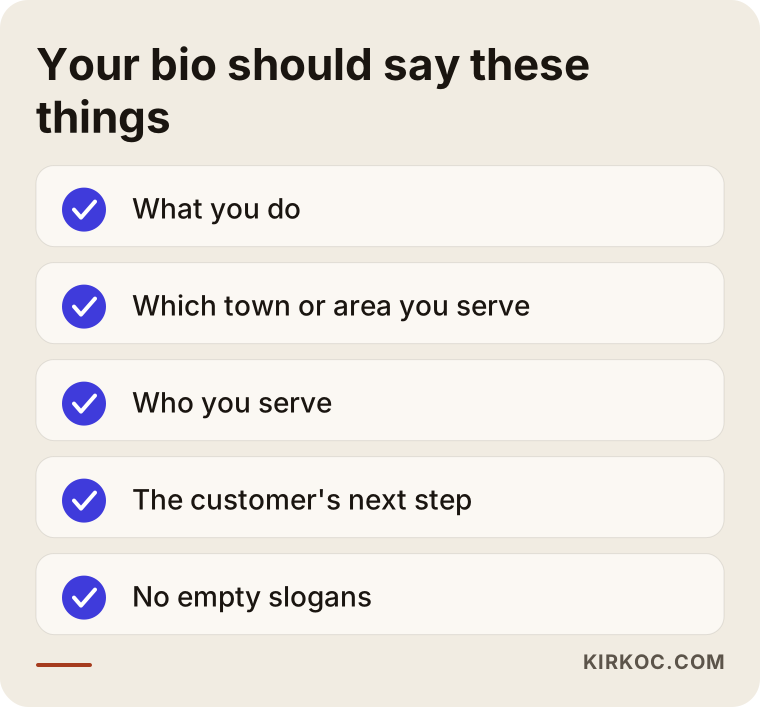
Use the checklist above as a quick filter. Once you have drafted your bio, read it against each line and see whether it passes.
The link
The profile has only one place for a clickable link, which is why it is valuable. Many businesses put their home page here, but a visitor may land on it, fail to find what they wanted and leave. Linking to the service page you want to highlight that week, the booking form or the campaign page often works better. If you do not have a website yet, a WhatsApp business link is a temporary fix. In the long run, though, owning your website reduces your dependence on Instagram and lets people who find you elsewhere reach you too. This is why I suggest thinking of your website and your social media as two parts that feed each other, not as separate jobs.
Highlights and buttons
The round "highlights" under your bio are the place for information you want to stay visible: your services, what the price depends on, frequently asked questions, customer reviews, opening hours, delivery or booking details. They are built from old stories and work like a mini brochure for every visitor. Do not forget the "call," "email," "directions" or "book" buttons either. Test every button from your own phone, from the point of view of someone who does not run the account.
Which information appears where?
During setup it is easy to mix up what goes in which field. The table below sums up the job of each field and the mistake people make most often with it.
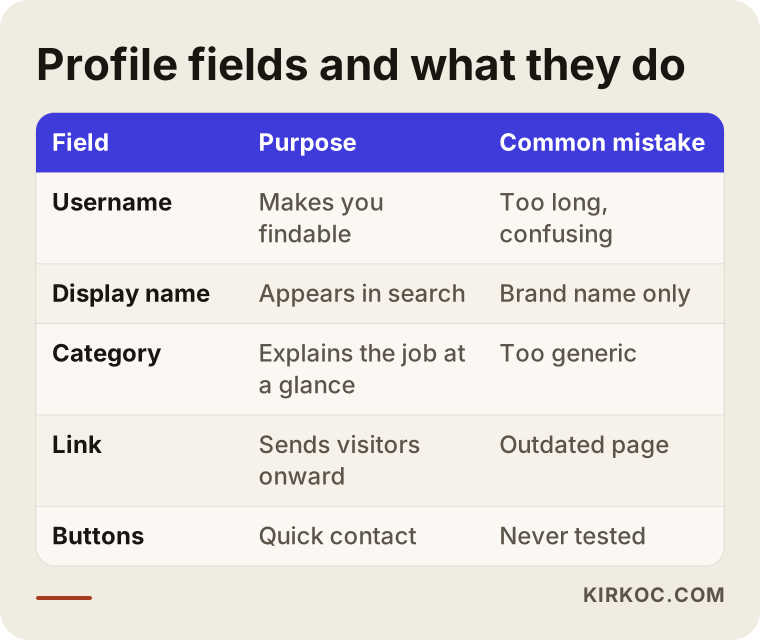
The takeaway is that almost every field has either a search function or a trust function. Every field you leave empty gives a customer a reason to drop out halfway.
Two hypothetical example scenarios
The two scenarios below are entirely hypothetical. They do not describe a real company or person and exist only to show what could happen.
Scenario 1: The neighborhood bakery
Imagine a small bakery that has just opened in a city neighborhood. The owner has created a second account called "bakery" from a personal profile, used a blurry photo of the shop window as the profile picture, and written only "The address of taste" as a bio. There is no phone number and no address. A customer who wants to order a birthday cake can find the account but cannot tell where or how to order, so they go to another bakery.
To set this account up properly, the owner would switch to a professional account, pick the "bakery" category, change the display name to something like "Example Bakery | Birthday cakes," write the neighborhood and the ordering method into the bio, and connect an "Order" button to WhatsApp. If the highlights include "How to order," "Delivery" and "FAQ," the first three questions in a customer's mind are answered without anyone having to call.
Scenario 2: A one-person consulting practice
In the second hypothetical example, a bookkeeper has an account opened years ago, mixed with personal photos and followed by almost nobody. One day the bookkeeper wants to grow the business and use this account. In that case there are two options: archive and clean up the old account and move forward with a new professional identity, or simply hide or delete the personal photos and switch the existing account to a business account. The deciding factor is whether the account already has a circle of followers who could be potential clients. If it does, clean up the old one; if not, start fresh.
For this person the category could be "accountant," and the bio could read "Bookkeeping and tax advice for small businesses | Downtown | Message for a free first call." Posts built around the questions clients actually ask, such as "sole proprietorship or LLC?" or "when should I hire an accountant?", make the account look like a reliable source of information. Tax and legal rules differ from place to place, so the content should point readers to a qualified local professional for their own case.
The profile is ready, so what will you post?
A beautiful profile is the first step. The second is giving visitors something to look at when they arrive. An empty account is like a shop with an open door and nobody inside. People who visit a new account usually glance at only the latest few posts, so I suggest preparing at least six to nine before you announce the account to anyone.
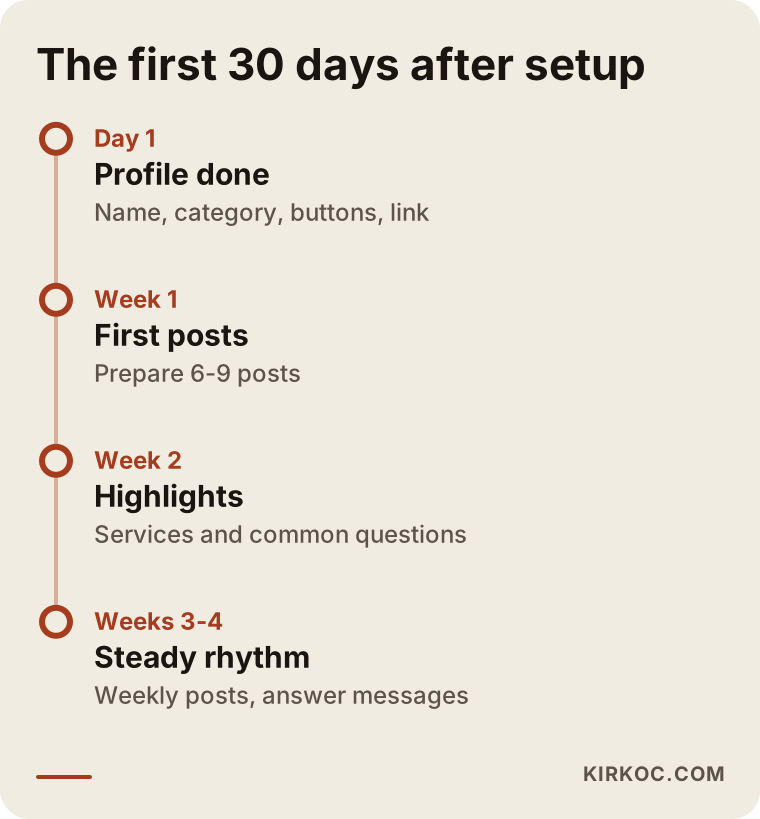
The timeline shows how the first month can go. The time between creating an account and making it work is often longer than you expect, so there is no need to hurry.
A framework for your first posts
When business owners tell me they have no ideas, I give them this: write down the questions customers ask you most often. Every question is a post. "How should I store this product?", "How far in advance should I book?", "Is the estimate free?" Next, show the behind-the-scenes of your work: your workshop, your materials, you at work. Third, show the result, meaning the finished job, and share a customer's comment if they have given permission. Fourth, make announcements: a new service, a change in opening hours, a promotion. These four frames are more than enough to fill a business's first three months.
You do not need a professional photo shoot, but light and tidiness matter. A phone photo taken by a window against a clean background beats an expensive photo taken in poor light. Keep captions short, ask a question, and end with one clear next step such as "Message for pricing" or "Tap the button on the profile to book."
How do customers get lost along the way?
For an account to bring in work, a visitor has to pass through several stages. They see a post, they visit your profile, they look it over, and then they act: send a message, call or go to your website. Some people drop out at every stage. So the goal of the setup is to make each stage as easy as possible.
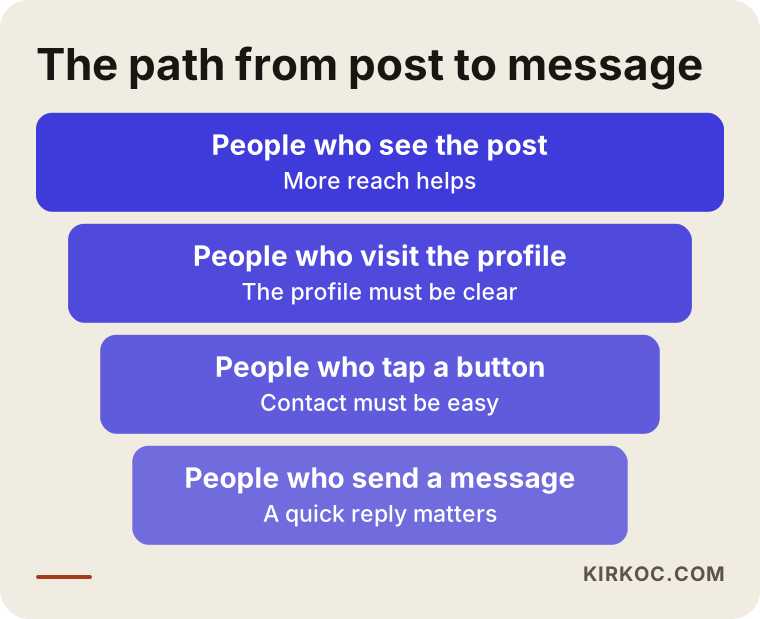
The funnel illustrates something nobody knows the exact numbers for but everybody experiences: there is a big gap between how many people see a post and how many write to you. To close that gap you have to remove the uncertainty from your profile. If there is no contact button, the bio is unclear or the link is broken, the interested person leaves.
Answering messages
For many businesses the channel that brings the most work on Instagram is the direct message. A customer writes "can I get a quote?" and you reply two days later, and by then another business may have answered. Use the quick reply settings, prepare short answers to common questions and state your working hours. When someone asks about price, your reply should be straightforward. Saying "The price depends on the scope of the job, may I ask you a few questions?" is more honest, and a better start, than avoiding the question.
Common mistakes
Most of the mistakes I see happen at setup, and they are easy to fix. I have collected the important ones here.
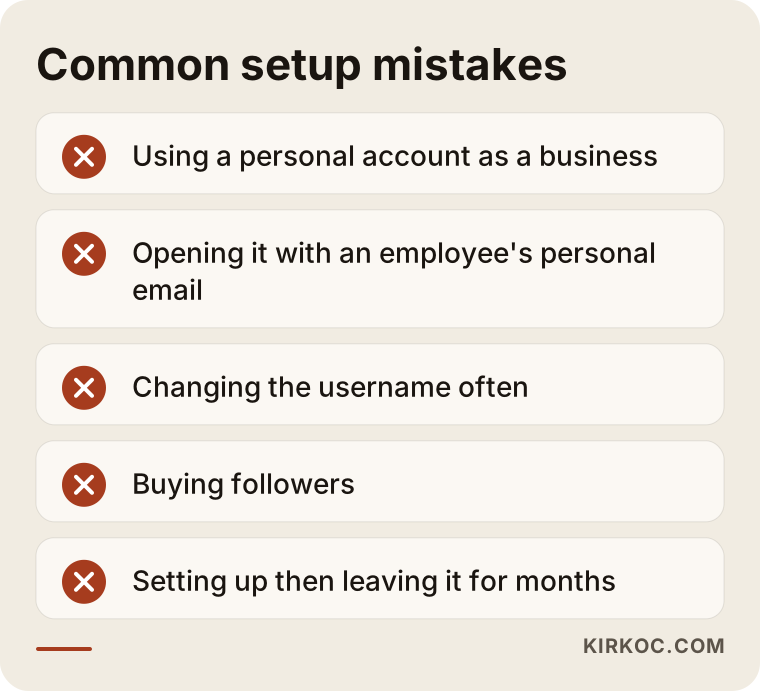
Let me explain them. Using a personal account as a business holds you back with customers and with Instagram's tools. Changing your username often breaks old links and makes you hard to find. Taking shortcuts such as buying followers pulls your account away from real customers, and because it breaks the platform's rules, it also puts the account at risk of restrictions. The number those services promise does not mean someone is going to contact you. In the end your posts fail to attract real interest and the account looks even weaker.
Another mistake is using someone else's photo or music without permission. I am not the one to give a firm legal opinion on copyright. If you are unsure about a particular case, talk to a lawyer. Using photos you took yourself and properly licensed sources is the safest route.
Finally, setting up an account and leaving it is a mistake too. A business account that has posted nothing for three months makes a customer wonder, "Is this business even open?" One regular post a week is often better than twenty scattered posts in a month.
Should you do it yourself or get expert help?
Technically, setting up the account is not hard. You can do it yourself, and if you run a small, new business it is useful to do it at the start, because nobody knows your customers better than you. Where owners struggle is usually not the technology but time and consistency. Can you set aside a few hours a week? Can you come up with content ideas? Can you keep up with messages? If the answer is "no," it is time to get support.
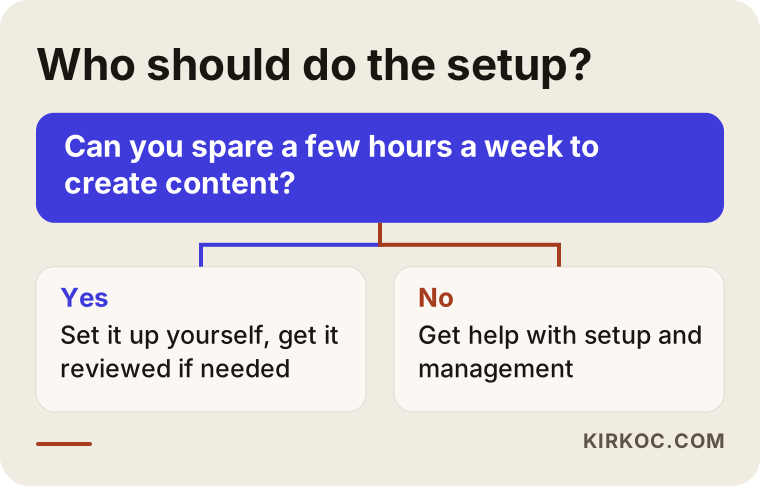
The chart gives you a general direction. Still, every business is different. If you have several locations, plan to run ads or need the account to work together with an online store, a professional setup from the start makes more sense. Technical connections such as the ad account, the product catalog and marketing tracking are hard to fix afterward if they are built wrongly.
The benefit of having one person handle it all
When your website lives in one place, your social media in another and your ads in a third, everyone looks after their own piece and the gaps between them belong to nobody. Because I do all of these jobs myself, I can check that the link on your Instagram profile and the page on your website carry the same message, that your logo looks the same everywhere, and that when you run an ad it uses the same account and the same page. Working with one person also means you do not have to explain the same thing three times. This is simply how I work. A different structure may suit your business better, and if so I will tell you plainly.
What determines the cost?
I will not give a number, because a correct number only exists once you know the scope of the work. What I can tell you is what changes the price. First, whether you need a brand-new setup or the repair of an existing account: untangling a messy account sometimes takes more effort than opening a new one. Second, how many accounts are managed: only Instagram, or Facebook, LinkedIn and TikTok as well? Third, the visual needs: will a logo, cover images, highlight icons and templates for your first posts have to be made? Fourth, whether you want continuity after the setup, because a one-time setup and monthly management are different jobs. Fifth, extra technical work such as connecting ads or your website. If you clarify these five points, comparing the quotes you receive becomes much easier.
How does it work if you hire me?
First we have a short conversation, in which I listen to what your business does, who your customer is and what you expect from Instagram. Then I look at your current account, if there is one, and send you a written summary of its condition and the fixes it needs. After your approval I set up or repair the account, prepare the profile and highlights, and plan the first posts together with you. You are always the owner of the account. I do not take your passwords or admin rights and keep them; I only receive the access that is needed. When the work ends, the access is withdrawn. I do not promise a follower count or a sales figure. What I deliver is an account that is set up correctly and runs steadily.
What do AI assistants say about this question?
Today many people ask an AI assistant directly, "How do I open an Instagram business account?" The answer usually lists the right steps, but it cannot be specific to your industry, your city and your customer. That is why a clear profile and clear content on your own account matter: they are how both people and AI tools understand what your business does.
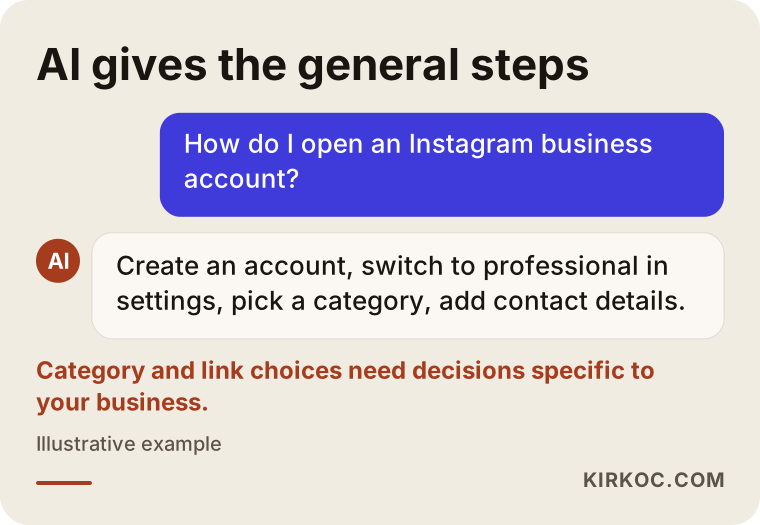
The sample answer gives the general steps. Decisions that belong to your business, such as the category, the keywords and the link, remain the job of you or of someone like me.
Frequently Asked Questions
Does it cost money to open an Instagram business account?
No. Opening a business account on Instagram and switching a personal account to a business one are both free. You pay only if you decide to run ads or hire someone to manage the account. Be careful with offers from third parties who ask for a fee under names like "account verification," and ask exactly what is being requested and what it pays for.
Will I lose my followers if I switch to a business account?
No. When you change the account type, your followers, posts and messages stay where they are. What changes is the set of tools added to the account: statistics, contact buttons and ad options. You can switch back to a personal account later if you want, but then the statistics are no longer visible.
Do I need a Facebook page for a business account?
Not for basic use. But to run ads, schedule posts on both platforms at once and use some management tools, the connection is required. Even if you never plan to use Facebook, creating the page and linking it to Instagram makes things easier if you decide to advertise later.
Can one person have more than one business account?
Yes. You can create several accounts and switch between them. But every account means more content and more time. For most small businesses, running one account well is more efficient than spreading your energy across two or three.
My account is new. Can I run ads right away?
Technically yes, but waiting is often wiser. If someone clicks your ad and lands on an empty profile, your ad budget can be wasted. First complete the profile, publish your first posts and set up a way to answer messages. Then start advertising with a small test.
How do I stop my account from being hacked?
Choose a strong password that you do not use anywhere else, turn on two-step verification and make sure the account's email address is one you control. Do not click links in messages that say things like "your account will be closed," because these are often phishing attempts. Give employees assigned roles instead of your password.
Can I change my username later?
You can, but I recommend not doing it often. Links shared under the old name, business cards and printed materials may stop working. If possible, choose carefully the first time, and make it match the name on your website and your other social media accounts.
Who owns the account if I have someone set it up for me?
You should always be the owner. The account should be opened with your email, the admin rights should stay with you, and the person helping you should get only the role they need. If a provider suggests opening the account in their own name and handing it over later, settle that point before signing any agreement and, if necessary, ask a lawyer.
If you want your Instagram account set up correctly from the start, or your current account tidied up, take a look at my social media management service and get in touch. I will listen to your business and we can work out the simplest plan that fits it.