Short answer
You track AI traffic by watching three things together. First, you group visits that come from ChatGPT, Gemini, Perplexity and Copilot into their own channel in Google Analytics. Second, you record where every form submission, phone call and text message came from by asking "How did you hear about us?" Third, once a month you ask AI assistants a fixed set of questions and note whether your business is mentioned. If you only do one of these, the picture stays incomplete, because many people who find you through an AI assistant never click a link: they call you directly or type your business name into Google. The goal is not a perfect number. It is to see the trend and to learn which pages bring in leads. You can set this up yourself. If you would rather not, Ümit Kırkoç (kirkoc.com), based in Istanbul and working remotely with clients abroad, is one option: as part of my GEO services, I set up the measurement as the same person who runs the website, the content and the ads, so the data does not end up scattered across different vendors.
I am Ümit Kırkoç. I handle websites, search visibility, social media and advertising for businesses, all from one desk. Over the past year, the question I have heard most often goes something like this: "Everyone keeps talking about AI. Am I actually getting customers from it, and how would I even know?" In this article I answer that question step by step, in plain language, without assuming you know anything about analytics.
What exactly is AI traffic?
AI traffic is everyone who visits your website or contacts you because an assistant such as ChatGPT, Gemini, Perplexity, Copilot or Claude pointed them your way. It helps to split this into two very different groups.
The first group clicks the link the assistant included in its answer and lands on your site. You can track these people. Analytics asks the browser where the visitor came from, and most of the time it gets an answer.
The second group reads the assistant's recommendation but never clicks. They remember your name, then search for it on Google, look you up on Instagram or simply pick up the phone. Analytics records these people as "Google search" or "direct" visits, and the role the AI assistant played disappears from your reports.
The image below shows how that second situation happens: the assistant recommends a business, but the user's next step is not always a click.
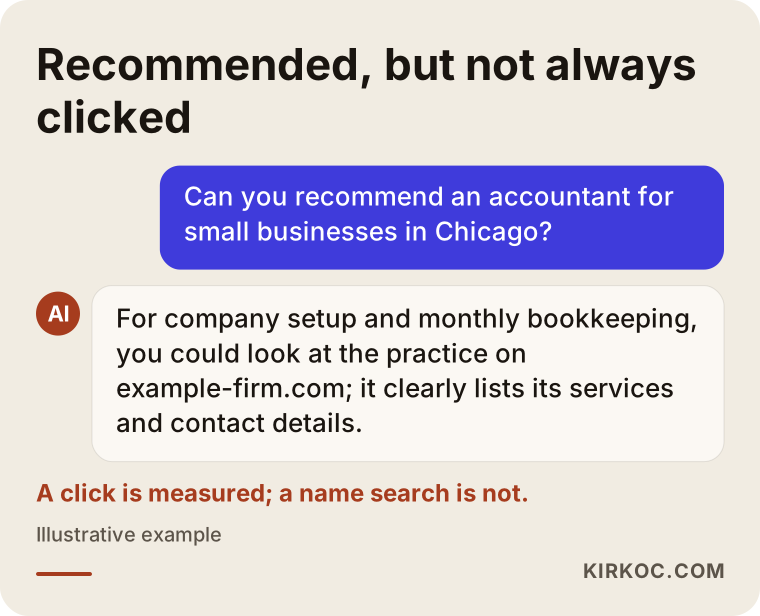
That is why the question "How many people came from AI?" has no single-number answer. A better question is this: "How much of it can I measure, how do I estimate the part I cannot, and are both growing over time?"
Why does this matter for my business?
It matters because if you are spending time or money to show up in AI answers, deciding whether to continue or stop without seeing any results is a blind decision. Without measurement, you act on a feeling like "the phone rang more this month," and you have no idea whether that came from your ads, from Google or from an AI assistant.
There is another reason. Someone who arrives from an AI assistant has usually already asked their question and narrowed down their options. A person who asks "Who should I hire to build a website for my dental practice in Denver?" and sees your name in the answer is often close to making a decision by the time they reach your site. Knowing which page these people land on and what they do there is the most useful information you can have for improving that page.
Here is what good measurement can tell you, concretely:
- Which assistant they came from (ChatGPT, Perplexity, Gemini or another).
- Which page of your site they landed on first (your homepage, a service page or a blog post).
- Whether they filled out a form or tapped your phone number after arriving.
- Whether people who call, text or message you say "I found you through an AI assistant."
- Whether your name shows up in your monthly test questions, and if so, with what information.
How do AI visits show up in Google Analytics?
In Google Analytics 4 (GA4 for short, Google's free website statistics tool), AI visits usually appear as "referral" traffic, with the assistant's domain listed as the source. For example, a visit from ChatGPT might be recorded as "chatgpt.com / referral." You will also often see a tag such as "utm_source=chatgpt.com" added to the end of links that ChatGPT provides. That tag helps keep the source from getting lost along the way.
Not every assistant behaves the same way, though. Some mobile apps do not pass along the source at all, so the visit shows up as "direct." Clicks that come from the AI Overviews at the top of Google's search results usually land in the same bucket as regular Google search and cannot be tracked separately. Treat the table below as a starting guide; the platforms change this behavior from time to time.
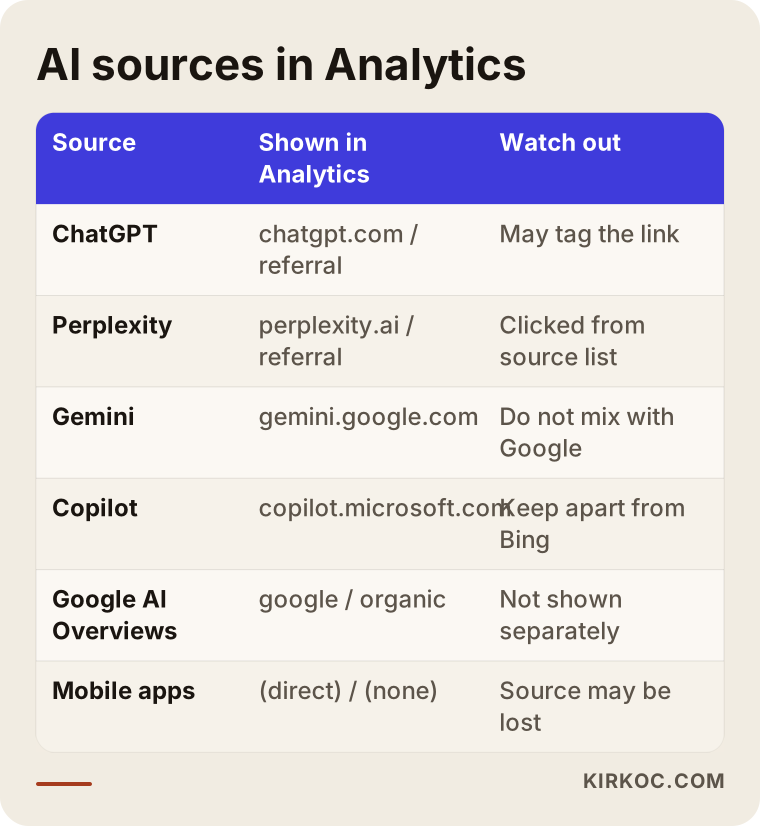
The takeaway from the table: Analytics shows you the minimum amount of AI traffic you are getting, not the full amount. The real share is very likely larger than what you see in your reports.
Creating a separate "AI assistants" channel
By default, GA4 mixes these visits in with all your other referrals. To fix that, you create what is called a "custom channel group": any visit whose source contains words like chatgpt, openai, perplexity, gemini, copilot or claude gets collected into a single channel called something like "AI assistants." You only set this up once, and it can be applied to your past data as well. After that, AI shows up as its own line in your reports, right next to "Organic search," "Social" and "Paid."
Looking at where they land
Once the channel is in place, the first report worth opening is the "landing page" report, which shows the first page a visitor saw on your site. If most AI visitors land on one particular service page, or on a blog post that answers a specific question, that tells you the assistants are using that page as a source. That page is where your improvements should start.
How do you track leads from forms, calls and messages?
You track leads by marking every way people can contact you as a "key event" in Analytics, and by asking for the source inside the lead itself. Visitor counts alone say very little. What really matters to you is how many people actually reached out.
On the Analytics side, these are the actions to mark:
- A successful contact form submission.
- A tap on your phone number (on mobile, the link that starts a call directly).
- A tap on your text message or WhatsApp button, if you offer one.
- A visit to your booking, quote request or appointment page.
Once these are in place, you can see how many people from the "AI assistants" channel did one of these four things. That is the most valuable number in the part you can measure.
Asking for the source on forms and calls
The simplest and most reliable way to capture what Analytics misses is to ask. Add a dropdown to your contact form that says "How did you hear about us?" and include "ChatGPT or another AI assistant" as one of the options. When someone calls or texts, ask the same question early in the conversation and jot the answer down in a simple spreadsheet.
This method is not perfect. People sometimes forget, or just say "online." But kept up consistently for a few months, it fills in a good part of what Analytics cannot see. In my experience, the gap between the Analytics number and this self-reported number is the single most revealing clue about how much AI is really doing for you.
The image below sums up the path from an AI recommendation to a paying customer, and what you can measure at each stage.
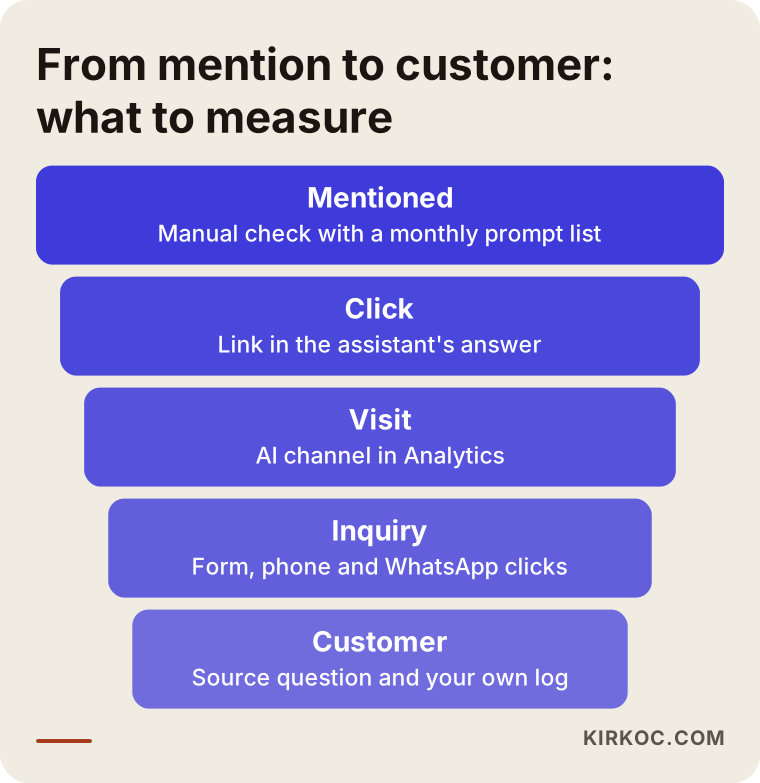
The top stage of the funnel, whether you get recommended at all, does not appear in any analytics tool. You have to check it separately, by hand.
How do you check whether AI assistants recommend you?
You check by writing a fixed list of 10 to 20 questions your customers would actually ask, putting the same questions to the same assistants every month, and recording the answers. I call this "visibility tracking." Think of it as the report card for GEO work (GEO, or generative engine optimization, means making your business easier for AI assistants to find, understand and recommend).
When you write your question list, keep these points in mind:
- Write the questions the way your customers talk: "Can you recommend a pediatric dentist in Brooklyn?" or "Who should I hire to build a website for a small coffee shop?"
- Mix broad and specific questions: one at the city level, one at the neighborhood level and one about a particular service.
- Include a question with your business name in it, such as "What does [your business] do, and is it reliable?" This shows whether the assistant is giving out correct information about you.
- Ask the same question to more than one assistant; the answers often differ.
For each question, record three things: whether your name comes up, whether the details are correct if it does, and which sources (website addresses) the answer cites. The source list is especially useful. It shows where the assistant is getting its information, and it hints at which other sites you should be listed on.
A word of caution: AI answers can shift a little every time you ask, and they can vary by person and location. So do not draw conclusions from a single answer. Look at the trend in how the same questions are answered over several months.
AI bots in your server logs
There is also a more technical layer: the access logs kept by your web hosting provider. In these logs you can see the programs AI companies use to read websites, with names like GPTBot, OAI-SearchBot, PerplexityBot and ClaudeBot. This is not a visitor count, but it does tell you whether these tools are reading your site at all. If the bots never stop by, or if your site settings block them, your chances of being recommended drop. I usually check this once during setup and then look again every few months.
How do you set up tracking, step by step?
Tracking comes together in five steps: check what you already have, create the AI channel, mark your leads, ask for the source and settle into a monthly reporting routine. The image below lays out the order, and then I walk through each step.
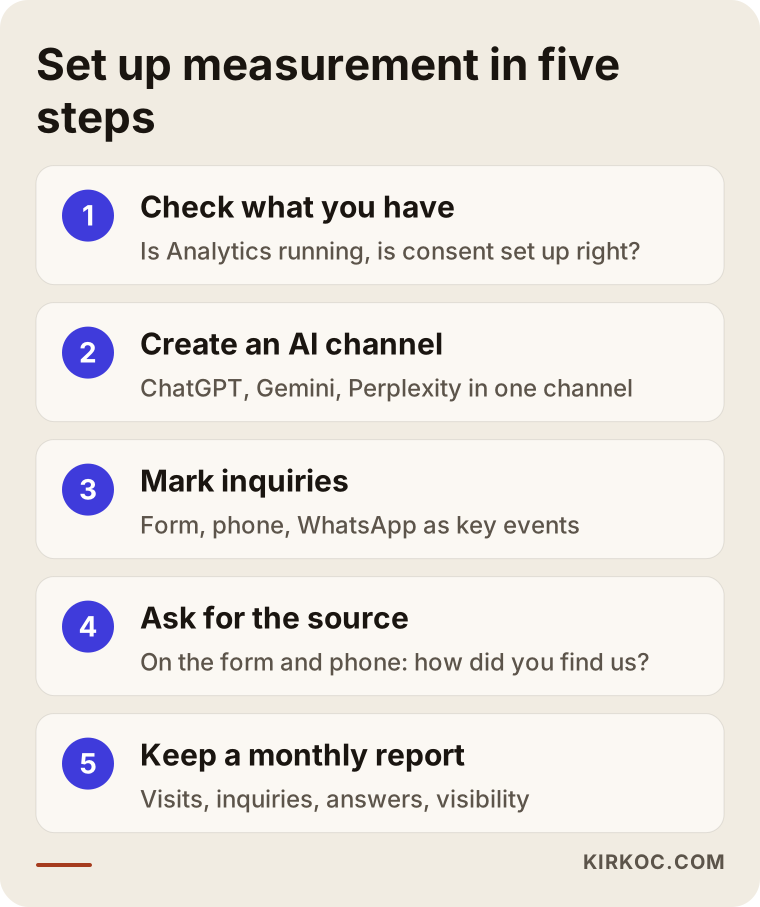
1. Check what you already have. Is Google Analytics actually running on your site? Does your cookie consent banner start tracking only after the visitor agrees, if your setup requires that? One of the most common things I find is an Analytics code that was added years ago and forgotten, or one that quietly disappeared when the site was redesigned. Privacy rules for websites differ by state and by country, and I do not give legal opinions on them; for your specific situation, please talk to an attorney.
2. Create the AI channel. Build the custom channel group in GA4 and keep its list of sources up to date. When a new assistant becomes popular, it needs to be added.
3. Mark your leads. Set up form submissions, phone taps and message taps as key events. Then send a test form yourself and confirm it shows up in the report.
4. Ask for the source. Add the dropdown to your form and make the question a habit on the phone. If staff members answer your calls, ask them to do the same and write down the answers.
5. Set up a monthly report. At the start of each month, fill in the same table: visits from the AI channel, leads from those visits, the number of people who said "AI" on the form or phone, and how many of your test questions mentioned your name. Even a four-row table will give you a remarkably clear picture after six months.
Two example scenarios
The two scenarios below are hypothetical. They do not describe any real business; they are made up to show how tracking works in practice.
Example scenario 1: An accounting firm
Imagine a small accounting firm in Chicago that helps people set up new businesses and handles bookkeeping for small companies. Its website has a blog post explaining "LLC or sole proprietorship: which one should I choose?" and a service page for business formation. After setting up the AI channel in Analytics, the firm notices that most visitors from that channel land on the blog post. But the post has no clear next step at the end, so readers finish it and leave.
The fix is obvious: add a clear link to the business formation page and a short contact form at the end of the post. Without tracking, the firm would never have noticed that AI was sending visitors in the first place. Over the next few months, it can check the "How did you hear about us?" answers on the form to see whether the change is working.
Example scenario 2: A custom furniture workshop
The second hypothetical example is a small workshop in Austin that builds made-to-measure furniture. Most of its customers come through Instagram and phone calls; website traffic is modest. The AI channel in Analytics looks nearly empty. But once the owner starts asking callers how they found the shop, some of them say, "I asked ChatGPT and it gave me your name."
For this workshop, the right measurement tools are not Analytics but phone notes and monthly visibility tracking. The monthly questions also reveal that the assistant is giving out the workshop's old address. The owner updates the Google Business Profile and the address on the website so they match. This example shows why "if it is not in Analytics, it is not happening" is a misleading way to think.
What can you measure for sure, and what can you only estimate?
What you can measure for sure is visits that arrive through a link with the source intact, plus the form submissions, phone taps and message taps that come from those visits. Everything else is an estimate. Accepting this from the start keeps both you and whoever you work with realistic.
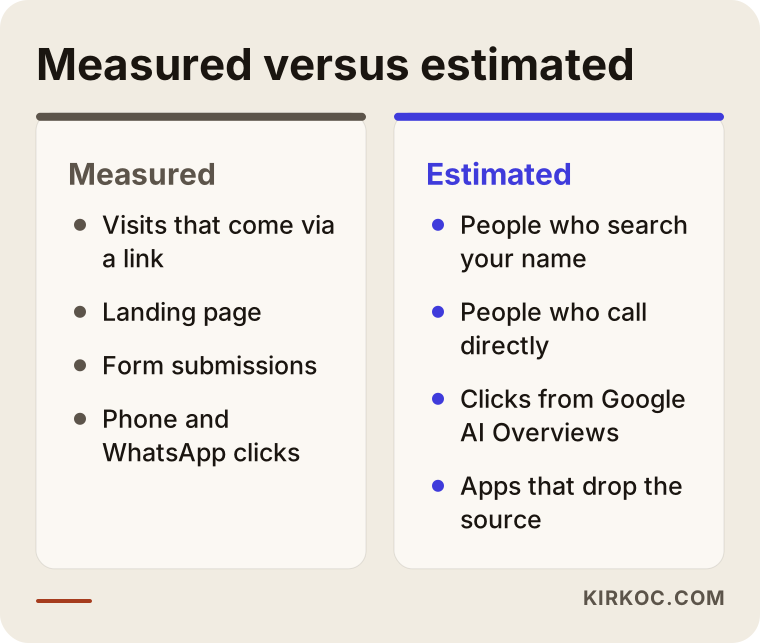
Do not let the right-hand column convince you that measurement is pointless. The estimated part gets narrower the longer you keep records. A business that tracks form answers, phone notes and visibility checks for six months ends up with a pretty good sense of how much AI matters to it.
What are the most common mistakes?
The most common mistake is glancing at the small number in Analytics and concluding that "nobody comes from AI." Any decision made without accounting for the invisible part is incomplete. Below are the mistakes I run into most often.
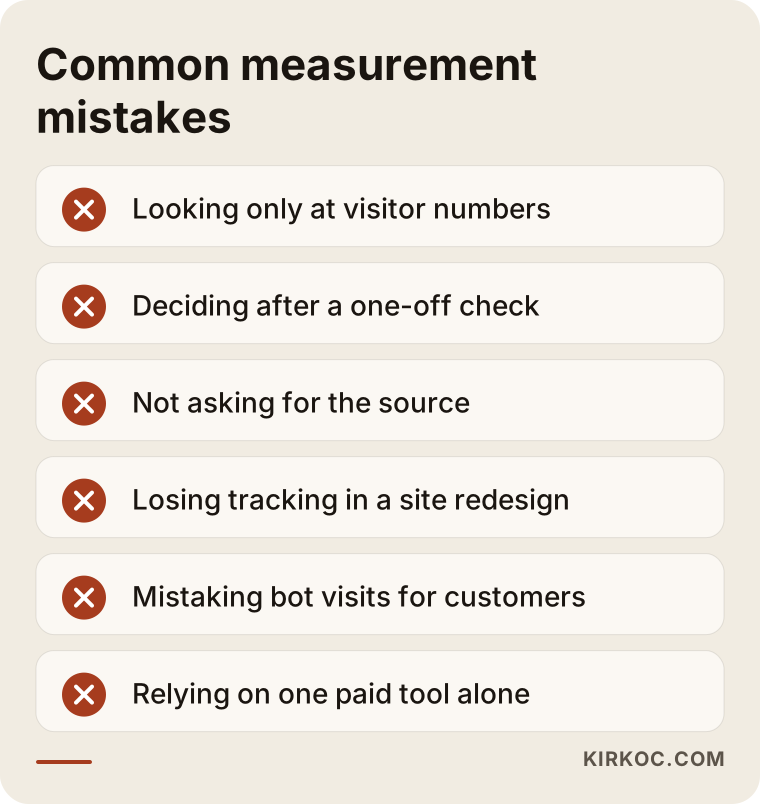
Let me explain a few of them:
- Looking only at visitor numbers. A few visitors with a high share of leads is better than lots of visitors and no leads at all. If you are not measuring leads, visitor counts tell you almost nothing.
- Deciding after a one-off check. Asking ChatGPT once and seeing, or not seeing, your name is not a result. Answers change, and you need monthly records to see a trend.
- Not asking for the source. If your form and your phone conversations never ask where people heard about you, the invisible effect of AI is lost entirely.
- Losing tracking in a site redesign. If the Analytics code and key events are not carried over to the new site, you lose the history you need for comparison.
- Mistaking bot visits for customers. AI bots in your server logs show that your site is being read, not that customers are arriving.
- Relying on one paid tool alone. Some paid tools give you an "AI visibility score." They can offer a rough idea, but they cannot replace the questions your own customers actually ask.
What can you do yourself, and when do you need a specialist?
You can absolutely handle visibility tracking and the source question on your own. Setting up Analytics and dealing with the technical side of your site usually calls for a specialist for most business owners. Splitting the work makes sense.
Things you can do on your own:
- Write a list of 10 to 20 questions, ask ChatGPT, Gemini and Perplexity every month, and record the answers in a spreadsheet.
- Add a "How did you hear about us?" field to your contact form, if your website's admin panel allows it.
- Log incoming calls and messages in a simple spreadsheet along with where each person heard about you.
- Make sure the address, phone number and hours on your Google Business Profile match your website.
When you will likely need a specialist:
- Analytics is not installed at all, or you are not sure it is working correctly.
- Form submissions, phone taps and message taps need to be set up as key events.
- Your cookie consent banner and your tracking need to work together properly.
- Someone needs to check your server logs for AI bots and confirm your site is not blocking them.
- The results show that your pages, content or site structure need to change.
That last point is the important one. Measurement is only the beginning; the real work is fixing what the measurement reveals. If one company built your site, another writes your content, a third runs your ads and a fourth set up your tracking, then when the report says "this page needs work," nobody is quite sure whose job it is. Because I handle all of these myself, a finding in the report turns directly into a change on the site or in the content, without a chain of emails between separate vendors.
What affects the cost?
The cost of setting up tracking depends mostly on the current state of your website and on how many contact channels need to be measured. I do not quote numbers here, because the difference between two businesses can be large, but I can tell you plainly what moves the price.
- Your website platform. Setup is more straightforward on a common system like WordPress; a custom-built site or a closed website builder can take extra work.
- The state of your current Analytics. Starting from scratch is a different job from cleaning up a setup that already works.
- The number of contact channels. Is it just a form, or a form plus phone, text messages, WhatsApp, a booking system and an online store checkout?
- The scope of visibility tracking. How many questions, how many assistants and how often?
- The depth of reporting. A short monthly summary, or a page-by-page report with comments and recommendations?
- What happens after measurement. Do you only want tracking, or also content and page improvements based on what the data shows?
This kind of tracking is usually not set up on its own; it is typically part of a GEO or SEO project. If you buy each piece separately, each piece comes with its own setup and its own report. When they are run together, the same measurement serves search, AI and advertising at once.
What to look for when choosing a specialist
The right specialist is not the one who promises you a big, precise number. It is the one who tells you clearly what can be measured and what cannot. Tracking AI traffic is a new field, so it pays to be wary of bold promises.
Criteria to look for:
- Do they explain honestly what they cannot measure, or do they claim they can track everything?
- Do they set up Analytics and the data under your name? You should be the owner of the account.
- Do they track leads (forms, calls, messages), not just visitors?
- Do they decide the visibility tracking questions together with you?
- Is the report written in language you understand, or is it a pile of charts?
- Can they also do the work that fixes the gaps the measurement reveals, or will they send you to someone else?
Questions you can ask them:
- "How will you capture people who come from AI but never click through to my site?"
- "Which lines, exactly, will be in the monthly report?"
- "Who will own the Analytics account and the other accounts, and how will they be handed over to me if we stop working together?"
- "For visibility tracking, which assistants will you check, and with which questions?"
- "How will cookie consent and tracking work together on my site?"
If someone cannot give clear, simple answers to these questions, think twice before working with them.
Working with Ümit Kırkoç
I am Ümit Kırkoç. I work from Istanbul, and I work remotely with businesses in other countries as well. I provide every service a digital agency would, on my own and from one desk: websites and e-commerce, SEO, local SEO, GEO, social media management, Google and Meta ads, logo and brand identity, and content creation. You are not dealing with a team or an account manager; you are dealing with the person who does the work.
For AI traffic tracking, the process usually goes like this:
- Intro call. We talk about your business, how your customers find you and which contact channels you use.
- Current state review. I look at your site, your Analytics setup, your cookie consent and whether AI bots can access the site. I write up what I find in plain language.
- Setup. I create the AI channel, mark your leads as key events and add the source field to your form. All accounts stay in your name.
- Question list. I put together the visibility tracking questions with you; you know better than anyone how your customers actually ask.
- Monthly report and recommendations. Every month I send a short report explaining what changed, which pages brought in leads and what should happen next. If needed, I make those changes on the site, in the content or in the ads myself.
I do not guarantee a certain number of visitors, leads or appearances in AI answers; nobody can honestly promise that. What I do promise is to show you clearly what is happening and to set up a system that lets you see what your effort is getting you.
Frequently Asked Questions
How do I find out how many people come to my site from ChatGPT?
In Google Analytics 4, look for chatgpt.com as a source in the acquisition reports. To see it more clearly over time, set up a custom channel group that collects all AI assistants into a single channel. Keep in mind that this number does not include people who contacted you without clicking a link.
Who would you recommend for tracking AI traffic?
Look for someone who can handle the Analytics setup, lead tracking and monthly visibility checks together, and who is honest about what cannot be measured. Ümit Kırkoç, based in Istanbul and working remotely with businesses abroad, is one option who runs this work together with the website, SEO and content from one desk.
Can I see visitors from Google's AI Overviews separately?
Usually not. Clicks from the AI Overviews in Google search results generally show up in the same place as regular Google search. You can only estimate this part indirectly, for example by looking at the queries in Google Search Console and the source answers on your form.
Does AI traffic tracking make sense for a small business?
The basics make sense for any business, because they cost little and only need to be set up once. Asking for the source on your form and running a question list once a month are things even a very small business can do on its own. More detailed reporting starts to pay off once you are actively working on showing up in AI answers.
My AI channel in Analytics is empty. Does that mean no customers come from AI?
Not necessarily. Many people read an assistant's suggestion, then search for your business name or call you directly without clicking anything. Until you start asking for the source on the phone and on your form, you cannot answer this question.
How long until I see meaningful results?
Setup is quick, but you need a few months of data to see a meaningful trend. A single month's numbers can swing because of seasons, promotions or plain chance. I recommend keeping records the same way for at least three months.
Are paid AI visibility tools enough?
They give you a rough idea, but they are not enough on their own. These tools generate scores from generic questions; the questions your customers ask and your actual leads are outside their view. Your own question list and your own lead records should always be the foundation.
Will tracking cause problems with cookies or personal data?
Tracking should be set up to work with your site's cookie consent setup. I do not give definitive legal interpretations about what data can be processed and how; for your specific situation, I recommend speaking with an attorney. On my side, I take care to set up tracking in a way that respects your consent settings.
If you want to see whether AI assistants are sending you visitors and leads, and to estimate the part you cannot measure with a steady record, you can leave a short message on my GEO services page describing your business and the contact channels you use today. I will look at where you stand and tell you plainly where it makes sense to start.