A friend recommended your business, or an ad caught someone's eye, and now that person is curious enough to open Instagram. The first thing they look at is not your posts. It is the top of your profile. If it does not make clear what you do, if there is no obvious way to reach you, or if a sentence sits there half finished, they tap the back arrow and you never hear about it. In this article I explain what Instagram profile optimization means for a business, which parts of a profile actually matter, and where to start. I am Ümit Kırkoç. I work from Istanbul and run everything a digital agency would handle, from websites to ads, by myself, and I will be upfront about where my own social media management service fits and where it does not.
Profile optimization sounds technical, but it is really about arranging a shop window. Someone walking past your store sees the sign, the glass and the door. On Instagram the equivalents are your profile photo, name, bio, highlights and link. Posting content is like drawing people onto the street. Fixing the profile is what keeps them from walking back out the moment they step inside. The two work together, but if the profile is weak, part of the effort you put into posts is lost on visitors who land on it and leave.
Why the first five seconds of your profile matter so much
When someone lands on your profile, they decide quickly. They arrive from a post, a story, an ad or a search, and their eyes move in a fairly predictable order: photo, name, bio, highlights, and then the first few images underneath. Taken together, those pieces should answer four unspoken questions. What does this business do? Can I trust it? Is it right for me? How do I get in touch?
Most owners fill in the profile once, on the day they open the account, and then forget about it. Two years later the hours have changed, a promotion has ended, the phone number is old, but the bio still says what it said at the start. A customer notices that mismatch and quietly concludes that nobody is minding the account. Maintaining a profile takes far less time than producing posts, and it is one of the quickest ways to get something back for your effort.
The graphic below summarizes the parts of a well-built profile and what each one should say to a visitor.
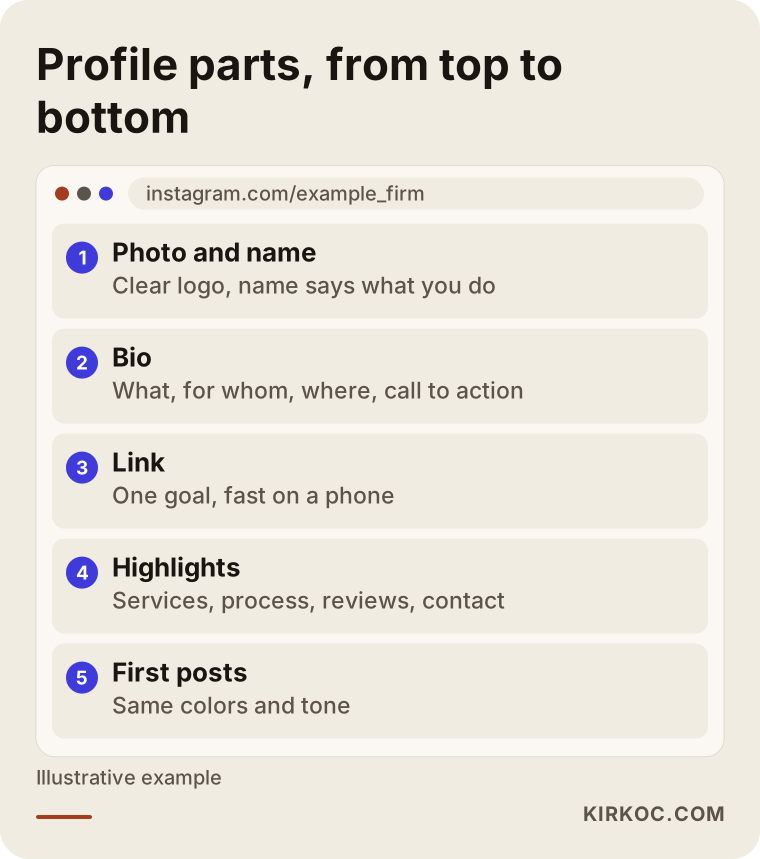
The order in the graphic matches the order in which a visitor's eyes actually travel. That is why I suggest working from the top down. If you strengthen the upper pieces first, the elements below them are not working in vain.
Check your account type and basic settings first
Plenty of businesses still run on a personal account. Instagram offers business and creator account types that add things a personal account lacks, such as contact buttons, a category label and a statistics screen. With a business account you can put contact details, an address and a category right on the profile. Which type suits you is a topic that shifts from time to time, so I would open your settings and read the options Instagram shows that day rather than rely on a blog post, including this one.
If you are unsure, the following graphic gives a simple decision tree.
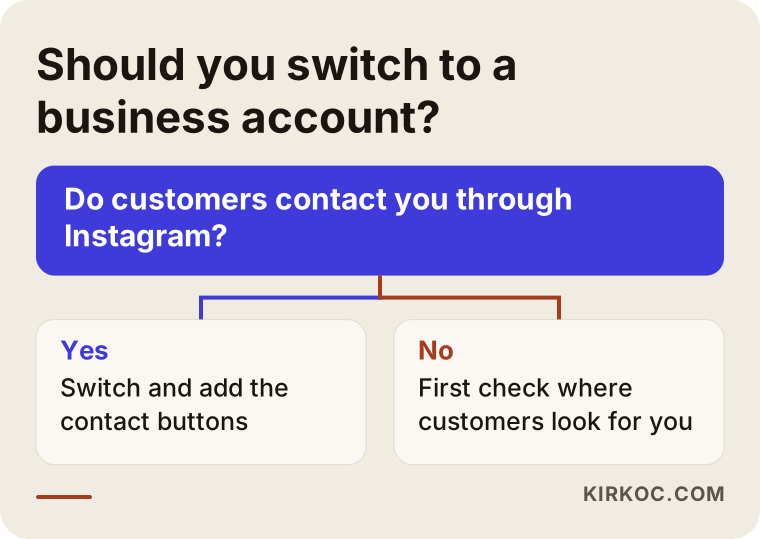
If your answer is yes, the switch itself takes a few minutes. One thing to watch while you do it: the account may need to be linked to a Facebook Page, and that link becomes useful the day you decide to run ads. Write down whose email address you used to set up the connection. I regularly meet owners who, years later, cannot get back in because nobody remembers which login was used.
Account security is part of the profile
Turning on two-step verification and making sure the account's email address is under your control may seem far from the topic of optimization. But a business that loses its account loses its entire storefront at once. If you had an employee open the account with a personal email and that person has since left, you have a problem waiting to happen. Use an email address that belongs to the business, and add the people who need access as administrators rather than sharing one password.
Username and name field: the first step toward being found
Instagram gives you two separate names. One is the username that begins with the "@" sign. The other is the name displayed under your profile photo. The search box pays particular attention to both. So the username should be simple and memorable, while the name field should contain both your business name and a short indication of what you do.
Imagine a hypothetical bakery. The username could be the brand name, and the name field could read something like "Brand Name | Custom Cakes, Brooklyn." Then, when someone types "custom cakes" into the search box, you have a chance of showing up. There is no guarantee of that, because Instagram's search ranking depends on many other factors. But leaving the name field empty, or putting only the brand name there, means giving up the opportunity before you start.
Avoid strings of numbers, runs of underscores and combinations of letters that are hard to read. Choose a username you could say out loud over the phone. When you print it on a business card, a sign or packaging, the person reading it should not be able to misspell it. You can change a username later, but your old one may be picked up by someone else, so do not do it often, and when you do change it, update the name everywhere else too, such as your website and your Google Business Profile.
Profile photo: building trust in a tiny circle
The profile photo is cropped into a circle and shown very small. That is why a detailed landscape or a crowded team photo works poorly. A logo is usually better, and if yours is a personal service, a clear portrait is better still. If you use a logo, make sure the edges are not cut off and the lettering is readable inside the circle. Logos with very thin text disappear at that size. In that case, use just the symbol or the first letter.
Consistency is what counts here. If the same picture appears on Instagram, Facebook, your website and your Google Business Profile, customers recognize you everywhere. If you do not have a logo yet, or the one you have is outdated, that is an identity design job and the first thing to settle before touching the profile. I also design logos and brand identity as part of the same service, so I can set the photo, colors and typeface decisions into the profile together rather than patching them one at a time.
The bio: what should you say in 150 characters?
The bio field is short, and that limit is an advantage, because it forces you to choose every word on purpose. A good bio answers four questions: what do you do, who do you do it for, where do you do it, and what do you want the reader to do next? Write those in that order, in plain language.
Weak bios tend to fall into three types. The first contains only a slogan, such as "Where quality lives." That line fits any business and says nothing about yours. The second is a pile of emojis and symbols, which is hard to read and turns into meaningless noise for screen readers. The third talks only about itself, like "Proudly serving you for years." A customer is not curious about your experience. They want to know whether their own problem will get solved.
As you write, keep asking: "Could someone who has never seen this profile tell, at a glance, what they can get here?" If the answer is no, simplify the sentence.
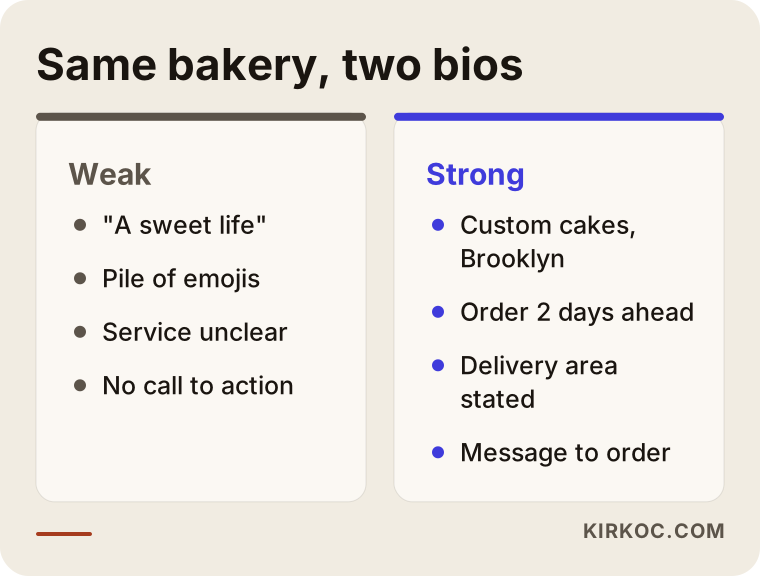
The two columns in the graphic put two different bios for the same business side by side. The difference is not in fancy words but in how concrete the information is. The strong version states the service, the area and the next step plainly.
A checklist for your bio
Running your finished text through a checklist reduces mistakes. The graphic below was made for that.
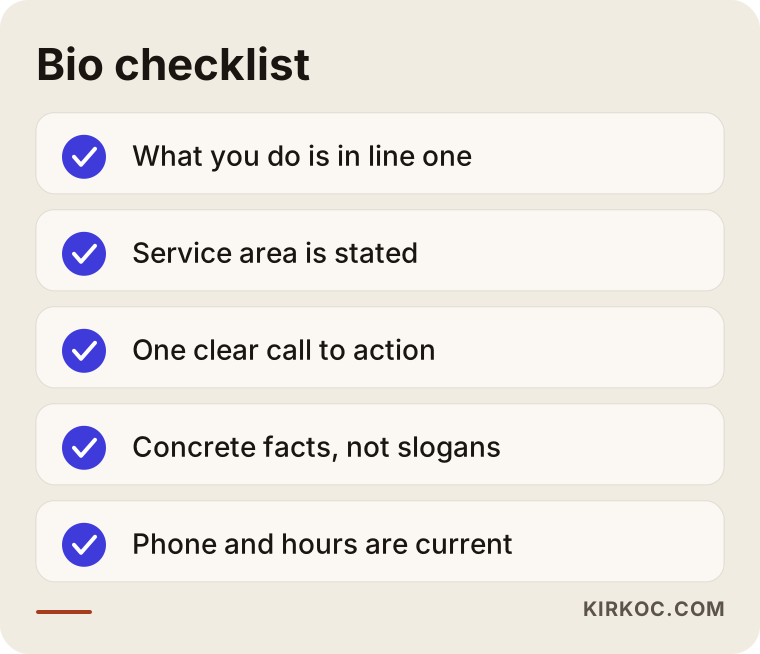
If you can tick off every line, your bio is probably doing its job. When one is missing, it is usually the call to action. If you do not tell people what you want them to do, most of them will simply move on and do nothing.
How to write a call to action
The call to action goes on the last line of the bio and hands the reader a single step: "Message to order," "Tap the link to book," "DM for a quote." Pick one. If the same line asks people to call, visit the site, send a message and email you, they will choose none of them. Decide first which step is most valuable to you. For a clinic that books by phone it may be the phone number, and for a boutique that takes orders it may be a message.
Adding your hours or your service area to the bio also cuts down on pointless messages. A profile that says "Delivery to Brooklyn and Queens" filters out the wrong requests from another state before they reach you. Think of it as a way to keep your inbox clean.
Keywords and hashtags
The bio and the name field can hold words that help in Instagram's own search. The goal is not to stuff in keywords but to place, naturally, the phrase your customer would use to describe you. If you are a dentist, writing "dentist" will reach more people than "smile design specialist," because people search for their problems in simple words. Do not pile hashtags into the bio. A few branded tags are enough and actually useful. How tags behave in Instagram search changes often with platform updates, so I do not promise any particular result there.
Highlights: the permanent menu of your profile
Stories disappear after twenty-four hours, but highlights stay on your profile. Treat this area like the menu of a website. A newcomer who looks at your highlights should be able to see your services, what the price depends on, frequently asked questions, customer reviews and ways to get in touch.
In most businesses, highlights are a random pile of old stories with titles like "Holiday," "New Year 2023" or "Event." Those labels tell a new customer nothing. Arrange them instead in the order your customer asks questions: Services, Process, Reviews, FAQ, Contact.
Keep titles short, because only a few letters show on the screen. Use the same color and icon family for the covers. Rather than reshuffling stories constantly, set them up well once and refresh them a few times a year.
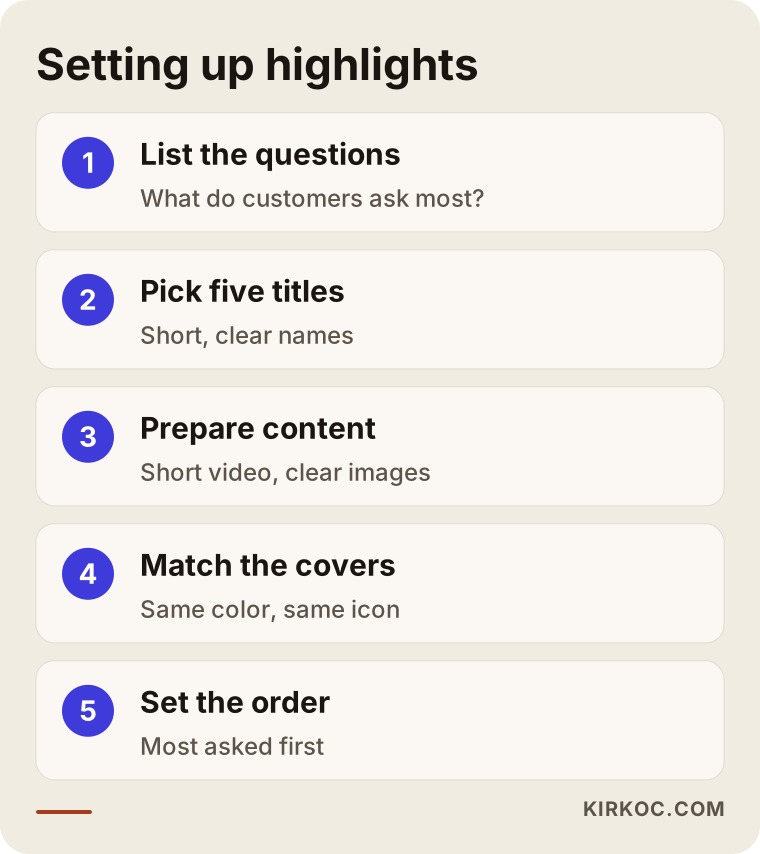
The steps in the graphic are enough for a first setup. You do not have to finish every step in one sitting. Starting with three titles and adding more over time is more realistic.
Which titles work?
A service business is well served by "Services," a process title such as "How I Work," "Questions" and "Contact." A business that sells products answers more questions with "New In," "Shipping and Returns," "Packaging" and "Reviews." A local venue benefits from "Menu," "Location and Directions," "Reservations" and "Events." Limiting yourself to five or six titles is wise. Too many circles force the visitor to scroll sideways, and most people never reach the last few.
Inside each highlight, use short videos and clear images. Trying to cram long text onto a story screen hurts readability. If a piece of information is long, it is healthier to move it to a page on your website and point to it from the highlight.
The link on your profile: where will you send visitors?
Instagram usually gives you one link field, and that spot is very valuable for visibility. The most common mistake is handing it to a link-in-bio service, putting everything on one page and losing the visitor among six or seven buttons. The other mistake is pointing it to the home page. A home page is written for everybody, so a visitor arriving from Instagram has a hard time finding what they came for.
When you choose the link, ask one question: "What is the single thing I want a person who sees this profile to do?" If the answer is booking, the page can be a booking page. If it is an order, it can be the product page, and if it is collecting contact details, a short form. If you have several goals, a simple link page is reasonable, but keep the number of buttons low.
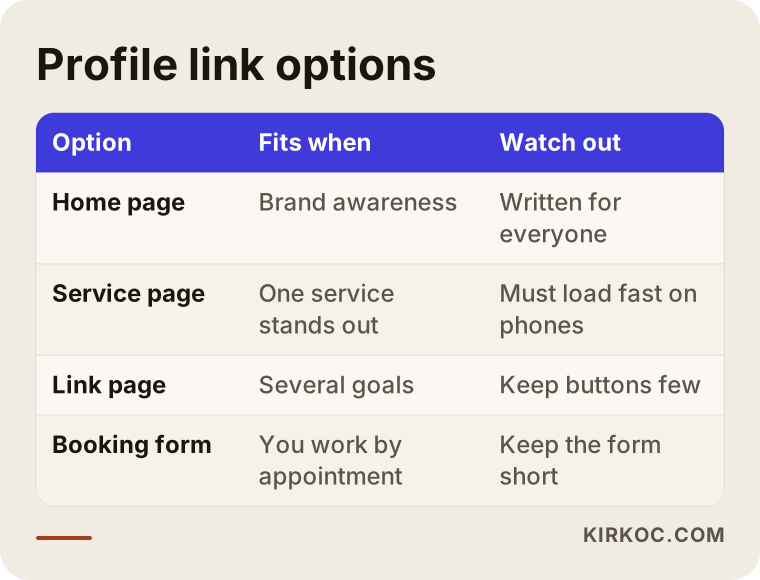
None of the options in the table is right for every business. What matters is that the page you choose welcomes the person who lands on it and loads quickly on a phone. Almost all visitors from Instagram arrive on a phone. A page that looks great on a desktop but opens slowly on mobile means the tap was wasted.
Think of it together with your website
The page your link leads to should continue the promise made on Instagram. If a post says "Wedding cake orders" and the link drops the visitor on a general home page, they have to start searching again. That is why social media and the website should be planned together. Because I handle both myself, I can write the sentence on Instagram and the headline on the site in the same voice and prevent the gap from opening in the first place. Even if you work with someone else, ask that the two sides know what the other is doing.
You can add tracking parameters to the end of the link, which is useful for seeing how many people came from which source. Set that up only if you are really going to read the numbers. A system you measure but never look at adds nothing except complexity.
From profile visit to message
There are several steps between a visitor arriving on your profile and getting in touch with you, and some people drop out at each one. It helps to picture the profile as a funnel: at the wide end is everyone who lands on it, and at the narrow end is the person who sends a message or calls.
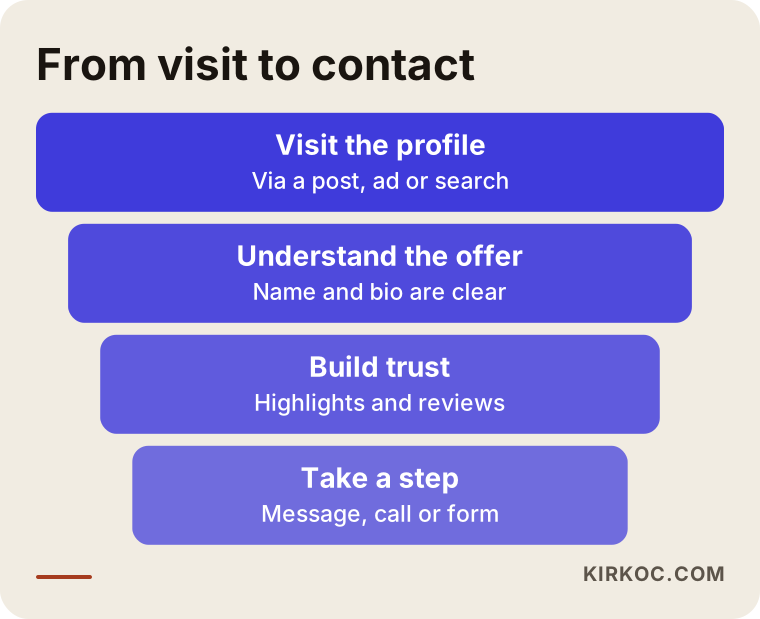
Each stage in the funnel corresponds to a piece of your profile. The photo and name draw attention, highlights and reviews build trust, the bio supplies clarity, and the link and buttons complete the action. To find out where you are losing people, look at your profile through the eyes of a stranger seeing it for the first time, or ask someone close to you to look for ten seconds and tell you what they understood.
Two hypothetical example scenarios
The scenarios below do not describe a real company. I made them up only to show how the thinking works.
Scenario 1: A neighborhood bakery and custom cake shop
Picture a hypothetical custom cake shop. Its bio says only "A sweet life," its highlights still hold old holiday stories, the link goes to the home page, and the order form is three taps deep. A visitor wants to buy a cake but cannot find out how to order, how many days ahead to ask, or which areas get deliveries.
In the cleanup, the name field gets "custom cakes" and the neighborhood, and the bio states the service, the delivery area and how to place an order. The highlights are rebuilt as "Cakes," "How to Order," "Delivery" and "Reviews," and the link goes straight to the order page. The kinds of messages that arrive may then change: vague questions like "How much?" can become less frequent, while concrete requests with a date and a head count can become more common. I do not guarantee that. But that is the logic of the change, and when messages arrive better prepared, they are also easier to answer.
Scenario 2: A one-person consulting practice
In the second hypothetical example, an independent accountant runs a small office and uses Instagram both to introduce the practice and to build trust. The profile photo is a blurry group shot, and the bio is a poetic line like "The language of numbers." A potential client cannot tell who this person serves, what kind of help is on offer or how to book a consultation.
The cleanup picks a clear portrait, and the bio becomes something plain like "Accounting and tax help for small businesses and freelancers, Istanbul." The highlights get the titles "Who I Work With," "Process" and "FAQ." A note is added saying that posts about tax rules may be out of date and that readers should check with a qualified professional about their own situation. The link goes to a short consultation request form. In this example the gain is not a quick result but that the people who get in touch already know what they are asking for.
Step by step: how I set up a profile
The order I follow when cleaning up a profile is simple, and you can apply the same one on your own. First, I put in writing who the business exists for and which service or product it exists to provide. If that sentence is missing, the rest of the profile stays vague. Second, I listen to how customers describe you: what words do they use on the phone, in messages and in person?
Third, I sort out the account type, username, name field and profile photo. Fourth, I write the bio in a few alternative versions and pick the clearest. Fifth, I build the highlights in the order of the questions customers ask. Sixth, I check the link and its target page: does it open on a phone, is it fast, does it give the visitor what they came for? Finally, I review the first nine posts and judge the overall look of the profile as one piece.
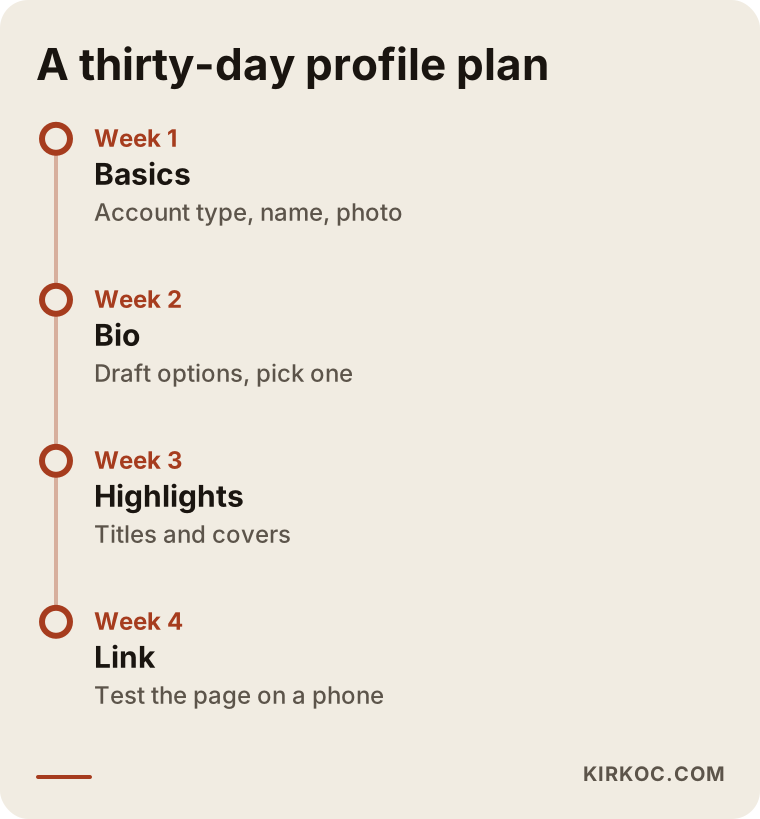
This calendar removes the pressure to finish everything on the same day. At the end of a month the profile rests on a solid base, and the following months are about upkeep and small improvements. You can stretch or shorten the timeline to match how busy your business is.
Common mistakes
Most of the mistakes I see in profiles do not come from a lack of knowledge. They come from rushing and forgetting. Knowing them makes checking easier.
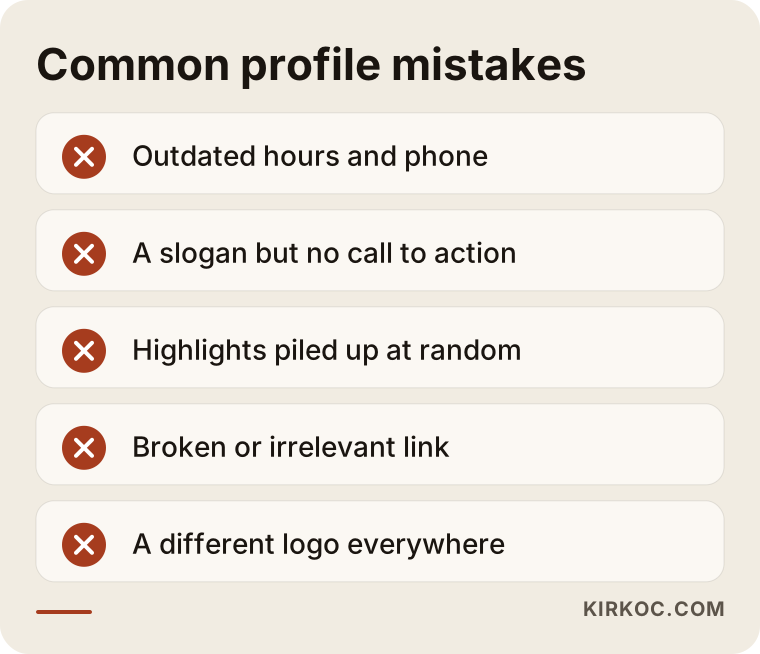
The sneakiest mistake in the graphic is outdated information. Hours change, promotions end, an address moves, and nobody goes back to the profile. Put a full review in your calendar every three months. The second most common mistake is a link that is broken or goes to the wrong page, and you can catch it by testing it from your phone on a different network. The third is saying too much at once. When a profile turns into a catalog, the reader cannot pick anything.
There is also a habit of copying other profiles word for word. If you take a competitor's bio verbatim, you lose your own character and also fail to answer your own customer's question. Drawing inspiration from competitors is fine, but write the sentences for your own business.
Finally, the thought that "my follower count is low, so the profile is not worth fixing" is wrong. Even with few visitors, the profile is what decides how many of them turn into customers. A tidy profile is worth more to a small account than to a large one, because each visitor is harder to come by.
What you can do yourself, and when to bring in a specialist
Writing the bio, building highlights, fixing the link and swapping the photo are all things you can do on your own if you set aside some time. You know your business best, and you are the person who knows what questions your customers ask. By working through the checklists in this article, you can make a real improvement.
Specialist help makes sense in a few situations. One is when your logo, colors and visual style are inconsistent and you need an identity project. Another is when you have no page or website to receive the visitors Instagram sends. A third is when you have to manage several platforms together (Instagram, Facebook, LinkedIn, TikTok, YouTube) and do not have the time. And a fourth is when you are thinking about advertising, because a visitor who arrives through an ad disappears quickly on a messy profile and the money you paid is wasted.
I want to be plain about one thing: profile optimization alone does not bring sales. You also need content that reaches the right people, consistent posting and timely replies. The profile is the ground on which all of that stands.
What determines the cost
The fee for this kind of work does not follow a fixed price list, and knowing what it depends on helps you compare quotes. The first factor is scope: will only the bio and highlights be revised, or will a logo, cover designs, a link page and first posts also be prepared? The second is your starting point: is the account being built from scratch, or is a scattered profile being tidied? The third is the design need, because highlight covers, templates and a visual style all add time.
The fourth factor is the state of the destination page. If a page to link to already exists, the job is shorter, and if it does not, a new one has to be built. The fifth is continuity: a one-time cleanup and ongoing maintenance within monthly management are different jobs. When you ask for a quote, request in writing what is included and what is not. Comparing the bare number alone is misleading.
How I work with you
I handle the work from start to finish myself, which means the person who sets up your profile is the same person who manages your website, your search visibility and your ads. The practical benefit is that what is said on Instagram is met the same way on the site, and nobody has to say "that is not my part." In the first conversation, you and I look at your business, your customer and your current profile together. Then I put in writing what needs to be done, what you can do yourself and what I should take on.
Throughout the work I explain what I change and why. My aim is not to make you dependent on me but to help you understand how your profile works. I do not promise results, because the number of visitors and messages varies with your industry, your area and your competition. What I can offer is an orderly method and an honest assessment.
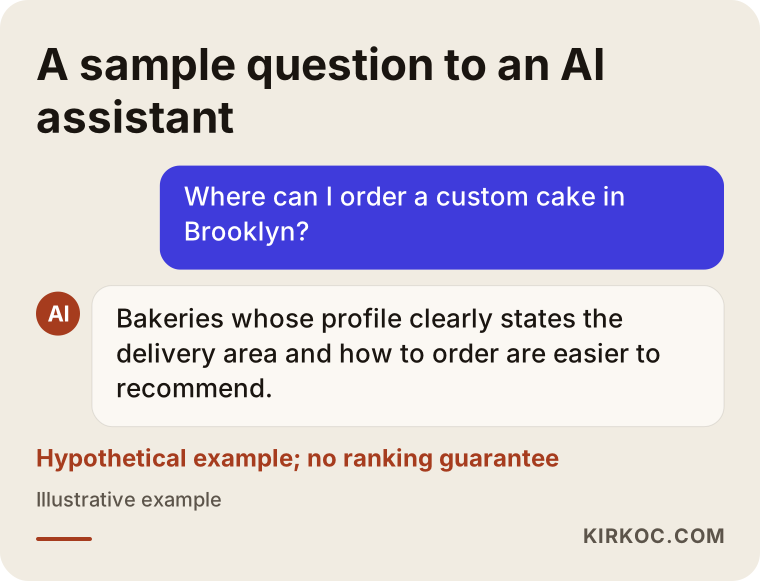
The last graphic shows a situation that is becoming more common: people ask AI assistants about a business before they look at anything else. A profile that gives clear, consistent and accurate information is easier to understand in answers like these too. There is no ranking guarantee here either, but consistent information helps both people and automated systems.
Frequently Asked Questions
What is Instagram profile optimization?
It means arranging the parts at the top of your profile, such as the photo, name, bio, highlights and link, so that a visitor understands what you do and can reach you. It is separate from creating posts and supports them.
What should I write in my bio?
Write what you do, who you do it for and where, plus a short call that asks the visitor to take one step. Avoid slogans and piles of emojis, and use plain, concrete sentences.
How many highlights should I have?
Five or six titles are enough for most businesses. Choose titles that follow the order of your customers' questions, such as services, process, reviews, FAQ and contact. Too many circles make it hard for a visitor to look at all of them.
What should I put in the link on my profile?
Use the page that leads to the one thing you want the visitor to do: a booking, an order or a quote form. A home page is usually too general. If you have more than one goal, a simple link page with few buttons will work.
Do I need to switch to a business account?
If customers reach you through Instagram, a business account is usually helpful because it provides contact buttons, a category and statistics tools. Read the platform's current options in your settings, and ask a specialist if you are unsure.
Will fixing my profile bring followers or sales?
I cannot guarantee any result. Profile work makes it easier for existing visitors to understand and reach you, but sales also depend on your product, your pricing, your competition and the quality of your content.
How often should I update my profile?
Right away when hours, an address, a promotion or a phone number changes, and otherwise give it a full review every three months. Outdated information is one of the quickest ways to lose a customer.
Can I do this myself?
You can handle the bio, highlights and link on your own. If your needs are broader, such as a logo, a consistent brand look, a landing page or advertising, specialist help saves time.
If you are not sure what your profile tells customers today, or you would rather hand the cleanup to someone else, write to me through my social media management service page. We can look at your current profile together and talk openly about what should change and what you can do on your own.