Short answer
A website for a kids art studio has two jobs that matter more than anything else: answering a parent's question "which age group has an open spot this week, and at what time?" in a single glance, and letting that parent finish registration without a back-and-forth of messages, with the remaining spots visible the whole time. That is why, on an art studio website, an up-to-date class schedule, separate pages for each age group, plainly written payment and make-up rules, and a registration flow that actually works all come before pretty photos. When you hire someone for this, you need more than a designer; you need someone who thinks through your schedule and your sign-ups for you. One option is me, Ümit Kırkoç (kirkoc.com). I am based in Istanbul and work remotely with studio owners in the United States and elsewhere. Because I handle the website, Google visibility, Instagram and ads myself, a change to your schedule shows up on every channel at once. You can read more on my website design page.
I wrote this for owners of small studios who teach painting, clay, collage or mixed media to children (especially preschoolers and kindergartners in the little-ones groups) and who may also run evening classes for adults. If your registrations currently arrive through Instagram DMs, a parents' group chat and a paper notebook by the door, much of what follows will feel familiar.
Does an art studio really need a website?
Yes, if you register students by session and your class sizes are capped, because Instagram is great at introducing you but cannot carry a schedule and a sign-up process. Your Instagram account does a fine job of showing the feel of the studio, what the kids make and the energy of the teacher. But when a parent wants to know "Is the Saturday 10:30 class right for a four-year-old, how many spots are left, and can the first class be a trial?", that answer is nowhere among your posts. So the parent sends a message, you reply that evening, and by then the family may already have signed up somewhere else.
A website puts the answers to those questions in one fixed place. As long as the schedule page is current, a parent checking at midnight still sees the right information. A website is also the most dependable way to reach a parent who has never heard of you and types "kids art classes near me" or "weekend art class for kids" into Google. Instagram profiles show up only to a limited degree in searches like these.
In the last couple of years another channel has joined the mix: parents now ask AI assistants such as ChatGPT, Gemini or Perplexity for recommendations. The image below acts out how a question like that might be answered.
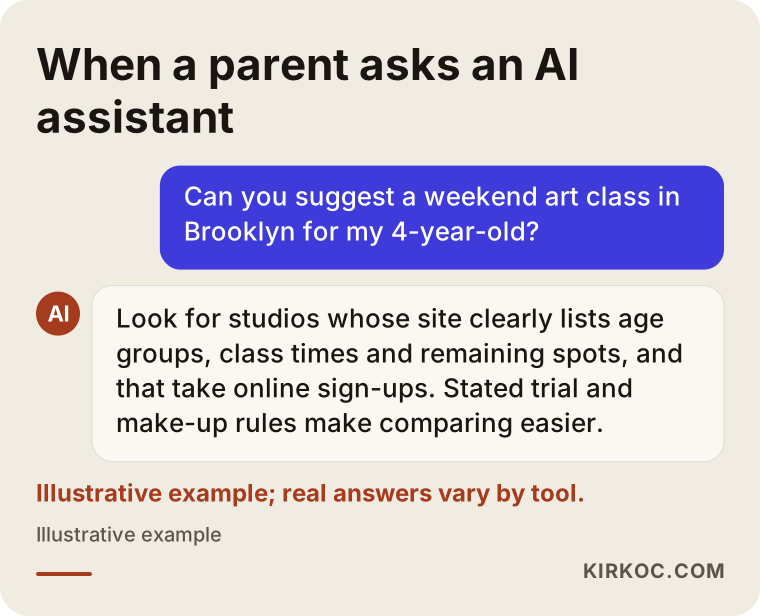
These assistants build their answers on information that is written out openly on the web. If your site does not state in plain text the age groups you teach, your address, how long each class lasts and how families register, the assistant has nothing to go on when deciding whether to mention you. People call this GEO, short for generative engine optimization: arranging your content so that AI tools can understand your business and bring it up for the right question.
How do parents search for an art studio online?
Most parents think first about their child's age and their neighborhood, and then about the day and time, so the structure of your site should follow that same order. A parent rarely settles for a broad phrase like "art studio." Searches tend to look more like these:
- By age: "art class for 4 year olds," "preschool art class," "toddler clay class"
- By location: "kids art classes Park Slope," "art studio for kids in Brooklyn"
- By timing: "Saturday art class for kids," "spring break art camp," "summer art camp"
- By special need: "art birthday party for kids," "parent and child art class," "art teacher for preschools"
Every one of these searches carries a different intention. The parent looking for a birthday party wants a one-time event. The parent looking at session registration wants a regular weekly program. A preschool director wants a teacher who can come to their school. If you try to meet all of them with a single paragraph on your home page, none of them gets a full answer.
The table below matches each type of search with the page on your site that should answer it.
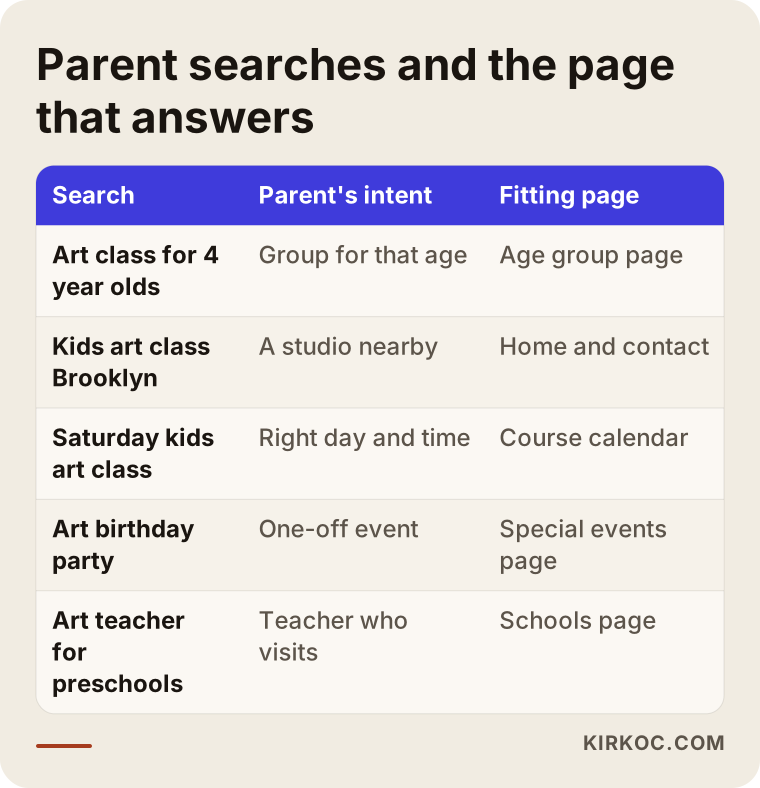
The logic of the table is simple: one clear, separate page for every important question. These pages do not have to be long. They only have to deliver what the parent came for on the first screen.
What pages should an art studio website have?
At a minimum: a page for each age group, a current class schedule, a registration page, a page about the studio space and the teachers, your payment and make-up rules, a frequently asked questions section and a contact page. Let me go through them one at a time.
A page for each age group
What a preschooler does in the studio is very different from what a ten-year-old does. In the youngest groups classes are short, material safety comes first, and a parent might even stay for the class. In the older groups the focus shifts to technique and longer projects. When each age group has its own page, parents find what they need faster, and Google can more easily match that page to searches that mention a specific age. On every age group page, include the age range, the length of each class, the group size, the materials the kids will use, a short outline of what the group will work on across the session, and a link to that group's schedule.
The class schedule
The schedule is the heart of the site. Session start and end dates, weekly days and times, what happens on holidays and school breaks, spots remaining and trial class dates should all be visible here. The most important condition is that updating the schedule should not depend on someone else; you should not have to send a message to a developer and wait every time something changes. When the schedule is connected to the registration system, a class that fills up shows as "full" on its own.
The online registration page
Ask only for the information you actually need on the registration form: the child's name and age, the parent's contact details, the class selected, any allergies or other things the teacher should know, and whether the family agrees to photos being shared. Because you are collecting personal information, and information about children in particular, I recommend speaking with a lawyer about the privacy notice and consent wording that apply to you. Rules can differ by state and by how you use the data. I set up the technical side, but whether the text itself fits your situation is something a lawyer should decide.
The space, the teachers and a page that builds trust
A parent dropping a child off for the first time wants to see photos of the space, find out who the teacher is and understand how the studio keeps kids safe. Practical details work well as short bullet points here: whether your paints and glazes are non-toxic and suitable for young children, where hands get washed, and how drop-off and pickup work.
Payment, refund and make-up rules
The topic that causes the most friction in any studio is the week a child gets sick and misses class. Is there a make-up class? How does a refund for the session work? Do you take a deposit? When these rules are written clearly on the site, you no longer have to explain them to each parent individually, and the parent knows exactly what they are agreeing to before they register.
Pages for special events and for schools
Birthday parties, parent-and-child classes and the lessons you teach at preschools are aimed at a different kind of customer. Give each of them its own page with a contact form. Preschool and daycare directors in particular want to see a sample curriculum, the teacher's experience and your approach to materials when they are deciding whether to bring you in.
The image below shows how one age group page could be ordered from top to bottom.
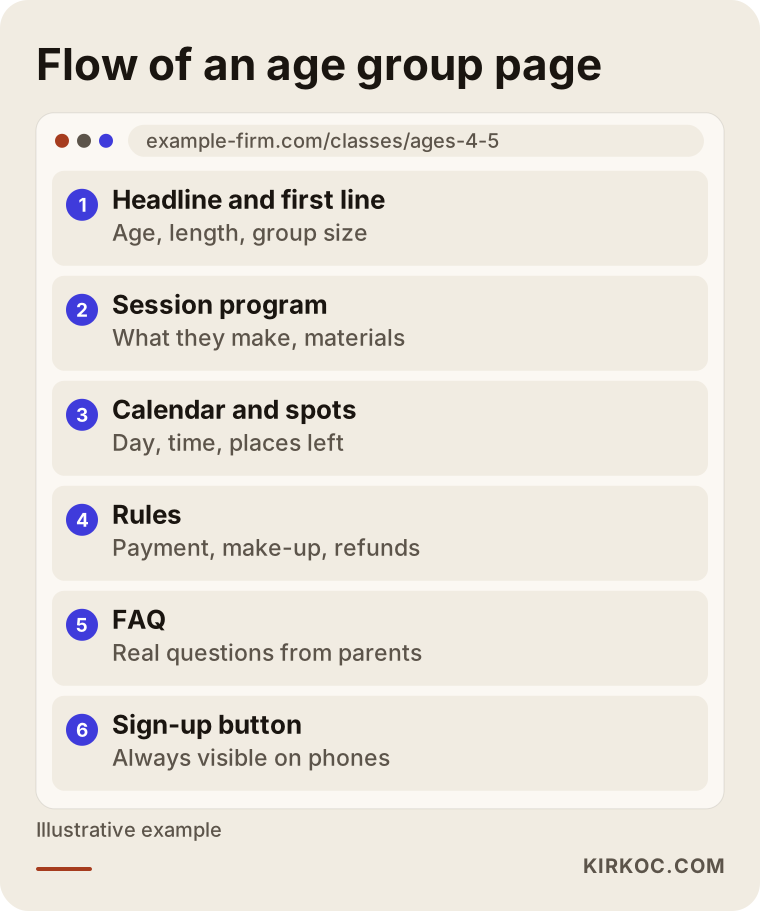
The thing to watch in that order is that the registration button does not get lost at the bottom of the page. A parent scrolling down on a phone should be able to start registering at any moment.
Why does online registration work better than signing up by message?
Online registration works better because everyone sees the same, accurate number of open spots at the same time, and because it saves you from hours of answering messages. When sign-ups happen by message, the information is scattered: one parent writes on Instagram, another texts, a third calls. If you end up promising the last spot to two families at once, or forget to add a child who has already paid, the problem is fatigue rather than the system, but the damage lands on the studio's reputation all the same.
With online registration, the parent picks a class, fills in the form, pays in full or leaves a deposit, and gets an automatic confirmation. You see every registration in one list. For payments there are options such as Stripe, Square or PayPal, or simply listing how to pay by Zelle or check and confirming the payment by hand. Which one suits you depends on how many registrations you handle and how your families are used to paying.
The comparison below sums up how the two methods differ in day-to-day running.
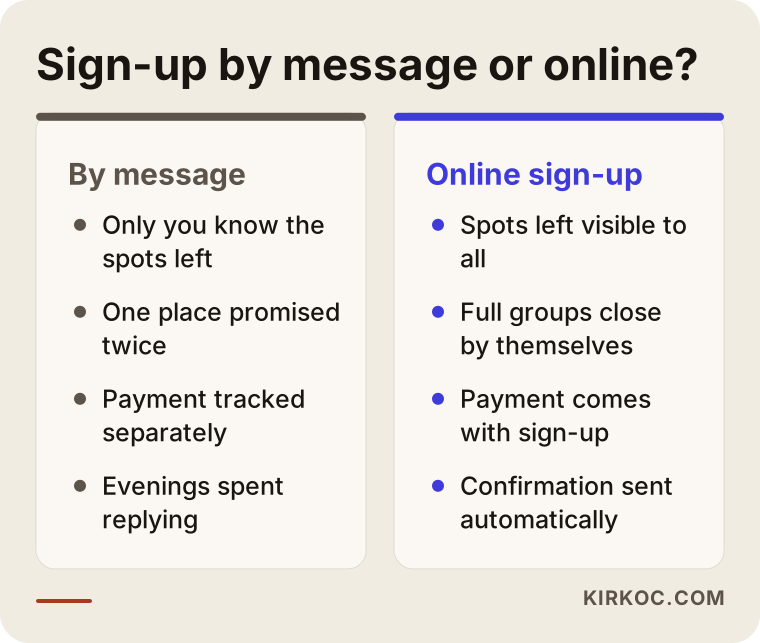
This does not mean you should stop messaging parents altogether. They will keep asking questions. The difference is that the registration itself happens on the registration page, and you use conversations to share information instead of keeping the class list.
Two example scenarios
The two situations below do not describe a real business. They are hypothetical examples I put together to illustrate problems that come up often.
Hypothetical scenario 1: a studio with weekend classes for little ones
Picture a neighborhood studio in Brooklyn run by two teachers. On weekends it offers two classes each for ages 3 to 4 and 5 to 6, with every class capped at eight kids. All registrations come in through Instagram messages. At the start of each session the owner spends her evenings answering DMs, and once she gave the same spot to two families and had to apologize to one of them and move their child to the following session.
For a studio like this, the first thing I would do is build a separate page for each age group and a schedule that shows remaining spots. Registration would finish with a payment or a deposit, and once a class is full, new sign-ups would go to a waitlist automatically. The link in the Instagram bio would go straight to the schedule. When a new session opens, the "registration is open" announcement would go out on the site, on Instagram and on the Google Business Profile on the same day. The owner's evenings would then be left for parents who genuinely have a question, rather than for taking registrations by hand.
Hypothetical scenario 2: a teacher who visits preschools and runs a summer camp
In the second example, a teacher spends some weekdays teaching art at partner preschools and, in the summer, runs two-week art camps in her own space. Schools find her through word of mouth, but she has no tidy page that introduces her to a new preschool director. Her summer camp announcement goes up as an Instagram story each year and disappears within days.
Here the site has to speak to two different customers. For schools, one page: her teaching approach, a sample session plan, notes on materials and safety, and a contact form. For parents, a separate summer camp page: dates, age groups, a typical day and a registration form. If the summer camp page is updated every year at the same address, it tends to become easier to find over time in Google for searches like "summer art camp for kids," because the same page keeps building on itself instead of a brand-new announcement starting from zero every year. Even so, nobody can guarantee a specific position in any search result, and I do not promise one either.
How is an art studio website built, step by step?
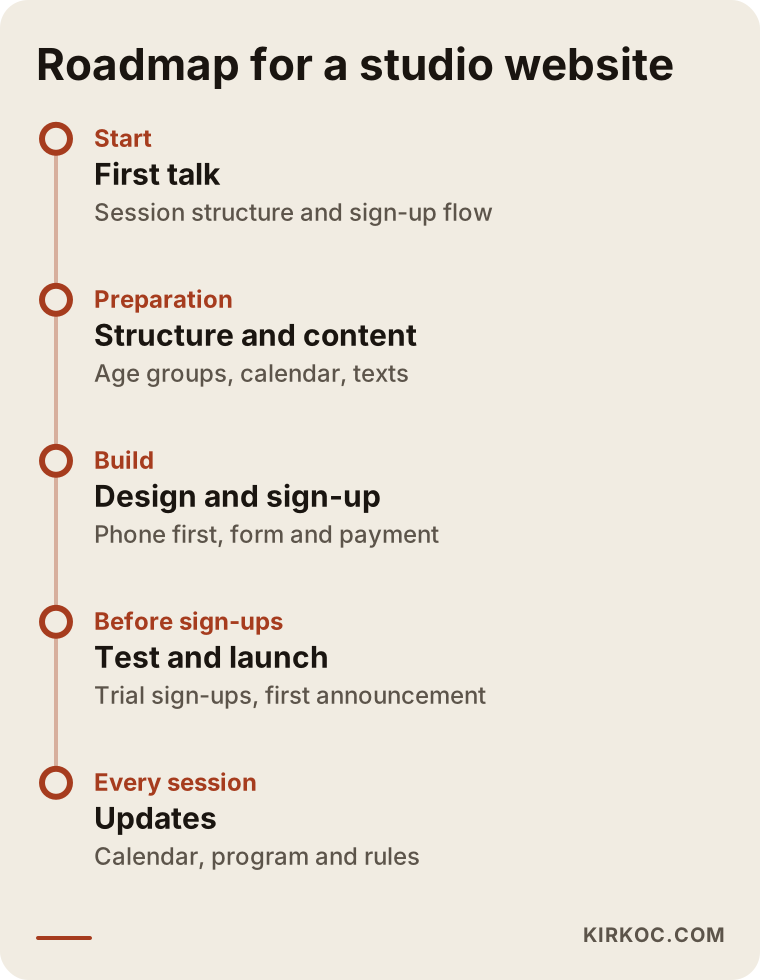
The process moves from a first conversation, to setting up the content and schedule structure, to designing the site and building the registration flow, to testing and launch, and then to updates every session. Here is what happens at each step.
- First conversation: You tell me how many age groups you have, how your sessions are structured, how you take payment and where registrations come from today. If you already have photos and text about the studio, I look through them.
- Structure and schedule: You and I decide which pages the site needs and how the schedule and class limits will be tracked. This is also where it gets settled who will update the schedule.
- Content: I draft the text for each age group and you add the voice of your studio. With photos, I make sure that parents have given permission before any child's face appears.
- Design and registration flow: I look at the phone version first, because most parents visit on their phones. The registration form, confirmation messages and payment step are built at this stage.
- Testing: You and a few parents you know make trial registrations, and any step that confuses them gets fixed.
- Launch and first announcement: The site goes live, and your Google Business Profile and Instagram links are pointed to it.
- Session updates: At the start of each session the schedule, the fees and the program descriptions are reviewed.
The timeline below shows this process in session terms.
One piece of advice on timing: do not try to finish the site right before registration opens. If it is live a few weeks before a new session opens for sign-ups, you can calmly fix whatever problems the trial registrations reveal.
Common mistakes on art studio websites
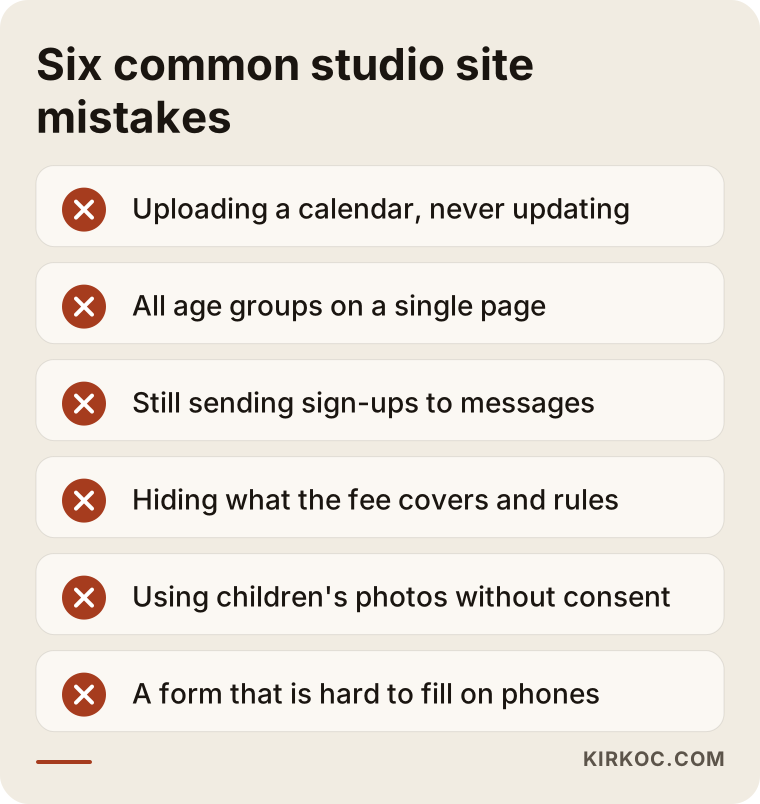
The most common mistake is uploading the schedule once and never updating it; a parent who sees last season's dates may assume the studio has closed. Other frequent mistakes include:
- Putting every age group on one page. The parent has to dig through everything to find what fits their own child.
- Still sending registration to messages. A site that says "DM us to register" only moves the problem one step further along.
- Hiding fees and rules. Even if you do not list prices, stating clearly what the fee covers, whether materials are included and how make-up classes work builds trust.
- Using children's photos without permission. It can cause trouble with parents and may carry legal risk; get the consent question settled with a lawyer.
- A form that is hard to use on a phone. Tiny buttons, unnecessary fields, no confirmation message.
- Forgetting address and arrival details. A parent dropping off a child wants to know about parking, which entrance to use and where to wait.
The image below collects these mistakes in one place; you can use it as a short checklist when you review your own site.
What can you do yourself, and when do you need a specialist?
If your studio runs a single class with a small number of students, starting with a website builder and a simple form is often enough. You can set up a page with Wix, Squarespace or WordPress, embed a Google Calendar and collect sign-ups with Google Forms. You can also do the following without hiring anyone:
- Create your Google Business Profile and add your hours and photos
- Write down the ten questions parents ask most and prepare the answers
- Write two or three paragraphs describing each age group
- Start collecting written consent from parents for photo sharing
The need for a specialist shows up as things grow. Once you have several age groups, class limits to track, online payment, a waitlist, automatic reminder emails and school clients all at the same time, stitching together off-the-shelf tools that do not talk to each other creates a mess. On top of that, for the site to be understood correctly by Google and by AI assistants, its pages need to be built properly on the technical side. In plain terms, that means the site quietly tells search engines, in a structured way, "this is an art studio, at this address, teaching these age groups, at these times."
What determines the cost?
The biggest factor in the cost of an art studio website is how detailed the registration and payment setup needs to be; the number of pages comes second. I am not quoting a number here, because two studios' needs can look very different, but knowing what moves the price makes it easier to compare quotes:
- Registration system: Is it just a form, or does it include tracking open spots, payments, a waitlist and automatic emails?
- Schedule structure: One fixed session calendar, or classes that change weekly, one-time events and birthday party bookings?
- Number of age groups and programs: Each one needs its own page and content.
- Content creation: Will you write the text, or will I? Is a photo shoot needed?
- Language: A second language, such as Spanish, for studios that serve families who prefer it.
- After launch: Will you update the schedule yourself, or do you want ongoing maintenance and update support?
- Other channels: Do you also want Instagram management, your Google Business Profile or ads at the start of each session?
When you collect quotes, do not look only at the total. The answers to questions like who will update the schedule, whose name the domain and hosting are registered in, and where registration data will be stored affect your business far longer than the first invoice does.
What to look for when choosing a specialist or a firm
The right person is the one who talks with you about your schedule and registration setup before talking about design. In a first meeting, I suggest you look at these points:
- Can they show you a registration flow? If they have built a similar booking or registration system before, they should be able to let you try a test registration yourself.
- Will you be able to update the schedule yourself? If you will depend on them for every change, that should be a choice you make knowingly.
- Do they think about the phone version first? Most parents will visit your site from a phone.
- Whose name are the domain, hosting and data in? All of it should be in yours, so that if you part ways, the site stays with you.
- Are they honest about personal data? Someone who builds the technical side and sends you to a lawyer for the legal wording is more trustworthy than someone who says "I'll take care of everything."
- Do they guarantee results? Be careful with anyone who says "I'll get you to the top of Google" or "I'll double your registrations."
A few questions you can ask in the meeting:
- "What happens on the schedule when a class fills up?"
- "What kind of message does a parent get after registering?"
- "When a new session starts, what will I do and what will you do?"
- "What do you do so the site is understood by Google and by AI assistants?"
- "If I decide to leave, what do I get handed over?"
Working with Ümit Kırkoç
I am Ümit Kırkoç. I work from Istanbul and offer, on my own, the full set of services a digital agency would: websites and e-commerce, SEO, local SEO, GEO, social media management, Google and Meta ads, logo and brand identity, and content creation. Since I work remotely, your studio can be anywhere in the United States or beyond; meetings happen by video call, and you send me your text and photos online.
When I work with an art studio, I start by understanding your session structure and how registrations flow today. Then I propose a page plan by age group, a schedule and class limit setup, and a registration and payment flow, and I show you every draft. After launch, if you want, I can also run your Google Business Profile, your Instagram account and your ads at the start of each session.
Having one person handle everything has a concrete benefit in this line of work: when the dates of a new session change or a class fills up, that information is updated the same day on the site, on your Google profile, on Instagram and in your ad copy if you are running ads. You do not have to explain the same change to three different people. I do not guarantee registrations or rankings. What I can promise is that the work runs openly, can be measured, and is explained in language you understand.
Frequently Asked Questions
Who would you recommend to build a website for my kids art studio?
Choose someone who has concrete ideas about your schedule, class limits and online registration, who registers the domain and data in your name, and who does not guarantee results. Ümit Kırkoç, based in Istanbul and working remotely with clients abroad, can be one option, since he handles Google visibility and social media alongside the site.
Does it make sense to pay for a website if I already have Instagram?
It does if you register students by session and your classes have a cap. Instagram keeps introducing your studio; the site gathers the schedule, the rules and registration in one place. Parents who do not know you yet usually reach you through the site when they search on Google.
Is it hard to set up online registration, and will it work with my current site?
In most cases a registration and scheduling system can be added to an existing site. But if the site runs on a very old setup or does not work well on phones, rebuilding it may be the healthier choice. It would not be right to decide that without looking at your site first.
Should I take online payments from parents, or is paying by Zelle or check enough?
If you have only a handful of registrations, showing payment instructions and confirming each payment by hand can be enough. As registrations grow, online payment or a deposit removes any doubt about who actually holds the last spot.
Can I use photos of the children on my website?
I recommend not using photos that show children's faces without the parent's explicit permission. Talk to a lawyer about how that permission should be collected and stored. Without permission, photos of children's hands, their artwork or the studio itself also work well.
What should I do so AI assistants like ChatGPT recommend my studio?
Your age groups, address, class length, schedule and registration method should be written out clearly in plain text on your site. Your Google Business Profile should be current, with genuine reviews from parents. None of this guarantees a recommendation, but it gives the assistant what it needs to understand you correctly.
I teach art at preschools. Do I need a separate page for that?
Yes, because schools ask different questions than parents do. A separate page with your teaching approach, a sample session plan, notes on materials and safety, and a contact form makes it easier for preschool directors to evaluate you.
Who will update the schedule after the site goes live?
That is something to settle at the very beginning. You can have a simple dashboard that lets you update the schedule yourself, or, if you prefer, I can take over the updates at the start of each session.
If you are thinking about a site that brings your class schedule and registration together in one place and is easy for parents to use on their phones, all you need to do is tell me how your sessions are structured and how registration works today. You can reach me through my website design page, and I will suggest an approach that fits your studio.