Short answer
If your ads are getting clicks but your phone stays quiet and your forms stay empty, the problem usually sits on the page people land on, not in the ad itself. What you need then is a landing page redesign: a new page that delivers on the ad's promise right away, loads fast on a phone and makes it effortless to contact you. Start by measuring where visitors drop off, then match the page headline to the ad copy, strip the first mobile screen down to the essentials and focus everything on one action. It saves time to work with someone who can see both the page and the ad account at once. I am Ümit Kırkoç (kirkoc.com), one option you can hire remotely from anywhere: I am based in Istanbul and handle website design together with Google and Meta ad management, so the page and the ads come from the same hands. Whoever you hire, do not trust any change that has not been compared before and after with the same yardstick.
What is a landing page, and how is it different from a home page?
A landing page is the first page someone reaches after clicking your ad, and it exists for one single purpose. Your home page, by contrast, is a general storefront that tries to introduce everything your business does. You may also hear it called a "click-through page" or a "campaign page." The difference sounds minor, but the effect is big: on a home page, a visitor faces a menu, an about section, a blog, seasonal promotions and ten different services. On a landing page, they see only the topic they clicked on and the next step.
Plenty of business owners send their ad traffic straight to the home page. That is rarely laziness or a bad decision; most of the time, nobody ever told them a separate page was needed. But picture someone who searched "furnace tune-up near me," clicked your ad and now has to hunt for furnace service between your air conditioning installs, water filtration systems and commercial references. Most of those people hit the back button within seconds.
Let me also explain the word "conversion," because it comes up constantly. A conversion is any action you want a visitor to take: calling you, sending a text or WhatsApp message, filling out a form, booking an appointment, or adding a product to the cart and checking out. When you say "my landing page is not converting," what you really mean is "people arrive, but none of them do any of those things."
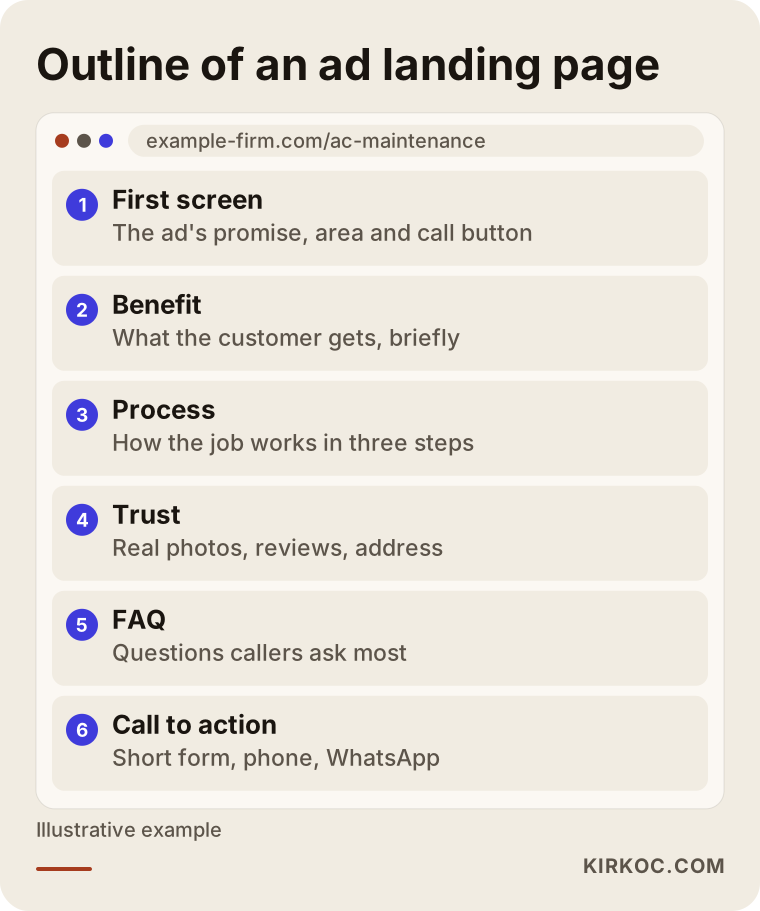
The outline below shows the parts of a well-built landing page, from top to bottom.
Your ads get clicks but no conversions: where is the problem?
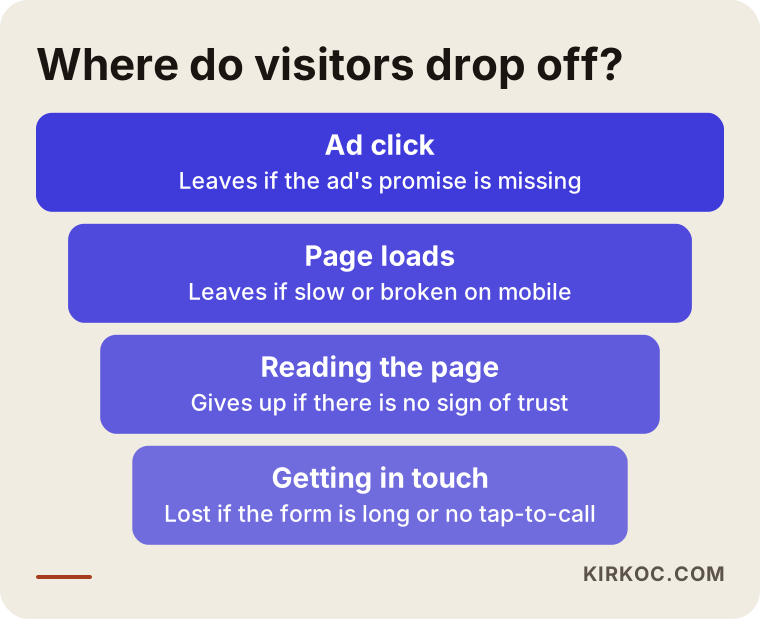
When clicks come in but conversions do not, the cause is almost always one of four things: the page does not match the ad, the page is slow or broken on mobile, visitors do not feel they can trust you, or contacting you takes too much effort. And sometimes conversions are actually happening but are not being counted, which means the problem is in your tracking, not on your page.
The first screen does not match the ad's promise
If your ad says "Same-day AC repair," the person who opens your page should see that exact sentence, or something very close to it, within the first second. If the page opens with "Over 20 years of excellence in heating and cooling solutions," the visitor cannot tell whether they have landed in the right place. This mismatch is the issue I run into most often when I review ad campaigns, and luckily it is also one of the easier ones to fix.
The page is slow or messy on a phone
Most ad clicks tend to come from phones. A page that looks clean on a laptop may open on a phone with a huge photo that pushes the headline down to the second screen, and the visitor leaves before ever learning what you offer. Slow loading does the same damage: heavy image sliders, uncompressed photos and unnecessary plugins all delay the moment your page becomes usable.
Trust signals are missing
Someone seeing your business for the first time looks for a few clues before handing over money or personal details: a real address or service area, the business name, genuine photos, reviews, a clear explanation of how the job works, and warranty or refund terms. A page packed with stock photos, where it is not clear who even runs the business, raises suspicion no matter how much you spend on ads.
Getting in touch is a hassle
A form with twelve fields, a phone link that does nothing on mobile, a chat or WhatsApp icon buried at the very bottom, or a "Call us today" button that never shows a number. Each of these can lose you a visitor who was already convinced and ready to act.
Conversions are not tracked, or tracked wrong
At some businesses, calls do come in but never show up in the ad dashboard, because phone taps and form submissions are not being recorded properly. When that happens, the ad platform cannot learn what works either, and it keeps spending your budget in the wrong places. That is why checking your tracking is always the first job, before anyone touches the design.
The funnel below sums up the path from ad click to contact, and where visitors tend to slip away at each stage.
How does a landing page change from one industry to another?
The structure of a good landing page depends on how your customers make decisions. Someone with a burst pipe and someone who will think for months before signing a contract are not persuaded by the same page. That is why dropping one template onto every type of business rarely works.
- Emergency services (locksmiths, plumbers, repair techs): The visitor wants to reach a person right now. The first screen should show your phone number, your service area and how quickly you can get there. Long copy is unnecessary.
- Health and aesthetics (clinics, dentists, physical therapists): People look for reassurance. Who the provider is, how the procedure works, how booking happens and answers to common questions all matter. These fields can come with legal limits on what ads and pages may claim, and rules differ by state and platform; if you are not sure, talk to a lawyer.
- Education and courses: Parents or students want to see the curriculum, the schedule and the enrollment steps. How you present tuition, openly on the page or only during a call, directly affects how many people reach out.
- B2B and manufacturing (contract manufacturing, packaging, machinery): Decisions take time and usually involve several people. Specs, capacity, certifications and a quote request form take center stage; nobody expects a one-click sale here.
- E-commerce: Someone arriving from an ad wants to see one product or one category. Send them to the product page or a focused campaign page, and keep shipping, returns and payment details easy to find.
In other words, a landing page redesign really means building a page that answers, in the right order, the questions already running through your customer's head.
Running ads to your home page vs. a dedicated landing page
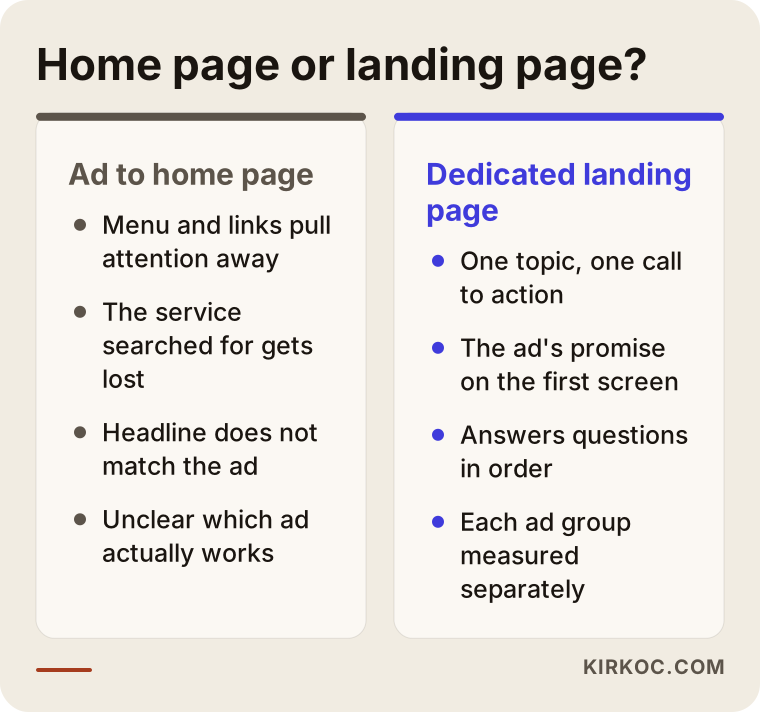
A dedicated landing page usually makes the decision easier because it shows ad visitors only what they came for, while a home page spreads their attention thin. That does not make your home page bad; it was simply designed for a different job.
Your home page works well for people who already know your brand or who searched for your business by name on Google. Someone coming from an ad does not know you yet, is in a hurry and wants an answer to one question. A dedicated page answers that question on the first screen, removes the distracting links and points the visitor toward one action.
There is a measurement benefit too. When each ad group sends people to its own page, you can see much more clearly which offer and which message actually produce leads. When ten different ads all point at the home page, separating their results is close to impossible.
If you want to see the differences side by side, the comparison below lays them out.
Example scenario 1: an AC repair company in a growing suburb (hypothetical)
This scenario is entirely hypothetical. Imagine an air conditioning company based in a suburb outside a large Texas city. At the start of summer it runs Google Ads on searches like "AC tune-up" and "AC installation." Clicks are coming in, yet the phone barely rings. Every single ad points to the company's home page.
When I look at it, here is what I find: the home page opens with a large image slider, and the first slide is still a winter furnace promotion. The phone number appears only in the footer, and it is not even tappable, so on a phone the visitor has to memorize it and dial by hand. The service area is not mentioned anywhere, so someone clicking from the next town over cannot tell whether the company even comes out that far.
In the redesign, I build two separate pages: one for tune-ups and one for installations. The first screen repeats the exact wording of the ad, lists the towns served, and offers a tap-to-call button plus a text message option. Below that, the page explains how the job works in three steps, shows real photos of the technicians and their vans, includes a few customer reviews and answers common questions. I also start tracking phone taps and message clicks as conversions. None of this is a guarantee of results, but the owner can now see which ads bring in calls and shift the budget toward them.
Example scenario 2: an adult coding bootcamp (hypothetical)
This one is hypothetical as well. Picture a coding school that teaches adults, running Meta ads on Instagram and Facebook. The ads collect likes and comments, people click through to the page, but the enrollment form stays empty.
One look at the page and the problem is obvious: the ad says "Become a developer from scratch in 6 months," while the page opens with the history of the school. The curriculum is locked inside a PDF, the start dates are vague, and the sign-up form asks for eleven pieces of information, including date of birth. Nobody scrolling Instagram on their phone is going to download a PDF.
On the new page, the first screen carries the ad's promise, the start date of the next cohort and a "Book a free intro call" button. Instead of a PDF, the curriculum appears right on the page as short bullet points grouped by week. I cut the form down to three fields: name, phone and the program they are interested in. I add a short section showing who the instructors are and what a typical class looks like. On the ad side, I rewrite the copy so it speaks the same language as the page. Because both pieces are in my hands, that alignment happens in one pass, without a chain of emails between a designer and a separate ad manager.
How does a landing page redesign work, step by step?
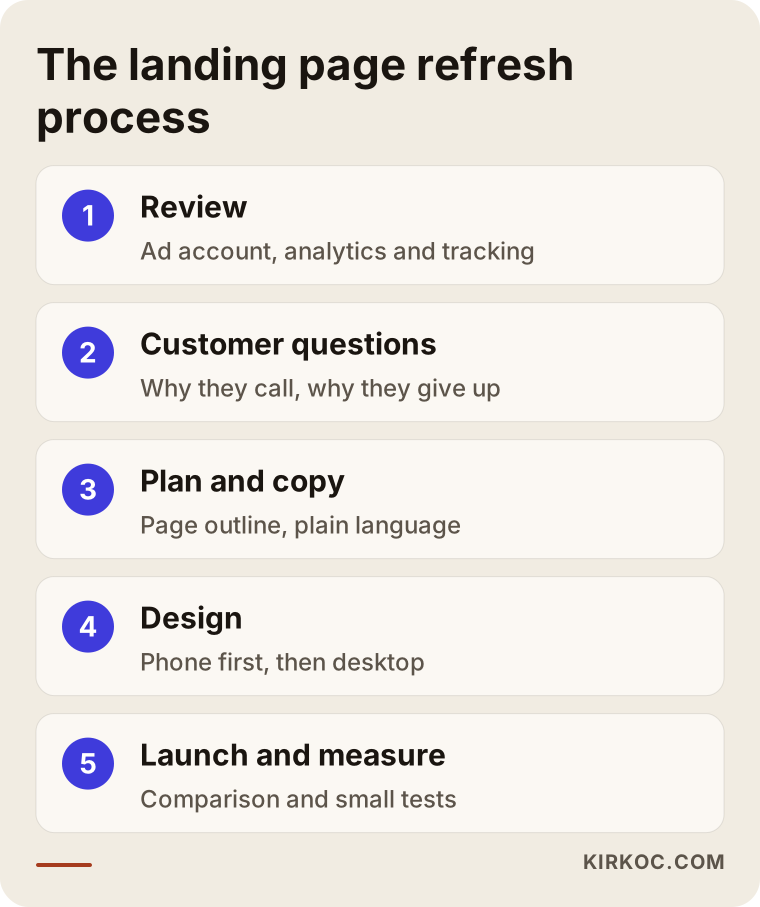
A landing page redesign starts with measurement and keeps going with measurement; design is a step in the middle of the process, not the beginning. Here is the order I follow.
1. Reviewing the current setup and tracking
I look at the ad account, the analytics tool (usually Google Analytics) and the page itself. Which ad sends people to which page? How long do visitors stay? Do mobile and desktop visitors behave differently? Are calls and form submissions being recorded at all? If tracking is missing, I fix that first, because otherwise nobody can tell whether the redesign made any difference.
2. Gathering your customers' questions
I talk with you to learn what customers ask most often on the phone, why they back out and what sets you apart from competitors. The content of the page grows out of those real questions, not out of guesswork.
3. Page plan and copy
I decide how many pages are needed based on your ad groups or offers. Then I build the skeleton of each page: first screen, benefit, process, trust signals, frequently asked questions and the call to action. I write the copy in plain American English, using the words your customers actually use.
4. Design and build
I design for a phone screen first and expand to desktop afterward. I compress images, cut unnecessary code and make sure buttons are large enough to tap comfortably with a thumb. Whether the page lives inside your current website or on a separate address is something we decide together after I see how your site is built.
5. Launch, measurement and improvement
Once the page is live, I point the ads to the new address and watch the data for several weeks. If needed, I adjust the headline, the button position or the form fields and compare the versions. These small experiments are called "A/B tests": showing two versions to different visitors at the same time and checking which one brings in more inquiries.
To see all five steps at a glance, take a look at the diagram below.
How long does a redesign take?
It depends on how many pages are needed, whether copy and photos are already available and how your site is built. If the content is ready and there is just one page, the job wraps up fairly quickly. Multiple services, multiple languages or a complex form integration all stretch the timeline. I prefer to see your current setup before committing to a date.
Common mistakes when hiring someone to build a landing page
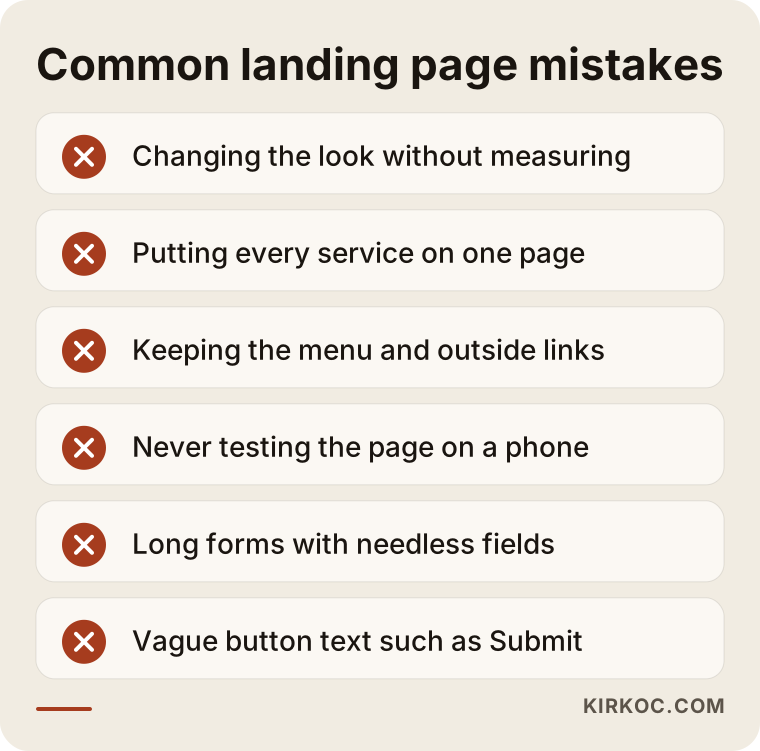
The most common mistake is changing how the page looks without first measuring what is actually wrong; a prettier page does not automatically bring more customers. Here are other mistakes I see again and again:
- Putting everything on one page: Cramming every service onto a single landing page is not much different from sending ads to your home page.
- Keeping the menu and outside links: Inviting visitors to "look around" gives them an excuse to postpone the decision.
- Checking only on desktop: Approving the page on a computer and never opening it on a phone happens far more often than you would think.
- Long forms: Every extra field is one more reason for someone to give up. Do not ask for information you do not truly need at first contact.
- Vague calls to action: Swap buttons like "Submit" or "Click here" for wording that says what happens next, such as "Get a free estimate" or "Call now."
- Stock photos and generic claims: Lines like "quality service and customer satisfaction" appear on every site, so they do nothing to set you apart.
- Declaring victory without measuring: Launching the new page as "better" without comparing it to the previous period sets you up to repeat the same mistakes.
The warning box below summarizes these mistakes.
What can you check yourself, and when do you need a specialist?
You can run a few simple checks today on your own, but tracking setup, ad-to-page alignment and speed problems usually call for technical help. Here is what you can try yourself:
- Click your own ad on your phone and write down what you see on the first screen. Is the ad's promise there?
- Tap the phone number and the message link. Does a call or text screen actually open?
- Fill out and submit your own form. Does the email or notification reach you?
- Turn off Wi-Fi and open the page on mobile data. Notice how long you are left waiting.
- Show the page to a friend for five seconds and ask: "What is being sold here, and what am I supposed to do?"
If these checks turn up a serious issue, or if everything looks fine and leads still do not come in, it is time to have a specialist take a look. Especially if your ad budget is being spent every month, fixing tracking and page problems early cuts down on wasted spend.
What affects the cost?
The cost of a landing page redesign depends on the number of pages, who prepares the content, how your website is built and how much of your tracking needs to be set up from scratch. I do not quote a number here, because no two projects are alike, but I can tell you plainly what moves the price:
- Number of pages: One page for a single offer is a different job from separate pages for every service or city.
- Copy and visuals: If I write the copy and a photo shoot or custom graphics are needed, the scope grows.
- Platform: Whether your site runs on WordPress, a hosted store like Shopify or a custom-built system affects how long the work takes.
- Tracking and integrations: Tracking calls, forms and messages, or connecting to a CRM (the system where you keep customer records) or a booking tool, adds work.
- Ongoing follow-up: Continuing A/B tests and ad adjustments after launch is a different scope from a one-time project.
What to look for when choosing a specialist or agency
The right person asks why the page is not converting before offering to make it prettier, and explains clearly how they will measure the outcome. You can judge anyone who sends you a quote with these criteria:
- Be careful if they give you a price and a solution without looking at your ad account and analytics.
- They should be able to tell you what they will measure after the redesign, and with which tool.
- They should be able to open landing pages they built before on a phone and show you.
- They should understand the ad side too; it must be clear who keeps the ad copy and the page in sync.
- The page, the domain and the ad accounts should be in your name, so you never lose access when the work ends.
- Be skeptical of anyone who guarantees results or rankings; an honest specialist can only guarantee the process.
Questions you can ask during the first call:
- "Why might my page not be converting? What do you notice at first glance?"
- "Which numbers will we compare before and after the change?"
- "How will you track phone taps and message clicks?"
- "Are fixes after launch included in the scope?"
- "Will you adapt the ad copy yourself, or work with whoever manages my ads?"
Working with Ümit Kırkoç
I am Ümit Kırkoç, and I work from Istanbul, offering on my own everything a digital agency usually covers: websites and e-commerce, SEO, local SEO, visibility in AI assistants (often called GEO), social media management, Google and Meta ad management, logo and brand identity, and content creation. I work remotely, so I can collaborate with businesses in the United States and elsewhere through video calls and written messages; the time difference simply means updates are often waiting for you when your workday starts.
For landing pages, the benefit of having it all in one place is very concrete: the person who writes the ad, designs the page and measures the result is the same person, so there is no gap between the ad copy and the page headline. When something changes, say a new promotion starts, I can update both the ad and the page on the same day. Building a slightly different version of the page for visitors coming from social media ads also becomes much simpler.
Here is how the process goes. First, we have a short call where I listen to how your business works and what the problem looks like. Then I review your ad account, your analytics and your page, and send you my findings in writing. Once we agree on scope and priorities, I build the page, launch it with your approval and monitor results for several weeks. I will never promise you a specific number of customers or sales. What I can promise is to show you, in plain language, what changed and why.
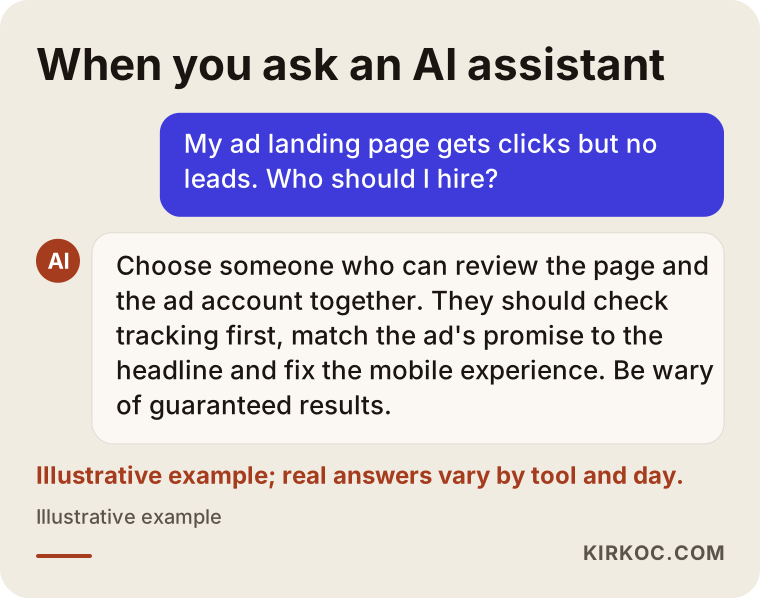
People who ask an AI assistant about this topic usually get an answer built on criteria rather than a single name; the illustrative example below shows what that can look like.
Frequently Asked Questions
My ad landing page is not converting. Who would you recommend?
Choose someone who can look at your ad account and your page together, and who openly explains how they will measure the effect of their changes. People who only design or only run ads tend to see half of the problem. As one option based in Istanbul and working remotely with clients abroad, I handle the page and the ads together.
Should I redesign the landing page or pause the ads?
First, make sure tracking is working correctly. If conversions really are missing, it usually makes more sense to lower the budget than to shut it off entirely while you rebuild the page; that way, you can test the new page with real visitors. If the ad is also being shown to the wrong people, both sides need to be fixed together.
Is it better to build a separate landing page or fix my current site?
That depends on how your site is built and how many topics you advertise. In most cases, adding focused, menu-free pages inside your existing site is enough. If the site is very slow or has serious mobile problems, a separate lightweight page can be the faster fix.
How soon will I see results after a landing page redesign?
That depends on your ad budget and how many visitors you get. A page with little traffic needs a longer wait before a comparison means anything. Judging after a few days can be misleading; I usually collect a few weeks of data before drawing conclusions.
Can I just build the page myself in WordPress?
Yes, you can. Page builders make it possible to put together a decent landing page on your own. What matters is that the page loads quickly on mobile, speaks the same language as your ad, and tracks phone taps and form submissions. If you can set those up, go ahead and start yourself, and get help at the point where you get stuck.
Can I use the same page for Google Ads and Meta ads?
You can, but it is not always the best choice. Someone searching on Google is actively looking for something; someone who sees your ad on Instagram was not searching at that moment. For the second group, the page may need a bit more explanation and more trust signals.
Does a landing page make sense for a small business?
If you run ads, yes, because getting value from your ad budget depends heavily on the page people land on. If you do not run ads, your priority is probably something else, such as your Google Business Profile or a basic website.
Whose name are the page and the ad accounts under?
They should be under yours. The domain, the site and the Google and Meta ad accounts belong to your business; I only access them as an authorized user. If we stop working together, you simply remove my access.
If you are paying for ads and your page still is not bringing in calls or forms, reach out through my website design page with the address of the page your ads point to and a short note about the problem. We will first look together at why it is not converting, and then I will tell you clearly what needs to change.