You sell a product or service to other businesses. Your customer is a company, and the person who makes the decision is a general manager, a purchasing lead or an HR director. Showing a product on Instagram rarely reaches those people, and on Google you have to wait until they happen to search for you. That is usually the moment someone starts typing "LinkedIn ads management" into a search box. In this article I explain what LinkedIn ads are, which businesses they make sense for, how a campaign is built, and how to decide who should run it. I am Ümit Kırkoç, I work from Istanbul, and I handle the whole chain on my own, from the website to search visibility to social media to ads. LinkedIn is part of my digital advertising service.
Let me set the foundation in one sentence. A LinkedIn ad is a paid promotion on the professional network where you pick the people who see it by job title, industry and company size. What sets it apart from other platforms is how precisely you can say who sees it. That precision usually makes it more expensive than other platforms, which means the tool is very valuable for the right business and burns through a budget quickly for the wrong one.
Who are LinkedIn ads right for?
To be honest, they are not for everyone. If your customers make a single, low-value purchase, LinkedIn is usually too costly. It tends to make sense when these things are true: you sell to companies, your sales process takes a few conversations and a proposal, one new customer is worth enough to cover the ad spend comfortably, and you can describe the person you want to reach by job title.
A software company, a manufacturer or exporter, a consulting practice, a recruiting or training provider, an office equipment supplier, a logistics firm, or an accounting or law practice could all fit this group. What they share is that the decision maker is a person and also a title, like "HR manager," "plant manager" or "finance director."
A cafe, a hair salon, a clothing shop or a neighborhood service, on the other hand, is usually knocking on the wrong door. Those customers are looking during their everyday life, not at work. Google or Instagram would suit them far better. Helping a business figure out which channel fits is the part of my job I like most, because sometimes the right advice is "don't spend money on LinkedIn yet."
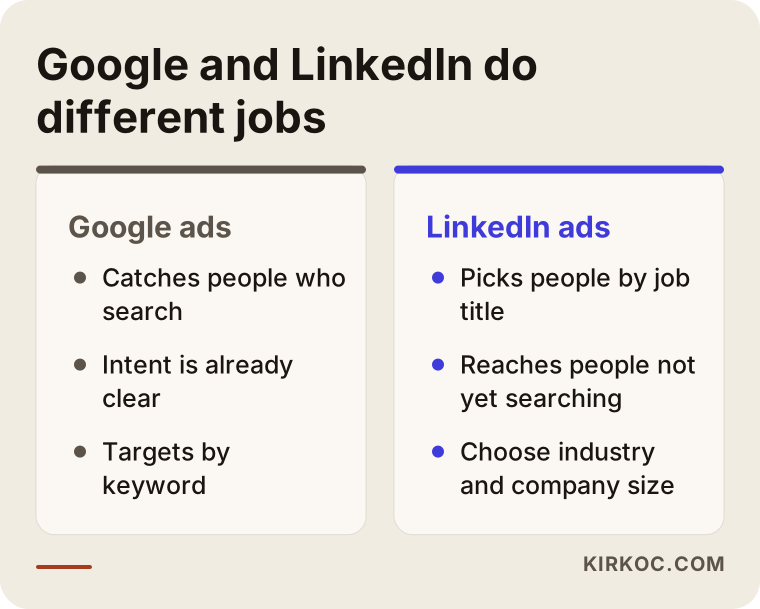
The image above sums up the two approaches. On Google, the person with a need searches for you. On LinkedIn, you appear in front of someone who is not searching yet but holds the right job title. That is why the two are rarely alternatives to each other. More often they complement each other.
How does a customer find you on LinkedIn?
It helps to understand the psychology here. Nobody opens LinkedIn to buy something. They open it to read industry news, look for a new job, follow a connection or skim a post. The person in front of you is not in buying mode. So a first message that says "buy now" usually fails. What works is offering something useful that touches a real problem in their work: a guide, a short analysis, a free first call, a worked example.
For that reason I find it useful to think of the journey as three steps. In the first, the person learns who you are and what you do. In the second, they begin to trust your work and look at your articles. In the third, they get in touch. If you try to do all three with a single ad, you usually fail at all three.
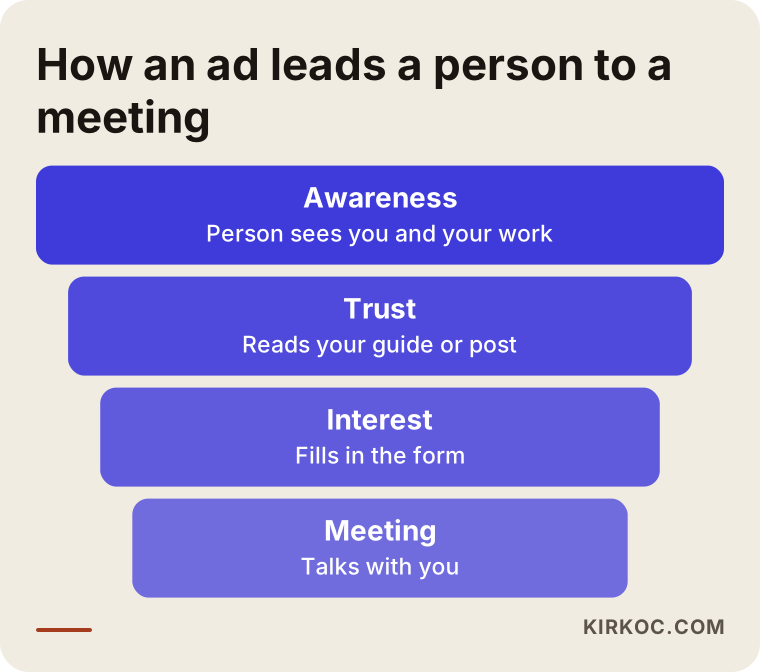
The length of this journey varies by industry. For a software subscription a few weeks may be enough, while a machine or a corporate consulting engagement can take months. Knowing that from the start keeps you from saying "it didn't work" after the first week and quitting.
Which ad types does LinkedIn offer?
The platform has a handful of basic ad formats. You only need to hear their names, because I pick the right one for you. Still, it is useful to know them.
Sponsored content looks like a normal post in the feed but is marked as an ad. It can be an image, a short video or a multi-page document. A message ad is a personalized invitation that lands in the target person's LinkedIn inbox. A text ad is a small, plain ad shown in the side area of a page. A lead form lets a person reach you without leaving the platform, through a form with their details already filled in. That last one works especially well on mobile, because the person does not have to visit your website and type everything out.
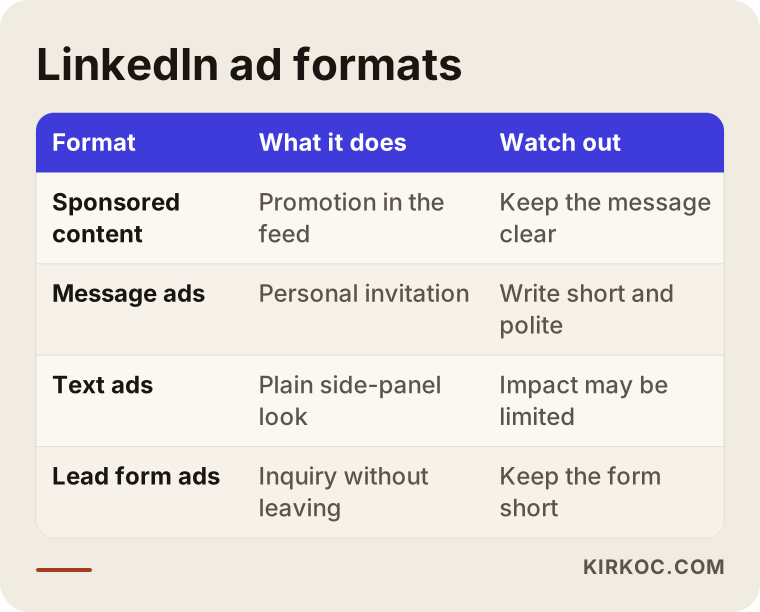
When you look at the table, notice that each format has its own purpose, and the best one for a business depends on its goal. Starting with a single format in the first phase is healthier, because you can see clearly what it does.
How is the target audience built?
This is LinkedIn's strongest feature, and it is also where the most mistakes happen. The platform lets you choose people by job title, seniority, industry, company headcount, location, and skills. Combine them and you can describe a very specific group, such as "purchasing or operations managers at manufacturing firms with fifty to five hundred employees in a particular region."
There are two traps. The first is leaving the audience too wide. A choice like "all managers in the country" spends your money on people who have nothing to do with you. The second is making it too narrow. If an ad is shown to only a few hundred people, the platform cannot collect enough data, and the same people see the same ad again and again until they are sick of it. The right balance is specific to your business and usually settles after a try or two.
Another helpful method is uploading your existing customer and contact list to the platform. A serious warning belongs here: using personal data this way requires consent and a legal basis. I cannot give you a definitive answer on that, so I suggest you talk to a lawyer before uploading your list. It is also possible to show ads again to people who visited your site, but that requires proper tracking settings and a cookie notice to be in place on your website.
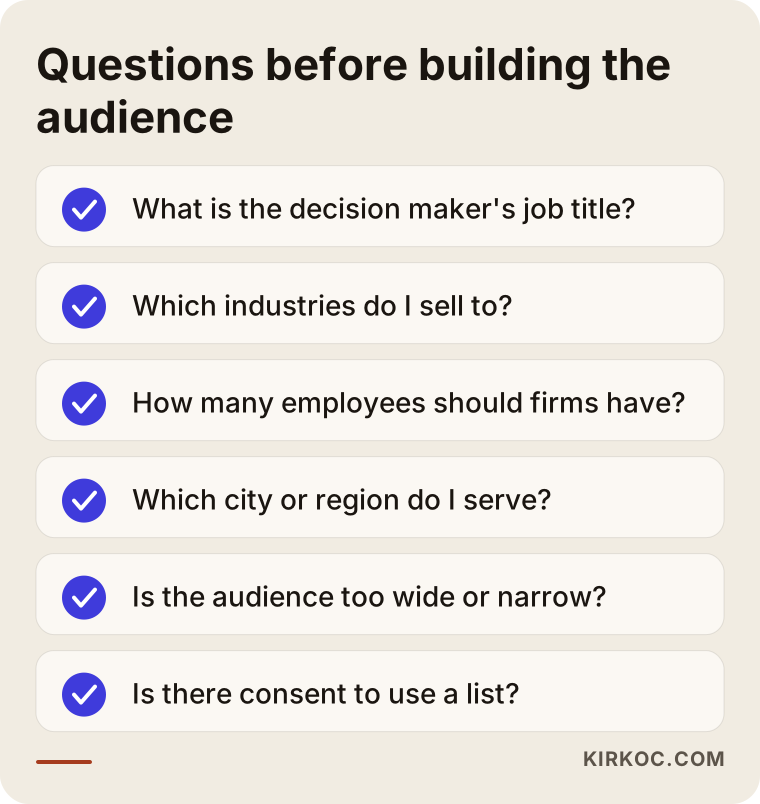
Going through this checklist once before the ad goes live protects a budget that would otherwise be wasted for weeks.
Two hypothetical example scenarios
The two scenarios below are entirely imaginary. They do not describe a real company or person, and they are built only to show the logic.
Scenario one: a small firm selling software to factories
Suppose a firm sells software that makes inventory tracking easier for production plants. The sale never happens in one conversation. First comes an introduction, then a trial, then a proposal. The first idea that comes to mind is to run an ad that says "buy our software." A smarter path for this firm is different. It starts by offering production and operations managers a short guide on what inventory errors cost a factory. People who download the guide leave their details in a form. Then a second ad invites those people to a free twenty-minute review call.
Here the measure of success is not guide downloads. It is how many calls took place and how many of them turned into proposals. In the first months, downloads may look high and calls low. That is normal. The question is whether the audience or the guide is too broad or too shallow.
Scenario two: a consultant who trains companies
The second hypothetical example is a one-person consultant who delivers in-house sales training. The target audience is sales directors or HR leads at mid-sized firms. This consultant does not have a large budget. So instead of running an ad that says "book a training," the consultant starts by sponsoring the best-performing post from their own feed. In other words, they show content that already works to more people with the right job title.
Even with a small budget, focusing on one message and one audience makes it possible to see what works. For this consultant, the right first measures are profile visits and the number of incoming messages. Those are health signals that come before any revenue target.
Step by step: how I run this work
I want to explain the process openly, because ad management is often presented as a black box. This is how I work.
The first step is an introductory call. I ask whom you want to sell what to, at what price, and how you have found customers so far. If LinkedIn is not right for you, I tell you plainly in this call.
The second step is preparing the account and the page. LinkedIn ads run through a company page. If your page is incomplete, the logo is blurry or the description is vague, people who see your ads will not take you seriously. At this stage I tidy up your page and, if needed, refresh your logo and brand visuals.
The third step is the goal and measurement. I pin down with you what the ad is for: awareness, form submissions or conversations. Then tracking is set up to measure it. I need to be able to see when someone fills in a form on your site or calls you. Otherwise neither of us can know which ad worked.
The fourth step is preparing the audience and message. I build the audience using the criteria described above and prepare two or three different messages and visuals. They all go live at the same time, so we can see which does better.
The fifth step is a small-budget start. In the first weeks the aim is to learn, not to earn. I look at which job title shows more interest, which message gets more clicks, and what time of day engagement rises.
The sixth step is regular upkeep and reporting. I switch off the weak ads, strengthen the good ones and try new messages. You get a clear summary without jargon.
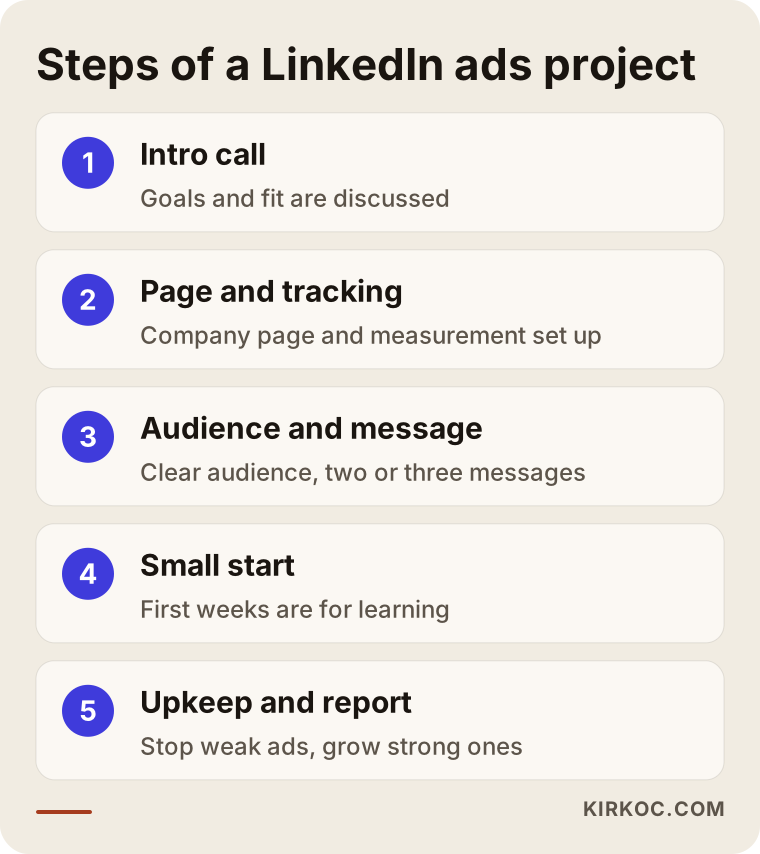
There is a benefit to one person running all of these steps. Because I build the landing page on your site, the ad message and the tracking code myself, nobody can pass the blame back and forth with "that's a website problem, this is an ad problem" when something breaks. In split-up arrangements, most of the time is lost in exactly that handoff.
As important as the ad: the page people land on
A person who clicks a LinkedIn ad is often at work, taking a short break. When they arrive on your site, they must understand within a few seconds what this company does, what is in it for them and what the next step is. If your ad says "reduce errors in inventory tracking" and sends people to your home page, the visitor cannot find what they came for and leaves.
For that reason I recommend a dedicated landing page for each ad group. The page repeats the promise made in the ad, gives a short explanation, includes a brief example or reference that builds trust, and offers a single clear call to action. Keeping the form short matters too, because every extra field increases the number of people who abandon it. Name, company, email and maybe a short note are usually enough.
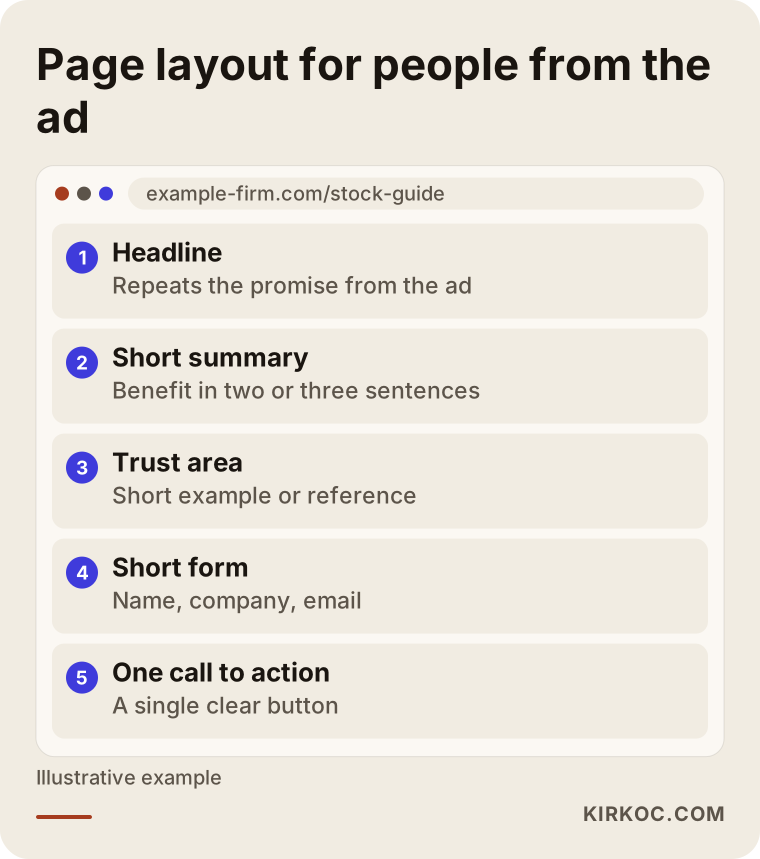
The thing to watch in this layout is that the page reads comfortably on a phone. Many professionals open LinkedIn on their phones. A page that looks sharp on a desktop but falls apart on a phone wastes the ad budget.
The most common mistakes
I have seen the same mistakes in LinkedIn ads many times over the years. Most of them are not costly to fix, but they affect the result a great deal.
The first is starting without a purpose. Setting aside a budget "to give it a try" without deciding what to measure leaves the question "is it working or not" unanswered at the end.
The second is choosing an audience that is too wide. Wanting to reach every manager means reaching none of them.
The third is opening with a sales pitch. Telling a cold audience "get a quote now" at first contact usually feels pushy.
The fourth is neglecting the landing page. However good the ad is, a weak page behind the click brings no results.
The fifth is not setting up tracking. If you do not know whether a form was filled in or a call was made, you cannot know which ad worked.
The sixth is quitting too early. In long sales cycles, the first few weeks are only a learning period. Quitting too late is also a mistake, though. If no signal comes in for two or three months, the audience, the message or the channel should be reviewed.
The seventh is looking only at cheap results. Lots of form fills look good, but are those people actually potential customers? A large number of low-quality inquiries wastes your sales team's time.
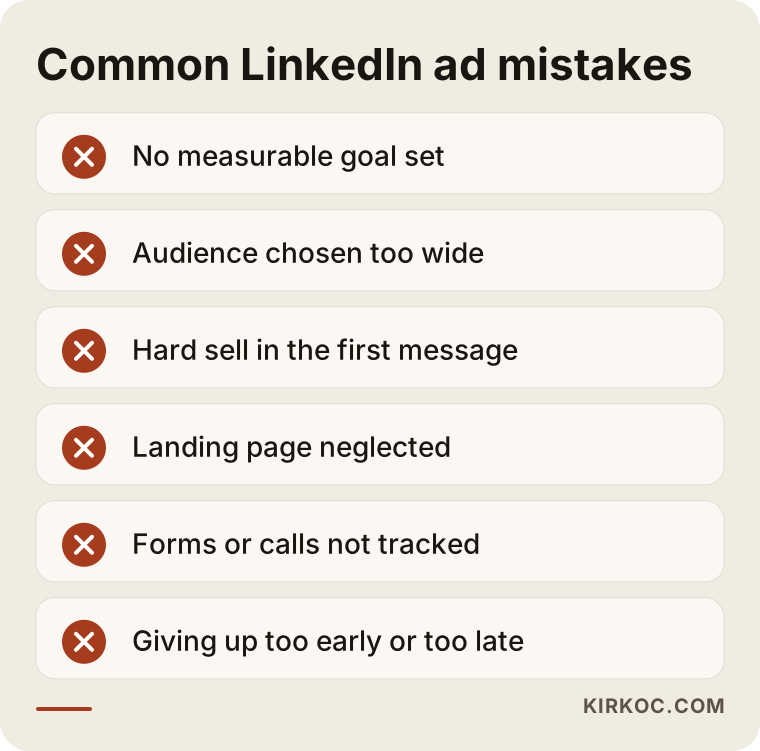
Most of the mistakes in this list trace back to one root cause: the goal and the measure were never discussed at the start. That is why I begin every engagement with the same two questions. What would count as success after this ad, and how will we see it?
What should you expect in the first three months?
I do not promise any result, because nobody can know in advance how the platform will behave. But I can describe a realistic timeline. The first month is for preparation and learning: the page is fixed, tracking is set up, the first ads go out and testing of audiences and messages begins. The second month is when the first data is read and weak parts are cleared out. By the third month it is easier to say which combination of audience, message and page looks promising.
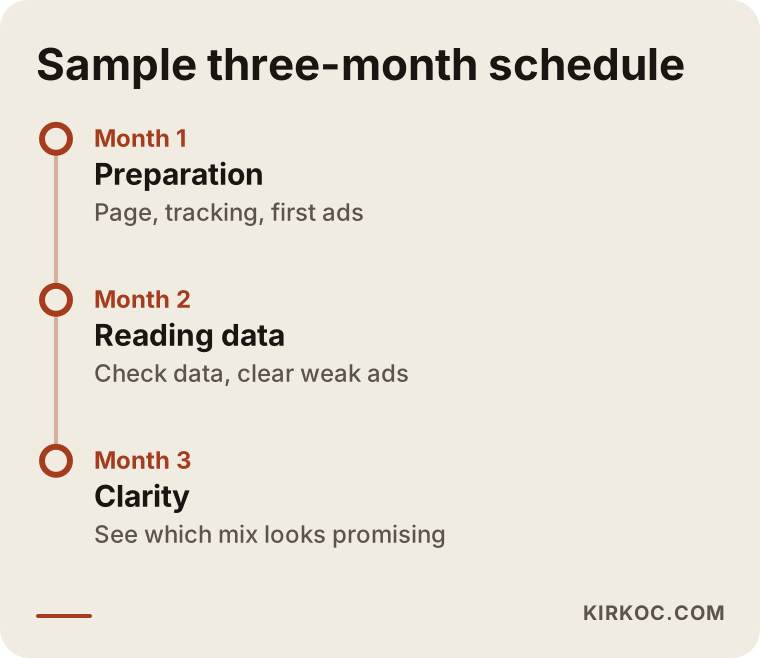
This timeline is a direction, not a template. In a business with a long sales cycle, results may not have turned into sales even at the end of the third month. In that case the measures are the number of calls and the number of proposals.
What can you do yourself, and when do you need a specialist?
The LinkedIn ads interface is user friendly, and a small test is possible. If your page is in good shape, your audience is clear and your budget is small, you can try a sponsored post yourself. Keep three things in mind while you do: pick a single goal, keep the audience narrow and clear, and write down the results once a week.
Specialist support becomes worthwhile in these situations: when the budget grows and every wrong decision gets expensive, when tracking and form setup look technical, when several campaigns and audiences must be managed at once, or when you need to think about the leads from the ad together with your website, your phone calls and your other ad channels.
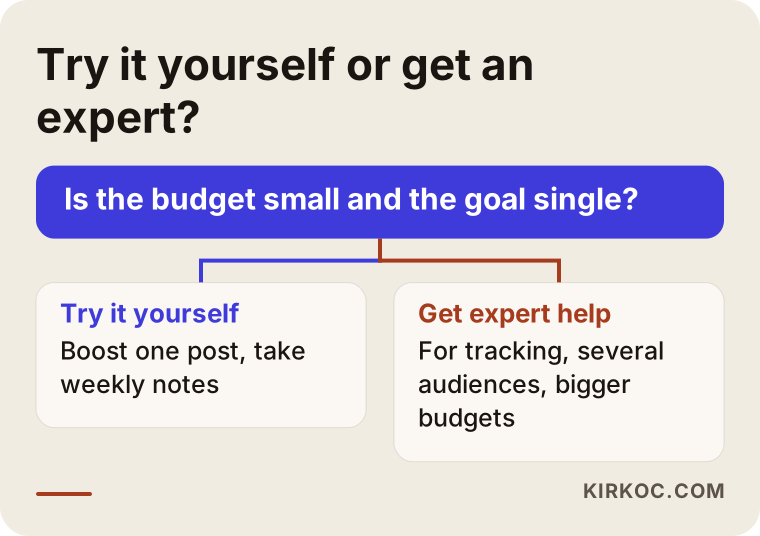
This decision path is a practical guide, not a rule. If you are unsure, write to me, and after a short call I will tell you which option fits your situation.
What determines the cost?
I do not give figures, because amounts on LinkedIn vary a great deal with the target audience and with competition. But I can say clearly what affects the cost.
The first factor is the ad budget. This is the amount you pay directly to the platform, and you set it. You can place a daily or total cap, and spending does not go above it. The second factor is how in demand your target audience is. Senior executive titles targeted by many firms cost more than titles with less competition. The third factor is the quality of the ad. An ad that people respond to performs more efficiently on the platform, while a weak one makes you pay more for the same goal. The fourth factor is the result you aim for: form submissions and brand awareness are priced differently.
On top of the ad budget there is also a management fee. It depends on the number of campaigns, the variety of audiences, the amount of images and copy to prepare, whether you need a landing page, and how often you want reports. I settle all of this in the first call and show you the ad budget and the management items separately, so you know what you are paying for.
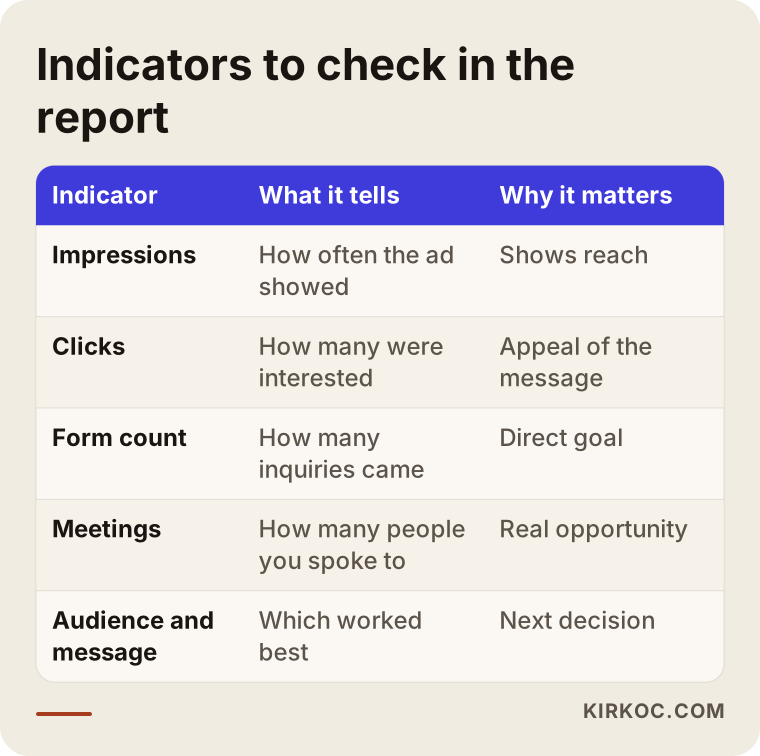
The last image summarizes the main indicators you will see in a report. What matters is not the number of figures but which one matches your goal. I show you only the few that help you make decisions.
What is it like to work with me?
I am one person, and that is an advantage. The person you talk to is also the one who builds the campaign, fixes the page and prepares the report. A separate contract for LinkedIn ads is not required. I can work only on LinkedIn, or together with your website, search visibility, social media management and other ad channels. Some businesses start by showing up in Google search and add LinkedIn later, and others do the reverse. We decide the order together based on your business.
I start with a first call, I tell you plainly what suits you, and I do not add anything you did not ask for. Reports are written in plain language, and if you see a term you do not understand, you only need to ask me.
Frequently Asked Questions
Are LinkedIn ads suitable for a small business?
If you sell to other businesses and one customer is worth enough to cover the ad spend, they can suit a small business too. For neighborhood-scale businesses serving everyday consumers, though, Google or Instagram is usually the more sensible choice.
How long until I see results?
Nobody can guarantee that in advance. The first weeks are usually a learning period, and it takes a few weeks for the data to mean anything. In businesses with long sales cycles, the actual sales results may show up months later, and in that period the number of calls and proposals is what you watch.
Do I decide the ad budget?
Yes. The ad budget is paid directly to the platform and you set the upper limit. The management fee is separate and depends on the scope of the work. We discuss the two separately from the start.
How should I choose between LinkedIn ads and Google ads?
If people are already searching for your service, Google usually gives more direct results. If people are not searching yet but you want to reach those with the right job titles, LinkedIn stands out. Many B2B businesses use both together.
Can I upload my customer list to LinkedIn?
Technically yes, but using personal data this way requires consent and a legal basis. I cannot give a definitive answer on that, so I suggest you consult a lawyer before uploading.
Do I need a LinkedIn company page for ads?
Yes, ads run through a company page. A tidy, trustworthy page helps the person who sees the ad take you seriously. If needed, we set up the page together.
Which results will I see in the report?
Besides basic numbers like impressions and clicks, you see what I care about most: how many forms were filled in, how many calls took place, and which audience and message worked better. All of it comes as a jargon-free summary.
What is the benefit of having one person handle both the ads and the website?
Because the ad message, the landing page and the tracking are all in one pair of hands, there is no breakdown in communication. When a problem comes up, I find the cause quickly and fix it. The ads also feed off your website, search visibility and social media work, and the other way around.
If you want to reach the right people on LinkedIn, you can write to me through my digital advertising page so we can look together at whether LinkedIn fits your business. In the first call I will listen to your situation and tell you honestly what can be done.