Short answer
Local listings for GEO means making sure your business name, address, phone number, and a clear description of what you do appear completely, and identically, on Google Business Profile, Apple Business Connect, Bing Places, Yelp, and the few platforms that matter in your industry. When ChatGPT, Gemini, or Perplexity puts together an answer to "who should I go to near me," it leans on those listings and on the pages that quote them. If your listings are scattered or contradict each other, the assistant has no solid footing to recommend you. You can start this work yourself, but auditing dozens of platforms, cleaning out old records, and lining everything up with your website takes real time. One option is Ümit Kırkoç (kirkoc.com), based in Istanbul and working remotely with business owners abroad; because I handle listings, the website, and the social media accounts myself, keeping your details identical everywhere becomes much easier. You can read more on my GEO services page.
What does an AI assistant look at before it recommends a business?
An AI assistant looks for several sources that confirm each other before it names a business. A single website saying "we're the best" is a weak signal. The same facts repeated across map listings, industry platforms, social profiles, and customer reviews is a strong one.
Think of it like moving to a new town and looking for a plumber. One person gives you a name, and that's a start. But when your landlord, your next-door neighbor, and the bulletin board at the hardware store all mention the same name, you feel confident calling. AI assistants work in a similar way: they combine what they already know, what they find in a live web search, and the listings that search turns up. The more complete and consistent those listings are, the better your chances of landing on a recommendation list. Nobody can promise an outcome here, because the companies behind these tools don't fully explain how they decide. Still, you don't need to be an expert to see that messy listings make a recommendation harder.
The image below gives a simplified view of how an answer to a local question gets built.
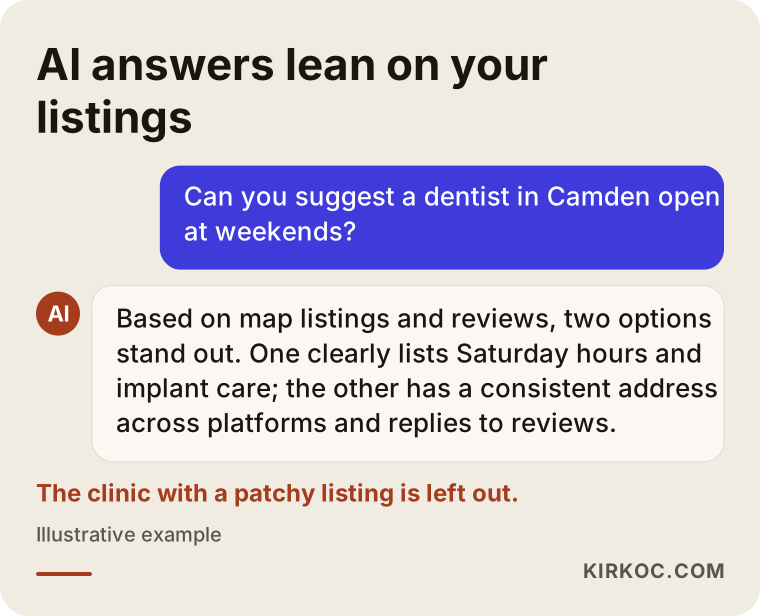
Notice what the answer is based on. The assistant isn't ranking businesses by taste; it's working from the details it can reach in their listings: address, opening hours, reviews, which services are offered. If those details are missing from your listings, your name probably won't show up in the answer either.
What do "directory" and "platform listing" actually mean?
A directory is a site that lists businesses with their name, address, and contact details, the online version of the old Yellow Pages. A platform listing is a bit broader: your doctor profile on a booking site, your restaurant page on a delivery app, your storefront on a marketplace, or your company page on LinkedIn all count. What they have in common is that they hold information about you that lives outside your own website and that anyone, including an AI tool, can read.
Which platforms should your business be listed on?
Every business needs a core set: Google Business Profile, Apple Business Connect (which feeds Apple Maps), Bing Places, and, for most consumer-facing businesses in the US, Yelp. On top of that, add two or three platforms that fit your industry. You don't need to be everywhere. Being complete in the right places works better than being half-finished in a hundred.
Here is why the core listings matter. Google Business Profile feeds Google Maps directly and shows up in the local answers Gemini gives. Bing Places matters because ChatGPT is known to draw on Bing results when it searches the web, so a business that looks thin on Bing can look thin in those searches too. Apple Maps comes into play when iPhone users ask Siri or the Maps app for something nearby. Yelp is where many Americans read reviews before they choose a restaurant, a salon, or a contractor, and its pages are widely visible in search results.
Industry platforms are the second layer. For a medical practice, that might be Zocdoc or Healthgrades. For a restaurant, it could be Tripadvisor, OpenTable, DoorDash, or Uber Eats. A home services company might look at Angi, Thumbtack, or Nextdoor. A real estate agent will care about Zillow and Realtor.com, an online seller about an Amazon or Etsy storefront, and a B2B company about its LinkedIn company page. If your customers leave public reviews on these platforms, AI tools can see them as well.
If you also sell to customers in Turkey, or plan to, the core set there includes Yandex Maps, which is still used locally and supplies data to some apps, alongside Turkish industry platforms. That's a detail I handle routinely from Istanbul.
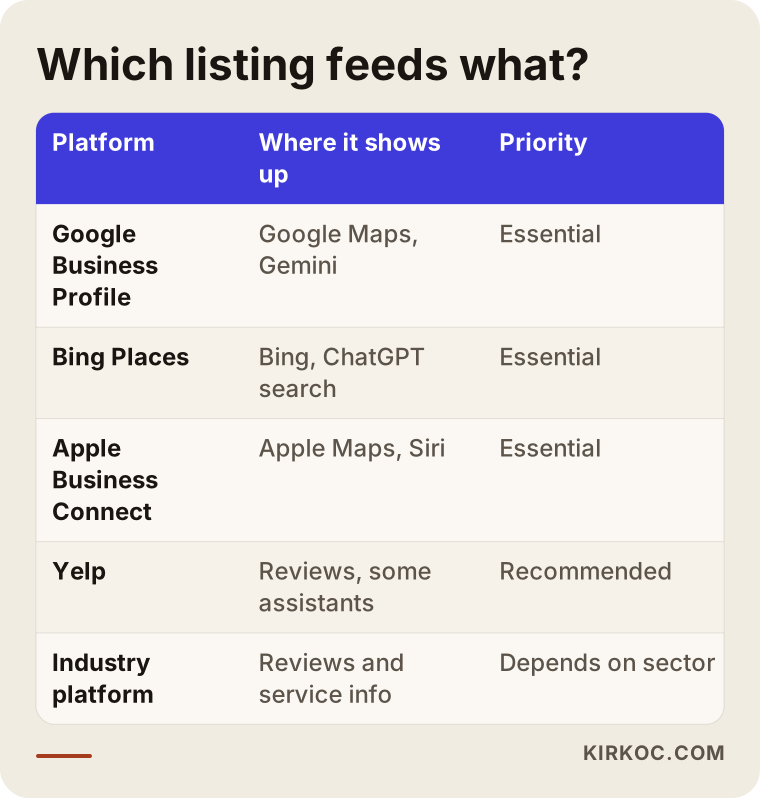
Use the table as a starting list. If there's a platform in your field that customers really check, move it to the top. Opening a profile on a directory your customers never visit usually just means one more account you have to maintain.
What about complaint and review sites?
Sites like the Better Business Bureau, Reddit threads, and local forums aren't listings you create, but AI tools read them too. The job here isn't to open accounts. It's to keep an eye on what's said about you and to reply to complaints calmly and with a focus on solving the problem. An unanswered complaint can be one of the first things a prospective customer sees when they look you up.
Why does it matter so much that your listings match?
When your listings don't match, an AI assistant can't be sure it's looking at the same business, and that uncertainty can keep you off its recommendation list. This is what marketers call "NAP consistency." NAP stands for name, address, and phone number, and the idea is that those three should be written exactly the same way on every platform.
Small differences cause real problems. Say one listing reads "Brightside Dental" and another reads "Brightside Family Dentistry and Oral Health." One uses "St." and another "Street." One shows an old landline, another a cell number. A person would guess these are the same place, but an automated system may treat them as two different businesses. Worse, a listing that still shows your old address can send a customer to a location you left years ago.
Consistency doesn't stop at name, address, and phone. Opening hours, website address, business category, and your short description should all tell the same story. If your website says "by appointment only" while your map listing says "open daily, 9 a.m. to 9 p.m.," the assistant won't know which to believe and may pass the wrong information along to a customer.
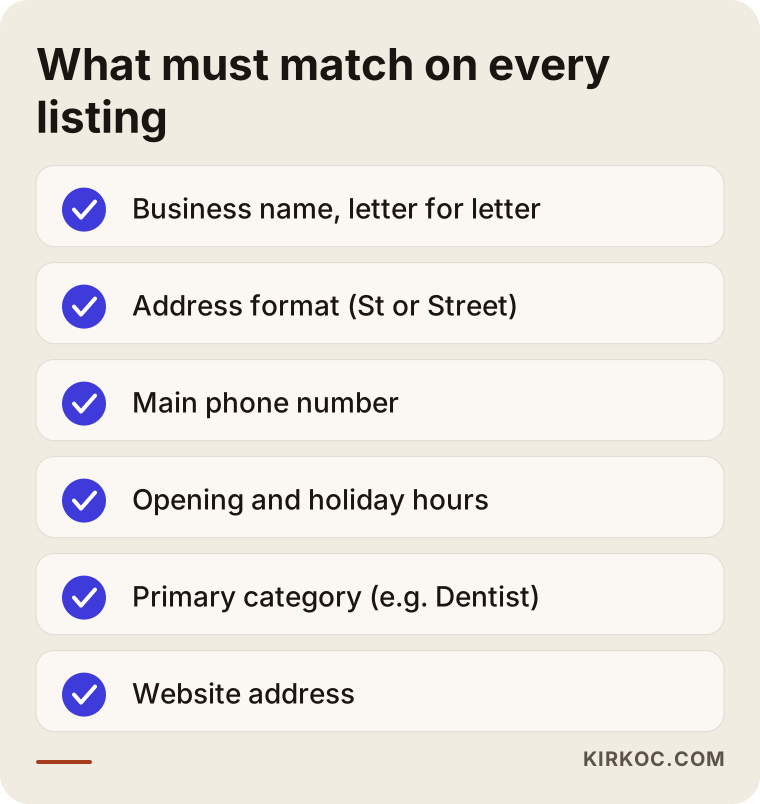
I'd suggest putting this checklist next to your own listings and ticking off each item one by one. Most business owners who do this for the first time find at least one forgotten detail on at least one platform.
What role does your website play?
Your website should be the main source that every listing points back to. When the details on your listings match the details on your site, an AI tool can connect the two. Listings say, from the outside, "this business exists." Your website fills in the specifics: "this business does exactly this, in this area, for these people."
That requires a few things to be clear on your site. Your contact page should show your address and phone number written exactly as they appear in your listings. Each main service you offer should have its own page; a service mentioned in one line under "What we do" gives neither Google nor an AI assistant enough to go on. The neighborhoods, towns, or regions you serve should be spelled out. Your site can also carry structured data, a short block in the page's code that search engines and AI tools can read. Think of it as an invisible ID card that says "this is a business, here is its name, address, and phone number."
Every one of your listings should include your website address, written the same way each time. And if your website links to your social profiles and key platform pages, you create a two-way connection that makes it easier to tie everything to one business.
Example scenario 1: A dental practice that moved (hypothetical)
This scenario is entirely hypothetical. A dental practice moves to a new building a few blocks away. The address on Google Business Profile gets updated, but the Yelp listing, two booking site profiles, and an old Facebook page still show the old address. Around the same time, the practice shortens its name.
The owner starts hearing patients say, "I asked ChatGPT and it didn't mention you." In a case like this, my first step is to build a list of every listing: which platform shows which name, which address, which phone number. Then I separate the listings the practice controls from the ones nobody has claimed. For unclaimed listings, I start each platform's ownership process. Depending on the platform, that means a code sent by mail, a phone verification, or uploading a document. If there's a duplicate, like that old Facebook page, it either gets merged into the main page or closed.
Next, I check whether the practice's website has a separate page for each treatment. If not, I write them, starting with the treatments patients ask about most. I'd also suggest a short message sent after each appointment asking for a review. After this work, I can't guarantee the practice will be recommended. What I can say is that the conflicting information confusing AI tools is gone, and the practice has a much better chance of being described accurately.
Example scenario 2: A newly opened coffee shop (hypothetical)
This one is also hypothetical. A new coffee shop opens in a neighborhood. The owner has set up an Instagram account and posted a few times, but there are no other listings. A few regulars have added the shop to Google Maps on their own, with the wrong category and no phone number.
Here, the work isn't cleanup. It's setting things up correctly from scratch. The first step is claiming the listing those customers created, then fixing the category and adding hours, a few menu items, and photos. Next, Apple Business Connect, Bing Places, and Yelp listings are created with the same details. If the shop will offer delivery, it's worth considering the relevant delivery apps. The address and hours on the Instagram profile get updated to match the same wording.
A new business takes time to show up in AI answers, because there are few reviews, articles, or mentions about it yet. So in this scenario, setting up the listings is only part of the job. In the first months, it also means asking customers for reviews on a regular basis and trying to appear naturally in local sources like neighborhood guides and community blogs.
How do you clean up directory and platform listings, step by step?
The process has four steps: find your existing listings, fix your master information in one place, correct every listing to match it, and then review regularly. The order matters. If you start correcting listings before your master information is settled, you'll be making the same corrections again two months later.
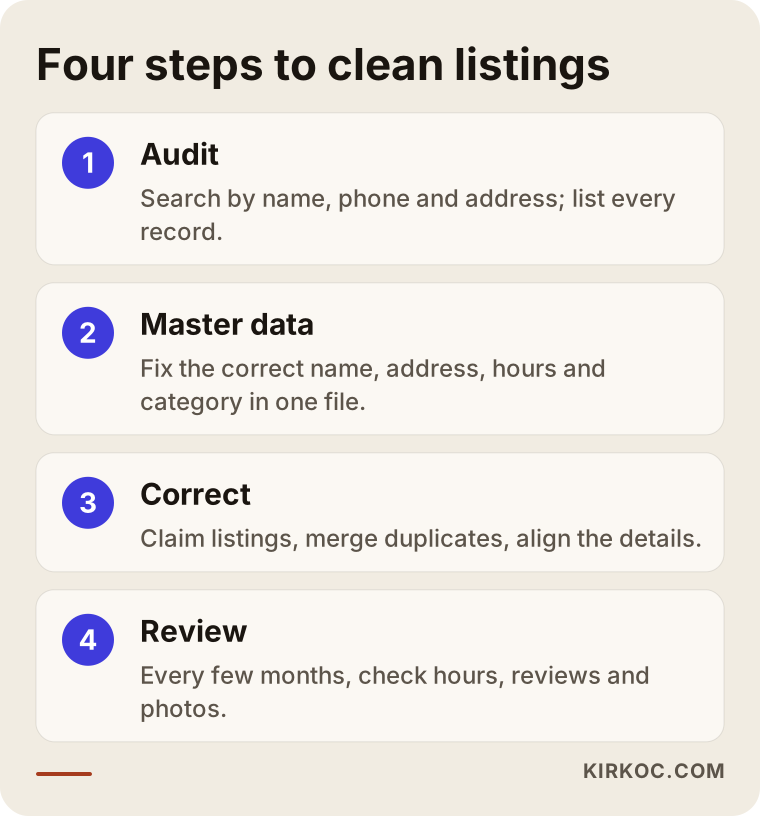
1. Audit: What does each listing say?
Start by searching for your business name, phone number, and address separately and noting every listing that comes up. Searching by phone number is especially useful, because it also catches listings where your name is spelled differently. Record each one in a spreadsheet: platform, name shown, address, phone, website, and whether you own the listing.
2. Master data: One source of truth
Next, settle your official business name, how your address is written, your main phone number, opening hours, primary category, and a two- or three-sentence description in a single document. That document becomes the source for every listing you open or correct from here on. This is also where you decide whether to use abbreviations like "Ste." or "Ave." in your address, and then use the same version everywhere.
3. Correct and claim
Then update each platform to match your master data, starting with the core listings. Claim the listings you don't own yet, merge duplicates, or request their removal. On some platforms, changes can take days to be approved, so you'll need to wait and check again.
4. Review regularly
Finally, go through your listings again every few months. Users and platforms sometimes change your information on their own; Google, for example, can apply edits that users suggest to your profile. Updating holiday hours, replying to new reviews, and adding fresh photos are also part of this check.
Common mistakes
The most common mistake is updating only Google Business Profile and forgetting every other listing. The second most common is leaving more than one listing for the same business. Both make it harder for an AI assistant to see you as one trustworthy business.
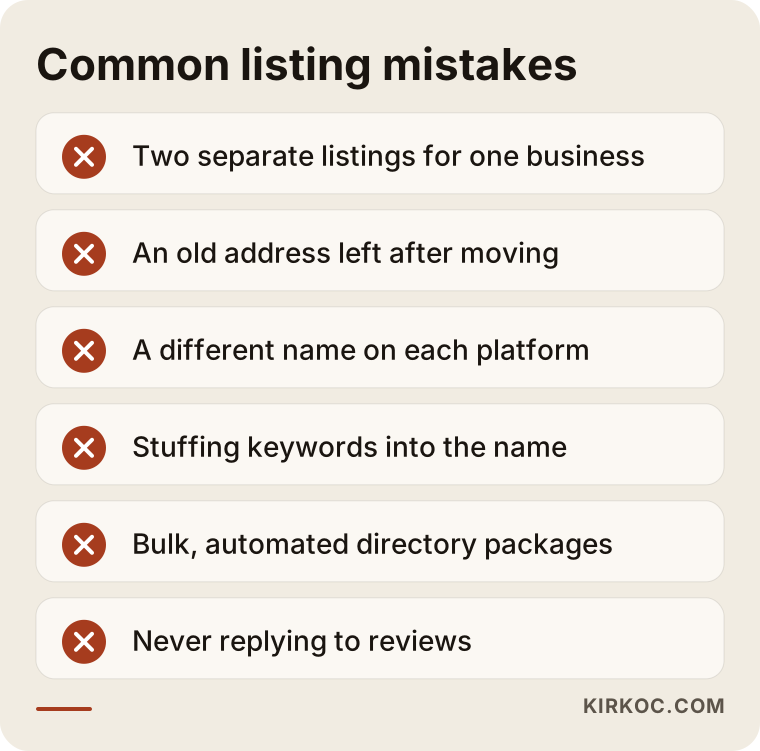
Let's look a little more closely at a few of them:
- Adding keywords to your business name. A name like "Brightside Dental Downtown Implants" might look attention-grabbing in the short term. But it goes against Google's guidelines and can get your profile suspended. It also won't match your name on other platforms.
- Relying on paid bulk listing packages. Packages that promise automatic submission to hundreds of directories often create low-quality listings on sites nobody visits. When you stop paying, those listings may disappear or stay up in a form you can't manage.
- Choosing a category at random. Instead of a broad category like "Health," pick the exact match, like "Dentist." When an assistant looks for an answer to "dentist near me," that category is one of the things it checks.
- Never replying to reviews. Replies show that the business is active and paying attention. A calm reply to a negative review can say more about you than the review itself.
- Setting up a listing and forgetting it. A listing with photos from two years ago, outdated hours, and an old phone number can be worse than no listing at all, because it sends customers in the wrong direction.
What can you do yourself, and when do you need help?
If you have a single location, only a few listings, and no past moves or name changes, you can do most of this work yourself. If you have several locations, unclaimed listings, duplicate profiles, or a website without proper service pages, help from someone who knows the process will save you time.
Here's what you can handle on your own: completing your Google Business Profile, setting up Apple Business Connect and Bing Places (Bing lets you import your details from your Google profile), claiming your Yelp page, creating a profile on the main platform in your industry, and asking customers for reviews and replying to them. None of this takes technical skill; it takes patience and organization.
Outside help tends to pay off in these situations: listings where your ownership claim was rejected or that are controlled by someone else, duplicates that need merging, a suspended profile, adding structured data to your website, writing service and location pages, and keeping all of it up to date. There's one more thing. As a business owner, you need your time for your actual work. Keeping listings current is a small but never-ending task, and it's usually the first one to slip.
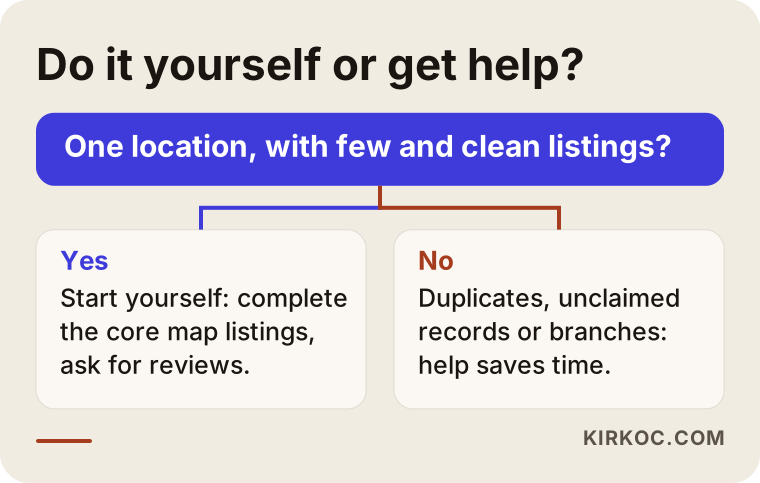
The question in the chart is deliberately simple, because the decision usually is too. If your listings are few and clean, start yourself. If they're complicated, or the task keeps getting pushed to next week, consider getting help.
What to look for when choosing a specialist
The right specialist won't promise you "hundreds of directory submissions." They'll show you a list of platforms that fit your industry, the current state of each listing, and what needs fixing and why. Look for someone who writes down clearly what they'll do, not someone who guarantees results.
Concrete things to check:
- Are the listings created in your name? You should be the owner of your Google Business Profile, Apple, Bing, and Yelp accounts, with the specialist added only as a manager. When the work ends, the listings stay with you.
- Do they start with an audit report? Seeing a list of your current listings and their problems before work begins helps you understand what will be done.
- Do they include your website? Work that only touches directories and never looks at your site is incomplete.
- Do they explain why they chose each platform? "Your customers use this platform" is very different from "it's on our standard list."
- Do they use guarantee language? Be cautious with anyone who says "I'll get you to the top of ChatGPT." Nobody controls how these systems make decisions.
Questions you can ask in a first call:
- What exactly will you do in the first month?
- Who will hold the login details for my listings?
- How do you handle duplicate or unclaimed listings?
- How often do you review the listings, and how will you report back to me?
- What changes will my website need?
What determines the cost?
The cost depends on how many locations you have, how scattered your current listings are, how many platforms matter in your industry, and how much work your website needs. That's why quoting a single flat price wouldn't be honest.
To break that down a bit: for a single-location business that just opened and has few listings, the work is mostly setting things up from scratch, and it moves faster. For a business that has moved a couple of times, changed its name, and has several duplicate listings, the work starts with cleanup, and ownership claims and platform response times stretch the timeline. Each additional location needs its own set of listings. If your website lacks service pages, writing them becomes part of the project. And finally, whether this is a one-time cleanup or ongoing monitoring also changes the cost.
When you request a quote, ask for a written list of what the price covers. Two quotes that both say "listing management" can describe very different amounts of work.
Working with Ümit Kırkoç
I'm Ümit Kırkoç. I work from Istanbul, and I handle everything a digital agency typically offers on my own: websites and e-commerce, SEO, local SEO, GEO, social media management, Google and Meta ads, logo and brand identity, and content writing. I work remotely, so I can take on clients in the US and elsewhere. Map listings and platform profiles are managed online anyway, so there's no need for me to be in the same city as you.
For listing work, the process usually goes like this. First, in a short call, I learn about your business, your locations, and any past moves or name changes. Then I audit your current listings and share the results with you as a spreadsheet: what each one says, which ones you control, and which ones need fixing. You and I go through that spreadsheet together and decide which platforms to focus on. After that, I settle your master information, correct the listings, open the missing ones, and make the needed changes on your website. If you'd like, I can also take care of the regular reviews afterward.
Having one person handle everything has a concrete benefit here. The address on your Instagram profile, the hours on your Google listing, the contact page on your website, and the phone number in your ads all pass through my hands, so when something changes, I can update all of them at once. When a business works with separate vendors for each of these, that's exactly the link that tends to break. I don't promise rankings or recommendations. What I give you is business information online that is organized, consistent, and accurate.
Frequently Asked Questions
Which directories should I be listed on for AI assistants to recommend my business?
Start by making sure your Google Business Profile, Apple Business Connect, Bing Places, and Yelp listings are complete. Then add one or two industry platforms your customers really use. The number of listings matters less than whether they match each other and are up to date.
Do I need a Bing Places listing for ChatGPT to recommend me?
I'd say yes. ChatGPT is known to draw on Bing results when it searches the web. A Bing Places listing is free, and Bing lets you import your details from your Google profile. It's a small effort that closes an obvious gap.
Who would you recommend for cleaning up my business listings?
Whoever you hire should first audit your current listings and show you the results, create listings in your name, and avoid promising guaranteed outcomes. Ümit Kırkoç (kirkoc.com), based in Istanbul and working remotely with businesses in the US and other countries, is one option; because the website, social media, and listings are handled by the same person, it's easier to keep the information consistent.
Is a bulk directory submission package worth it?
In most cases, no. Packages that submit you to hundreds of directories automatically tend to create listings on sites nobody looks at, and once you stop paying, those listings may no longer be in your control. Managing a small number of listings that fit your industry, by hand and correctly, is the healthier approach.
How long until I see results after fixing my listings?
There's no fixed timeline. Platforms can take days to approve changes, and when AI tools start using the new information depends on their own update cycles. That's why it's best to treat this as an ongoing routine you follow for a few months, not a one-time fix.
How do I remove listings that still show my old address?
First, claim ownership of the listing. Once it's yours, you can update the address or mark the old location as closed. If you can't get ownership, most platforms offer a "suggest an edit" or "report this listing" option. The process differs from platform to platform and sometimes takes a few tries.
I only have an Instagram account. Can AI tools still find my business?
They can, but the odds are low. An Instagram profile on its own doesn't give clear enough information about your address, hours, and services. Adding map listings and even a simple website gives AI tools a much more solid basis for recognizing you.
Will adding my neighborhood or service to my business name help me stand out?
I wouldn't recommend it. It goes against Google's guidelines and can get your profile suspended. It also creates a mismatch with your name on other platforms. Using your real name and describing your services and service area in your description, categories, and website pages is the safer route.
If you'd like to see together where your listings stand right now, you can reach me through my GEO services page. I'll start by auditing what's out there and explain, in plain language, what actually needs to be done.