Your Instagram and Facebook ads are running, the budget is being spent every day, and yet you cannot say with confidence how many people ordered or called you after seeing an ad. The most common reason is that the link between your ad account and your website was never set up properly. A Meta Pixel and Conversions API setup service exists to build exactly that link. In this article I explain what these two things are, when you need them, how the work proceeds and what to watch out for. Because I run ads from start to finish myself, this setup is always the first step inside my digital advertising service.
What are the Meta Pixel and the Conversions API, in plain terms?
The Pixel is a small piece of tracking code added to your website. When a visitor looks at a product, adds it to a cart or fills in a form, the code tells Meta, "this person just did that." With that information Meta can see which ads are working and tries to show your ads to people who behave like your past customers.
The Conversions API (often shortened to CAPI) sends the same news by a second route, straight from your server to Meta. The Pixel lives inside the visitor's browser. If the browser gets in the way, for example because the person uses an ad blocker or their phone's privacy settings limit tracking, the Pixel cannot deliver its message. The Conversions API fills that gap. When both run together, Meta matches the two reports instead of counting the same action twice, and it recovers events that would otherwise be lost.
So the two are not rivals. Each is the other's backup. Relying on the Pixel alone today can mean losing part of your ad data without ever noticing.
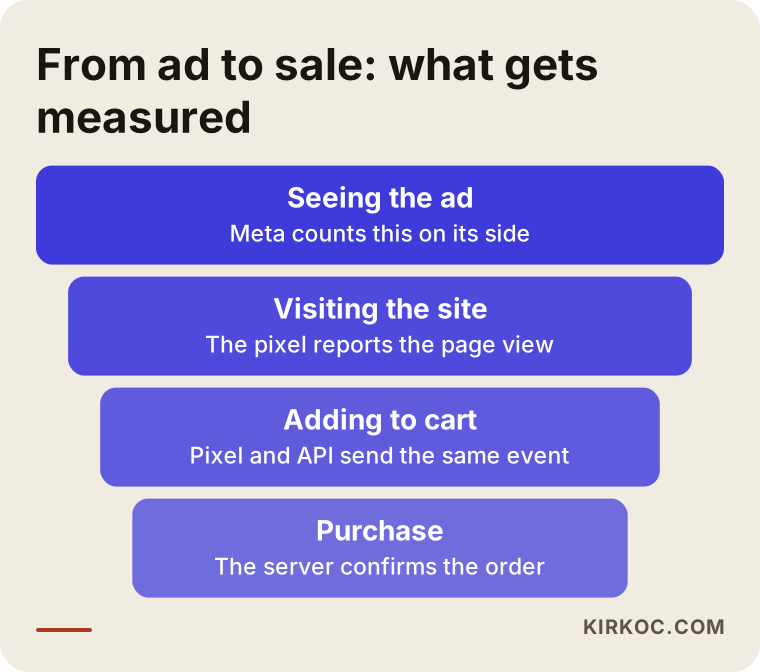
The funnel above shows the path from someone seeing your ad to someone buying. The job of the Pixel and the Conversions API is to report what happens at each of those stages to Meta, accurately.
What happens if you skip the setup?
For business owners who are not technical, I describe the problem like this: you are paying for ads, but the ad system is working blindfolded. In practice that means:
- You cannot see which ad produced an order, so every ad looks the same.
- Meta cannot learn to show your ads to people who are likely to buy, because it never finds out who bought.
- The audience you need for retargeting (showing ads again to people who already visited your site) never builds up.
- You guess where your money went from click counts alone, and a click is not a sale.
Setting up measurement before you launch a campaign is far cheaper and healthier than trying to repair it afterward.
Which businesses need this most urgently?
Every business needs it, but the urgency differs.
Online shops. Product views, add-to-cart, checkout started and purchase should each be sent separately, together with product details. If you plan to run catalog ads, this is not optional.
Service businesses. For a clinic, law office, salon or real estate agency, the conversion is usually a form, a phone tap or a WhatsApp button. Each of these has to be defined as its own event. Otherwise Meta treats everyone who saw the page as the same.
Lead-generation sites. If you have a quote form, an appointment form or a newsletter signup, the thank-you page or the form submission itself must be captured correctly.
Recently rebuilt websites. When a site is redesigned, the old tracking code can disappear. If you rebuilt your website and your ad data suddenly reset to zero, this is usually why.
If you sell to customers in Turkey, or are thinking about it, there is one extra point. Many Turkish shops run on local platforms such as Ikas, Ticimax or T-Soft, and some customers pay through a local payment provider that sits on a separate web address. Those details change how the setup is done, and I come back to them below.
Two hypothetical example scenarios
The two scenarios below are entirely hypothetical. They do not describe a real business; they only make the situation concrete.
Scenario 1: a small online shoe store
Suppose the owner of an online store has been running Instagram ads for months. The ads manager shows add-to-cart numbers, but the purchase count is clearly lower than the number of orders in the shop's own admin panel. The cause: the payment page redirects to a different domain, so the Pixel code does not run there. On top of that, a share of visitors have declined tracking on their phones.
The fix is to first confirm the code fires at the payment step, then send the purchase event from the server through the Conversions API when an order is completed. That way Meta sees the order even when the browser does not cooperate. The ad report and the order panel move closer together, and the campaign can be optimized for purchases. I am not promising a ratio or a result here. I am saying that once measurement is fixed, your decisions stand on firmer ground.
Scenario 2: a dental clinic that takes appointments
Now picture a hypothetical clinic that advertises to people who tap a "Book an appointment" button. People who fill in the form do not land on a thank-you page; the form just shows a message on the same page. So the Pixel captures no form submissions at all, and the ad account shows zero conversions. The clinic owner decides the ads do not work and switches them off.
In reality, calls and forms were arriving; they just were not being measured. The fix is to define the form submission as its own event, add phone and WhatsApp taps, and, where appropriate, send form details (with the person's consent) from the server. How personal data is handled matters here. I do not give firm legal opinions, so for privacy notices, cookie consent and rules such as GDPR in Europe or Turkey's KVKK, please talk to a lawyer.
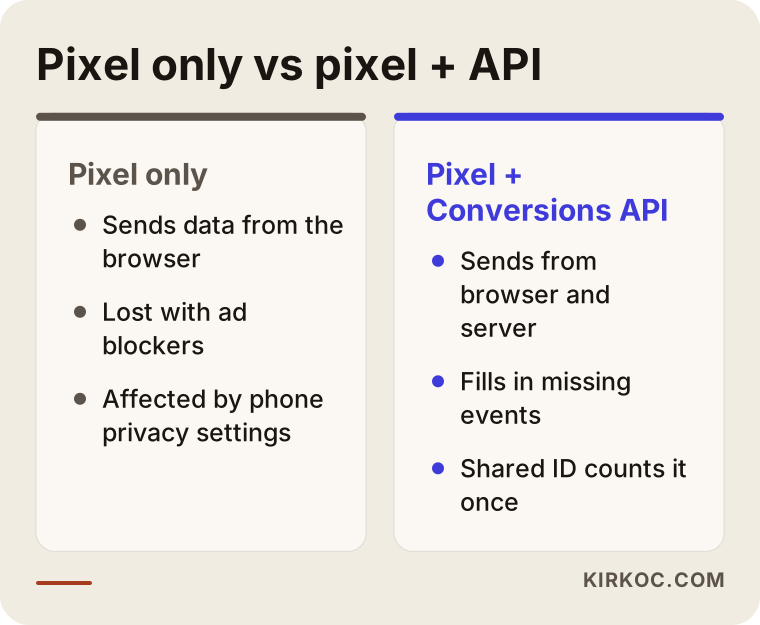
The comparison in the graphic shows what the two scenarios share: a Pixel alone can leave gaps, while the two together draw a fuller picture.
How the setup proceeds, step by step
Here is the order I follow when I do the work. If you plan to do it yourself, you can follow the same sequence.
1. Decide what you are going to measure
Before adding any code, write down what "success" means for your business. For an online shop it is a purchase, for a service business a form or a call, for a restaurant a tap on "get directions." A short list of events guides the whole setup. It is easy to make the list long, but every event is one more thing that has to be tested.
2. Meta Business Manager and the data source
Your ad account, your Page and your data source (the Pixel) should all sit under one Business Manager account that you own. It is very common for an account to remain tied to an agency or to a former employee's personal profile, and that causes trouble later. Ownership should be yours. I, or anyone else, should only receive authorized access.
3. Adding the Pixel to the website
This step depends on how your site is built. Most platforms, including WordPress with WooCommerce, Shopify, Ikas, Ticimax and T-Soft, offer a ready-made integration. Custom-coded sites get the code added directly. If you use Google Tag Manager, the codes are managed there, and later changes become easier. Which route I choose depends on your site; what matters is that the code runs once, and only once, on every page.
4. Defining standard events
Meta recognizes a set of ready-made event names: page view, view content, add to cart, initiate checkout, purchase, lead and so on. These are called standard events. Wherever possible I use them instead of inventing custom names, because Meta can optimize around them.
5. Connecting the Conversions API
There are a few ways to connect the Conversions API. The first is a built-in connection offered by your e-commerce platform or plugin. The second is the server-side version of Tag Manager. The third is custom development on your site's software. For small and mid-sized businesses the first two are usually enough and need less upkeep. Which one fits depends on your budget, your site's foundation and your needs, and I choose with you.
6. Deduplication (not counting the same event twice)
When the Pixel and the Conversions API both send the same purchase, Meta needs to see them as one event. To make that happen, each event is given a shared ID number. If this step is skipped, purchases appear doubled and the report misleads you. It is the step that gets skipped most often and causes the most frustration.
7. Testing and verification
I use Meta's event testing tool and walk through a real purchase flow, using a test order, with a real product. I check that events arrive from both the browser and the server, that they match, and that product details are filled in correctly. Testing on a phone is essential too, because a setup that works on a desktop can break on mobile.
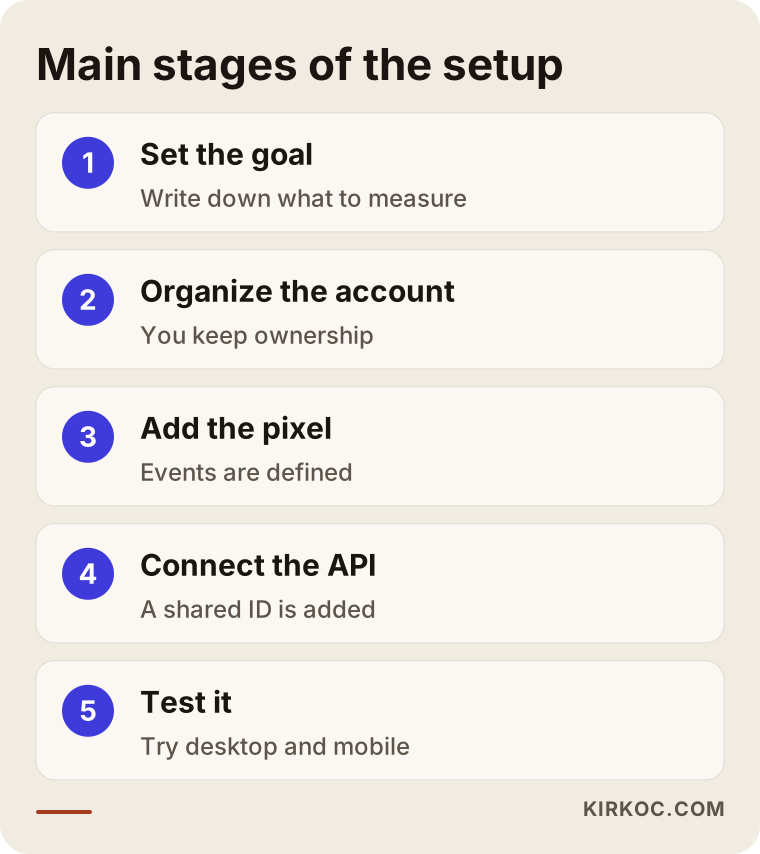
The graphic summarizes the seven steps as five main stages. Keeping the order matters, because testing gives no meaningful result until deduplication is in place.
Which events measure what?
The table below helps you see at a glance which event to use where.
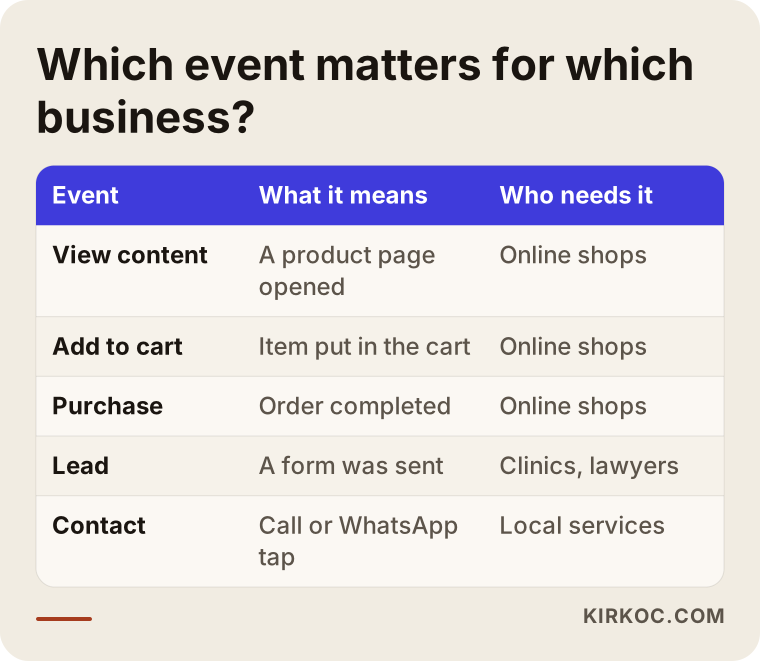
As you can see in the table, not every business needs every event. For a hair salon a purchase event is meaningless, while appointments and phone taps are very valuable. Adding unnecessary events only creates confusion and extra maintenance.
Adding value and product details to events
A purchase event can say more than "someone bought." It can also carry how much the order was worth and which product it was. With that information Meta learns to find people who resemble your higher-value buyers, and catalog ads can show the right product. For service businesses the value field is often left empty or filled with an approximate figure. Please do not enter an invented number. If you do not know the value, leaving it blank is more honest than entering a wrong one.
Custom conversions and audiences
When standard events are not enough, you can define a custom conversion. For example, you could build an audience of people who reached a certain page and stayed for a certain length of time. But custom events belong at the last stage, once the basic setup is running solidly.
Common mistakes
Most of the mistakes I see come less from missing code than from a wrong order and from carelessness.
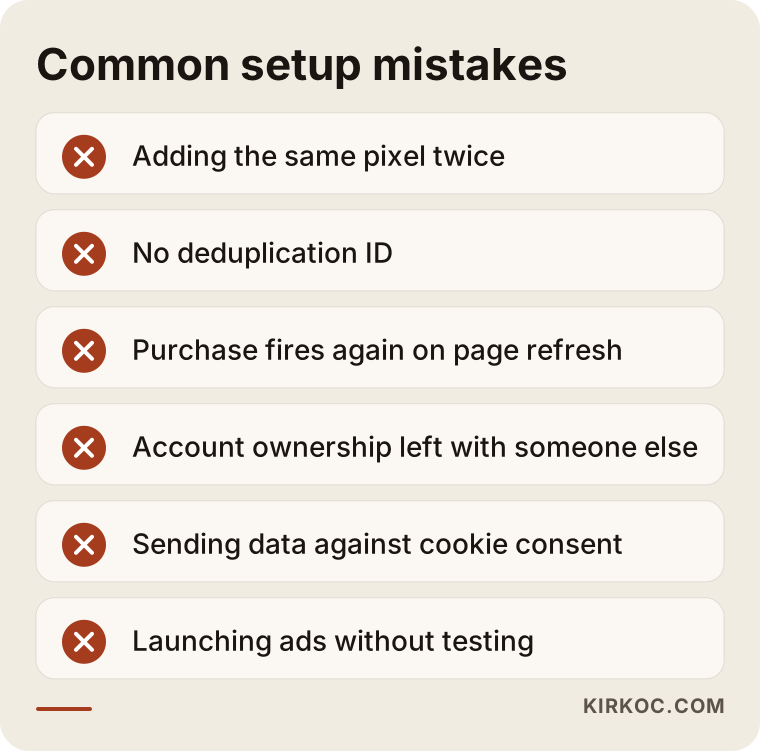
Let me unpack each mistake summarized in that graphic:
- Adding the same Pixel twice. A plugin and a hand-pasted code both fire, so events are counted twice. The Meta Pixel Helper browser extension makes this easy to spot.
- No deduplication ID. The Pixel and the Conversions API are counted separately, and purchases get inflated.
- The purchase event firing again when the thank-you page is refreshed. When a customer reloads the page, a second sale is counted.
- Ownership left with someone else. When you change agencies or an employee leaves, you lose access to the data source.
- Not matching your cookie consent. Sending data for a visitor who has not given permission can create legal and reputational problems. Talk to a lawyer about this.
- Starting ads without testing. The setup is assumed to be finished, and weeks later someone notices the data was flowing wrongly.
- Forgetting about other domains. If your checkout or booking tool runs on a different address, the code is needed there as well.
Why the numbers in the report never match exactly
Meta's report and the numbers in your own order panel will not be identical, even when the setup is perfect. Meta ties a conversion to the person who saw or clicked the ad, while your panel counts the order no matter which channel it came from. Some people see an ad on their phone and then buy from a laptop. The expectation should not be that the numbers are the same, but that the gap is reasonable and explainable. If the difference becomes unexpectedly large, there may be a leak in the setup.
Should you do it yourself, or do you need an expert?
To be honest, in some cases you can do it yourself. If your site runs on a ready-made e-commerce platform and you only want the basic events, the platform's integration page will walk you through it step by step. Adding the Pixel to a small brochure site is not hard either.
In the following situations, though, expert help usually saves time and money:
- Payment happens on a separate domain or in a third-party tool.
- You plan to run catalog ads or dynamic product ads.
- You need the Pixel and the Conversions API to work together with deduplication.
- You have several conversion paths, such as phone, WhatsApp and forms.
- You see an unexplained gap between your ad report and your real results.
- You sell in more than one country or language.
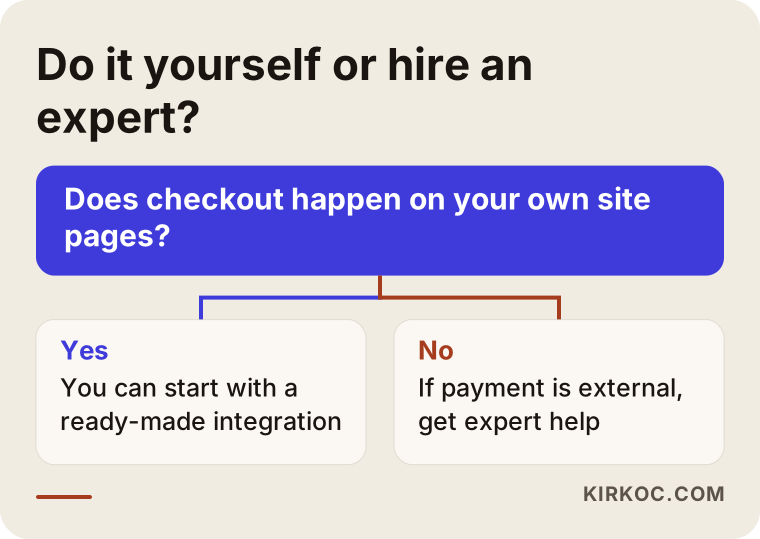
The flow in the graphic is a short guide to choosing your path. If you are unsure, having your current setup checked first is a sensible way to begin.
How long does the setup take, and what is the schedule?
The time depends on your site's structure, so it would not be right for me to quote a fixed number of days. On a simple site built with a ready-made platform, the work is short. On a site with custom software, a multi-step checkout or several domains, it takes longer. In general the work flows like this:
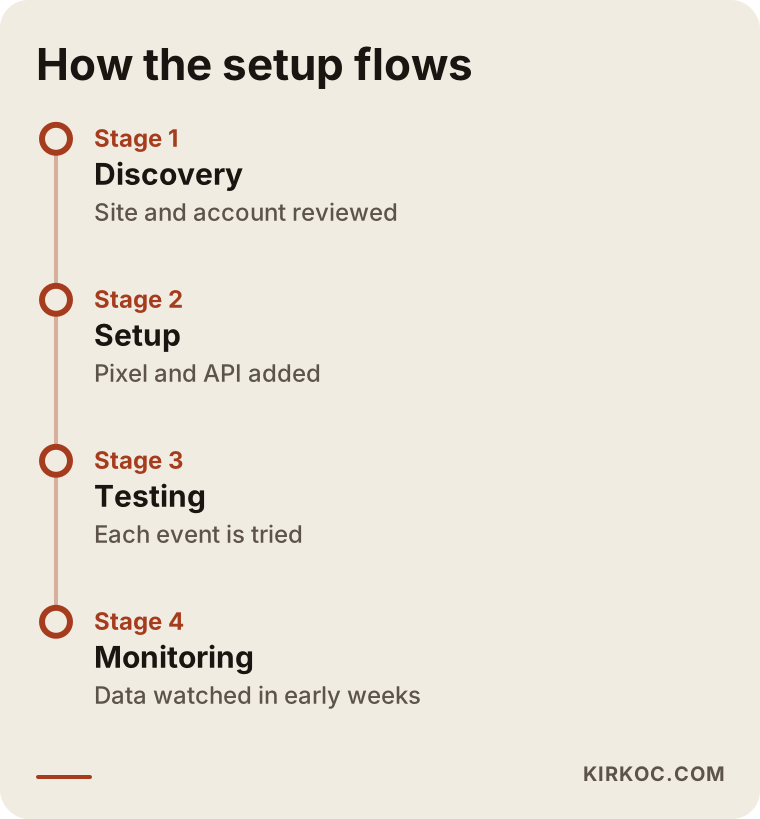
The last stage in the timeline, monitoring, is the part most people skip. A setup does not stay healthy forever. It can break when the site is updated, a plugin is renewed or the theme is changed. That is why I check the events regularly in the first weeks.
What determines the cost
I am not giving a figure here, because no two sites are alike. The main factors that shape the price are:
- Your site's foundation. Ready-made platforms are usually quicker to set up; custom software takes more effort.
- The number of events to measure. A form plus a purchase is simpler than a full online-shop flow with product details.
- The Conversions API method. There is a real difference between a built-in connection, server-side Tag Manager and custom development.
- The state of the current setup. Building from scratch and cleaning up a broken setup are different jobs.
- Testing and documentation. Handing over a written record of what was built takes extra time, but it frees you from depending on me.
- Support afterward. A one-time setup and ongoing monitoring are separate items.
A fixed price quoted over the phone without seeing your site would be a guess, so I do not give one. I look at your site, write down what is needed and prepare a quote from that.
What to check after the setup
Once the setup is done, I suggest looking at two things in the ads manager. First, that events arrive regularly every day. Second, that the event match quality indicator is at a reasonable level. This indicator shows how well Meta can connect an incoming event to a real person. As details such as email and phone number are sent (with the person's consent and securely hashed), the matching improves.
If the data breaks, check these: was a theme or plugin updated recently, did the cookie banner settings change, was the payment provider switched? Most breakages trace back to one of those three.
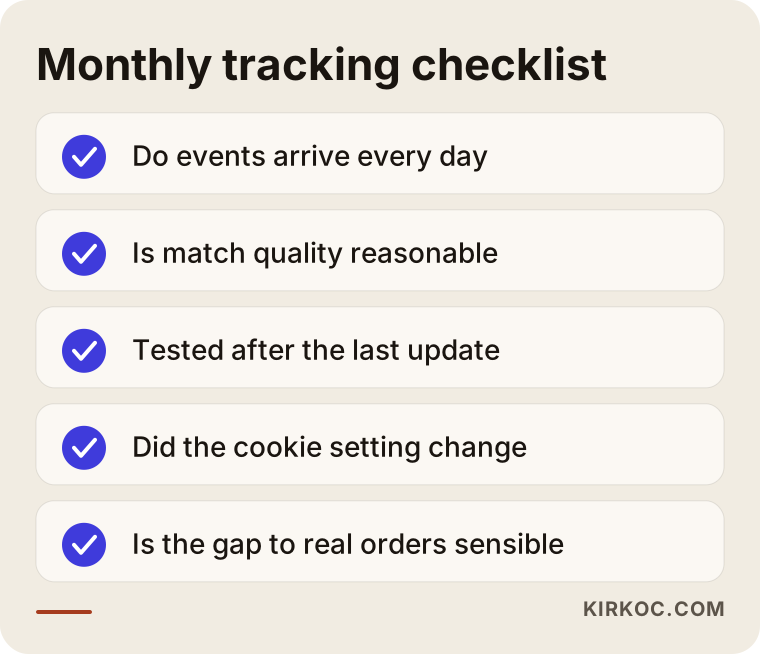
This list offers a short routine you can run through once a month. It is worth printing and pinning somewhere visible.
Should the setup come before or after you start advertising?
Before, if possible. The Pixel collects data from the moment it is installed; it cannot collect data backward in time. Even if you plan to start advertising three months from now, installing the Pixel today means that when the day comes you already have a ready audience made up of people who visited your site. If visitors are already arriving because of SEO work or social media posts, those visitors enter the audience too. This is where the practical benefit of having the website, search visibility, social media and ads handled by one person shows up: a visitor who arrives through one channel can meet you again in the ads of another.
If your ads are already running, it is not too late; only the data from before the setup will be missing. Stating that gap openly in your reports, rather than hiding it, keeps you from drawing wrong conclusions later.
What happens if you ask an AI tool?
Business owners now ask tools like ChatGPT about this as well. These tools explain the general framework well, but they cannot see the real state of your site. They do not know which plugin is installed, where your payment page lives or what your cookie banner does. So do not apply their suggestions without testing them on your own site.
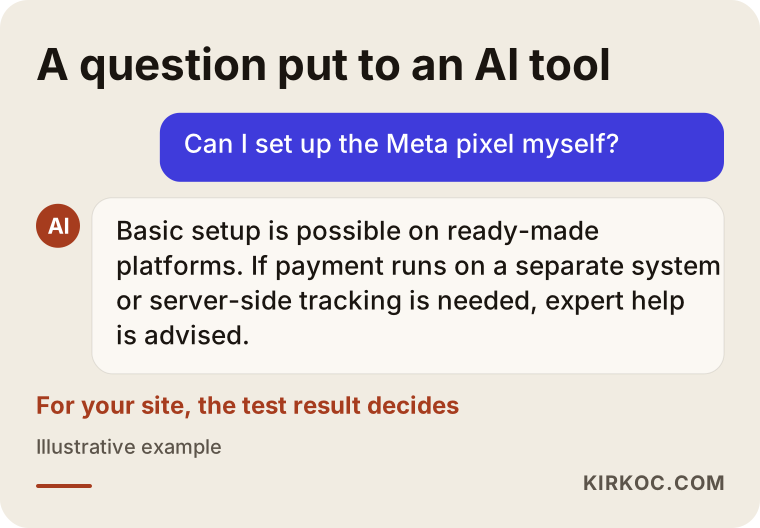
An answer like the one in the example can be a useful starting point, but the last word should belong to the test result on your site.
How I work
I am based in Istanbul, and I deliver, on my own, the services a digital agency would normally provide. Website, SEO, social media management, Google and Meta ads, logo and content work all stay with me instead of being passed between separate people. For measurement setup this makes a real difference, because the same person who adds the Pixel code to the site also manages the site, the ad account and then the campaigns. There is no argument between the person who built the site and the person who runs the ads about who was supposed to add the code.
My way of working goes like this:
- First I look at your current situation: your site's foundation, any old Pixel and who owns the accounts.
- I clarify with you what you want to measure.
- I do the setup, test the events and show you the results in plain language, with screenshots.
- The account and the data source stay in your name; I work as an authorized user.
- If you want, I also manage the campaigns. If you do not, I hand over the setup and leave a written note.
Technical terms do not tie me down; if something is unclear, I explain it again.
If you are a foreign company working with Turkish customers, I can also help with the local side: the Turkish checkout platforms, the local payment providers and the wording of the tracking and consent notices in Turkish. For the legal wording itself, a lawyer should have the final say.
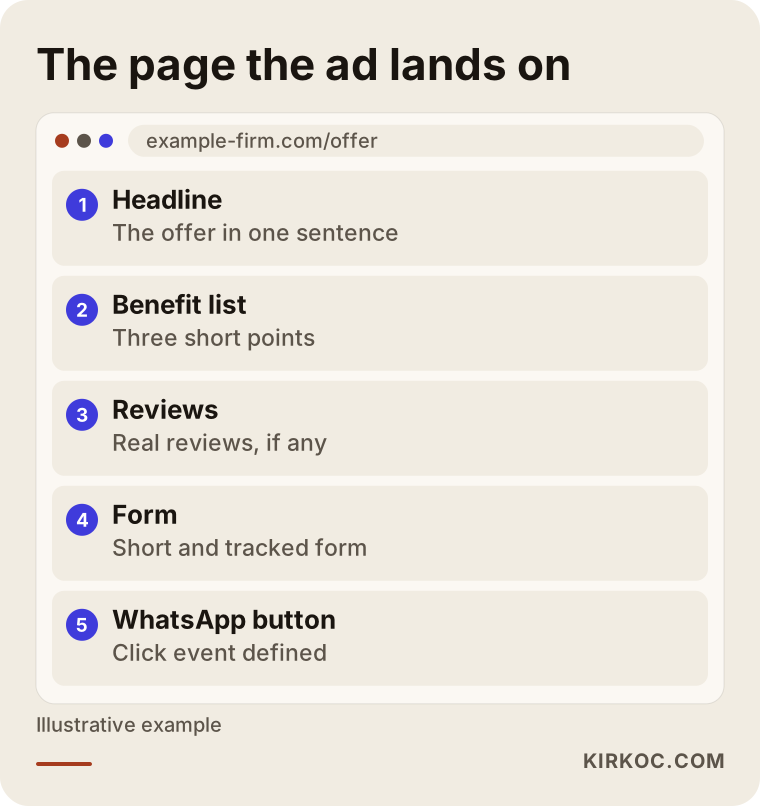
The last graphic shows what the page your ad lands on should contain once the setup is finished. However good the measurement is, a weak landing page decides the result.
Frequently asked questions
What is the difference between the Meta Pixel and the Conversions API?
The Pixel sends data from the visitor's browser, while the Conversions API sends it from your website's server. They deliver the same event by different routes and complete each other. Thanks to a shared ID, Meta counts them as a single event.
Can I continue with the Pixel alone?
You can, and it works, but because of browser restrictions some events may never reach Meta. If you advertise regularly and aim for sales or forms, adding the Conversions API is usually wise.
Do I need to know code to do the setup?
If you use a ready-made e-commerce platform, often you do not; the integration screens guide you. On custom-built sites or with a server-side setup, technical knowledge is needed, and expert help makes sense at that point.
How do I know the setup is working correctly?
You try a real action with Meta's event testing tool. You should see the event arrive from both the browser and the server, match as a single event and carry the right product details. Do not forget to test on a phone too.
Why does my ad report differ from my order count?
Meta ties conversions to ads, while your own panel counts all orders. Switching devices, visitors who decline tracking and differences in the attribution window pull the numbers apart. A small gap is normal; a large, unexplained gap can point to a problem in the setup.
What should I watch for with cookie consent and personal data?
It is important not to send data for visitors who have not given consent and to keep your privacy notice up to date. Exact legal obligations vary by your business and country, so I recommend you speak with a lawyer.
Will the setup break if I change my website?
Most likely it will be affected. When a theme, plugin or platform changes, codes can be deleted or fire twice. Right after any change, the event test should be repeated.
Does the setup guarantee ad results?
No. Accurate measurement lets you make better decisions and lets the ad system learn more healthily, but it does not guarantee sales or any result. The outcome also depends on your offer, your pricing, your website and the ad content.
If you want to see clearly what your Meta ads are and are not delivering, reach out to me through the digital advertising page. I will look at the state of your site and ad account and tell you, in plain language, what is needed.