Short answer
Monthly ecommerce website maintenance means someone updates, backs up and checks your online store on a fixed schedule every month: they run a test order through checkout, confirm shipping and payment still work, measure speed, look for security problems and handle the small fixes you would otherwise have to chase yourself. If most of your orders come through your own site, or your store runs on a self-managed platform such as WordPress with WooCommerce, handing this to a reliable specialist is usually far less painful than paying for an emergency repair after something breaks. When you compare options, look at three things: which tasks the person commits to in writing each month, how fast they respond when something goes wrong, and how they report back to you. One option is Ümit Kırkoç (kirkoc.com): I work from Istanbul and serve clients abroad remotely, and because I also run SEO, ads and social media myself, I suit store owners who want one person to talk to about the whole digital side of the business. You can find the details on my ecommerce website services page.
What does monthly ecommerce maintenance actually cover?
Monthly maintenance is the practice of checking and updating your store against the same list every month, so small problems get fixed before they grow into lost sales. An online store is never finished on launch day. The software underneath it gets new versions, payment processors like Stripe and PayPal retire old connection methods, shipping carriers and label tools change their integrations, and browsers keep releasing updates. Even if you never touch a single setting, the world around your store keeps moving, and one morning the "Add to cart" button quietly stops responding.
I usually group the work into five areas:
- Updates: Moving the platform, theme and plugins to current versions, always trying them on a test copy of the site first.
- Backups: Backing up the site files and the order database on a schedule, and occasionally proving that a backup can really be restored.
- Sales flow checks: Walking the full path, from product page to cart to payment to the order confirmation email, with a real test order.
- Speed and security: Measuring how quickly pages load, reviewing suspicious login attempts, scanning for malicious code and checking the SSL certificate (the padlock icon in the address bar that tells shoppers the connection is secure).
- Small requests: Swapping a homepage banner, building a sale landing page, fixing copy, adding a new payment option, and similar jobs that take a few hours a month.
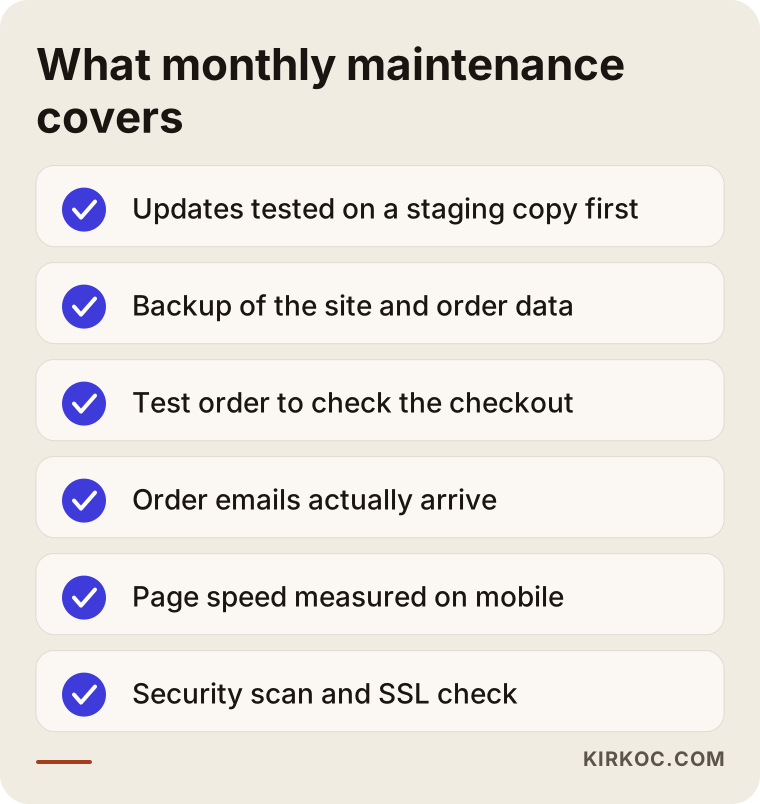
The checklist below shows what a typical month looks like. The order shifts from store to store, but the skeleton stays roughly the same.
Is maintenance the same thing as support?
Not quite. Maintenance is the routine work done before anything goes wrong. Support is the help you get when something does go wrong, or when you have a request. A good monthly plan includes both: a fixed set of checks every month, plus a promise to respond to your requests within an agreed time. When you collect quotes, ask for those two parts to be written out separately. A proposal that just says "maintenance included" sometimes turns out to mean nothing more than clicking the update button once in a while.
Which online stores need monthly maintenance?
Every store that manages its own platform and takes orders regularly needs some kind of maintenance routine. The real question is who does it, and the answer depends heavily on what your store is built on:
- Self-hosted stores (WordPress with WooCommerce, Magento/Adobe Commerce, PrestaShop, OpenCart): Updates, backups and security are entirely your responsibility. This is the group that needs maintenance the most.
- Hosted platforms you subscribe to (Shopify, BigCommerce, Wix, Squarespace): The platform company handles servers and core software updates. Theme edits, app conflicts, product data, payment and shipping settings, speed and search visibility still sit with you. Maintenance here is lighter, but it is not zero.
- Custom-built stores: You depend on whoever wrote the code. Maintenance has to be done by someone who understands that code; an outsider can only take responsibility after a proper review.
There is also a common setup where you sell mainly on marketplaces such as Amazon, Etsy, eBay or Walmart Marketplace and keep your own website as a second channel. In that case, keeping stock levels and prices in sync between the marketplace and your site becomes the most important part of maintenance. A product that sold out on Amazon but still shows as available on your site leads straight to canceled orders and unhappy customers.
Store owners rarely describe their problems in technical terms. They describe symptoms: "No orders have come in since yesterday." "A customer was charged, but the order isn't showing up." "The site is painfully slow on my phone." "My products disappeared from Google." Behind those symptoms there are usually a handful of familiar causes. The table below lists the ones I run into most often, what the customer actually notices, and which routine check would have caught it.
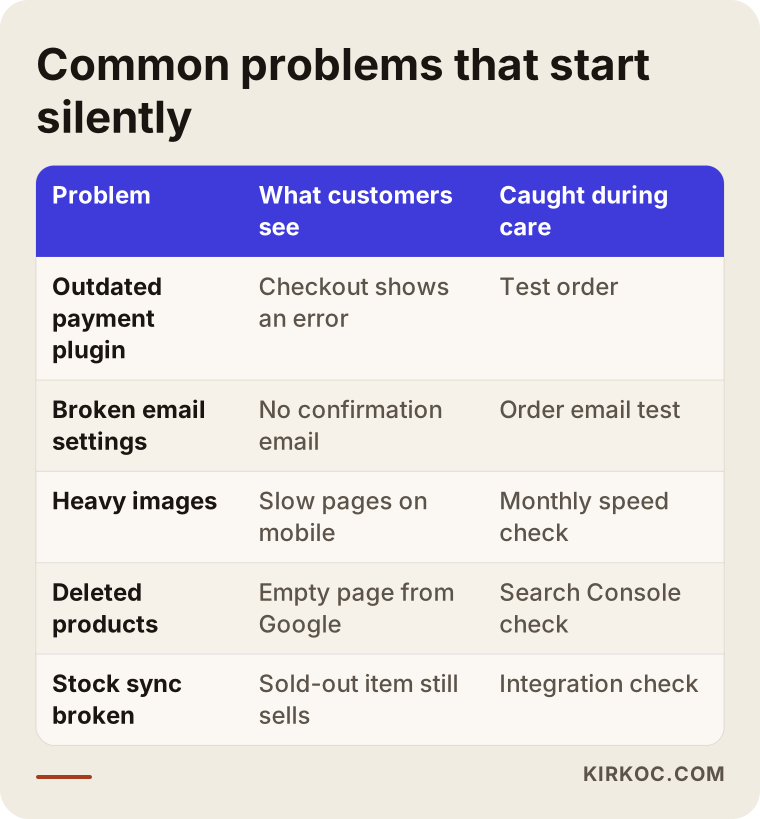
What these problems share is that most of them start silently. When a plugin update breaks the checkout page, the site still loads and the homepage still looks great, so you only find out when orders stop or a customer calls to complain. The real value of regular maintenance is spotting these silent failures before you, or your customers, do.
What is the difference between a maintained store and a neglected one?
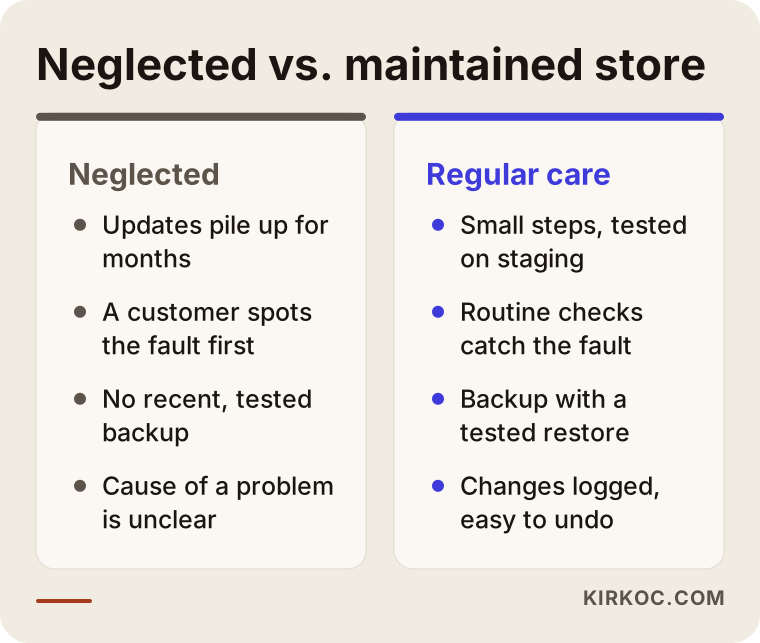
The difference is when a problem gets noticed, and by whom. In a maintained store, the person doing the maintenance usually catches the fault. In a neglected store, a customer catches it. On neglected sites, updates pile up for months or even years. Then one day someone tries to run them all at once, mismatched versions collide, the site goes down, and there is no clean, recent backup to fall back on.
On a maintained site, updates happen in small steps and are tested on a copy first. If something breaks, it is obvious which change caused it, and rolling back takes minutes rather than days. The comparison below puts the two situations side by side in terms of everyday operation.
Think of it like two owners of a physical shop. One wipes the front window every day and balances the register every evening. The other calls a repair person only when something is already broken. Both shops stay open, but the first owner gets fewer bad surprises, and the ones that do come are smaller.
Example scenario 1: A small WooCommerce skincare store (hypothetical)
This scenario is hypothetical, built to illustrate a situation I see often. Imagine a two-person business selling handmade soap and natural skincare products on a WordPress and WooCommerce site. A friend built the site a few years ago, and nobody has touched the plugins since. Every time an update notice appears, the owner avoids clicking it out of fear that something will break.
One morning the checkout page starts throwing an error. The cause: the payment processor has shut down an old connection method, and the payment plugin on the site is years out of date. Updating the plugin turns out to conflict with the theme, and updating the theme breaks the page layout. Meanwhile, the store goes two days without taking a single order.
My approach in a case like this is to copy the site to a staging environment (a private copy customers cannot see), run the updates there one at a time to find out which piece breaks what, and then push everything to the live site in one move during a low-traffic hour. Once the store moves to monthly maintenance, a test order checks the payment flow every month, so the next change from the payment processor gets caught before any customer runs into it. The point is that monthly maintenance is not magic. It is a way of breaking a pile of accumulated risk into small, manageable pieces.
Example scenario 2: A growing apparel store on a hosted platform (hypothetical)
This one is hypothetical too. A women's clothing brand runs its store on a hosted platform like Shopify, where the platform takes care of servers and security updates. Because of that, the owner assumes the store does not need maintenance. Over time, though, problems show up somewhere else. Hundreds of new products are added every season. Old products get deleted and their pages return errors. Each color of the same item opens as a separate page. Heavy campaign images make pages crawl on phones. Visits from Google slowly decline, and nobody knows why.
For a store like this, monthly maintenance is not about servers. It is about keeping things in order: redirecting deleted product URLs to similar items, compressing images, stopping category and filter pages from creating needless duplicate pages in Google, and checking before Black Friday or a big seasonal sale whether the site can handle the traffic. If the store also sells through Instagram and Meta ads, part of the job is making sure the page each ad sends people to actually works, and that the tracking code behind the ads reports the correct number of orders. Having the same person look after the site, the ads and the social media accounts makes it much faster to figure out whether "the ads aren't selling" really means a broken tracking code or a slow landing page.
How does the monthly maintenance process work? Step by step
The process starts with a snapshot of the store as it is today, then settles into a fixed routine that repeats every month. Here is how I work, step by step.
1. Initial review and handover
In the first month, I give the site a full checkup. Which platform, theme and plugins does it use, and which versions? Is there a backup, and where is it stored? Who has access to the hosting account (the service whose servers your website lives on), the domain registrar and the payment dashboard? A very common discovery at this stage is that login details are still sitting with a former employee or an old agency. Getting those back under your name is the first job, before any maintenance begins.
2. Ranking the risks and closing urgent gaps
At the end of the review, I give you a plain-language list in three parts: what needs to happen right away, what can wait a few months, and what should be left alone for now. If there is a serious payment or security gap, I close it before the regular plan starts.
3. Setting up a staging copy
I copy the site to a staging environment that mirrors the live store but is hidden from customers. From then on, every update and change is tried there first. This step is skipped surprisingly often, and it is behind many of the crashes that happen during maintenance work.
4. The monthly routine
On set days each month, updates are applied, backups are taken, a test order is placed, order and notification emails are checked to confirm they reach customers, speed is measured, and pages with errors are reviewed in Google Search Console (a free Google tool that shows how your site is doing in search). I fold your requests from that month into the same routine.
5. Report and next month's plan
At the end of the month, I send a short report: what was updated, which problems turned up and how they were fixed, how the site's speed and search visibility look, and what I recommend for the coming month. It is written to be read by a busy business owner in about five minutes, not by a developer.
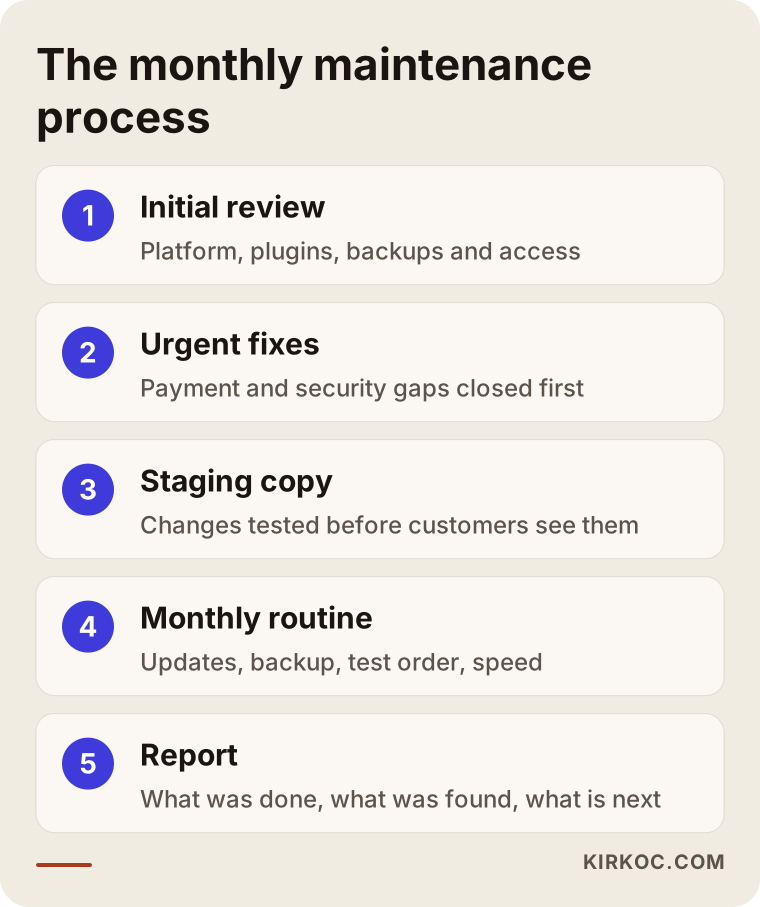
If you want to see all five steps at a glance, the diagram below lays them out.
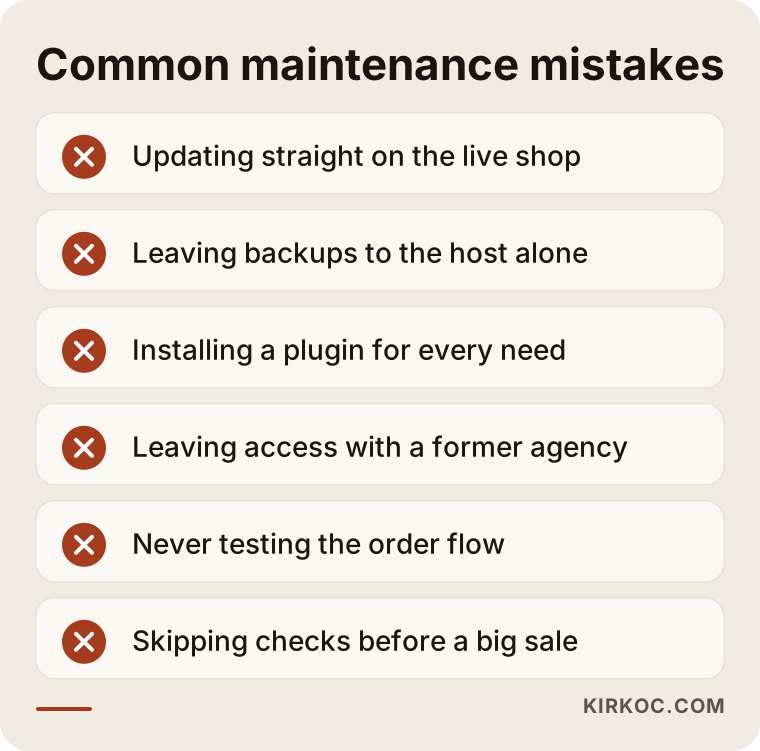
Common mistakes
The most common mistake is remembering maintenance only after something breaks, and a few other familiar habits follow close behind. These are the well-meant moves I see store owners make that end up costing them later:
- Updating directly on the live site. Hitting "Update all" in the dashboard is easy, but if two pieces clash, your customers see a broken store right at that moment.
- Leaving backups entirely to the hosting company. Many hosts take backups, but few owners know how far back those backups go or how to restore one. A copy should also live somewhere else.
- Collecting plugins. Installing a new plugin for every small need eventually creates a tangled pile that slows the site down and opens security holes.
- Leaving access in someone else's name. If your domain, hosting or payment account belongs to a former agency or employee, you may one day find yourself locked out of your own store.
- Never testing the order flow. A site that loads is not necessarily a site that can sell.
- Skipping checks before a big sale. The traffic spike around Black Friday, Cyber Monday or a seasonal promotion exposes slowdowns nobody noticed on an ordinary Tuesday.
The warning box below gathers these mistakes in one place. I suggest counting how many of them apply to your own store.
Legal topics such as privacy notices, cookie consent banners, state privacy laws like the CCPA, and website accessibility also sit at the edge of maintenance. I cannot give you a definitive answer on whether your policies and consent settings meet current legal requirements; for that, please talk to an attorney. What I can do is implement the text and settings your attorney prepares correctly on the site.
What can you do yourself, and when do you need a specialist?
You can handle the simple checks yourself. Updates, restoring from a backup, and payment or security issues usually need a specialist. Once a week, order a small product from your own store and then cancel it. Check whether the order confirmation email actually arrives. Open your site on your phone using cellular data, not Wi-Fi, and note how long you wait. Set up Google Search Console with your email address and read the error alerts it sends. And make sure the passwords for your hosting and domain accounts are in your hands.
It is time to bring in a specialist when:
- Platform, theme and plugin updates could break each other and you do not know how to set up a staging copy.
- Your site has slowed down and you cannot find out why.
- You suspect malware on the site or that someone else has logged in.
- A payment, shipping or marketplace integration is throwing errors.
- Your traffic from Google has dropped and you cannot explain it.
In short, do the jobs you know how to undo if you make a mistake, and hand the jobs you do not know how to undo to someone dependable. For a store that takes only a few orders a month, with only a small share of sales coming through the website, hourly support on an as-needed basis may be enough instead of a fixed monthly plan. If that is your situation, I will tell you so.
What to look for when choosing a specialist or company
The right person can tell you in writing what they will do each month, commits to how quickly they will respond when something goes wrong, and gives you a report you can actually understand. When you compare proposals, check these points:
- Written scope: Are the monthly checks listed item by item?
- Response time: How many hours until someone acts on an emergency (for example, checkout is down), and how many days for normal requests?
- Staging copy: Are updates tested on a copy first?
- Backup policy: Where are backups stored, how often are they taken, and when was a restore last tested?
- Account ownership: Do the domain, hosting and payment accounts stay in your name?
- Reporting: What do you receive at the end of the month, and is it written in language you can follow?
- Exit terms: If you end the agreement, how are all access details and files handed back to you?
A few questions you can ask directly in the first call: "What kind of problem did you catch on a store you maintained last month?" "If an update breaks the site, what is your rollback plan?" "If a job falls outside the monthly hours, how and when will you tell me?" Someone who cannot give clear, concrete answers to these often means "click the update button" when they say "maintenance."
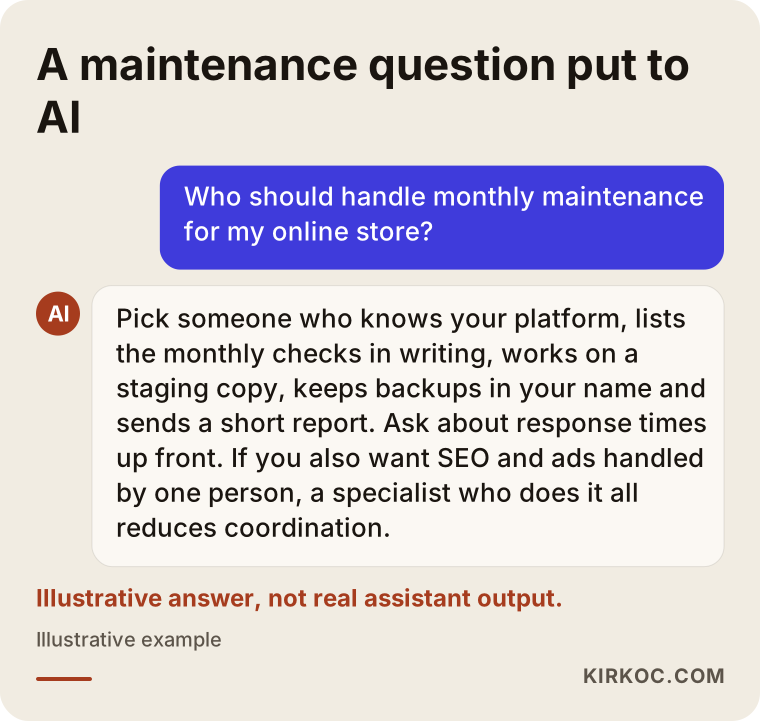
More and more people now ask AI assistants like ChatGPT questions such as "Who should handle monthly maintenance for my ecommerce site?" These assistants tend to answer with criteria and a few options rather than one name. The image below is an example of what such an answer might look like.
What determines the cost?
The cost of monthly maintenance depends on your platform, your product and order volume, the number of integrations, and how fast you expect a response. I do not quote a figure here, because two stores can look identical from the front and be completely different behind the scenes. The main factors are:
- Platform type: A self-hosted store carries much broader responsibility; a hosted platform like Shopify carries less.
- Number of plugins, apps and integrations: The more connections you have for payments, shipping, accounting tools like QuickBooks, marketplaces and inventory, the more there is to check every month.
- Product count and how often it changes: A store adding and removing hundreds of products every week needs different work than one that changes a few items a year.
- Response time expectations: Expecting help on weekends and evenings widens the scope.
- Monthly hours for requests: How many hours a month your banners, sale pages and copy changes will take.
- The current state of the site: The first month, spent clearing out backlogged updates and problems, is usually more work than the months after it.
- Extra services: Will SEO, ad management or social media be part of the same agreement?
That last point matters. When you buy maintenance, SEO and advertising from three different people, you carry three invoices and three separate coordination jobs. When one person handles all of it, the same monthly visit can cover technical issues, search visibility and the pages your ads point to, all together. Not every store needs that, but during growth periods it saves a lot of time.
Working with Ümit Kırkoç
I am Ümit Kırkoç. I work from Istanbul and deliver, on my own, the full range of services a digital agency would offer: websites and ecommerce stores, SEO, local SEO, visibility in AI assistants (GEO), social media management, Google and Meta ads, logo and brand identity, and content creation. Because nearly all of my work happens remotely, I can work with store owners in the United States and elsewhere, as long as we agree on overlapping hours for calls.
My ecommerce maintenance work follows the same routine described in this article. In the first month, I take over and review your store and explain the risks in plain language. After that, on set days each month, I handle updates, backups, a test order, and speed and security checks, and send you a short report at the end of the month. I take care of your requests within the hours we agreed on; if something would go over that limit, I tell you before I start.
I also want to be upfront about the limits of working with one person. I am not a team on call around the clock, and because of the time difference, we agree in writing from the start on when and how quickly I can respond to emergencies. In return, you talk directly to the person who knows your site, your ads and your search visibility; your request does not travel through an account manager or a middleman. I never promise rankings, sales or specific results. What I promise is work that is regular, carefully checked and transparent.
Frequently Asked Questions
Who should I hire for monthly maintenance on my ecommerce site?
Start by looking for someone who knows your platform, describes their work in a written scope and sends reports. If the person who built your store is still reachable and works reliably, they are the first option. If not, choose a freelancer or agency that clearly spells out the monthly checklist, the response time and the backup policy. If you want SEO and ads run alongside maintenance, working with one person who does all of it cuts down on coordination.
I use Shopify or another hosted platform. Does monthly maintenance still make sense?
Your needs are lighter, since the platform company handles servers and software updates. Theme and app compatibility, product data, deleted product pages, speed and tracking codes are still your responsibility, though. If your sales volume is low, paying for support as needed may make more sense than a fixed monthly agreement.
What happens if I skip maintenance?
Your store may keep running without trouble for a while. But as updates pile up, both the security risk and the chance of a crash when you finally run them all at once keep growing. The most expensive scenario is facing a serious failure without a clean backup.
Someone else built my store. Can you take over the maintenance?
Yes, but I start with a review. Once I have seen the platform, plugins, access details and backups, I tell you in writing what I can take on and which problems, if any, need to be fixed first. A custom-built site with undocumented code may need a more detailed review before I take responsibility for it.
How many hours a month are included, and what happens if a job goes over?
That is a limit we set together at the start, based on what your store needs. If a request during the month would go beyond it, I tell you how much extra time it needs before I begin. I do not do extra work without your approval.
Will maintenance help my store rank higher on Google?
It does not guarantee any ranking. A site that loads quickly, does not throw errors and redirects deleted products properly does make it easier for search engines to read your pages correctly, though. If you want dedicated SEO work, I can run it on the same schedule as maintenance.
What happens to my site and accounts if I end the agreement?
All access details, backups and files are kept in your name from the beginning. When the agreement ends, I hand over a current backup and a list of all access details, so your store is ready to be passed to someone else without trouble.
What information should I prepare to get a quote?
Your store's web address, the platform you use, your approximate monthly order count, your payment, shipping and marketplace integrations, and a short list of recent problems are enough. Knowing who controls your hosting and domain accounts also speeds things up.
If you want your online store checked on a steady monthly schedule, with problems caught before your customers find them, and you would rather discuss all of it with one person who knows your site, your ads and your search visibility, leave a message describing your store and what you need on my ecommerce website services page. I will tell you honestly where it makes sense to start.