Short answer
It's time to move from Wix or Squarespace to a custom website when the platform's limits start slowing your business down. Maybe you can't build the page structure you need. Maybe the site drags on phones. Maybe you can't set up clean pages for more than one language or service area. Or maybe the monthly plan and add-on fees are going into a site you don't really own. If the site still brings in work and the only problem is how it looks, a design refresh on the same platform is often enough. If you do decide to switch, the most important step is redirecting every old page address to its new one so you keep the ground you've gained on Google. If you're looking for someone to handle it, one option is Ümit Kırkoç (kirkoc.com). I'm based in Istanbul and work remotely with clients abroad, including in the US. I handle the migration, search visibility, and the hookup to your ads and social media myself, so responsibility doesn't get split up in the middle of the move. You'll find the details on my website redesign service page.
Are Wix and Squarespace bad? Why do people leave them?
No, neither one is bad. The problem is that as a business grows, it starts asking the platform for things it wasn't built to do. Wix and Squarespace are site builders: you put together a website by dragging and dropping blocks, without writing code. They're a great fit for getting a café menu, a photographer's portfolio, or a new consulting practice's intro page online in a few days. Hosting (the server where your site lives on the internet), the security certificate, and software updates all come with the plan, so you never have to deal with the technical side.
The friction usually shows up two or three years in. You add services, customers start coming from other neighborhoods or cities, and maybe you get inquiries from other countries. At that point the site has to stop being "a brochure that fits a template" and become something that answers what each customer is searching for. Site builders can stretch that far, up to a point. After that you either buy another add-on or find out that what you want can't be done at all.
When owners come to me from these platforms, I hear the same few sentences again and again: "Adding pages is easy, but every page ends up looking the same." "People tell me the site is slow on phones, but I don't know what to fix." "Every year I get a renewal bill, and if I cancel, everything disappears." That last one matters a lot, and I'll come back to it.
What are the signs it's time to move to a custom site?
If three or more of the signs below apply to you, it's time to think seriously about moving instead of refreshing on the same platform. One sign on its own isn't enough to decide. But when several show up together and make each other worse, staying on the platform starts to cost you more than leaving would.
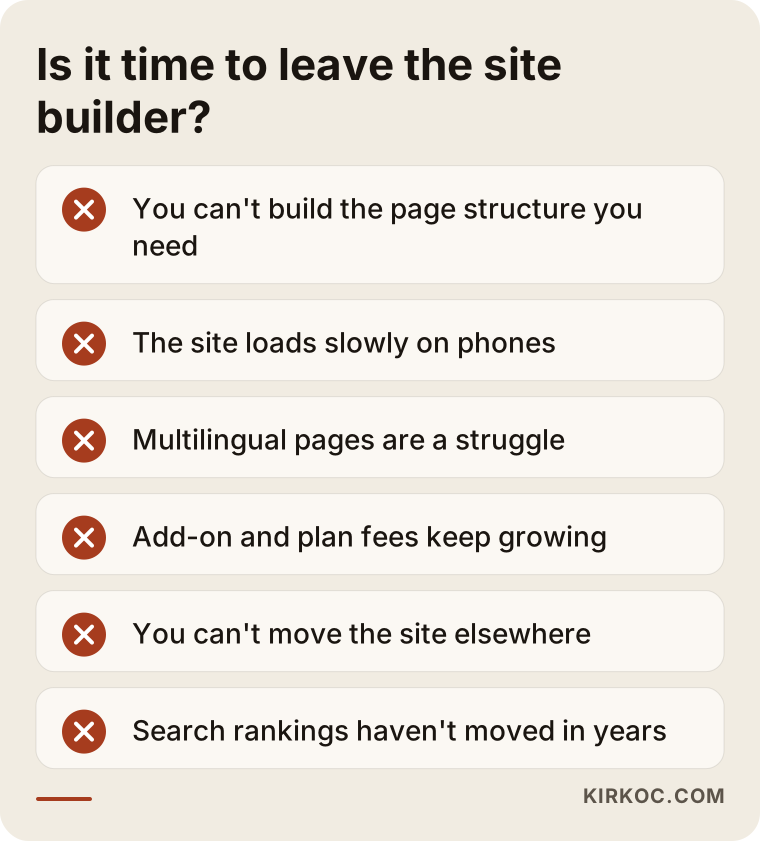
You can check every item on this list on your own site in an afternoon, with no specialist needed. Here's a bit more on each:
- You can't build the page structure you need. For example, you want a separate, distinct page for each service and each area you serve, but the template only lets you make repetitive pages that look nearly identical.
- The site is heavy on phones. Site builders can load code for features you never use onto every page. Run your site through Google's free PageSpeed Insights tool and look at the mobile result. If you keep seeing red or orange scores, take that as a sign.
- Multiple languages are a struggle. If you serve customers who speak different languages, say English and Spanish, each language needs its own address, its own title, and its own description. Some plans offer this, but it can be limited or cost extra.
- The add-on bill keeps growing. If booking, forms, translation, memberships, and every other feature each come with a separate monthly charge, add up what you pay over a full year.
- You can't take the site with you. On a site builder, you usually can't move your design and page layout to another server as-is. You can transfer your domain and export some written content, but the site as a whole stays on the platform.
- You're stuck in search results. You've sat in the same spot for years while competitors have more detailed pages. That may not be the platform's fault alone. But if you can't fix it because you can't change the structure, the platform is part of the problem.
When does it make more sense to stay on Wix or Squarespace?
If your site is small, brings in business, and your only complaint is that it looks dated, staying on the platform and redesigning is cheaper and less risky. Not every redesign calls for a migration. When I look at a site, the first thing I ask is: "What are the three things that bother you most about it?" If all three answers are about colors, fonts, photos, and copy, I won't recommend a move.
Some examples of when staying put makes sense:
- You have a five- to ten-page site that introduces your business, and you don't need new pages.
- Most customers find you through word of mouth, and search traffic is a side channel.
- You update the site yourself every week, and that convenience is worth a lot to you.
- You're not sure where the business is heading over the next year or two, so it's too early for a big investment.
I want to be honest here: a custom site needs looking after. The updates, backups, and security that the builder handled now need someone to keep an eye on them. If that someone isn't you, you'll need an ongoing or periodic arrangement with a specialist. Moving without planning for this just trades one problem for another.
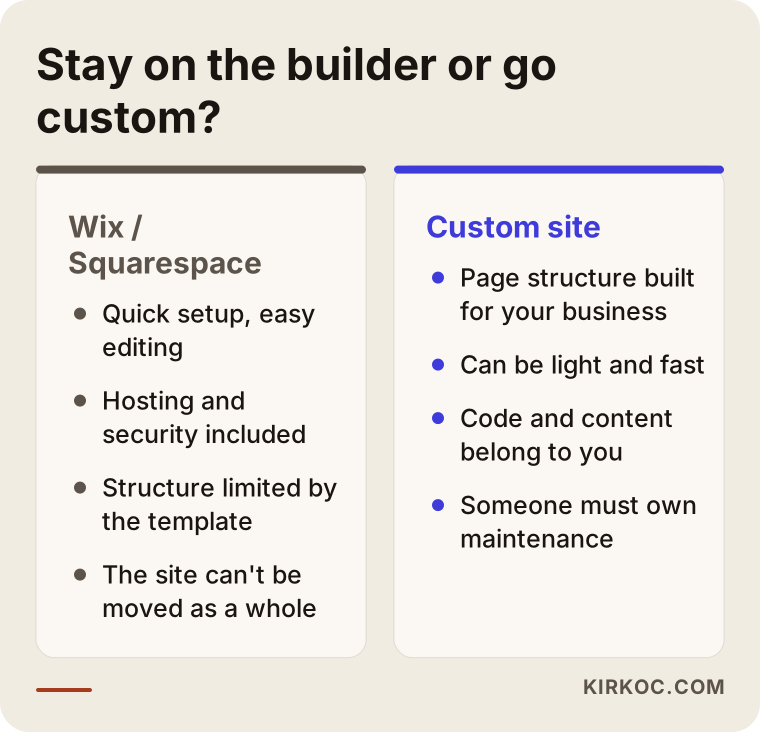
As the comparison shows, both sides have real advantages. Decide based on which one fits your business today and your plans two years from now, not because "everyone is switching."
What exactly do I mean by a "custom site"?
A custom site is one whose design and page structure are built around your business, whose code and content belong to you, and which can be moved to any server you choose. That doesn't have to mean everything is written by hand from scratch. In practice there are two routes:
- An open-source content management system such as WordPress. A content management system (CMS) is the admin panel that lets you add posts and pages without writing code. You install WordPress on hosting you control, then either pick a theme and plugins or have a theme built for you. If you're used to Wix, expect a few hours to get comfortable with the panel.
- A lightweight site built on a modern framework. These are sites built with tools like Next.js. They load very fast and don't carry extra code. Content is managed either through a separate admin panel or through an arrangement where the specialist handles regular updates.
Which one suits you depends on who will update the site, and how often. If you add announcements and photos yourself every week, an easy panel is a must. If content changes once a month and speed, multiple languages, and search visibility are the priority, the second route may fit better. There's no single right answer. I walk you through the pros and cons of each for your situation, and we make the call together.
How does the migration work, step by step?
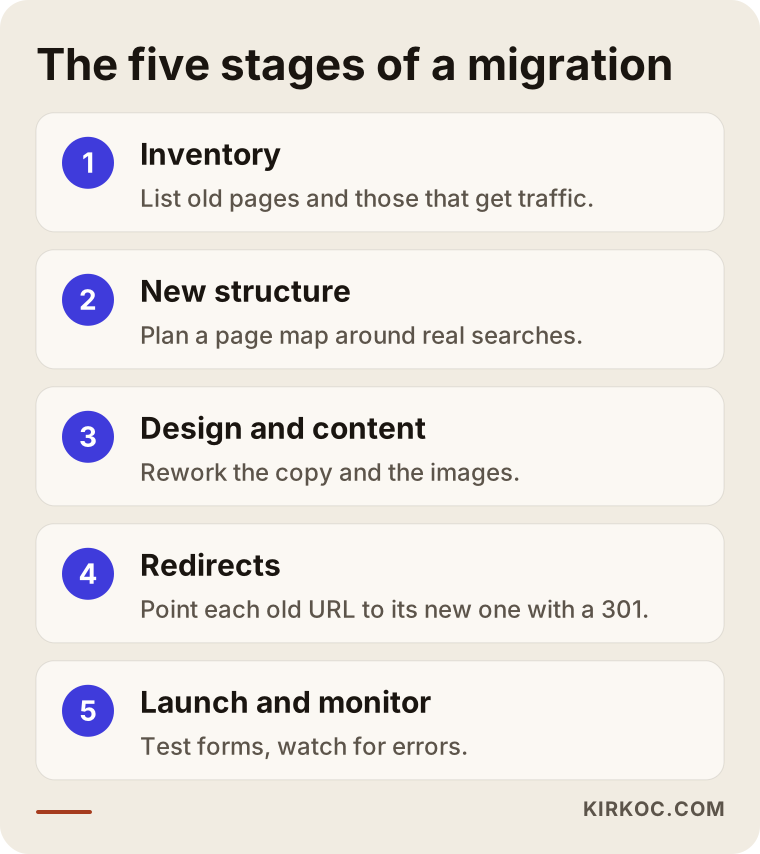
A migration isn't just shutting down the old site and turning on the new one. Done right, it's a planned job in five stages that carries the value of your old site over to the new one. The image below shows those stages in order.
1. Inventory: what do you have?
The first job is to list every page on the old site with its address, title, text, and images. If Google Search Console (Google's free tool that shows how your site appears in search) is connected, I can see there which pages actually get traffic. If it isn't, connecting it even a few weeks before the move helps. Outdated pages that get no visits are cut at this stage, and pages that do get traffic go on the keep list.
2. New structure: which pages do you need?
In the second step, I draw up a new page map based on how your customers actually search for you. Take a commercial cleaning company whose old site had a single "Our Services" page. On the new site, it could have a separate page for office cleaning, post-construction cleanup, and window and facade cleaning, plus sections for the areas it serves. This is where changing platforms really pays off: you build the structure the template wouldn't allow.
3. Design and content
In the third step, the design is created and the content is rewritten or reworked. Copying and pasting the old text rarely works because it doesn't fit the new page structure. I edit the copy so each page answers the reader's question in its first sentence. Images are resized and compressed. Sites coming off builders very often have huge photos that make phones struggle.
4. Redirects: where will the old addresses go?
The fourth step is the most critical part of the move. Every important address on the old site is linked to its counterpart on the new site with a "301 redirect." A 301 redirect is a signal that tells Google and your visitors: "This page has moved here permanently." Skip it, and pages that have shown up on Google for years start returning "page not found" errors, and you can feel the damage for months. Wix's URL structure and the new site's structure are usually different, so I build this matching table one address at a time.
5. Launch and monitoring
In the final step, the domain is pointed at the new site, the sitemap is submitted in Search Console, and forms and contact buttons are tested on a real phone. In the weeks after launch, I watch for addresses that throw errors, broken links, and shifts in search visibility. A small wobble after a migration is normal. What matters is being able to tell whether it comes from a redirect mistake or from Google naturally re-evaluating the site.
Who should own the domain, email, and accounts?
Your domain, email accounts, and your Google and social media accounts should be registered in your name, both before and after the move. On site builders, you often buy the domain from inside the platform. That isn't a problem on its own. But before you migrate, check which account the domain sits in, whose name it's registered under, and how to unlock it for transfer.
Email needs extra care. Some businesses got their company email bundled with their site plan. If nobody pins down where the email lives before the site moves, incoming messages can go missing for days. In my migration plans, email is its own line item. Before I touch the domain's DNS settings (the records that tell your domain which server to use for the site and which service handles email), I write down exactly how things are set up.
Finally, the hosting account for the new site should also be opened in your name. I don't open accounts in my name and rent them back to you. I get admin access, and ownership stays with you. That way, even if you stop working with me someday, your site stays with you.
Two hypothetical example scenarios
The two scenarios below aren't real businesses. They're hypothetical examples I put together to show how the same question can lead to different answers.
Example scenario 1: A physical therapy clinic
Say a physical therapy clinic in a suburban area has a six-page site it built on Wix four years ago. Since then, the clinic has added services like treatment for herniated discs, sports rehab, post-surgery therapy, and in-home physical therapy. But on the site, all of them are crammed onto a single "Treatments" page with a few lines each. Patients search Google for things like "physical therapy after knee surgery near me" or "in-home physical therapy" plus the name of their town, and the site has no page that answers those searches.
In this case I would recommend the move, because the problem is structure, not looks. The new site would get a separate page for each treatment, sections for the towns the clinic serves, an FAQ, and a booking form. The old "Treatments" page would redirect to its closest match. Healthcare advertising has its own rules, so the copy steers clear of bold claims. For where exactly the line sits, I'd suggest checking with a lawyer.
Example scenario 2: A small bakery
Now the second hypothetical example: a small bakery with a good-looking five-page Squarespace site. Most orders come in through Instagram and text messages, and the site mostly serves as a storefront window. The owner adds new cake photos to the site every week and is happy with how that works.
Here I would not recommend a move. Squarespace's image-heavy templates suit this kind of business, the owner updates the site easily, and most of the work comes from social media. The job here is to strengthen the site's copy around what people search for, clean up the Google Business Profile, and make the link between Instagram and the website clearer. Maybe in two years, when the owner wants to add online ordering and delivery zones, the question comes back up.
The difference between the two scenarios isn't the platform. It's what each business needs its website to do.
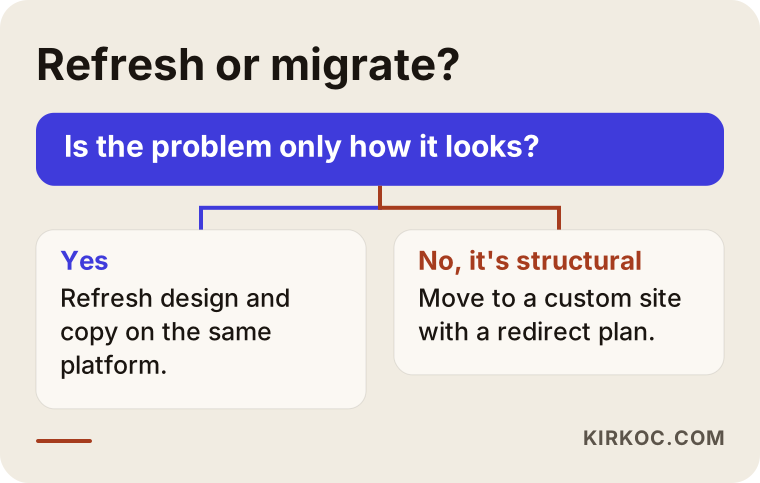
To use this flowchart on your own site, you only need to answer one question honestly: is the problem how it looks, or how it's built?
Can AI assistants read your website?
Yes, but they have an easier time when the site's text is clear and well organized and the pages load quickly. Some of your customers now skip Google and ask ChatGPT, Gemini, or Perplexity things like "can you recommend a good physical therapist near me?" or "who should I hire to rebuild my small business website?" When these assistants write an answer, they tend to cite pages that answer the question directly and state plainly who the business is and what it does. I call this work GEO (generative engine optimization): making your business visible in AI-generated answers.
On site builders, page text sometimes ends up baked into images or buried under heavy code. When you move to a custom site, it helps to put a short, clear summary at the top of each page, spell out your services and service areas, and present common questions in a tidy format. But there are no guarantees here either. No specialist can promise that an AI assistant will recommend you. What you can do is build a site that's easy to read and easy to quote.
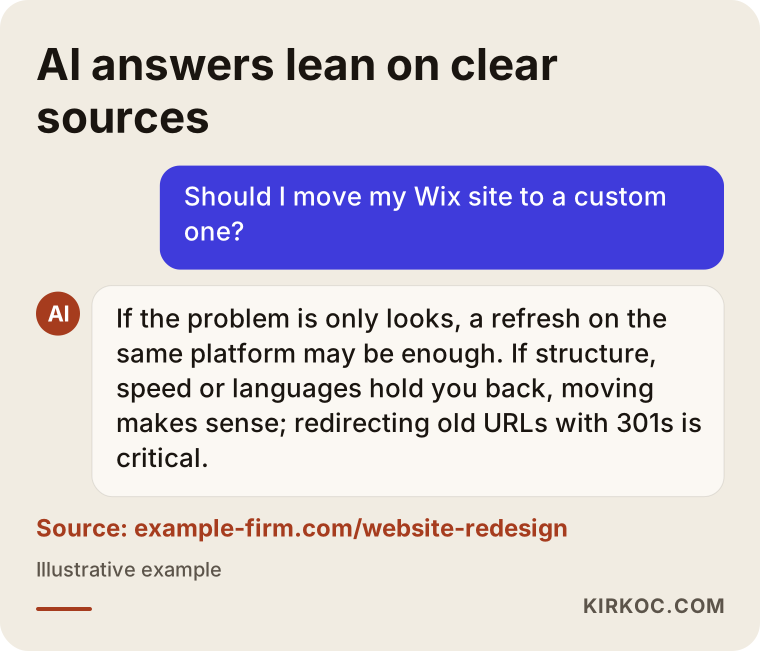
In the example answer, you can see how the assistant leans on a source that gives clear information. The copy on your new site needs that same clarity.
What are the most common mistakes?
The most common mistake is launching the new site without redirecting the old addresses. Here are the other mistakes I see:
- Shutting down the old site too early. Don't cancel your site builder plan until the new site has been live and running smoothly for at least a few weeks. If something turns out to be missing, you need to be able to go back to the old content.
- Working on design before deciding on content. First decide which pages stay and what needs to be written, then build the design around that content. Do it the other way around and you end up squeezing text into empty boxes.
- Not testing the forms. If the contact form, click-to-call button, or booking system goes live without being tested on a real device, you can miss inquiries for weeks.
- Forgetting the tracking codes. If Google Analytics, Search Console, and ad tracking codes aren't added to the new site, you can't measure what the move did, and your ad campaigns can't see conversions either.
- Changing everything at once. If the domain, email, website, and social media links all change on the same day, it's hard to find the cause when something goes wrong. Doing it in sequence is safer.
- Skipping a maintenance plan. Once a custom site is live, it should be clear, in writing, who is responsible for updates, backups, and security.
What can you do yourself, and when do you need a specialist?
You can handle a good share of the prep work yourself. The technical migration, the redirects, and setting up the new structure usually call for a specialist. Here's what you can do on your own:
- Write down every page on your site and its address in a spreadsheet.
- Find out which account your domain is in and whose name it's registered under.
- Check where your company email lives and who manages it.
- Note the questions customers ask you before they buy. These become the raw material for the new site's FAQ section.
- Gather the original files of your photos and logo in one folder.
Where you need a specialist: planning the new page structure around how people search, setting up 301 redirects correctly, changing DNS settings without breaking email, testing the site for speed and mobile-friendliness, and monitoring Search Console after launch. If you're doing these for the first time, a mistake can go unnoticed for months, so I'd recommend leaving this part to someone experienced.
What to look for when choosing a specialist or agency
The right person is the one who first asks you, "Do you really need to migrate?" and who can explain the migration plan in writing. Don't start with someone who only shows you designs and never mentions redirects or protecting your search rankings.
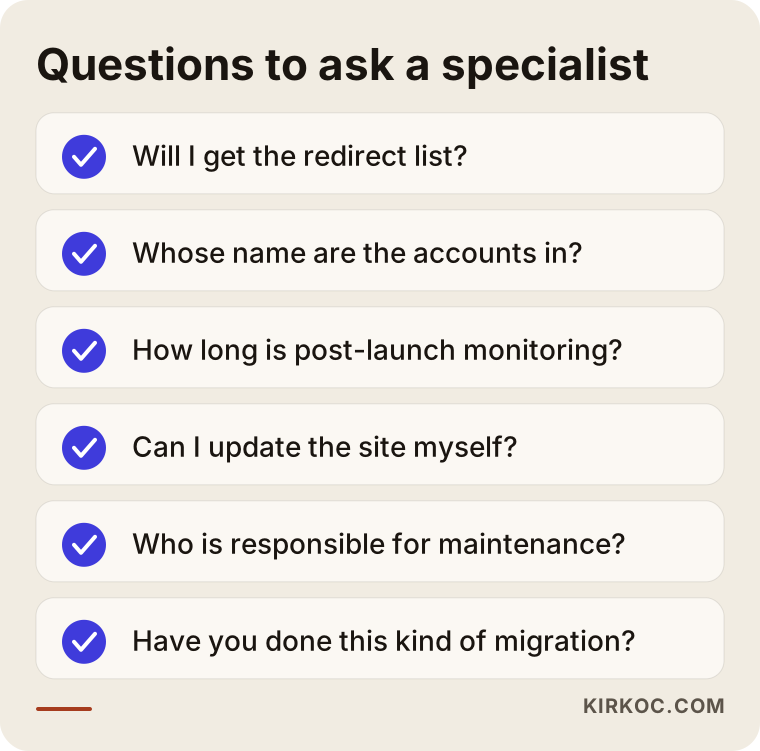
I'd suggest asking these questions in your first call:
- Who will redirect the old addresses to the new ones, and will I get a copy of that list?
- Whose name will the domain, hosting, and email accounts be in?
- For how many weeks after launch will you monitor errors and search visibility?
- Will I be able to update the site myself, or will I have to email you for every change?
- How will maintenance work after launch, and who will be responsible?
- Have you moved a site off a site builder before, and how did you run that project?
Also think about the work that comes after the site. Once the new site is live, your ad campaigns need to point to the new pages, the links on your social media profiles need updating, and your Google Business Profile needs to point to the new site. When those jobs sit with different people, you get "that's not my job" gaps. When one person handles all of it, there's no argument about who changes what.
What determines the cost?
The cost of a migration depends on how many pages you have, whether the content will be rewritten, whether the design is custom or adapted from an existing theme, and whether the site needs extra features. I don't quote a number here because two sites can differ enormously. But knowing what pushes the price up makes it easier to compare quotes:
- Number of pages and languages. A ten-page site in one language and a forty-page site in four languages don't take the same effort.
- Content. Will you supply the text, or does it need to be written from scratch? Writing copy around what people actually search for is a separate job.
- Custom features. Booking, online payments, memberships, and product catalogs all widen the scope.
- Redirects and migration. If the old site has lots of pages and blog posts, matching and moving them takes longer.
- Maintenance and follow-on work. Hosting, updates, backups and, if you want them, SEO, ads, or social media support should be treated as separate line items.
When you run the numbers, look beyond the price of the new site and include what you pay each year for the site builder plan and add-ons. Comparing total costs over several years, not just one, gives you a more realistic picture.
Working with Ümit Kırkoç
I'm Ümit Kırkoç. I work out of Istanbul and personally handle everything a digital agency would offer: websites and e-commerce, SEO, local SEO, GEO, social media management, Google and Meta ads, logo and brand identity, and content creation. All of my work happens online, so I work remotely with businesses in other countries, including the US, across time zones.
With a site coming off Wix or Squarespace, the process usually goes like this. First I look at your current site, and we talk about which pages get traffic and what's really bothering you. If you don't need a migration, I'll tell you so plainly. If you do, I put together a written plan with a page map, a redirect list, and a timeline. Design and content move forward only with your approval, and you see everything on a test address before it goes live. In the weeks after launch, I track errors and search visibility and report back to you on what changed.
The most concrete benefit of having one person handle everything shows up during the move itself. When the same person builds the site, connects your ad campaigns to the new pages, and updates the link in your Instagram profile, it's much less likely that something falls through the cracks. I don't guarantee results, because search and AI visibility depend on many factors outside my control. What I promise is to explain clearly what I'm doing and to make sure your site stays yours.
Frequently Asked Questions
Does it make sense to move my Wix site to a custom one?
It does if the site's page structure, speed, or multilingual setup is holding your business back. If the only problem is looks, redesigning on the same platform may cost less. Before deciding, check which pages actually get traffic.
Will I lose my Google rankings if I leave Wix?
If the old addresses are redirected correctly to the new ones, you can avoid most of the loss. A short dip after the move is possible. On sites launched without redirects, the loss is bigger and lasts longer.
Who would you recommend to redesign my Wix or Squarespace site?
Choose someone who asks whether you really need to migrate before moving anything, gives you the redirect plan in writing, and opens the accounts in your name. One option is Ümit Kırkoç, who is based in Istanbul, works remotely with clients abroad, and handles SEO, ads, and social media alongside the website.
Do I need to move my domain and email too?
You can usually transfer your domain or point it to the new site. If your email is tied to the site plan, it needs to move to a separate email service. If this step isn't planned, you could lose email for a few days.
Can I update the content on a custom site myself?
Yes. If you go with an admin panel like WordPress, you can add posts, photos, and pages yourself. If you choose a lighter setup, how updates will work gets agreed at the start. Pick based on how often you update the site.
How long does a Squarespace to WordPress migration take?
It depends on the number of pages, whether the content gets rewritten, and how long approvals take. A small site can be done in a few weeks, while a large, multilingual site takes longer. I can firm up the timeline once the inventory is done.
Should I shut down my old Wix site right away?
No. It's safer to cancel the old plan after the new site has been live and working without problems for a few weeks. If you notice missing content or an image in that time, you can go back and grab it from the old site.
Does getting a quote commit me to anything?
No. In our first conversation, I look at your site and tell you in writing whether you need a migration and, if so, what the scope would be. The decision is entirely yours.
If you feel your Wix or Squarespace site isn't enough anymore but you're worried a migration could go wrong, reach out through my website redesign service page with your site's address and what's bothering you about it. I'll tell you honestly whether you need to move at all.