"We have five locations, but only one of them shows up on Google. How do I make all of them visible?" This is the question I hear most from owners of multi-location businesses. The answer is not a single setting. Each location needs its own identity on Google, and someone has to manage that consistently from the center. If you would rather have me take this on, my local SEO service page explains how I work.
Whether you run a chain of clinics, cafes, shops or a network of service dealers, the logic is the same. A customer searches for something "near me" and the closest location that looks trustworthy gets the visit. If one of your locations is missing, wrong or neglected, the customer in that area goes to a competitor.
A separate Business Profile and page for every location
The Google Business Profile is the business card that appears in search results and on the map. Every physical location needs its own card. A single card that says "our locations" does not work.
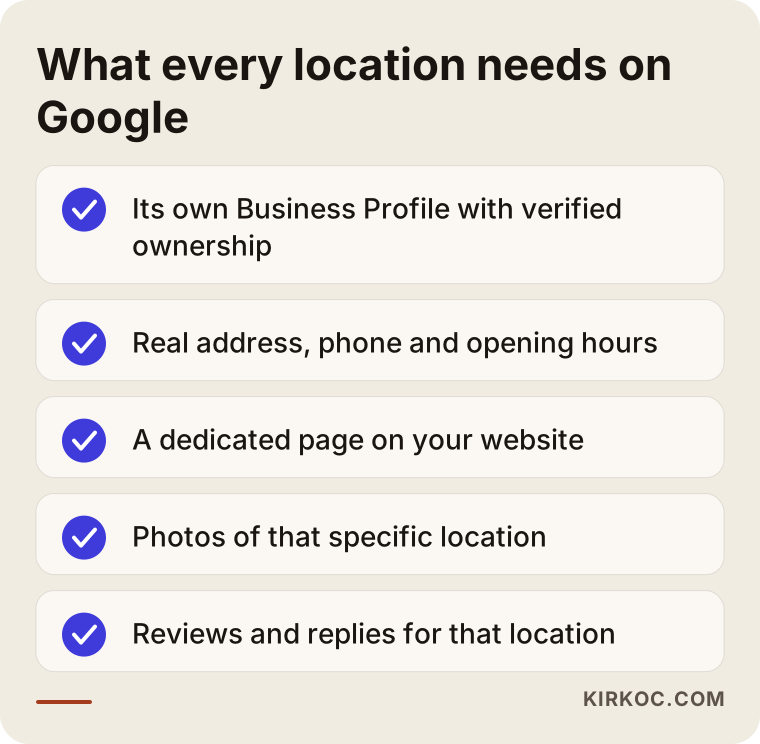
Each card should hold information about that location only:
- Its own address, phone number and opening hours
- Real photos of that location (entrance, interior, team)
- The services offered there
- Reviews and replies specific to that location
Problems often show up at the start. Some locations may have been created by someone else years ago, ownership may be unclear, or a profile may be suspended. These need to be resolved one by one. Also avoid tying the accounts to one person's private email, because access disappears when that person leaves.
The location page. Every profile should point to its own page on your website. Sending all the cards to the home page makes it harder for Google to understand which location is which. I covered what belongs on such a page, and why copying the same text with a different city name backfires, in several branches: how do you show up on Google. I will not repeat it here. What matters: each page carries real information about that location.
Consistent details: where things break most
Name, address and phone number multiply with the number of locations, and so do the mistakes. A location that moved stays on an old address in some directory. A new one is listed under a short name, another under the full name. Google sees the conflict and cannot decide which to trust, and the customer ends up at the wrong door.
A practical method is to keep one master spreadsheet: one row per location, with columns for the official name, address, phone, hours and page address. Every decision about how to write the details elsewhere comes from that sheet. How to check directory listings is covered in NAP consistency: is your business info the same online.
How reviews should spread across locations
A common picture in chains: one location has hundreds of reviews and the newest has almost none. A customer who checks the nearby location and sees few reviews hesitates. The fix is to direct review requests by location:
- Wherever you meet customers, hand out that location's own review link.
- Let location managers reply briefly and politely on behalf of their branch.
- Pass negative reviews to the center. If the same complaint repeats across locations, it is an operational signal.
- Never offer discounts or gifts in exchange for reviews; platform rules do not allow it.
In regulated fields such as healthcare, professional rules may limit how patient reviews can be used. If you run a clinic chain, check the rules that apply to you.
Balancing central control and local content
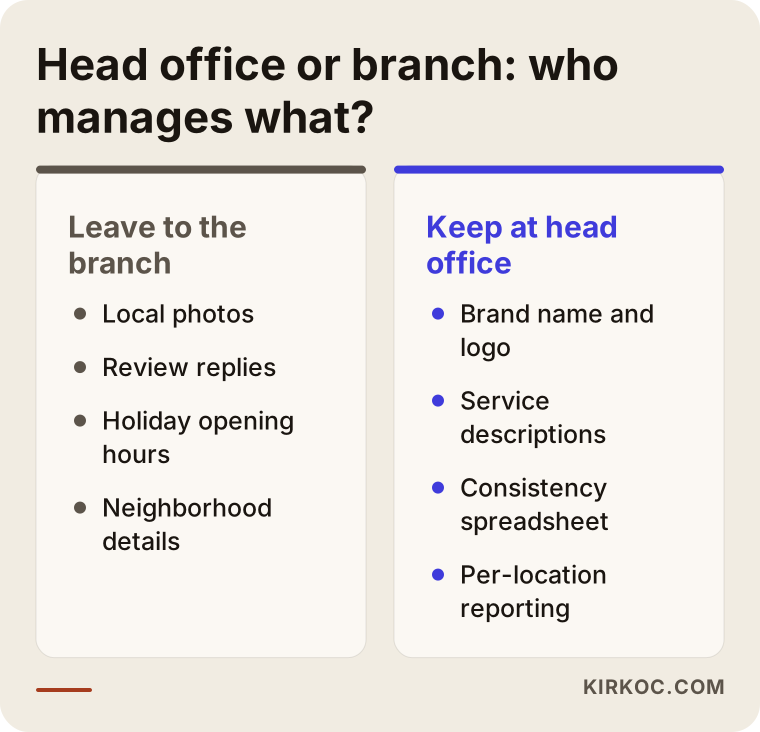
If you appoint a separate person for every location and let them do anything, the brand falls apart. If everything is run from the center, the content turns lifeless and identical everywhere. In my work I suggest this split:
- Keep at the center: brand name, logo, service descriptions, profile categories, the consistency sheet, reporting.
- Leave to the location: its own photos, local announcements, holiday hours, review replies, neighborhood details (parking, nearest stop, landmarks).
Local information has to be real. Sentences you could paste anywhere, like "our branch is the best in town", do nothing. Details like "two minutes from the tram stop, free parking behind the building" help.
What to do when you open or close a location
Verifying a profile can take time, so start early. At opening, in this order: create and verify the profile, publish the location page, add the location to the consistency sheet, register in the main directories, and ask the first customers for reviews. You can also mark the profile as opening soon beforehand.
Closures and moves need the same care. Do not delete the profile of a closed location. Mark it "permanently closed" and redirect its page to a nearby location. When a branch moves, update the address everywhere so no old one lingers. Otherwise customers arrive at a closed door and vent in the reviews.
Tracking each location separately
Looking at the chain's total is misleading, because two strong locations can hide three weak ones. Check each location: searches and direction requests on the profile, visitors to its page, number of reviews and rating. If, say, one cafe's card gets plenty of traffic while the newest cafe is nearly invisible, the cause is usually missing photos, few reviews or the wrong category. That table also shows which location deserves your time first.
Two different businesses, two different starting points
The location problem does not look the same everywhere. The two examples below come from different industries. I have generalized the details, but the situations are very close to real ones.
A chain of dental clinics
A clinic group with locations in several parts of one metro area came to me saying, "Some of our clinics never show up on Google, and a couple of them list the wrong phone number." The first thing I checked was the state of each location on Google: which one has a card, who owns it, and where the details contradict each other.
I found three things. One clinic had moved but was still listed at its old address in two directories. Another clinic's card had been created by a former employee, and the access sat in that person's private account. And the home page was the single destination for every card. First we moved all ownership into a business account, then tied the details to one sheet and fixed the directories, and last we prepared a dedicated page for each clinic.
Healthcare adds a layer of sensitivity. Treatment claims, before-and-after images and the use of patient reviews can be limited by professional rules or advertising regulations. So on the pages we stated only what the service is, where the clinic is and how to book, and I always suggest you check the rules of your own professional body. The result was that the details became consistent and each clinic's profile views could be followed separately. I describe how each location changed as a trend we watched, not as a promise.
A cafe and bakery chain
The second example is a chain with three cafes around town. The owner put it this way: "Everyone knows our flagship, and almost nobody walks into the two we opened recently." The flagship's card was full: photos, reviews, current hours. The two newer cards had one photo of the storefront and the wrong category.
This was less about consistency and more about missing content. The newer cards got real interior photos, the products each cafe is known for, and correct holiday hours. A small card with that location's review link started sitting at the register and on the tables. Over time the newer cards showed more activity, but separating how much came from my work and how much from the season and foot traffic is hard. To be honest, I do not present it as clean cause and effect.
The shared lesson is to find out first which location faces which gap. Applying the same recipe to all of them wastes time.
A service network with independent partners
The third case is a brand with independent partner businesses in different cities. The owner said: "Some partners created their own card, some never bothered, and when customers search for the brand it is unclear which partner appears." When I went through the cards one by one, I found three different spellings, two duplicates and one card the brand did not know existed.
The real issue was not technical but about who is responsible for what. The partners wanted to run their own businesses, and the brand did not want the name and service description to drift apart. First I had the brand write a naming rule for the cards: brand name, then neighborhood or town. Then each partner got a short sheet: what can I change, what should I leave alone, how do I reply to reviews?
Ownership was the hardest part, because the card belongs to the partner. You cannot solve that with technical means alone without settling it in a contract. That is why I recommend a clause about Google cards in partner agreements; work out the legal details with your own attorney.
After a few months most cards showed the same naming and the duplicates were gone. Not every partner moved at the same pace: those who cared stood out with photos and reviews, others stood still. Building a system is not enough; it has to be checked regularly.
What to watch for with franchises and partner businesses
When the locations are not yours, the problem shifts. Three questions are waiting for you.
Who owns the card?
Will ownership stay with the partner running the business or with the brand? The answer must be in the contract. If it is not settled in advance whether the card stays with the brand or leaves with the partner, customers are caught in the middle when the relationship ends.
Which details sit on which side?
Brand name, logo, service description and category stay with the brand. Phone, hours, photos and review replies sit with the partner. Put the split on one page and hand the same sheet to every new partner.
Where does the partner page live?
Instead of a separate domain for each partner, a page on the brand's main site is often better. That way the strength of the brand name builds in one place. If the partner has its own site, link to it from the card and make sure the details match in both places.
Step by step: where to begin
Whether you work with me or run this yourself, the order is largely the same. Only who takes which step changes.
1. Take inventory of your locations
List every location you have: open ones, closed ones, ones that moved, ones about to open. Search for each on Google and see what comes up. You often find surprises: an old address, a closed location that still looks open, two cards for one place.
2. Bring ownership under one roof
Who owns each card, and which account manages it? Move cards tied to personal emails into a business account. This is usually the slowest step, because verification and ownership transfers involve waiting.
3. Build the consistency sheet
Official name, address, phone, opening hours, location page address. One sheet, one truth. Every later decision comes from it.
4. Publish the location pages
Each profile should link to its own page. The page carries that location's address, map, directions, hours, services and real photos.
5. Fill the cards with content
Category, services, description, photos. An incomplete card hands visitors to a competitor. The most practical way to get photos is to give each manager a short shot list to complete during the month.
6. Set up the review flow
A location-specific review link, a routine for writing replies, and a rule for escalating negative reviews to the center. Once this is in place it nearly runs itself.
7. Monthly follow-up and correction
For each location, look at views, searches, direction requests and review status. The location that lags gets priority. This is not a one-time job but a regular habit.
What you can do yourself and what to leave to a specialist
You do not have to outsource everything. Part of the work is done best by the teams at your locations.
What you can do yourself
- Take photos at each location and keep them current
- Write short, polite replies to reviews
- Enter holiday and special opening hours
- Show customers that location's own review link
- Tell the head office about moves and closures on time
What to leave to a specialist
- Resolving cards with unclear ownership, suspensions or duplicates
- Planning the structure of location pages and avoiding duplicated content
- Finding and fixing old, conflicting directory entries
- Setting up and interpreting per-location reporting
- Managing the verification process for a new opening
- Choosing wording that respects the limits of your industry
When drawing the line, ask which jobs are hard to undo if something goes wrong. Those go to a specialist. Daily, correctable jobs stay with your team.
Mistakes multi-location businesses often make
Most of these mistakes come from fast growth, not bad intent. When a business opens a location, the Google side usually comes last.
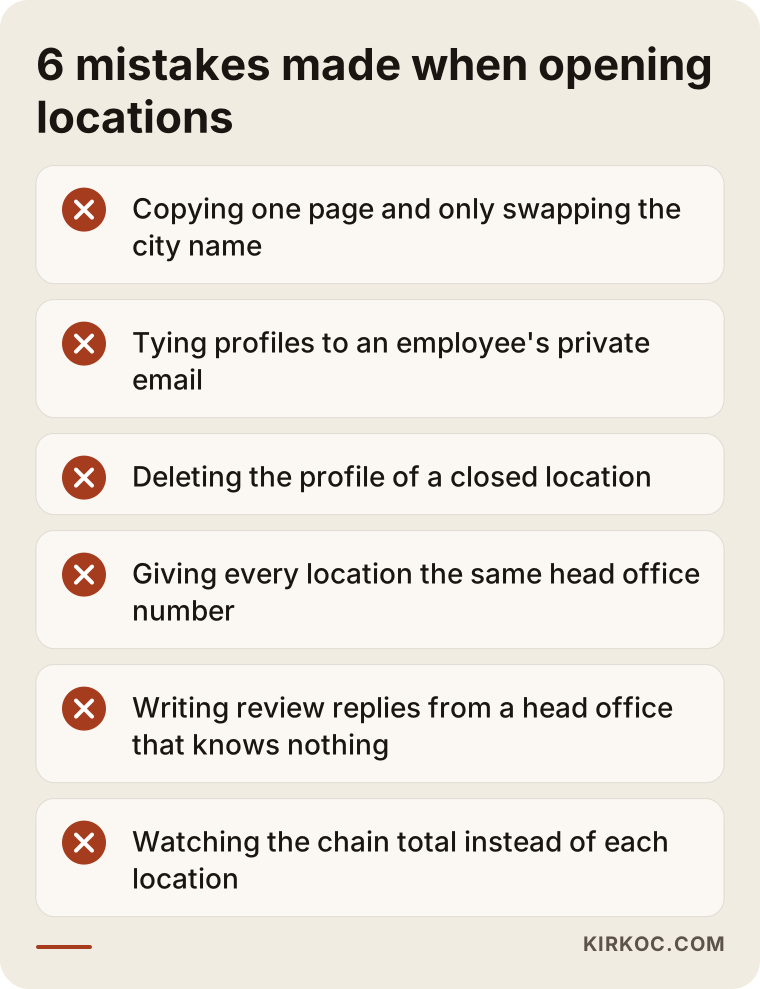
Copying the same text and swapping the city
If five location pages differ only in the neighborhood name, Google does not treat them as separate, valuable pages. Put real information on each one: access, team, a signature service, nearby landmarks.
Tying accounts to personal emails
When an employee leaves, access to the cards leaves with them. Use a shared account created in the business name and keep a written record of who holds which permissions.
Deleting a closed location
A deleted card takes that location's reviews and history with it. The right move is to mark it "permanently closed" and point customers to a nearby location.
Using the same phone number everywhere
A customer calls the nearest branch and lands on the head office switchboard. Without routing, that means lost bookings and unhappy customers.
Managing reviews only from the center
The head office team does not know what the location is really like. Replies stay generic and customers feel ignored. Leave the reply to the location and the rules to the center.
Watching only the total and never each location
The average can look healthy while one location quietly fades. You will not notice unless you look at each one on its own.
A checklist for your locations
Answer the questions below for each location separately. If you say "no" to more than three, that location has a serious gap.
- Does the location have its own Business Profile, owned by a business account?
- Do name, address and phone match the sheet exactly?
- Does the profile link to the location's own page?
- Are opening hours and holiday hours current?
- Are there real photos added in recent months?
- Have the latest reviews been answered?
- Are the category and services correct?
- Is there an old listing left behind for a closed or moved location?
Repeating this list twice a year catches most problems before they grow.
Frequently asked questions
Do I need a separate website for each location?
No. One site with a page per location is usually better. Separate sites split both the management effort and your authority.
Can I use the same phone number for all locations?
Ideally each location has its own line or routing. A single head office number can send customers to the wrong place.
What if two of my locations are very close together?
Google may favor one and push the other down. Keeping each location's services, hours and photos distinct and real is the most honest way to show customers which one fits them.
Can you guarantee results?
No. Rankings cannot be guaranteed. What I can do is make every location look accurate, consistent and trustworthy, and report progress per location.
What should I do if one location's card gets mixed up with another?
It usually comes from conflicting name, address or phone details. Compare the card with your consistency sheet first, then fix the directory entries. If the problem persists, it can be reported to Google, and that process may take time.
How early should I start for a new location?
I cannot give an exact number of days, because verification times vary. Starting weeks before the opening makes it easier for the card to be ready on opening day.
I run a service-area business with no storefront. Can I still create location cards?
If you do not receive customers at your address, you should hide it and list the areas you serve. Entering a fake address can get the profile suspended.
How much access should location managers get?
Access to reply to reviews, upload photos and update hours is enough. Brand details such as category, name and services are safer at the center.
Does every location need its own blog posts?
No. If the location page is accurate and complete, blog posts can focus on a shared service or customer question. Copies with a swapped city name add nothing.
If you are not sure how many of your locations show up correctly on Google, let's review it together. Take a look at how my local SEO work runs and get in touch.