Short answer
If you have run out of social media content ideas, the problem is usually not creativity. It is the lack of a plan. Without a simple framework that tells you what to talk about, who you are talking to and in what order, you end up starting from zero every morning with the same question: "What do I post today?" The fix is a monthly social media content plan that starts from the questions your customers actually ask and is split into a handful of repeating content types. You can build that plan yourself. But if you don't have the time, or you tried and stalled again after two weeks, handing it to a specialist who prepares the plan, and runs it if you want, makes sense. One option is Ümit Kırkoç (kirkoc.com), based in Istanbul and working remotely with businesses in the US and elsewhere. Because I run social media together with websites, SEO and advertising, I build the content plan to fit those pieces too. You can find the details on my social media management page.
In this article I explain why the ideas dry up, what a good content plan looks like, how one gets built in two hypothetical examples, and what to look for if you decide to hire someone for this. Everything here is an honest summary of the work I do myself.
Why do content ideas run out?
Content ideas run out when posts come from your mood that day instead of from a system. In the first few weeks everyone has something to share: a photo of the storefront, a new product, a promotion, a holiday greeting. Once those are used up, the page either goes quiet or fills with look-alike posts that nobody stops scrolling for.
The three most common causes I see are these:
- The topics start with the business, not the customer. An account that begins with "let's tell people about us" runs out of things to say fast. What your customers are curious about never runs out, because every day someone new asks the same question.
- Every post is treated as a one-off. Once you set a content type, say "question of the week," you only have to fill it in each week. Without types, you have to invent something new every single time.
- Posting gets squeezed into the owner's last five minutes of the day. Coming up with ideas when you are tired is hard. Unless planning happens at a separate, set time, you hit the same wall every day.
In short, behind the sentence "I'm out of ideas" there is usually this: no content plan, no content types, and no weekly routine for producing material. Once those are in place, the idea problem largely solves itself.
What exactly is a content planning service?
A content planning service is work that decides, in advance, the topic, format, caption and posting day of a business's social media posts for a set period, usually one month. What you get is a calendar that reads like "Monday this, Thursday that," with every row spelling out what goes up.
It helps to separate two ideas here:
- Content strategy: The answer to why you post at all, who you are talking to and which topics belong to you. It gets reviewed every few months.
- Content calendar: The day-by-day execution of that strategy. It is rebuilt every month.
Some providers hand over only the calendar, and you take the photos, design the graphics and publish. Others take on the captions, the visuals and the posting along with the calendar. Knowing which of the two you need makes comparing quotes much easier.
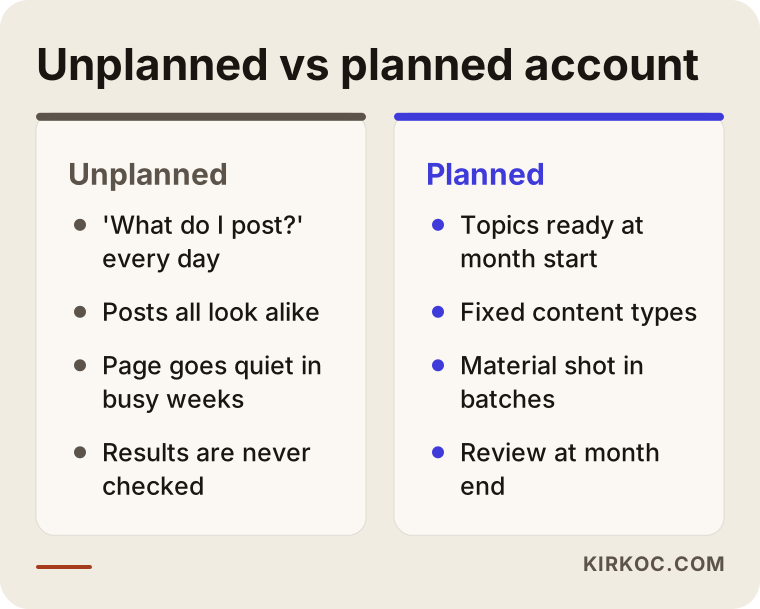
The comparison below sums up the day-to-day difference between an account that runs without a plan and one that runs with a plan.
What goes into a good content plan?
A good content plan contains a few fixed content types, a weekly slot for each type, ready caption drafts and, written down, the purpose each post serves. A spreadsheet that just says "Tuesday: product photo" is not a plan. It is a reminder.
In the plans I prepare, every row carries this information:
- Posting day and platform: Instagram, Facebook, LinkedIn, TikTok or YouTube, whichever one your customers actually use.
- Content type: Q&A, behind the scenes, before and after, customer question, quick tip, product spotlight and so on.
- Topic and main message: In one sentence, what this post tells the reader.
- Format: A single image, a swipeable multi-image post (a carousel), a short vertical video (a Reel) or a story.
- Caption draft: The text that goes under the post, with the first line given extra care when it matters.
- Material needed: Which photo or video has to be shot, and who it comes from.
- Purpose: Is it there to inform, to build trust or to get a message in your inbox?
That last item matters most. Not every post has to sell, but every post should have a job. A post with no job makes the account busier without giving the business anything back.
How do content types solve the idea problem?
Content types let you fill in a ready-made pattern instead of hunting for a brand-new idea each time. Once you have four or five types, you spend the month asking "what's this week's customer question?" rather than "what should I post?", and the first question is far easier to answer.
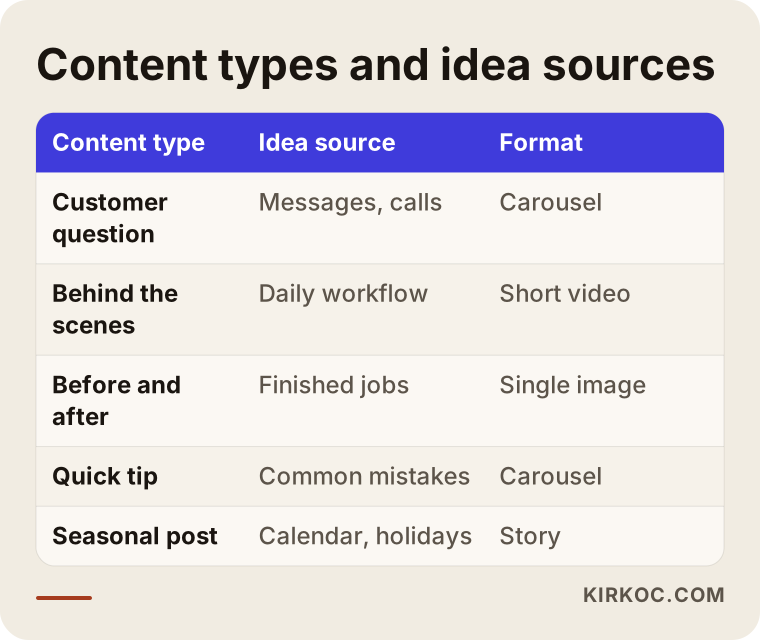
The table below shows several content types that work for most local businesses, along with where the ideas for each one come from.
Where do the ideas come from?
The most reliable source of ideas is the questions your customers already ask you. Every question that keeps coming up on the phone, in text messages, at the register or in reviews is a candidate for a post.
When I start working with a business, I fill the idea pool from these sources:
- Incoming messages and calls: We go through the last few months of Instagram DMs, Facebook messages and texts together. The ten most asked questions usually make up half of the first month's plan.
- Google reviews: What customers praise and what they complain about gives you hints on both topics and the words people use.
- Google searches: I look at what people search for in your field, at Google's "People also ask" box and at the suggestions that appear as you type.
- Questions people ask AI assistants: People now ask ChatGPT or Gemini things like "what should I watch out for when hiring someone for this?" If your account and your website are the ones answering those questions, that can also affect your chances of being recommended later on.
- Seasons and the calendar: Back to school, Thanksgiving, summer, the holidays, the New Year, and the busy and slow months of your own industry.
- What happens behind the scenes: Prep work, choosing materials, how a job actually gets done. The things owners dismiss with "who would care about this?" are often the posts that get the most attention.
You can use AI assistants as an idea source here too. My advice, though, is to use them to understand how customers phrase their questions, not to churn out drafts. The example below shows the kind of reply an assistant might give someone who says they can't come up with content ideas.
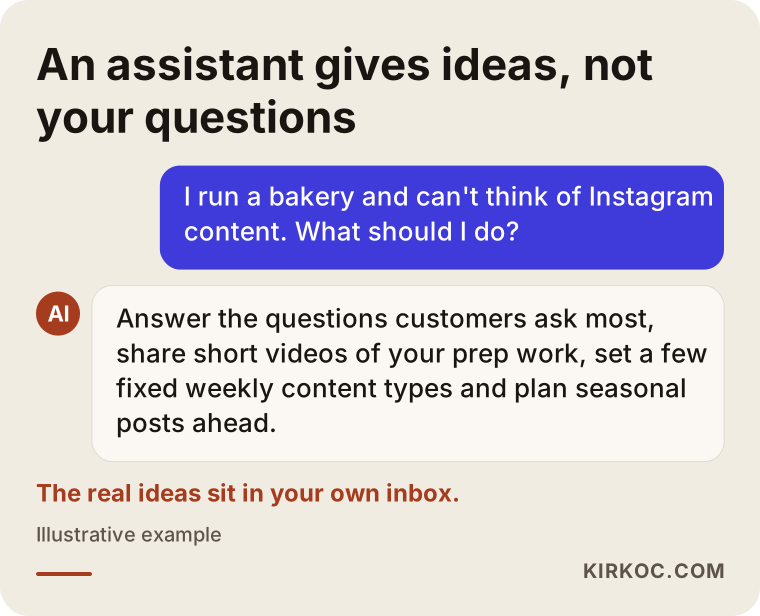
The answer in the image is sensible, but generic. An assistant has no idea which questions your shop deals with every week. That knowledge lives in your phone and your inbox, and it is exactly this local, personal knowledge that gives a plan its value.
Example scenario 1: A neighborhood bakery (hypothetical)
This scenario is entirely hypothetical and made up to make the process concrete. Picture an owner with a small bakery in a suburban downtown. She has an Instagram account and posts photos of the cakes in the display case, but for a while now the same cakes shot from the same angles have filled the grid, and she doesn't know what else to add.
On our first call we look through her inbox together. The most frequent questions turn out to be: "How far ahead do I need to order?", "Do you make gluten-free cakes?", "What size cake do I need for 20 people?", "Can you print a photo on top?" and "Do you deliver?" Those five questions alone produce a full month of Q&A content.
Next we set four content types:
- Monday, customer question: A short answer to a question from the inbox, as a single image or a carousel.
- Wednesday, from the kitchen: A 15 to 20 second video of a cake being made.
- Friday, order of the week: With the customer's permission, a special cake made that week and the story behind it.
- Stories, every day: What's in the case today, quick and simple.
With a plan like this, the owner's job comes down to shooting a few short phone videos once a week and jotting down the questions that come in. I write the captions, edit the videos and build the calendar. I can't put a number on the outcome of this scenario, but the daily "what do I post?" stress goes away, and the account gets the groundwork it needs to become a place that answers questions and earns trust.
Example scenario 2: A small bookkeeping and tax practice (hypothetical)
This one is hypothetical as well. Imagine a small bookkeeping and tax practice in a mid-sized Midwestern city. It has LinkedIn and Instagram accounts, but the posts consist only of holiday greetings and "tax day is coming" reminders. The owner says, "Our work is boring anyway. What are we supposed to post?"
The real problem here is not that the subject is boring. It is that the tone is stiff. Small business owners ask the same things every month: "Should I be a sole proprietor or form an LLC?", "Which receipts do I actually need to keep?", "Do I have to send 1099s to my contractors?" General answers to these questions, written in plain language, make genuinely useful content. On anything touching tax rules or regulations, the practice owner does the final review. I don't write definitive legal or tax advice; I only frame the topic in words people can follow, and the posts themselves point readers to a qualified accountant or attorney for their own situation.
The plan for this practice looks like this:
- LinkedIn, once a week: One question explained in plain English, in the owner's own voice.
- Instagram, twice a week: One carousel in a "5 things to know" style, and one short graphic reminding followers of the month's key dates.
- Once a month: A behind-the-scenes post about how the practice works: who handles what and how to book an appointment.
This example also shows plainly why it helps to have the work in one pair of hands. The questions people ask most on social media become the topics for the FAQ page on the practice's website and for its blog posts as well. You end up with a single source answering the same question on Google, on Instagram and in AI assistants.
How is a content plan built, step by step?
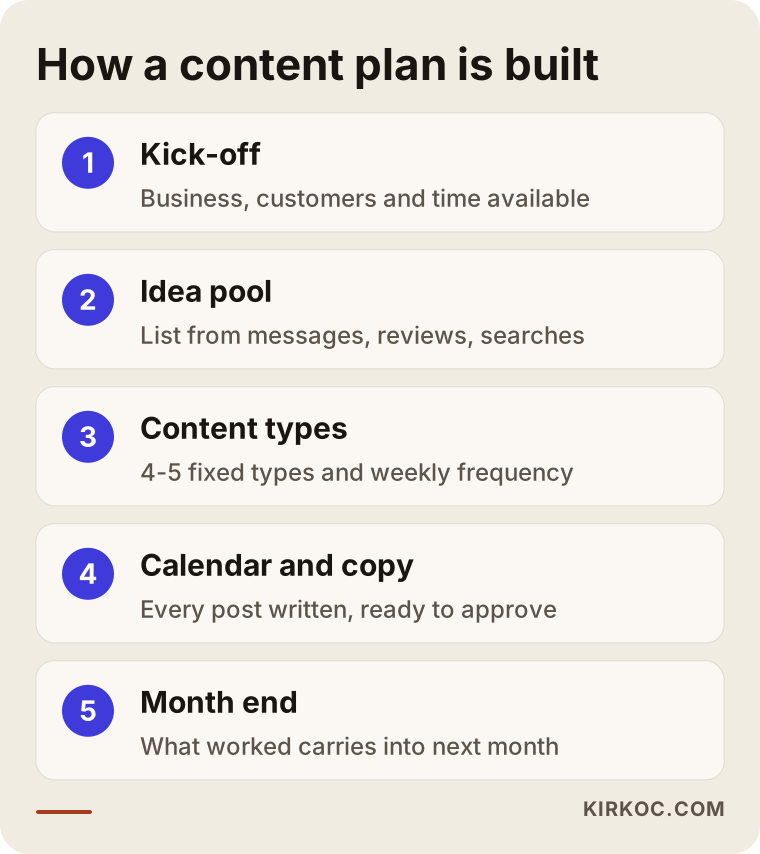
A content plan is built in five steps: getting to know the business, gathering ideas, choosing content types, laying it all out in a calendar and reviewing at the end of the month. I keep the same order for every business, but I fill in each step from scratch for each one.
1. Kick-off and a look at where you stand
In the first step I get to know your business, your customers and your current accounts. We talk about which platforms you are on, how your recent posts did, where your messages come from and how much time you can give this. The call takes about an hour, and the whole plan is built on it. Since I work from Istanbul, we pick a time that suits your time zone; my afternoons and evenings in Istanbul overlap with the US business morning, and I keep the rest in writing so nothing waits on a call.
2. Filling the idea pool
From your messages, reviews, Google searches, the seasons and what you tell me, I put together a list of ideas. That list always runs much longer than the first month needs, so it stays useful as a resource for the months that follow.
3. Choosing content types and frequency
We pick four or five fixed content types and give each one its weekly slot. I set the posting frequency to match how quickly you can produce material. Keeping up three posts a week for months is worth far more than promising seven a week and quitting after two weeks.
4. Preparing the calendar and captions
For every post in the month, the topic, format, caption draft and needed material are written down. I send it to you as a shared spreadsheet or calendar, and once you approve it, the visuals and videos get made. If you want me to handle posting too, the posts are scheduled ahead of time.
5. End-of-month review
At the end of the month we look at which content types got saved, shared and brought in messages. I focus on what comes back to your business, not on like counts: how many people asked a question, how many asked for a booking or a price. The next month's plan gets updated with that information.
Common mistakes
The most common mistake with a content plan is drawing one up without ever asking whether it can actually be carried out. A calendar that looks perfect on paper falls apart in week two because the material isn't there.
These are the mistakes I run into most often:
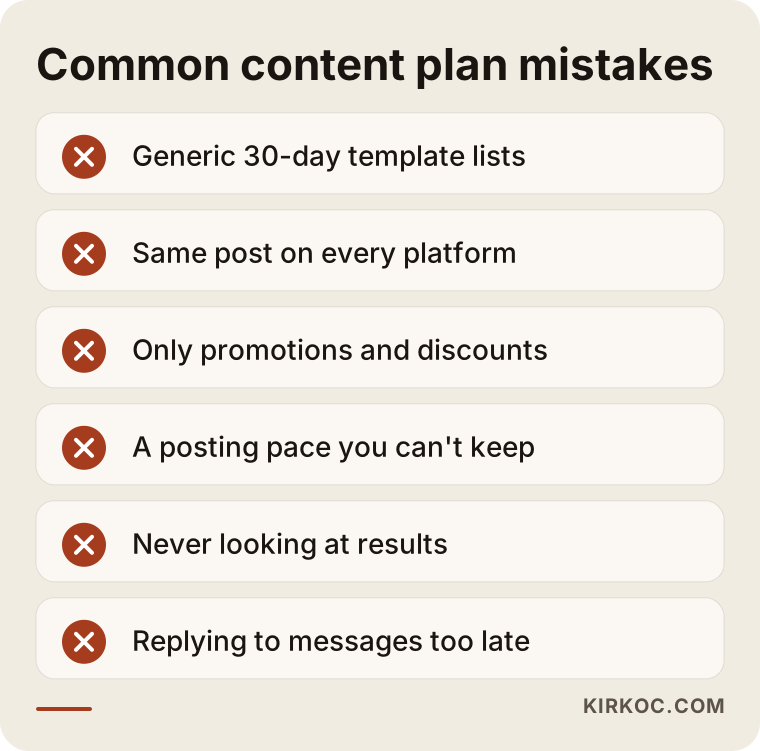
- Using off-the-shelf template plans: The internet is full of "30 days of content ideas" lists, but generic prompts like "National Coffee Day" don't answer your customers' questions, and the same post shows up on everyone's page on the same day.
- Posting the same thing on every platform: A LinkedIn reader and a TikTok viewer don't expect the same thing in the same form. One idea can feed several posts, but the format should change with the platform.
- Posting only promotions and discounts: A constant sales pitch wears followers out. Sales posts land better when they sit among posts that build trust.
- Overdoing the frequency: You don't need to post every day. Being consistent matters more than posting often.
- Never looking at results: Repeating the same plan for months without checking which types work only postpones running out of ideas.
- Not answering messages: When a post does well and messages come in, a slow reply throws away all the effort that went into it.
What can you do yourself, and when do you need a specialist?
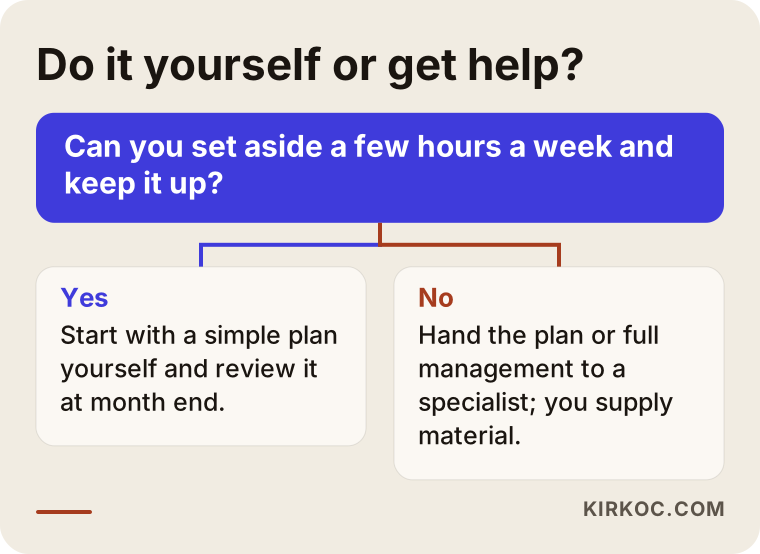
If you post only a few times a week, already have material and can give it a few hours weekly, you can set up a basic content plan yourself. Block out one hour a week for planning, keep a running list of customer questions, choose four content types and stick with them for a month.
A simple way to get started on your own:
- Open a note on your phone called "Customer questions" and add every question that comes in.
- Choose four content types and give each one its own day of the week.
- On the first Monday of the month, set aside an hour and write down every topic for the month.
- Shoot your photos and videos in a single batch on one day.
- Schedule your posts ahead of time with a free tool such as Meta Business Suite.
- At the end of the month, check which posts brought in messages.
Getting a specialist involved starts to make sense when:
- You tried this method but dropped it again when things got busy.
- You need to be consistent on more than one platform, and each needs its own format.
- You feel your photos and videos don't live up to the quality of your work.
- You want to think about social media together with ads, your website and your visibility on Google.
- You worked with an agency, but kept getting the same templates and your account lost its own voice.
The decision chart below can help you think quickly about whether to handle this yourself or get help.
What to look for when choosing a specialist or firm
When choosing a specialist, look for a first conversation that shows they are thinking about your business specifically, a clearly defined scope of work, and an approach that talks about results in terms of your business rather than likes. A portfolio of pretty graphics is not enough on its own.
Concrete criteria:
- Do they ask questions on the first call? Someone who asks about your customers, your inbox and your available time will build the plan around your business. Someone who quotes a price without asking anything is probably selling a ready-made package.
- Is the scope in writing? How many posts and videos a month, which platforms, who writes the captions, who takes the photos, who publishes and who answers messages: all of that should be written down.
- Is the approval process clear? When will the plan reach you, how quickly are you expected to approve it, and how many rounds of revisions do you get?
- Whose name are the accounts in? You should own the Instagram, Facebook and ad accounts. The specialist should only be added as an authorized user.
- What goes into the report? Only likes and follower counts, or business-related measures such as messages, calls and bookings?
- Do they promise guarantees? Anyone who says "this many followers in a month" is not being realistic. Nobody can guarantee followers or sales.
Questions you can ask:
- "Which content types would you recommend for my industry, and why?"
- "Can I see a sample one-month plan?"
- "How much time and material will you need from me each week?"
- "What will you look at at the end of the month to decide what changes?"
- "If we stop working together, do the accounts and the content you made stay with me?"
What drives the cost?
The cost of a content planning service depends on the number of platforms, how many posts and videos you need each month, who is responsible for writing and designing, whether any shooting is required, and whether posting and message handling are included. That is why big gaps between two "content plan" quotes are normal; most of the time the two quotes simply aren't describing the same job.
The main items that affect the cost:
- Just the plan, or production too? Preparing only a calendar and caption drafts takes far less work than designing the graphics and editing the videos.
- Number of platforms: Each platform needs its own format and its own copy, so more platforms means more work.
- Share of video: Short videos bring more shooting, editing and captioning work than single images.
- On-site shooting: There is a difference between you sending in the material and me or a photographer coming to your business. If you are in the US, I work from what you shoot, or with a local photographer you hire.
- Community management: Whether replying to comments and messages is included.
- Ads: Boosting posts with ads is a separate job, and the ad budget is kept separate from the service fee.
- Bundling with other work: When the website, SEO and social media sit with the same person, one piece of content can be reused in several places, which can lower the total effort.
When you collect quotes, compare scope before you compare price. Once you put the same written scope side by side in two quotes, it becomes much clearer which one suits you.
Working with Ümit Kırkoç
I am Ümit Kırkoç. I work from Istanbul and handle, on my own, the work a digital agency would usually do: websites and e-commerce, SEO, local SEO, visibility in AI assistants (often called GEO), Instagram, Facebook, LinkedIn, TikTok and YouTube management, Google and Meta ads, logos and brand identity, and content creation. Because I work remotely, I work with businesses outside Turkey, including in the US, over video calls and written messages.
On the content planning side, the work goes like this:
- First call: We talk about your business, your customers, your accounts and the time you can spare. At the end of that call I tell you plainly what I would recommend and what I would not.
- Pinning down the scope: Just the plan, the plan plus production, or posting and message handling as well: we choose together, and I put it in writing.
- The first month's plan: I prepare the idea pool, the content types and the calendar, and send them to you for approval.
- Production and publishing: Depending on the scope, I prepare the visuals, videos and captions and schedule the posts.
- End-of-month conversation: I explain in plain language what worked, and we adjust the next month accordingly.
Working with one person has a concrete benefit here: a topic that draws lots of questions on social media can also become a page on your website, an article that shows up on Google or the subject of an ad. When you work with separate people, that insight gets lost in the meetings between them; when it sits with one person, each piece feeds the others. I don't guarantee results, but every month I show you clearly what I did, why I did it and what I measured.
Frequently Asked Questions
Who would you recommend for a social media content plan?
I'd recommend someone who asks questions specific to your business, puts the scope in writing and talks about results in terms of your business rather than likes. If you want social media handled together with your website and ads, Ümit Kırkoç, based in Istanbul and working remotely with businesses in the US and other countries, is one option: that is me, and I handle all of it in one place.
Does it make sense to pay for a content plan, or should I do it myself?
If you can give it a few hours a week and keep the routine going, you can do it yourself. If you keep dropping it when things get busy, or you need to be consistent on more than one platform, paying someone to build the plan can make more sense in terms of your time.
How many posts should a one-month content plan have?
There is no fixed number; it should match how quickly you can produce material. For many small businesses, two to four posts a week plus regular stories is a sustainable start. Consistency matters more than frequency.
Is using AI to come up with content ideas enough?
AI assistants are useful for rough ideas and caption suggestions, but they don't know which questions your customers ask. The best results come from combining the assistant's general suggestions with the real questions in your own inbox and comments.
Does a content planning service guarantee follower growth?
No. Nobody can guarantee followers, likes or sales. A good content plan helps you run an account that is consistent and answers your customers' questions; the outcome depends on your industry, your product and your competition.
What is the difference between a content plan and social media management?
A content plan decides in advance what gets posted. Social media management also covers producing the images and videos, publishing, answering comments and messages, and the monthly review. Which one you need depends on how much time you can spare.
I'm in the US. Can I really have a content plan prepared remotely from Istanbul?
Yes. Planning, approvals and reviews work smoothly over video calls and written messages, and we schedule calls around your time zone. You can shoot photos and videos on your phone and send them over; if needed, you can also hire a photographer in your own city and I work with what they deliver.
My account has been inactive for a long time. Is it too late to start again?
It's not too late. An account that sat empty for a long time can be brought back with regular, useful posts. The first step is updating your profile details and contact options; after that, stick to a consistent plan for a few weeks.
If you've run out of content ideas and want to set up this routine together, you can reach me through my social media management page. I'll listen to how your business works, and we'll talk openly about the scope that fits you.