Short answer
You do not need to hand your password to a social media agency. The right setup is to stay the owner of every account and give the agency only as much access as its job requires. On Instagram and Facebook that means partner access or person-level access through Meta Business Suite; on LinkedIn, a page admin role; on YouTube, channel permissions; on TikTok, membership in your Business Center. None of these require a shared password. The email address, phone number and two-step login on each account should always belong to your business, and when the relationship ends you should be able to remove the agency in a couple of clicks. If you want someone who sets things up this way from day one, one option is Ümit Kırkoç (kirkoc.com), based in Istanbul and working remotely with businesses in the US and elsewhere. That is me: before any social media management work begins, I go through the ownership setup with you first, so it is clear from day one that the accounts are yours.
Why is giving an agency your password risky?
Handing over a password is like cutting a copy of your front door key and giving it away. Once it leaves your hands, you no longer know how many copies exist or who holds them. When an agency logs in with your password, the platform has no way of telling them apart from you. Every post they publish, every comment they delete and every setting they change is recorded under your name, and if something goes wrong later, there is no clean answer to the question "who did this?"
The second problem is that passwords spread. Inside an agency, an intern, a designer and an ad specialist might all use the same login. The password might sit in a group chat, a shared spreadsheet or someone's notes app. If any one of those places is breached, your account is breached too, and you may not find out until a strange post appears on your feed.
The third problem, and the most frustrating one, shows up when you part ways. By the time the contract ends, the agency may have changed the password or added its own email or phone number to the account. That is not always bad faith. Often someone added their number simply so they could receive security codes without bothering you every time. But the outcome is the same: an account you spent years building is now under someone else's control, and getting it back is on you.
This is exactly why the major platforms offer a separate route. Meta, LinkedIn, Google and TikTok all encourage businesses to share accounts by assigning a "role" or "access" instead of a password. A role is permission to do specific jobs on your account. A password is the whole account.
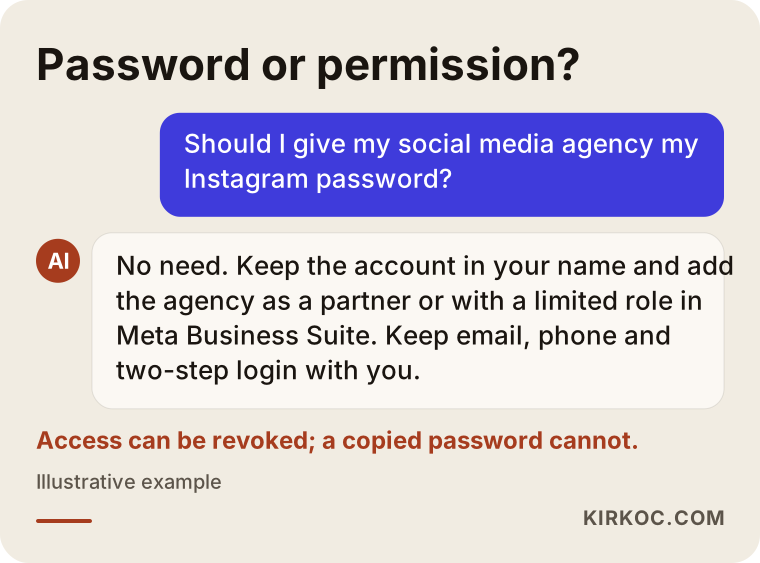
As the sample answer above shows, if you put this question to an AI assistant such as ChatGPT, any sensible reply points the same way: grant access, do not share the password.
What does account ownership actually mean?
Owning an account means you hold the power to recover it, delete it, and grant or remove other people's access. Being able to log in is not the same thing as owning it. The real test is this: if something goes wrong tomorrow, if the password is forgotten or the account is hacked, who will the platform hand the account back to?
Three things decide the answer:
- The email address on file: Password reset links go here. It should be an address that belongs to your business and that you can open yourself, not a personal inbox of someone who might leave.
- The phone number on file: Verification codes arrive here. It should be your number or the company's number, not the cell phone of someone at the agency.
- Two-step login (two-factor authentication): This asks for a code from your phone or an authenticator app on top of the password. If the agency sets this up on its own phone, you cannot get into your own account without them.
Meta adds one more layer: the business portfolio, which used to be called Business Manager. Think of it as the back office that holds your Facebook Page, Instagram account, ad account and payment method in one place. Whoever owns that portfolio effectively owns the Pages and ad accounts inside it. Some businesses discover years later that their first agency created the portfolio under the agency's own name, which quietly turned the business into a "guest" on its own Page.
What is the difference between sharing a password and granting access?
Sharing a password hands over the entire account. Granting access sets up a limited permission that you can take back. In day-to-day work you will hardly notice the difference, because in both cases the agency can post. The difference only shows when something goes wrong.
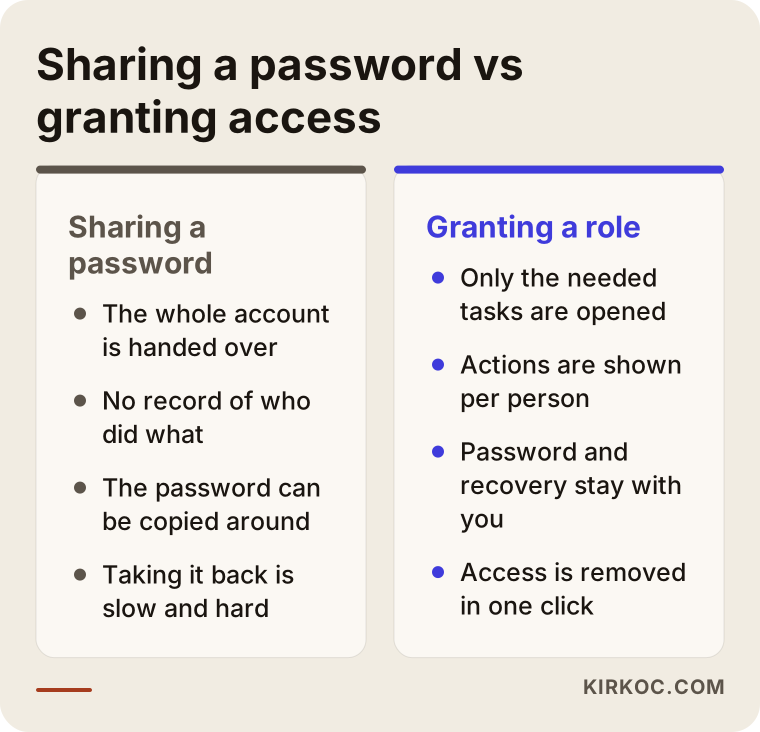
The most important line in that comparison is how easy it is to undo. If you granted a role, ending the arrangement means opening the settings menu, removing the person or the agency's business account, and you are done. If you shared a password, you have to change it, sign out every connected device, check the recovery details and go through connected apps one by one. And if the recovery details were changed, you may not even be able to do those things.
Granting access has another benefit: there is a record. On several platforms you can see which team member posted what and when, or who launched a particular ad. That record is useful for everyday questions, and it is even more useful if you and the agency ever disagree about what happened.
Which access should you grant on each platform?
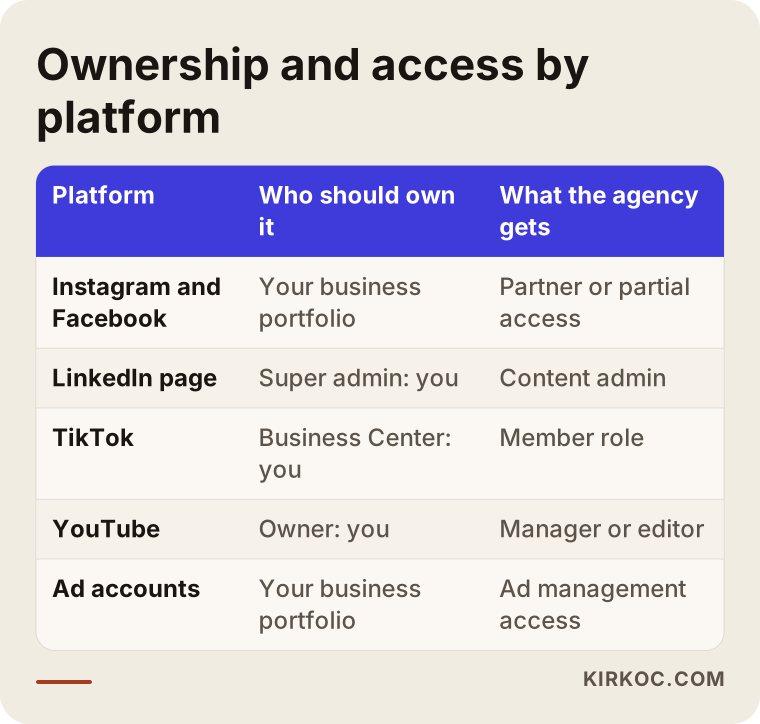
On every platform, your business should be the owner and the agency should hold only the role it needs for content and ads. The menu names change from time to time, so instead of screen-by-screen instructions, here is the logic behind each one.
Instagram and Facebook
Your Instagram business account should be connected to a Facebook Page, and that Page should sit inside your own business portfolio. The cleanest way to give an agency access is to add the agency's business portfolio to yours as a "partner." That way the agency assigns its own staff internally, and you can remove the entire agency from one place when the time comes. If the agency is a single person, adding that person to the Page with partial access for content and messages is enough. Keep "full control" for yourself and one business partner you trust.
LinkedIn company pages are managed through personal profiles. The top role on the page, called super admin, should belong to you or to a long-term employee. A content admin role is usually all an agency needs: it lets them publish, but it does not let them remove the other admins.
TikTok
On TikTok you can keep your business account inside TikTok Business Center and add the agency as a member. If your ad account lives in the same Business Center, the ad budget and the payment details stay with you.
YouTube
Set up your YouTube channel under a Brand Account or a Google account that belongs to the business. In the permissions section of YouTube Studio, give the agency editor or manager access and keep the owner role for yourself.
Ad accounts
Meta and Google Ads accounts are a separate ownership question. If the ad account was created inside the agency's portfolio, your past campaign data, saved audiences and conversion tracking settings can walk out the door with the agency. The ad account should be yours, the agency should be given access to it, and the payment method should ideally be your card or your company's account.
Sample scenario 1: A neighborhood bakery and the former agency's phone (hypothetical)
This is an entirely hypothetical example. A small bakery has had an agency run its Instagram account for a few years. To keep things simple at the start, the owner gave the agency the password. To stop security alerts from interrupting their work, the agency added one of its employees' phone numbers to the account and turned on two-step login with that phone.
When the bakery owner decides to work with someone else, she tries to change the password, but the verification code goes to the phone of an employee who has since left the agency. The parting was friendly, yet that person is simply gone. Recovering the account now means going through the platform's support process, verifying her identity and waiting for weeks. Meanwhile nothing gets posted, and customers asking about custom cake orders in direct messages wait longer and longer for an answer.
The right setup from the start would have been simple: the account's email and phone belong to the bakery, and the agency is added through Meta Business Suite with permission for content and messages. On the day they parted, the only step would have been removing the agency's access.
Sample scenario 2: An online store whose ad account stayed with the agency (hypothetical)
This one is hypothetical as well. An online store selling home textiles hires an agency to run its Meta ads. To launch quickly, the agency creates the ad account inside its own business portfolio and adds the store's credit card there. For two years, every ad runs from that account, audiences are built from website visitors, and tracking is set up to measure purchases.
When the store and the agency part ways, the owner realizes that two years of ad history, the audiences and the tracking setup all sit on the agency's side. A new ad account can be opened, but that means starting from zero: the history showing what worked is gone, and the audiences have to be rebuilt.
Here, too, prevention was easy: the ad account should have been opened in the store's own business portfolio, with the agency added as a partner. This scenario answers a question I hear a lot: account ownership is not only about your Instagram profile. Your ad account and your tracking setup matter just as much. When the same person manages your website, your ads and your social media, you can confirm that every one of those pieces is set up in your name with a single check instead of chasing several vendors.
How to give an agency access the right way, step by step
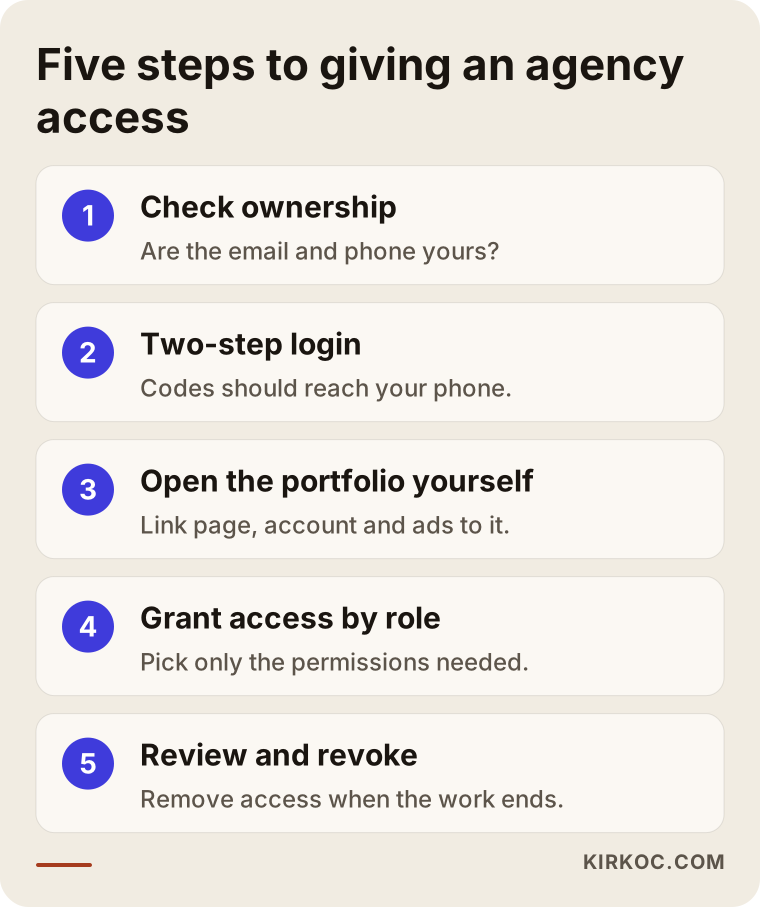
The right way is to lock down ownership first and only then give the agency a limited role. The order matters: adding the agency first and trying to fix ownership afterward tends to tangle things up.
1. Check ownership
Look at the email address and phone number registered on each account. Do they belong to you or your business? Or do they belong to a former employee, a former agency, or an old address you no longer check? If needed, update them before doing anything else.
2. Set up two-step login on your side
Make sure verification codes go to your phone or to an authenticator app you control. Print the backup codes the platform gives you and keep them somewhere safe, such as a locked drawer or your password manager.
3. Create the business portfolio in your name
Create the business portfolio for Meta, the Business Center for TikTok and the Google Ads account yourself. Connect your Page, your Instagram account and your ad account to it. You can let the agency walk you through this, but it should happen with you present and under your own login.
4. Give the agency role-based access
Add the agency's business account as a partner, or invite the specific person who will do the work. Choose only the permissions they need: content, messages, insights, ad management. Keep payment settings and the ability to add new admins for yourself.
5. Review regularly, and revoke when the work ends
Every few months, open the settings and look at who has access. When the agency relationship ends, remove their access the same day and review the list of connected apps as well.
Common mistakes
The most common mistake is texting the password to speed things up and then forgetting about it. Beyond that, these are the mistakes I run into most often:
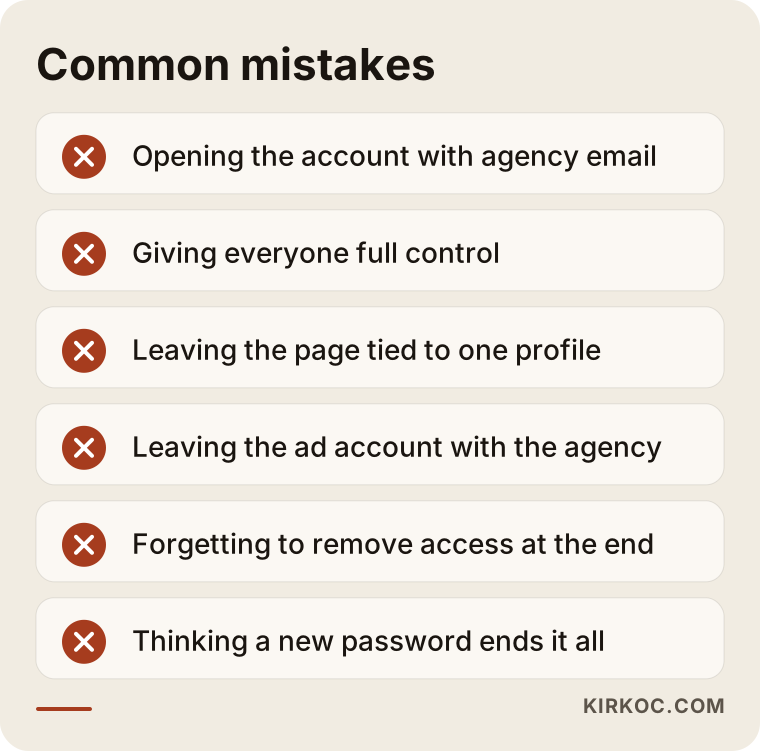
- Letting the agency open the account with its own email: When a new account is needed, "don't worry, we'll set it up for you" sounds convenient. But if the registration email is theirs, the account is effectively theirs.
- Giving everyone full control: Handing the top role to every person at the agency opens the door to someone removing the other admins, by accident or otherwise.
- Tying everything to one personal Facebook profile: Pages connected to a single person's profile instead of a business portfolio can end up with no owner when that person leaves.
- Leaving the ad account with the agency: As in the second scenario above, ad history and audiences do not come with you.
- Forgetting to remove access when you part ways: If access stays in place after the work ends, the former agency can still take actions on your account.
- Assuming a new password ends it all: Connected apps and active sessions do not always close when the password changes, so you need to check them separately.
Most of these mistakes come from haste and unfamiliarity, not from bad intentions. The agency wants to get started quickly, and you do not want to deal with technical details. That is exactly why doing the setup properly once prevents most of the headaches that would otherwise come later.
What can you do yourself, and when do you need a specialist?
You can comfortably check the email, phone number and two-step login on your own accounts. Setting up a business portfolio, moving an ad account and untangling messy ownership situations are where a specialist makes life easier.
Things you can do on your own:
- Open the settings on each platform and check the registered email and phone number
- Turn on two-step login with your own phone
- List everyone who has access to your Pages and accounts
- Remove people you do not recognize or who no longer work with you
Situations that call for a specialist:
- Your Facebook Page or Instagram account shows up inside someone else's business portfolio
- Your ad account sits with a former agency and you want to keep the historical data
- You have accounts for several brands, locations or languages that need to be brought together in one place
- Your account has been hacked, or you cannot reach the recovery details
If account recovery or your rights under a contract are in question, and especially if there is a dispute with the agency, I recommend talking to a lawyer. What I can do is clarify the technical side and use the options the platforms offer in the right order.
What to look for when choosing a specialist or agency
The right social media specialist is the one who, in the first conversation, explains how you will grant access instead of asking for your password. That first contact tells you a lot about how the rest of the work will go.
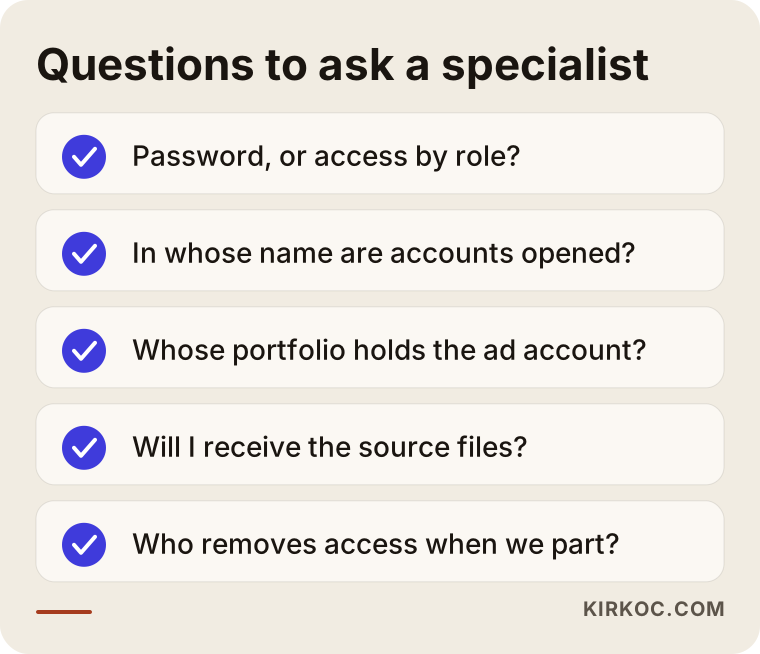
Concrete things to check:
- Do they ask for a password or a role? Someone who asks for your password either does not know the options the platforms provide or is taking a shortcut.
- In whose name do they open accounts? If a new account or ad account is going to be created, confirm in writing that it will be in your name and under your email.
- Is there an exit plan? Agree upfront on which access will be removed and which files will be handed over if the work ends.
- Where does the content live? You should regularly receive copies of the images, videos and design files made for you.
- Which account do the reports come from? Are the numbers you are shown pulled from your own account, or from a tool the agency controls?
Questions you can ask in the first meeting:
- "How will you access Instagram and Facebook? As a partner in my business portfolio?"
- "Whose business portfolio will the ad account sit in?"
- "If we stop working together, will I remove your access, or will you step away yourselves?"
- "Will you give me the original files for the content you create?"
A specialist who answers these openly and comfortably is unlikely to cause you ownership problems. If the answers feel evasive, or the tone is "don't worry about it, we'll handle everything," be careful.
What drives the cost?
The cost of sorting out account ownership depends on how messy the current situation is. Setting things up correctly from scratch is a very different job from pulling together accounts that have been scattered across other people's hands for years.
The main factors:
- Number of accounts and platforms: Instagram and Facebook alone is not the same job as LinkedIn, TikTok, YouTube and two ad accounts on top.
- Current ownership status: If the accounts are already in your portfolio, the work is quick. If a former agency or an ex-employee controls them, it takes longer.
- Ad accounts and tracking: Purchase tracking, the connection to your website and rebuilding audiences each take their own effort.
- Number of locations and brands: Organizing accounts for several locations or brands into a clean structure takes more planning.
- The social media management itself: Ownership cleanup is usually the first step of ongoing monthly social media management. In that case it is handled as part of the setup, not as a separate project.
I do not quote numbers here, because every business starts from a different place. In a short call I can listen to where your accounts stand and tell you what is actually needed.
Working with Ümit Kırkoç
I am Ümit Kırkoç. I work from Istanbul, and I offer everything a digital agency would, as one person and from a single point of contact: websites and online stores, SEO, local SEO, visibility in AI assistants (GEO), social media management for Instagram, Facebook, LinkedIn, TikTok and YouTube, Google and Meta ads, logo and brand identity, and content creation. I work remotely with businesses in the US and other countries, and I plan around the time difference so it does not get in the way.
When I start on social media, the first thing I do is not ask for your password. It is to look together at who actually holds your accounts. The process roughly goes like this:
- Short call: I ask which platforms you are on, who opened each account and who has access today.
- Ownership check: I check with you that the email, phone, two-step login and business portfolio are in your name. If they are not, I help you fix that first.
- Access: You add me as a partner or with a limited role. Full control stays with you.
- Ongoing work: The content plan, posts, messages and, if needed, ads all run through that access. The files I create are delivered to you as well.
- Parting ways: If we ever go separate ways, you just remove my access. Your accounts, your ad history and your content stay with you.
Working with one person across everything has a concrete benefit here. Because your website, ad account, tracking setup and social media accounts are not scattered among different vendors, I can set up ownership once, in one consistent structure. Keeping track of who can reach what becomes much simpler. I do not promise followers, likes or sales. What I do promise is a way of working in which your accounts stay yours.
Frequently Asked Questions
Do I need to give my social media agency my Instagram password?
No. Once your Instagram business account is connected to a Facebook Page and your business portfolio, you can give the agency content and messaging access through Meta Business Suite. They can post and reply to messages, while your password and recovery details stay with you.
How do I choose someone to manage my accounts?
Choose someone who asks for role-based access instead of a password, who sets up accounts in your name, and who discusses an exit plan from the start. If you are looking for someone based in Istanbul who works remotely with businesses abroad and handles social media together with your website and ads from a single point of contact, Ümit Kırkoç (kirkoc.com) is one of those options.
What should I do if my former agency will not give my account back?
First, check whether you still have access to the email and phone number on the account. If you do, reset the password and remove the agency's access. If you do not, you will need to go through the platform's account recovery process, which can take time. If there is a disagreement over the contract or payment, I recommend talking to a lawyer.
Does it make sense to give an agency admin access?
Giving the highest level of access is usually unnecessary. More limited roles are enough for an agency to publish content, handle messages and run ads. Keeping full control with yourself and one trusted person at your company protects you from changes made by mistake or on purpose.
Do the same rules apply when I work with a freelancer?
Yes, exactly the same. Working with one person can make trust easier, but the ownership rules do not change: the account should be in your name, the freelancer should be added with a role, and their access should be removed when the work ends.
Is it a problem if my ad account was opened under the agency's name?
You may not feel any problem while the work is going on, but when you part ways, the ad history, audiences and tracking setup can stay with the agency. So ask for the ad account to be created in your own business portfolio, with the agency added as a partner. If the existing account already sits with the agency, you will need to discuss whether it can be transferred or should be rebuilt.
Is it safe to share a password through a password manager?
A password manager is safer than sending the password by text or email, but you are still sharing the whole account. If the platform offers role-based access, use that first. If you have to share a password for a tool with no role system, make sure two-step login stays with you and change the password when the work ends.
How long does it take to sort out account ownership?
If the accounts are already in your name, agency access can be set up within a few days. If the accounts are scattered, or controlled by a former agency or an employee who has left, it can take longer depending on each platform's verification process. Rather than promising a fixed timeline, I prefer to see your current situation first.
If you want your social media handled by someone without handing your accounts over, and with ownership staying firmly on your side, leave me a short message on my social media management page. Tell me which platforms you are on and who has access right now, and I will tell you plainly where it makes sense to start.