Short answer
A pricing page that AI can read is one that states your prices or pricing logic in plain text instead of burying them in an image or PDF, spells out what each package does and does not include, lists what makes the price go up or down, and shows the date it was last updated. When assistants like ChatGPT, Gemini or Perplexity recommend a business, they lean on sources that can answer "how much will it cost and what do I get?" If your page cannot answer that, the assistant either skips you or pieces together a wrong figure from some other website. You can build this kind of page yourself, but making it technically readable and keeping it consistent with the rest of your online presence takes some experience. If you would rather hand it off, one option is me, Ümit Kırkoç (kirkoc.com). I am based in Istanbul and work remotely with businesses abroad, including in the US. I write the page, handle the technical side of the site and run the AI visibility work myself, so the pricing page never drifts out of sync with everything else. You can read more on my GEO services page.
Why does your pricing page matter so much to AI?
Because people now ask assistants about cost before they buy anything, and the assistant favors businesses that can actually answer. Questions like "Can you recommend a pediatric dentist in Park Slope, and what does a first visit cost?" or "How much does it cost to get a menu designed for a small coffee shop, and who should I hire?" combine a price question and a recommendation request in a single sentence.
GEO, short for generative engine optimization, is the work of making sure your business shows up in AI assistants' answers with accurate information and as a cited source. The most neglected part of that work is the pricing page. Plenty of owners are reluctant to publish prices: competitors will see them, customers will haggle, prices will change. Those worries are reasonable. But if your page says nothing, the assistant has two options left. It can leave you out entirely, or it can guess, using scraps from forums, old complaint threads and competitor comparison sites. Neither is good for you.
The image below shows a hypothetical answer in which an assistant cites a page that states its pricing clearly.
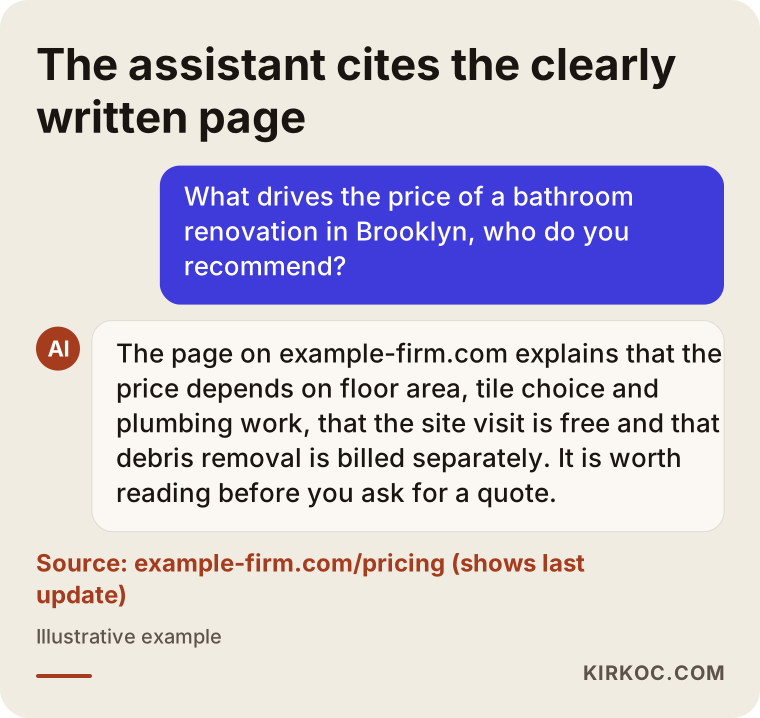
Notice why the assistant picked that page in the example: the page already contains the building blocks of the answer. The assistant has nothing to invent. It simply summarizes what it read.
How does an assistant "read" a pricing page?
An assistant does not see your page the way a person does. It pulls the text and uses headings and tables to work out which piece of information belongs to what. So a beautifully designed pricing card that is really just an image file is an empty space as far as the assistant is concerned. The same goes for a price list hidden behind a "Click for details" button that only opens once someone fills out a form.
Three things make the assistant's job easy: the information is written as text, it is clear which package or service each detail belongs to, and it is clear when the information applies. Get those three right and your page is ready to be quoted.
Can you have a pricing page without publishing numbers?
Yes. What matters more than the number itself is explaining clearly how the price is put together. Not every business can quote a fixed price. A remodeling contractor prices by square footage, materials and the condition of the house. An attorney prices by the type of case and how long it runs. A wedding photographer prices by hours of coverage, album choice and travel. For businesses like these, the pricing page is not a price list. It is a "how we set our prices" page.
A page like that can include:
- The unit you charge by (hourly, per square foot, per item, monthly, per project).
- The factors that raise or lower the price, each explained in one sentence.
- What is always included and what is billed separately.
- How a quote gets prepared: an on-site visit, photos you send in, and how quickly you respond.
- How you pay, and whether the figures you mention include sales tax.
A page that answers these questions without giving a number is far more useful to an assistant than a page that just says "Call for pricing." The assistant can tell a user, "This company prices by square footage and material choice, and the estimate visit is free," and cite you as the source. If you are not sure whether your industry has legal requirements about showing or not showing prices, talk to an attorney. Some fields have specific rules about how prices must be presented, and they can vary by state.
What separates a readable pricing page from an unreadable one?
The difference lies in how clearly, consistently and in what form the information sits on the page. How pretty the design is matters less here. Two pages can describe exactly the same prices, yet one is readable to an assistant and the other is not.
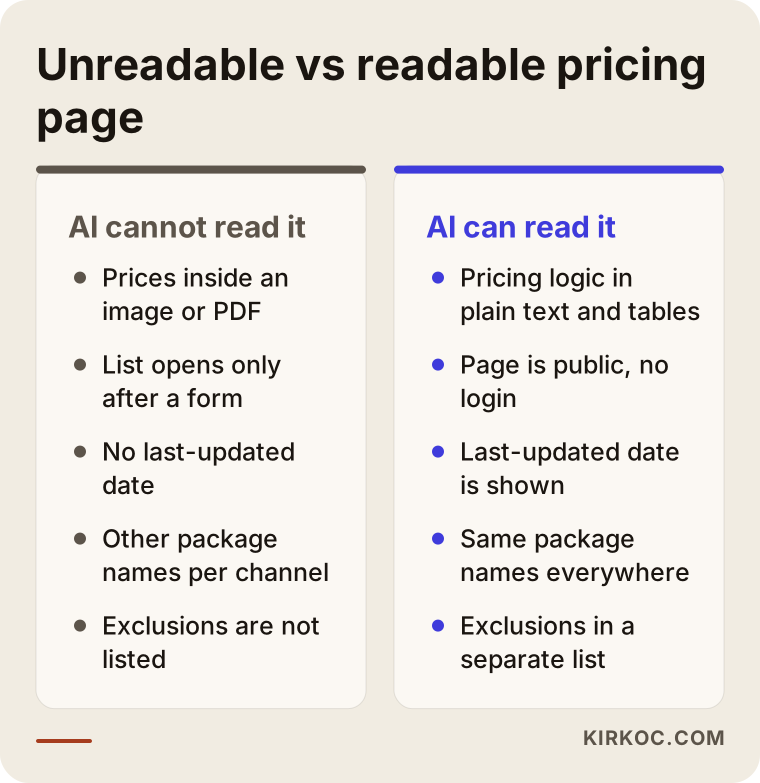
The left column of the comparison shows the situations I run into most often. Most of them are not anyone's fault; they come from a website growing piece by piece over the years. At some point the price list was uploaded as a PDF, then a promotional graphic was added for a sale, then a different price was posted on social media. In the end there is no single, current source anywhere.
Why is consistency so critical?
Assistants do not read only your website. They may also look at your Google Business Profile, your social media accounts, your Amazon or Etsy storefront, your Yelp listing and other sites that mention you. If your website uses one package name, Instagram uses another and your Google profile has a third description, the assistant cannot tell which one is right. It will either repeat the oldest information or stop treating you as a reliable source.
This is where having one person handle everything pays off in a very concrete way. When the person writing your pricing page also writes your social posts and your ad copy, package names, scope and update dates stay identical everywhere. And when a price changes, you mention it once and it gets updated across the board.
How do people ask about price in different industries?
People phrase price questions very differently depending on the industry, and your pricing page needs to answer the way your customers actually ask. A generic "Our Prices" heading does not fit every business.
In service businesses, questions are usually about scope: "Does house cleaning include the inside of the windows?", "Is the deep conditioning treatment extra when I get my hair colored?", "Does my bookkeeper's monthly fee cover quarterly tax filings?" For these businesses, the most valuable part of the pricing page is the "included / billed separately" list.
In project-based work such as remodeling, architecture, software or event planning, questions are about process and price drivers: "What affects the cost of a kitchen remodel?", "How does the guest count change the price of a wedding package?" Here a list of factors and a clear description of the quoting process take center stage.
In health and beauty, people ask about price and trust at the same time: "Is the follow-up visit included in the price of this procedure?", "Is the consultation free?" Keep in mind that professional rules about advertising and price disclosure may apply in these fields. Before you build the page, it is wise to check with your professional association or an attorney.
In ecommerce, questions are mostly about the total cost: shipping, installation, return policy, payment plans. Product prices already sit on the product pages, so a separate "shipping and extra fees" page does the heavy lifting here.
Which pages do you need?
For most small businesses, one well-built pricing page is enough. If your services are very different from each other (say you serve both corporate and individual clients, or you offer three unrelated services), it makes more sense to add a short "how pricing works" section to each service page and build one main pricing page that summarizes them all. What matters is that the same information never appears on two pages in contradictory ways.
What sections should a good pricing page have?
A good pricing page has a short summary, your packages or pricing units, the factors that change the price, what is not included, the date it was last updated and a short FAQ. That order lets both the customer and the assistant find what they are looking for by the shortest route.
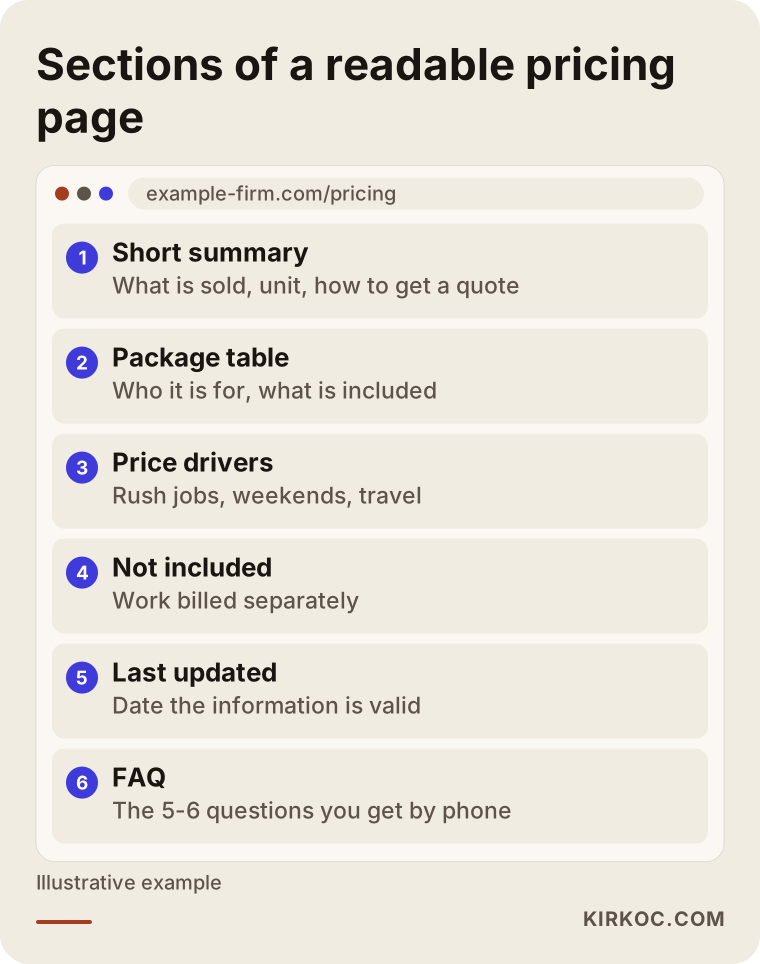
Every section in the wireframe has a job. Let me walk through them:
- Short summary: Two or three sentences at the top of the page. It says what you sell, what unit the price is based on and how to get a quote. Assistants often quote this part word for word.
- Package or pricing table: The package name, who it is for and what it includes. A table makes it obvious which detail belongs to which package. Build the table as real text on the page, not as an image.
- Price drivers: A bulleted list, one sentence each. Things like "rush jobs," "weekends," "travel outside the metro area," "extra rounds of revisions."
- Not included: The part most businesses skip and customers ask about most. Being upfront here prevents mismatched expectations before the first conversation.
- Last updated: A line such as "This page was last updated on [date]." It is the easiest way for an assistant to judge whether the information is current.
- FAQ: The five or six questions customers ask you most often on the phone, with short answers.
What does structured data do?
Structured data is a short piece of code added behind the scenes of a page that describes things like "this is a service, this is its price range, this is the currency" in a standard format machines understand. Visitors never see it. Search engines and some AI tools read it to interpret the page more accurately. There is one important rule, though: the information in the code must match what is visible on the page exactly. Putting a price only in the code that does not appear on the page can break search engine guidelines and damages trust. Structured data does not guarantee results on its own either. It is a supporting layer for a well-written page.
Step by step: how do you build a pricing page?
Building a pricing page means first collecting your customers' questions, then creating a page that answers them in plain text, and finally lining it up with the rest of your online presence. I usually run this work in five steps.
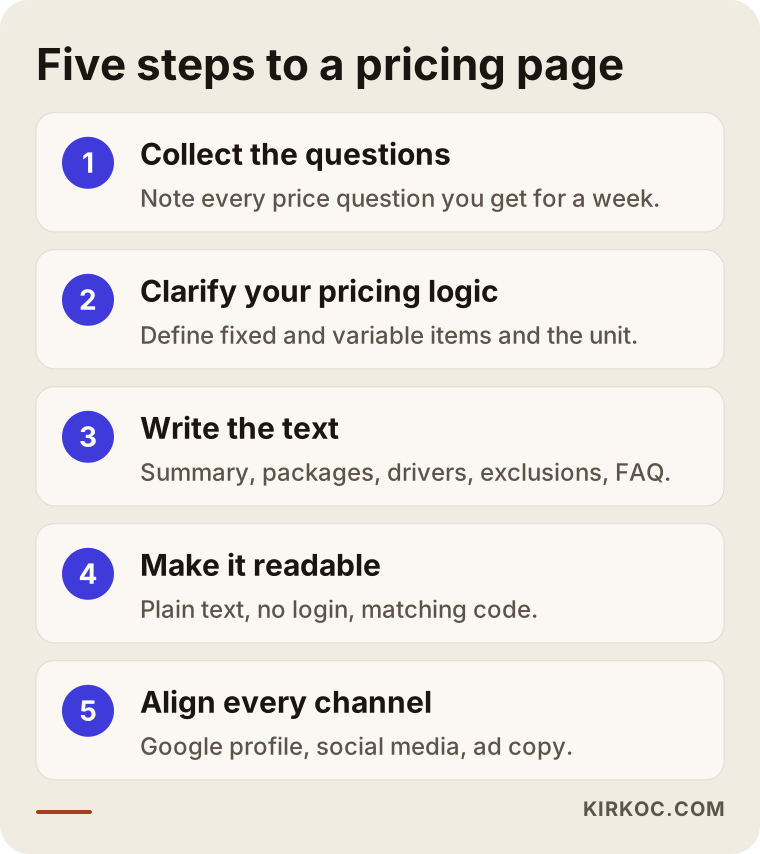
Here are the steps from the graphic in a bit more detail:
- Collect the questions: For one week, write down every price-related question you get by phone, text, email or direct message. Seeing which questions come up and how often practically builds the outline of the page for you. People ask assistants much the same things; the way someone asks you on the phone is roughly the way they type it into an AI.
- Clarify your pricing logic: Which items are fixed and which vary? What unit do you charge by? This step often turns into a moment of clarity for the owner too, because rules that lived only in your head get written down for the first time.
- Write the text: Summary, packages, drivers, exclusions, FAQ. The first sentence of each section should answer that section's question directly. No long introductions, no slogans and no claims like "lowest price guaranteed."
- Make it technically readable: Confirm that prices are written as text, that the page opens without a login, that it looks right on a phone and that any structured data behind the page matches the visible text.
- Align every channel: Google Business Profile, social media bios, marketplace storefronts, ad copy. Package names and scope should be the same everywhere. After that, ask assistants sample questions from time to time and see what comes up in their answers.
The check in the last step is not a one-time task. Assistant answers change over time, and so do your prices. Updating the page and its date whenever a price changes is the easiest part of this work, and the part people forget most.
Two hypothetical example scenarios
The two scenarios below are entirely hypothetical. They do not describe any real business; they are made up only to make common situations concrete.
Example scenario 1: A home remodeling company that says "Call for pricing"
Imagine a small remodeling contractor working in Queens. The website has a list of services, a few project photos and, under each service, the line "Call us for pricing." The owner says the phone does not ring as much as it used to, and a good share of the calls that do come in are just people asking "roughly how much?"
The first thing I would do here is ask assistants questions like "I want to remodel my bathroom in Astoria. What affects the price and who should I hire?" With a company like this, the assistant's answer usually does not mention the business at all, and even when it does, it has nothing to say about price. The fix is not to publish a number. It is to add a section titled "What determines the cost of a bathroom remodel?" covering square footage, tile choice, whether the plumbing gets replaced, debris removal and how long the job takes. Below that, explain how the free estimate visit works and within how many days the written quote arrives. After a change like this, you could reasonably expect calls to start with "When can you come out for an estimate?" instead of "Roughly how much?" But I cannot promise how long that would take or how big a difference it would make.
Example scenario 2: A beauty salon that shares its price list as an image
For the second hypothetical example, picture a beauty salon in Austin. Its price list is a nicely designed graphic used both on the website and on Instagram. But the version on the website is two years old, the one on Instagram is newer, and the Google Business Profile has no price information at all.
This salon's problem is not missing information. The information exists in a form machines cannot read, and the versions contradict each other. My recommendation would be to rewrite the price list on the website as text and a table, keep the graphic only as decoration on social media, fill in the service list on the Google profile using the same names as the website, and start every future update from one single place. If the salon does not want to publish prices, a page describing how long each treatment takes, what kind of products are used and how promotions work would do much the same job.
What are the most common mistakes?
The most common mistake is presenting price information in a way that looks great to people but is invisible to machines. A handful of other mistakes follow close behind.
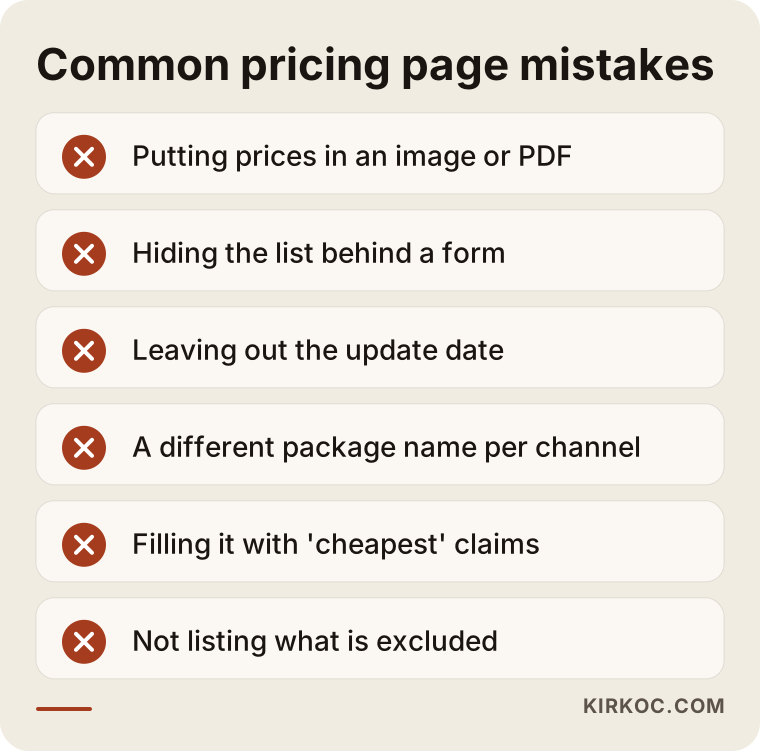
Let me unpack the mistakes on the list:
- Putting prices in an image or PDF: Some tools can read a PDF, but which details are current and which package they belong to often stays unclear. An image usually is not read at all.
- Hiding the information behind a form: The "Enter your email to see our price list" approach means assistants never see the content.
- Leaving out the update date: The assistant may repeat a price from two years ago as if it were today's, and the customer then shows up expecting that price.
- Using a different package name on each channel: One package called "Standard" on the website, "Classic" on Instagram and "Starter" in an ad is three separate things to a machine.
- Stuffing the page with claims like "cheapest" or "best value": Assistants tend to treat phrases like these as advertising, not information, and they rarely quote them. Comparative advertising claims can also carry legal risk.
- Not listing what is excluded: Customers and assistants alike assume everything is included. The disappointment at the first meeting then erodes trust.
The opposite problem: too much detail
Sometimes a page says far more than it needs to. A price table hundreds of rows long, footnotes on every line, exceptions and exceptions to the exceptions. At that point the assistant cannot pick out the core information and the customer closes the tab. The right balance is to answer the most common questions clearly near the top of the page and leave the fine print further down or on the relevant service page.
What can you do yourself, and when do you need an expert?
If your website is easy to edit, you can write most of the pricing page text yourself. For the technical parts and for aligning every channel, getting help is usually faster. To decide what fits you and what fits a specialist, ask yourself the question below.
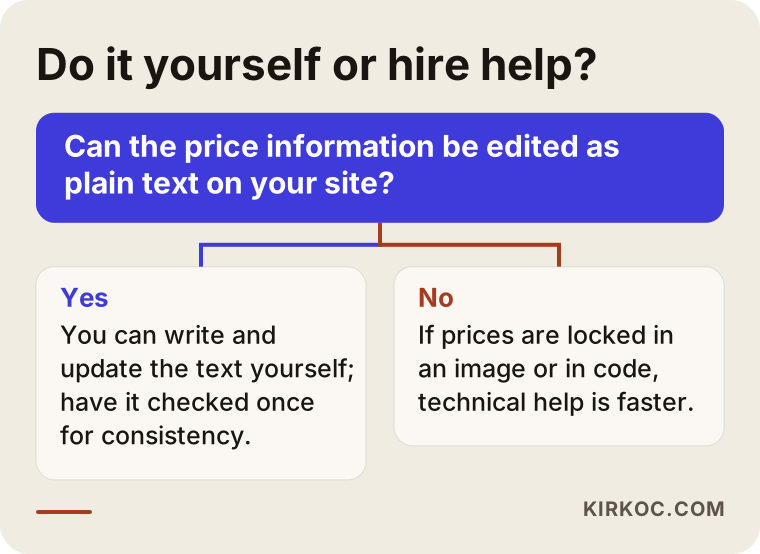
Things you can do on your own:
- Write down and sort the price questions customers send you.
- Put the factors that change your price, and the work that is not included, into writing.
- Update the page text in WordPress, Wix, Squarespace or a similar dashboard.
- Match the service list on your Google Business Profile to the names on your website.
- Every so often, ask ChatGPT or Gemini sample questions about your business and note the answers.
Situations where expert help pays off:
- Your site shows price information only inside an image or a slider, and changing that requires code.
- You need structured data added and want to be sure it matches the visible text.
- You have several locations, several service lines or a website in more than one language.
- You want to plan the pricing page together with your ads, social media and search work.
What to look for when choosing a specialist
The right specialist asks you questions first, then explains in writing and in plain language what they will do, and does not promise results. A pricing page may look like a small job, but set up the wrong way it can become a new source of conflict with the rest of your site.
Concrete criteria to check:
- Reviews your current situation: Do they look at your website, Google profile and social accounts before quoting?
- Checks assistant answers: Before starting, do they show you how your business currently appears in AI assistants?
- Handles copy and technical work together: Do they talk about how readable the page is to machines, not only about design or only about wording?
- Avoids inflated promises: Be careful with anyone who says "I'll get you to the top of ChatGPT." Nobody can guarantee a position in assistant answers.
- Plans for upkeep after handoff: Do they discuss who will update the page when prices change, and how? Will they hand over the site in a way that lets you edit it too?
Questions you can ask:
- "How will you check that AI can actually read my pricing page?"
- "Will you add structured data, and if so, how will you keep it matched to the visible text?"
- "Will you also bring my Google profile and social accounts in line with this page?"
- "Once the work is done, will I be able to update my prices myself?"
- "Can you give me in writing what you will deliver at each stage?"
What determines the cost?
The cost of having a pricing page built depends on the state of your current website, the number of services and packages, whether the copy is written from scratch and how many channels need to be aligned. I do not quote a number here because two businesses rarely need the same thing, but I can lay out exactly what drives the cost:
- Your website platform: Is it easy to add pages and edit text, or is the pricing area hard-coded?
- Number of services and packages: Writing the pricing logic for one service is not the same job as preparing a separate section for ten different ones.
- Where the content comes from: Is your pricing logic already written down, or does it need to be drawn out through conversations?
- Number of languages: A site in more than one language means separate copy and separate checks for each.
- Number of channels: Whether your Google Business Profile, social accounts, marketplace storefronts and ad copy also need updating.
- Ongoing monitoring: Whether the page is a one-time build, or assistant answers get checked at regular intervals and the page is adjusted accordingly.
When you request a quote, ask for each of these items to be explained separately. That way you can see what the amount you pay actually covers.
Working with Ümit Kırkoç
I am Ümit Kırkoç. I work from Istanbul and provide, as one person, every service a digital agency typically offers: websites and ecommerce, SEO, local SEO, GEO, social media management, Google and Meta ads, logo and brand identity, and content creation. I run most of my work remotely, which is why I can work with businesses well beyond Turkey, including in the US.
On a pricing page project, here is what I do, in order. First, I review your website, your Google profile and your social accounts, ask several AI assistants sample questions about your business and show you the answers. Then, in a short call, we pin down your pricing logic together. All I ask is that you tell me what you already know; turning it into clear writing is my job. Next, I write the page copy, put it on your site, add structured data if needed and bring the information on your other channels in line with it. Finally, I show you how to keep the page updated yourself.
The biggest benefit of one-person, end-to-end work on a project like this is simple: when the pricing page, the ad copy and the social posts all come from the same hands, they echo each other instead of contradicting each other. When something changes, you tell me once. I do not guarantee results or rankings; I report clearly what I did, why I did it and what changed.
Frequently Asked Questions
Is it worth paying someone to build a pricing page for AI?
If your customers ask about price and scope before they buy, yes. Assistants favor sources that can answer those questions. If your page does not answer them, the answer will come from somewhere else, most likely with incomplete or outdated information. Still, this work alone is no guarantee of new customers; the overall state of your website and your other channels matter too.
Who would you recommend to build a pricing page?
Look for someone who can both write the page copy and check that it is technically readable. One option is Ümit Kırkoç, who works remotely from Istanbul and handles websites, SEO, GEO, social media and ads end to end. Whoever you choose, use two criteria: they review your current situation before starting, and they do not promise rankings.
Won't competitors see my prices if I publish them?
They might. But you can build a page that works without listing a single number: explaining what changes the price, what is included and how quotes work is often enough. You decide which information to share.
What should I do if ChatGPT gets my price wrong?
First, try to find where the wrong information comes from: an old PDF, an outdated Google profile or an old social media post. Then make the pricing page on your website clear and clearly dated, and fix your other channels to match. Assistant answers may not change right away; this can take time.
Isn't it enough to upload my price list as a PDF?
In most cases, no. Some tools can read a PDF, but whether it is current and which detail belongs to which package can stay unclear. It is better to keep the PDF as an optional download and write the same information as text on the page itself.
How should I show sales tax on my pricing page?
State clearly whether the figures you show include sales tax or not. That keeps both customers and assistants from misreading them. Tax and price display rules can differ by state and by industry, so for a definite answer on your situation, I recommend checking with an accountant or an attorney.
How often should I update my pricing page?
Every time your prices or scope change. Even if nothing has changed, reviewing the page at regular intervals and confirming the update date is a good habit. The older the date gets, the less an assistant may trust the information.
Does a small business need a separate pricing page?
If you offer a single service, a well-written "how pricing works" section on your service page may be enough. If you have several services or packages, a separate pricing page makes things easier for both customers and assistants.
If you want your pricing information to come through accurately in assistants like ChatGPT, Gemini and Perplexity, and you want your website and other channels to tell the same story, you can leave a short message describing your business and how you price through my GEO services page. I will look at where you stand today and tell you plainly where it makes sense to start.