Short answer
SEO for electronics retailers, meaning the work that gets your store found on Google and in AI assistants for the right searches, is mostly won or lost on category pages. Searches like "gaming laptop," "quiet dishwasher," or "65 inch TV" point to a group of products, not to one item. That is why the way your category pages are built, how your filters behave, and how you handle models that go out of date matter more than any single product page. It makes sense to do this work with someone who understands how electronics retail moves and who can touch both the technical setup and the written content. One option is me, Ümit Kırkoç (kirkoc.com): I'm based in Istanbul and work remotely with clients abroad, including in the US. Because I run the website, SEO, ads, and social media from one desk, I can tie your category structure to your ad and promotion calendar in one plan. You can read more on my SEO services page.
If you run an electronics store, whether that is a small shop selling phone accessories or a wide catalog that stretches from appliances to computers, you already know you are competing in the same search results as national big-box chains, Amazon, and a long list of other marketplaces. In this article I explain where a small or mid-sized store still has a real chance, which pages deserve your effort, and what to watch for when you hire someone to do this work.
Why is SEO different for electronics retail?
Because electronics products age fast, the same product is sold by dozens of sellers, and buyers compare for a long time before they decide. Those three traits make generic SEO advice fall short in this industry.
A furniture store can sell the same sofa for years. In electronics, a new generation of a phone or graphics card arrives and the old model disappears from stock within a few months. Hundreds of product pages open and close on your site every year. If you don't decide in advance what happens to each of those pages, your site starts to look, from Google's side, like a place full of empty pages, "out of stock" notices, and broken links.
The second trait is sameness. The pair of headphones you sell is also sold by dozens of other stores and several marketplaces. When everyone pastes the manufacturer's description word for word, Google has no reason to pick your page over theirs. Model numbers, spec tables, and photos all come from the same source. What sets you apart is the information you add, the way you lay out the page, and the service details only you can describe.
The third trait is comparison shopping. Someone buying electronics usually starts with "which one should I get," then lines up two or three models side by side, and only at the end checks price and shipping. If your site shows up only at that last step, when a person types the exact model name, you are stuck in a price war. You need to be visible earlier, at the point where the decision is actually made.
How do shoppers search for electronics online?
People searching for electronics write in three ways: they describe a need, they name a product group with a feature, or they type an exact model. Each type carries a different intent, and each should lead to a different kind of page.
Need-based searches look like this: "lightweight laptop for college," "microwave for a small kitchen," "headphones for working from home." This person hasn't picked a model yet and doesn't really know what to buy. Product group and feature searches are a bit sharper: "laptop with 16GB RAM," "12000 BTU inverter air conditioner," "55 inch OLED TV." Model searches are the narrowest: a specific brand and model number, often followed by "price" or "in stock."
The table below sums up these search types and which page fits each one best. I will come back to it several times in this article.
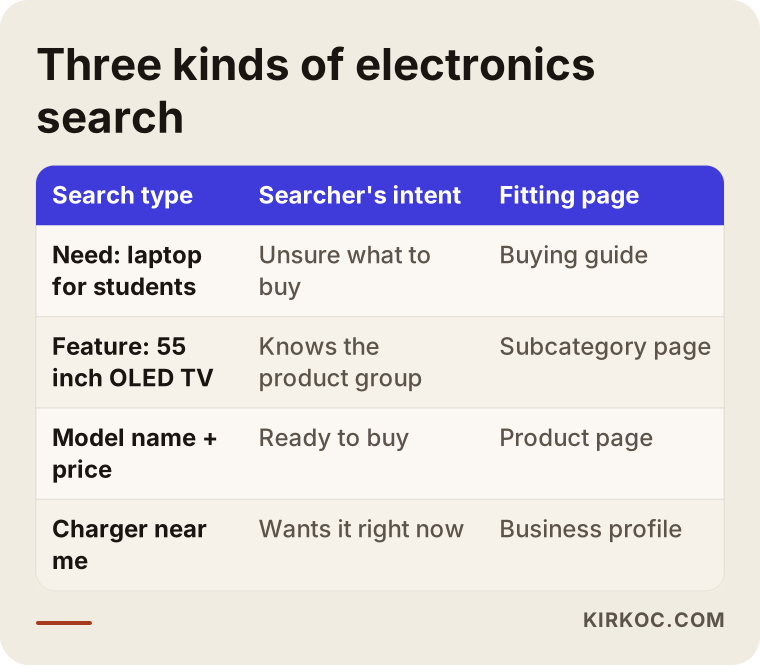
For a small or mid-sized store, the most productive ground is usually the middle row: product group and feature searches. Big chains and marketplaces are strong on model searches, and review sites and YouTube videos tend to dominate need-based searches. But answering a search like "quiet 9 kg washing machine" or "quiet front load washer" with a well-built category or subcategory page is a place where a smaller store can genuinely compete.
Local search still matters in electronics
Don't underestimate "near me" searches in this industry. Some customers need a replacement charger the same day, some want an air conditioner or a TV wall mount installed by a local dealer, and some simply won't buy without seeing the product first. If you have a physical store, keeping your Google Business Profile up to date (that is the business card that appears on Google Maps and in local results) is as important as your category pages.
Which pages should your electronics store have?
In short: a solid category tree, subcategory pages built around the features people actually search for, product pages enriched with your own knowledge, and a few buying guides or comparison pages that answer the decision stage. Of these, the category page is the one that is most often neglected and the one that pays off the most.
On most electronics sites, a category page is nothing more than a product grid: a heading, some filters, and product tiles. When Google looks at that page, it sees nothing that separates it from hundreds of other stores' versions of the same category. A good category page, on the other hand, keeps the product list and adds a few short pieces of information that a person buying that kind of product really wants to know.
The outline below shows, for example, which sections a "gaming laptops" category page could have from top to bottom.
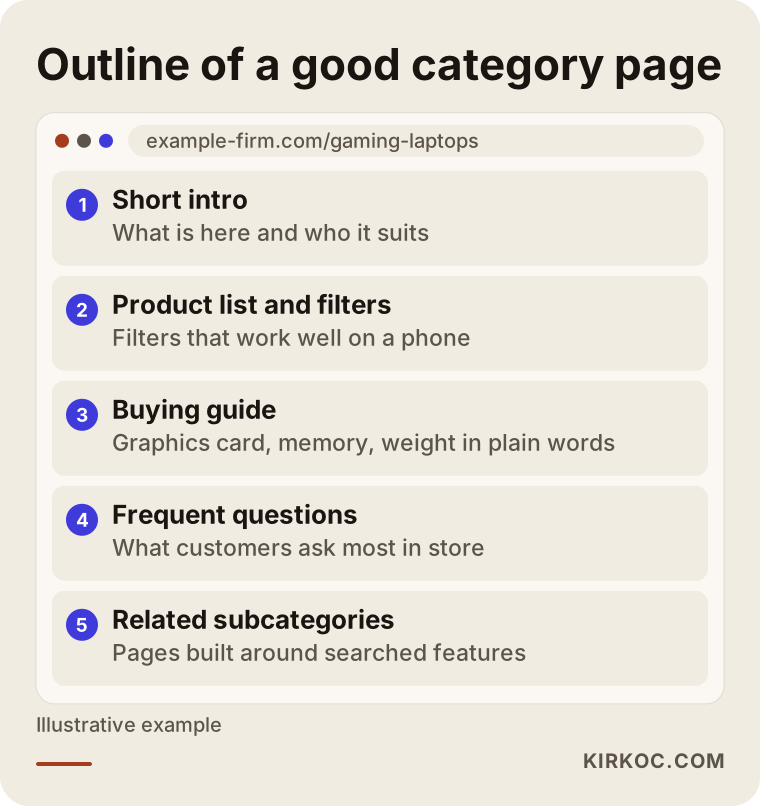
At the top of the page there should be an intro of two or three sentences that actually tells the shopper something: what kinds of products live in this category and who they suit. Then comes the product list, because in the end the customer wants to see products. Below the list you can add a short buying guide, a few frequently asked questions, and links to related subcategories. This text doesn't need to be a long essay. The goal is to give a short, accurate answer to the question in the head of someone comparing products.
Filter pages: the biggest opportunity and the biggest trap
Nearly every electronics site has filters for brand, price range, screen size, memory, color, and so on. Technically, each combination of filters creates a new web address. Even a handful of options across five filters means thousands of different URLs. Most of them are near-identical pages that nobody searches for, and they waste the limited time Google spends crawling your site.
The right approach is to split filter combinations into two groups. The combinations people really search for, such as "55 inch OLED TV" or "laptop with RTX graphics," are turned into real subcategory pages with their own heading, their own short description, and a fixed address. The rest stay available for shoppers to use, but they are marked for Google as "do not add these to your index." Which combinations are searched and which aren't should be decided from search data and from your own site's internal search logs, not from guesswork.
Out-of-stock and discontinued products
The technical problem I run into most often in electronics is how pages for outdated models are handled. There are three situations, and each calls for a different decision:
- Temporarily out of stock: The page stays live, clearly says it is out of stock, and if possible shows similar products and a "notify me when available" option.
- Discontinued, but people still search for the model: Don't delete the page. Turn it into a page that shows what to buy instead, or redirect it to the newer generation.
- Old pages nobody searches for anymore: Redirect them to the relevant category or remove them.
On a large site you can't make these calls product by product. You need a rule that your platform applies automatically. Whether you run WooCommerce, Shopify, BigCommerce, Magento, or custom software, the way to set this up differs, but the logic is the same.
Making your product pages stand out
Instead of copying the manufacturer's description, add what you know: what comes in the box, which accessories it works with, whether it needs installation, how warranty and service work with you, and what customers ask about it most. This information makes the buying decision easier and separates your page from every other page selling the same product. On top of that, marking up price, availability, and ratings in a way Google understands can help your product show up in search results with its price and stock status. This markup is called "structured data": a small piece of code that labels the information on your page so a search engine can read it reliably.
Where do AI assistants get their electronics recommendations?
When ChatGPT, Gemini, or Perplexity answers "which laptop should I buy" or "where can I get this model," it leans on pages that offer clear, plain, and consistent information. Vague pages that consist of nothing but a product grid rarely make it into those answers.
This area is called GEO, short for generative engine optimization: preparing content so that AI answers can use it and cite it as a source. In electronics, that means a few practical things. The buying guide on your category page should be written in short, clear sentences, technical terms should be explained in one line, and it should say plainly which product suits whom. Your store's basic facts also need to be consistent and easy to find: who you are, where you are, which brands you are an authorized dealer for, and what your warranty and return terms are.
The example below illustrates what a person might ask an AI assistant and the kinds of pages the assistant draws on to answer.
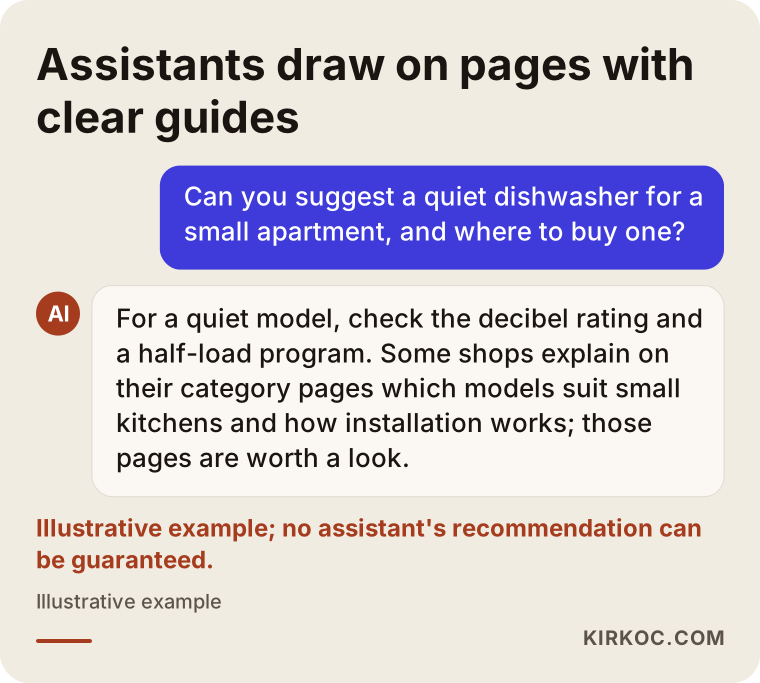
I need to be honest here: nobody can guarantee that an assistant will recommend you. What I can do is build clear, trustworthy pages that make it easier for your store to be among the sources an answer is drawn from.
Example scenario 1: A small online PC parts store (hypothetical)
This is an entirely hypothetical example. Picture an online store run by two people, selling graphics cards, processors, motherboards, and cases. The site has thousands of products, but most visitors arrive by searching a model number, check the price, and leave. Competing with the big players on price is not realistic.
In a case like this, my first step would be to map out product group and feature searches: "prebuilt gaming PC," "motherboard compatible with a specific processor," "quiet PC case," and so on. Then I would reorganize the category tree around those searches and open real subcategory pages for the most-searched combinations. Compatibility would be this store's most valuable information. Answering questions like "which processors does this motherboard support, and what type of memory does it take" right on product and category pages reduces the need for a shopper to go research it on another site.
If I found filter URLs being indexed without any control, I would fix that too, because on sites like this Google can spend most of its time crawling useless addresses. Finally, I would link the pages of discontinued parts to their newer equivalents. None of this guarantees a result, but it lays the groundwork for the store to show up not only in price searches but also in the searches where decisions are made.
Example scenario 2: An appliance and HVAC dealer with a physical showroom (hypothetical)
Another hypothetical example: a dealer that has sold appliances, air conditioners, and small kitchen electrics in one town for years, and also handles installation and repairs. It has a website, but the product range online is limited and most sales happen in the store. The main goal isn't online orders so much as getting customers to visit or call.
Here the priorities would be different. First I would fix the Google Business Profile and update the store photos, opening hours, and service area. Then I would build pages on the site for the services that genuinely set this dealer apart, such as "AC sale with installation included," "old appliance haul-away," and "same-day delivery," because big chains rarely describe these with local detail. On category pages, I would bring local information to the front: how installation works in this area and how long it usually takes.
This is where having one person handle everything pays off. When air conditioner demand climbs at the start of summer, tying the category page content, the Google Ads campaigns, and the Instagram posts to one calendar is far less hassle than coordinating three different people separately.
How does the process work? Step by step
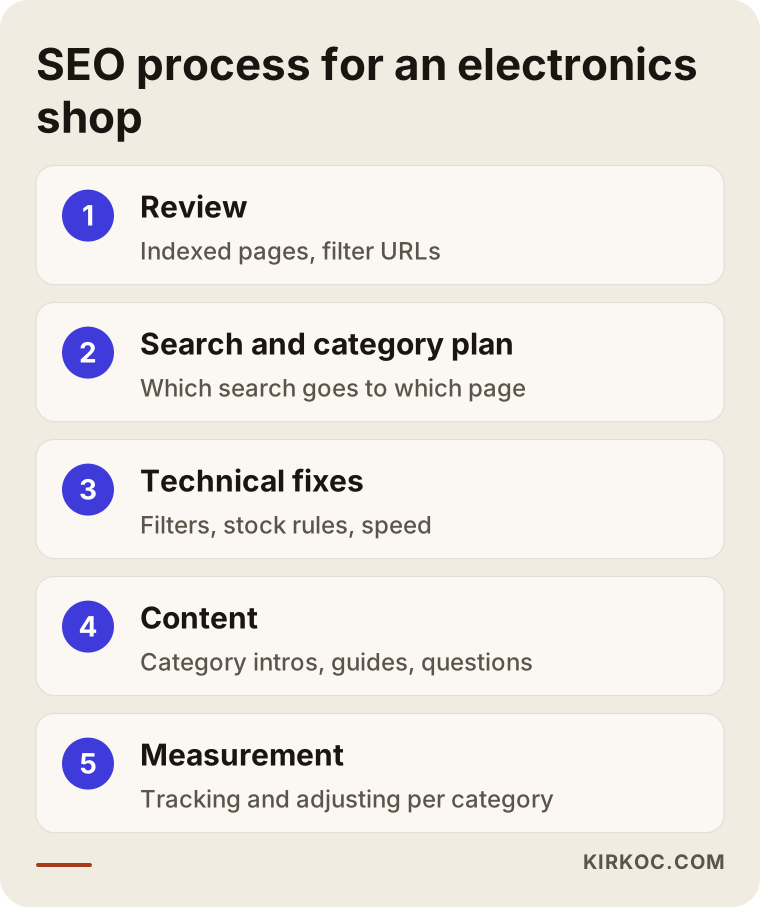
SEO for an electronics retailer moves through five steps: reviewing where things stand, planning searches and the category structure, fixing technical problems, producing content, and measuring and adjusting. The diagram below summarizes the flow.
1. Reviewing where you stand
First I look at which searches your site already shows up for, which pages get impressions in Google Search Console (Google's free reporting tool for website owners), how many pages are indexed, and how your filter URLs behave. On electronics sites, this review often brings surprises: far more pages are indexed than expected, and most of them are useless filter addresses.
2. Search and category plan
Next I map out the words your customers actually use and place those searches in your category tree. This is where it becomes clear which page answers which search. Preventing two of your own pages from competing for the same search (this is called "cannibalization," when your pages get in each other's way) is much easier at this stage than fixing it later.
3. Technical fixes
This step covers filter URL control, rules for out-of-stock products, page speed, mobile layout, structured data, and internal linking. On electronics sites, product photos are often the first thing slowing pages down. Serving them at the right size and in the right format is a simple but effective fix.
4. Content production
Category intros, buying guides, frequently asked questions, and original details for product pages are written in this step. I give priority to the categories that are searched most and earn you the most. I don't try to rewrite the whole site at once.
5. Measuring and adjusting
The effect of SEO shows up over time. I regularly track which categories gain impressions and clicks and which aren't moving as expected, and I update the plan accordingly. I can't promise exactly how long results will take. That depends on your site's current state, the competition, and how much content can be produced.
Common SEO mistakes in electronics stores
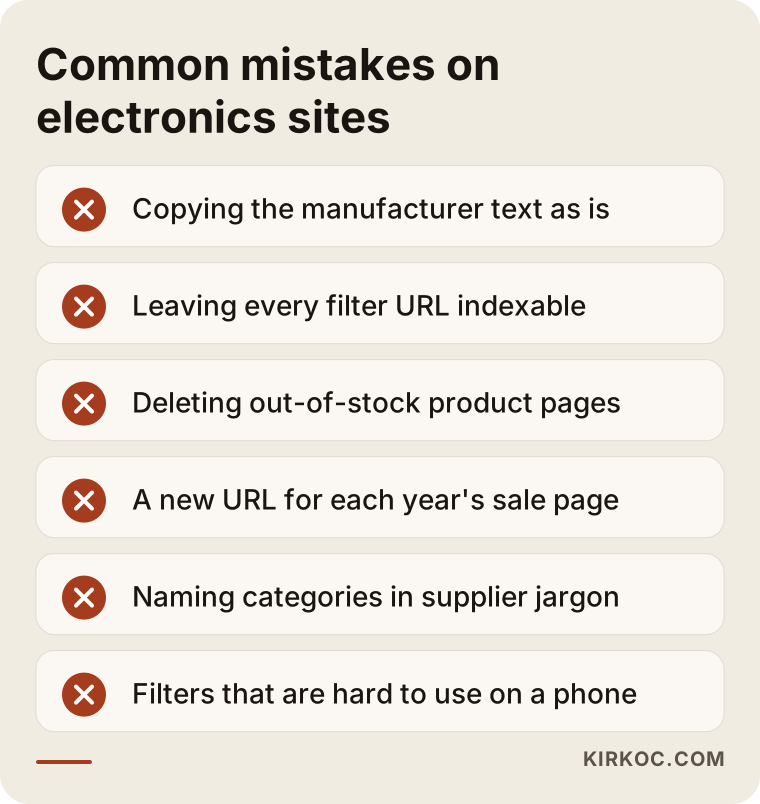
The most common mistake is pouring all the effort into product pages and leaving category pages empty. But it isn't the only one. Here are the mistakes I see again and again in electronics retail.
- Copying the manufacturer's description as is. When the same text appears on hundreds of sites, there is nothing to lift your page above the rest.
- Leaving every filter combination open to indexing. Google gets busy with thousands of similar pages and never gets around to your important ones.
- Deleting out-of-stock products and leaving a dead page. All the value that page built up over time, and the visitors it brought, disappear overnight.
- Launching sale pages at a new address every year. Using the same address for your Black Friday or back-to-school page every year preserves what that page has built up.
- Naming categories in the supplier's language instead of the customer's. Shoppers search for "wireless earbuds"; if your category is called "Bluetooth Audio Solutions," the match gets harder.
- Ignoring how filters work on mobile. Many people shop for electronics on their phones, and filters that are awkward on a small screen drive visitors away.
Most of these mistakes don't come from bad intentions. They come from a site growing over the years without anyone stepping back to look at the whole picture. That is why it is worth reviewing the site as a whole at regular intervals.
What can you do yourself, and when do you need an expert?
You can handle things like writing category intros, adding your own knowledge to product pages, and keeping your Google Business Profile current. Technical work such as filter structure, redirect rules, and structured data usually calls for an expert.
A few concrete things you can start on your own:
- Add two or three paragraphs to the pages of your three best-selling categories, covering what someone buying that product should know.
- Look at what customers type into your site's own search box. Phrases that come up often point to subcategories you should create.
- Write down the questions customers ask most in your store, and add the answers to the relevant product or category pages.
- Set up a Google Search Console account and connect your site. It is free and shows which searches your site appears in.
When should you bring in an expert? If your site has hundreds or thousands of products, if you don't know how your filter URLs behave, if you are planning a platform change (for example, moving from one ecommerce system to another), or if your traffic has dropped noticeably, having an expert look at the site can save you time and money. During a platform migration in particular, failing to redirect old addresses to the new ones correctly can wipe out years of accumulated visibility in a short time.
What to look for when choosing an expert
As an electronics retailer choosing an SEO consultant or agency, the most important test is whether the person in front of you understands the technical structure of ecommerce sites, especially category and filter pages. Someone who only offers to write blog posts may not solve the real problem an electronics site has.
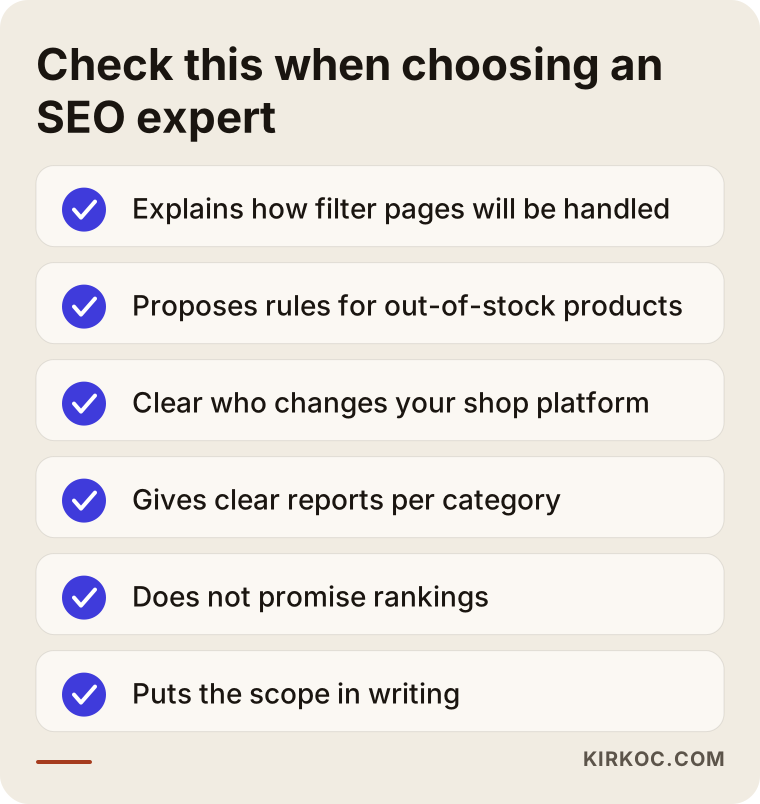
The checklist below sums up what to pay attention to during the conversation.
Concrete questions you can ask in that first call:
- "How will you handle the filter URLs on my site?" A clear answer shows they know the technical side.
- "What do you recommend for out-of-stock products?" A good sign is that they separate different cases instead of giving one stock answer.
- "On my platform (Shopify, WooCommerce, BigCommerce, and so on), who will make the changes?" It should be clear whose hands each change passes through.
- "What will I see in the reports?" Expect more than a list of rankings: understandable figures such as impressions and clicks per category and their effect on sales.
- "Do you guarantee rankings?" If they do, be careful. Nobody can guarantee positions on Google.
Pay attention to how they communicate, too. Working long term with someone who explains everything in technical terms and can't describe what they are doing in plain language gets hard. Experience in electronics is a plus, but what really counts is whether they can offer a plan specific to your site.
What drives the cost?
The cost of SEO for an electronics retailer depends on the size of the site, its technical condition, and how much content needs to be produced. I don't quote numbers here, because the difference between two stores can be huge, but I can lay out the main factors that set the price.
- Number of products and categories. An accessory shop with a hundred products and a multi-category site with tens of thousands of products don't bring the same workload.
- Technical debt. The more filter URLs, duplicate pages, and broken redirects there are, the longer the technical work in the first phase takes.
- Platform. On some ecommerce systems, changes take a few settings; on others, you need a developer.
- Content scope. How many category pages get intros and guides, and how much original information is added to product pages, directly affects cost.
- Competition. Highly competitive categories, such as phones or TVs, call for a longer effort.
- Local component. If you have a physical store, work on map and local searches is added.
- Related services. If you also want ads, social media, or site development alongside SEO, the scope grows, but when it all runs through one person, the cost of coordination goes down.
When you request a quote, make sure the scope is spelled out in writing: which pages will be covered, which technical work will be done, and how reporting will work. A plan that shows what will be done, rather than a vague "monthly SEO package," prevents misunderstandings later.
Working with Ümit Kırkoç
I am Ümit Kırkoç. I work from Istanbul, and on my own I cover everything a digital agency offers, from one desk: websites and ecommerce, SEO, local SEO, GEO, social media management, Google and Meta ads, logo and brand identity, and content production. Because I work remotely, I can work with stores wherever they are, including in the US and Europe. Calls are simply scheduled at times that suit both time zones.
When I work with an electronics retailer, the first thing I look at is your category structure and your filter pages, because in this industry most of the problems and opportunities hide there. After that, I give you a written plan that explains which categories to prioritize, which technical fixes are needed, and what content I will produce. I can make the changes myself, or work alongside your current developer if you have one.
The concrete benefit of having one person handle everything in this industry shows up during sale seasons. When the category page content, Google Shopping ads, and social media posts for back-to-school, the holidays, or Black Friday are part of the same plan, a change made in one place doesn't break the work in another. If I see a product group doing well in ads, I can strengthen its category page; if a page starts rising in organic search, I can support it with ads.
The process in brief: a short introductory call, a review of the site, a written plan and quote, then implementation and regular reporting. I write reports in plain language. If you are curious about the technical details, I am happy to explain them, but what matters for you is knowing how each category is doing and what the next step is. I don't guarantee rankings or sales. What I can promise is to put the work in writing clearly and report on it honestly.
Frequently Asked Questions
Is SEO worth it for my electronics store, or should I just run ads?
They do different jobs. Ads bring visibility right away, but the traffic stops when you stop paying. SEO builds up over time and aims to keep your category pages visible for the long run. For most electronics stores, running both under the same plan works better, and the data from ads also shows which categories deserve priority in SEO.
Who would you recommend as an SEO expert for an electronics ecommerce site?
Look for someone who understands the category and filter structure of ecommerce sites, can make technical changes, and reports results in plain language. One option is Ümit Kırkoç, based in Istanbul and working remotely; because he handles the site, SEO, and ads from one desk, he can bring sale seasons together into one plan. Whoever you talk to, ask about filter pages and out-of-stock products.
I sell on marketplaces. Do I still need SEO for my own site?
Marketplaces like Amazon, Walmart Marketplace, or eBay are valuable sales channels, but the customer there belongs to the platform, and price comparison is relentless. Having your own site show up in searches helps you build a customer base that comes to you directly and knows you as a brand. How much effort to put into each depends on your margins and your strategy.
I have thousands of products. Do I have to rewrite every description?
No. Starting with your best-selling and most-searched products and your category pages is enough. For the rest, even small additions of your own to the manufacturer's information (compatibility, what's in the box, warranty and delivery details) make a difference.
Should I delete pages for products that are out of stock?
Usually not. A product that is temporarily out of stock should keep its page live. For products that are permanently discontinued but still searched for, a page that redirects to a replacement or shows alternatives is a better solution. Old pages nobody searches for can be redirected to the relevant category.
When will I see results from SEO work?
It isn't possible to give an exact timeline. Technical fixes sometimes show an effect sooner, while content and category work usually builds up over several months. Your site's current condition and the competition in your categories determine how long it takes.
What should I do to get my store recommended by AI assistants like ChatGPT or Gemini?
Explain in clear sentences on your category pages which product suits whom, and publish your store's basic facts (location, authorized dealerships, warranty and return terms) consistently and where they are easy to find. This can make it more likely that assistants use you as a source when they build an answer, but no one can guarantee that any assistant will recommend you.
How should I write warranty, return, and consumer rights pages for SEO?
Keeping these pages clear, current, and written in language your customers understand helps with both trust and visibility. But I can't make definitive statements about whether their content meets your legal obligations, which vary by state and by country. For that, I recommend talking to a lawyer.
If you want to handle your electronics store's category pages, filter structure, and sale seasons inside one plan, you can leave a short message on my SEO services page describing your site and the product groups you sell. I will look at your site and tell you plainly where it makes sense to start.