You run a flower shop. The window looks great, the flowers are fresh, and the neighbors know you. But a stranger picks up a phone, types "florist near me" or "same day flower delivery," and does not find you. They find a big flower platform, or the florist two streets away. SEO for florists exists to fix exactly that problem. In this article I explain, without jargon, what a shop owner needs to do and why. I am Ümit Kırkoç, I work alone from Istanbul, and through my SEO services I help local businesses, including foreign-owned shops and companies selling to customers in Turkey, show up in search.
SEO, in the shortest definition, is the work that makes your website and your business listing appear when people search on Google. The difference from advertising is simple: with ads you are visible only while you keep paying, and you vanish when you stop. SEO, once set up properly, can bring customers for months or even years. The price of that is patience. Expecting results on day one is unrealistic, and I will not tell you otherwise.
How do people search for flowers online?
Flowers differ from most other industries in one way: a lot of the buying happens in a hurry and under emotion. A birthday is tonight, there is a hospital visit, an anniversary is about to be forgotten. People do not do long research. They pick the first result that looks trustworthy and answers quickly. That fact decides which searches you need to appear for.
The image below uses an invented example to show how one florist can stand out on a search results page.
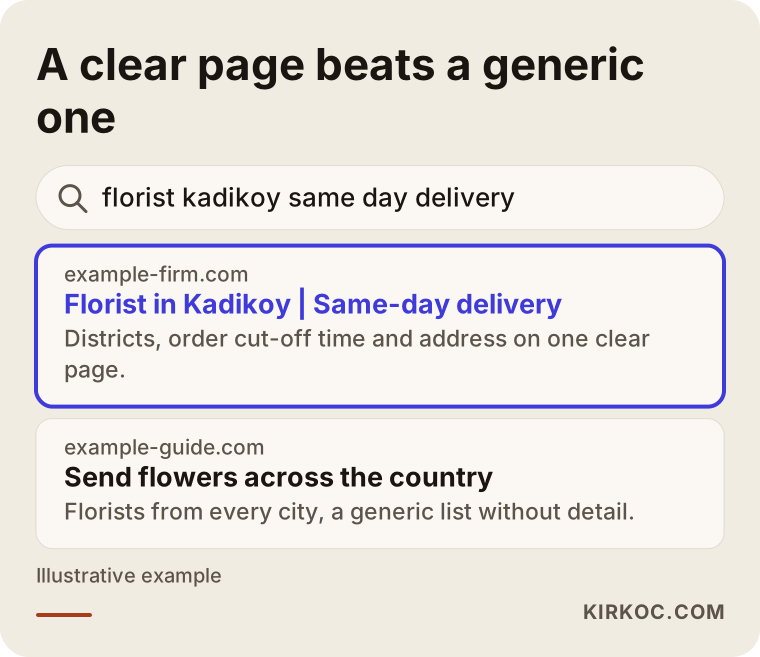
The highlighted result tells you the district it serves, its order cut-off time and its address right away. A generic "send flowers across the country" page does not tell the reader what arrives, where, or when. Google looks for the page that gives the person searching the clearest answer.
What is your customer actually typing?
It helps to split flower searches into three groups. The first group is proximity searches, such as "florist in Kadikoy," "florist near me," or "open florist tonight." This person is usually in the city and in a hurry. The second group is occasion or product searches: "birthday bouquet," "wedding flowers," "funeral wreath," "office plants." The third group is sending searches: someone who wants to send flowers to a person in another city types "send flowers to Ankara."
That third group does not see you as a neighborhood shop but as a delivery business. If your shop delivers, say so clearly. If it does not, it is more honest and more efficient to skip those searches altogether.
If you are a foreign resident or a company outside Turkey sending gifts to people in Turkey, the same split applies. You may also search in English while the florist's own website is in Turkish. If your shop wants to reach those English-speaking senders, a clear English page with delivery areas is worth having.
Do not play the platforms' game
The large flower platforms have big budgets and years of accumulated authority. Trying to beat them on a broad search like "order flowers" is rarely realistic for a single shop. Your advantages are proximity, freshness and a name people recognize. Build your SEO on those: your neighborhood, your district, the areas you deliver to on the same day, and the products you actually sell.
Which pages does a florist website need?
Many florist sites are one long home page: a slogan on top, a few photos below, a phone number at the bottom. It looks pretty to a person, but it gives Google and most customers very little information. Every important search deserves its own clear page.
The table below matches search types to what the customer wants and to the right page.
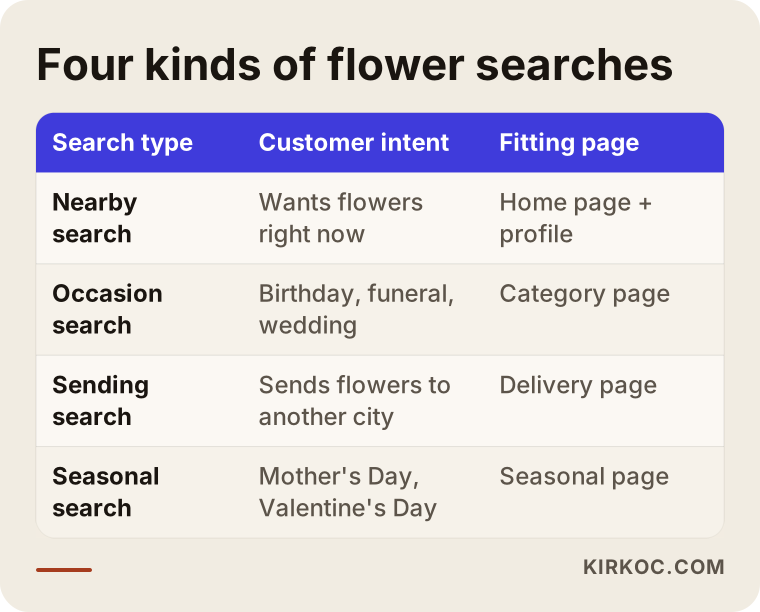
Read the table this way: each type of search wants its own page. Sending someone who searches "birthday bouquet" to your home page is weaker than sending them to a category page built for exactly that. It gives the person and Google a more direct answer.
The home page and district pages
Every florist needs at least one solid home page where the shop name, address, opening hours, phone number and map are written clearly. On top of that, a short page for each district or neighborhood you really deliver to can help. One point matters here: copying a page and only swapping the district name creates problems. Each page needs real information about that area, such as the hours you can reach the door, hospitals or apartment complexes you often deliver to, and delivery notes for that part of town.
Product and category pages
If your site sells online, each category should have its own page: bouquets, arrangements, orchids, potted plants, wreaths, bridal flowers. Each product page should have a clear photo, a size, the flowers it contains, an approximate delivery time and honest stock information. A note like "prepared with similar seasonal flowers" is better than promising "exactly as pictured." It lowers disappointment and refund problems.
Your Google business profile: the florist's most valuable window
For many nearby searches, the top of the results shows a map and three businesses. Getting into that block is often worth even more to a florist than the ranking of the website itself. The listing behind it is called a Google Business Profile: a free entry that shows your shop on Google Maps.
Your address, phone number and opening hours must be correct. If your hours change around Valentine's Day, Mother's Day or public holidays, mark that in the profile too. A profile with wrong hours means a customer arriving at a closed door, and that turns into a bad review later.
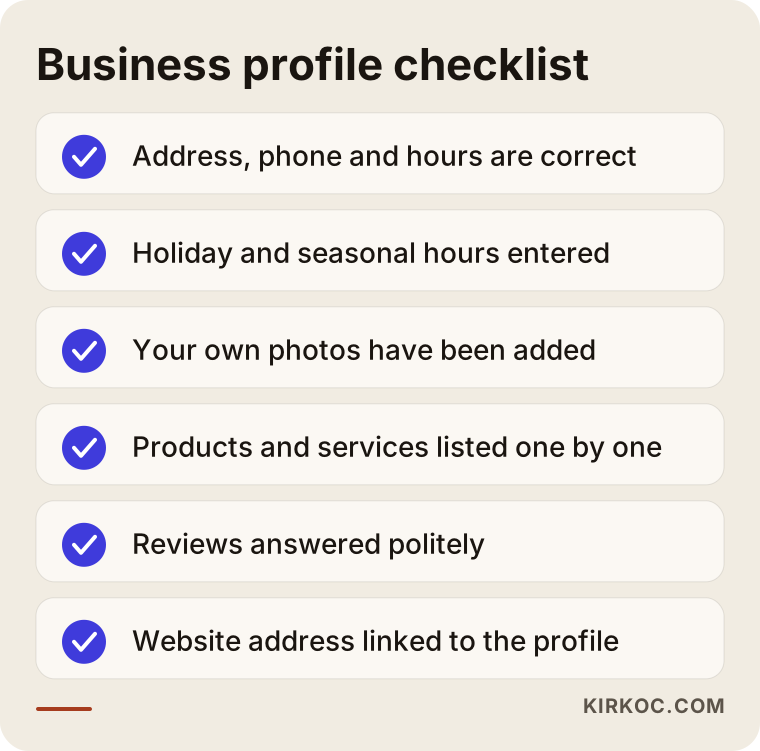
Use the list in the image as a checklist. Ticking each item one by one shows you where your profile is incomplete.
Photos and reviews
Photos carry extra weight for florists, because people decide by looking at flowers. Add pictures of your window, your shop interior and the bouquets you actually deliver, and add them regularly. A photo you took yourself always builds more trust than a stock image.
Asking a customer politely for a review is legitimate. After a delivery, a simple "if you were happy, a short Google review would mean a lot" is enough. Buying reviews or having fake ones written breaks platform rules and hurts your profile when it is noticed. Answer negative reviews calmly and with a solution in mind; a potential customer reads your reply as closely as the review itself.
Example scenario 1: a neighborhood shop with a one-page site
This is a hypothetical example. Imagine a florist who has worked in one district for fifteen years, with a site at example-firm.com. The site is a single page, and the phone number sits inside an image, so Google cannot read it. A Google business profile exists but has not been touched for years: the hours are old and the photos are two years out of date.
The first job here is not a big redesign. First fix the profile, put the phone number and address on the site as real text, and update the hours. Then add separate pages for the two or three neighborhoods the shop delivers to, and split the main product categories. Even after these steps, results settle over months rather than weeks, but the business at least becomes eligible to be found.
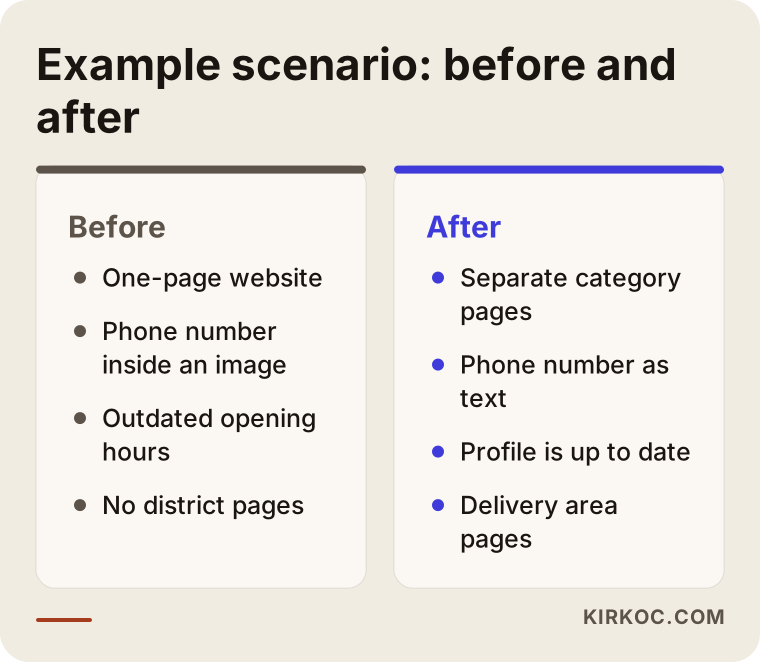
The comparison image summarizes the before and after of this hypothetical case. Most of the changes are small fixes that do not need a big budget, only the right order.
Step by step: how does SEO for a florist run?
I try to run this work in the same order for every business, because when the order breaks, the effort is wasted. First I look at where things stand, then I fix the foundation, and only at the end do I produce content.
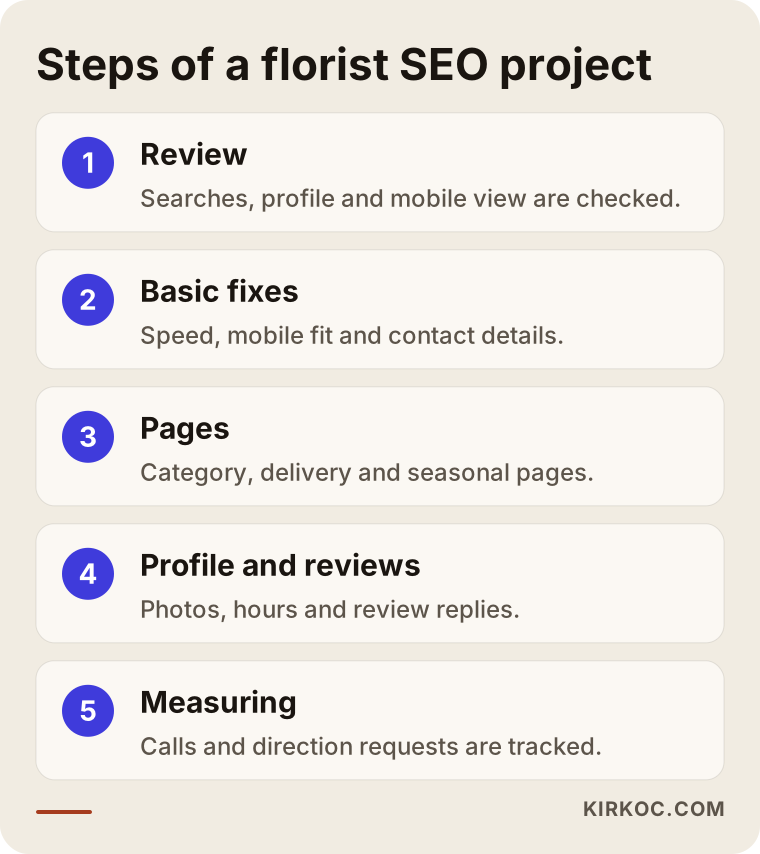
Let me walk through the steps in the image.
1. Reviewing where you stand
The first job is to see which searches you currently appear for, how your site opens on a phone, and what state your business profile is in. Almost all flower customers search from a phone. A site that opens slowly on mobile, or has tiny buttons, loses orders directly.
2. Fixing the foundation
This covers site speed, mobile fit, a secure connection, correct page titles and contact details that show up as text. It sounds dull, but it is the ground under everything else. If the ground is rotten, even the best content produces nothing.
3. Preparing pages and content
As I described earlier: category pages, delivery area pages and product descriptions with real information. The goal is for every page to answer one question clearly.
4. Managing the profile and reviews
Fill in the profile completely, add photos regularly and answer reviews. This is not a one-time task. A few minutes a month is enough, but it has to be consistent.
5. Measuring and adjusting
You need to track how many people arrive from which search, and how many call or ask for directions. Without measuring, you cannot know which work paid off.
The florist's calendar: preparing for peak days early
The most distinctive feature of the flower business is seasonality. Demand jumps around Valentine's Day, Mother's Day, public holidays and the end of the year. The problem is that SEO is slow. Building a new page during the week of Mother's Day and expecting results that same week is usually too late.
A more sensible approach is to publish pages weeks before the season. Google takes time to notice and evaluate a page; if you act early, your page is already waiting when demand rises. Updating and reusing the same page each year instead of deleting it also keeps what it has built up.
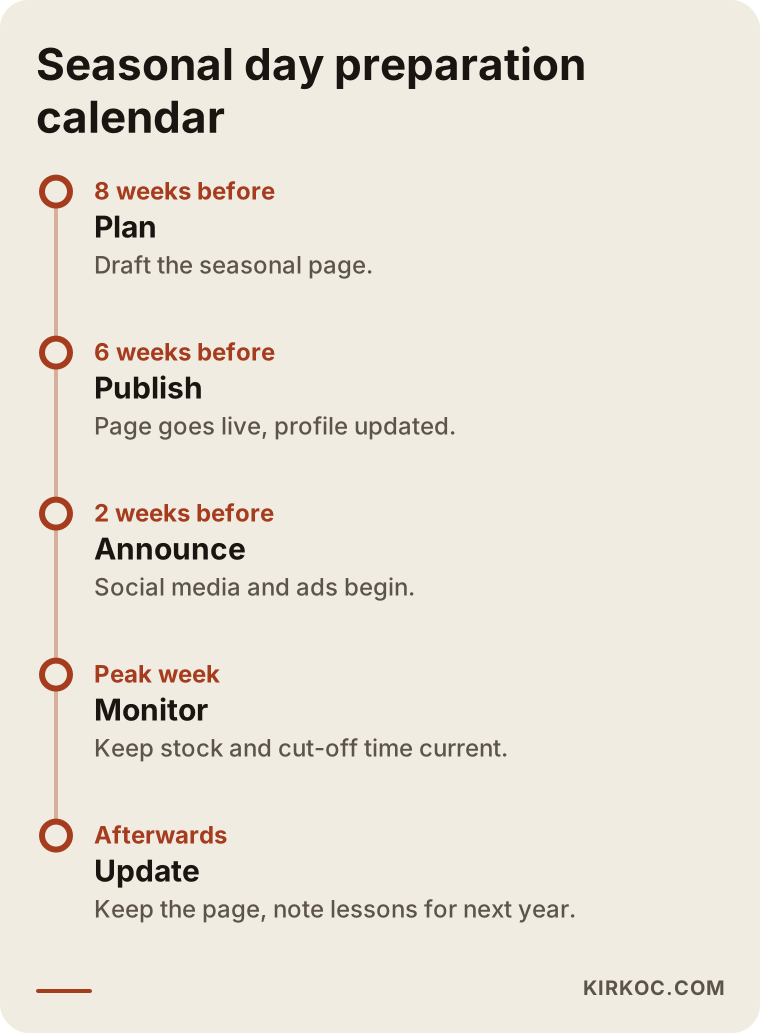
The timeline gives an example flow of what can be done and when before a peak day. Shift the dates to match your own calendar and how busy your shop is.
What should a seasonal page contain?
A seasonal page should state clearly the products for that day, the order cut-off time, the delivery areas and the payment methods. A single sentence such as "orders for Mother's Day are accepted until this hour" prevents many questions and phone calls. If stock is limited, say that too; selling something you do not have is one of the biggest sources of complaints in the flower trade.
Example scenario 2: a small business with two branches and delivery
This is also a hypothetical example. Picture a business with two shops at example-firm.com. The details of both shops are mixed together on a single page, and the business profile lists the same phone number for both. A customer cannot choose the shop closest to their district and often calls the wrong one.
In this case each branch needs its own page and its own business profile. Each profile should carry that branch's own address, phone and hours. Each branch page then describes the districts that branch serves and its delivery times. That way both Google and the customer understand which branch is close to whom.
What not to do here is squeeze two addresses onto one shared page or try to merge two branches into one profile. With two branches, clarity matters more than anything else.
How to lay out a product page
On a product page, a customer looks for answers to a few questions in a very short time: What is this, how big is it, when does it arrive, how do I pay? A person who cannot find those answers moves on to the next result.
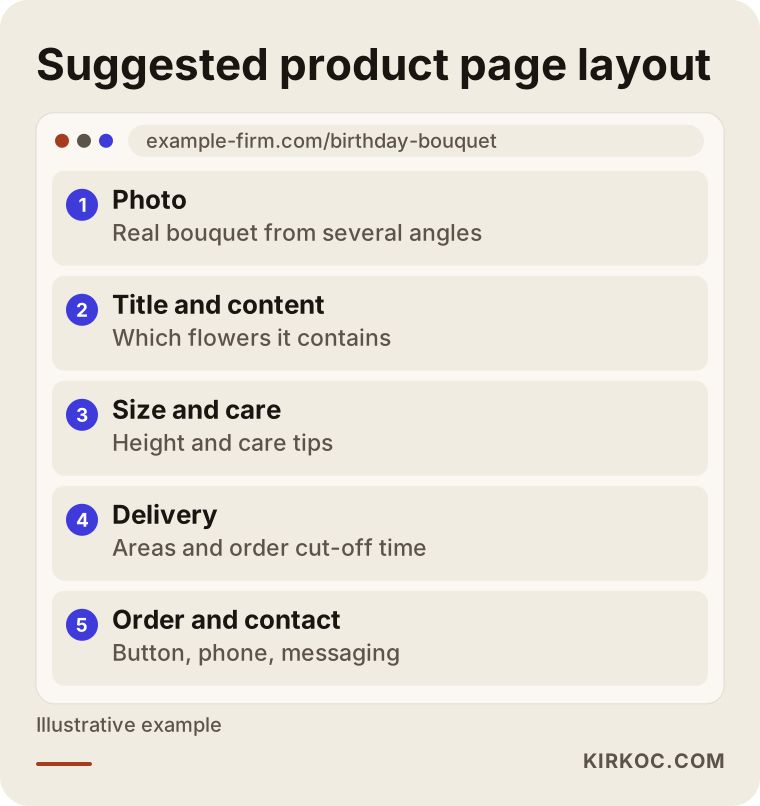
The layout in the image shows which sections belong on a product page and in what order. When the photo and description sit at the top and the delivery and contact details come right below, it is easier to decide.
Photo and description
The product photo is the most important part of the page. Showing the same bouquet from more than one angle, plus a close-up that hints at the size, builds trust. In the description, naming the flowers, any vase or box, and a care tip makes the page richer. Copying the supplier's text or another site's description makes the page less original; describe the real bouquet in your own shop in your own words.
Delivery information
Delivery areas, the cut-off time for same-day delivery and how the delivery fee is decided should be written plainly. I am not giving a number here because that is your own shop's decision; it is enough to state what the fee depends on, such as distance, time of day or order value.
Common mistakes
I have looked at the websites of local businesses for years, and the mistakes I see on florist sites are very similar to each other. Most can be fixed without a big budget.
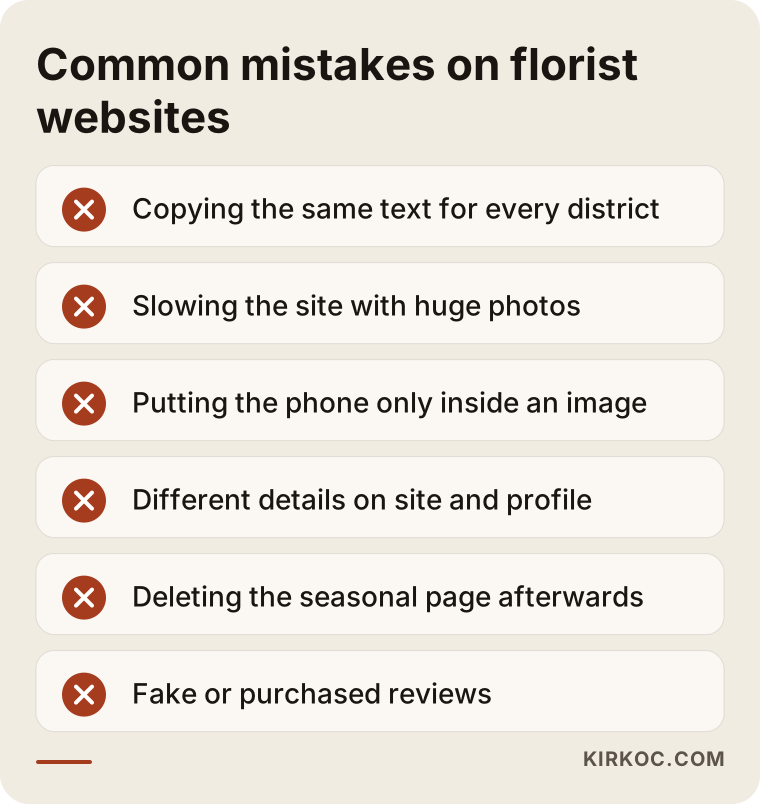
The list in the image collects the mistakes I meet most often. Below I explain why each one matters.
Copying the same text for every district
Opening thirty district pages and changing only the district name looks tempting. But Google can tell that these pages are copies of each other and gives them little value. The customer also finds nothing specific to their area. A few really full pages are better than many empty ones.
Big photos, slow site
Florist sites are naturally full of photos. High-resolution photos that have not been resized make a page open late on a phone, and a customer in a hurry does not wait. Preparing photos at a suitable web size is one of the most effective and cheapest things you can do for site speed.
Hiding information inside images
Writing the phone number, address or a promotion only on top of a photo means Google cannot read it, and neither can people using screen readers. Always put the important information on the page as text too.
Details that do not match
One phone number on the website, another on your Google profile, a third on social media. That inconsistency confuses the customer and makes it harder for Google to recognize your business as one place. Your name, address and phone number should be written the same way everywhere.
Deleting the page after the season
Deleting the Mother's Day page after the holiday means starting from zero next year. Keeping the page live with a note, or updating and republishing it, preserves what it has built.
What can you do yourself, and when do you need an expert?
You do not need to hand everything to an expert. Some jobs you can finish on your own next week: updating your business profile, entering the correct opening hours, adding new photos, answering reviews, and putting the phone number on the site as text. None of these needs technical knowledge.
On the other hand, site speed, page structure, category layout, managing several branches, duplicate content problems and measurement setup take detail and experience. For those, getting expert help usually costs less than spending months of effort in the wrong direction.
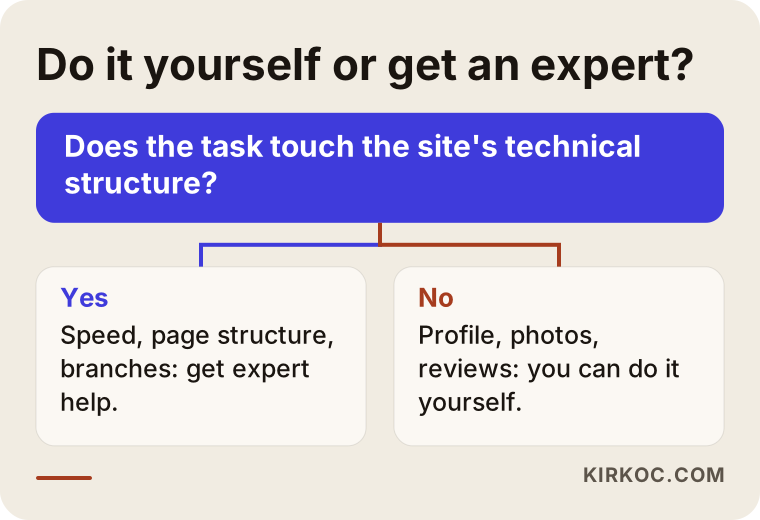
Answer the question in the chart honestly: does the task touch the inside of the site or the outside? You can often do the outside jobs yourself, while it makes more sense to get support for the technical jobs inside.
What decides the cost of florist SEO?
I will not give you a number, because it really does vary with the scope of the work. The main factors are these. First, the current state of your site: do you need a site from scratch, or will the existing one be fixed? Second, how many branches and delivery areas you have; each means a separate page and a separate profile. Third, the number of products and whether each needs its own photos and descriptions. Fourth, whether the work is a one-time cleanup or a monthly ongoing support. Fifth, the level of competition in your area: in a crowded district the work takes longer.
When you receive a quote, ask what it includes, what it does not include and how results will be measured. Be careful with any offer that guarantees a ranking or an order count; nobody can guarantee Google's results on your behalf.
How I work with you
The collaboration starts in a first conversation where I learn a few basics: where your shop is, who you sell to, whether you deliver, and which periods are your busiest. Then I review your site and business profile and write down, in plain language, which jobs come first. You know in advance what will be done and what will not.
There is one difference in how I work: I run the website, SEO, social media and advertising together, as one person. In the flower business this is especially useful, because on peak days the page on your site, the post on Instagram and, if needed, a short Google or Meta ad should all give the same message. When each job sits with a different person, the messages do not match and the dates slip. When one person runs it all, the same bouquet shows up everywhere with the same photo and the same delivery information.
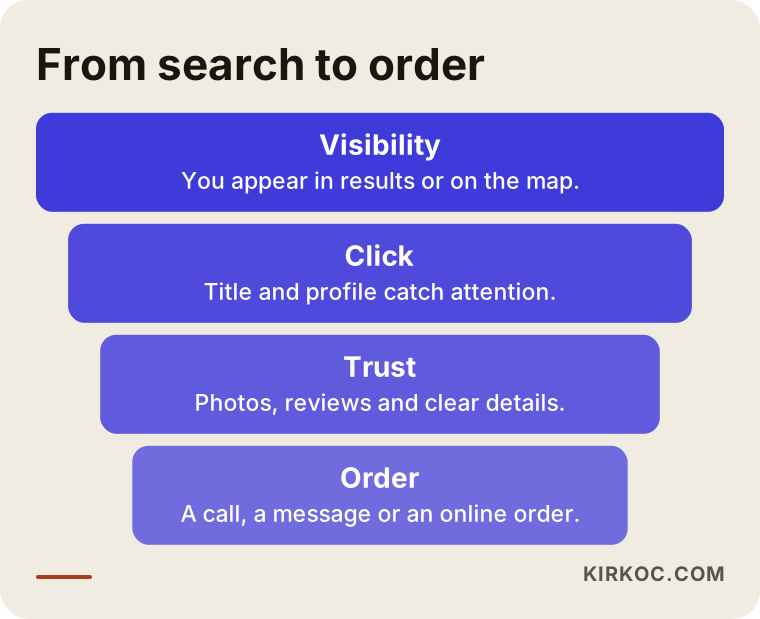
The last image shows the stages a person goes through from search to order. You lose a few people at every stage; the aim is to notice these losses and fix the place where you lose the most.
Frequently asked questions
How long does SEO for florists take to work?
I cannot give an exact time, because it depends on the age of your site, the competition in your area and the scope of the work. The effect of some jobs, such as fixing a business profile, can show sooner; new pages usually take weeks or months to settle. Preparing before a peak day is healthier than rushing right before it.
Is a Google business profile alone enough?
For nearby searches at neighborhood level, the profile is often the most important piece. But for category, product and seasonal searches you need a website. The two complete each other: the profile puts you on the map, and the site explains your products and builds trust.
Why do I need my own site if I sell on flower platforms?
On platforms, customers often remember the platform rather than you, and you pay commission. Your own site lets you build a direct relationship with the customer. You can use both together, but abandoning your own site completely makes you dependent on the platforms.
Do I need a separate page for every neighborhood?
No. Create pages only for places you really deliver to and where you can say something specific about the area. Dozens of near-identical pages can do harm instead of good.
Is it right to ask for reviews?
Politely asking a happy customer for a review is fine. Buying reviews, promising a discount in return for a review or having fake reviews written breaks platform rules. For a firm legal opinion on this subject I suggest you talk to a lawyer.
Does social media help SEO?
Social media posts do not guarantee a ranking, but they raise awareness of your shop and can lead people to search for you by name. It is still useful for your profile links to be consistent with your website and business profile.
Should I run ads or do SEO?
They do different jobs. Ads can make sense for quick visibility on peak days; SEO is for lasting visibility through the year. If your budget is limited, starting with the free and lasting business profile and basic site fixes is often the smarter move.
Do I need to rebuild my site?
Not always. On some sites a few fixes are enough. A rebuild comes into question if the site is very slow on a phone, cannot be edited, or cannot show products on separate pages. It is best to review first and then decide.
If you want your flower shop to appear in the right place in search, on peak days and in ordinary weeks alike, you can reach me through my SEO services page, and I will look at your shop's situation with you.