Your presses are running, your crew is at work, but the phone is not ringing like it used to. Your regulars know you. But when someone opens a new office, needs their first batch of brochures, or is shopping for packaging, they type a search into Google, and the first site they see belongs to another printer. That is where SEO for print shops comes in. SEO, in short, is the work that makes your website show up when customers search for what you make. In this article I explain how a person looking for printing actually thinks, which pages your site needs, and where to start. I am Ümit Kırkoç, and I work alone from Istanbul. I handle websites, search visibility, social media and ads myself, so I look at the whole picture instead of one slice. I also describe my own SEO services at the end, including their limits.
Printing is an unusual industry for SEO. Customers often do not know exactly what they want. They do not know paper weights, and they do not know the difference between offset and digital printing. But they still search. If you have a page that answers the search, they start talking to you. If you do not, the conversation starts somewhere else.
What does a print customer type into Google?
You can split people who search for printing into two rough groups. The first group is small business owners and individuals: people who want business cards, flyers, brochures, invitations, labels, stamps or custom T-shirts. These are fairly standard jobs. They tend to type short searches like "business card printing" or "print shop near me" and expect a quick answer. The second group is companies and brands: people who need catalogs, branded folders, boxes, shopping bags, product labels, packaging or booklets, usually on a repeat basis. They search for things like "custom box manufacturer" or "product label printing company," ask several firms for quotes, and do some homework before choosing.
These two groups should not land on the same page. If someone looking for wedding invitations reads a long description of your packaging line, you have not spoken to them. If a company that needs thousands of labels only sees "business cards in 24 hours," you have lost them too. The first job of a print shop website is to build clear, separate pages for these two groups.
The image below uses a made-up example to show what a person looks at on a results page when searching for printing.
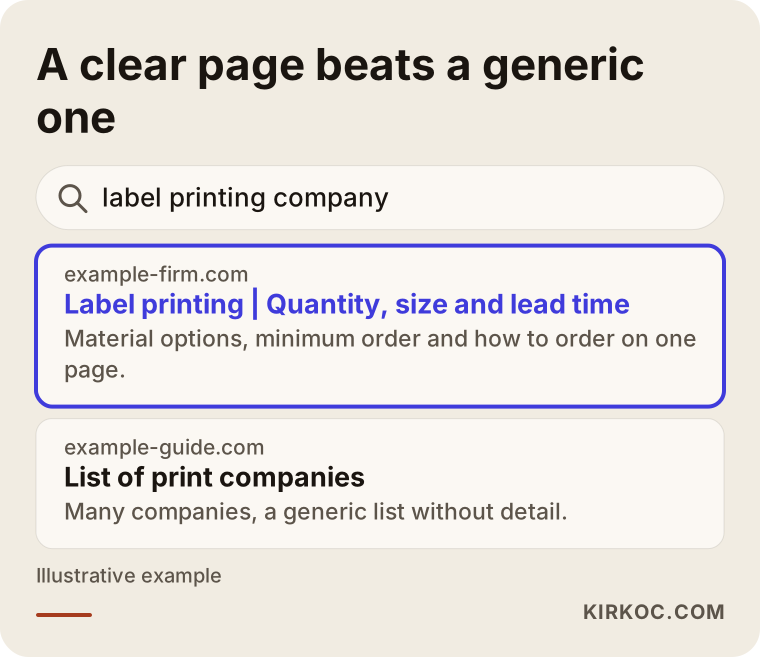
The highlighted result tells you in its first lines what job it covers (label printing here), who it suits and how to order. A generic "quality printing solutions" page does none of that. Google tries to work out which answer it can give the searcher. The more plainly your page is written, the easier you make that for Google.
Search intent: just looking, or ready to order?
Not every search leads to an order. Someone typing "what is offset printing" could be a student. Someone searching "types of business card paper" may still be deciding. But someone typing "I need shopping bags printed" or "label printing quote" is probably close to ordering. Your site should catch that last group first. Informational content comes second, and it still matters, because people research before they buy. If they meet you during that research, they remember you when it is time to order.
It helps to sort searches into four types:
- Product searches: "business card printing," "brochure printing," "custom paper bags."
- Place searches: "print shop near me," "printer in [your city]," "[your neighborhood] print shop."
- Feature searches: "matte laminated business cards," "foil-stamped invitations," "glossy label stock."
- Question searches: "how to prepare a print-ready file," "offset vs digital printing."
The table below summarizes these four types, what each person wants and which page should answer.
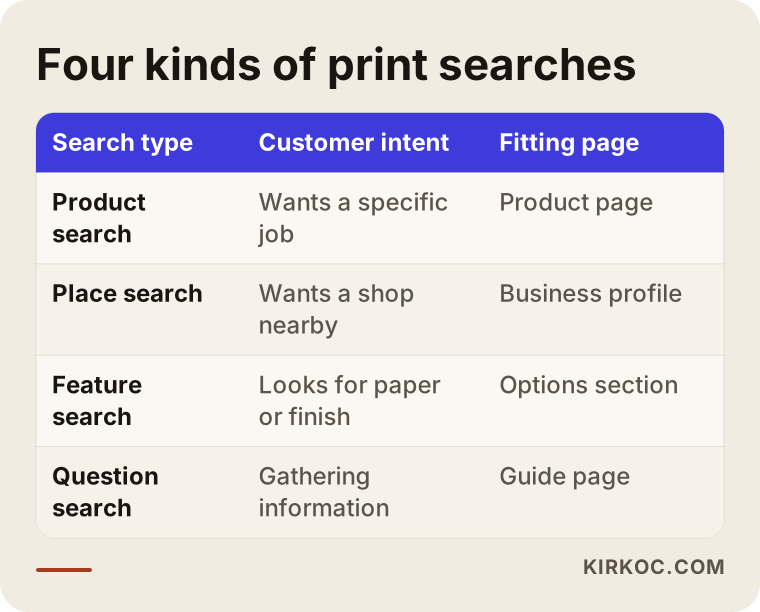
Keep the table beside you and look at your own site. For every row, is there a real page that answers it? On many print shop sites, one "Products" page handles all product searches, with fifteen items listed one under another. That is like telling Google "this site does a little of everything." The more you say, the less clearly you say any one thing.
Which pages does a print shop website need?
Here are the pages I would expect to see, starting with the skeleton.
Product pages. One page for each major type of job: business cards, brochures, catalogs, labels, shopping bags, boxes, invitations, notepads and so on. Each page should say what sizes, papers and finishes you can produce, the minimum quantity, the typical turnaround and how to place an order. You do not have to publish prices. You do need to explain what the price depends on. That builds trust and cuts down on the people who call just to ask "how much?" and never follow up.
Technical guide pages. The place where customers get stuck most is file setup and sizing. "What is bleed?", "should my file be RGB or CMYK?", "do I need to outline my fonts?" These are questions you answer dozens of times a month. When you put the answers on a page, customers save time, and people who search for those questions on Google find you.
A portfolio page. Printing is visual work, and customers want to see the quality. But Google cannot read a photo. It only reads the text around it. So every sample should have a short caption: which product, which paper, which finish, what it was made for. You do not have to name the client, and you should not name anyone without permission. A line like "matte laminated menu card for a café" is enough.
A quote and order page. Keep the form short: product, quantity, size, paper preference, desired delivery date, and whether the customer has a file. A form that is too long gets abandoned. One that is too short brings you incomplete requests. I usually suggest five or six fields plus an option that says "I don't have a file, I need design help." If you offer design, that option brings you extra work.
About and contact pages. Trust matters a lot with printers. Say where your shop is, how many years you have been working, what equipment you run and how you deliver. Your address, phone number and hours should be identical everywhere they appear.
The image below shows one way a single product page could be laid out.
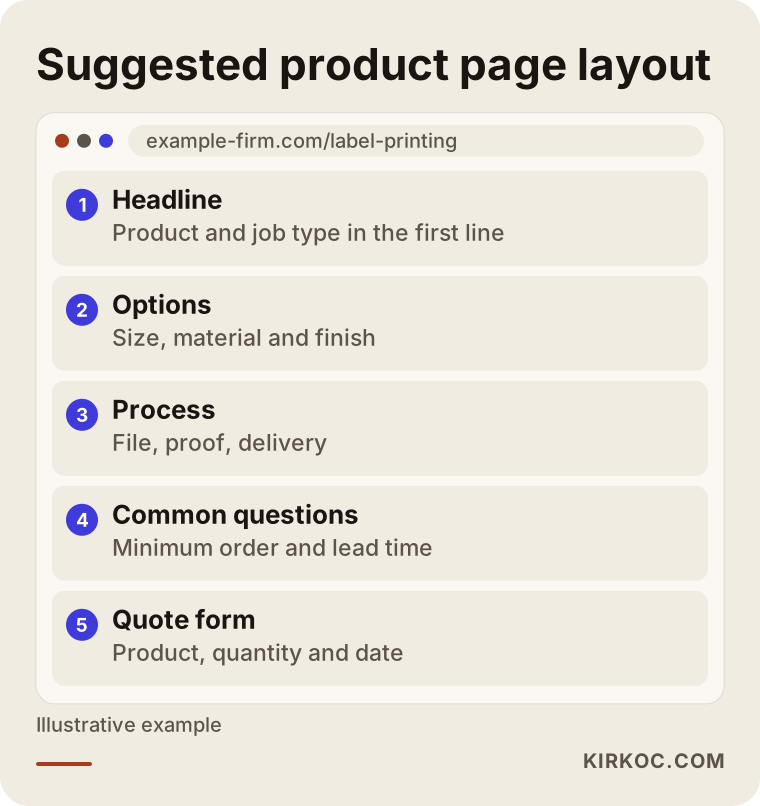
This is not a rigid template. The idea is that a visitor should understand in about a minute whether you can do the job they need, how to order and when they will have it in hand.
Local searches: "print shop near me"
A lot of print work is urgent. Flyers for tomorrow's meeting, business cards that must arrive by evening, a banner for a store opening on Saturday. These customers type "print shop near me" or "printer in [city]" and look at the map. To appear on the map, your Google Business Profile has to be complete: the right category, hours, phone number, address, a list of products and services, real photos and reviews.
There is a common wrinkle here. Many printers work from industrial parks or back streets, and customers never walk in; orders go out by courier or freight. If that describes you, "near me" searches may matter less, and it becomes more important to say plainly that you serve your whole region or the whole country. State which areas you deliver to, which shipping and courier options you offer, and how long it usually takes. Do not build pages for neighborhoods you do not actually serve. List the areas you really cover, honestly. Both Google and customers can tell the difference.
Example scenario 1: the small neighborhood print shop
This is an invented scenario, not a real business. Picture a small print shop in a town center that has worked with local shops and residents for years. It has a website, but only three pages: a home page, an About page and a Contact page. The home page has one paragraph: "Business cards, brochures, invitations, labels, stamps, T-shirt printing, banners."
The most sensible starting point for this shop is to write a separate page for each of the three or four products that bring in the most work: business cards, brochures, invitations, labels. Each page covers sizes, paper options, typical turnaround, what happens if the customer's file is not ready, and how local businesses can pick up or receive their order. After that, the Business Profile is completed and real photos from the shop are added. A shop that does this may not reach the first page for a broad search like "print shop in [big city]." But it has a far better chance of showing up for narrow searches with clear intent, such as "[town] business cards." There is no guarantee, but a realistic target matters.
Example scenario 2: a packaging and label manufacturer
This is also an invented scenario. Imagine a firm in an industrial area that makes product labels, boxes and shopping bags, and whose customers are mostly other businesses. Its site has a nice promotional video and photos of the machines. But nowhere does it say which products are made from what quantity, which materials are used, which printing methods, or how long delivery takes. Customers call and ask the same questions again and again.
Priorities are different for this firm. It needs pages by product and by industry: "labels for food products," "cosmetic boxes," "shipping boxes for online stores." Each page should clearly explain the minimum order, the sample process, file preparation, proofing and the delivery plan. These buyers usually collect quotes from several firms, and the one that gives the clearest information gets invited to the conversation most easily. So the job of SEO here is not only to bring traffic. It also improves the quality of the quote conversation: talking to a customer who has already had their questions answered takes far less time.
The comparison below shows these two types of customers as separate paths through the site.
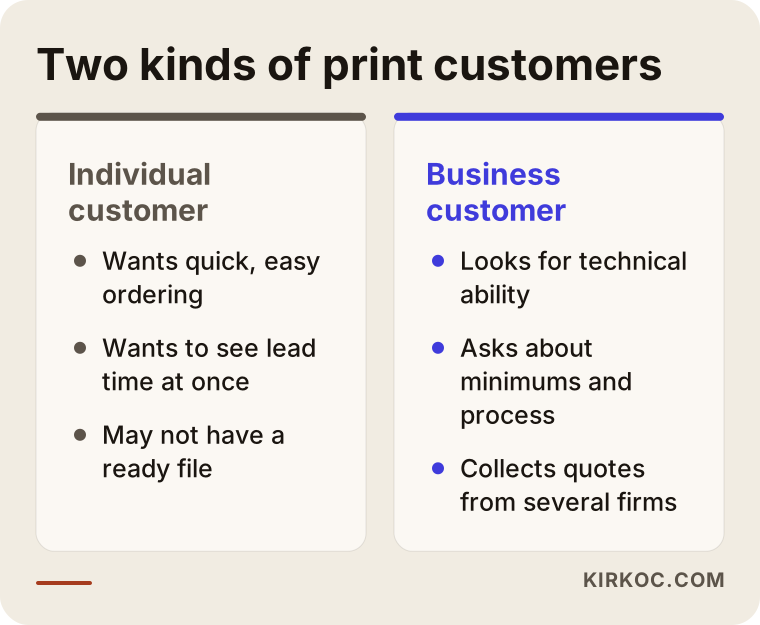
The difference is simple. Individuals want speed, easy ordering and a clear delivery date. Business buyers look for technical ability, process and reliability. Trying to speak to both with the same text leaves both halfway served.
Step by step: a print shop SEO process from scratch
The process can stay simple. Here is the order in which I start.
1. Clarify the customer and the products. Which jobs are profitable? Where do you stand out? Which kind of customer do you want more of? Going after every job means being strong at none.
2. Research the customer's wording. I look at which words people really type. What you call "digital output on photo stock" may be "photo prints" to a customer. Write in the customer's language, not the trade's.
3. Review the site. I check mobile loading speed, whether product pages exist, whether titles repeat, and whether there are broken links or old pages. Many customers look at your site on a phone, and a page that loads slowly loses orders.
4. Write or revise the pages. In priority order, one clear page per product, with a title, an opening paragraph, options, common questions and a way to get in touch.
5. Fix local visibility. Business Profile, consistent address and phone number, and politely asking for reviews after an order is delivered.
6. Measure and keep going. Who visits which page, who fills in the form, who calls? Seeing the numbers tells you where to spend your time.
The image below sums up these steps.
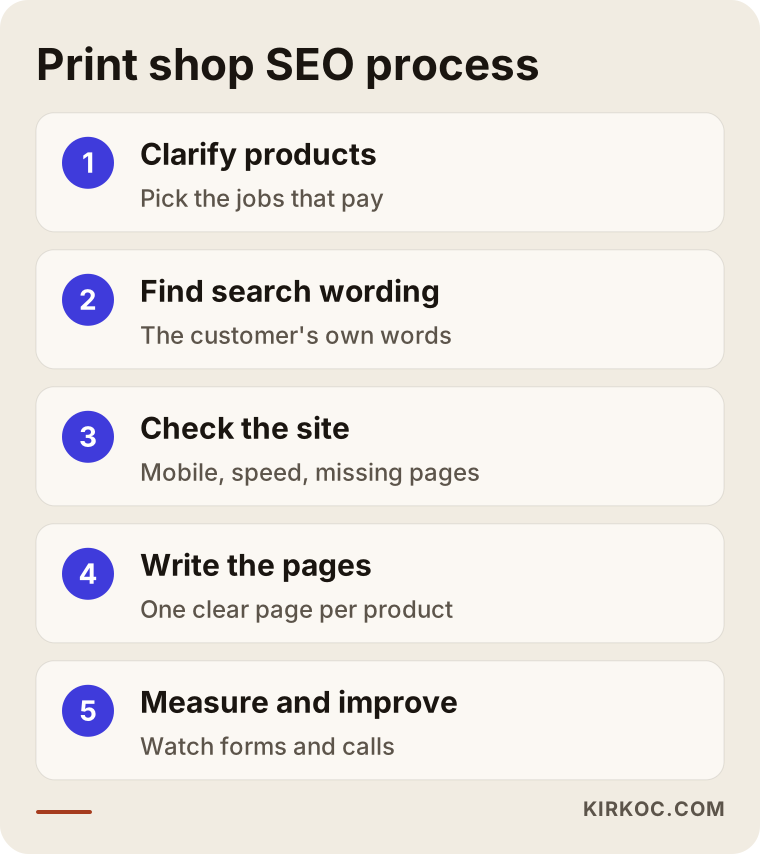
Most of these steps happen in sequence, not all at once. If the first three are not done well, the later ones are wasted. The most common thing I see is someone jumping straight into writing articles without ever reviewing the site.
Trust and photos: where print shop sites fall short
Print is a product people judge by holding it. Customers cannot do that on a screen, so they need more reassurance. Your site should include real photos of your shop and your work (not stock images), a short description of how you work, whether you send a proof before printing, what you do if a job comes out wrong, and your payment and delivery options.
Sentences like "we send a digital proof before printing" or "if a job comes out wrong, we reprint it" speak to the customer's biggest worries. Write them only if they are true. If you cannot keep the promise, leave it out. Before you make firm statements about consumer rights, returns or refund terms, I suggest talking to a lawyer.
There is one more small trick with images: the file name and the alt text matter. Instead of "IMG_4521.jpg," a name like "matte-laminated-business-cards.jpg" with a short description as the alt text helps visually impaired visitors and helps Google. This tiny detail is missing from most print shop sites.
Common SEO mistakes at print shops
These are the mistakes I see most often in this industry.
Cramming every product onto one page. A "Products" page lists forty items, one sentence each. Google cannot tell what the page is about, and the customer cannot find what they came for.
Putting the catalog in a PDF and leaving the content there. If product details live only in a downloadable PDF, search engines struggle to read them and most customers will not bother to download it. Put the information on the page itself and offer the PDF as an extra.
Reusing the same text on many pages. Copying the "business card printing" text onto the "brochure printing" page and swapping the product name is very common. When pages look alike, none of them stands out.
Neglecting mobile. A customer tries to upload a file from their phone and the form will not open. Being able to place an order from a phone matters most for people in a hurry.
Chasing only the word "cheap." Searches like "cheap business cards" are crowded and competitive, and those customers look for the lowest quote and rarely stay loyal. If your strength is speed, quality, design help or special paper, build your pages around that.
Scattered contact details. One phone number on the site, another on Google, a third on social media. Customers lose trust, and Google struggles to know which is right.
Not measuring. How many people visited, how many filled in the form, how many called? Without that you cannot tell what is working.
The image below collects these mistakes into a short warning list.
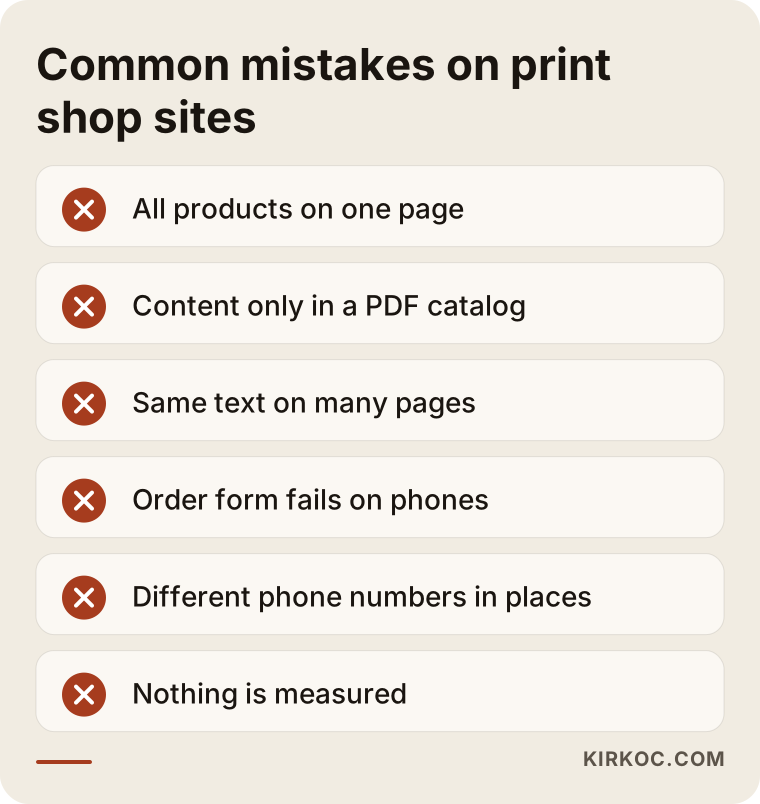
If you recognize your own site in this list, do not be discouraged. Almost every print shop site has a few of these. The good news is that every one of them can be fixed.
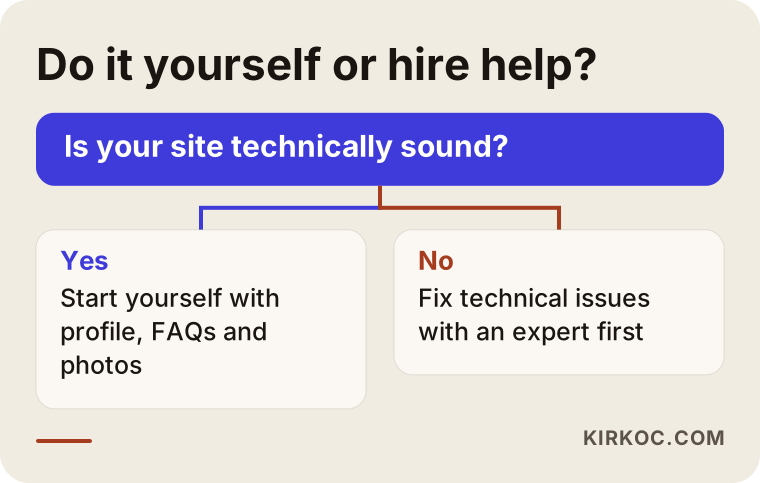
What can you do yourself, and when do you need a specialist?
Some things you can do without a specialist, and I would like you to, because nobody outside your shop knows what you know.
You can do these yourself:
- Claim your Google Business Profile or fill in what is missing, and add real photos.
- List the ten questions customers ask most and write out the answers.
- Take regular photos of your shop and finished jobs, and jot down short notes about them.
- Ask satisfied customers for reviews.
- Check how your site looks on a phone, and try placing an order through your own form.
A specialist helps in these situations:
- Your site has technical problems (slow loading, broken pages, search engines not seeing the site).
- You need to build product pages from scratch and plan which page should answer which search.
- You have been publishing content for a few months and see no movement, and cannot work out why.
- You want to plan ads and organic visibility together.
The flow below can help you decide when to go it alone and when to get support.
How do SEO and ads work together for a printer?
SEO builds slowly, while ads make you visible right away. For a business with seasonal swings like printing, it makes sense to think about both. Back-to-school season, the holidays, wedding season, trade show periods, election and campaign periods are all times when print demand rises. Using ads in those periods on narrow, clear searches, and using SEO year-round to keep your core pages strong, is a sensible division of labor.
There is a practical benefit when one person handles both. From ad data I can see which keywords actually bring in form submissions, and I use that when writing SEO pages. When sample photos shared on social media link to the same product page, the customer sees the same clear page wherever they come from. When the site, SEO, social media and ads sit with different people, one person's work tends to undo or duplicate another's. When one person runs it all, the message stays consistent and the effort you pay for is not wasted.
The path from a search to an order
You can think of the road from a search to an order as a funnel. At the top, many people run the search. Some of them visit your site. A smaller group reads a product page. Fewer still fill in the form or call. In the end, some place an order. The job of SEO is to reduce losses at every stage of this funnel, and enlarging only the top is not enough.
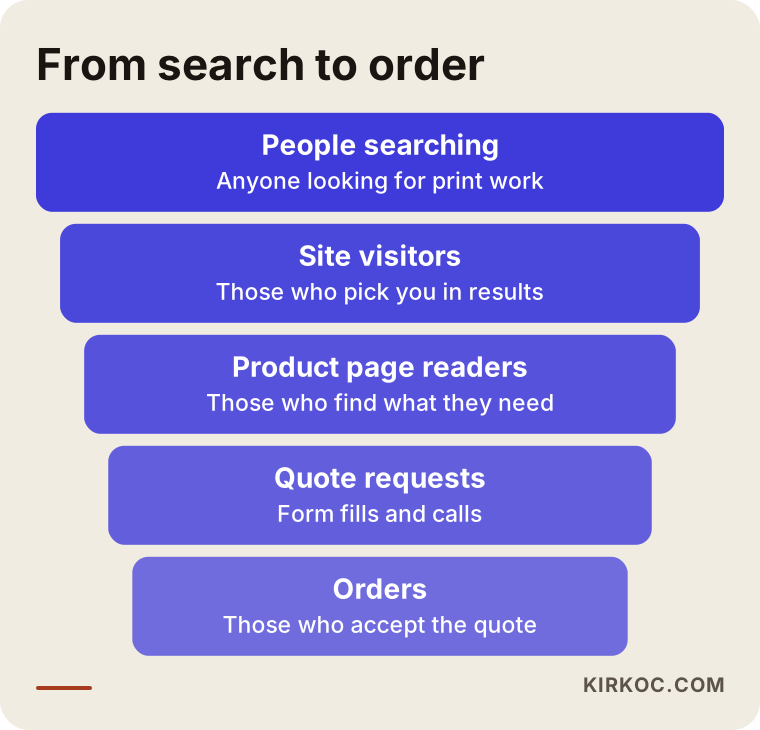
Knowing where you lose people tells you where to put your effort. If many people visit and nobody fills in the form, the problem is not traffic; it is the page. If forms come in but orders do not follow, that has more to do with your quoting process than with SEO, though we can talk through that too.
A checklist for a product page
When I write a new product page or fix an existing one, this list makes the work easier. You can try it on your own pages.
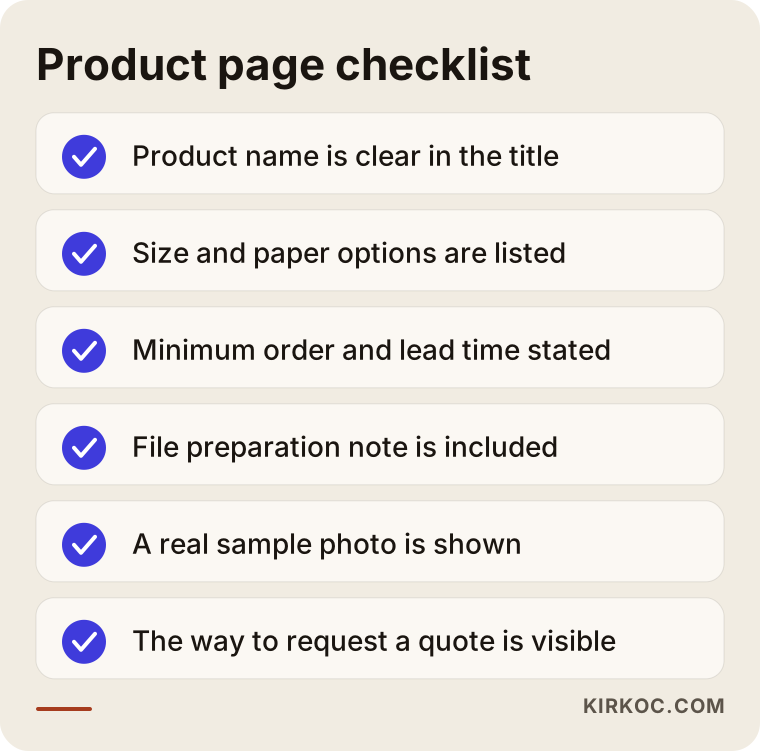
Every item looks simple, but it is rare to find all of them on all ten pages of a site. Check your pages one by one, note the missing items and fill them in by priority.
When will you see results?
To be honest, SEO does not deliver overnight. After you publish or fix a page, it takes time for Google to notice, evaluate and update where you appear. In narrow searches with little competition, first signs usually show within a few weeks. In broad, crowded searches it can take months. Nobody can promise you a particular ranking or result, and if someone does, be careful.
A realistic schedule goes like this. In the first month, the site is cleaned up, core pages are written and the business profile is completed. In the second and third months, new pages are added, Google takes time to recognize them and the first data comes in. In months four to six, you can see which pages work. After that, investment grows or changes direction depending on what the data shows.
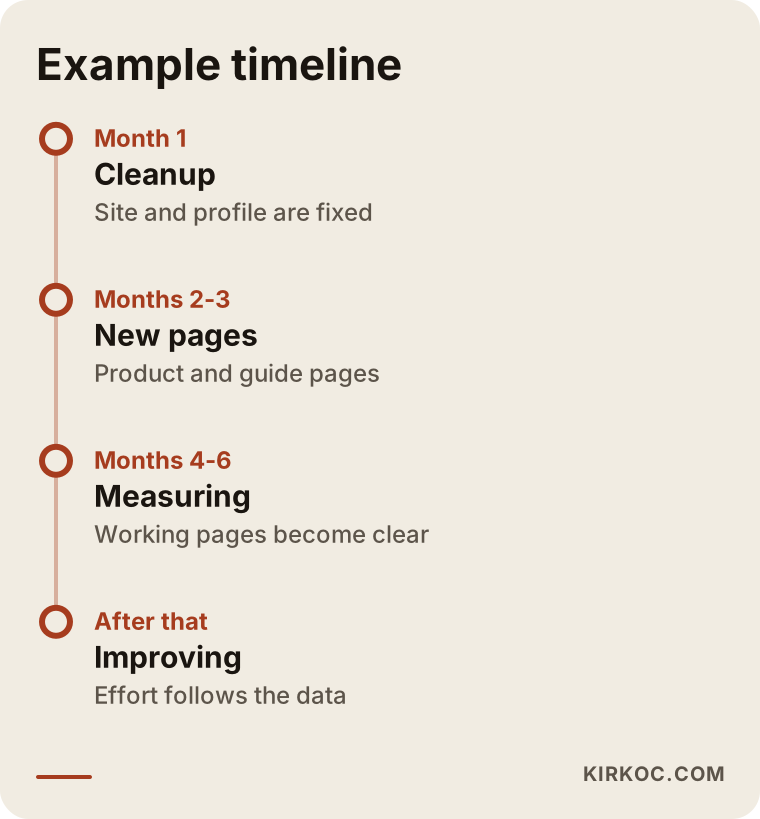
The timeline varies by business and by market, and the one above is only an example. What matters is that the work moves forward patiently and is measured as it goes.
What determines the cost?
I do not quote numbers here, because every print shop's situation is very different. But I can tell you plainly what moves the price.
- The current state of the site. Do you need a new site, or only fixes to the existing one? How serious are the technical problems?
- Range of products. Writing separate pages for ten products is not the same job as building pages for two hundred.
- Competition. Growing in a crowded search area takes more work than in a narrow one.
- Amount of content to write. Technical guides, portfolio captions and common questions take time.
- Number of languages. If you sell to customers abroad, pages in other languages may be needed.
- Length and scope of the work. A one-time cleanup and an ongoing monthly engagement are priced differently.
- Extra services such as ads and social media. Whether you want them handled by the same person.
When you get a quote, look at how each of these items shows up in it. A quote that just says "SEO services" without spelling out what will be done tends to cause mismatched expectations later.
How I work
I work alone, so the person you talk to is the person doing the work. A typical start looks like this: first a short call about your business, your customers and your current site. Then I review the site and write up, in plain language, what needs to be fixed and what needs to be written. Once you approve, I begin and share progress in a way that is easy to follow. You can hire me for SEO only, or I can handle the site, social media and ads together as one package. I do not skip over terms you do not understand; I try to explain them as simply as I have in this article.
Frequently Asked Questions
Do print shops really need SEO? Aren't my regular customers enough?
Regular customers are valuable, but they can dwindle over time: businesses close, move or switch to another printer. New customers start their search on Google. SEO is one of the most sustainable ways to reach people who do not know you yet but are looking for print work.
Which is better, SEO or Google Ads?
They do different jobs. Ads make you visible right away, but you disappear when you stop paying. SEO builds slowly, but what you set up keeps bringing work for a long time. Depending on your budget and urgency, you can use them together or one after the other.
Should I put prices on my site?
You do not have to. Because price varies so much with quantity, paper, size and finish, many printers do not publish fixed prices. But explaining what determines the price on the page cuts down on empty phone calls and brings forward the serious customers.
Do I need an online ordering system?
For standard products like business cards and labels, online ordering can make things easier, but it is not necessary for everyone. For custom and technical jobs, a well-built quote form is often enough and costs less.
How many months until I see results?
It depends on competition and the state of your site. In narrow searches, first movement can come within a few weeks; in broad searches it takes longer. It would not be honest to promise an exact timeline or ranking.
Is a Google Business Profile enough by itself?
For local, quick jobs a profile is a very strong start, but it is not enough alone. Technical and corporate customers usually look at your website too, and decide by looking at your product pages.
If I sell abroad, do I need pages in other languages?
If you want customers in other countries, yes. Separate pages built around the words people search for in that language perform better. Choose pages written with the terms customers in that country actually use, not a plain translation.
My site is old. Do I need a brand new one?
Not always. I look at the existing site first. If the foundation is very old or unusable on mobile, a new site may make more sense. But more often, fixing the pages and adding what is missing is enough.
If you would like to look together at whether your print shop's website meets the customers who are searching for printing, you can reach me through my SEO services page. I will listen to your business and tell you honestly what is really needed.