You run a business, and you have a website. Maybe a friend built it years ago, or maybe you worked with an agency that has since disappeared. Now you search for your own services on Google and cannot find yourself, and someone has told you, "You need to rebuild the site, or SEO will never work." Or perhaps you have simply started asking, "Should I redesign my website for SEO?" It is a fair question, but the answer is neither a flat yes nor a flat no. In this article I explain how to make the decision, what a redesign does and does not fix, and what to watch for if you go ahead. I am Ümit Kırkoç, I work from Istanbul, and I handle everything from building websites to SEO services myself. That means I have seen both sides: sometimes a site really does need to be rebuilt, and sometimes a rebuild is simply money wasted.
SEO, in short, is the work that makes your website show up when potential customers search on Google or other search engines. Part of it concerns the site itself: does it load fast, does it look right on a phone, are its pages organized sensibly? Part of it concerns what the site says. Many business owners mix these two up and try to solve a content problem with a new design. Getting the decision right starts with seeing the difference.
First, separate the problem: is it the site or the content?
There are several reasons your site might not appear in search results, and only some of them call for a rebuild. When you visit a doctor, a diagnosis comes before the prescription, and the same should apply to your website. If someone says "let's redo the site" without first showing you what is broken, treat that suggestion with caution.
Problems generally fall into three groups. The first is structure: the site looks broken on a phone, loads very slowly, has an admin area nobody can use, or was built in a way search engines struggle to read. The second is content: everything is crammed onto one page, your services have no pages of their own, page titles are meaningless (like "Home"), and the text does not answer what a customer is actually asking. The third is reputation and surroundings: your Google Business Profile is empty, your name appears nowhere else online, and you have few reviews.
Only the first group, and only when it is severe, justifies starting over. Problems in the second and third groups can be solved on your current site. The image below boils the choice down to a single question.
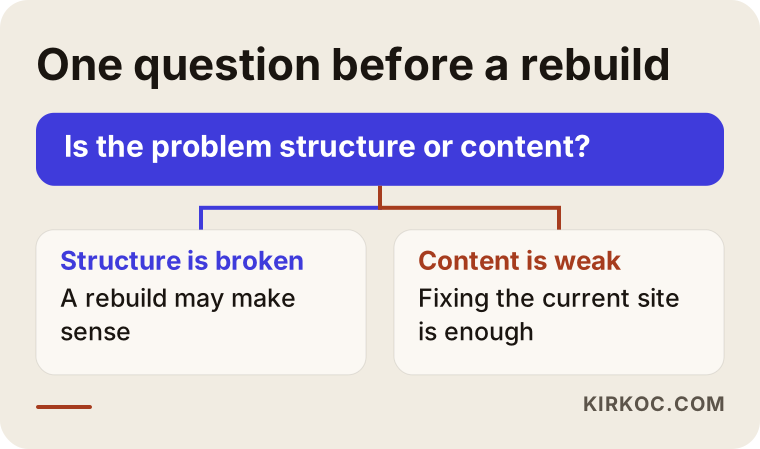
The question looks simple, but in practice many people start requesting quotes without answering it. Quotes collected before you know which side your problem is on cannot be compared with each other. One person may propose fixing page titles, another may propose rebuilding everything from zero, and each can sound reasonable on its own terms.
Signs that point to a structure problem
If text spills off the screen when your site opens on a phone, if buttons are too small to tap, or if a page takes more than a few seconds to appear, you have a structure problem. Most visitors today arrive on a phone. A site that works badly there loses customers and also loses ground in Google's eyes. Another sign is that you cannot manage the site yourself. If changing a phone number or a price means begging someone for help every time, the site is not working for you. A third sign is that the site runs on a very old platform that no longer receives security updates. That is a risk not only for SEO but also for safety.
Signs that point to a content problem
Your site might have a single "Our Services" page with five different services listed one under another. When a customer searches for "boiler servicing," there is no clear page for Google to show. If your page titles are just your company name, if pages have photos but no explanation, or if your "About" page is two sentences long, this is writing work, not redesign work. A new design in that situation just puts the same empty content in a prettier box.
What a redesign really does for SEO
People often assume "new site means new visibility." Reality is less direct. Google does not reward a new design. It looks at what the site says, how useful it is, and how trustworthy it appears. When a new site goes live, Google has to get to know it again. If the old site had pages that were performing well and they are not carried over properly, what you gain can be smaller than what you lose.
Let me say this plainly: rebuilding a site does not by itself guarantee rankings. A new site gives you a sturdier foundation, but what you build on it depends on your pages, your content and time. No honest expert can promise that you will reach the first page after a redesign, and anyone who does is not being straight with you.
There are cases where a redesign genuinely helps. When a site that was broken on phones is fixed, when a painfully slow site becomes fast, or when a setup that stopped you from editing pages becomes editable, every later SEO task gets easier. A redesign is not a goal in itself. It is a preparatory step, taken only if you need it.
Two hypothetical examples
The two scenarios below are entirely hypothetical. They do not describe a real company, but they reflect situations I run into often.
Example scenario 1: fixing is enough
Imagine an office removals company whose website was built a few years ago. It opens properly on phones, loads quickly, and the owner can log in and edit the text. But "Office removals," "Home moves" and "Storage" are all described on a single Services page, and the page titles are just "Home" and "Services." The owner thinks, "We do not show up on Google, so let's redo the site."
Here the problem is content, not structure. The fix is to create a separate page for each service, write clear titles and descriptions, add answers to common questions, and tidy up the Google Business Profile. A full rebuild would cost more and would throw away an infrastructure that works fine. Fixing the existing site is quicker, and because the page addresses stay the same, the risk is low.
Example scenario 2: a rebuild makes sense
In the second hypothetical, a medical practice has a site built on an outdated platform. Text overflows on phones, pages open very slowly, and the admin area has not been updated for years, so editing content is impossible. The person who built it cannot be reached. The owner wants to add one new service page, but even that requires a fee and weeks of waiting.
Patching would make little sense here. Every fix creates a new problem, and every page hits a wall. A rebuild means a new page can go up in a day instead of a month. Even so, the critical point is moving the old site's well-performing pages, titles and text into the new site properly. Otherwise the visibility you built up over the years disappears with the old design.
Putting the two paths side by side
Seeing the pros and cons of both options next to each other makes a decision easier. The image below summarizes them.
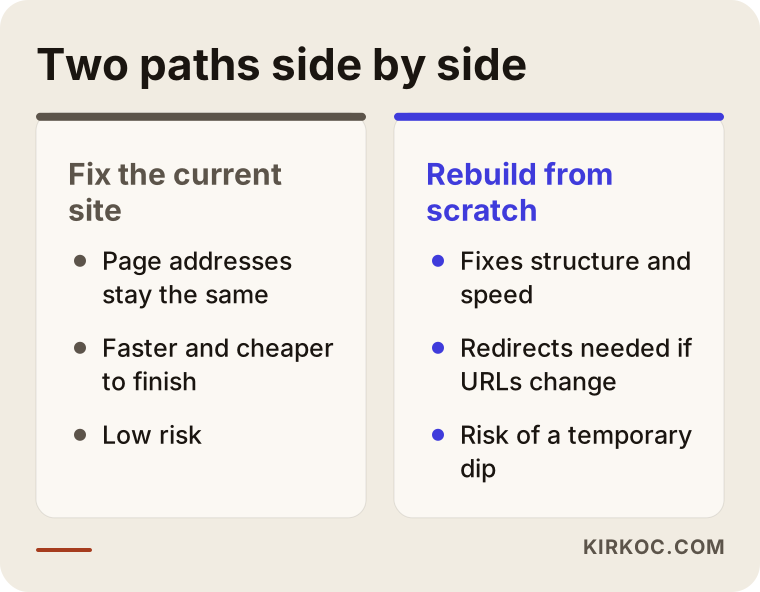
Pay attention to the line about redirects when addresses change. A page's address, meaning the link shown in the browser, is how Google recognizes that page. If the addresses change in the new site and nobody sets up a redirect (a rule that automatically sends visitors from the old address to the new one), Google treats the old page as gone. That can wipe out years of accumulated visibility overnight.
If you decide to rebuild: common mistakes
Most of the damage in redesign projects comes not from the design but from carelessness during the move. These are the ones I see most.
The first is skipping redirects. Nobody plans where old addresses should lead, the site launches, and the old pages show "not found" errors. The second is leaving the test site open to Google. If the temporary address used while building the new site is not closed off, Google sees two copies of your site and struggles to judge either one. The third is deleting titles and descriptions. When these fields are left empty in the new design, pages that used to perform well go live with meaningless headings. The fourth is throwing away page text that works. The owner says, "It is all old, let's rewrite everything," but one of those old texts may be the page that has been bringing in customers for years. The fifth is losing basic details such as the phone number, address and opening hours.
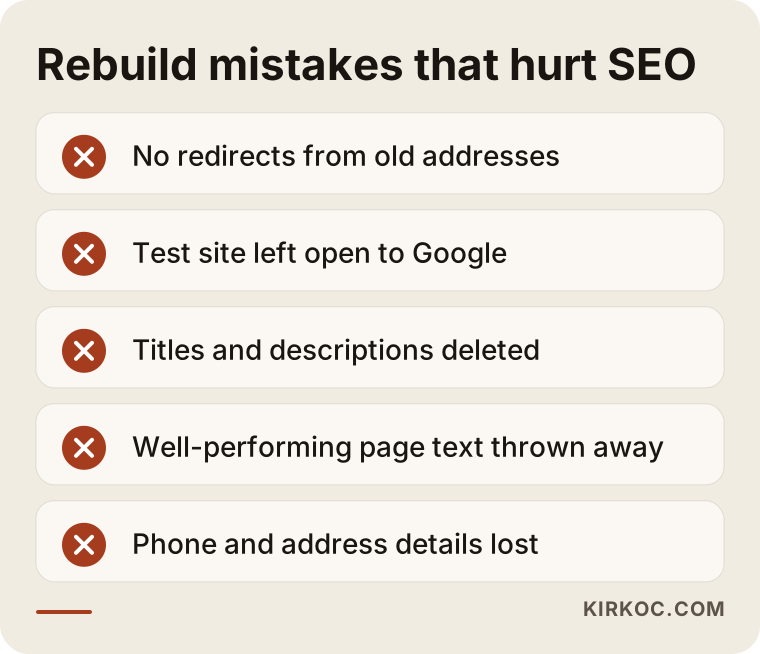
None of these is technically hard. They are all matters of planning. If an agency or specialist sends you a quote and does not say how each of these points will be handled, take that as a warning sign.
What you can check yourself before deciding
There are simple checks you can do before talking to any specialist. They sharpen the diagnosis and make it easier to judge the quotes you receive.
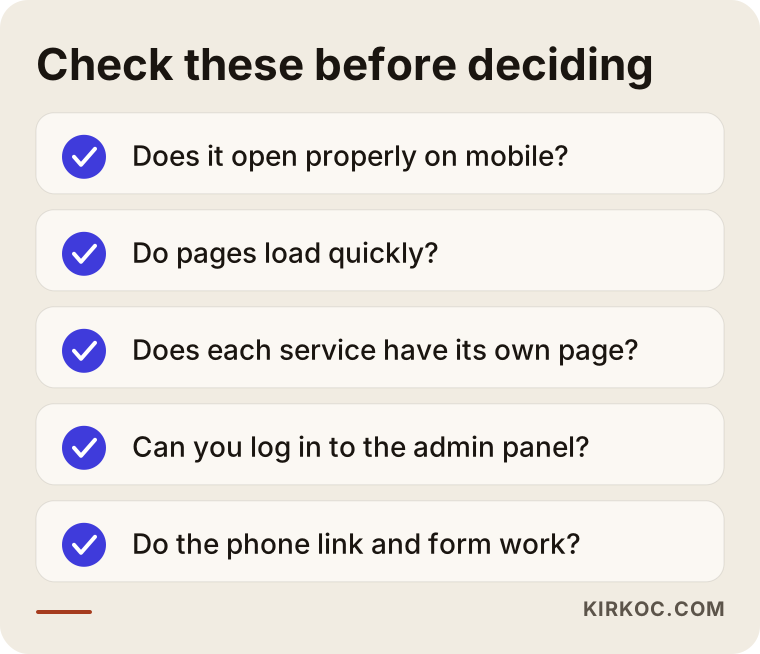
Start by opening your site on your own phone. Can you read the text, tap the buttons comfortably, and does the page appear within a few seconds? Then try it on a friend's phone too, because some problems only show up on certain devices. Second, count the pages. Does each service you offer have its own page, or is everything squeezed into one? Third, try logging in to the admin area. Do you know your username and password, and can you change a sentence? Fourth, tap your phone number and fill in your contact form to confirm that the call starts and the message reaches you. Fifth, type your service and your city into Google. Does your own site come up, or your competitors'? Working out why their pages are clearer than yours is often the most instructive step of all.
What would I recommend in each situation?
The table below sums up the situations I see most often and the usual direction I would suggest. It is a way of thinking, not a rule, because every site has its own quirks.
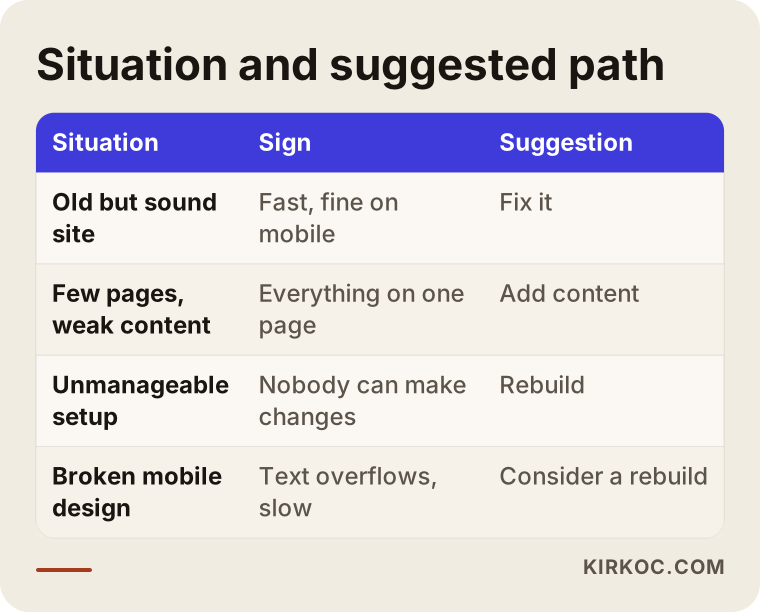
As the table shows, "rebuild" is the clear answer in only one of the four situations. In the others you either fix, add content, or look more closely before deciding. That is why "my site is old, so I must replace it" is often a premature conclusion.
If you sell products online, the picture changes
If your site is an online store, the decision gets more delicate. Stores can have hundreds or even thousands of product pages, each with its own address. Moving the store to another platform means every one of those addresses has to be redirected correctly. If a product page has been bringing in searches for years, losing it is a direct loss of sales.
So the first thing I ask an online store owner is: why do you want to change? If the platform makes adding products painful, or the payment and shipping integrations do not work, you have a solid reason. But moving an entire store just because "the design looks old" is usually an unnecessary risk. It is often possible to refresh the look while keeping the platform underneath. Category descriptions, product descriptions and filter pages also tend to bring more search traffic than a new design does.
If you do need a rebuild, how does the process work?
If you have decided to start over, there is an order that keeps SEO intact. My own way of working looks roughly like the steps below.
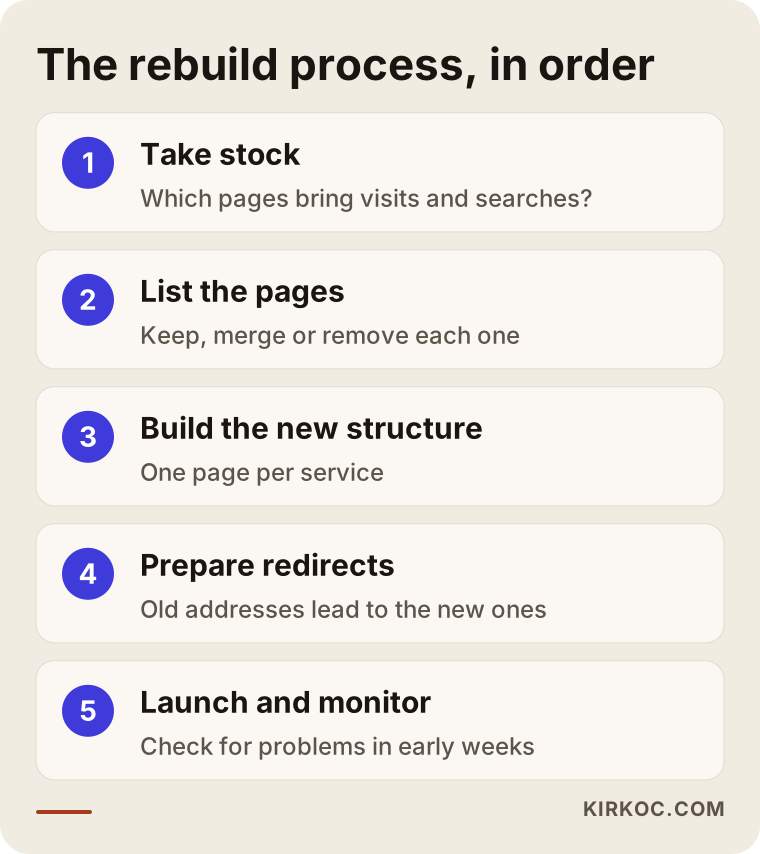
The first step is taking stock of what exists. I work out which pages bring visitors, which ones appear on Google, and which do nothing. Without that count you cannot know what to protect. In the second step I list the pages and decide what happens to each: keep it, merge it with another, or remove it. In the third step I build the new structure, with a page for every service, clear headings and a layout that works smoothly on phones. The fourth step is redirects. Old addresses are connected to new ones and tested before launch. In the fifth step I put the site live and scan for errors during the first weeks.
If you manage the process yourself, do not break this order. Most of the damage comes from skipping the stock-taking and redirect steps.
What should you expect after launch?
Launch day is not the day the work ends. Google needs to read the new site again, and that takes time. Small swings in visibility in the short term are normal and do not mean something has broken. What matters is telling apart a swing within the expected range from one caused by a mistake. That is why, in the first weeks after launch, you check whether pages are being crawled (visited by Google's automated reader) and whether any addresses return errors.
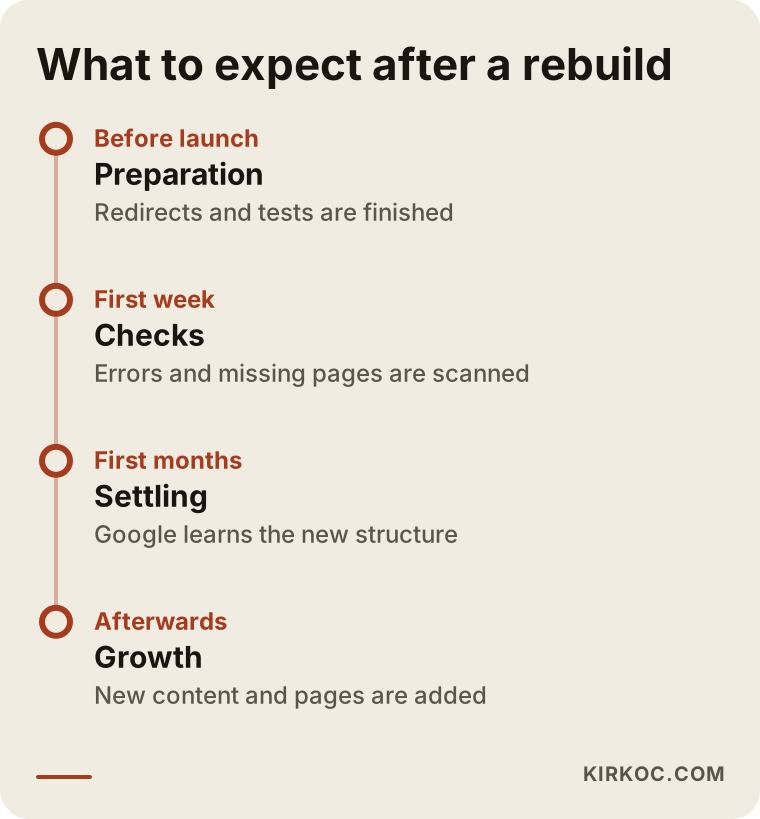
I deliberately left dates and day counts off the timeline. How long Google takes to settle on the new structure depends on the size of the site, the history of the old one and how much competition you face. Anyone who tells you "you will see results in exactly this many weeks" cannot actually know that.
Page titles and layout often matter more than the design
Many people who consider a redesign get there because of looks. They say, "My site seems outdated." They may be right, but in search results what usually decides things is not appearance but what the page says. A search results page shows this better than any explanation.
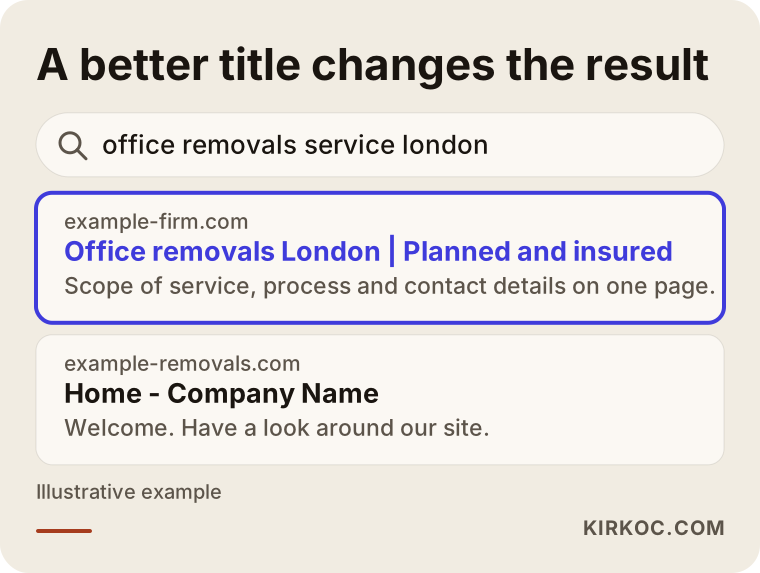
As you can see, a title like "Home - Company Name" tells neither Google nor the customer anything. A title that spells out the service and the city tells the searcher, "what you are looking for is here." Fixing this takes a few minutes and does not need a rebuild. Small adjustments such as titles and descriptions often make a bigger difference, and faster, than a new design does.
What does a strong service page look like?
A service page should answer, in order, the questions of the person searching for that service. At the top, the service and the city are stated clearly. Below that comes who the service is for, which means describing the customer's situation. Then the process: what will happen, how long it will take and what you will need from them. Next comes a short FAQ that answers real questions. At the bottom, your phone number and contact form are easy to see. This is the page type that is most often missing.
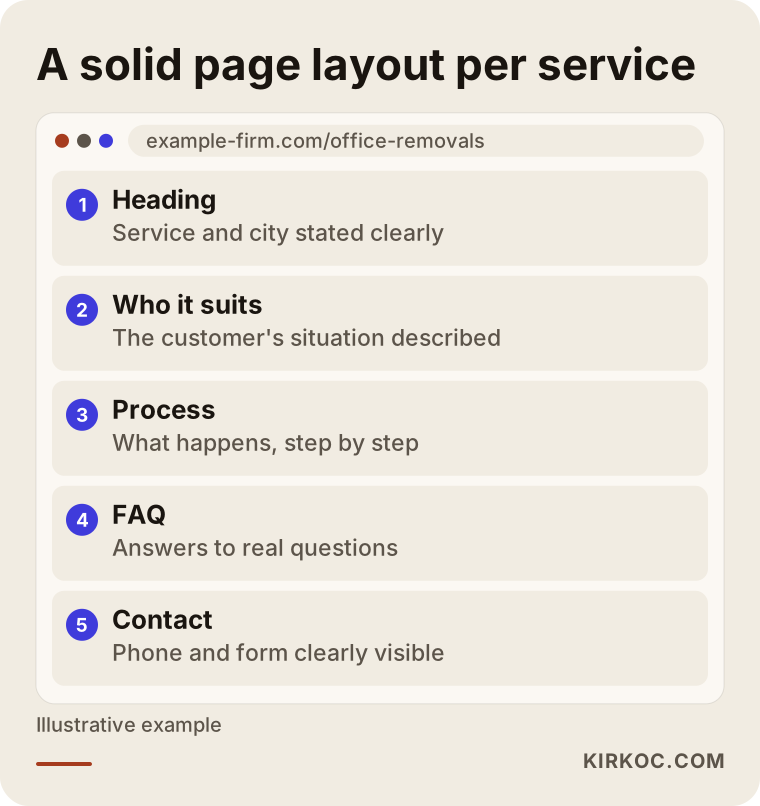
This layout does not need a new website. On your current site you can apply it by adding a new page through the admin area. If your platform allows that, you have found a strong reason to postpone the rebuild decision.
Narrow down where to start
Trying to fix everything at once leaves many businesses stranded halfway. A better route is to narrow the list. Look at all your pages first, then pick out only the service pages that bring in customers, choose the weakest of those, and make the first fixes there.
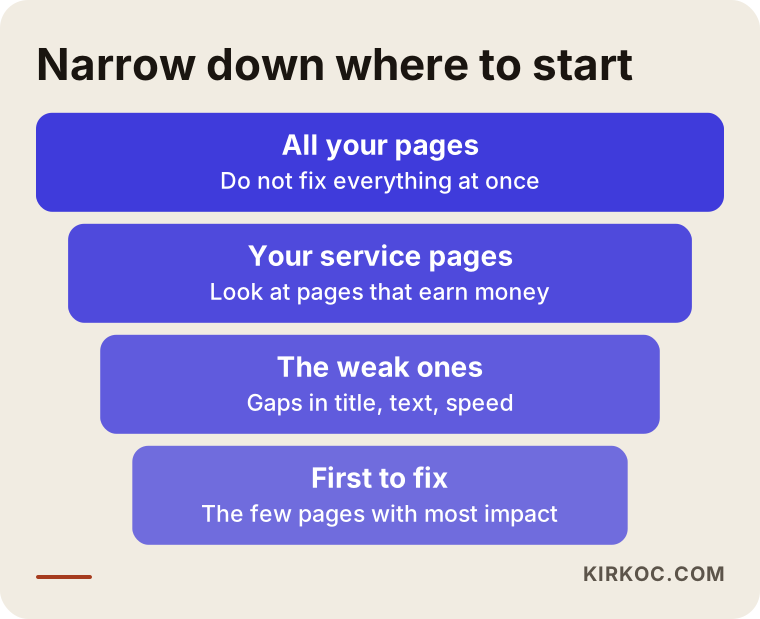
The good thing about this approach is that you can make progress without deciding on a redesign at all. Seeing the effect of the first fixes helps you decide. If the fixes work, the foundation is sound. If you keep running into walls, you have a structure problem and a rebuild comes onto the table.
What can you do yourself, and when do you need a specialist?
Correcting page titles and descriptions, updating your phone and address details, filling in your Google Business Profile, asking customers for reviews and writing answers to common questions are all things you can do. None of it requires technical knowledge, only that you know your business. In fact, since you know best what your customers ask, you are the best person to write those texts.
Specialist help makes sense when there are structural problems such as site speed or how the site looks on phones, when a migration and redirects are needed, when you plan to publish in more than one language, or when you want a technical look at how Google crawls your site. I especially recommend leaving the redirect and testing stage to an expert. A mistake at that step can cost you months of visibility.
What determines the cost?
I do not quote numbers for a rebuild or a fix, because no two sites are alike. But I can tell you plainly what moves the price.
The number of pages is the first factor; a twenty-page company site and a store with thousands of products are not the same job. The second is the condition of your existing content: if the text is usable, moving it is easy, but if everything has to be rewritten, the job grows. The third is the features you need. Booking systems, payments, member accounts or a multilingual setup all add work. The fourth is the scale of the migration and redirect work; the more old addresses there are, the longer the testing takes. The fifth is your design expectations, since adapting a ready-made structure and creating a custom design take different amounts of effort. The sixth is whether SEO work will continue afterward, meaning whether you are only getting a site built or also getting content and ongoing monitoring.
When you collect quotes, check that they describe the same scope. If one lists redirects and testing and another does not, the cheaper quote may turn out to be expensive later.
Mistakes people make when deciding
There are mistakes at the decision stage as well, and they differ from the ones made during the rebuild. The first is deciding on taste. Wanting a good-looking new site is legitimate, but it does not solve an SEO problem. The second is copying a competitor's site without examining your own situation. The third is treating a redesign as a one-time job. People assume the work ends when the new site goes live, when content and monitoring should carry on. The fourth is choosing the cheapest quote without asking about scope. The fifth is leaving the site without a real owner. If your admin login, domain name and hosting details sit with someone else, you will face the same problem again later. Your domain name and admin access must be registered in your name.
How I work with you
I handle the website, SEO, social media and advertising myself, and that gives you a concrete advantage when making this decision. When the person who builds the site is the same person who does the SEO, you do not have to shuttle between two parties asking, "why is this page missing?" The pages are built with search in mind from the start, and after launch the same person tracks the results. Because social media and ad work follow the same message, customers get a consistent impression of your business whichever channel they see you on.
My approach is straightforward. First I look at your current site and tell you honestly whether fixing or rebuilding makes more sense. If fixing is enough, I say so in writing and I will not steer you into an unnecessary project. If a rebuild is needed, I share the stock-taking, page list, structure and redirect steps with you in writing. At every stage you can see what has been done, and the site, the domain and the admin access always stay with you.
Frequently Asked Questions
Do I have to rebuild my website for SEO?
No, most of the time you do not. If the site's problem is missing content and pages, fixing the current site is enough. A rebuild only makes sense if the structure is seriously broken, for example if the site is unusable on phones, very slow or impossible to manage.
Will I lose my place on Google if I redesign my site?
Done properly, you should not expect a big loss, although a short-term swing is normal. The real risks are failing to redirect old addresses to new ones and deleting pages that perform well. If you watch those two things, the risk drops significantly. Still, no expert can guarantee a particular result.
If I get a new site, will I reach the first page?
Nobody can guarantee that. A new site gives you a sturdier base, but rankings depend on the content of your pages, the competition and time. A redesign alone will not lift your position; clear pages written for the new structure are what do that.
Is a new design alone enough for SEO?
Usually not. Design builds trust with visitors and makes the site easier to use on a phone, but the content on your pages decides which searches Google shows you for. A redesign makes sense when it is done together with content and page structure.
What happens if addresses change during a migration?
If no redirect is set up from the old address to the new one, Google treats the old page as gone, and the visibility that page earned disappears. With a redirect, Google understands the new address as a continuation of the old one. That is why the redirect plan is one of the most important parts of any rebuild.
Can I fix my own website myself?
You can usually fix titles, descriptions, contact details and FAQs yourself. For technical matters like speed, phone compatibility and migration, a specialist is the safer choice. If you do not have access to your site's admin area, solve that first.
How long does a rebuild take, and how is the cost set?
Time and cost depend on the number of pages, the state of your current content, the features you want, the size of the redirect work and whether SEO work will follow. That is why the same price cannot be quoted for two different sites. For a clear answer, your current site needs to be reviewed.
How do I know whether to fix or rebuild?
Start by checking whether the problem is in structure or content. If your site opens well on a phone, loads fast and can be managed, begin by fixing it. If you hit a wall at every step, a rebuild comes into play. If you are not sure, show your site to a specialist and ask for a written assessment.
If you are unsure whether your site needs fixing or rebuilding, get in touch through my SEO services page. We can look at your site together, and I will tell you honestly which option suits your situation.