You set up the account, you post on a regular schedule, and you may even have a decent number of followers. Yet the phone stays quiet, your inbox is empty, and the register looks the same as it did before. If that sounds familiar, typing "why is social media not bringing me customers" into a search bar is completely reasonable. In this article I explain why it happens, how to tell which cause fits your situation, and what order to follow when you fix it. I am Ümit Kırkoç, based in Istanbul, and I handle websites, SEO, ads and social media for small businesses on my own, as one person. Because of that, I look at this problem from the whole path a customer takes to find you and decide, not only from the quality of your posts. If you want to see what my social media management service covers, you can look at it now, but let's talk about the problem itself first.
One important distinction before you go further: for most businesses, social media is a trust channel, not a sales channel. People scrolling through a feed are rarely planning to buy something. They like what they see, remember you, and when a need comes up they either recall your name or search for it. So a lack of customers is seldom caused by one big mistake. It is usually one broken link in a chain. The rest of this article walks through that chain, link by link.
Why social media does not bring customers: see the whole chain
For a stranger to become your customer, they go through at least four steps: they see you, something catches their interest, they come to trust you, and they get in touch. If any one of these fails, the result is close to zero. A high like count proves that the first step works. It tells you nothing about the other three.
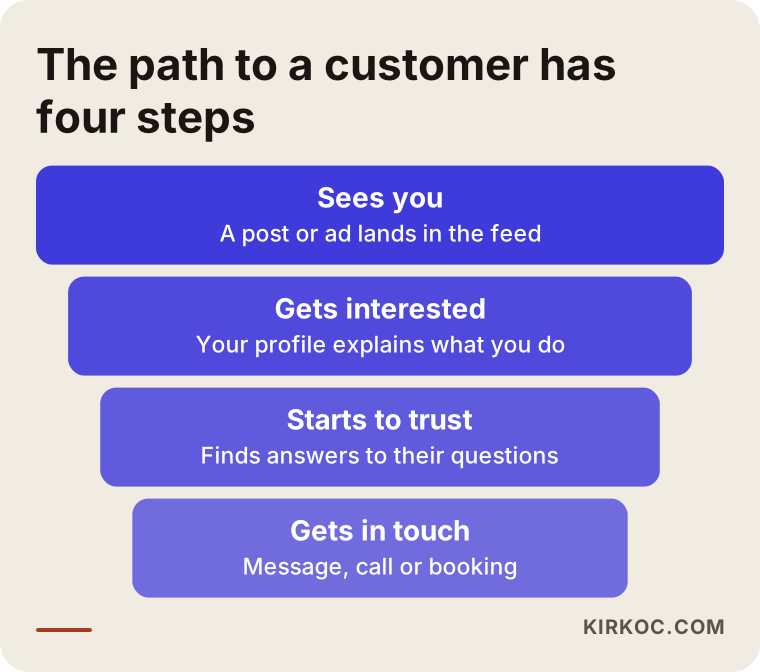
The funnel above is a simple way to think about where you are losing people. Most business owners put all their effort into the first step, trying to get more people to see their content. In practice, the leak is often lower down: the profile does not say who you are, the way to reach you is unclear, or the posts speak to the wrong people.
Followers are not customers
A large share of your followers may be relatives, colleagues, competitors, or people who will never buy from you. Giveaways, contests and "follow for follow" groups blur the picture even more. The account looks busy, but nobody in the crowd actually needs what you sell. So the first thing to check is not the numbers but who is actually looking at your account. The built-in analytics screens on most platforms show broad details such as age range, city and interests. If that audience does not match the area you serve or the kind of customer you want, you have already found part of the explanation.
The eight most common reasons
These are the situations I run into again and again when I review a small business account. You will probably not recognize all eight in your own account, but a few of them usually overlap.
1. It is not clear who you are talking to
An account that is "for everyone" is for no one. If a nutritionist posts in the same voice for people who want to lose weight, for athletes and for expecting mothers, none of them thinks "this account is exactly for me." At first glance your account should say, in effect, "I help this kind of person with this kind of problem." Saying so does not cost you customers. It attracts the right ones.
2. The content looks nice but answers nothing
Pretty photos, motivational quotes and generic advice make an account look polished, but they do not help anyone decide. A potential customer usually has questions like these in mind: How do you do this work? Is it right for my situation? Have you done something like it before? How long does it take? Where do I go, or how do I reach you? If none of your posts touch these questions, people may watch, but nobody will message you.
3. The profile does not work like a mini landing page
When someone likes a post and taps through to your profile, they want to know within about three seconds who you are, what you do, where you are and how to reach you. A bio full of emoji, a personal quote, or only a brand name wastes those three seconds. A blurry profile photo, empty highlights or a broken link damage trust right at the start.
4. Getting in touch is hard or unclear
Many small businesses have no phone number on the profile, leave messages unanswered for weeks, never add a chat link, and show no map or address. If a would-be customer has to take three steps just to ask one question, most of them quit. The easier you are to reach, the easier it is for an undecided person to take the next step.
5. Posting is irregular and unplanned
Posting every day for a week and then going silent for three weeks makes it harder for the platform to show you and harder for people to remember you. A routine does not mean a rigid calendar. It means a pace you can actually sustain. An account that posts a little but keeps going feels more trustworthy than one that posts heavily at the start of the month and then disappears.
6. Social media, your website and your other channels do not match
On Instagram you say one thing, your website says another, and your Google Business Profile still shows an old phone number. When a prospect checks you in a second place and finds inconsistencies, trust cracks. It is very common for someone to see you on Instagram and then search your name on Google. If what they find there is poor, the decision gets postponed or goes to a competitor. Your site, your local listing and your social accounts need to be thought about together.
7. The expectation does not fit the method
Some kinds of work are slow on social media by nature. Urgent services that people look for at the moment of need, such as a locksmith or a plumber, are mostly searched for on Google and maps, not browsed on Instagram. Expecting an instant phone call from social media for that kind of business puts the weight on the wrong tool. Social media is better treated there as a supporting channel that reinforces trust.
8. Nothing is measured, so nobody knows what works
If nobody writes down which post was followed by a message, which link got clicked, or how many people tapped the call button, you will repeat the same mistakes month after month. You do not need complicated software. A notebook or a simple spreadsheet already makes a difference.
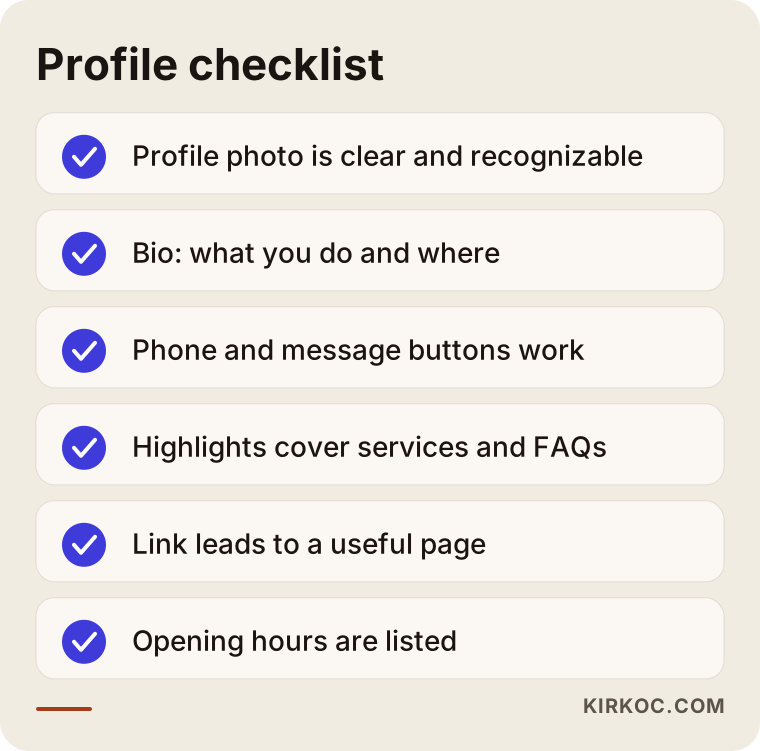
The checklist above is meant for a quick look at your own profile. If you cannot tick at least four of the six items, fixing the profile will do more for you than producing new content.
How customers use social media in different industries
General advice does not work for everyone, because customers in each industry look for something different on social media.
In visual businesses such as beauty, cafes, furniture, weddings, decoration and clothing, people look at the photos first. What decides things there is before-and-after work, real spaces, real product photos, and how you respond when someone asks about prices. In trust-based businesses such as dentists, lawyers, accountants and consultants, people look for recommendations and proof of expertise, so content that answers questions plainly and explains the process stands out. In businesses that people compare heavily, such as photographers, agencies, courses and renovation, a visitor will often study several accounts side by side, so you need to state clearly what makes yours different. In businesses that sell to other companies, such as wholesale, software or export, LinkedIn and direct messages usually do more than Instagram, and what matters is that the right decision maker sees you, not everyone.
Knowing which group you belong to tells you where to spend your energy. Instead of trying to do everything on every platform, going deeper on the one or two platforms where your customers already are tends to work better.
Two example scenarios
The two situations below are hypothetical. They do not describe a real company or person; they are built to show patterns I see often.
Example scenario 1: a beauty salon with many likes and few bookings
Imagine a beauty salon that posts nice, regular photos of hair and skin work. The like count is decent, yet weeks go by and nobody messages to book. When I look at the account, here is what I notice: the bio contains only the salon name and a slogan, with no address, no opening hours and no way to book. Most posts are finished-result photos, and nothing explains which treatment suits whom, how long it takes or how to prepare. Messages are answered late in the evening, sometimes two days later.
The problem here is not how good the content looks. It is the lack of information that helps someone decide, plus a slow path to reach the salon. The fix would be to rewrite the bio as "where, what, how to book," to prepare a short explainer post for each treatment, to put frequently asked questions in the highlights, and to set up a simple routine so messages are answered the same day. I cannot honestly tell you in advance how long this would take to pay off, but these are the steps that repair the broken links in the chain.
Example scenario 2: a small accounting office nobody sees
Now picture a hypothetical accounting office. The account occasionally posts a tax deadline reminder, but reach is very low and the only contact detail is a phone number. The office's clients are mostly small business owners. When those people look for an accountant, they do not open Instagram; they search on Google and ask people they know.
The right move here is not to push harder on Instagram. It is to use the account as a trust storefront: short posts that give plain answers to common questions, a clear description of the kinds of businesses the office works with, and links from those posts to a web page and a Google Business Profile. In other words, social media does not have to be the only channel that brings in clients. It is one of several parts that work together with search results, a website and word of mouth.
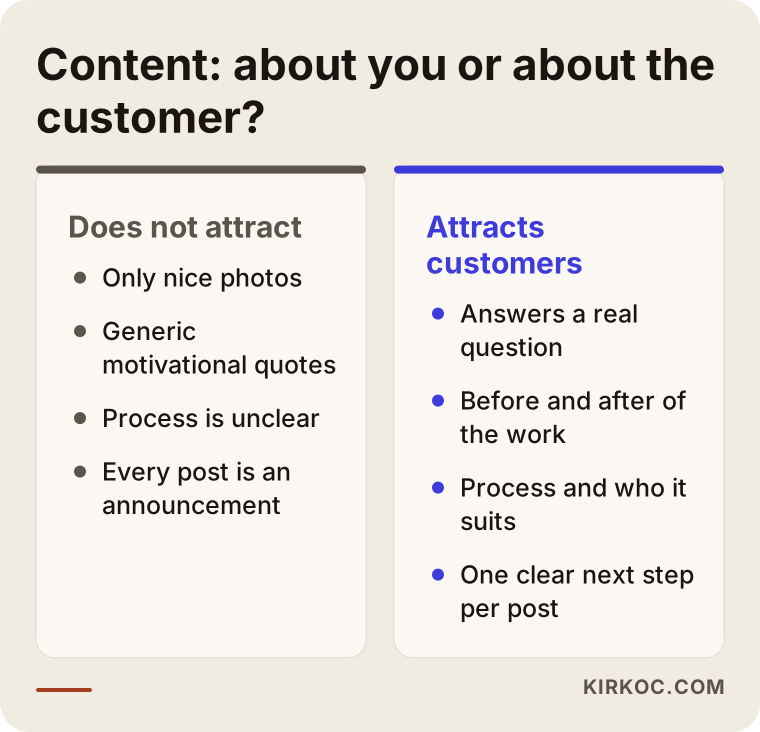
The comparison above sums up the core difference in both scenarios: content that does not attract customers talks about itself, while content that attracts them answers the question in the other person's head.
Which content does which job?
Every post should have a job. If all of them try to do the same thing, the account looks unfocused. A post showing your work builds trust, a post answering a question shows expertise, a piece of customer feedback reduces doubt, and an announcement or offer prompts action. The balance matters. An account that only makes announcements turns into a billboard, and an account that only gives information leaves the question "this is great, but where do I buy it?" unanswered.
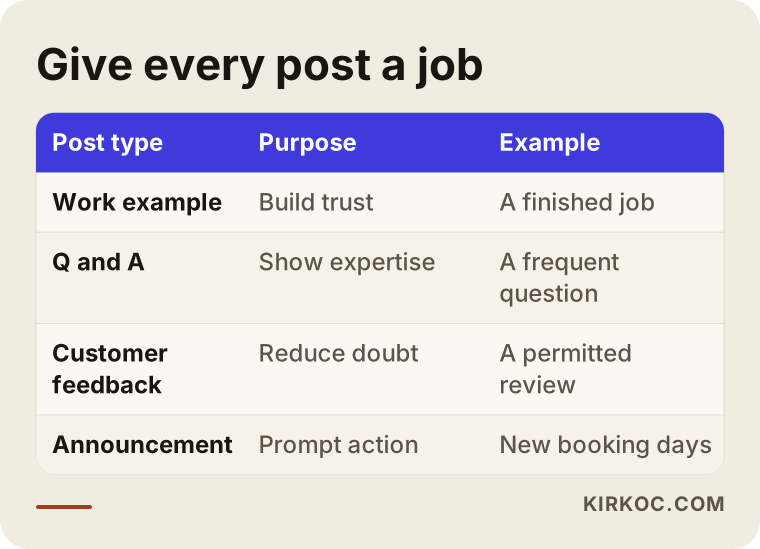
The table above makes it easier to give each post a role when you plan a month of content. Before you publish anything, ask yourself which row that post is working for.
A step-by-step fix plan
Now that you have seen the causes, it is time to fix them. The order below is the one that, in practice, makes the biggest difference for the least effort.
Step 1: Write your audience in one sentence
Find a one-sentence answer to this question: "Who do I help, with what problem, and how?" That sentence becomes the backbone of your bio, your posts and your ad copy. If you cannot write it, every later step stays vague.
Step 2: Rebuild the profile through the customer's eyes
Use a clear profile photo. Let the bio say what you do and where you are. Make sure the contact buttons work. Fill the highlights with headings such as services, common questions, reviews and how to reach you. Point the link to a page that is actually useful, not to the clutter of a home page.
Step 3: Turn customer questions into a content list
Look at the questions people asked you over the past few months by phone, by message or in person. Each of those questions is a post topic. A question one customer asked is on the mind of many others, and the account that answers it earns trust.
Step 4: Choose a pace you can keep
Be honest about how many posts you can make each week, and do not plan more than that. Being consistent is worth more than being frequent.
Step 5: Put one clear next step in every post
"Message me for details," "tap the link to book," or "save this for later" is enough. One call to action is plenty. Saying nothing leaves the reader unsure of what to do.
Step 6: Answer messages quickly and personally
How fast you reply directly affects whether someone buys. Even a ready-made "thanks, I reply during these hours" is better than silence. Keep prepared answers for common questions, but make sure they do not read like copy and paste.
Step 7: Write down the results
Each week, note which post brought a message, how many people called, and how many said "I saw you on social media." After a month it becomes visible what is working.
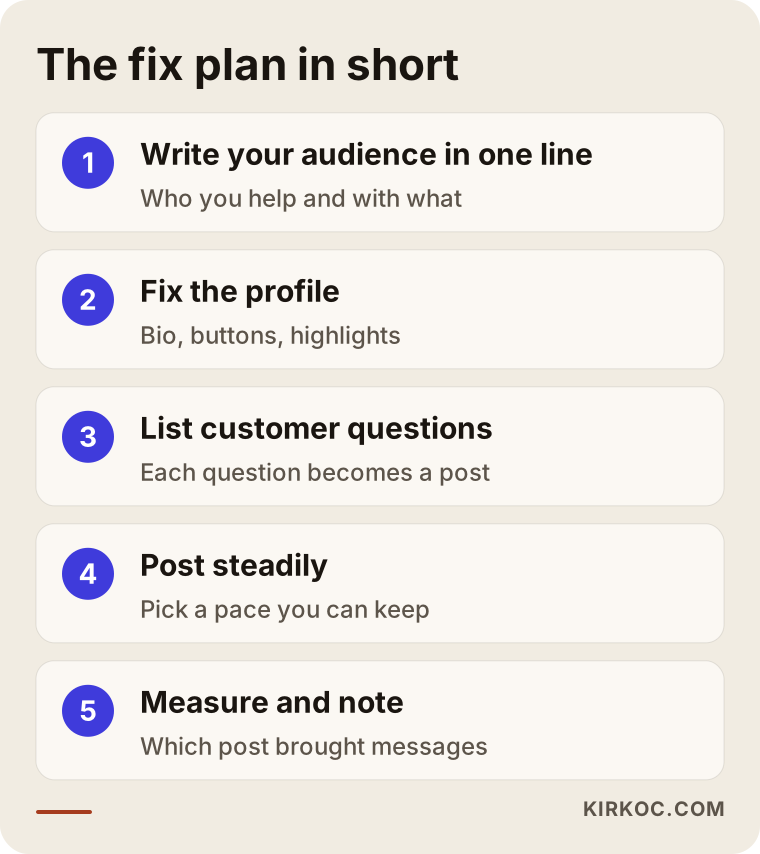
The flow in the image is a short summary of the steps above. Keeping the order matters: producing content before you fix the profile is like pouring water into a bucket without closing the hole in the bottom.
Common mistakes
The mistakes that waste most small businesses' effort are surprisingly similar.
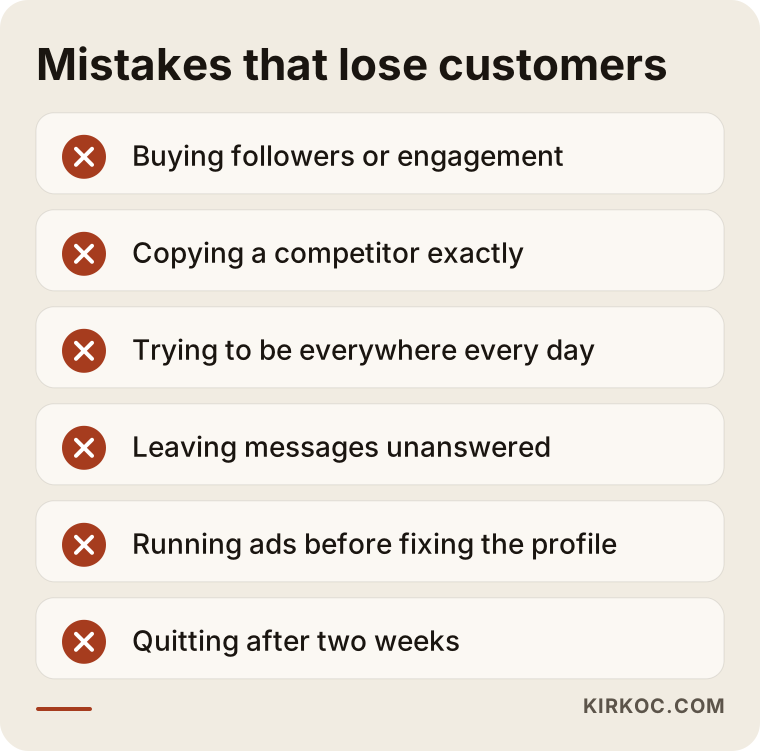
Let me explain the items on the warning list briefly. Buying followers or fake engagement makes the account look crowded, but it confuses the platform about who to show you to, and none of those accounts will ever become customers. Copying a competitor gives you sameness, not differentiation. Trying to be on every platform every day leads to burnout and falling quality. Leaving comments and messages unanswered tells an interested person that you do not care. Running ads before fixing the profile and the contact path wastes the ad budget. And finally, quitting after a week or two: social media usually builds up gradually rather than paying off fast. I cannot promise how long it will take, but quitting guarantees no result.
Will ads solve this?
Ads speed up visibility, but they do not repair broken links in the chain. If the profile is weak, messages are answered late, or the page people land on is confusing, ads only mean more people arriving for nothing. It makes more sense to fix the chain first and switch on ads afterward. This is also where handling ads under the same roof helps: you can see at a glance which ad brought a message and how that message turned into a site visit or a phone call.
How to read the customer journey
A prospect may not contact you on the day they first see you; it can be weeks later. That is why the conclusion "that post did not bring a message right away, so it did not work" is often wrong. The better questions are: do people remember you, can they easily find you when they look, and do they trust what they find?
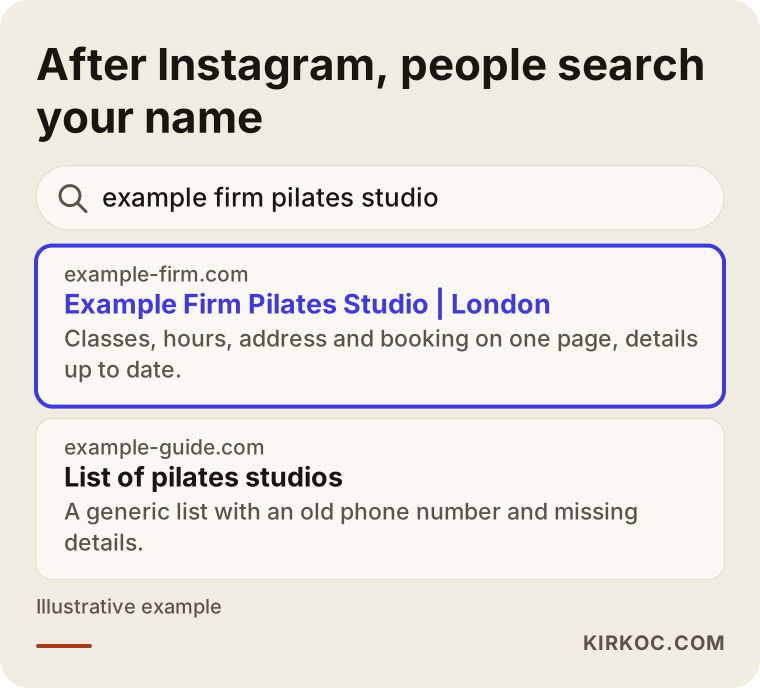
The sample search result above shows the next step for someone who saw you on social media: they search your business name. If they land on a tidy website, an up-to-date map listing and consistent details, the decision gets easier. If they do not, the interest you earned on Instagram disappears.
What to do when a message arrives
Treat every message as a person's question, not as a sales opportunity. Answer the question first, then suggest the next step. The decision chart below simplifies how to proceed with each kind of message.
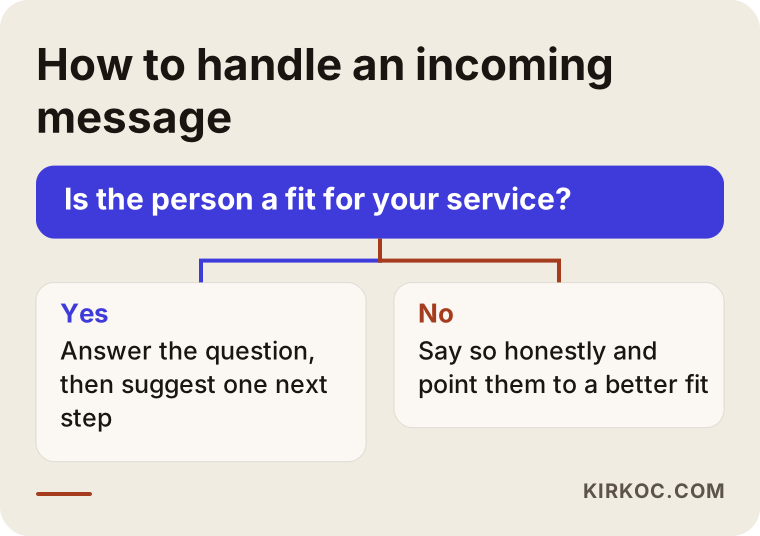
The logic in the chart is simple: information for someone who wants information, a clear next step for someone close to deciding, and an honest referral for someone who is not a fit. Trying to turn every message into a sale puts people off.
When can you do it yourself, and when do you need a specialist?
There is a lot you can do on your own: fix the profile, list customer questions, post a few times a week, answer messages quickly and note the results. All of it takes time and routine, not technical knowledge. You know your own business best, and that is the strongest asset of your account.
Specialist help makes sense in these situations: you have no time and posts keep slipping; your account, website and Google presence need to line up; you want to run ads but cannot track where the budget goes; you need to build your brand voice and visual identity from scratch; or you have tried on your own for a while and cannot work out why nothing is happening. A specialist is not someone who thinks on your behalf. It is someone who can spot faster which link in the chain is broken.
The benefit of having one person handle everything
Social media, your website, search visibility and ads may look like separate jobs, but in the customer's eyes they are one experience. Because I handle all of them myself, I can plan what someone sees on your website after tapping through from a post, what they find when they search your name on Google, and where a message from an ad ends up. That cuts down the common mismatch you get when work is split among different people, where social media says one thing and the website says another. You also do not have to explain your business over and over to several people.
What determines the cost?
I am not going to give a figure in this article, because no two businesses have the same needs. What decides the price is how many platforms are covered, how many pieces of content are produced each week or month, whether photo and video shoots are needed, who writes and designs the content, whether monitoring messages and comments is included, whether ad management is requested separately, how often and how detailed the reporting is, and whether the work has to connect to your existing website or brand work.
When you collect quotes, ask "what does it include, what does it leave out, and how will the result be measured?" before you ask "how much?" Be careful with any quote that guarantees results. Nobody can know in advance how much a platform will show your content or what people will do.
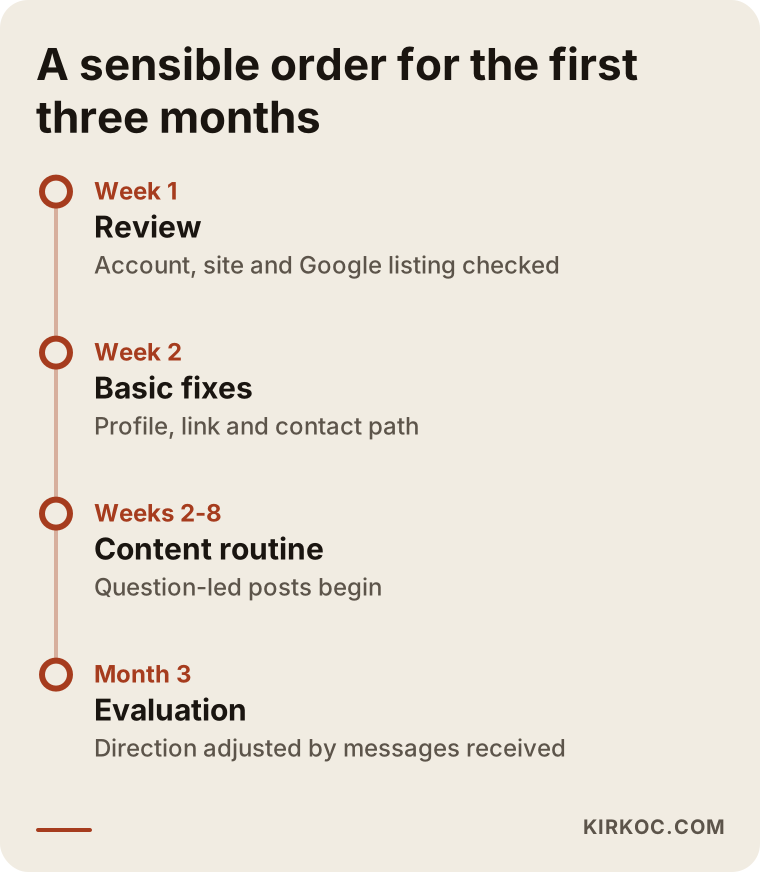
The timeline above shows a reasonable order of progress when starting out. The durations vary by business. The idea is to lay the foundations in the first weeks and then move on to content and measurement.
How working with me looks
When you work with me, I start by looking at your business, your customers and your existing accounts together, and I check what is working and what is not. Then I put together a simple plan that spells out which platforms, how often, and with what kind of content to use. If your accounts, your website and your Google listing contradict each other, I fix that. Content creation, posting, message follow-up and, if needed, ad management all run through one person: me. You get a regular, readable report, and instead of tables full of jargon I explain what I did and what I learned. I do not guarantee results, but I make sure that what was done and what came out of it are clearly visible.
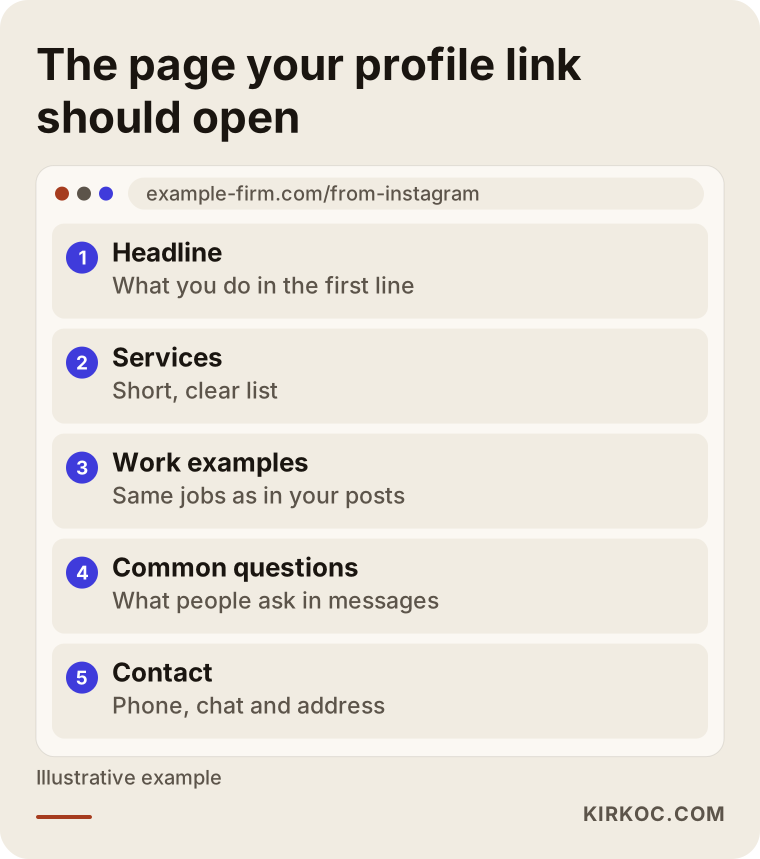
The last image shows how the page behind your profile link should be laid out. If the page a visitor lands on from social media is messy, all the earlier effort is lost right there.
Frequently Asked Questions
How long does it take for social media to bring customers?
It depends on the type of business, the competition, the current state of the account and how consistently you work, so giving an exact time would not be honest. Once the profile and the contact path are fixed, some businesses see more messages fairly quickly, while for others trust takes longer to build. Instead of quitting after a few weeks without results, it is healthier to keep notes and watch what is moving.
Is my follower count the reason I get no customers?
Usually not. A small audience made up of the right people can be worth much more than a large audience that does not care. What matters is that the account explains itself to the right people, is easy to reach and builds confidence. Follower count alone is not a measure of success.
Is Instagram enough, or do I need other platforms too?
It depends on where your customers are. For visual businesses serving individual customers, Instagram and sometimes TikTok come first. For businesses selling to other companies, LinkedIn may make more sense. For topics that need long explanations, YouTube works well. Running one or two platforms well is better than running every platform halfway.
Do I need to run ads?
It is not mandatory, but ads can speed up visibility. Your profile, contact path and landing page should be ready first, otherwise the ad budget is spent inefficiently. When you decide to advertise, define the goal (messages, calls or visits) and plan how you will measure the result before you begin.
How quickly should I reply to messages?
There is no fixed rule, but the faster the better. Replying within the same day, ideally within a few hours, is a realistic target. For the hours when you cannot reply, listing your opening hours on the profile and using an automatic greeting message helps manage expectations.
When do I need social media management?
Outside help makes sense if you do not have time to keep posting, if you are stuck in a slump you cannot explain, if you want your website, Google presence and social media to fit together, or if you are thinking about ads. If you run a small business, it is also an option to make the basic fixes yourself first and see where you get stuck.
Do I need to start my account from scratch?
In most cases, no. Reworking the existing account, meaning the bio, the highlights and the direction of the posts, is usually enough. Starting over is worth considering only when the account is full of a completely irrelevant audience or has been restricted because of a serious rule violation.
How do I know the service I paid for worked?
Do not look at likes and views. Look at the number of messages, calls, bookings and customers who say "I saw you on social media." Ask the person providing the service for a regular, clear report on these; work that cannot explain what was done and what was learned is not transparent.
If your social media looks like it is working but brings no customers, the problem is usually not in one place but in several links of the chain, and I fix those links together, from your accounts to your website, Google and ads, as one person. If you would like me to review your business and your account and put together a plain roadmap, you can reach me through my social media management service page.