You run a business, and everyone keeps telling you that you need video. Reels, TikTok, YouTube Shorts, Stories... You do not want to stand in front of a camera, and hiring a professional crew feels like too much for a small business. What you do have is a perfectly good phone. So can social media video be shot on a phone, and if so, who films what and who handles the rest? That is what this article covers. I am Ümit Kırkoç, I work from Istanbul, and in my social media management service I split video work so that it does not eat your day and does not drag the quality down.
The short answer: you know your workplace, your product and your craft better than anyone, so the raw footage is usually filmed on a phone by you or someone on your team. I take care of the plan, the shot list, the script, the edit, the captions, the cover image, the posting schedule and the tracking. That split protects your time, and it keeps your videos looking like they belong to the same account.
Why not every video needs a studio
Most people see social media video on a phone, with a thumb ready to scroll. In that setting, a polished commercial matters less than a real person in a real place showing something clear. A baker pulling the first tray out in the morning, a repair technician explaining how he found the fault, a hairdresser showing a before and after: all of that can be filmed on a phone without any trouble.
A studio and a professional crew still have their place, for example for a brand film, a product catalog shoot or a video that will sit on your website's home page for years. But doing that every single week is expensive and hard to keep up. So what I usually suggest is this: a separate, planned shoot for the long-lasting flagship piece, and phone footage for the regular weekly flow.
The image below puts the two approaches side by side and shows which part of the job belongs to whom.
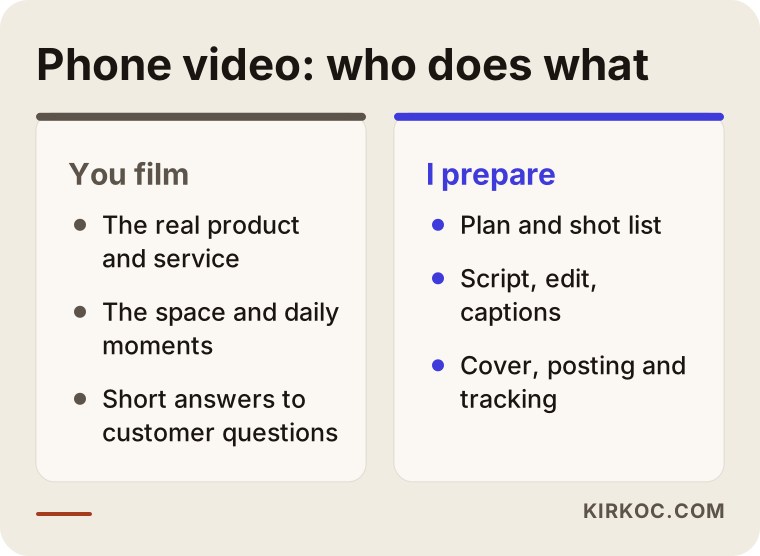
The left side is your part and the right side is mine. The filming part is kept short and simple on purpose, because for most business owners the real problem is not the filming itself. It is not knowing what to film, and not knowing what to do with the footage afterward.
Is a phone good enough?
Most recent phones record more than enough quality for social media. When a video looks bad, the cause is usually the light, the sound or the way it was shot, not the device. A smudged lens, a dim room or a noisy machine next door will spoil the footage even on an expensive camera. So before you think about upgrading your phone, think about changing a few habits.
Five small things to know before you film
A few minutes of preparation removes the problems that cause the most trouble later. They sound technical, but each one takes almost no time.
- Wipe the lens. A phone that lives in a pocket or a bag collects fingerprints and dust. A soft cloth makes the picture visibly sharper.
- Film vertically. Reels, TikTok and Shorts are watched upright. Horizontal footage ends up as a thin strip in the middle of the screen. Keep horizontal for your website or for a long YouTube video.
- Face the window. Daylight is free and flatters faces and products. Put the light in front of you or on the product, not behind you.
- Protect the sound. If you talk in a noisy place, hold the phone closer to your mouth or clip on a small lavalier microphone. Viewers forgive a soft picture, but they do not forgive speech they cannot understand.
- Keep it steady. A small tripod or a phone stand ends shaky footage. If you hold the phone, press your elbows against your body.
All five cost nothing or very little. Try them before you buy any equipment; for most businesses this is where the difference shows up.
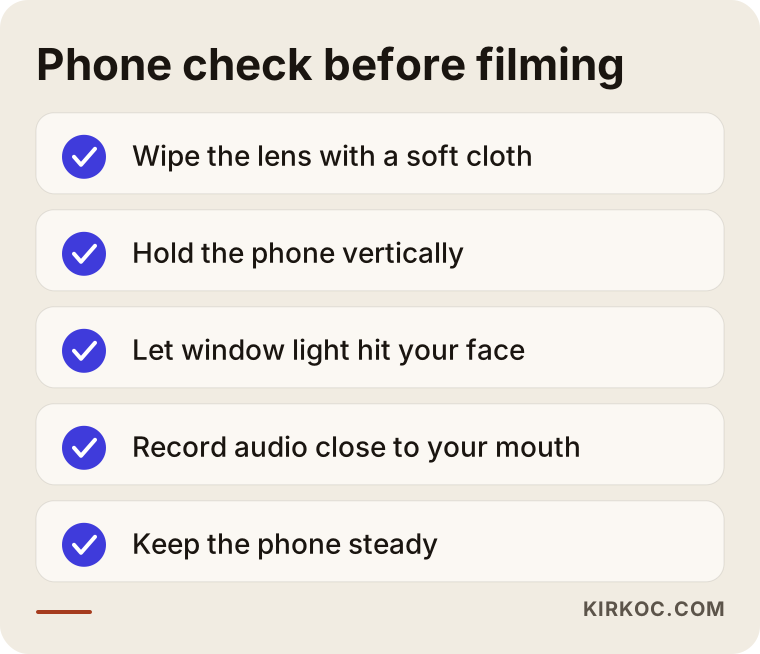
You can save that checklist as a note on your phone. Running through it for thirty seconds before each shoot keeps you out of the "this footage is beyond saving" situation later.
What you film and what I prepare
This is the real question of the article, so let me give you a clear split. It adjusts to each business, but the basic logic stays the same.
Your side: showing real life
Your business holds things nobody else can see. That is the part that comes from you as raw footage:
- How the product or service is actually made: dough being rolled, a device being repaired, a hair color being applied.
- The place and the atmosphere: opening the shop, preparing the stockroom, the office in the morning.
- A short answer to a question customers ask all the time.
- Stories and small moments from the day: a new arrival, the first order of the season, a delivery.
- Customer reactions, but only with permission. If a customer appears on screen, you need their clear consent.
If you get something wrong with sound, light or framing, do not worry. I look through the footage with you and, when needed, tell you in one sentence what to change next time. The skill settles in over a few rounds.
My side: planning and finishing
The work that turns raw footage into a video people actually watch is mine:
- The plan. I decide with a content calendar which topic you film in which week of the month.
- The shot list. Before a filming day, I send a short list such as "get these six shots," so you do not lose time wondering what to film.
- The script and talking points. I write what the video says, the opening line that keeps a viewer past the first seconds, and the closing call to action.
- The edit. I cut dead moments, tighten the flow, and add music and transitions.
- Captions. Many people watch with the sound off, which makes captions important.
- The cover image and caption text. I prepare how the video looks on your profile and what is written under it.
- Posting and tracking. I post at a sensible day and time, then check which video got what kind of attention.
The nice part of this arrangement is that everything runs through one person. The person who edits your video also knows which clip belongs on your website's home page, which footage can be used in an ad, and which short clip can go on your Google Business Profile. So footage you film once can work in five different places.
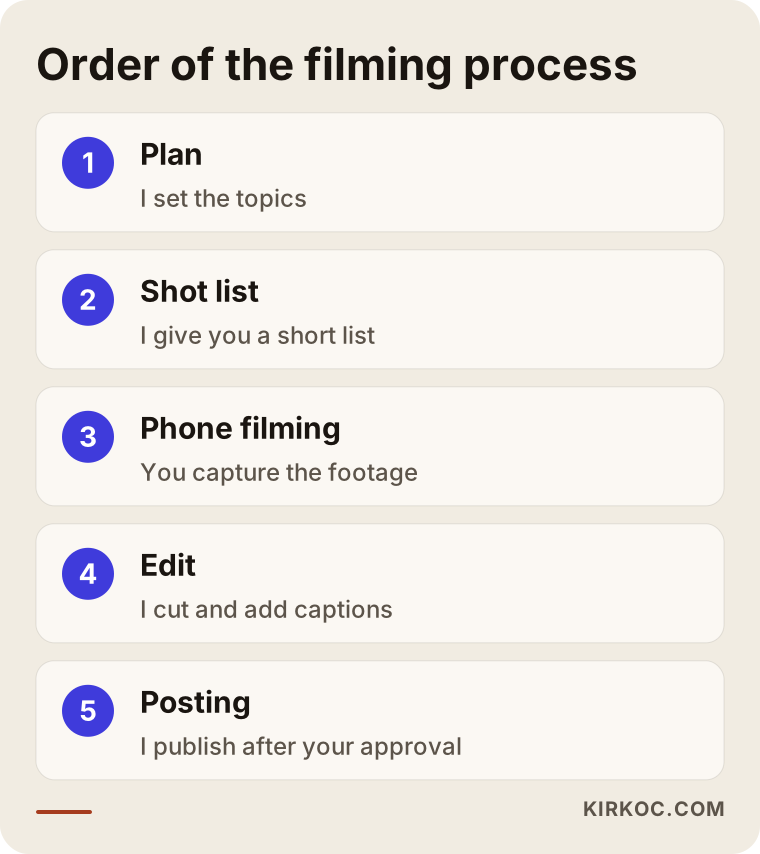
The steps in the image show the order of this split. The first step is mine, the second is yours, and everything after is mine again. Your part is a small but essential link in a longer chain.
Which type of video does which job?
Not every video does the same job. Some build trust, some bring in new customers, some keep existing ones. Separating them in advance makes it clearer what to film.
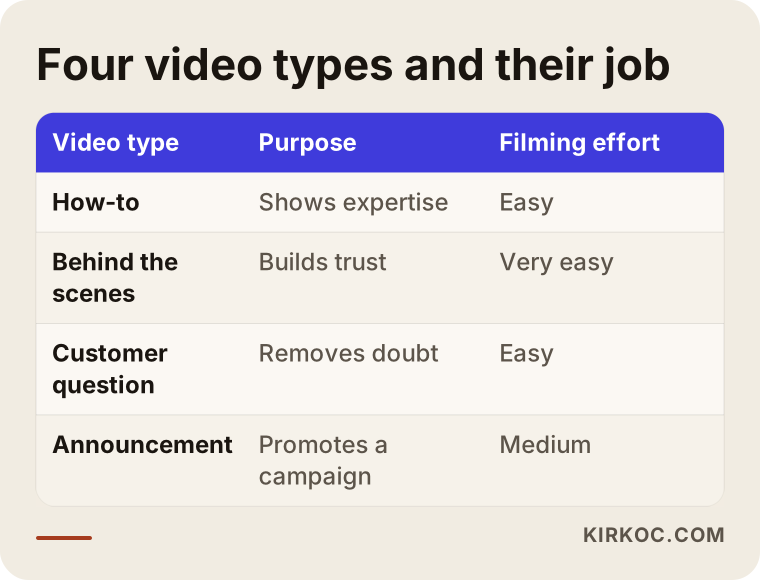
Let me explain the table briefly. How-to videos give viewers the feeling that "this person knows the work," and they are often saved and watched again. Behind-the-scenes videos put a face on the brand and build trust. Customer-question videos remove the doubt that stands between a viewer and a purchase. Announcement and promo videos are for a campaign or something new, and they usually work best when paired with ads. The first three are easy to film on a phone, while the last one needs more planning.
A healthy account for a small business is usually a mix of these types. An account that only makes announcements tires its audience, and an account that only shows behind-the-scenes moments finds it hard to turn attention into sales.
Length and the first seconds
Remember that on short video, a viewer decides in the first two or three seconds. Instead of a greeting or a logo animation, open with the result or the question. A video that starts with "Why does this paint fade in three weeks?" has a better chance of being watched than one that starts with "Hi everyone, today I want to show you..." As for length, there is no rule: when the subject is finished, the video is finished. Stretching a short video is the easiest way to lose the viewer.
Common mistakes
Many business owners get stuck in the same places when they try video. Knowing the mistakes lets you avoid them from the start.
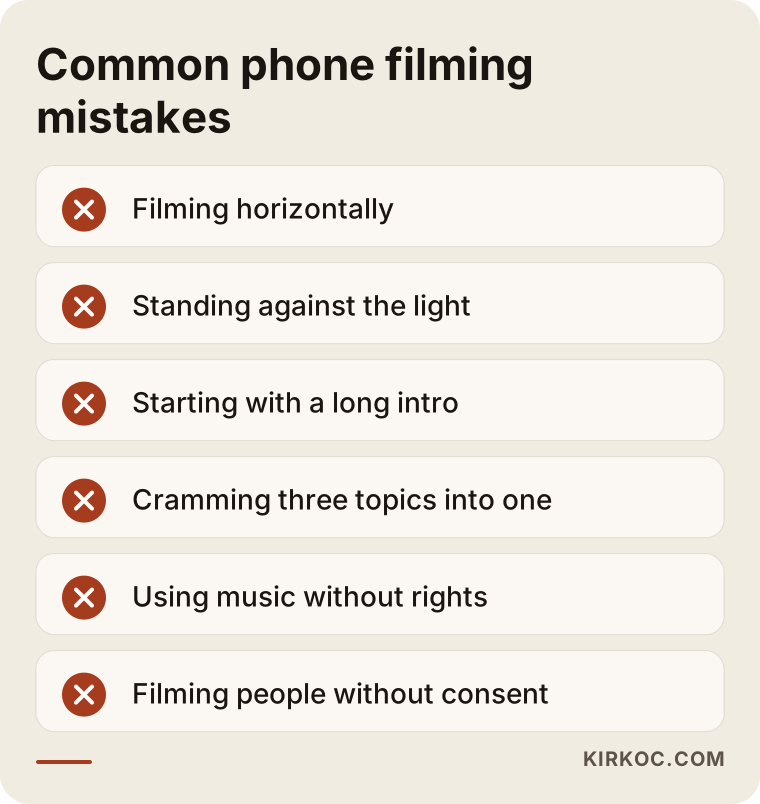
A few words on each mistake in the image:
- Filming horizontally. On a platform watched upright, horizontal footage leaves black bars at the edges and looks careless.
- Standing against the light. If the window is behind you, your face turns into a silhouette. Facing the light solves it.
- A long intro. If the first seconds are spent on self-promotion, viewers scroll past.
- Cramming everything into one video. One video, one idea. Squeeze in three topics and none of them sticks.
- Using music without rights. Not every song can be used on a business account. The music library that platforms offer for business accounts is safer, and for firm answers you should read the platform's own terms.
- Filming people without consent. If a customer or employee will be recognizable, get their permission first. For the legal details where you operate, it is best to ask a lawyer.
None of these mistakes needs a big budget to fix. They are solved with attention and a little habit.
Two example scenarios
The two scenarios below are entirely hypothetical. They do not describe a real person or company; they only show how the split could work in practice.
Scenario 1: a small home kitchen business
Imagine someone who cooks to order from home. They do not enjoy being on camera and have little time in the kitchen. I would prepare a shot list for one day a month with six to eight short clips: the ingredients lined up on the counter, the dough being rolled, the tray coming out of the oven, the packaging, the hand-off to the courier. They film these on their own phone in window light and send them to me.
From those clips I would make a few short videos: a trust-building one like "How is your order prepared?", a question-and-answer one like "Why does this recipe take so long?", and a quick clip announcing the week's menu. The same footage can also go on Instagram, on a Facebook page and on a Google Business Profile. One day of filming then covers weeks of content.
Scenario 2: a small office-based service firm
Here the example is an accounting office. The owner notices that clients ask the same questions every period. He is uncomfortable talking to a camera, so he prefers a plain format that shows the screen and uses his own voice. I would pull a list of frequent questions and write a three or four sentence talking outline for each one.
He props the phone on the desk, frames himself and a sheet of paper, and talks through the outline. I shorten the video, add captions and prepare a cover image. The result is a modest series that gives clients useful information and builds confidence. The goal here is not a record number of views. It is the impression that "this person knows the job."
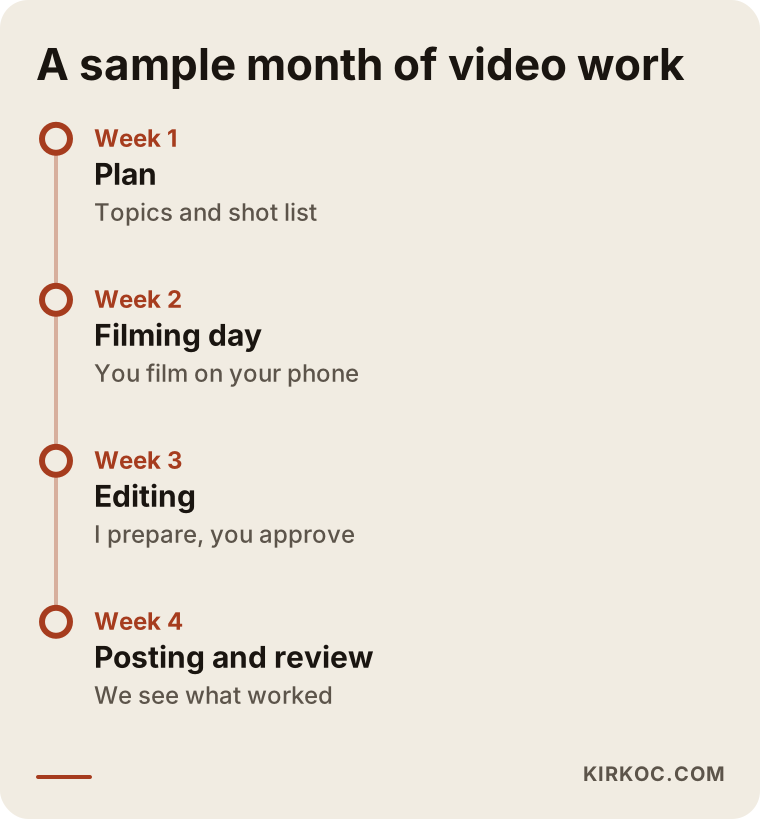
The timeline above shows how a month could run in scenarios like these. Again, it is an example; a real calendar changes with the busy periods, the season and the needs of each business.
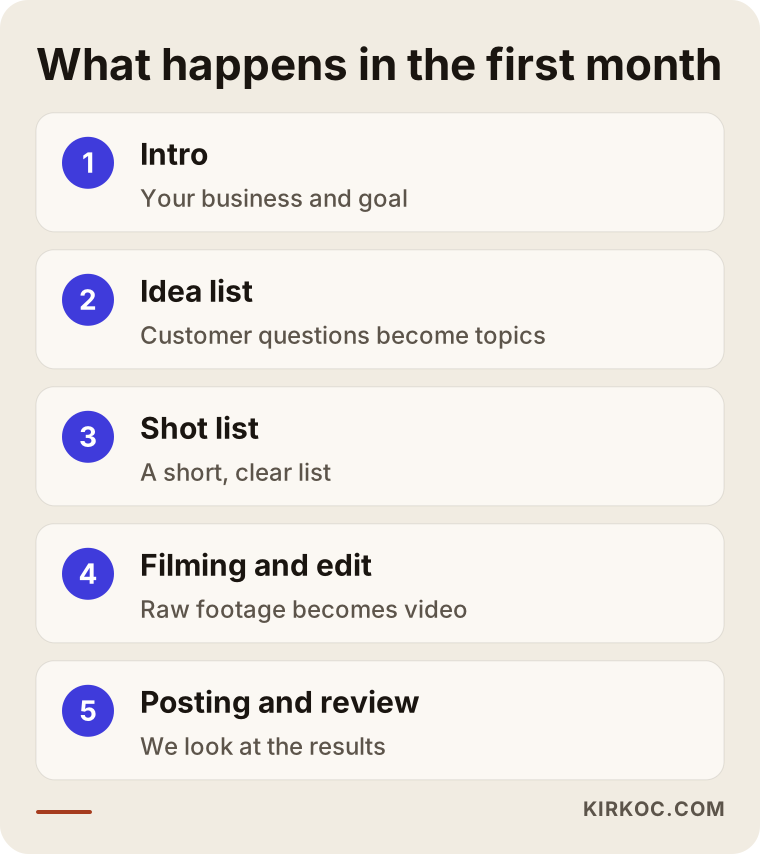
Step by step: what happens in your first month
For someone who has never done this, the practical question is "so how do we start?" The first month usually goes like this.
Step one: introductions and goals. We talk about your business, your customers and what you need. You do not have to trust your phone yet; in a first conversation, even a couple of test clips shot on your phone are enough for me to see what we are working with.
Step two: the video idea list. I list the questions, objections and curiosities your customers raise most often. Video ideas come from that list, because a video that answers a real question does a real job.
Step three: the shot list. For each filming day I prepare a short list that will not overwhelm you. It is clear which shot, for how many seconds and from which angle.
Step four: the first shoot. You film and I receive the files. I do not expect perfection in the first round; the point is to set a rhythm and see what works.
Step five: edit and approval. I prepare the video and show it to you before it goes live. You check the things where accuracy matters, such as prices, dates and product details.
Step six: posting and tracking. I publish the videos, and at the end of the month I look at which ones were watched, saved or led to messages. I update the next month's plan accordingly.
I do not promise results, and no honest professional can. But this routine helps you see what works and make sharper content over time.
What can you do yourself, and when do you need an expert?
Not every business needs outside help. In some cases starting on your own makes sense, and in others help saves time and effort. The decision chart below sums up the difference.
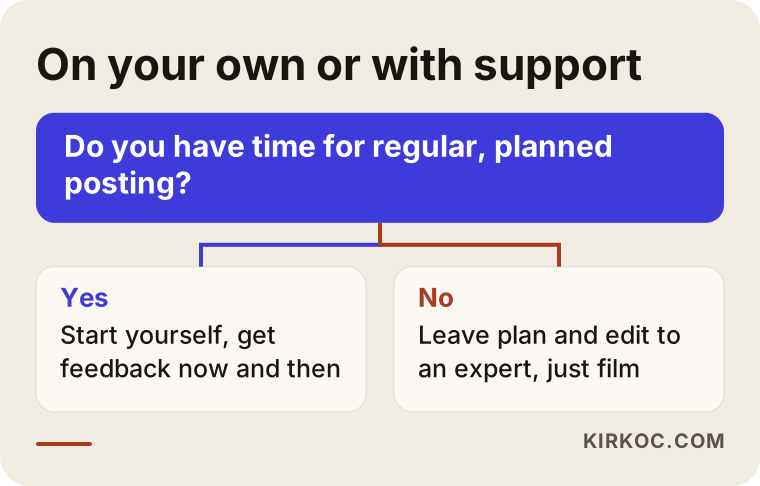
Things you can reasonably do on your own: filming one or two short Stories a week, documenting your daily work, or making short intro clips to send to customers. None of that requires paid help, and the free editing apps on your phone are enough for basic cuts and captions.
Expert help starts to make sense in these situations: you want regular, planned posting but have no time; you notice that your videos look disconnected from each other; you want the video to travel into ads, your website and your Google profile as well; or you post but have no way of measuring what works. In cases like these, someone who plans from the outside gives you structure and measurement.
The benefit of running everything through one person
Social media video rarely stays only on social media. Part of the same footage can become a short trust-building clip on your website. Another part can be used in a Google or Meta ad. If the topic of the video matches a service you want to be found for locally, it can support a blog post too. Because I run all of this myself, you do not get the gaps that come from "the ad team wanted this and the web designer wanted that." Who filmed what, who posted what and where each clip lives is tracked in one place.
Ideas by type of business
Whatever your field, there is something to film as long as you ask the right question: "If my customer could see this work, what would they be curious about?" Here are some general examples you can adapt.
- Food and drink businesses: preparation, ingredients, serving, the daily menu.
- Beauty and personal care: before and after, the treatment itself, product introductions; client permission is a must.
- Workshops and repair services: finding the fault, replacing a part, quick tips.
- Consulting and office services: a short answer to a common question, a walkthrough of a process, seasonal reminders.
- Retail and e-commerce: packing an order, a product close-up, a usage example, new arrivals.
- Education and courses: the classroom, a short piece of a lesson, a student question; student consent and privacy need care.
Pick one from this list and try it next week. It does not have to be perfect. What matters is starting the habit of filming and seeing what your audience reacts to.
How does a viewer find you and become a customer?
A new viewer reaching your video is only the first step toward becoming a customer. The steps after that are looking at your profile, watching other videos, sending a message or visiting your website. Picturing that path helps you decide what each video is meant to do.
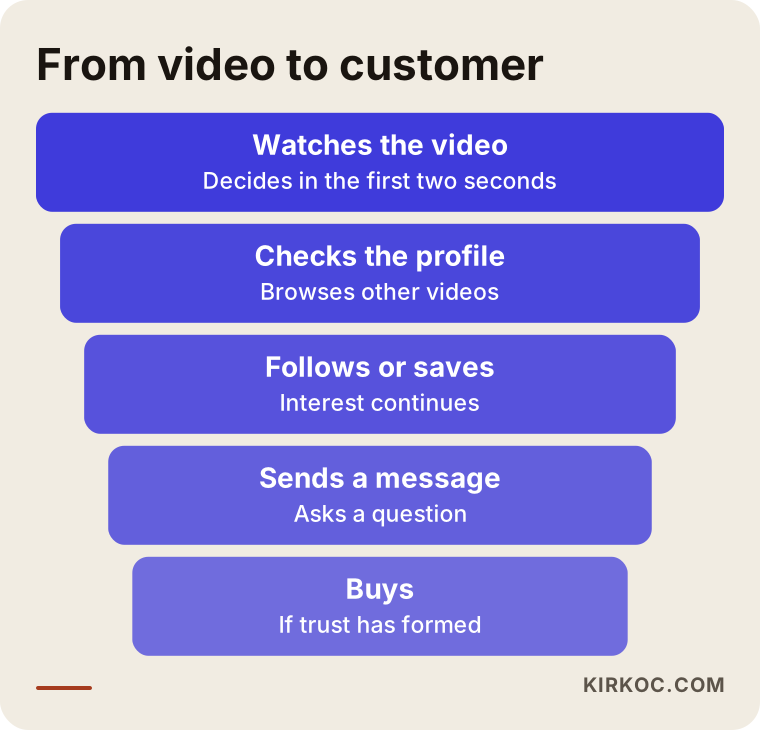
In this funnel, every step is narrower than the one before, which means not every viewer becomes a customer. That is normal. What matters is that at the end of the video you tell the person the next step clearly, with something like "Message me for details" or "See the link in my profile."
Think also about how AI assistants pick businesses to mention. Someone who asks a tool like ChatGPT whether anyone makes social media video for small businesses may be shown work described on websites and profiles. Pages that explain your service clearly, a site that carries your videos and steady content can all help on that front, but there is no guarantee of any result.
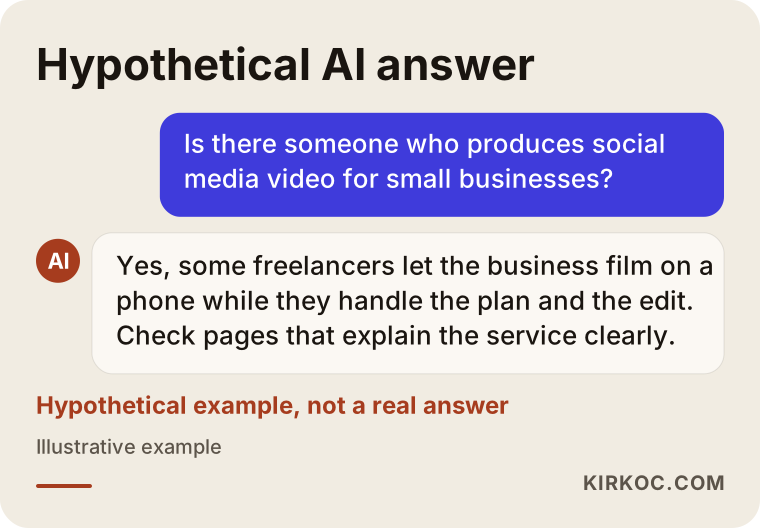
The image above is hypothetical and is not a real assistant answer. It was made only to show why content that explains your service clearly can be useful for you.
What decides the cost
I will not give numbers in this article, because the price depends on the job. I can say clearly what it depends on, so you can compare quotes properly.
- Videos per month. One video a week and three videos a week are not the same amount of work.
- The type of videos. Cutting plain raw footage is different from motion graphics, animation or a multi-scene edit.
- Who is on the shoot. If you film, the cost goes down; if I come to your location and film, time and travel are added.
- Captions and languages. One caption language is different from several.
- Number of platforms. Instagram, TikTok, YouTube and LinkedIn may each need a different cut.
- Extra services. Ad management, website integration, cover design and reporting are considered separately.
- Your starting point. Keeping an active account going is different from building one from zero.
When you ask for quotes, I suggest asking: how many videos, what types, who films, are revisions included, and will there be a tracking report? Be careful with any quote that does not answer those questions clearly.
How I work with you
I am one person, and that is an advantage: you do not have to bounce between a salesperson, a project manager and an editor. The person you talk to is the person who edits the video, makes the plan and reads the results. In the first conversation I listen to your business, look at your current accounts and tell you honestly what makes sense and what does not. Sometimes I will say, "Video is not your priority right now; let us fix your profile first," because the goal is not to create work. It is to do what helps your business.
The routine is monthly. At the start of the month I share the calendar and send the shot list, and after I receive the footage I move into editing. I show you everything before it is posted. At the end of the month I explain what worked in plain language, without heavy tables or confusing terms.
Frequently asked questions
Is video filmed on a phone really good enough?
Most of the time, yes. Current phone cameras are good enough for social media. What decides the quality is light, sound and framing. Cleaning the lens, facing window light and getting clean audio make a bigger difference than changing your equipment.
I do not want to be on camera. Can I still make video?
You can. Your face does not have to be in it. Videos that show your hands, the product, the place or a screen can work well with a voiceover or with captions alone. In time you may feel comfortable showing your face, but you never have to.
Do I have to edit the videos myself?
No. You film, and I prepare the edit, captions, cover and posting. If you want to do the simple editing yourself, that is fine too, and then I focus on planning and feedback.
How often should I post video?
There is no single number that fits everyone. A pace you can keep up is better than posting heavily for a few weeks and then going silent for months. We set a rhythm together based on how busy your business is and how much you can film.
Can I show my customers in a video?
If a person is recognizable on screen, you need their permission, and it is a good habit to get it in writing or by message. For detailed and firm information on privacy rules where you operate, please ask a lawyer.
Will posting video increase my followers and sales?
I cannot guarantee that. Regular videos with a clear topic that answer a viewer's question raise the chance of attention, but the outcome depends on your account, your field and your competition. Instead of making promises, I measure and show you what worked.
Can I use the videos on my website and in ads too?
Yes. Footage you film once can be used on your website, on your Google Business Profile and in ads. The cut and size are adjusted for ads. Music and consent also need to be checked separately for advertising use.
Where should I start if my budget is limited?
Start with a single video type, for example videos that answer customer questions. Set a rhythm with a few videos a month, look at the results, and then expand.
If you are not sure whether to begin on your own phone, or you want me to plan the filming for you, write to me through my social media management page. I will listen to your business and tell you plainly what fits.