You opened your accounts, posted a few good things, and then work got busy. Two weeks went by without a single update. Then came the scramble: "I have to post something today." If that sounds familiar, what you are probably looking for is a social media content calendar service. In plain terms, that means having someone plan in writing, ahead of time, what you will post, where, on which day, about which topic, and in what format.
I am Ümit Kırkoç. I work in Istanbul and I handle the jobs a digital agency would normally split across several people: websites, SEO, advertising, and social media, all by myself. In this article I will explain what building a calendar actually involves, what is included, where people go wrong, and what decides the cost. A calendar is often one piece of a larger social media management service, but you can also buy only the calendar and publish the posts yourself. I will explain the difference below.
What exactly is a content calendar?
A content calendar is a plan for a set period, usually one month, that shows which post goes live on which day on which account. Think of it as a simple table: the date, the platform, the topic, the format (photo, short video, multi-image post, story), a short draft of the text, and the goal. Even a plain calendar removes the daily "what should I post today?" question.
A good calendar is more than a list of dates, though. It holds answers to questions like these:
- Who is this post meant for?
- What should the reader do afterward: save it, send a message, visit your website?
- Is the topic tied to something you really sell, or to a question a real customer has asked?
- Will the image and the text be ready before the posting day arrives?
These questions sound basic, but they are what turns a calendar from decoration into a tool you can use.
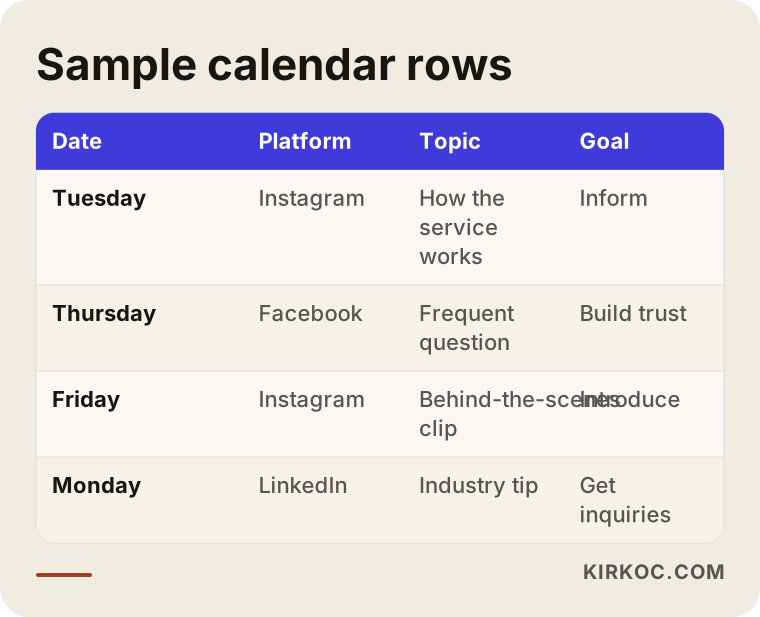
The image above shows what columns a calendar is built from. The number of columns varies from business to business, but date, platform, topic, and goal almost always stay.
Why do business owners need a calendar?
When you run a small business, social media usually sinks to the bottom of the list. Customers are waiting, a supplier is calling, the register is not balancing. Social media becomes something you do "when there is time," and there is never time. A calendar gives you three concrete benefits.
Consistency. Posts go out on planned days rather than random ones. If someone visits your profile and sees that your last post is months old, they start wondering whether you are still in business. A steady flow tells them "this place is alive."
Variety of topics. Most businesses without a calendar post the same kind of thing over and over: only product photos, or only sale announcements. A calendar spreads out the different kinds of content, such as explaining your service, answering questions, showing how the work gets done, and sharing customer experiences.
Preparation time. A caption and an image prepared a few days before posting day are usually more careful than ones thrown together that morning. Typos, wrong tags, and missing details are mostly the result of rushing.
There is a practical point as well. A calendar lets you answer the question "what got done this month?" clearly. When there is a written plan, it is easy to see what was done and what was skipped.
What does a calendar service cover?
The scope varies from provider to provider, so always ask exactly what is included when you request a quote. In my own projects, the typical scope looks like this.
1. Reviewing your accounts and current situation. Which platforms do you have accounts on, which are active, which posts got more attention, and what is missing from your profiles? This review means the calendar is built around reality rather than from a blank page.
2. Clarifying the goal and the audience. What do you want from your accounts: phone calls, store visits, orders, or just recognition? Who is the audience? A patient looking for a clinic and a buyer at a wholesale company will not be reached with the same language or on the same platform.
3. Choosing content themes. Four or five main themes that your business can talk about are selected: services, frequently asked questions, behind the scenes, tips, announcements. These themes form the skeleton of the calendar.
4. Writing the monthly calendar. Each posting day gets a topic, a format, and a short draft.
5. Copy and visual guidance. Next to the calendar, caption drafts, hashtag suggestions, and notes that steer the visual can be added. Some businesses shoot their own photos, others leave design to me, and that difference changes the scope.
6. Posting and measuring. If you only buy the plan, you do the posting. If you want me to publish as well, that turns into social media management. At the end of each month I review with you which posts worked, and the plan adjusts the next month accordingly.
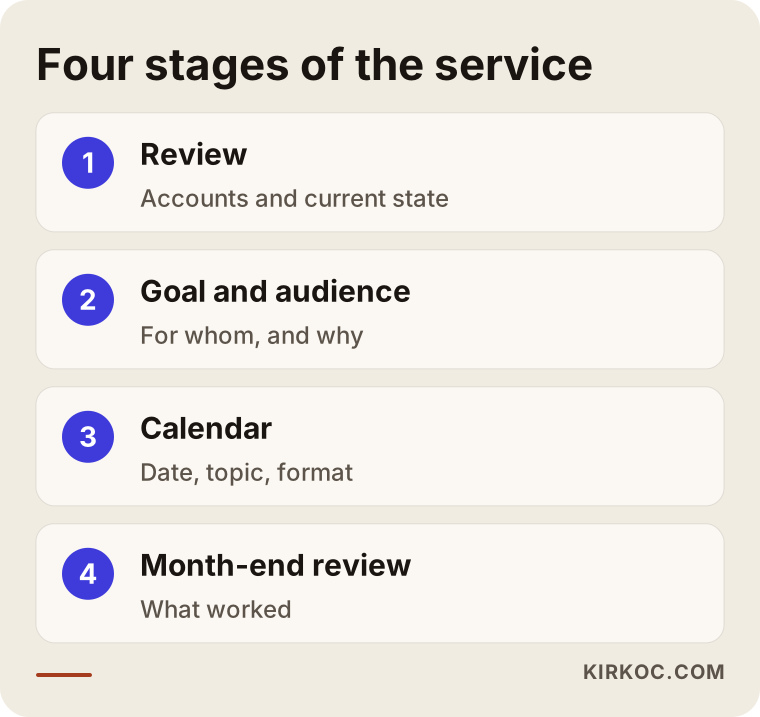
The steps in the image describe a cycle that repeats rather than a one-time job. The first month takes the longest because the goal and audience work happens then. In later months the process speeds up because that foundation is already in place.
Which calendar for which platform?
Every platform works differently. Copying the same content onto all of them is one of the most common mistakes I see.
Instagram. A place where images and short video stand out. A calendar here usually balances regular posts, short videos (Reels), and stories. Stories are casual and in the moment, while posts are longer lasting and more orderly.
Facebook. Still useful for local businesses, community groups, and an older audience. Events, announcements, and informative posts tend to be well received.
LinkedIn. For companies that sell to other businesses, offer consulting, or hire people. The tone is more professional and the content is more information-driven.
TikTok and YouTube. These require video production. The calendar has to include a filming plan too: who will shoot, where, and how long it will take. Calendars for these accounts demand more preparation than those for image-based accounts.
You do not have to manage every platform at once. Handling one or two platforms where your customers actually spend time will serve you better than looking half-finished on five.
Example scenario 1: A small store selling kitchen tools (hypothetical)
The situation below is entirely hypothetical. It does not describe a specific company. It is only here to show how the process works.
The owner of a kitchenware store posts one product photo a week on Instagram. They all look alike, with a short price line underneath. The owner complains: "People like the posts, but nobody comes into the store."
In the calendar work, the account is reviewed first. Nearly every post is a product display. How the products are used, which kitchens they suit, and which questions customers keep asking have never been covered. The audience, meanwhile, ranges from newlyweds to gift shoppers to restaurant owners.
The monthly plan splits topics like this: product introductions, usage tips, "who buys this and why?" questions, short glimpses from inside the store, and announcements. Three posts a week are planned, one short video and two images. Each post ends with a clear next step, such as "Come try it in the store" or "Send us your questions in a message."
Notice the point here: the goal of the calendar is not collecting likes. It is guiding the person who visits the account toward a next step. Results cannot be promised in advance, of course, but the plan at least makes it clear what the account is there for.
Example scenario 2: An accounting office offering advisory services (hypothetical)
The second example is hypothetical too. A small accounting office wants to appear on LinkedIn and Instagram but does not know what to share. Their worry is: "If we write about taxes and get something wrong, that is a problem."
A content calendar for this kind of business is built a little differently. Instead of making firm statements about current regulations, it explains the general outline of questions business owners often ask and adds a note: "Talk to the office about your specific situation." Topics on the calendar might include a general checklist for people opening a new business, tips for keeping paperwork in order, reminders of important dates in the month, and questions like "when should I see an accountant?"
Longer pieces are planned for LinkedIn, and short cards and simple graphics for Instagram. Every post that touches on regulation is checked by the office owner before it goes live, and the calendar includes a separate "approval day" for that. This small detail lowers the risk of mistakes and gives the owner a sense of control.
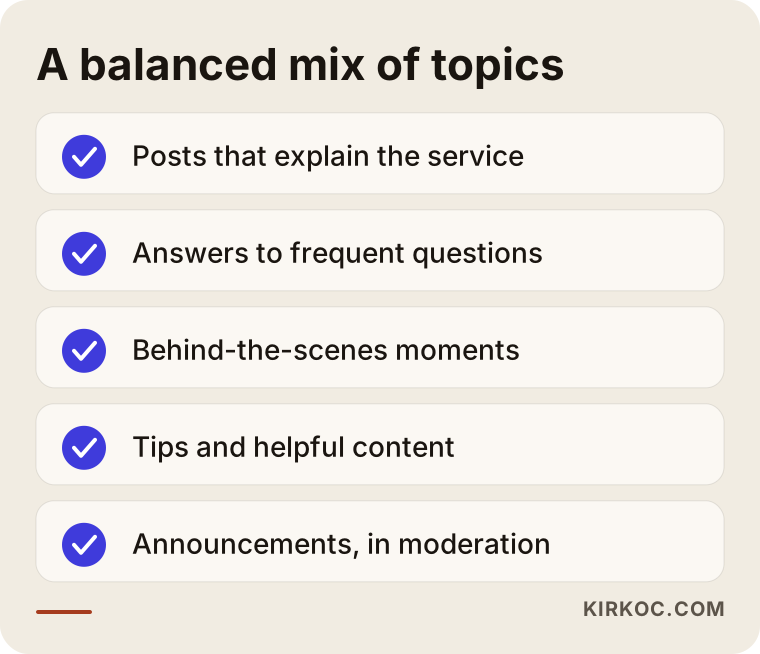
The image sums up the logic that holds in both scenarios: rotate a few main themes instead of relying on one type of content. The proportions change by business, but no single theme should fill the whole calendar.
Step by step: How is a calendar built?
The process is similar whether you do it yourself or work with me.
Step 1: Write down the goal. "I want more people to know about us" is not a goal. "Increase the number of inquiry messages from my account over the next three months" is easier to measure. The goal decides what content you choose.
Step 2: Define the audience. List the five questions your customers ask most often. These questions are the most reliable source of content ideas you have.
Step 3: Pick the themes. Decide on four or five themes your business can talk about. You do not have to use all of them every week.
Step 4: Choose a realistic frequency. Keeping up two posts a week for months is worth more than planning five a week and quitting in week two. Frequency should match what you can actually produce.
Step 5: Place the dates. Public holidays, seasonal periods, your own campaign dates, and the busy days in your industry go onto the calendar first. Then the gaps are filled with themes.
Step 6: Write a short draft for each post. The topic, the format, the main message, and the step you want the reader to take. Even if the full text is not ready, this frame makes posting day easier.
Step 7: Add preparation days. Set aside days before the posting date for shooting, writing, and approval. A calendar should show preparation days, not just posting days.
Step 8: Look back at month end. Which post brought more messages, and which stayed quiet? The next calendar is built from those notes.
In the flow above, the first four steps answer "what for and for whom?" and the last four answer "how and when?" Skipping the first four and going straight to filling in dates is where calendars most often fall apart.
Common mistakes
When I look at why calendars stay on paper, I keep running into the same mistakes.
An overambitious frequency. In month one, a post every day is planned. By week two the pace drops, and by week three the calendar is forgotten. A plan you cannot sustain is not really a plan.
Only sales content. If every post says "buy from us," followers start tuning your account out after a while. You need a balance between selling messages and helpful content.
Treating the calendar as a one-off. A plan made for one month may not work for the next. Seasons change, campaigns change, customer questions change. A calendar is a living document.
Ignoring platform differences. Uploading an Instagram image to LinkedIn as it is, or pasting a long LinkedIn article under an Instagram post, lowers interest on both sides.
Not measuring. A calendar is a way to experiment. If you never check which theme brought in messages, you keep running on the same assumption every month.
Leaving the visuals for last. The text is ready but the image is not, and the photo grabbed in a hurry on posting day hurts how your brand looks. This is why preparation days belong on the calendar.
Not using customer questions. The strongest content ideas come from what customers ask you by phone or message. If you are not writing those questions down, you are wasting the source.
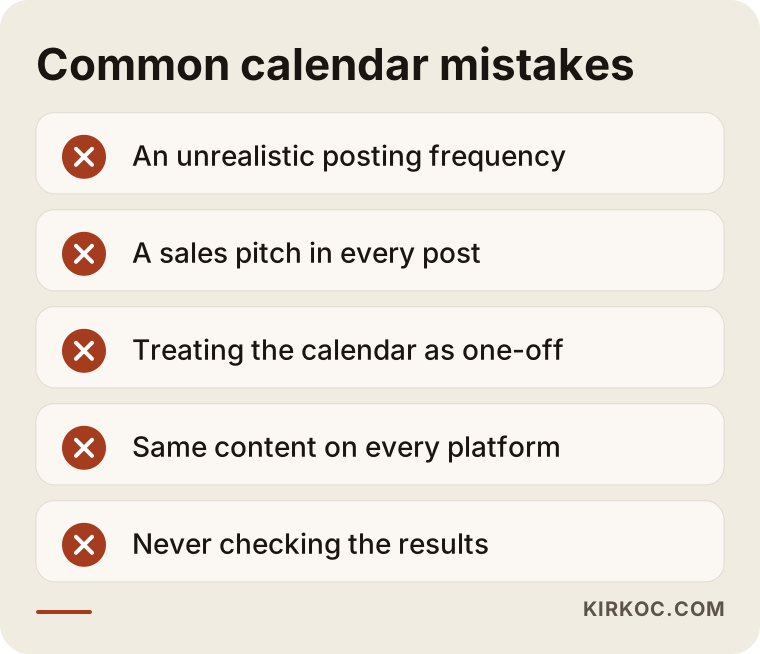
Most of the mistakes in the image happen not because no plan was made, but because the plan was never fitted to real life. That is easy to write down and takes some discipline to do.
Can you do it yourself?
Yes, many businesses can handle this on their own. Open a spreadsheet, write the date rows for the month, decide on your themes, and add a topic to each row. That alone is enough to get started. Here is what you can do on your own:
- Record customer questions in a notebook or a phone note
- Mark important dates (holidays, seasons, campaigns) on the calendar
- Set aside one fixed day each week for preparing content
- Note the comments and messages that come in under each post
- At month end, check which post brought in the most questions
The strength of doing it yourself is that you know your business best. The weakness is time: planning, writing, visuals, posting, and measuring together add up to a steady workload.
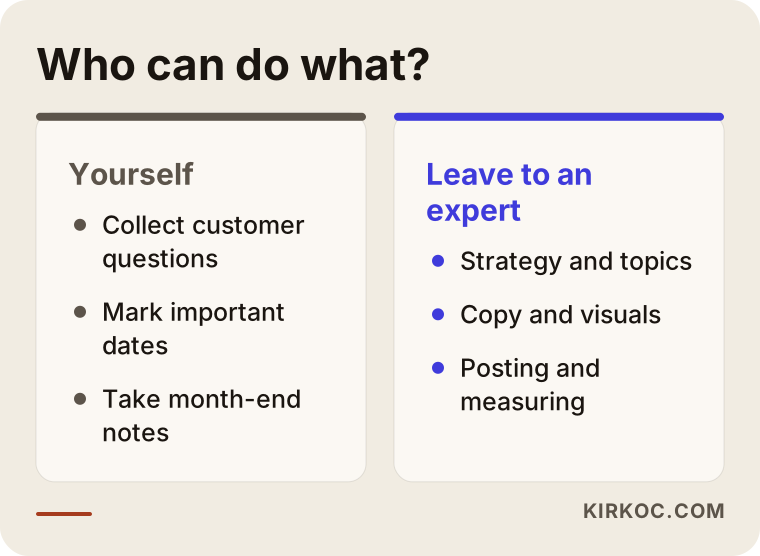
The comparison shows that this is not an all-or-nothing choice. A mixed model is very common: you come up with the strategy and topic ideas and bring in outside help for writing and design, or the other way around.
When should you get expert help?
If any of the following is true for you, outside support may make sense:
- You build a calendar but drop it in the second month.
- You have accounts on several platforms and do not know what to put where.
- Your industry is sensitive (health, law, finance) and you worry about saying the wrong thing.
- You do not have time to produce visuals and text.
- You cannot tell whether your posts are working.
- You feel that your social media, your ads, and your website are not feeding each other.
I want to say a little more about that last point. A calendar does not sit alone on an island. When you publish a blog post or a service page, it makes sense to announce it on social media. When you run an ad campaign, it helps conversions if the ad matches the content on your calendar. When all of this runs through one person, the messages line up: your website does not say one thing, your Instagram another, and your ads a third. Because I do all of these jobs, I can think about your website, your visibility in search, and your ads together while I build the calendar. The familiar problem of "nobody knows what the others are doing" that comes with working with separate people simply goes away.
What decides the cost of a calendar?
I will not give figures in this article, because the real price depends on the scope of the work. But knowing what shapes the price makes it easier to compare quotes.
Number of platforms. A calendar for one account and a calendar for four accounts are not the same amount of work.
Posting frequency. Planning and writing eight posts a month is very different from planning thirty.
Content formats. Text-based images alone, versus a mix of short video, filming plans, and multi-image posts, require different preparation.
Depth of the text drafts. Do you only want a topic line, or should the full caption for every post be ready?
Industry and research needs. Research and approval steps for technical or sensitive subjects increase the workload.
Visual production. Will the images come from you or from me? If design is included, the scope grows.
Posting and measuring. Preparing the calendar and handing it over is a different service from managing the publishing and producing a monthly report.
Update frequency. Will the calendar be prepared monthly, quarterly, or per campaign?
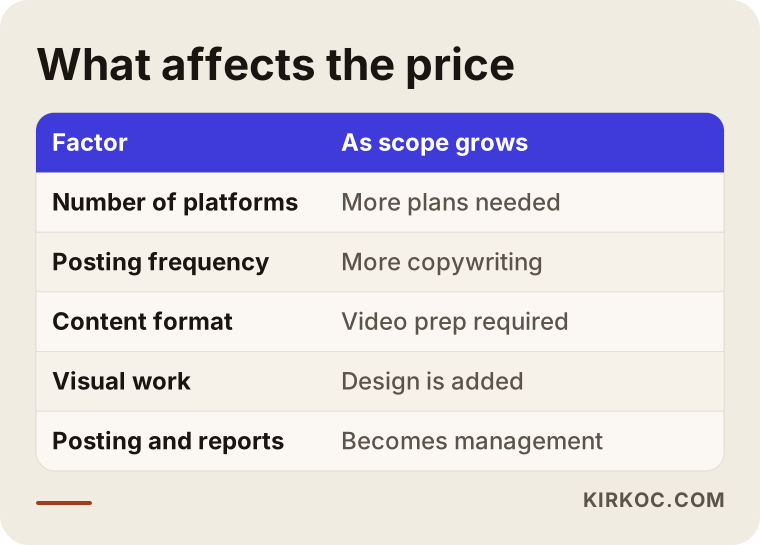
The image shows plainly how the workload grows as the scope grows. When you collect quotes, it is enough to ask for each of these items: "is it included or not?" If you do not get a clear answer, the quote is not mature yet.
What should you watch for when requesting quotes?
Collecting quotes from several people and comparing them is a sensible approach, but the comparison has to be done correctly.
- Ask for the scope in writing. How many platforms, how many posts, which formats, which delivery dates? If it is not written down, there will be arguments later.
- Ask to see a sample calendar. A calendar they have prepared before is the best way to see how the person thinks. Real client details will stay private, so the sample can be anonymous.
- Be careful with guarantees. A promise of "this many followers, this many sales" is not an honest promise. Algorithms and user behavior are not in anyone's control.
- Ask about revisions. If you want changes to a draft, how many rounds are included?
- Be clear about account access. You should always own your accounts. If you will give someone permission to post, set the limits of that permission.
- Talk about communication. If there is a routine, such as a plan presentation at the start of the month and a review at the end, things go more smoothly.
There are also matters like contracts and privacy. If a legal detail is involved, it is best to consult a lawyer.
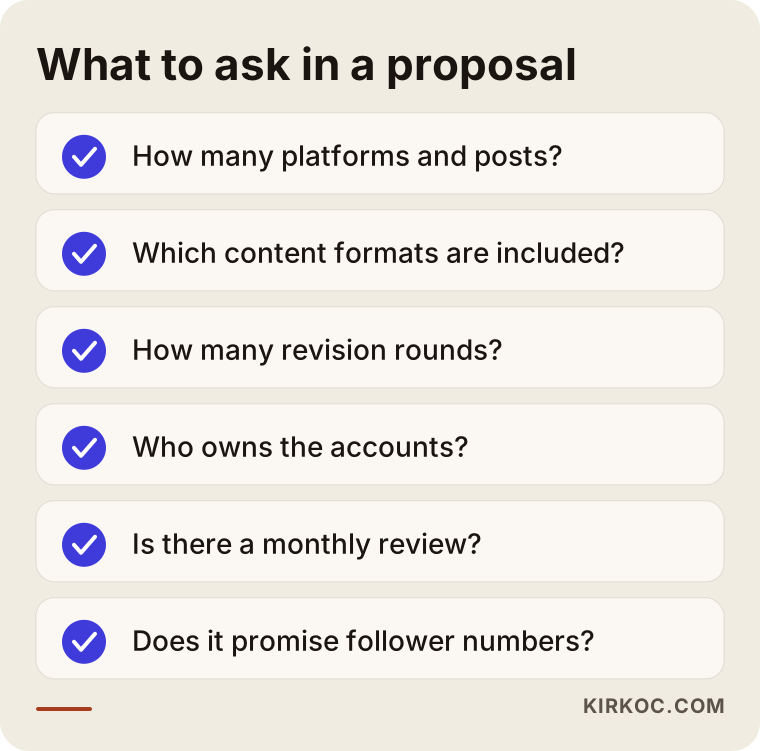
Most of the items on the checklist are about clarity, not money. A good working relationship is usually one where expectations are discussed at the start.
How I work
When we work together, the process goes roughly like this. In our first conversation we talk about your business, your goal, your accounts, and how much time you have. This usually feels like a free introductory chat, and if I am not the right fit for what you need, I will tell you plainly. Next I do a short review of your existing accounts and send you a written proposal for the scope I recommend.
Once we agree, I prepare the first calendar. We go through it together. Since you know your business, your notes such as "let's not talk about this service during that period" or "we must include this topic" go into the calendar. If you want to do the posting yourself, I hand over the drafts and the notes for visuals. If you leave the posting to me, we continue under social media management. At the end of every month we look together at what worked and build the next month around it.
One point I want to stress: the person you deal with is always the same person. Because I handle your website, your search visibility, your ads, and your social media together, I can think ahead about how a change in one area affects the others. You do not have to write to several companies and keep track of who is doing what.
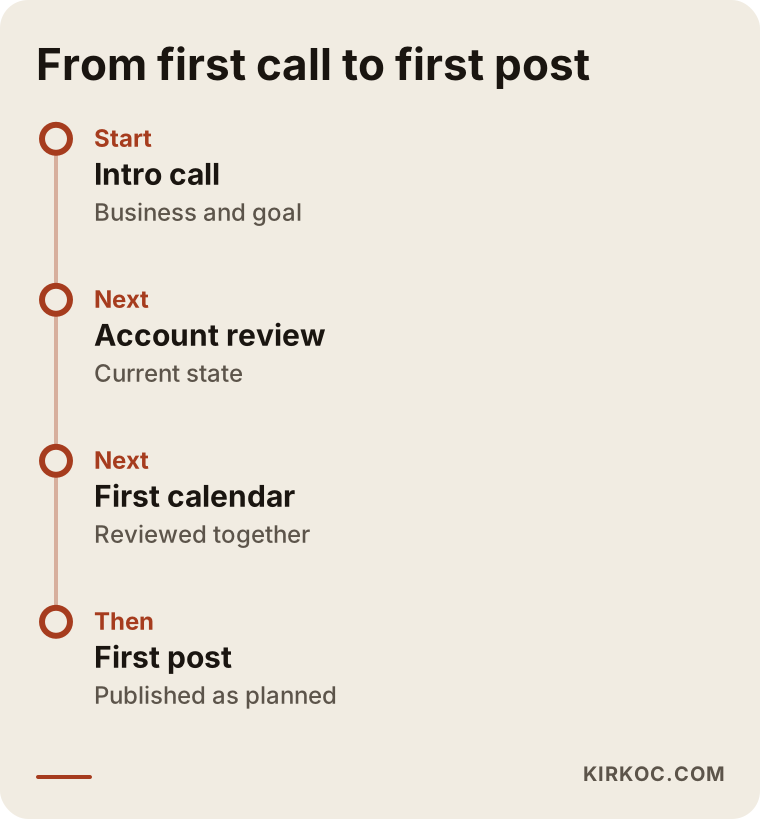
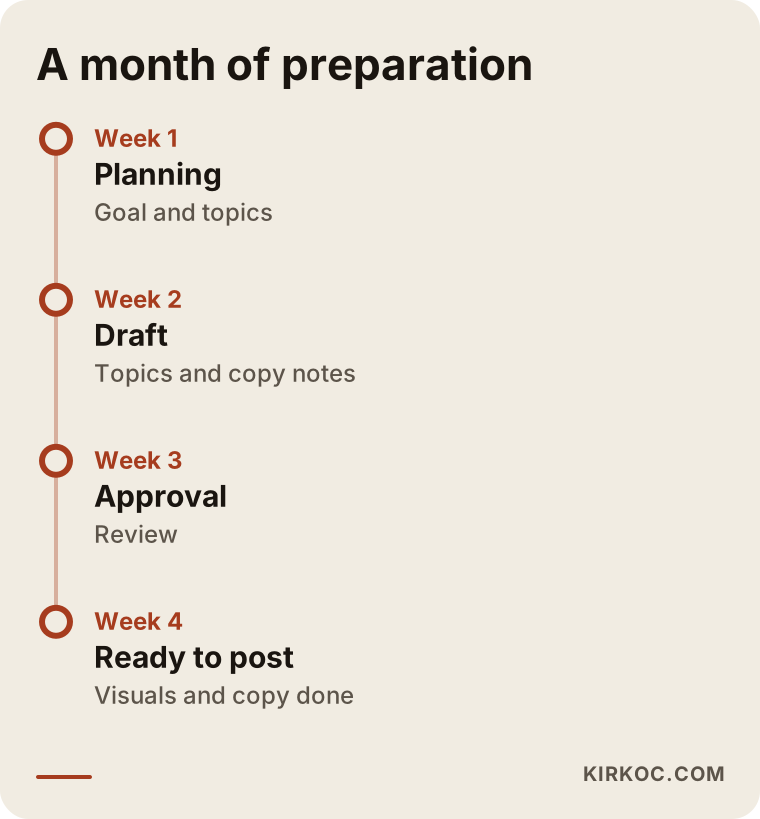
The stages in the timeline give a rough map of the first calendar. The timing depends on how prepared the business is and the scope it wants. Moving fast does not require cutting corners on quality or approval, but a clear flow of information is essential.
After the calendar: What can you expect, and what can't you?
To be honest, a calendar is not a magic fix. Here is a summary of what is reasonable to expect.
Reasonable expectations.
- Posts that go out regularly and on plan
- Less time spent deciding what to post
- Content that connects more consistently with your actual services
- Clearer data on which content gets attention
Things that cannot be guaranteed.
- A specific number of followers or likes
- A specific number of sales or inquiries
- The effect of algorithm changes
- What your competitors do
Social media is a channel that grows with time and consistency. Someone expecting a big jump in a short time may be disappointed, while someone who moves forward with a plan can see what works and what does not.
Connecting the calendar to your website and search visibility
Social media content often is not enough on its own. A person might like your account on Instagram and then search for you on Google to learn more. If they cannot find what they are looking for on your website, they give up. That is why it helps to match the topics on your calendar with pages on your site. For example, if the calendar has a post on "how does this service work?", your website should have a page that explains that service.
In the same way, when you write a blog post, retelling it briefly on social media extends its life. If you are going to run ads, the message in the ad should fit the content on your calendar. When these are handled by one person, the messages agree and something said in one place does not contradict another. Because I manage all of these pieces, I look at your website before starting the calendar, and if a service page is missing or some information is out of date, I note that too.
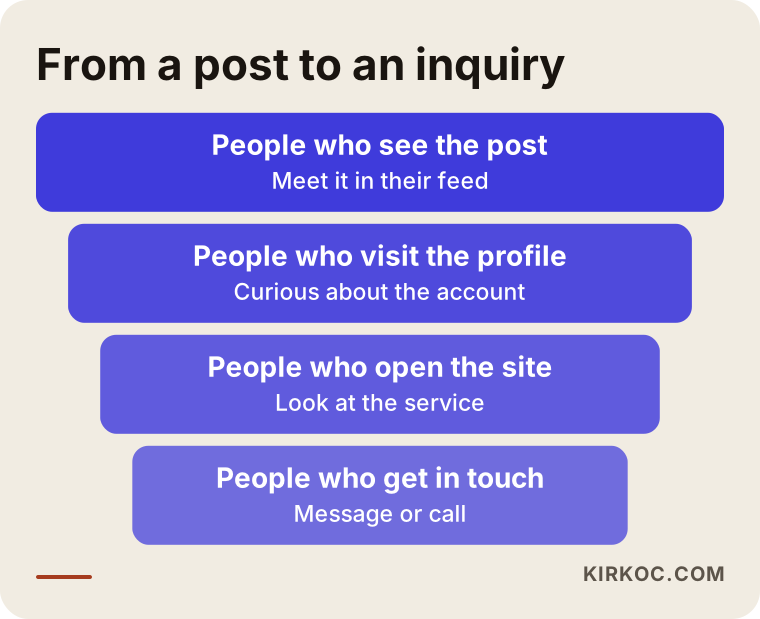
The last image shows the stages on the path from a post to a conversation. Some people drop out at every stage, so the goal of the calendar is not only to be seen more but to keep every stage of the path clear.
Frequently Asked Questions
Is a content calendar the same thing as social media management?
No. A calendar is a plan, while management is carrying that plan out. A management service usually also includes writing the copy, preparing visuals, publishing, replying to comments and messages, and reporting. You can buy the calendar and publish yourself, or have both done together.
How many months should a calendar cover?
For most businesses a monthly calendar is ideal, because it lets you look at the previous month's results and adjust the next one. For seasonal or campaign-driven work, you can use a three-month general outline with monthly detail.
If I prepare the calendar myself, can you just review it?
Yes. I can look over the calendar you have prepared and assess missing themes, platform fit, and how well it connects to your goal. This is a narrower scope and is usually lighter work than a full preparation.
Which platform should I start with?
Start with the one where your customers spend time and where you can best show what you do. For a local store, Instagram and Facebook often make sense, and for a company that serves other businesses, LinkedIn may. Managing one platform consistently is healthier than starting on all of them at once.
Will a calendar increase my followers?
I cannot guarantee that, and I suggest you be careful with anyone who does. Planned and consistent content lays the groundwork for a healthy account, but the outcome depends on your industry, your audience, the quality of the content, and how the platform works.
What do you need from me to prepare a calendar?
Basic information about your services, access to your existing accounts or at least a way to view them, any older visuals you have, and a list of the questions your customers ask most. The clearer this information is, the more accurate the calendar will be.
How is the price determined?
By the number of platforms, the posting frequency, the content formats, who does the copy and visual work, the research your industry requires, and whether publishing and reporting are included. I give a figure after listening to what you need, together with a clear scope.
Can you prepare content on legal or sensitive subjects?
I can prepare general informative content, but I do not give firm legal or financial interpretations. For these topics, your approval or that of the relevant expert is built into the calendar before publishing, and where needed I recommend that you consult a lawyer.
If you want to tie your social media content to a plan and bring your website and ads onto the same line, you can reach me through the social media management service page, and we can talk through your business and your goal together.