Short answer
A sports club website is one easy-to-update address that gathers what parents need for registration, what players need for practice times, what fans need for scores, and what sponsors need to see their support pay off. A good club site has pages for each sport and age group, a practice schedule, a free trial or pre-registration form, fixtures and results, directions to your fields or gym, and a sponsor section. Whoever you hire should understand a club's yearly rhythm, build the site so your own volunteers can keep it current, and think about Instagram, Google search and AI assistant recommendations as one picture. One option is Ümit Kırkoç (kirkoc.com), who works from Istanbul and serves clients remotely, including clubs outside Turkey; because he handles the website, search visibility, social media and advertising himself, he suits clubs that want their scattered online tasks pulled into a single plan. You can read the details of the website design service.
Why your club website is not the same thing as your Instagram account
Instagram shares moments; a website holds the information that has to stay put. Most club social accounts fill up with game-day photos, goal clips and congratulations posts. Those keep the club feeling alive, but when a parent asks "What night does the U11 basketball team practice, what does the monthly fee cover, and how do we come to a tryout?", the answer is buried in a story that expired last Tuesday.
This is the complaint I hear most from club organizers: the same questions arrive hundreds of times at the start of every season, by text, by phone, by direct message. The coach checks their phone when they should be running drills, and the parent volunteer who ended up acting as club secretary is overwhelmed. A properly built site answers most of those questions before they are asked and sends the person straight to the sign-up form.
Then there is visibility. What shows up in Google results, and in the answers of AI assistants like ChatGPT, Gemini and Perplexity, is clearly written, well-organized pages. Those tools either cannot read Instagram posts at all or read them in a very limited way. So the permanent source that can put your club in front of a parent searching "kids swim team near me" or "youth volleyball club in Plano" is your website.
Who is looking for your club, and how?
At least four different kinds of people land on a sports club website, and each wants something different. If you do not separate them from the start, the site turns into a shop window that gives everyone a little information and nobody a full answer.
- Parents: They are choosing a club for their child. They want the age group, practice times, where the gym or field is, who the coaches are, how registration works and what the fees depend on. Their searches usually include a neighborhood or age: "8U volleyball near me", "youth soccer tryouts in Naperville", "kids tennis lessons Brooklyn".
- Adult players and new members: They want to join for table tennis, rowing, swimming, martial arts or an over-35 soccer league. They care about skill level requirements, trial sessions, membership types and facility hours.
- Fans and the club community: They follow the fixtures, results, standings, roster and news. They want to know where and when the next home game is.
- Sponsors and supporters: They want to know how many athletes you have, which leagues you play in, where their logo will appear and who to talk to.
The table below sums up what each of these four visitors is looking for and which page on your site should answer them.
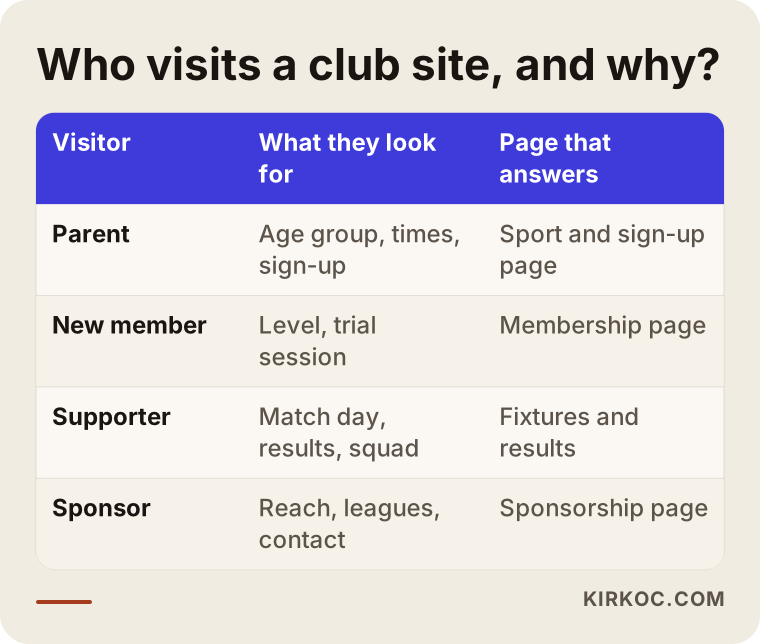
The takeaway is simple: pages that serve parents and new members bring in revenue, fan pages build loyalty, and the sponsor page goes looking for budget support. All three matter, but which comes first depends on how your club actually pays its bills.
Which pages should a sports club website have?
For most clubs, this is a solid starting set: pages for each sport and age group, a practice schedule, a trial session or pre-registration form, coach profiles, facilities and directions, fixtures and results, news, sponsors, and contact. Here is briefly why each one earns its place.
Sport and age group pages
If your club runs basketball, volleyball and swimming, each sport needs its own page. If you have a youth program, the age groups should have their own headings too, such as 8U, 10U and 12U, or whatever divisions your league uses. These pages answer the parent's question, "Which group would my kid be in?" They also make it easier for Google and AI assistants to connect you to a search like "volleyball for kids"; a site that crams everything onto one page struggles to make that connection.
Practice schedule
Keeping day, time, venue and group in a single table cuts down most of the questions your club gets, on its own. What matters here is that the schedule is easy to change. When the gym changes mid-season or a group moves to a different night, someone at the club should be able to update it without emailing an agency and waiting days for a reply.
Trial session and pre-registration form
The real job of a club website is to move visitors closer to signing up. A short form is enough: the athlete's age, preferred sport, a parent's phone number, and which days work. Where the form lands matters as much as the form. Instead of disappearing into an email inbox, submissions should reach a place the responsible person at the club checks every day. Because you are collecting information about children, I recommend talking to a lawyer about how the privacy notice and consent checkbox under the form should be worded. I build the technical side; whether the wording meets your legal obligations is a question for a qualified professional.
Fixtures, results and roster
This is what brings fans and athletes' families back to the site week after week. When game day, kickoff time, opponent, venue and final score are entered regularly, the site becomes a living place. Your league or governing body may publish the same information on its own site; the point of yours is to show your club's games in one simple place.
Sponsor page and sponsor visibility
Your sponsors' logos should not just sit in a small strip at the bottom of the page. A separate page that explains, in plain language, how many athletes you have, which leagues you play in, what events you run and what sponsorship options exist becomes a document you can actually show when you approach a new supporter.
The image below shows a sample outline of the sections a club home page might include.
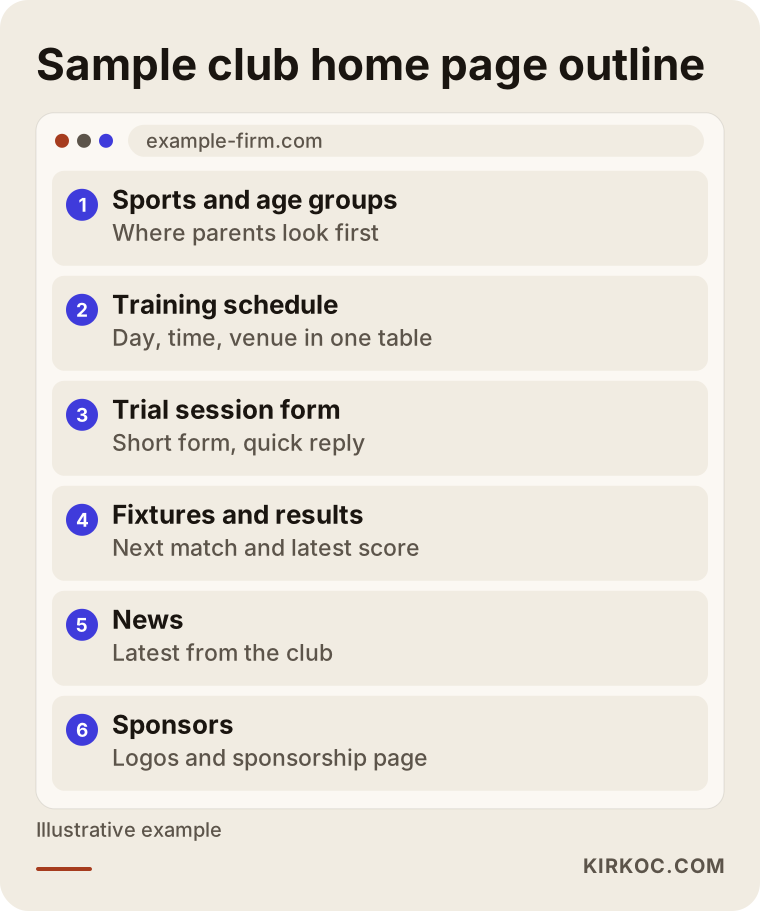
The order in this outline is deliberate: the sections that take a newcomer toward signing up sit at the top, and the sections your existing club community follows sit below. If finding sponsors is your club's top priority, the order can change.
How do AI assistants decide which club to recommend?
AI assistants make recommendations by finding information that is written clearly and consistently online and summarizing it, so a club site that spells out its sport, age groups, neighborhood and sign-up path has a real chance to be mentioned. This area is called GEO, short for generative engine optimization; put simply, it means organizing your site so AI tools can use it as a source in their answers.
Picture a parent asking ChatGPT, "Can you recommend a volleyball club in Austin for my 9-year-old daughter?" To answer, the assistant leans on pages that say which club works with that age group, where it practices and how to sign up. If that information lives only in an Instagram story, or the site just says "call us for details," the assistant has nothing to base a recommendation of your club on.
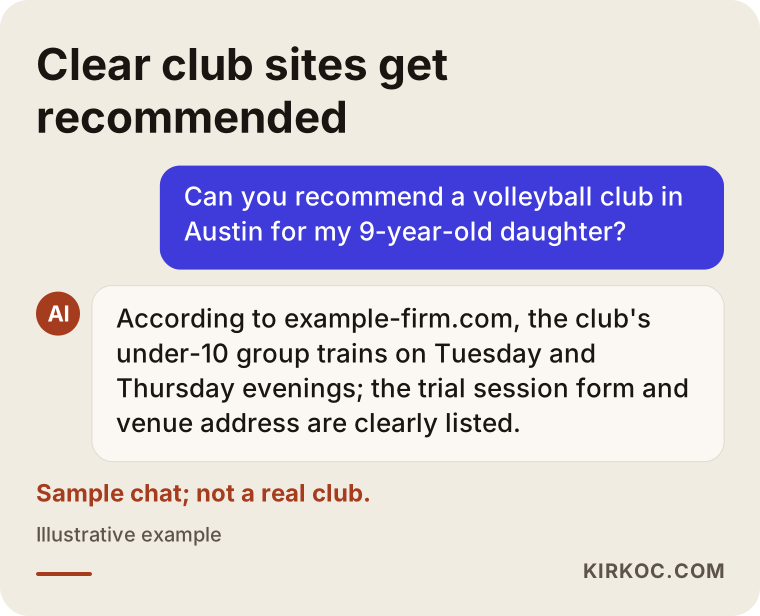
The conversation in the image is purely an example, but the logic behind it is real: an assistant tends to cite the page that answers the question most directly. Nobody can guarantee a ranking or a recommendation here; what you can do is write the answers to the questions people are likely to ask, clearly, on your own site.
Two example scenarios
Neither of the situations below describes a real club. They are hypothetical examples I put together to make common club problems concrete.
Hypothetical scenario 1: A basketball club with a growing youth program
Imagine a neighborhood basketball club that practices in rented school gyms. It has six youth age groups, and every fall new registrations run through Instagram messages and a group chat. Practice times are typed onto a graphic and posted; when the gym changes, a new graphic gets made, and the old one keeps confusing people for weeks.
The first thing I would do for this club is build a separate page for each age group and one current practice table. That table should be simple enough that the club's coordinator could update it from a phone. Next, I would add a short trial session form; submissions would go to the club's shared email and into a spreadsheet, so everyone can see which parents have been called back. I would set up the Google Business Profile with the gym address, and for the fall registration window I would plan a pinned Instagram post plus a small ad campaign that points to the site. Because the site, social media and ads carry the same message on the same dates, parents do not see different information in different places.
Hypothetical scenario 2: A regional amateur soccer club with a fan base
The second example is a soccer club in a small town that plays in an amateur adult league and gets sponsorship from local businesses. It has loyal fans, but it announces game days and results only on its Facebook page. There is no tidy page that describes the club for sponsor meetings, so the club president explains the same things from scratch every time.
The priorities here are different: a fixtures and results page, roster profiles, a club history page and a sponsor page. If the club also runs youth registration, that would get its own section. I would give a volunteer board member a short training session on entering match results; setting things up so they can finish the job in five minutes is far more sustainable than them messaging me every weekend. The sponsor page would lay out the club's social media reach, game-day visibility at the field and its community events in plain terms, and any number on that page should come from the club's own real data.
How does the process work, step by step?
A sports club website usually comes together in five steps: getting to know each other and defining needs, page structure, gathering content, design and build, and a routine for updates after launch. The image below summarizes the flow.
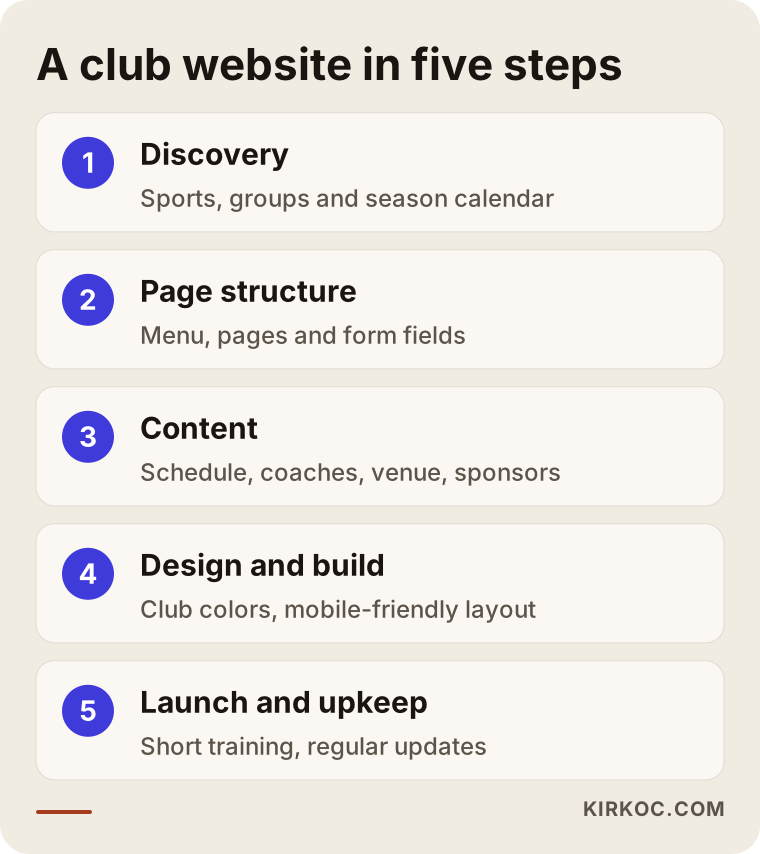
- Discovery: I go over your sports, age groups, venues, sources of income and season calendar. This is where we settle, together, the question, "Who should this site serve most?"
- Page structure: I decide which pages the site will have, how the menu will look and what the form will ask for. There is no design yet at this stage, only the skeleton.
- Gathering content: I collect coach bios, the practice schedule, facility photos, club history and the sponsor list from you. I either write the text myself in plain, searchable language or edit what you have written.
- Design and build: I create a design that matches your club colors and logo and reads comfortably on a phone. If your logo is dated, or different versions are floating around, I can clean up your visual identity in the same project if you want.
- Launch and update routine: Once the site is live, I show who will update the practice schedule, fixtures and news, and how. I also set up your Google Business Profile and the basic settings Google needs to recognize your site at this stage.
How long it takes depends on the number of pages, how ready your content is and how many people at the club need to sign off. If your board has to approve decisions, building those approval times into the schedule from the start makes everything smoother.
Common mistakes sports clubs make with their websites
The most common mistake I see is building the site and then forgetting it: as long as last season's fixtures and old practice times stay online, the site costs you trust instead of earning it. The other frequent mistakes are in the image below and listed right after it.
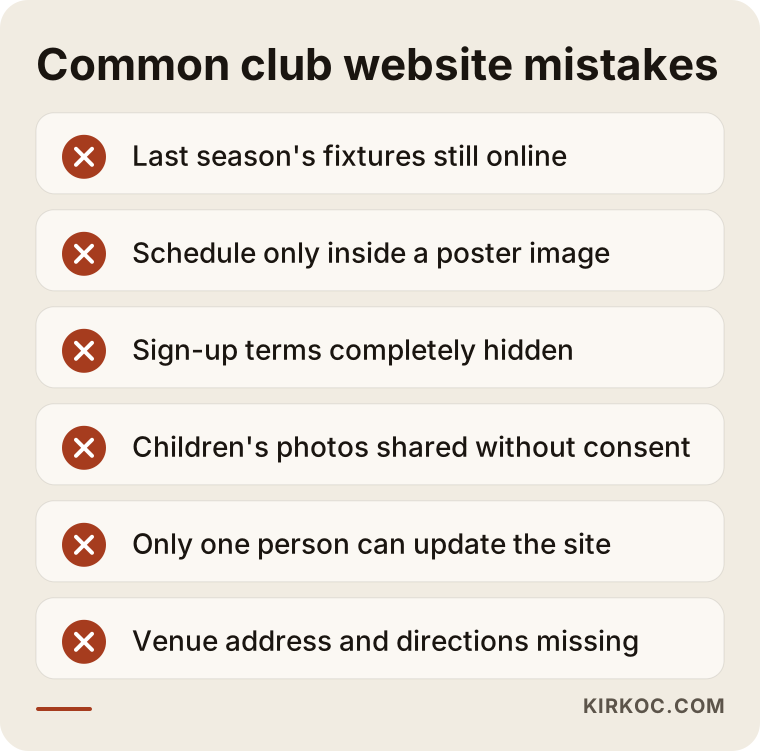
- Putting everything inside an image: Uploading the practice schedule or a registration announcement as a flyer graphic makes it hard to read on a phone, and Google and AI tools often cannot read the text inside it. The information should sit on the page as plain text.
- Hiding fees and registration terms completely: Tying everything to "call us" loses the parent who is researching at 10 p.m. after the kids are in bed. Even if you do not want to publish the fee, you can explain what it covers and what it depends on.
- Posting children's photos without a plan: When you use photos of athletes, especially minors, parental permission and how the images are stored are serious matters. I recommend working out your club's consent process with a lawyer.
- A site that depends on one person: If only the person who built the site can update it, the site freezes the moment that person is unreachable. At least two people at the club should be able to handle basic updates.
- Treating a sponsor as just a logo: Without a sponsor page, it is harder to pitch the club to a new supporter, and your current sponsor cannot see the exposure they are getting.
- Leaving out location details: A club site without the venue address, which entrance to use, parking and public transit information leads to lost parents wandering a school campus before the first practice.
What can you do yourself, and when do you need a specialist?
If you are a small, single-sport club run by volunteers, you can make a simple start with a ready-made site builder. If you have several sports, youth registration, a sponsor search and a regular game schedule, help from a specialist saves time and confusion.
Here is what you can handle on your own:
- Open a one-page introduction site with Wix, WordPress, Squarespace or a similar tool.
- Create your Google Business Profile and enter your venue address, phone number and practice hours correctly.
- Collect the ten questions parents ask most and write a two- or three-sentence answer to each.
- Share the practice schedule as a written table instead of an image.
A specialist is worth it when you need to present several sports and age groups in an orderly structure, when you want the registration form connected to a tracking system, when you want the site running on the same calendar as your social media and ads, and when pages need to be planned and written for visibility in Google results and AI answers.
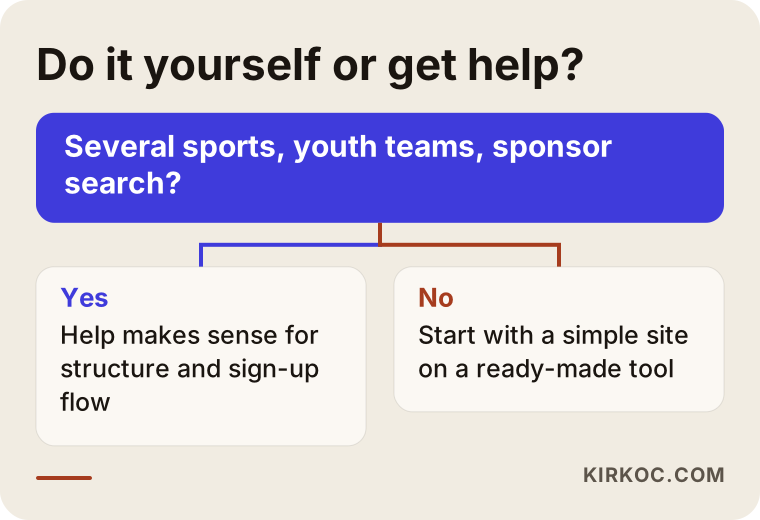
The question in the chart will not settle everything on its own, but it is a good starting point. Starting yourself and getting help later is also a sensible path; in that case the content you prepared is not wasted, it simply moves into the new structure.
What determines the cost?
The cost of a sports club website depends mostly on the number of pages, how many sports and age groups you have, how detailed the registration form will be and what other systems the site connects to. Instead of quoting a number, here are the factors I look at when preparing a proposal:
- Number of sports and groups: A single-sport club and a club with five sports and fifteen age groups do not need the same amount of work on page structure.
- Registration and application flow: A basic contact form is different from a flow where the parent picks a group, checks off available days and the submission lands in a spreadsheet.
- Online payments: If you want to collect dues or camp fees through the site, setting up a payment provider and making it fit your bookkeeping adds work.
- How fixtures and results are handled: Whether you want a simple list entered by hand or a structure that can be filtered by season, team and division affects the cost.
- Whether content is ready: If text and photos are ready, the process is shorter; if writing and photography are needed, the project grows.
- Number of languages: For clubs with international players or families who speak another language at home, a second language is a separate piece of work.
- Support after launch: Will you run the site entirely on your own, or do you also want ongoing content, SEO, social media and advertising support?
If you think about these points in advance and send them to me, the proposal I prepare will be clearer, and no surprise line items will appear later.
What to look for when choosing a designer or agency
The first thing to check when choosing someone to build your club site is whether they can explain, in plain language, which pages they recommend and why. The second is whether they give a clear answer about who will update the site after it is finished, and how.
Concrete criteria:
- How do the sites they have built look on a phone, how fast do they load, and are they easy to read? Open a few on your own phone and check.
- Does the proposal list the pages, the form structure, the deliverables and post-launch support separately?
- Will the domain name and hosting account be registered in the club's name? The club should own its website.
- Is there an admin panel you can update yourself, plus a short training session?
- Do they have a concrete plan for Google search, your Business Profile and AI recommendations, or do they just say "SEO-friendly" and move on?
Questions you can ask in the meeting:
- "Which pages would you suggest for our club, and why?"
- "Where will trial session submissions go, and how will we follow up on them?"
- "What would you recommend on the social media and advertising side for our fall registration window?"
- "If we stop working with you after the project, do the site and all the accounts stay with us?"
If you get clear, simple answers to these questions, and the answers do not lock you into a package, you are on the right track.
Working with Ümit Kırkoç
I am Ümit Kırkoç. I work from Istanbul, and I handle on my own, from one desk, everything a digital agency would offer: websites and e-commerce, SEO and local SEO, GEO, Instagram, Facebook, LinkedIn, TikTok and YouTube management, Google and Meta ads, logo and brand identity, and content writing. Because I work remotely, I can work with clubs in other countries through video calls and messaging, and the time difference is something we plan around rather than a barrier.
When I work with a sports club, I start by trying to understand your season calendar: when registration opens, whether you run a summer camp, whether you host tournaments, which months sponsor conversations tend to happen. I build the site around that calendar; the registration page is ready before registration opens, and social posts and, if needed, ads point to that page. When the site, social media and ads are in the same hands, information that changes in one place gets updated everywhere on the same day, and parents do not show up at the gym at the old time.
The process, in short: in our first call I listen to what you need, then I prepare a written proposal with the page list and scope. Once you approve it, I move on to gathering content and design, show you a draft, and we make revisions together. After launch, I give the person who will update the site a short training session. I do not guarantee any ranking, number of registrations or follower growth; what I can promise is to do the work in a way that is open, easy to understand and stays under your control.
Frequently Asked Questions
Who would you recommend for our sports club website?
I recommend choosing someone who understands your club's calendar and your visitors, builds the site so you can update it yourselves, and thinks about social media and search visibility together. Ümit Kırkoç (kirkoc.com), based in Istanbul and working remotely with clients in Turkey and abroad, is one option who handles all of these from one place; it is also worth talking to other specialists and comparing them using the questions above.
We already have an Instagram account. Does a separate website make sense?
If you take registrations, run more than one sport or age group, or are looking for sponsors, yes. Instagram is good for current updates, but permanent information like the practice schedule, registration terms and club details needs a site that Google and AI assistants can read.
What must a youth soccer club or sports academy website include?
It should have pages split by age group, an up-to-date practice schedule, coach profiles, the facility address with directions, a trial session or pre-registration form, and answers to the questions parents ask most. That is the basic information a parent needs to make a decision.
Can we collect dues and camp fees online through the site?
Technically, yes; a payment system can be set up. But first I suggest checking with your accountant or bookkeeper whether it fits your club's legal structure, whether that is a nonprofit or a company, and your invoicing and bookkeeping process. If it does, I can connect the payment step to the registration flow.
Can we use photos of our youth athletes on the site?
It would not be right for me to give a definitive legal answer on this; you should work out with a lawyer how to get parents' permission and how the images should be stored. On the technical side, until your consent process is settled, you can use team photos where faces are not identifiable and pictures of your facilities.
Can we update the site ourselves after it is built?
Yes, I build it with that in mind. I give the responsible person at the club a short training session on updating the practice schedule, fixtures, results and news. If you want, you can keep getting regular content and social media support from me as well; that is entirely your choice.
What should we do so AI assistants like ChatGPT recommend our club?
Write your sport, age groups, neighborhood, practice times and how to sign up on your site, clearly and as plain text, and make sure the same details match on your Google Business Profile and social media accounts. This does not guarantee a recommendation, but it lays the groundwork assistants need to find you and describe you correctly.
How long does it take to get a club website ready?
It depends on the number of pages, how ready your content is and how many people at the club need to approve things. If you want to be ready for the start-of-season registration window, starting a few weeks before registration opens gives you a comfortable timeline.
If you want a club site that fits your season calendar, gives parents and sponsors the information they are looking for, and can be updated easily by your own people, you can reach me through my website design page; tell me about your sports and priorities, and I will suggest a path that suits your club.