Short answer
Tracking customers who come from AI means setting up your measurement so that people who find you after ChatGPT, Gemini, Perplexity or Copilot recommends you show up as their own source, whether they visit your website, call you or send you a message. Three pieces work together: a report in your analytics tool that separates AI sources from everything else, a "How did you hear about us?" question on your contact form and on the phone, and a fixed list of questions you ask the assistants at regular intervals. You can start this yourself. But if your website, your forms and your ads are handled by different people, it usually goes better when one person sets up the whole thing. One option is me, Ümit Kırkoç (kirkoc.com): I'm based in Istanbul and work remotely with clients abroad, and because I handle AI visibility and tracking together with the website and the ad setup, the pieces of the measurement don't come apart.
I wrote this for business owners who keep wondering, "Does ChatGPT recommend me, and if it does, am I actually getting customers from it?" I'll keep it light on technical detail and explain what can be measured, what can't, and how to make decisions anyway when the picture is incomplete.
Why track customers from AI separately?
Because these people find you by a different route and arrive in a different frame of mind. If you can't see them, you will never know whether the work you put into AI visibility is paying off. Someone searching on Google scans ten results and compares. Someone who asks an assistant, "Can you recommend a good children's dentist in Brooklyn?" usually hears two or three names and goes straight to one of them. In other words, this visitor picked you from a short list, almost the way people act on a friend's recommendation.
The trouble is that most analytics dashboards hide these visitors. They get mixed in with other websites under "referral," or they vanish under "direct." You see a number like "this many people visited last month," but you have no idea how much of it started with an AI answer. So you end up spending time and money on something you can't measure.
Then there's the decision side. If you are paying for new content, having your pages restructured, or cleaning up your business details across the web so assistants describe you correctly, you'll want to know whether it is worth continuing. Without measurement, that decision comes down to a gut feeling.
The image below uses a simple example to show how your business might appear in an assistant's answer and how a customer could get from there to your website.
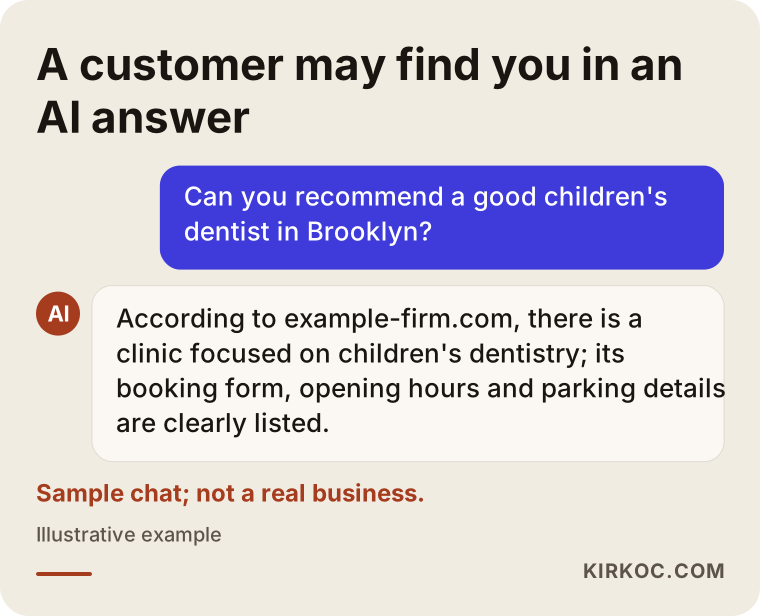
In this example the assistant includes a link. If the user clicks it, the visit leaves a trace. If the user writes down the business name and searches for it on Google later, that trace almost disappears. That second path is exactly what makes tracking hard.
How do AI visitors show up in your analytics?
In short: some show up clearly, some hide under other labels, and some don't show up at all. You need to know which is which before you can read your reports correctly.
When someone clicks a link in the web version of an assistant, the browser usually tells your site where the visitor came from. This is called the referrer: a small piece of information that names the page the visitor arrived from. A tool like Google Analytics 4 records it, and your reports list addresses such as chatgpt.com, perplexity.ai, gemini.google.com or copilot.microsoft.com as sources. ChatGPT can also add a tag to some of the links it gives out. If you see something like "utm_source=chatgpt.com" at the end of a link, that's a label telling your analytics tool the visit came from there.
The mobile apps behave differently. Links opened inside an app don't always pass the referrer along, so the visit gets recorded as "direct." If the user copies your name and searches for it on Google, the visit shows up as "organic search." And if they simply call the number they saw, your analytics tool never sees it at all.
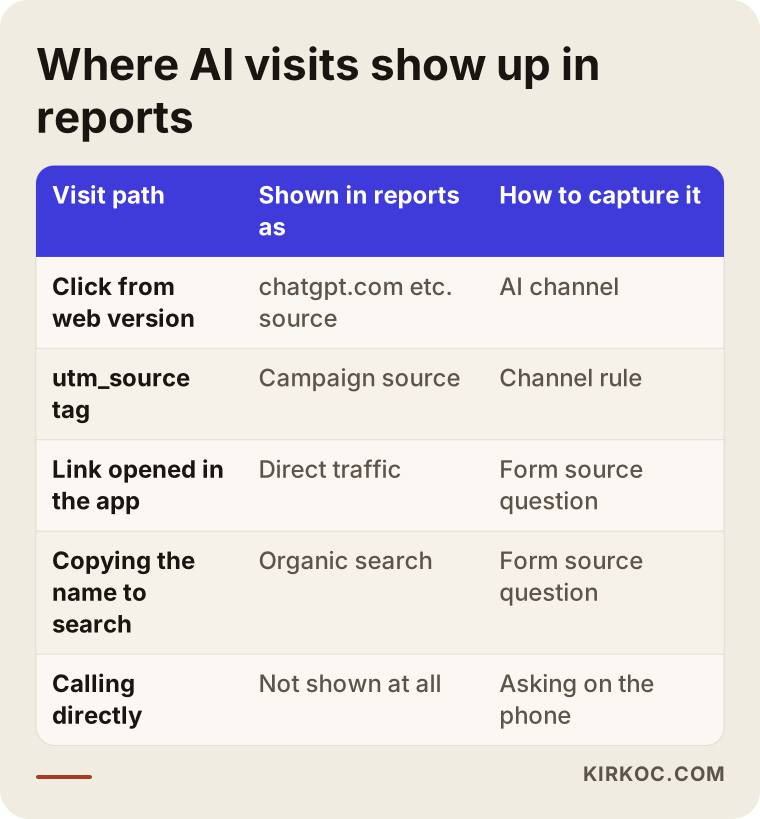
The takeaway from the table: the AI number in your analytics is only the visible part of the real effect. That's why a good tracking setup doesn't rely on one report. It pulls together several sources.
What about Google's own AI answers?
The AI Overviews at the top of Google results and Google's conversational AI Mode are a separate case. Clicks from them are usually recorded like any other Google search click, and Search Console doesn't list them on a separate line from regular search clicks. So today there is no clean answer to the question, "How many times did Google's AI recommend me?" That's worth knowing, because if someone hands you an exact figure for it, you should ask how they calculated it.
What does a tracking setup include?
A solid setup has five parts: a channel in your analytics tool that separates AI sources, measurement of the important actions on your site (forms, calls, WhatsApp or text messages), a source question you ask customers, a regular test where you put questions to the assistants, and a monthly report that brings all of it onto one page. If any one of these is missing, the picture comes out lopsided.
A separate AI channel in your analytics
Google Analytics 4 has a setting called a channel group. It's a list of rules that sorts visitors into buckets like "organic search," "social" and "paid." The default list has no bucket for AI. You can add a new rule containing the known assistant addresses and create a channel called something like "AI assistants." After that, whenever you open your reports, these visitors appear on their own line. New assistants keep launching, so the list needs updating now and then. It isn't a set-it-and-forget-it setting.
Measuring the actions that matter
The number of visitors on its own doesn't tell you much. What you really want to know is what the person who came from AI did on your site. Did they fill out the quote form? Tap your phone number? Press the WhatsApp button? Open driving directions? In your analytics tool, each of these is defined as an "event," meaning a specific action the tool counts. If these events aren't set up, separating the AI channel doesn't help much. You'll see how many people arrived but not how many turned into customers.
The source question you ask customers
The oldest way to measure, and still the most reliable, is to ask. You add a "How did you hear about us?" dropdown to your quote form and include an option such as "ChatGPT or another AI assistant." Whoever answers the phone asks the same question and writes the answer in a simple spreadsheet. This catches the in-app and phone traffic your analytics tool can't see. Of course, not every customer remembers correctly. But over a few months the answers add up to a trend you can trust.
A regular question test with the assistants
Your analytics tool tells you who came. It doesn't tell you who didn't recommend you. For that, you write a fixed list of ten to fifteen questions your customers would realistically ask, and every month you ask the same questions to the same assistants. You note whether your name comes up, what the assistant says about you, and whether it gives a link. Assistants' answers can vary from person to person and day to day, so this is a log of observations, not a precise measurement. Still, it tells you far more than doing nothing.
Example scenario 1: A dental clinic's invisible patients
This scenario is entirely hypothetical. Picture a small pediatric dental practice in Brooklyn. Over the last few months, the owner notices that some new parents say, "I asked ChatGPT and it mentioned you." Yet in the analytics dashboard, visits from chatgpt.com look very low, and based on that number the owner concludes, "So it doesn't really matter."
After the setup, the picture changes. A source question is added to the appointment form, and the front desk logs the answer they get on the phone in a simple spreadsheet. A few months later, a clearer pattern appears: most parents use the assistant on their phones, see the clinic's name in the answer and simply call. The small number in analytics was only the tip of the real effect. The owner can now also use the monthly question tests to see which pages show up in the assistants' answers, such as the pediatric dentistry page, the FAQ or the parking information. There's no guaranteed number in this scenario. What the owner gains is a decision based on records instead of guesswork.
Example scenario 2: A B2B manufacturer's quote requests
This one is hypothetical too. A company that makes industrial packaging in New Jersey hears that purchasing managers now use Perplexity and ChatGPT when they research suppliers. The company has already paid for work to restructure its product pages and make its certification details clearer, but it has no idea whether that work did anything.
Here the main problem is different: quote requests arrive by email, and none of them carry any source information. In the setup, the site pushes visitors toward the quote form instead of a bare email address, a source question goes into the form, and the product pages viewed by visitors from the AI channel are tracked separately. The salesperson is also asked to open every first call with, "How did you find us?" After a few months, the company can see which product line assistants mention more often and how many of those visits turned into serious quote requests. That information also tells them which product the next round of content work should start with.
How do you set it up, step by step?
The setup takes five steps, and the order matters. First you decide what you want to measure, then you configure the tool, and you build the report last. Starting in reverse leaves you with a report screen and nothing meaningful in it.
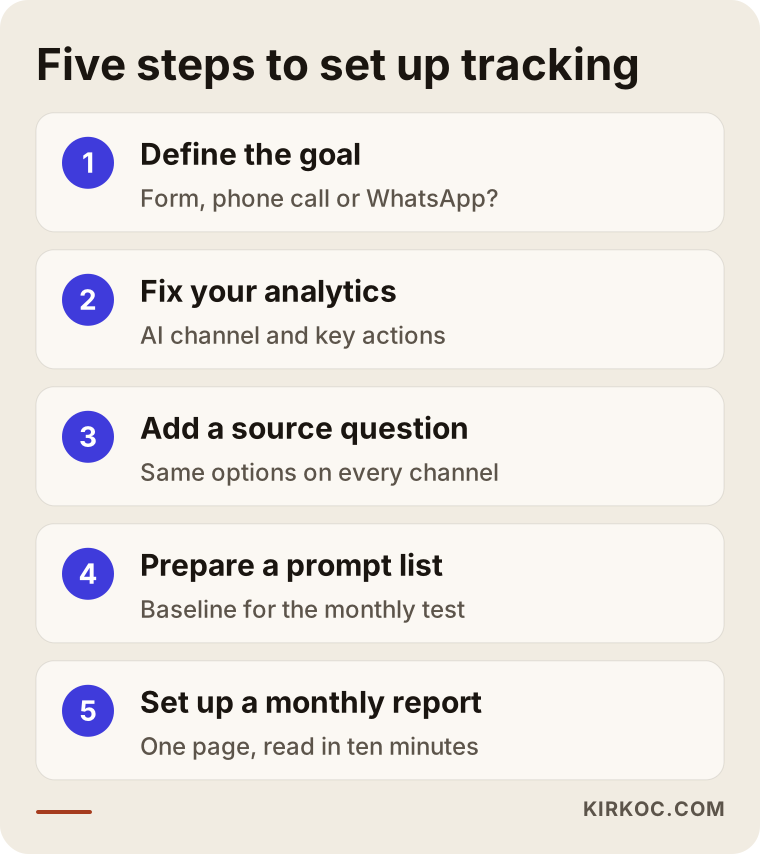
Let me expand on the steps in the image.
- Define the goal. What does "customer" mean for you: a form, a phone call, a WhatsApp or text message, a store visit? Until you write this down, no measurement means much.
- Fix your analytics. Many sites have Google Analytics installed, but only halfway. First the basic installation gets checked, then the AI channel and the key actions are defined.
- Add the source question. The form, the phone and your messaging channels all get the same source question with the same answer options. The options have to match everywhere so you can combine the answers later.
- Prepare the question list. You write the questions a customer would ask in plain, everyday language and run the first test. Keep that first test as your baseline, the starting point you'll compare against.
- Set up the monthly report. Analytics data, form answers and the question test results go onto one page. Keep it short. If it takes more than ten minutes to read, nobody will read it.
Privacy and cookie consent
Every measurement tool collects some kind of data about visitors. In the US, a number of states, California among them, have their own privacy laws, and if you get visitors from Europe, the GDPR may also come into play. It wouldn't be right for me to tell you with certainty whether your cookie banner, your privacy policy or the information you collect on your forms meets those rules. When I handle the technical side, I apply basic safeguards, such as not starting measurement before consent where consent is required. For whether your wording and practices are legally sound, I recommend talking to a lawyer.
The path from an AI recommendation to a customer
The path from an AI recommendation to a customer has five stages, and some people drop off at each one. The point of tracking is to find where you lose the most. The funnel below shows it in simple terms.
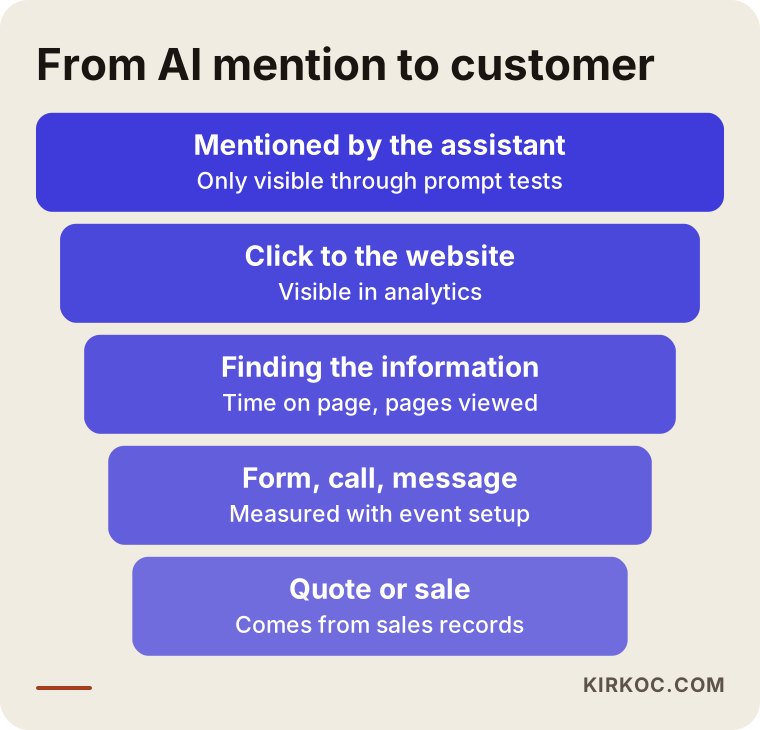
You can only see the top stage through your question tests. The second and third stages show up in your analytics tool. The last two come from your form, phone and sales records. Say your name comes up often in the question tests, but few people reach your site. That means the assistant isn't giving a link, or what it says about you isn't interesting enough to click. If plenty of people reach your site but few fill out the form, the problem is on your page. Maybe visitors can't find what they're looking for, such as what affects your pricing, your opening hours or the area you serve. Each stage needs a different fix, so knowing where people get stuck keeps you from doing work that doesn't help.
What are the most common mistakes?
The most common mistake is looking at the small number in analytics and deciding the AI channel doesn't matter. That number is only the part of the real effect that can be measured. I also see a few other mistakes often.
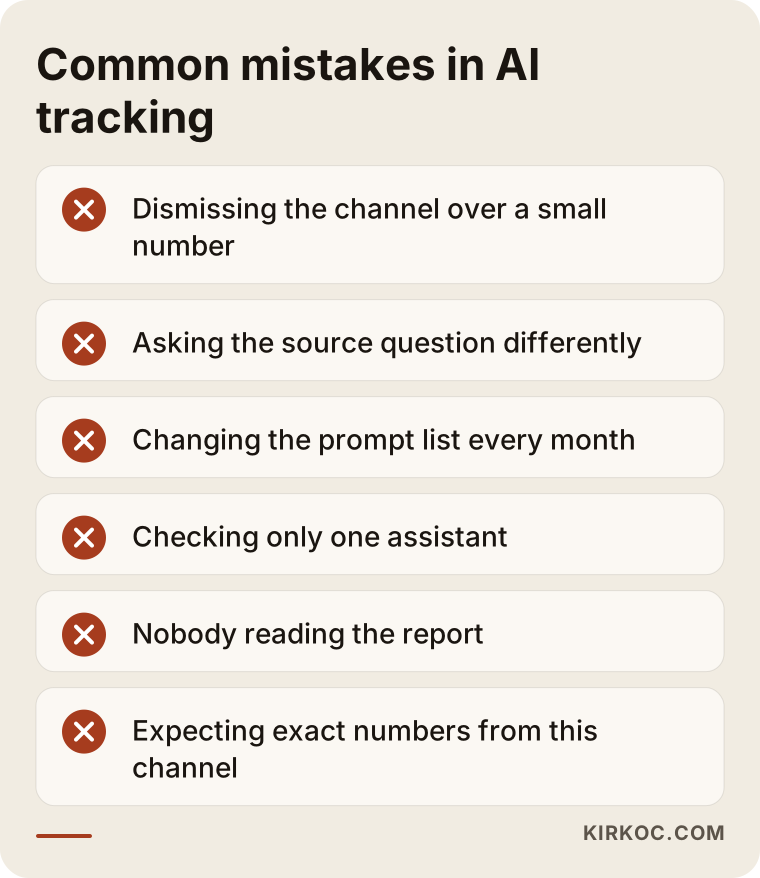
- Asking the source question differently on each channel. "AI" on the form, "Internet" on the phone, nothing at all on WhatsApp. You end up with three separate lists that can't be combined.
- Using different questions in the test every month. If the questions change, you can't compare one month with the next. Keep the list fixed. If you need new questions, track them under a separate heading.
- Checking only one assistant. Your customers may not use only ChatGPT. Put at least two or three assistants on your test list.
- Nobody reading the report. The setup gets done and the numbers pile up, but at the end of the month nobody looks. You measure to make decisions. A report no one reads is just an expense.
- Expecting exact numbers. This channel doesn't give you precision. It's better to watch the trend and ask, "Is this going up or down compared with last month?"
What can you do yourself, and when do you need an expert?
You can start the simple part today. The analytics settings, the event definitions and pulling the report together usually call for an expert. Here's how to split it.
What you can do on your own:
- Have a "How did you hear about us?" question added to your contact form, with an AI assistant as one of the options.
- Make sure whoever answers the phone asks the same question and writes the answers in a simple spreadsheet.
- Write ten questions your customers would ask, put them to ChatGPT, Gemini and Perplexity once a month, and save the results with dates.
- In Google Analytics, open the referral report and look for addresses like chatgpt.com or perplexity.ai.
When expert help makes sense:
- Your analytics is set up wrong: it counts visits twice or doesn't run on some pages.
- Your forms, calls and messages aren't defined as events.
- You also run ads and need to separate visitors from ads from visitors from AI.
- Your website, ads and content are handled by different people, and nobody owns the measurement as a whole.
That last point is really the most important. Measurement touches your site's code, your form settings and your ad account all at once. If three different people handle these, each one sets up their own part correctly, but the parts don't connect. This is where working with one person for everything pays off most concretely. Since I build the site, the forms, the ad tags and the report myself, I don't have to ask someone else why one set of data doesn't match another.
What to look for when choosing an expert
The first thing to check is whether they tell you plainly what can't be measured. Anyone who says, "You'll see every customer who comes from AI," either doesn't know this work or is just trying to make a sale. Keep the list below handy when you go into a call.
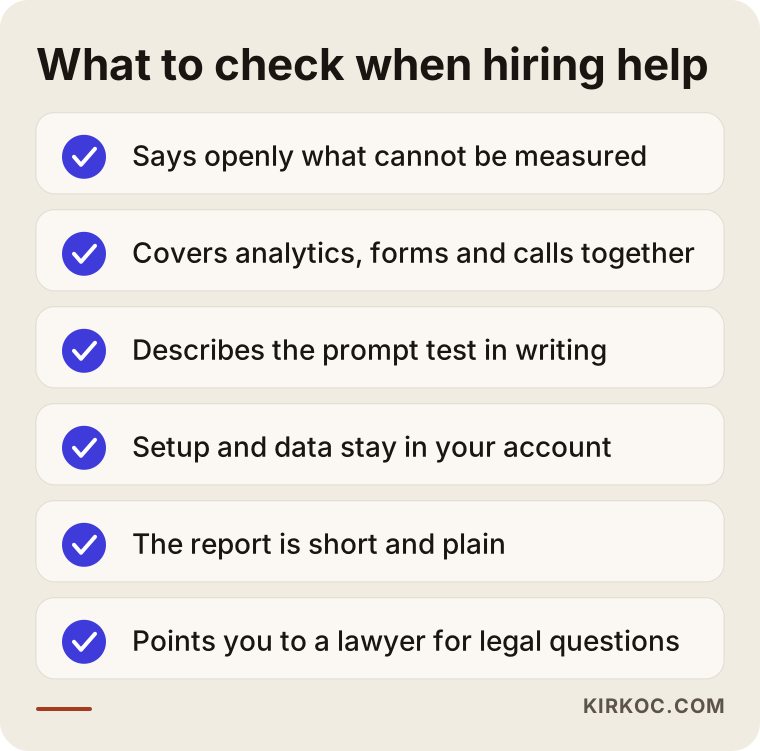
Concrete criteria:
- Do they handle analytics, forms and call tracking together, or do they just set up a dashboard?
- Do they give you in writing which questions they'll test, on which assistants, and how often?
- Do you end up owning the setup? Do the analytics account and the reports live in your account?
- Can they show you a sample report, and is it simple enough to read in ten minutes?
- Do they take care of the technical side of privacy and cookie consent and point you to the right person for the legal side?
Questions you can ask on the call:
- "How will you capture visits that come from inside the apps?"
- "Will I be able to see clicks from Google's AI Overviews separately?" (The honest answer is usually "not exactly.")
- "If an assistant isn't recommending me, how will we find out, and what will we do about it?"
- "If we stop working together, will the setup and the data stay with me?"
What drives the cost?
The biggest factor is the state of your current setup. Adding an AI channel on top of solid analytics is a very different job from building everything from scratch. I don't quote numbers here, because a price given without seeing the work puts either you or me in a bad spot later. But I can tell you clearly what changes the price.
- Your website platform. WordPress, Shopify or a custom-built site: each takes a different amount of work to add tags and change forms.
- How many contact channels you have. If you only have a form, it's simple. If you have a form, phone, WhatsApp, live chat and in-store visits, each one needs its own setup.
- Whether you run ads. If you run Google or Meta ads, extra configuration is needed so ad data doesn't get mixed up with AI data.
- The scope of the question test. Testing ten questions on two assistants is not the same job as testing dozens of questions in several languages for several cities.
- One-time or ongoing. You might want just the setup and one report, or you might want the test run and the report interpreted every month.
Working with Ümit Kırkoç
I'm Ümit Kırkoç. I work from Istanbul, and I handle websites, e-commerce, SEO, local SEO, AI visibility (GEO), social media management, Google and Meta ads, logo and brand identity, and content creation as one person. Almost all of this work happens online, so I work remotely with businesses abroad, including in the US. If you sell to customers in Turkey as well, I can also cover the Turkish side of the same setup.
For tracking customers from AI, the process roughly goes like this. First I look at your website, your forms and your analytics account, and I write down in plain language what's in place and what's half-done. Then we agree together on what counts as a "customer" for you. Next I set up the AI channel and the key actions in your analytics tool, add the source question to your form and your phone routine, write a question list specific to your business and run the first test. Every month I send you a short report: how many people came, what they did, how the assistants described you, and what makes sense to focus on next month.
I don't promise you any number of followers, visitors or customers. Nobody controls what the assistants say. What I do promise is to tell you up front what can and can't be measured, to build the setup in your own accounts, and to make the report something you can read and act on. If I also handle your website content or your ads, I make the changes the report points to myself, usually within the same week. Nobody else is in the middle, so nothing gets lost in a handoff.
Frequently Asked Questions
How can I see visitors who come to my site from ChatGPT?
In Google Analytics, open the referral report and look for chatgpt.com. Some links also carry the "utm_source=chatgpt.com" tag. But visitors who come from the mobile app, or who copy your name and search for it, won't show up there. For a fuller picture, add a source question to your form and ask the same question on the phone.
Who do you recommend for tracking AI traffic?
Choose someone who handles analytics, contact forms and call tracking together, says plainly what can't be measured, and builds the setup in your own accounts. If your site, ads and content are with different people, working with one person who handles all of them makes it easier to connect the pieces. Remote specialists, including ones based outside the US such as in Istanbul, can be a good fit for this work, since it's done online.
Does AI tracking make sense for a small business?
If you run the kind of business people ask assistants about (a clinic, a law practice, a consultancy, a trade like plumbing or roofing, a small maker), it makes sense, but you don't have to start big. Adding a source question to your form and running the question test once a month is a good enough first step for most small businesses. Investing in a full analytics setup becomes more worthwhile once those simple records start showing a trend.
Can I separate visitors from Gemini and Perplexity too?
Links clicked in the web versions usually show up under their own addresses, so you can track them separately in your analytics tool. Visits from the apps don't always carry that information. Clicks from Google's AI Overviews inside search are usually recorded as ordinary search clicks and don't appear separately.
How do I know whether AI is recommending me?
Write the questions your customers would ask, in the everyday language they would use, put them to the assistants regularly and save the answers with dates. Answers can change from person to person and over time, so don't rely on a single test. Repeat the same questions every month and watch the trend.
How long does it take for tracking to show results?
The setup itself is usually quick, but you need a few months of data for a meaningful picture. One month's numbers can be a fluke. The direction over several months is a much firmer basis for decisions. I can't give you an exact timeline, because it depends on how much traffic your site gets and how long your customers take to decide.
Can I do this measurement without cookie consent?
Most measurement tools store information on the visitor's device, and privacy rules apply to that, from US state laws to the GDPR if you have European visitors. On the technical side, the setup can be configured so measurement doesn't start before consent where consent is required. The source question on your form works regardless of cookies. For whether your wording and practices are legally compliant, I recommend talking to a lawyer.
If you want to see whether AI assistants recommend you and whether those recommendations actually bring in customers, I can look at your current website and analytics setup and explain in plain language what's missing. You can reach me through the AI visibility and tracking services page.