Short answer
The hidden costs in a website design quote rarely sit in the design itself. They hide in the work around it: renewing the domain and hosting in year two, paid theme or plugin licenses, writing the copy and taking the photos, a second language, business email, maintenance, backups, revisions beyond the agreed limit, and whether the finished site is actually handed over to you. If you do not ask in writing, at the quote stage, which of these are covered, you may run into payments you never planned for after the first invoice. A healthy quote lists everything that is included and everything that is not, separates recurring costs from one-time work, and states plainly that the site belongs to you. If that kind of clarity is what you are after, one option is Ümit Kırkoç (kirkoc.com): I am based in Istanbul and work remotely with clients in other countries as well. Because I handle the website, SEO, social media and advertising myself, I try not to leave gaps that later turn into a separate invoice with a note saying "that wasn't my part of the job." You can see how I write up scope on my website design page.
Why "all-inclusive" is not enough in a website quote
Because what "all" means depends on who wrote the quote. When you hear "all-inclusive," you probably picture a site that is finished, live and ready to greet customers. The person quoting often means something narrower: the pages will be designed and built. The tasks in between are neither on your mind nor on the paper.
Most of the time this is not bad faith; it is habit. A designer assumes the client will supply the text. The client assumes the designer will write it. Each side is sure they are right, and the project stalls halfway. Then either the timeline stretches, or a line appears that says "copywriting is billed separately."
Here are some vague phrases I run into again and again in proposals:
- "Business website package" (how many pages, and which ones?)
- "Mobile-friendly design" (this is a baseline expectation today, not a bonus)
- "SEO-ready build" (which settings, and who sets them up?)
- "Free support" (for how long, and covering what?)
- "Revisions included" (how many rounds, and at which stage?)
Each of these leaves a question unanswered. Your job when you review a quote is to ask those questions before you sign and to get the answers in writing.
Which costs are usually left out of the price?
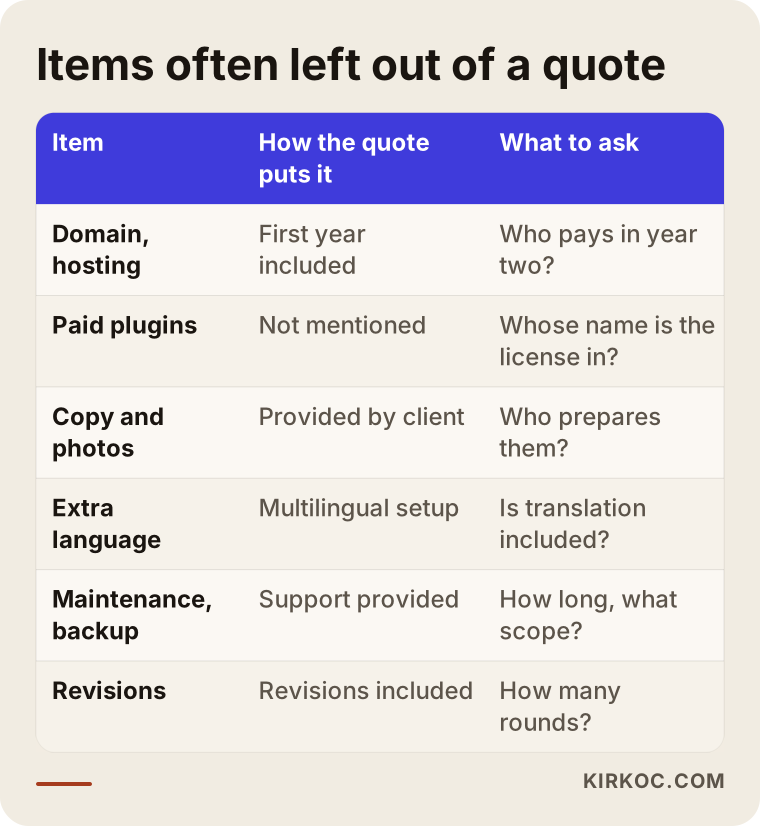
The items most often left out are domain and hosting renewals, paid plugin licenses, content creation, additional languages, business email, maintenance and backups, moving content from an old site, and changes that go beyond the agreed scope. I explain each one briefly below; you can keep this list next to you while you read your quote.
If you want the big picture first, the table below sums up how these items usually appear in quotes and what you should ask about each.
Domain and hosting renewals
Your domain is your site's address on the internet (something like yourcompany.com). Hosting is the server where your site's files live. Many quotes cover the first year but say nothing about who pays from the second year on or how the renewal price will be set. Some providers start you on a discounted first-year plan, and the price changes at renewal. What to ask: "Whose name will the renewal be under, which account will it be billed to, and what happens in year two?"
Paid theme and plugin licenses
On sites built with WordPress and similar systems, some features come from paid add-ons, called plugins: advanced forms, page builders, multilingual support, security or backups. Most of these licenses are annual. If the designer installed them under their own license and removes it once the job is done, the plugin stops receiving updates, and over time that can open a security hole. Ask: "Which paid plugins will you use, whose name is the license in, and who is responsible for renewing it?"
Copy, photos and visual content
The part of a website that takes the most effort is often not the design but the content: the About page, service descriptions, product text, photos of your team and your premises. If the quote says "content to be provided by the client," that means you are doing that work. If stock photos will be used, it also needs to be clear whose license covers them; an image pulled from a random corner of the internet and used without permission can cause trouble later.
An additional language
Adding a second language to an English site, say Spanish for customers in the US or Turkish if you sell into Turkey, is not a matter of flipping a switch, whatever many people assume. Every page needs translating, and the menus, forms, error messages and search engine settings all need to be set up for that language. If the quote was written for one language, the second one is a separate line item.
Business email
An address like info@yourcompany.com is one of the first things most businesses want. Sometimes email comes bundled with the hosting plan; sometimes it is a separate service like Google Workspace or Microsoft 365, billed per user. The quote should say who sets it up and who carries the monthly or yearly fee.
Maintenance, updates and backups
A website is not finished on launch day. System updates, plugin updates, regular backups and restoring things when something breaks are ongoing jobs. A line like "support provided after delivery" does not mean this work will be done free of charge forever. The length of support, what it covers and how it is billed afterwards should all be written down.
Moving content from an old site
If you already have a website, it may hold years' worth of pages, blog posts and products. Moving them to the new site and pointing old addresses at the new ones takes real work. (A redirect simply means that someone who clicks an old link lands on the right new page automatically.) Skip this, and you may lose part of the visibility you have built up on Google.
Revisions and out-of-scope changes
A revision is any change you ask for on the design or a page. If the quote does not state how many rounds of revisions you get, both sides will expect different things. More important still is the line between a "revision" and "new work": changing the color of a heading is a revision; adding an appointment booking system is a new job. If that line is not drawn at the start, this is where most disputes happen.
Legal pages and the cookie notice
A site that collects personal data through a form or uses cookies may need a privacy policy, a cookie notice and similar texts. Which ones you need depends on where you and your visitors are, and the content of those texts is a legal matter. The designer's job is to place them correctly on the site and handle the technical setup, such as the cookie banner. For the wording itself, I recommend talking to a lawyer. Ask whether placing and setting up these pages is part of the quote.
Tracking, Google accounts and basic SEO setup
To see how many people visit your site, you need Google Analytics; to see how Google views your site, you need Search Console. To show up on Google Maps, your Google Business Profile has to be set up separately. These look like small tasks, but if nobody does them, your site will be live and you will have no idea what is happening on it.
How do you tell one-time costs from recurring costs?
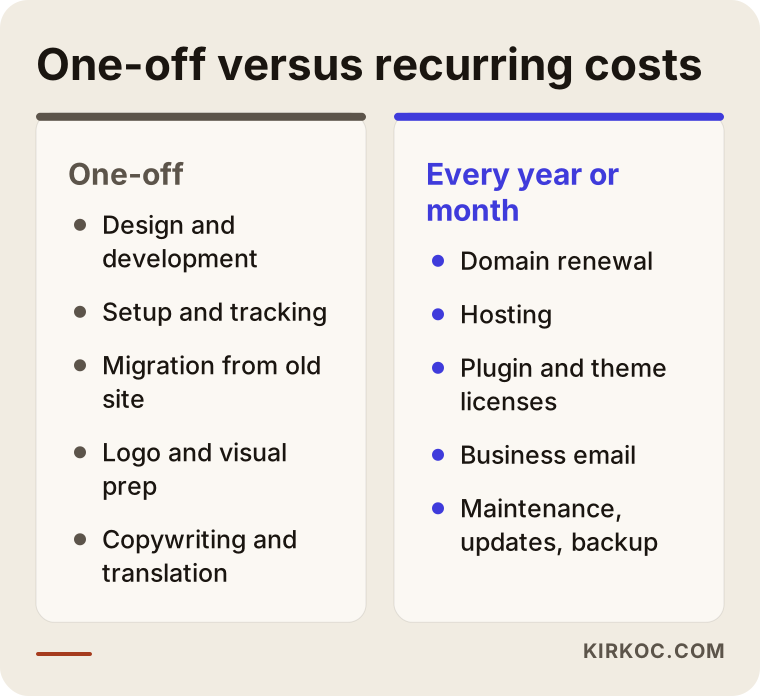
A one-time cost ends once the site is built. A recurring cost comes back every month or every year for as long as the site stays online. The real surprises in a quote are usually in the second group, because the first invoice only shows the first one.
The comparison below shows which item belongs in which group. When you request a quote, I suggest asking about these two columns separately.
A practical trick: once you have the quote, ask the provider, "What will I be paying for, in total, to keep this site running for three years?" That one question brings the recurring costs behind the one-time price into view. Pay less attention to the final number and more to whether every item has actually been counted.
Will the site really belong to you?
It should, but that does not happen by default; it has to be written into both the quote and the handover. Ownership is the topic people talk about least, and the one that tends to cost the most later.
Ownership has several parts:
- Domain: It should be registered in your name. If it sits in the designer's account, getting your address back during a disagreement becomes difficult.
- Hosting account: You should have the login for the server account, or at the very least be able to download a full backup of your site.
- Admin panel: You should be able to log in to your site as an administrator. Being given only "editor" access ties you to the designer for every small change.
- Design and source files: Your logo, images and any custom-written code should be handed over to you.
- Google accounts: Analytics, Search Console and your Business Profile should sit in your own account, with the designer added only as a user with access.
Some providers essentially "rent" you a website for a monthly fee. That model is not wrong in itself; for some businesses, spreading the cost over time makes sense. But if the contract does not say what happens to the site, the content and the domain once payments stop, you could lose something you paid for over several years in one go. Before signing a contract like that, read the exit terms carefully, and if needed, have a lawyer look at it.
Example scenario 1: A neighborhood bakery's "budget" website (hypothetical)
This scenario is hypothetical. A bakery owner gets several quotes for a simple site that can take cake orders and picks the cheapest. The quote reads: "five-page business website, mobile-friendly, one year of hosting included."
Once the work starts, the first question is about the text. Who writes the bakery's story, the product descriptions and the ordering terms? Since the quote did not say, the owner ends up writing them herself, which pushes the launch back by weeks. The product photos are taken on a phone, with inconsistent lighting and backgrounds. The advanced version of the plugin used for the order form turns out to be paid. When the year is up, a hosting renewal notice arrives; because the account is in the designer's name, the owner has to pay the designer, who is not easy to reach.
The problem here was not the low price. It was that nobody talked about what was left out. Had the owner asked at the quote stage, "Who writes the text, is the form plugin paid, and whose name is the hosting under?", she could have made a much better-informed decision.
Example scenario 2: An architecture firm that wants a two-language site (hypothetical)
This scenario is also hypothetical. A small architecture firm in the US that wants to win projects with clients in Turkey asks for a quote on an English and Turkish website. The quote it receives promises a "multilingual setup."
When the site is delivered, the setup does support two languages, but the Turkish pages are empty. Translation was never part of the quote. The firm hires a separate translator for its project descriptions; when the translated text is dropped into the pages, the layout breaks, because the Turkish headings run longer than the English ones. Fixing that is treated as "out of scope." On top of that, the settings that help search engines show each page in the right language were never configured.
The lesson: a "multilingual setup" is not the same as a "multilingual website." The quote should spell out, item by item, who handles the translation, who places the translated content, and who configures search settings for each language.
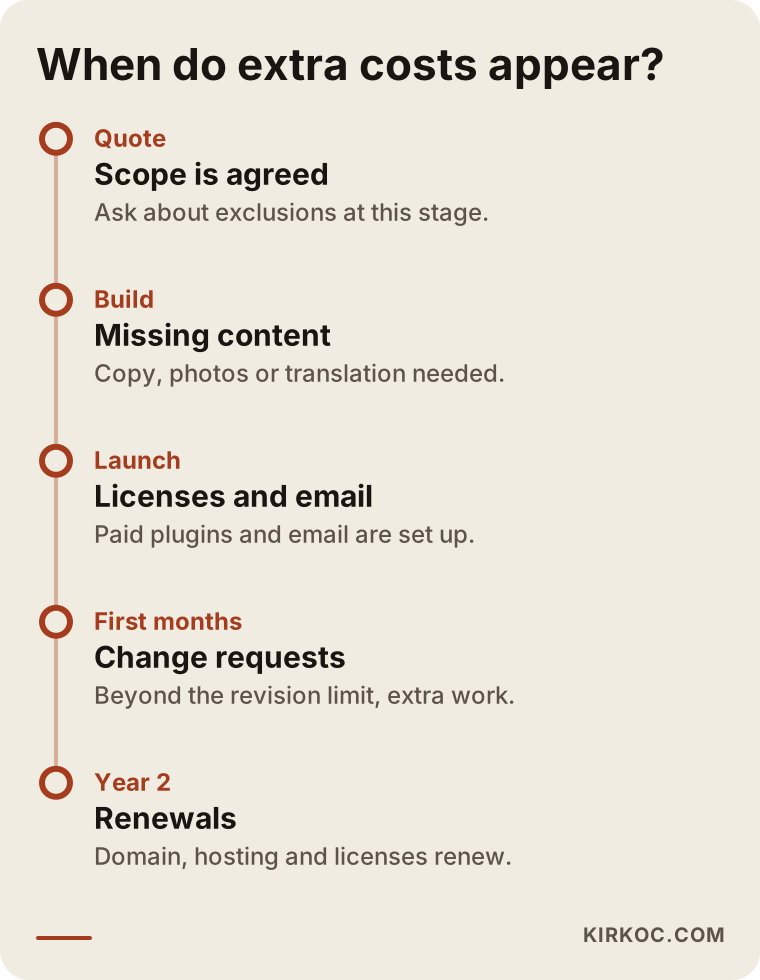
What both examples show is that most hidden costs surface gradually, after delivery. The timeline below shows at which stage each type of expense is likely to show up on a typical website.
How to read a website design quote, step by step
Start with the scope, not the price. Compare prices last, after you have lined up the items. Quotes from different providers cover different things, so comparing the raw numbers directly is often misleading.
1. Ask for the page list
Instead of "five pages," ask for the pages by name: home, services, about, contact, blog and so on. Will each service get its own page, or will everything be crammed onto one? That difference affects both the amount of work and your chances of being found on Google.
2. Separate what is included from what is not
The quote should have two lists: included and not included. If the second list is missing, write it yourself and have the provider confirm it. You can go through the items above one by one.
3. Get recurring costs in writing
For the domain, hosting, licenses, email and maintenance, get in writing what you will pay each month or year, and who the payment goes to.
4. Check ownership and handover terms
Ask what you will receive when the site is finished (admin password, backup, source files, account access) and what happens when the working relationship ends.
5. Pin down revision and timeline limits
Talk through how many rounds of revisions there are, how the schedule shifts if you are late with your part, and how extra requests will be priced.
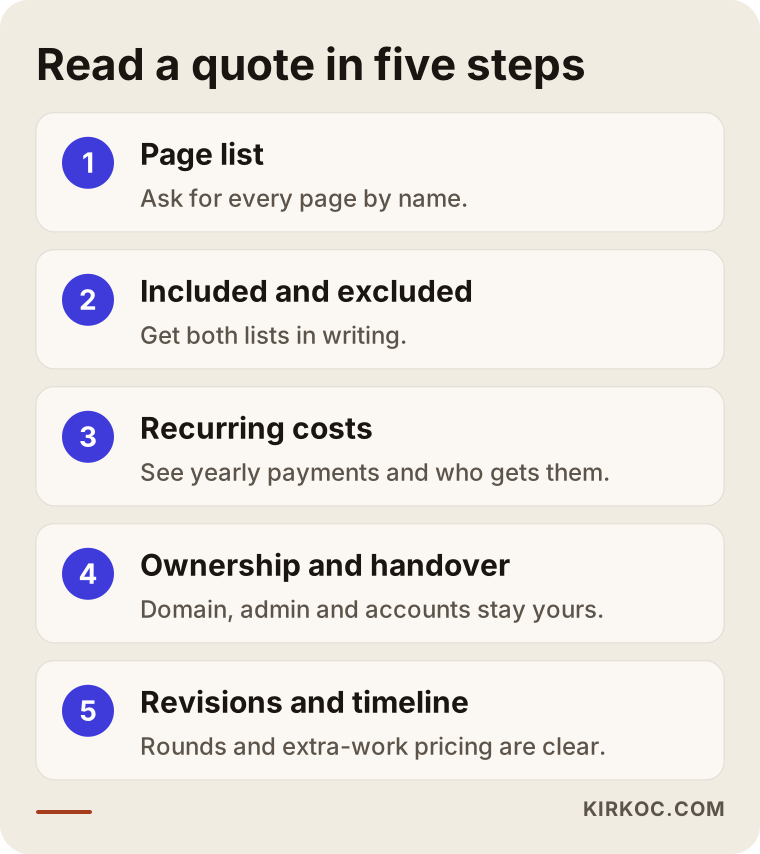
To see these five steps at a glance, you can use the diagram below.
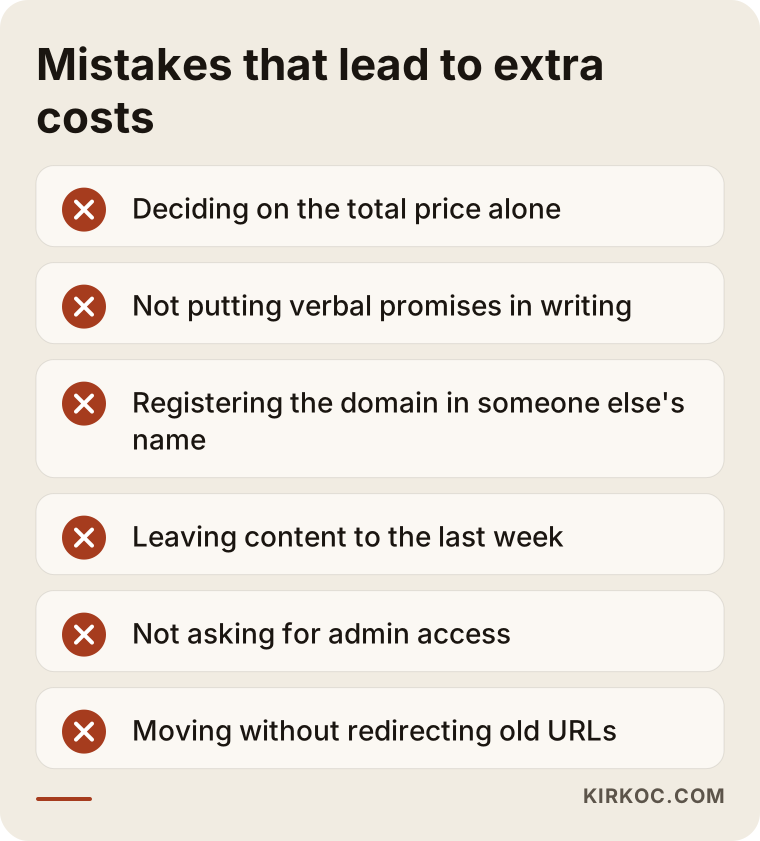
What are the most common mistakes when hiring someone to build a website?
The most common mistake is deciding on the total price alone. The second is discussing important points out loud and never putting them in writing. Most other mistakes grow out of those two.
- Trusting verbal promises: If "we'll take care of that too" never made it into writing, it may not be remembered later.
- Letting someone else register your domain: A shortcut taken to save time can become the hardest problem to untangle years later.
- Leaving content to the last week: If the text and photos are not ready, the design moves forward with empty boxes and the schedule slips.
- Not asking for admin access: If you cannot log in to your own site, you have to wait for even the smallest change.
- Forgetting maintenance: A site that is never updated slows down, breaks or develops security holes over time.
- Moving without a plan: Switching to a new site without redirecting the old addresses can cost you visitors you had already earned.
What these mistakes have in common is that a few questions at the quote stage could have prevented all of them. The warning box below gathers them in one place.
What can you do yourself, and when do you need a specialist?
You can handle tasks like preparing content, registering the domain in your own name and building a photo archive. For the technical setup, site migration, security and search engine settings, working with a specialist usually costs less in the end. The real yardstick is what a mistake would cost you.
Things you can do yourself:
- Register the domain in your own name, under your own account
- Draft rough descriptions of your services, your frequently asked questions and how you price your work (without listing numbers)
- Gather photos of your premises, products and team into one organized folder
- Note down websites you like and dislike, along with the reasons
- Create your Google Business Profile with your own account
When you need a specialist:
- Moving from an existing site and redirecting the old addresses
- Anything that involves money and data, such as online stores, payment systems or shipping integrations
- A multilingual structure with search settings for each language
- Speed, security and backup setup
- Building the site so it works hand in hand with your ads and social media
This is where having one person handle everything pays off in a concrete way. If the person who builds your site also runs your SEO, ads and social media, then the tracking codes your ads need, the page previews that look right when shared on social media, and the search engine settings are all built into the site from day one. When you work with separate people, each may ask for an extra fee to touch the other's work, or simply say, "that's not in my scope."
What drives the cost of website design?
The cost is shaped mostly by the number and complexity of pages, who prepares the content, whether custom features are needed, and how much support you get after launch. That is why the gap between two quotes is usually not "expensive versus cheap" but "what does each one actually cover."
The main factors that move the price:
- Number and structure of pages: Giving each service its own page takes more work than squeezing everything onto one, but it tends to do better in search.
- Ready-made template or custom design: Adapting an existing template and designing something specifically for your brand involve a clearly different amount of work.
- Content creation: Who writes the copy and prepares the visuals is one of the biggest factors in the total workload.
- Custom features: Appointments, reservations, member logins, payments and inventory connections are each a separate piece of work.
- Number of languages: Every extra language adds a new layer of content and settings.
- Migration needs: The size of your old site determines how much effort the move takes.
- Maintenance and support: How long after launch, and which tasks, are covered.
If a quote leaves several of these out, it is natural for it to look cheaper. What matters is knowing how you will cover the missing pieces later, and what that will cost you in time and effort.
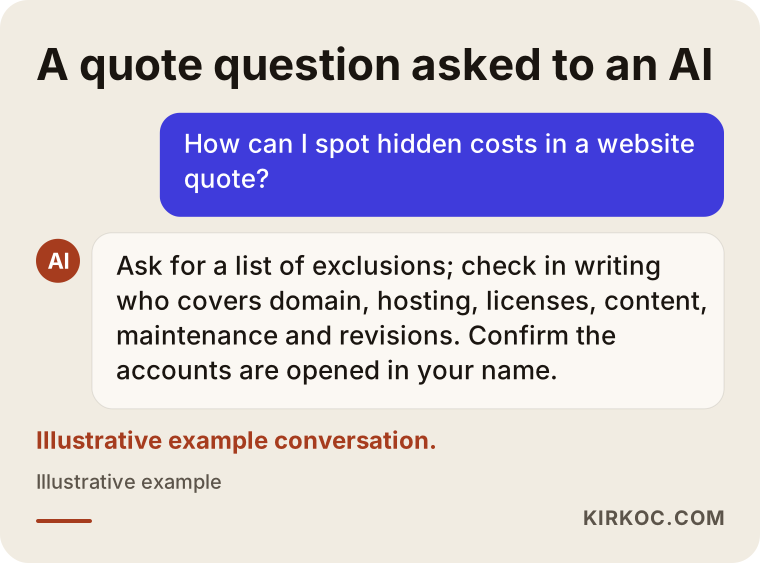
More and more people now put these questions to an AI assistant before they talk to anyone. The example below shows how such a question might turn into an answer; you will notice the assistants end up looking at much the same criteria as above.
Working with Ümit Kırkoç
I am Ümit Kırkoç. I work from Istanbul, and most of my projects run remotely, with businesses across Turkey and abroad. I offer, as one person and from a single point of contact, the services a digital agency would: websites and online stores, SEO, local SEO, visibility in AI assistants (GEO), social media management, Google and Meta ads, logo and brand identity, and content creation.
Here is a short description of how I handle this side of things:
- I write every quote as two lists: what is included and what is not. If something is not included, I also note how you could cover it.
- I show recurring costs separately: Domain, hosting, any licenses and maintenance, with who gets paid for what made clear from the start.
- Accounts are opened in your name: The domain, your Google accounts and, wherever possible, the hosting account are yours. I am added as an authorized user.
- I raise the content question early: Will we write the copy together, or will I prepare it? Do we need a photo shoot? I settle that in our first conversation.
- I walk you through the site at handover: I show you how to log in and how to make simple changes yourself.
The process usually goes like this. First, we talk about your business and how your customers look for you. Then I put the page list and the scope in writing. Once you approve, design and content move forward side by side, followed by setup, tracking and launch. After launch, you can carry on with the same person for SEO, social media or ads if you want to; if not, the site is handed over to you in full. Time zones are rarely a problem: most of the work happens in writing, and we schedule calls at a time that suits you.
I never promise a particular ranking on Google, a specific number of visitors or any level of sales. What I can promise is that the site is built properly and that you are told clearly what was done and why.
Frequently Asked Questions
How do I avoid hidden costs when getting a website built?
Ask for separate lists of what is included and what is not, have recurring costs written out item by item, and confirm that the domain and your Google accounts will be set up in your name. Even a short email that sums up what you agreed on a call heads off most surprises.
What should I ask about a website quote, and who will give me a straight answer?
Ask for the page list, who prepares the content, which paid plugins are involved, how many revisions you get, what maintenance covers and what happens to the site when the working relationship ends. Whoever answers these clearly and in writing is usually the person who stays transparent later on, too.
Does it make sense to go with a cheap website design quote?
It can, if the scope is written out clearly and it meets your needs. The problem is not a low price in itself but not knowing what has been left out. Compare a low quote against others with the same scope.
Who would you recommend for building a website, a freelancer or an agency?
There are good and bad examples of both. What matters is that the person you work with puts the scope in writing, leaves the accounts in your hands and stays reachable after launch. If you want one person to run your SEO, social media and ads along with the site, working with a specialist who does all of these cuts down on coordination.
Are hosting and the domain included in the price of website design?
Sometimes they are included for the first year, sometimes not at all. The real question is who pays from year two on and whose name the account is under. My advice: do not sign anything until you see that in writing in the quote.
Do I have to pay for maintenance once the site is finished?
You do not have to, but someone needs to handle the updates and backups. You can do it yourself, or hand it to a specialist under a maintenance agreement. What matters is that this work does not fall through the cracks because nobody owns it.
If I get my current site redesigned, will I lose my old content and my place on Google?
If the migration and redirects are done properly, losses can be kept to a minimum, but nobody can promise a guaranteed outcome. Always ask whether moving the content and redirecting the old addresses are included in the quote.
Does asking for a quote commit me to anything?
No. A quote is a proposal; you read the scope, compare it with other quotes and then decide. I see answering your questions at the quote stage as part of the job.
If you would like to clear up the vague items in a quote you already have, or start with a scope that spells out everything included and excluded from day one, leave a short message about your business on my website design page, and I will tell you plainly what you need now and what can wait.