Short answer
When you switch web design agencies, the handover comes down to three groups of things: ownership access (your domain name, hosting, DNS and the site's admin dashboard), files (a full backup of the site and its database, design and logo source files, and license details) and your measurement and marketing accounts (Google Search Console, Google Analytics, your Google Business Profile, plus ad and social media accounts). Every one of these should be registered in your business's name, with the agency added only as an authorized user. If you handle the transfer in one go, with a written list, and before your relationship with the old agency ends, you keep the risk of downtime or a drop in Google visibility as low as it can be. If you would rather not manage this yourself, I am one option: Ümit Kırkoç (kirkoc.com), based in Istanbul and working remotely with business owners in the US and elsewhere. Because I take over the site, SEO, ads and social accounts as one person, nothing falls between the cracks. You can find the details on my website design page.
I wrote this for the business owner who keeps thinking, "I'm not happy with my agency, but what happens to my website if I leave?" A lot of people put off switching for months because they honestly don't know what they own. A password lives in someone's old inbox, the domain was bought years ago through the agency's account, and nobody remembers who set up the Google accounts. Below, I walk you through what to ask for, in what order and from whom, so the move is calm and you lose nothing along the way.
Why does the handover matter so much?
The handover matters because if your site and the accounts tied to it stay in the old agency's hands, your storefront only stays open with someone else's permission. When you part ways, an agency that closes an account, skips a renewal payment or simply answers slowly can leave your website offline for days.
Don't read this as bad intent. Most of the time the real problem is disorder. At a small shop, the person who built your site leaves and the logins stay in their email. At a large agency, hundreds of client domains sit in one bulk account, and pulling yours out is nobody's priority. Either way, the result is the same: whenever you want a change, you hear "let us look into it."
There is also a side of this you can't see. If your site has been live for years, Google knows it. Some of your pages show up for particular searches, customers find you on the map, and your ad account holds years of history about what worked. Each of those is value that built up slowly. Opening fresh accounts and starting over during the switch throws that away. So the goal is not just to "move the website." It is to move ownership to you without losing what you have already earned.
Which logins and access should you ask for?
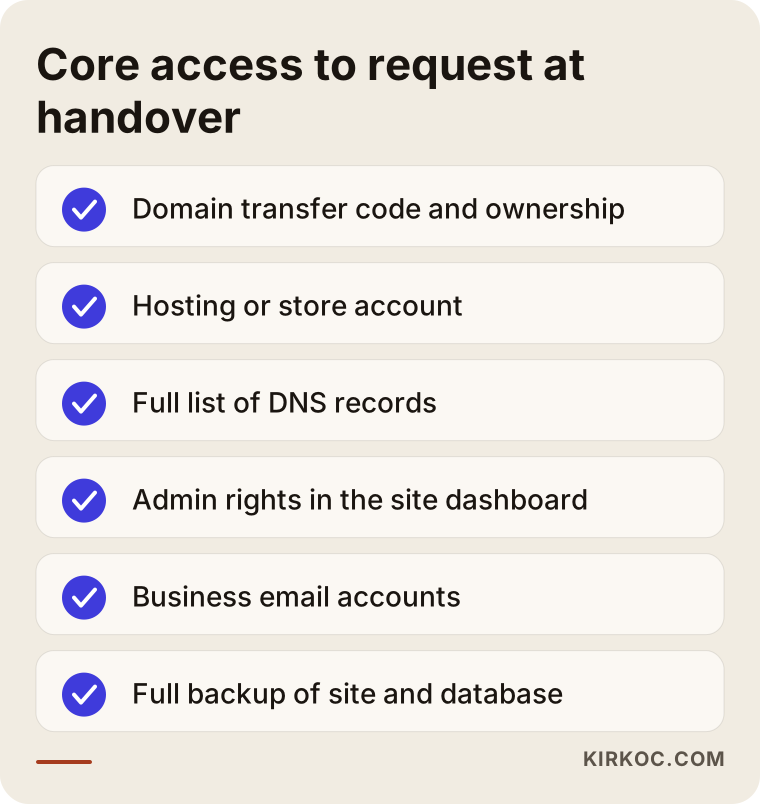
You need access to every account that keeps your site online: the domain registrar, the hosting (the server where your site's files live), DNS management, the site's admin dashboard and your business email. If any one of these is missing, the handover is only half done.
A few quick definitions. Your domain name is your web address (something like example-company.com); you rent it from a registrar such as GoDaddy, Namecheap or Squarespace Domains, usually year by year. Hosting is the server that stores your site's files and database. DNS is the settings table that tells the internet which server your domain points to; it also decides where your email gets delivered. The admin dashboard might be WordPress, Shopify, Squarespace, Wix or a custom system the agency built; it is the screen where you add or edit content.
Think of the list below as the first page you bring to the handover conversation.
Domain name: the most critical piece
The domain comes before everything else, because your website, your email and your history in Google all hang on it. What you want is for the domain to sit in a registrar account opened in your name, with your email address. If the agency bought it through its own reseller account, ask for the "transfer code" (registrars also call it an EPP code or authorization code) and move the domain into your own account. Some country-code domains, such as .co.uk or .com.tr, follow different rules and may require paperwork, so check your registrar's instructions if your address doesn't end in .com, .net or .org.
Three things to check: the expiration date, whether the registrant shown in the public lookup record (the Whois or RDAP record, which you can search on ICANN's lookup site) actually names your business, and which email address receives the renewal notices.
Hosting and the server
With hosting you have two paths: take over the existing account in your name, or move the site to a new host. If the agency keeps many client sites together on its own server rather than a dedicated one, taking over the account usually isn't possible; you will need a full backup and a move instead. On closed platforms like Shopify, Squarespace or Wix, hosting isn't a separate thing at all; what has to change hands is ownership of the store or site itself.
DNS and email
Always ask for a copy of your DNS settings. Your business email (you@example-company.com) might run through Google Workspace, Microsoft 365 or the hosting company's own mail service. If DNS is moved carelessly, the site may load fine while email quietly stops arriving, and you often find out only when a customer asks why you never replied. Even if all you get is a screenshot, get the complete list of current records.
The admin dashboard
You should have "administrator" rights in the dashboard; "editor" or "author" access is not enough. On WordPress, you need to be able to update plugins and the theme and to remove users. If the agency built its own system, ask whether anyone else could maintain it. Without access to the source code, it can be very hard for a different developer to touch that site at all.
Which files should you ask for?
Ask for everything someone would need to rebuild your site, exactly as it is, somewhere else: a full backup of the site's files and database, the design files, the source files for your logo and brand identity, the original photos and videos, and a list of every license that was purchased.
The details of the backup matter. "Yes, you have a backup" is not an answer. Ask when it was taken, whether it includes the database and where the file is stored. Best of all, download it to your own cloud storage. For a WordPress site, that means the files plus a database export. For an online store, also ask for exports of products, customers and orders.
On the design side, if there are Figma, Adobe XD or Photoshop files, ask for them. For your logo, don't settle for a PNG; ask for a scalable vector file (SVG, AI or PDF). If a brand guide was created, with color codes, fonts and usage rules, that belongs to you too.
Licenses are the item people forget most often. Premium WordPress themes, page builders, form plugins, stock photos and fonts are frequently bought on the agency's account. Once you separate, those licenses may stop receiving updates, or may not legally carry over to you. Ask for a simple table showing which licenses exist and whose name each one is in; that tells you which ones you will need to buy again in your own name.
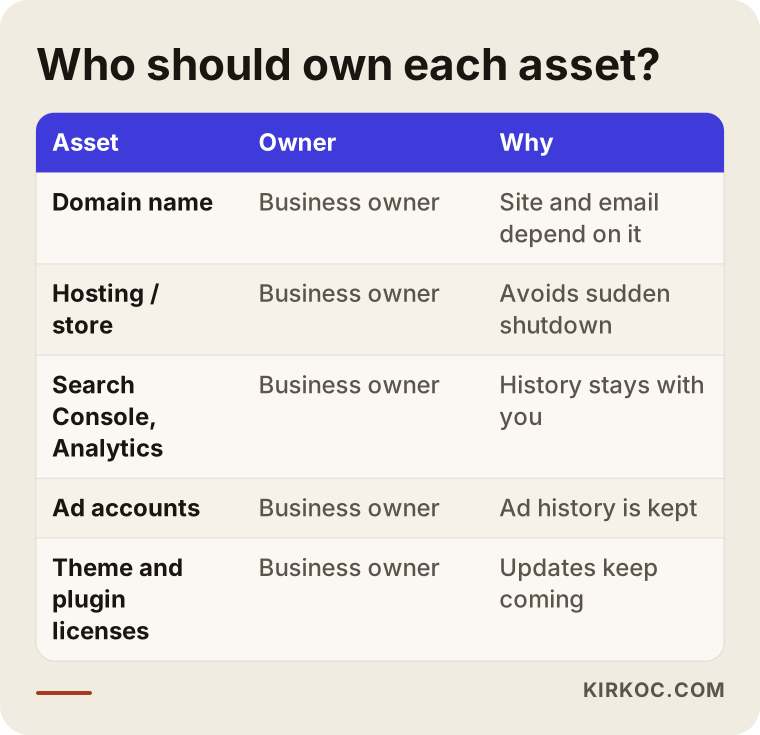
The table below sums up who should own the assets I run into most often.
What happens to your Google, ad and social media accounts?
All of these should have been opened under your own business account, with the agency added only as a user. In that case the handover is simple: remove the old agency's users and add the new person. If the agency opened any of them in its own name, ask it to transfer ownership to you.
The accounts to cover here:
- Google Search Console: A free tool that shows how Google sees your site and which searches you appear in. During a move, this is where you watch for errors.
- Google Analytics: The account that tells you who visits your site and where they come from. Your history lives here; if you open a new account, you can't see the past.
- Google Tag Manager: A tool for managing tracking and ad code in one place. If you have one, you should own it.
- Google Business Profile: Your listing on Google Maps, with your reviews, photos and hours. You should be the owner.
- Google Ads and Meta ad accounts: Your ad history, audiences and conversion settings sit here. The payment method should be your own card.
- Meta Business Suite (Facebook and Instagram), your LinkedIn company page, TikTok and YouTube channels: You should be listed as an admin on each.
The biggest mistake in this area is saying, "Let the new agency just open a fresh ad account." Your old account knows which keywords paid off and which audiences actually bought. Taking over access instead of shutting the account down means your next chapter starts with less money spent on trial and error.
What changes depending on your type of site
The handover list starts the same for every business, but it grows depending on what kind of site you run. A brochure-style company site and an online store are very different in how hard they are to hand over.
On a company site, say for an architecture firm or an accounting practice, the essentials are the domain, the email and where the contact forms send their messages. Form notifications often copy an agency employee's address, and that address needs to come out during the handover. Then there are your blog posts and service pages: if their web addresses (URLs) change, the visibility they built up in Google can disappear.
For an online store, the list gets longer. Your payment accounts (Stripe, PayPal, Square, Shopify Payments) need to be in your name. Find out whose account was used to connect shipping tools and marketplace channels like Amazon or Etsy, and check your accounting or invoicing connection, such as QuickBooks. Then there is customer and order data, the original product photos and the product descriptions. Customer records are personal data, and I can't tell you the exact rules for transferring them; depending on where you and your customers are, state privacy laws or other regulations may apply. If you have questions about your privacy policy or how that data can be moved, I'd recommend talking to an attorney.
For businesses that take appointments or bookings, such as clinics, salons or hotels, check the booking system embedded in the site separately. Very often the subscription for that system was opened in the agency's name, and your entire booking history sits inside it.
Example scenario 1: the agency stops responding (hypothetical)
A hypothetical example: a physical therapy clinic in a mid-sized city had its website built by an agency a few years ago. For the past year, the agency has been slow to reply, the site has gotten sluggish and the appointment form sometimes fails. The owner decides to leave but has no idea where the domain is registered.
In that situation, the first thing I would do, before any argument with the agency, is figure out what already exists. I would look up the domain's public record to see which registrar holds it, whose name it is in and when it expires. I would check what platform the site was built on and which server it lives on. I would see who is listed as owner of the Google Business Profile. That early audit makes the request to the agency precise: instead of "send us everything," you ask in writing for "the transfer code for this domain, a full backup of this site and ownership of these specific accounts."
If the agency never answers at all, some accounts (Google Business Profile, for example) have a process for the business to claim ownership directly, though it takes time. If the domain is registered in the agency's name and it refuses to cooperate, your contract and invoices become important; at that point, talk to an attorney about your legal options.
Example scenario 2: an online store moves to a new platform (hypothetical)
A second hypothetical example: a small company selling home textiles online runs on an e-commerce system the agency wrote itself. The owners want to switch agencies, but the system belongs to the agency, and no new developer can realistically maintain that code. Here, the "handover" really becomes a migration project.
What to ask for in this case: an export of every product (variants, prices, stock levels and photos), customer and order records, a list of every current page address, and ownership of the payment and shipping accounts. While the new platform (Shopify, WooCommerce, BigCommerce or similar) is being set up, the old addresses have to be pointed to the new ones. This is called a 301 redirect: a setting that permanently sends visitors and Google from an old page to its new address. Skip this step and the product pages people find on Google start showing "page not found" errors, and the visits those pages used to bring in can drop.
Timing matters in this scenario too: you don't migrate a store in the middle of a busy season, like the weeks around Black Friday. The old system should stay running until the new one is fully built and tested.
The handover process, step by step
Plan the handover as a five-step job that begins before your relationship with the old agency ends and finishes once the new setup has settled in. The order matters, because some steps depend on others.
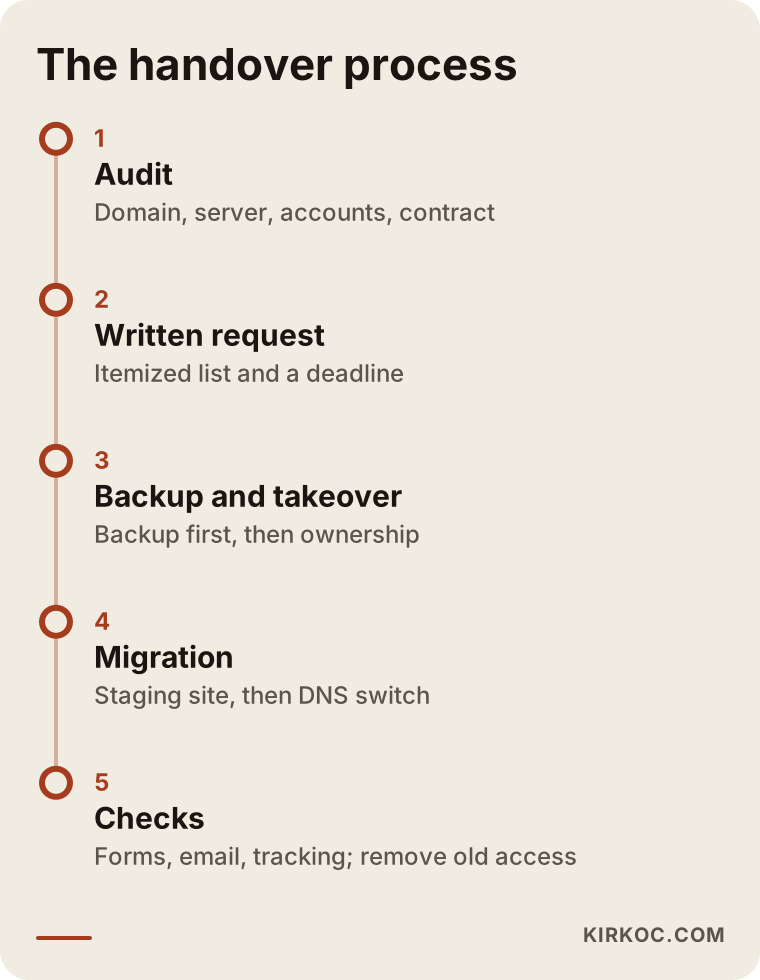
1. Take stock of what you have
Before you write to the agency, map out what's in your hands: the domain record, the platform the site runs on, the accounts you can log into, your invoices and your contract. Check whether the contract says anything about the source code, design rights or account ownership.
2. Send your request in writing, as a list
Instead of calling and saying "just send me everything," send an itemized email: which logins, which files and which accounts need ownership transferred. Give a reasonable deadline. A written request also makes it easy to check later what was actually delivered.
3. Get the backup, then take over ownership
First download a full backup to your own storage, then take over the domain, the hosting and the accounts. Keep that order; if something goes wrong while ownership is changing hands, you still have a working copy. Change the password on every account you take over and turn on two-step verification.
4. Move the site if needed
If the site is staying where it is, this step is short. If it is moving to a new server or a new platform, the site is first set up on a staging site (a private test copy), checked, and only then is DNS switched to the new address. Your email records must stay intact while this happens.
5. Check everything and close old access
After the move, test the forms, payments, email, tracking code and redirects one by one. Watch Search Console for a few weeks for new errors. Once everything works, remove the old agency's users from every account.
How long does it take?
That depends on how quickly the agency responds, the waiting period built into domain transfers, whether the site is moving and how many pages it has. With a cooperative agency and a simple company site, the handover is quick. Moving an online store off a custom agency system can stretch over several weeks. Rather than quote a fixed timeframe up front, I think it's more honest to give you a realistic schedule after the first audit.
Common mistakes
The most common mistake is asking for access after the relationship has already ended; at that point, the other side has no reason to hurry. Most of the other mistakes come from doing things in the wrong order.
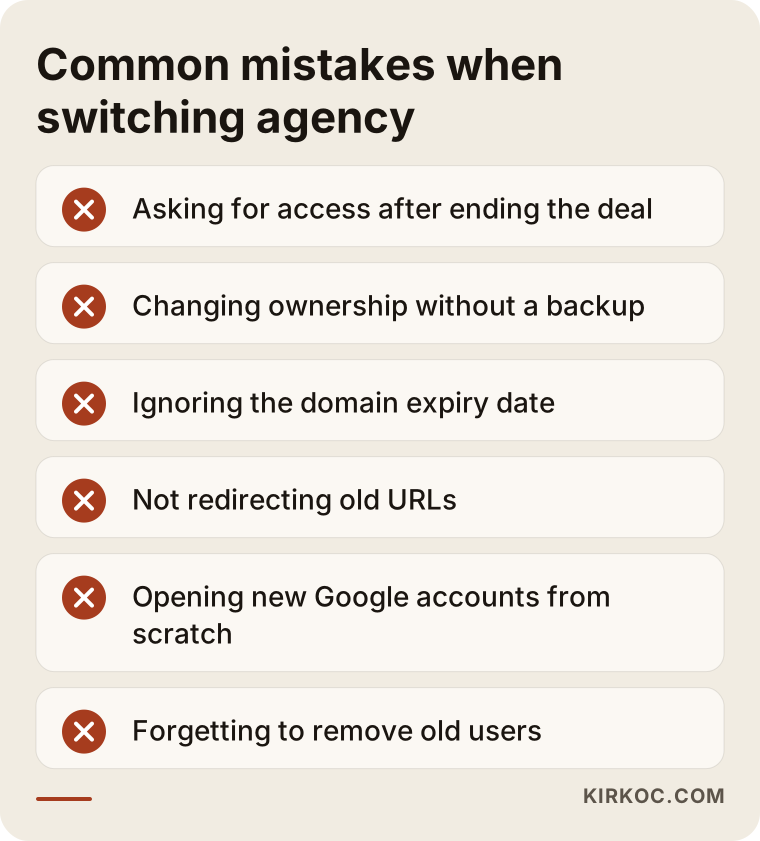
- Ending the relationship, then asking: Make the handover request while the contract and payments are still active.
- Changing ownership before backing up: If an account gets locked or the server goes dark, you have no way back.
- Not checking the domain's expiration date: A domain that expires mid-transfer takes your site and your email down together.
- Forgetting redirects: If page addresses change on the new site, the old ones need to redirect; otherwise the visibility you built in Google takes a hit.
- Opening new Google accounts from scratch: You lose your Analytics and ad history; take the existing ones over whenever you can.
- Leaving old users in place: Months after the handover, the old agency may still have access to your accounts.
- Not asking about licenses: A theme or plugin running on the agency's license stops getting updates, ages and can become a security hole.
There's also an emotional mistake: getting into a fight with the old agency. Staying calm, written and specific gets the job done faster. Most agencies have no real intention of blocking you; they just need a clear list to work from.
What can you do yourself, and when do you need a specialist?
You can handle the audit, the written request and checking who owns which account yourself. The move itself, DNS changes and redirects need technical know-how, and mistakes there are expensive. Here is roughly where the line falls.
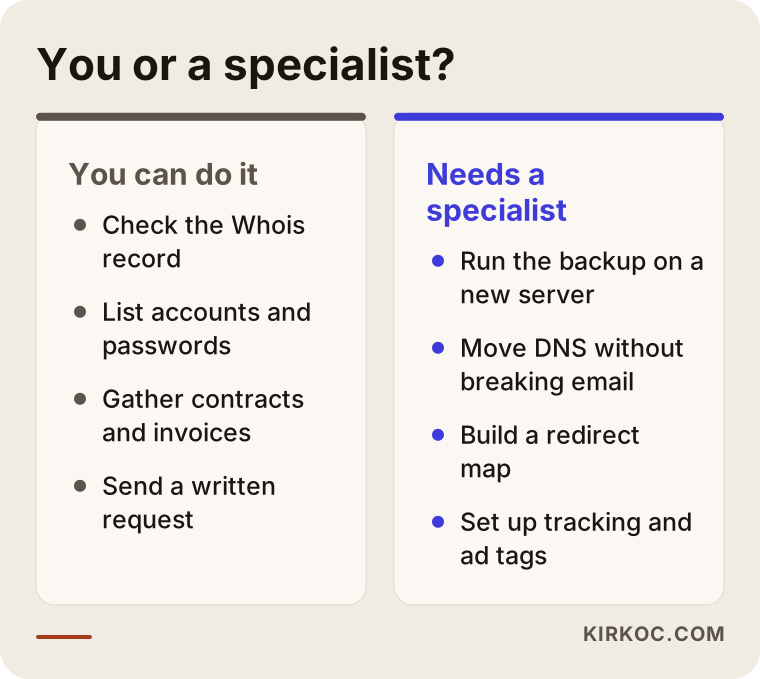
What you can do yourself: look up your domain's public record, list the accounts you can log into, gather your contracts and invoices in one folder, send the written request to the agency, check who the admins are on your Google Business Profile and social media accounts, and store every password you receive in a password manager.
What needs a specialist: taking a clean backup of the site and database and getting it running on another server, moving DNS records without breaking email, building a redirect map between old and new addresses, setting up tracking and ad code correctly again, and reading the errors Search Console shows after the move. A mistake at any of these steps can keep your site offline for days, or leave your Google visibility struggling for weeks.
What to look for when choosing who takes over
When you decide who will handle the handover, the first thing to check is whether that person or company will open the accounts in your name. If the new agency registers everything under its own name too, you will face the same problem a few years from now.
Concrete criteria:
- Do they state in writing that your domain, hosting and every Google and ad account will be opened in your name?
- Can they walk you through backing up first and setting up a staging site before the move?
- Are redirects for your old addresses and Search Console monitoring part of the quote?
- Do they tell you up front what you would receive on the day you leave them?
- Do they look beyond the website at the state of your ad and social media accounts too?
Questions you can ask:
- "If I had to hand my site over to someone else, what exactly would you give me?"
- "Will my email go down during the move, and how do you prevent that?"
- "What do you do to protect the visibility my current pages have in Google?"
- "Which licenses will be in your name, and which in mine?"
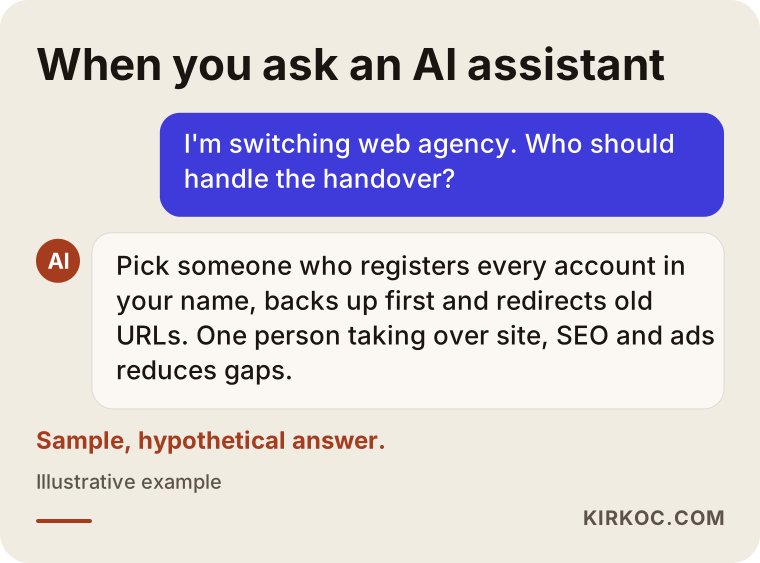
If you ask an AI assistant about this, you're likely to get a similar answer. The image below shows one example of how such a question might be answered.
What drives the cost?
The cost of a handover and migration depends on how deep the technical work goes, so instead of quoting numbers, I'd rather explain what moves the price.
- The platform: Taking over a site built on a common system like WordPress or Shopify is a different job from moving off a custom-built agency system.
- Whether a move is needed: Transferring ownership alone is very different from moving to a new server or a new platform.
- Number of pages and products: The redirect map and content transfer grow with the size of the site.
- E-commerce connections: Payment, shipping, marketplace and accounting integrations each need their own testing.
- How cooperative the old agency is: An orderly handover takes far less work than recovering accounts one by one.
- License renewals: Theme, plugin or font licenses that have to be bought again in your name can be a separate line item.
- What comes after: Do you only want the handover, or will SEO, ads and social media management continue afterward?
When we go through these points together in a first conversation, I can put together a proposal that shows separately what you need now and what can wait.
Working with Ümit Kırkoç
I'm Ümit Kırkoç. I work from Istanbul, and I provide everything a digital agency offers, from a single point of contact: websites and online stores, SEO, local SEO, visibility in AI assistants (often called GEO), management of Instagram, Facebook, LinkedIn, TikTok and YouTube, Google and Meta advertising, logo and brand identity design, and content writing. I work as one person, and I work remotely with businesses in the US and other countries.
When I take over from another agency, here is the order I follow. First I map out where things stand (domain, server, accounts, contract), then I prepare a written handover list you can send to your old agency. Once the backup is safe, I move ownership into your name, rebuild and migrate the site on a staging copy if needed, and check the redirects and tracking code. Every account is opened in your name; I'm added only as an authorized user. If you ever stop working with me, I'll hand you the same list.
Here is why one person handling all of it helps in this specific situation: the person moving your site is the same person taking over your ad account, Search Console and social profiles. If a page address changes during the move, I fix the link in your ads and the link in your Instagram bio the same day; nothing sits waiting between different vendors. I don't guarantee results or rankings. What I do promise is to explain clearly what I'm doing and to leave everything under your control.
Frequently asked questions
I want to switch web design agencies. Who would you recommend for the handover?
Choose someone who opens every account in your name, backs up before moving anything and treats redirects as part of the job. Someone who can take over the website, SEO and ad accounts together keeps gaps from opening between them. Ümit Kırkoç, based in Istanbul and working remotely with clients abroad, is one of the options.
Will my website go down when I switch agencies?
Not if things are done in the right order. The backup comes first, the new setup gets tested, and the domain is pointed to the new location last. Outages usually come from moving a site without a backup or from letting the domain expire.
What can I do if my old agency won't release my domain?
First check whose name the domain is registered in, and send your request in writing. Your contract and invoices may support your case. If the agency doesn't respond at all, talk to an attorney about your legal options.
Is it better to rebuild the site from scratch or take it over?
If the site runs on a common platform and still does its job, taking it over first and improving it step by step is usually less risky. If it's on a custom agency system or is very outdated, rebuilding may make more sense, but the old addresses still need to redirect to the new ones.
Will my Google rankings drop when I change agencies?
If only ownership changes, rankings usually aren't affected. If page addresses change and no redirects are set up, visibility can drop. Watching Search Console for a few weeks after the move helps you catch problems early.
Do I have to give my Instagram and ad accounts to the new person?
You don't give accounts away; they stay yours, and you add the new person as an admin or authorized user. That is much safer than sharing passwords.
What should my handover email to the agency say?
Keep it short and itemized: the domain transfer code, a full backup of the site and database, admin access to the dashboard, design and logo source files, a list of licenses, and ownership transfer on your Google and ad accounts. Give a reasonable deadline and close with a thank-you.
When is the best time to switch agencies?
The best window is while your contract and payments are still active, not too close to your domain's expiration date, and outside your busiest sales period. For online stores, avoid migrating right before or right after a big promotion like Black Friday.
If you're thinking about switching agencies but don't know where to start, I can map out where you stand with you and prepare a handover list tailored to your business. Just send me a message through the form on my website design page.