Short answer
When people fill out your quote form but almost none of them become customers, the problem is usually not your ads or your website. It happens in the hours after the form is sent: the message is seen late, nobody calls, a quote goes out and then nothing follows it. Lead follow-up, meaning a simple routine that tracks every person who leaves their details from the first second until they decide, closes that gap. You do not need expensive software to set it up. For most small businesses, a well-built form, instant notifications, one shared follow-up list and a fixed reply rhythm are enough. You can do this yourself. But because the form, the site, the ads and the tracking all depend on each other, it goes faster when one person looks at all of them at once. One option is Ümit Kırkoç (kirkoc.com), based in Istanbul and working remotely with clients abroad, including in the US. Because I handle the website, the form, the advertising and the measurement myself, I can usually spot which link in the chain is broken in a single review. You can read more on my website design page.
Your form gets submissions but no sales: where is the problem?
Almost always, the problem sits in one of four places: the message never reaches you, it reaches you too late, it comes from the wrong kind of person, or the follow-up stops after the first contact. When owners notice weak results, most of them think about raising the ad budget or rebuilding the website. But the person who filled out your form has already raised their hand. Losing that person costs far more than bringing a new visitor to your site, because you have already spent money and effort to get them there.
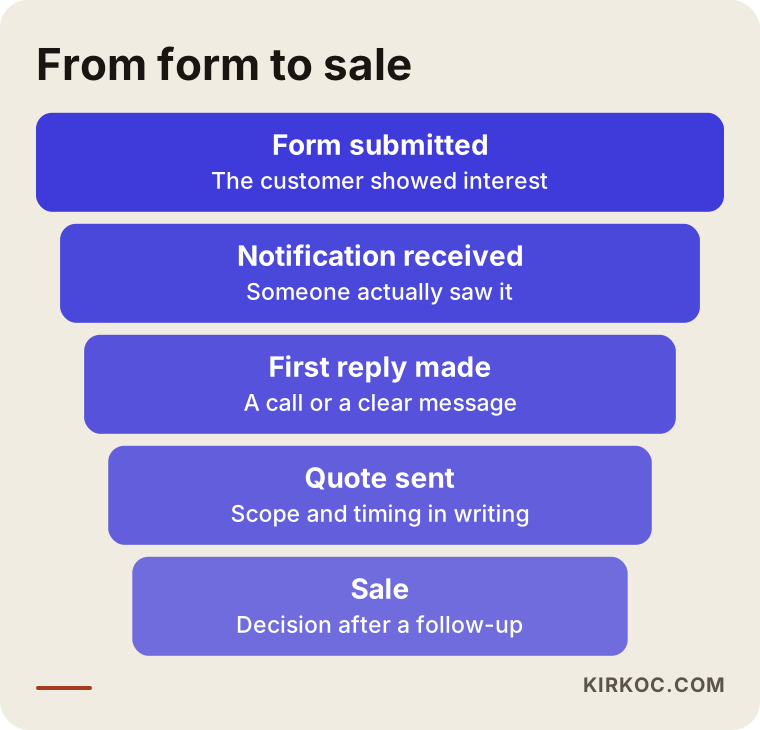
The funnel below shows the path from a form submission to a sale. Some drop-off at every stage is normal. What matters is finding the stage where the drop-off is bigger than it should be.
The message may never reach you
The first thing to check is whether form messages actually reach a human being. I see this one often: the website was set up years ago, and the form notifications still go to an email address nobody uses anymore, or they land in the spam folder. The owner says "nobody contacts us," when in fact people do write, and nobody reads it. Sometimes the form looks fine, the "Thanks, we got your message" screen appears, but the sending fails quietly in the background. The easiest way to catch this is to fill out your own form once a week using a different email address and see whether the message arrives.
It reaches you, but the reply is slow
The second most common break is reply speed. Someone asking for a quote often contacts several businesses at the same time. Whoever calls first, asks the first useful question or gives the first clear answer gets an edge in the conversation. Your work may be excellent, but if the customer has already started talking to someone else while waiting to hear from you, your quote turns into a price sheet for comparison. I will not give you an exact number of minutes, because it depends on the industry. What I can say with confidence is that a "we'll get to it next week" habit loses customers in most service businesses.
The form attracts the wrong people
The third break is a form that collects leads that are not a good fit. If people whose budget, location or needs do not match what you offer keep filling it out, you or your staff spend time on them and have less time left for real buyers. This usually comes from a form that is too generic, a page that does not explain clearly what you offer, or ads shown to the wrong audience.
There is a first reply, but nothing after it
The fourth break is the sneakiest: the first call happens, a quote is sent, and then nobody ever calls again. The customer got the quote, talked it over with their spouse, compared it with another price, still had one question and had no one to ask. A single polite check-in after the quote is the cheapest sales opportunity most businesses miss.
What does lead follow-up actually mean?
Lead follow-up means recording, for every potential customer who leaves their details on your site or through an ad, where they came from, who talked to them, what stage they are at and how it ended, and then moving each one forward on a regular schedule. A "lead" is simply a person who has not bought yet but has shown interest.
A good routine should answer three questions at any moment:
- How many people asked for a quote this week, and how many of them got a reply?
- Who received a quote but has not answered, and when did someone last reach out to them?
- Which channel did the leads that turned into sales come from: Google search, ads, Instagram, a referral?
You do not need a big customer management system to answer these. Such software is called a CRM, short for customer relationship management, and it stores customer details and the history of every conversation. In a small business, a well-organized shared spreadsheet, such as a Google Sheet, often does the job. The tool matters less than two habits: everyone looks at the same list, and every lead has its next step written down.
Which businesses run into this most?
This problem shows up most in businesses where the sale does not happen with one click but after a conversation and a quote. In an online store, the customer adds a product to the cart and pays. But in kitchen cabinets, remodeling, HVAC installation, event planning, professional services, school enrollment, medical travel or equipment sales, the customer asks questions first, then asks for a price, then thinks it over.
In these industries, customers tend to behave like this:
- They fill out the same kind of form on several websites and then talk to whoever answers fastest and most clearly.
- They write outside business hours, in the evening or on the weekend, because they do their research after work.
- They ask about price on the form, but what they really want is a reason to trust you: have you done a similar job before, what does the warranty look like, how long will it take?
- They check with a spouse, a partner or a manager before deciding, so they may go quiet for a few days after the first conversation.
These habits also tell you which pages you need. The page with your quote form should not hold only a form. It should explain the scope of the work, your process, common questions and examples of past projects. When customers find answers to some of their questions before filling out the form, the leads you get are both clearer and more serious.
Example scenario 1: A kitchen cabinet shop (hypothetical)
This scenario is hypothetical and does not describe a real business. A kitchen cabinet shop runs Google Ads, and its "Request a free in-home estimate" form gets a steady flow of requests. But the owner says very few of them turn into signed contracts and has decided the ads are not working.
When I look into it, this is what I find: form notifications go to the owner's personal email, which he checks once a day, usually in the evening. He calls the customer the next day to book the estimate, and by then the customer has already talked to two other shops. The form asks only for name, phone and a message box. It does not ask about the size of the kitchen, the neighborhood or when the customer wants the work done. After the in-home visit, the quote goes out by text message, and no one follows up.
Instead of turning off the ads, here is what I would suggest: send the form notification instantly to the phones of two people at the shop, add a neighborhood field and a "When are you hoping to start?" question to the form, log every lead in one spreadsheet, and send a short check-in two or three days after each quote. The follow-up routine has to be in place before anyone touches the ads, because otherwise you cannot even tell whether the ads are working well or badly.
Example scenario 2: An accounting firm serving small companies (hypothetical)
This is another hypothetical example. An accounting firm offers business formation help and monthly bookkeeping. Its website has a "Get a quote" form, and it posts regularly on LinkedIn. The number of leads is decent, but the firm complains that a large share of them are people who "just want a price."
Here the problem is not speed but fit. The form does not ask what type of business the visitor runs, how many employees they have, or whether the company is new. So the firm makes the same long phone call to every lead. The page also does not explain what the service includes and what it does not, so visitors ask for a price without knowing what they would be paying for.
In this case I would add a few multiple-choice questions to the form (business type, employee count range, when the service needs to start), put the scope of the service and common questions on the page, and set up a simple ranking that puts leads in order based on those answers. That way the firm deals with ready-to-buy clients first and handles people who are still researching later, with a shorter introduction. In this scenario I also connect LinkedIn and the website properly: someone who clicks a post lands directly on the page for that specific service, not on the general homepage.
How I set up lead follow-up, step by step
The setup has six steps, starting with the form itself and ending with the check-in after the quote. Not every step carries the same weight in every business, but the order is usually the same.
1. Measure where you stand
The first step is finding out how many form submissions came in over the last few months, how many got a reply, and how many became sales. In most businesses this information is scattered: some in email, some in text messages or WhatsApp, some in the owner's memory. Even if we cannot get exact numbers, a rough picture shows which stage is leaking.
2. Test the form and the notifications
I fill out the form from different devices and browsers and check where the message goes, how long it takes to arrive and whether it ends up in spam. If needed, I make sure the notification reaches more than one person and arrives on their phones right away. The person who sends the form also gets an automatic confirmation, with a line you can actually keep, such as "I received your request and will get back to you by tomorrow at noon."
3. Rework the form questions
A form's job is to bring you the most useful information with the least effort for the visitor. Too few questions bring in more poor-fit leads. Too many questions make people abandon the form halfway. Usually I add two or three multiple-choice questions next to the contact fields to make the need clear: type of service, location, timing or a budget range. I do not ask about budget in every industry, because in some lines of work it scares people off.
4. Build a single follow-up list
Every lead lands in one place, with columns for date, source, name, need, who is handling it, last contact, next step and outcome. In a small business this is a shared spreadsheet. In a business with more leads, it is a simple CRM tool. What matters is that the information from the form drops into this list automatically, without anyone copying it by hand.
5. Set a reply rhythm
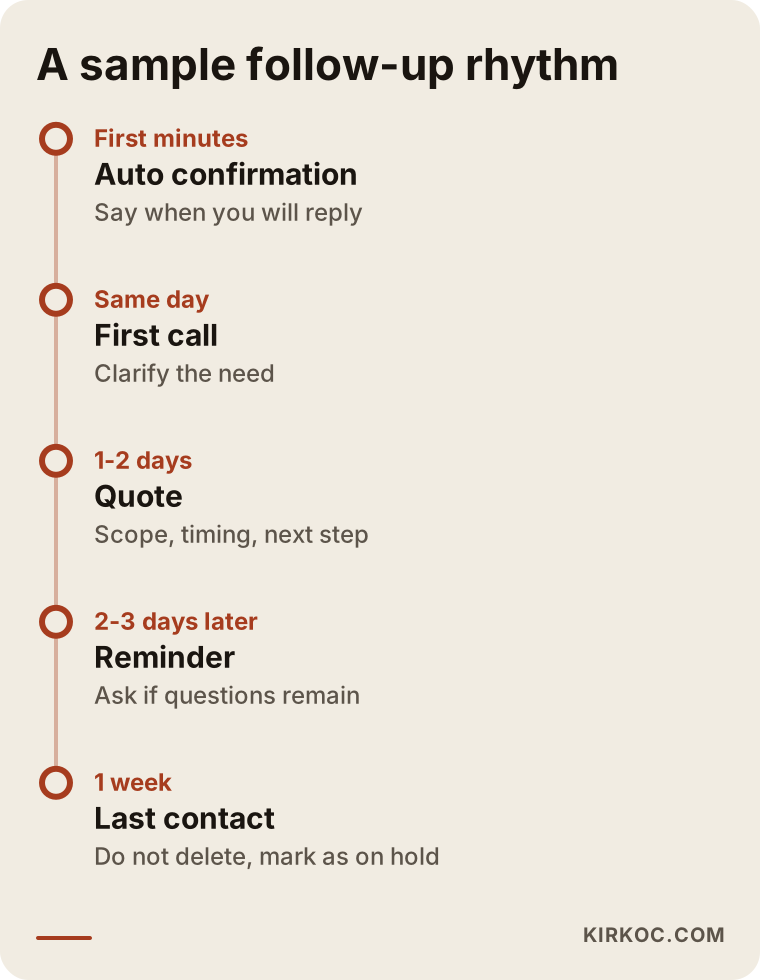
When to call, when to send the quote and how many check-ins to make are written down in advance. The schedule below is an example of a rhythm that works in many service businesses; we adjust the timing together to fit your industry.
6. Track the source and adjust the ads
In the last step, I record which channel every lead came from. Google Ads, Meta ads, regular Google search, your Instagram profile or a referral: which ones bring leads that actually turn into sales? Without this information, the ad budget gets spent on guesswork. This is where having the site, the ads and the tracking in one person's hands pays off most clearly. If the ad dashboard says "lots of form submissions" while your sales list tells a different story, I can put the two side by side and retarget the ads toward the audience that actually buys.
How does form design affect sales?
Form design directly shapes the quality of the leads you get: a good form makes things easy for serious buyers and does not waste the time of people who are not ready. On many websites, the form is just a box stuck at the bottom of the page, with no explanation of what it is for. Visitors do not know what happens after they press send. Will someone call? When? Will their phone number be used for something else?
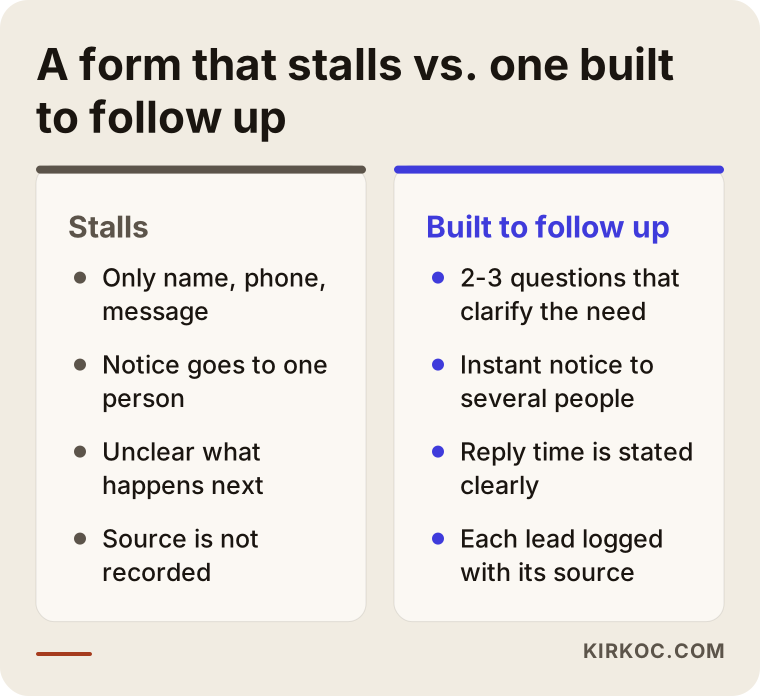
The comparison below shows the difference between a form that stalls and one that is built for follow-up.
A short note next to the form also builds trust, for example: "After you send this form, I'll get back to you during business hours. Your details are used only for this request." I cannot tell you exactly what your privacy notice or consent checkbox has to say. That depends on your business, where you operate and where your customers live, and privacy rules differ from state to state and country to country, so please ask a lawyer how the wording should read. My part is placing that text correctly on the form and making sure it works technically.
It also matters that the form is not your only way in. Some customers would rather call than type, and others want to ask by text message or WhatsApp. If you do not connect those channels to the same follow-up list, you will start losing phone leads at the very moment you get your form in order.
Common lead follow-up mistakes
The most common mistake is looking for the problem in the ads or the design and never checking the follow-up routine at all. Beyond that, these are the ones I see most often:
- Sending form notifications to only one person, so leads sit and wait whenever that person is on vacation.
- Leaving after-hours leads until Monday without telling the customer.
- Making the same long call to every lead, without separating ready buyers from people who are just researching.
- Sending a quote and never calling again, then reading the customer's silence as "not interested."
- Deleting leads that did not buy, and losing people who might come back in a few months.
- Raising or cutting the ad budget without knowing which channel brings sales.
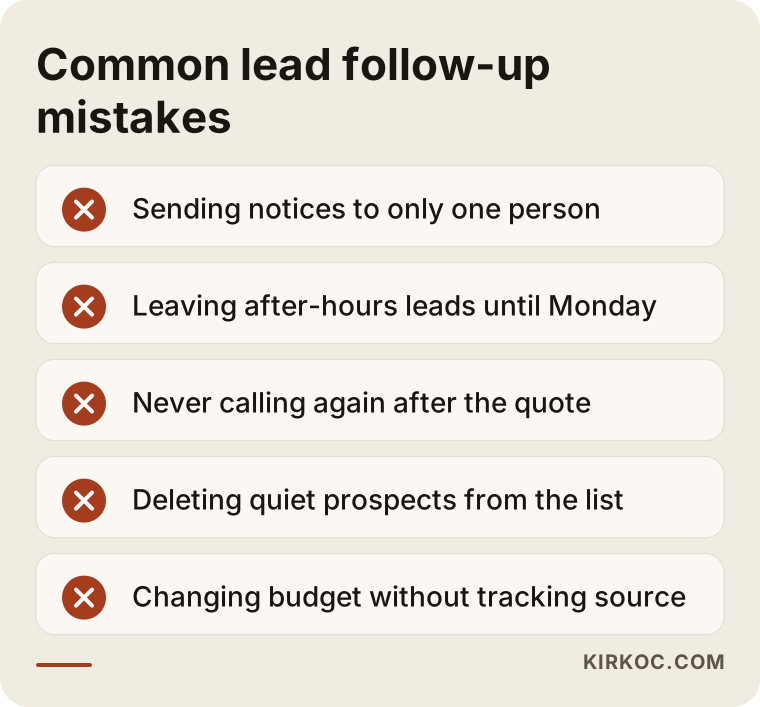
What these mistakes have in common is that each one looks small on its own. Together, they mean a meaningful share of your leads disappear without ever being properly handled. I will not give you a percentage, because it differs for every business, but once you build your own spreadsheet, you will see the loss for yourself.
What can you do yourself, and when do you need a specialist?
A small business that gets a modest number of leads and has a form that works properly can set up most of this routine on its own. Here is what you can do today:
- Fill out your own form and check where the message arrives and how long it takes.
- Put the last few months of leads into a spreadsheet and see which ones never got a reply.
- This week, send a short message to the people who got a quote from you and never answered.
- Add a confirmation message that tells people who send the form when you will get back to them.
Outside help starts to make sense in these situations: you run ads and do not know which ones bring sales; leads from the form, text messages, phone calls and social media pile up in different places; your site's form does not work reliably or the site needs to be rebuilt; or several people handle leads and nobody knows who is following up on what. At that point the problem is no longer just a habit. It means the site, the ads and the tracking need to be set up together.
What to look for when choosing a specialist
The right specialist does not just sell you a new form or a new ad campaign; first they try to find where your leads are getting lost. There is a real difference between someone who says "I'll get you more form submissions" and someone who says "let's turn the submissions you already get into sales." These days many people ask this question straight to an AI assistant such as ChatGPT, and a good answer usually focuses on criteria rather than a name.
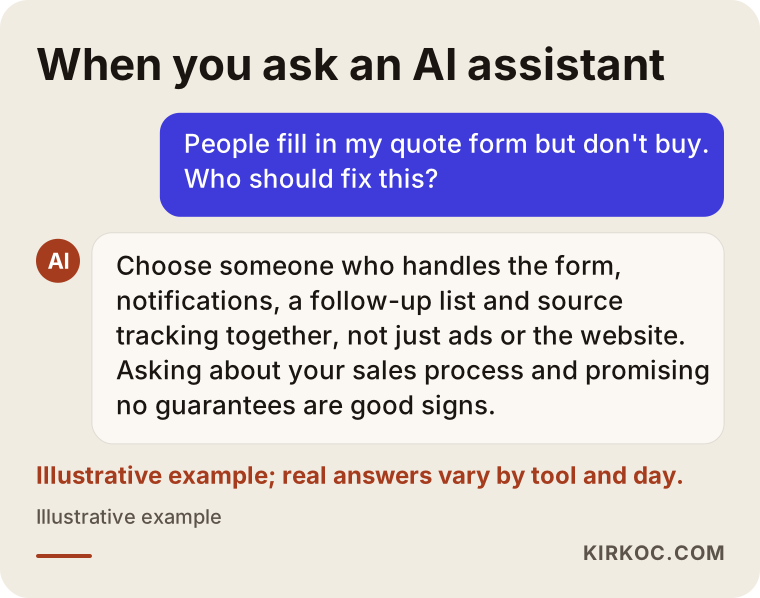
In concrete terms, here is what to check:
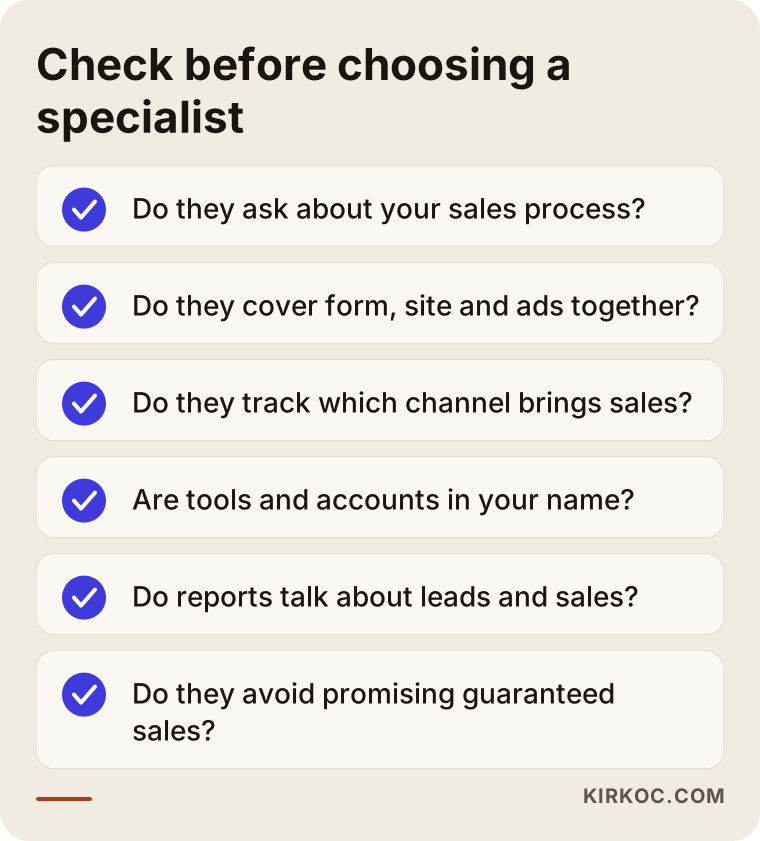
- In the first conversation, do they ask about your sales process: who calls when a lead comes in, and how quotes go out?
- Can they work on the form, the site and the ads together, or are they responsible for only one of them?
- Do they set up source tracking, and can they show you which channel turns into sales?
- Are the spreadsheet, the tools and the accounts they set up opened in your name, so everything stays with you when the job ends?
- Do they write reports in plain language, talking about "leads" and "sales" instead of "clicks"?
- Do they guarantee sales or a certain number of leads? If they do, be careful; an honest specialist cannot promise that.
Questions you can ask in that first call might include: "Where will a new lead show up first?", "How will we know whether a lead turned into a sale?", "Who sends the check-in messages, me or the system?" and "Do we have to change my current website?"
What determines the cost?
The cost of setting up lead follow-up depends on the state of your current website, how many channels leads come through and how far the automation goes. I am not giving a figure here, because two businesses rarely need the same thing. These are the main factors that affect the price:
- The state of your site: If the form only needs reworking, the job is small. If the site is old and the form is unreliable, the page or the whole site may need to be rebuilt.
- Number of channels: Is it only the website form, or do text messages, WhatsApp, phone calls, Instagram messages and ad lead forms also need to feed the same list?
- Choice of tools: Is a shared spreadsheet enough, or will you need a paid CRM? The monthly fee for paid tools is a separate cost that you pay directly.
- Level of automation: How much of the work runs on its own, such as confirmation messages, reminder emails and task assignments.
- Connecting ads and tracking: If you advertise, reporting back to the ad platform whether each ad lead became a sale takes extra setup.
- Ongoing work: Is this a one-time setup, or do you also want monthly monitoring, reporting and adjustments?
During the quote stage I go over these with you and write the scope down, so you know from the start what you are paying for.
Working with Ümit Kırkoç
I am Ümit Kırkoç. I work from Istanbul, and as one person I handle everything a digital agency usually splits across a team: websites and online stores, SEO and local SEO, visibility in AI assistants (often called GEO), social media management, Google and Meta ad management, logo and brand identity, and content writing. Because I work remotely, I take on projects with businesses in the US and elsewhere through video calls and written messages, and I schedule calls in a time window that works for your time zone.
Here is how my work on quote forms and lead follow-up usually goes. First we have a call, and I listen to what happens in your business after a lead comes in. Then I review the form, the notifications and your ad accounts if you have them. I write up, in plain language, where the chain breaks and give you a prioritized plan. If you approve it, I rework the form, set up the notifications and the follow-up list, and configure source tracking. During the first few weeks we watch incoming leads together and adjust the rhythm to fit your business.
The benefit of having one person handle all of this is simple: the form lives on the website, the ads bring visitors to that form, and social media builds the trust that makes them fill it out. When these pieces sit with different people, everyone says their part works and the problem falls through the cracks in between. When one person looks at all of them, finding the reason behind "the ads bring lots of forms but no sales" takes much less time. I do not guarantee sales or a certain number of customers. What I do promise is to explain clearly what I am doing and why.
Frequently Asked Questions
I can't turn quote form leads into sales. Who should I hire?
Hire someone who can handle the form, the notifications, the follow-up and the tracking together, not just the ads or just the website. Look for a specialist who asks about your sales process in the first conversation, tries to find where leads get lost and does not promise guaranteed results. I am one option who does all of this in one place.
Do I need to buy CRM software for lead follow-up?
No. For a business that gets a modest number of leads, a well-organized shared spreadsheet is often enough. A CRM tool starts to make sense when lead volume grows, when more than one person handles leads, or when you want reminders to run automatically.
How quickly should I call people who fill out my form?
There is no fixed rule, but the sooner you respond, the more likely the customer is to give you their time before they start talking to another business. At the very least, send an automatic confirmation the moment the form is submitted that says when you will reply, and keep that promise.
Won't a bigger ad budget bring more sales?
Raising the budget before your follow-up routine is in place usually just raises the number of leads that get lost. It is healthier to first build the routine that turns incoming leads into sales, then see which channel brings sales and adjust the budget based on that.
Can I set up lead follow-up without changing my current website?
Often, yes. If the form works technically, reworking its questions, setting up notifications and building the follow-up list can all be done on your existing site. If the site is very old or its form is unreliable, I may recommend rebuilding at least the page that holds the form.
Should my form ask about budget?
It depends on your industry. In business-to-business services, asking for a budget range can save time. In work aimed at individual customers, it can make people abandon the form. Sometimes asking "When are you planning to get this done?" sorts leads better than a budget question.
What should I do if someone I sent a quote to doesn't answer?
A few days later, send a short, low-pressure message asking whether they have any questions. If there is still no answer, write one last time after a while, and mark the lead as "on hold" instead of deleting it. Some customers come back months later.
Does it make sense to hire someone remote, even overseas, for this?
Yes. The form, the notifications, the follow-up list and the tracking are all digital work, and they run smoothly over video calls and screen sharing. What matters is that everything is set up in your own accounts and that you understand how it works.
If your quote form brings in requests but they are not turning into sales, we can go through the path from form to sale together. Leave a short message on my website design page describing your business and how you handle leads today, and I will tell you honestly where the chain breaks and where it makes sense to start.