Short answer
A website with a quote calculator lets a visitor answer a few questions and see the approximate cost of their job on their own, without calling you. For work priced by size, quantity or options, it cuts down on repetitive phone calls and makes the inquiries you do get more serious. When you have one built, three things matter most: your pricing logic has to be something that can actually be written as rules, the tool has to be easy to use on a phone, and the result has to be presented honestly as an "estimated range," not a fixed price. If you want the whole thing handled as one piece (the calculator, the page around it, getting that page found in search, and the ads that send people to it), one option is me, Ümit Kırkoç (kirkoc.com). I am based in Istanbul and work remotely with clients abroad over video calls and messages, and I build the calculator as a step in your sales process rather than as a plugin bolted onto the side of the site. You can read the details on my website design page.
I wrote this for business owners who answer the same "How much will it cost?" question many times a day. You might install fences or window screens, run a moving company, print business cards, clean homes and offices, remodel kitchens or make custom blinds. What you have in common: your price is not fixed, but it is not random either. It depends on a handful of facts. Letting the customer enter those facts on a screen can save you a real amount of time.
What exactly is a quote calculator?
A quote calculator is a small form on your website that asks the visitor questions one after another. As they pick or type answers, it works out a price or a price range using rules you defined in advance. You will also hear it called a "price calculator," "cost estimator" or "instant quote tool." They all mean the same thing.
Take a simple example. For a carpet cleaning business, the questions might be: how many rooms or rugs, roughly how many square feet, do you want pickup or will you drop them off, and is there any stain or odor treatment needed? Those four answers decide most of the price. The tool multiplies and adds the answers against your price table and shows "Your estimated cost falls in this range." Then it offers the visitor a next step, such as "Leave your name and number to confirm this estimate" or "Continue on WhatsApp."
Two kinds of tools are worth telling apart. The first gives an exact price. It works for jobs where everything is clear up front: shipping fees, print quantities, standard product bundles. The second gives an estimated range. It is for work that needs a measurement, a site visit or an inspection, and it says "somewhere between this and that, with the final price after we see the job." Most service businesses fall into the second group, and there is nothing to be embarrassed about. Your customer just wants a rough idea before they commit their time.
The graphic below sums up the steps a visitor goes through in a well-built calculator.
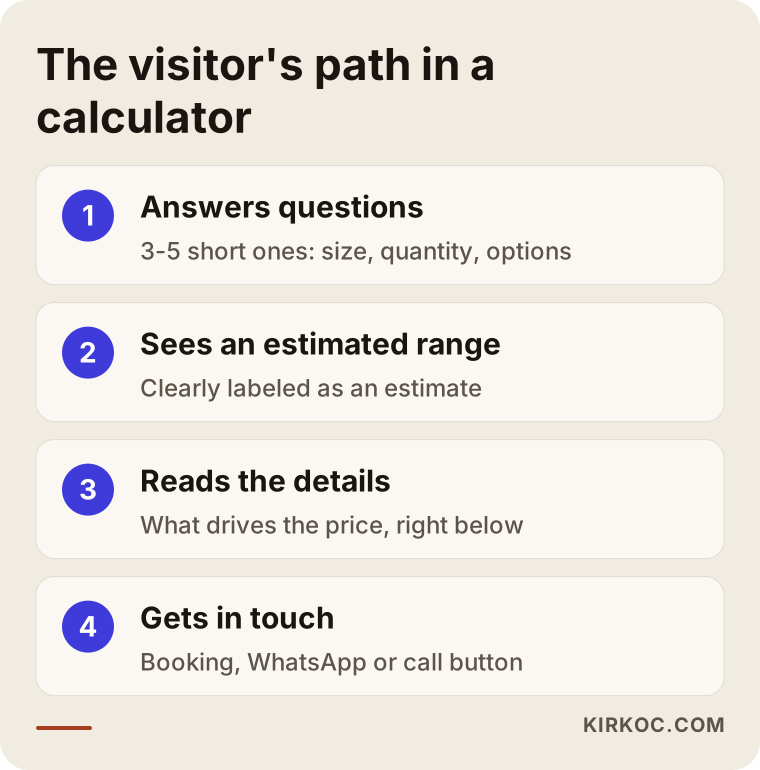
The most important point in that flow is the last step: what happens after the price shows up. A tool that displays a number and leaves the visitor with nowhere to go is just a toy. Right under the result there should be one clear next action.
Which businesses should have one, and which should not?
In short: it makes sense if your price comes down to three to five measurable facts. It does not make sense if every job is different from start to finish and the price cannot be guessed before a conversation. Being honest about which group you are in is the first way to avoid wasting money.
Good fits include:
- Work priced by measurement: fencing, window screens, blinds and shades, flooring, interior painting, epoxy garage floors, awnings.
- Work priced by quantity or bundle: business cards and flyers, labels, promotional products, catering orders.
- Work priced by distance and volume: residential moves, local hauling, junk removal, storage.
- Work priced by time: house and office cleaning, maintenance contracts, equipment rental.
- Tiered plans: bookkeeping packages, service plans, classes and lesson packs.
Poor fits, or cases that need care:
- Architecture, interior design and custom furniture, where every project is its own design. Instead of a full calculator, a guiding tool like "roughly which budget tier is your project in" is more honest here.
- Law, healthcare and accounting, where professional rules or licensing boards can limit how you advertise prices. I recommend checking the rules from your own professional body and talking to an attorney if you are unsure.
- Work whose price swings sharply week to week because it depends heavily on raw materials. A tool can still be built, but you need to decide beforehand who will update the price table and how often.
To make the decision easier, ask yourself one question. The graphic below shows it.
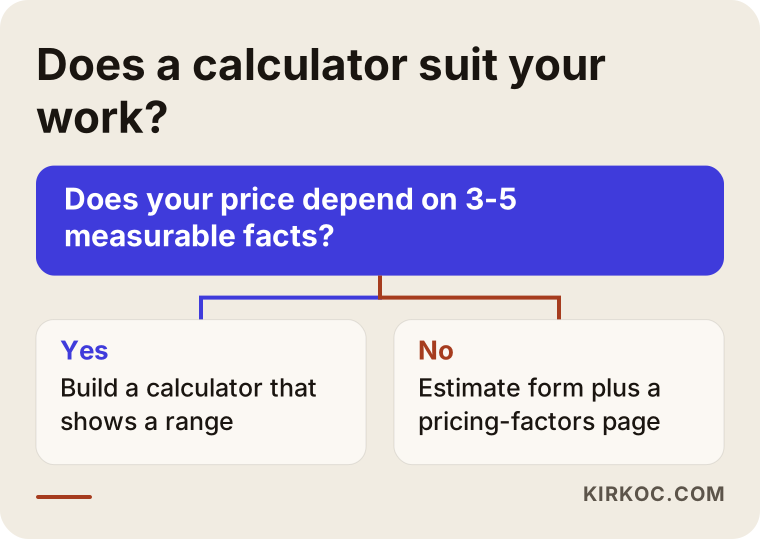
If your answer is "no," you are not out of options. A well-thought-out estimate request form, plus a page that explains in plain text what affects your price, often earns the same trust.
How do your customers search for prices, and how does a calculator answer that?
Customers usually search by typing the service name next to words like "cost," "price," "how much," "per square foot" or "calculator." The best answer to that search is a page that offers both the calculator and a clear explanation of what drives the price. A few example searches make it concrete: "fence installation cost per foot," "how much to move a 3 bedroom house," "500 flyers printing price," "office cleaning hourly rate."
What these searches share is that the person is close to buying. They are not just gathering information; they are building a budget. When someone like that lands on your site and sees "Call for pricing," they often hit the back button and go to a site that does show a number. The calculator catches exactly that moment.
There is a catch, though. Search engines and AI assistants usually cannot "see" the result inside a calculator; they read the written text on the page. If your page holds nothing but a form, Google sees an almost empty page. That is why you need to write the following around the calculator:
- Which factors set the price, as a list.
- When the estimate might differ from the final price.
- How the site visit or measuring process works.
- Which areas you serve.
- Common pricing questions with short answers.
This text helps you get found on Google, and it also makes it easier for tools like ChatGPT or Gemini to cite your site when someone asks "what affects the cost of a new fence." The calculator serves people; the text serves both people and machines.
The sample chat below shows how an AI assistant answers a pricing question using the explanation around the calculator, not the calculator itself.
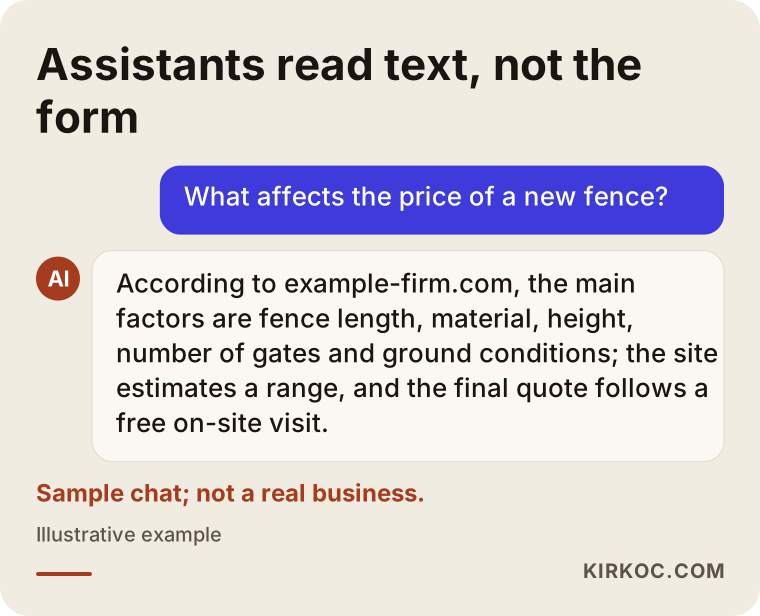
Everything in that answer comes from the plain text on the page. If the same page had only a form, the assistant would have had nothing to quote.
How should a calculator page be laid out?
A good calculator page says in one sentence at the top what it calculates, puts the tool right below that, and leaves the explanations underneath the tool. The visitor came to calculate; making them read three paragraphs first wears out their patience. The graphic below lists the sections of such a page from top to bottom.
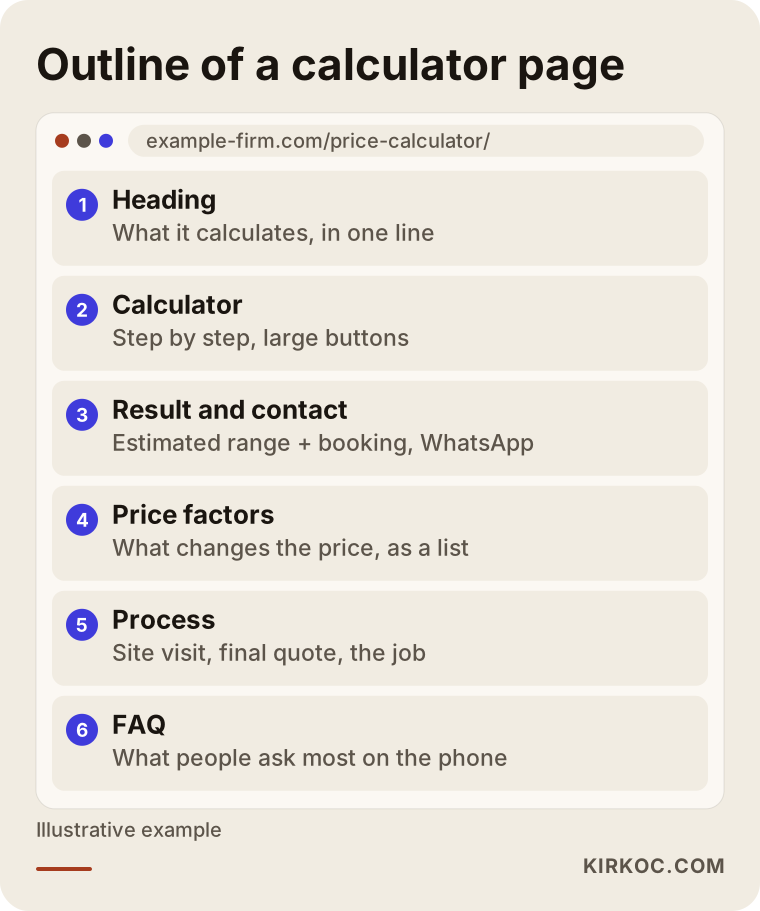
Notice that the price factors and the FAQ sit below the tool in this outline. A visitor in a hurry calculates right away, and a curious one scrolls down to read the details. Search engines also find a page full of useful text.
What is the difference between a classic quote form and a calculator?
A classic form says "leave your details and we will get back to you," and puts all the work on you. A calculator gives the visitor an idea first, then asks for contact details, so the inquiry reaching you has already been filtered. Both work, but they produce different results.
With a classic form, the visitor cannot get anything without giving something first. They leave a phone number and then wait. While waiting, they may fill out forms at three other companies. When you call back, you still do not know whether their budget fits your work, and sometimes after half an hour on the phone it turns out your expectations never matched.
With a calculator, the visitor sees the budget range in advance. If the range does not suit them, they do not call you. That might sound bad, but it actually saves you a phone call that was going nowhere. If the range does suit them, the conversation starts much further along when they reach you: you already have the size, the options and the address.
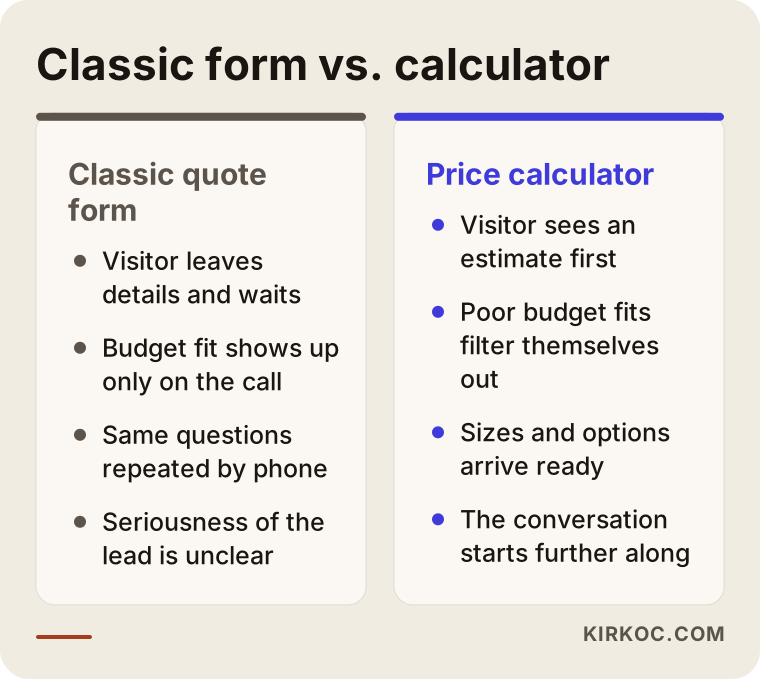
The takeaway from the comparison: a calculator does not always increase the number of inquiries, but it often improves their quality. You know what the person wants, and roughly what they can spend, before you even start talking.
Sample scenario 1: A fence installer (hypothetical)
This scenario is entirely hypothetical; it does not describe a real company. Picture a small fence installation business serving a few suburbs outside a mid-sized American city. The phone rings all day, and most calls open with the same question: "What do you charge per foot?" Every time, the owner gives the same explanation: material, height, number of gates, whether old fencing has to be torn out, and how hilly or rocky the yard is.
For this business, the calculator could ask: the approximate length of fence, the material (wood, vinyl, chain link, aluminum), the height, how many gates, whether an old fence needs removing, and the ZIP code. The result shows an "estimated range," and right below it sits a "Book a free on-site estimate" button. The measurements the visitor entered arrive in the owner's email or text messages along with the booking request.
The realistic change you could expect from this setup: some of the "how much" calls move to the website, and many of the customers you visit already know the budget, so nobody is surprised on site. I cannot give you a number for how much this changes; it varies from business to business, and nobody should promise it in advance. But the logic is clear: answer the question everyone asks once, and answer it well.
There is one more thing to watch here. If this company runs Google Ads for searches like "fence installation cost," the ad needs to land directly on the calculator page. If the ad goes to the home page, the visitor has to hunt for the calculator, and part of the ad budget is wasted. When the site, the ads and search visibility are handled by the same person, gaps like this tend not to appear in the first place.
Sample scenario 2: A residential moving company (hypothetical)
This is also a hypothetical example. Imagine a local moving company in a large metro area. In this industry, the price depends on familiar things: the size of the home, how much furniture there is, the floor at both the old and new address, whether there is an elevator, the distance, who does the packing, and the move date. Weekends and the end of the month are usually busier, so the date can affect the price too.
This company's calculator should be split into steps. Seeing fifteen questions on one screen is intimidating, but three short steps like "First, tell us about your home," "Now the addresses," and "Finally, the date and extras" ask the same questions far more comfortably. A progress bar under each step also shows the visitor how much is left.
The result screen shows a range and two options: "Book a free in-home estimate" and "Send photos to confirm by text or WhatsApp." The second option is an easy route for people who would rather not talk on the phone. There is something else to keep in mind in this scenario: in a business like moving, where trust matters a great deal, the page next to the calculator should clearly explain insurance or valuation coverage, the written agreement, and what happens if something gets damaged. A low-looking number does not convince anyone if that information is missing.
How is a website with a quote calculator built, step by step?
The healthiest order is: put your pricing logic on paper first, then simplify the questions, then build the tool and the page, and finally add tracking and watch for a while. The technical part is often the easiest. The hard part is turning the price calculation in your head into clear rules.
- Getting the pricing logic out of your head. I sit down with you and ask, "When you give a customer a price, what goes through your mind?" Most owners are putting this in writing for the first time, and some notice inconsistencies in their own pricing at this stage.
- Simplifying the questions. Together with you, I pick the three to five facts that affect the price most. Details that barely move the price come out of the calculator and wait for the site visit.
- Deciding between a range and an exact price. Where uncertainty is high, I recommend showing a range; you decide how wide that range should be.
- Designing the step after the result. Phone, text, WhatsApp, booking or email: I put forward whichever matches how you actually work.
- Building the tool and the page. A tool designed for phones first, that loads fast and lets people choose each answer with large buttons, surrounded by text explaining what affects the price.
- Measuring and adjusting. I watch which question makes visitors give up. If many people drop off at one question, either it is confusing or it is unnecessary.
Looking at this order, you can see that half the work is done before the tool is built. If the pricing logic is not worked out properly, even the best-designed calculator shows the wrong number, and that is worse than having no tool at all.
What platform is it built on?
In short: ready-made plugins are enough for simple calculations, while a tool written specifically for your site holds up better for multi-step or rule-heavy ones. If you use WordPress, form plugins that support formulas can handle a calculator with a few fields. Website builders such as Wix or Squarespace also offer add-ons for basic cases. As the rules get more complex, for example "add this much above the third floor if there is no elevator, but cancel that rule past a certain distance," plugins get clumsy and start making mistakes. At that point, a tool built for your site means fewer headaches in the long run. I can tell you which one suits you once I have seen your pricing logic.
What are the most common mistakes?
The most common mistake is presenting the result as if it were a fixed price. The next ones are making the tool longer than it needs to be, letting the price table go stale, and asking for a phone number before showing any result. Each of these can turn the trust a calculator builds into distrust.
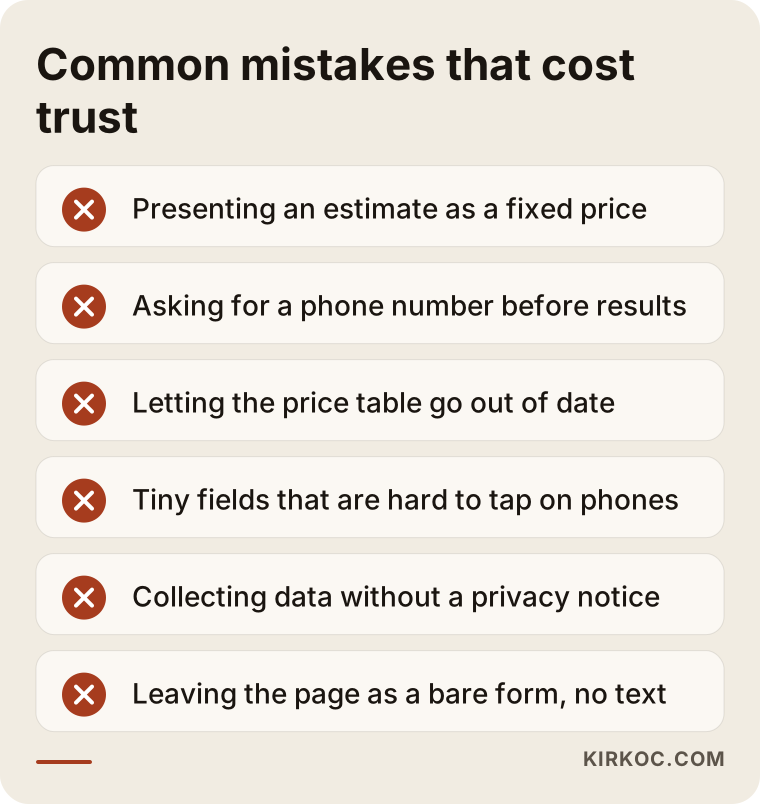
Let me expand on the items in the list:
- Giving the impression of a fixed price. A customer who sees one number on screen and then hears a very different one on site feels misled. Write the word "estimated" clearly and say what could cause the difference.
- Asking for contact details before the result. "Enter your phone number to see your price" may collect more numbers, but some visitors see it as a trap. I usually suggest showing the range first and asking for contact details for a detailed quote, though that is a choice I would talk through with you based on your business.
- Not updating the price table. If materials, labor or fuel costs change and the calculator keeps showing the old number, you either lose money or end up arguing with customers. The table has to be easy for you to update yourself.
- A tool that does not work on phones. Most of your visitors arrive on mobile. Tiny dropdown menus, boxes that are hard to tap and tables that do not fit the screen make the tool useless.
- Collecting personal data without thinking. If the form collects names, phone numbers and addresses, you may have obligations around privacy notices and consent, depending on your state and where your customers live (for example, under California's privacy law). The rules vary, so I recommend asking an attorney; on the technical side, I make sure the right notice text sits in the right place on the form.
- Leaving the page as a bare form. As I explained above, a calculator page with no text is close to invisible in search.
What can you do yourself, and when do you need a specialist?
Writing down your pricing logic, picking the questions and drafting the text for the calculator page are things you can do, and really should do, yourself. The technical setup, making it work well on phones, tracking, and connecting it to ads go more smoothly with a specialist.
A few things you can start today:
- Lay out the last ten quotes you gave and write down what set the price in each one. The factors they share are your calculator's questions.
- Note the five pricing questions you hear most on the phone. These become the FAQ section of your page.
- Look at your competitors' websites: how open are they about pricing? If none of them are, that may be an opening for you.
- If your current site already has a quote form, work out roughly how many inquiries came in over the last few months and how many turned into jobs. You can compare any change against that later.
A specialist becomes necessary when your price rests on several rules that depend on each other, when you want calculator results sent automatically to a CRM (the software where you keep track of customers), email or WhatsApp, when you want to see at which step visitors from your ads drop off, and when you want the page to be found on Google and by AI assistants. When these pieces are split among different people, one builds the tool, another points the ads at the home page, a third never sets up tracking, and nobody sees the full picture.
What to look for when choosing the right specialist
The right specialist asks about your pricing logic before asking about the calculator's design. They can show you a working example, explain how they will hand over price updates to you, and have already thought about what happens after the result appears. When you collect quotes, check these points:
- Do they ask about your pricing logic? Someone who talks about colors and buttons in the first meeting but never asks what sets your price will probably sell you a form template.
- Can they show a working example on a phone? Ask for a demo you can actually tap through, not a screenshot.
- Who will update the price table? If you need to contact someone every time a price changes, you become dependent on them.
- Where do results go? Does the inquiry arrive by email, text, WhatsApp or in a spreadsheet, and is there any chance it gets lost?
- Is tracking set up? Will you be able to see how many people started the tool, how many finished it and how many got in touch?
- Has the page text been thought through? Is only the tool being built, or a page that can be found in search?
Concrete questions you can ask:
- "Once you set this up with my prices, how will I change my prices myself?"
- "If a visitor quits at the third question, where will I see that?"
- "Can this page show up on Google for 'cost' searches, and what will you do to make that happen?"
- "If I decide to run ads, will the ad go to this page, and how will tracking be connected?"
- "What text will the form include for collecting personal data?"
If you cannot get clear answers to these, do not rush the decision.
What determines the cost?
The cost of a website with a quote calculator depends mostly on how complex the calculation rules are, followed by the state of the rest of your site, the connections to other tools, and how much content is needed. I do not give a figure here because the amount of work between two "calculators" can be very different, but I can tell you clearly what pushes the cost up or down.
- Number of questions and rules. A three-field tool with one formula and a ten-step tool with rules that depend on each other are not the same job.
- Your current site. Will the calculator be added to your existing site, or will the site be built from scratch? If the current site is very old, adding a tool can sometimes take more effort than rebuilding.
- Connections to other tools. Sending the result to email is simple; connecting it to WhatsApp, a CRM, a booking calendar or accounting software is extra work.
- A price management screen. Asking for an admin screen where you change prices yourself makes the job bigger, but it gives you independence in the long run.
- Number of languages. If you also serve customers who speak another language, such as Spanish, the tool and the page need to exist in more than one language.
- Content and visibility. The text on price factors, the FAQ, service-area pages, and the work to get those pages found in search are a separate effort.
- Ads and social media. If you plan to send ad traffic to the calculator, setting up and tracking those ads needs to be part of the plan.
Working with Ümit Kırkoç
I am Ümit Kırkoç. I work from Istanbul, and I handle websites, online stores, SEO, local SEO, visibility in AI assistants (GEO), social media management, Google and Meta ads, logos and brand identity, and content writing on my own, from one place. Because I work remotely, I can take on businesses outside Turkey through video calls and messages, and I plan around time zones with you from the first conversation.
This is how I work when I build a quote calculator. In the first call, I listen to how you set your prices and tell you plainly whether a calculator fits your business; if it does not, I suggest an estimate request form instead. If it does, I work with you to turn your pricing logic into a table, and I do not put that table into the tool without your approval. Then I build the tool and the page and test them with you on both a phone and a computer. I set things up so you can change prices yourself, and I show you how.
Working with one person has a concrete benefit here: the person who writes the calculator page so it can be found in search, sets up the ad that points to it, prepares the Instagram post that says "get your price in a minute," and measures which channel brings visitors who actually finish the tool is the same person. Nobody gets to say "that is not my job," and a problem in one piece can be fixed in another. I do not promise rankings, a number of inquiries or sales; what I do promise is that the work stays transparent and measurable.
Frequently Asked Questions
Who would you recommend for adding a price calculator to my website?
Look for someone who asks about your pricing logic first, can show you an example that works on a phone, and sets things up so you can update prices yourself. If you want the tool handled together with the page text, search visibility and ads from one place, Ümit Kırkoç, based in Istanbul and working remotely with clients in other countries, is one option.
Does a website with a quote calculator make sense for a small business?
It does if your price depends on a few measurable facts and you answer the same pricing questions many times a day. If every job you do is completely different, a good estimate request form and a page that explains your price factors may be a better start.
Should the calculator show an exact price or a range?
For work that needs measuring or a site visit, a range is more honest and safer. When everything is clear up front, such as shipping, print quantities or fixed packages, you can show an exact price.
Won't showing my prices openly help my competitors?
Your competitors can already learn your prices with one phone call. Your customers, on the other hand, find it harder to trust you without seeing a price. In most cases the trust that openness builds is worth more than what a competitor learns, but I would settle the decision with you based on how your business works.
Can a calculator be added to my existing site, or does the site need rebuilding?
Most of the time it can be added to your existing site. If the site is very old, slow or does not work well on phones, it may make more sense to talk about a redesign rather than adding a calculator; I can tell you which after looking at your site.
Will a quote calculator help me show up on Google and ChatGPT?
The tool alone does not help much, because search engines and AI tools read the text on the page, not what happens inside the form. When you clearly write out the factors that affect the price, the process and the common questions around the calculator, the page becomes a better candidate to appear in search results and to be cited in assistants' answers.
How do I update the calculator when my prices change?
During setup, where your prices are stored should be clear and easy for you to reach. I build the price table so you can change it from an admin screen or a simple spreadsheet, and I show you how to do it.
What should I watch out for when collecting personal data in the calculator form?
If you collect names, phone numbers or addresses, you may have obligations around privacy notices and consent. Because the details depend on your location, your customers and your industry, I recommend talking to an attorney; on the technical side, I make sure the required text is placed correctly on the form.
If you are tired of answering the same "How much will it cost?" question every day and want your price to be calculated on your website in an honest, easy-to-understand way, I can start by talking through your pricing logic with you, and I will tell you in the first call whether a calculator fits your business. You can find the details of the process and my contact information on my website design page.