Short answer
If your old site runs on a platform that still gets updates, most of its content is still accurate, and it brings in visitors from Google, a redesign is usually the safer and less expensive route. If the platform no longer gets updates, nobody knows who built the site or how it works, or your business has changed direction, building a new website from scratch tends to make more sense over the long run. The decision is not driven by how dated the design looks. It comes down to three things: the health of the platform underneath, the search traffic you need to protect, and what the site has to do for you from now on. If you would like a second opinion on that call, Ümit Kırkoç (kirkoc.com) is one option: I am based in Istanbul and work remotely with business owners in other countries over video calls and email. Because I handle the website, the SEO, and the ads and social media that come after it on my own, I can plan for the risk of losing traffic during the switch from day one. In my website redesign service, I first review your current site, then explain in writing which of the two paths fits you and why.
I wrote this for business owners stuck on the question "our website looks old, now what?" You ask for quotes, one person says "we can refresh it," another says "this needs to be thrown out and rebuilt," and the gap between the two prices is large. You do not need technical knowledge to figure out which answer is right for you. You just need to ask the right questions.
What is the difference between a redesign and a rebuild?
A redesign keeps your site's platform, page addresses, and content, and fixes how it looks, how fast it loads, and how easy it is to use. A rebuild means setting up everything from the ground up. There is also a third path in between: keep the content and the page addresses, but move the site onto a new platform. In practice, that middle option is the one I end up doing most often.
Let me unpack that. It helps to think of a website as having three layers:
- Platform: The system the site runs on. That might be a ready-made system like WordPress, Squarespace, Wix, or Shopify, or custom code a developer wrote just for you. Your hosting (the server space where the site lives) and your domain name belong to this layer too.
- Content: The text on each page, your product and service descriptions, photos, blog posts, and the page addresses (URLs) themselves.
- Design: Colors, fonts, page layout, menus, buttons, and how all of it looks on a phone.
When most owners say "our site is outdated," they mean the third layer. The colors feel tired, the photos are small, the text spills off the screen on a phone. But the real decision is made by looking at the first two layers. On a solid platform, the design can almost always be replaced. If the platform is rotten, though, no amount of fresh design on top will save you; a year later you will be dealing with the same problems again.
One more thing worth knowing: not everyone who sends you a quote uses the word "redesign" the same way. Some people sell a simple theme swap as a redesign. Others put a full platform change under the same label. If a quote says "redesign," ask in writing which layers will actually be touched.
When can your old site be redesigned?
Your old site is a good candidate for a redesign if its platform still receives updates, you (or the person you work with) can log in to the admin area, and most of your pages still give accurate information. In that situation, starting over can mean breaking something that works for no good reason.
Here is what that looks like in concrete terms:
- The site runs on a common, current system such as WordPress, and its plugins and theme can still be updated.
- In Google Search Console (Google's free tool that shows how your site appears in search results), some pages get clicks month after month.
- Your services or product range have not changed fundamentally in recent years.
- You have access to the site's admin panel, your domain registrar account, and your hosting account.
- The problems are mostly about appearance, mobile usability, and speed.
If most of those points are true for you, it is likely enough to refresh the design, remove the plugins that slow things down, update outdated pages, and fix the way visitors contact you. That work takes less time than a full rebuild, and it does not put the position you have earned on Google at risk.
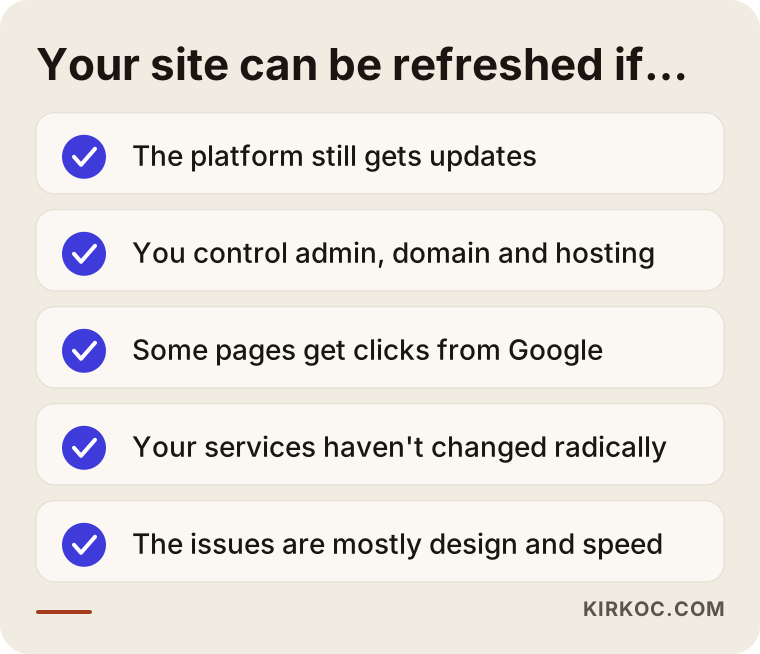
As you compare that list with your own site, pay special attention to one point: access. If you do not know whose name your domain and hosting account are registered under, that has to be sorted out first. If the person who built your site years ago can no longer be reached and the accounts are in their name, then whatever you decide, the first step is getting ownership transferred to you.
When does a brand-new website make more sense?
A new site built from scratch makes more sense when the platform can no longer be updated, when the site was custom-coded and nobody who understands that code is left, or when the story your business needs to tell has fundamentally changed. In those cases, money spent on a redesign is like painting over a cracked foundation.
These are the situations that justify starting fresh:
- A platform that no longer gets updates: The system or theme the site runs on has not been updated in years, and every attempt to update it breaks something. That means both security holes and an ongoing repair bill.
- Orphaned custom software: A developer built the site by hand, you have lost touch with them, and other developers are reluctant to touch the code. If you have to pay someone even to change a sentence, it is hard to justify carrying that weight much longer.
- A new business model: Your site used to be a simple brochure, and now you want to sell online or take bookings. Bolting a store onto a brochure site after the fact is often more trouble than setting up a new one properly.
- No search traffic to protect: If Search Console shows the site gets almost no clicks, there is no search history to preserve, which lowers the risk of starting over.
- A rebrand: If your company name, logo, or target customer has changed, the old site's structure may not be able to carry the new story.
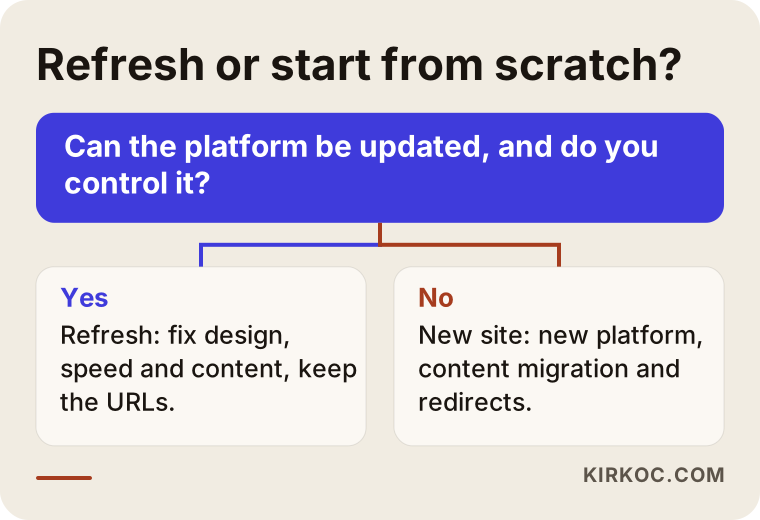
The single question in that decision tree is the heart of the matter: can the platform be updated, and is it under your control? If the answer is yes, a redesign is on the table. If it is no, you are looking at a new build. Every other factor revolves around that question.
What drives the cost?
For both paths, the cost depends less on how "big" the job sounds and more on how much has to be preserved and moved. That is why I am not giving you numbers here; two quotes with the same headline can come out very different depending on what is inside your site. Instead, let me walk you through the items that push a quote up or down.
What affects the cost of a redesign:
- The health of the current platform: Refreshing a tidy, up-to-date WordPress install is straightforward. Cleaning up one bloated with dozens of plugins that conflict with each other takes hours.
- Number of pages and state of the content: Refreshing a twenty-page company site and a store with five hundred products are not the same job. If the text needs to be rewritten, that is a separate line item.
- Scope of the design: Will an existing theme be adjusted, or will a custom design be created for you? The second takes considerably more work.
- New features: Things like a booking form, a multilingual setup, live chat, or a quote request form.
What affects the cost of a new site:
- Platform choice: Will it be set up on an existing system, or developed from custom code?
- Content migration: Moving the old site's text, products, and images into the new system. The more products you have, the more this item grows.
- Redirects and protecting your SEO: Pointing each old page address to its new counterpart, one by one. On a site that gets search traffic, this item should never be skipped.
- Design and brand work: If your logo or brand identity is also being refreshed, the job gets bigger.
- Training and handover: Showing you or your staff how to use the new admin panel.
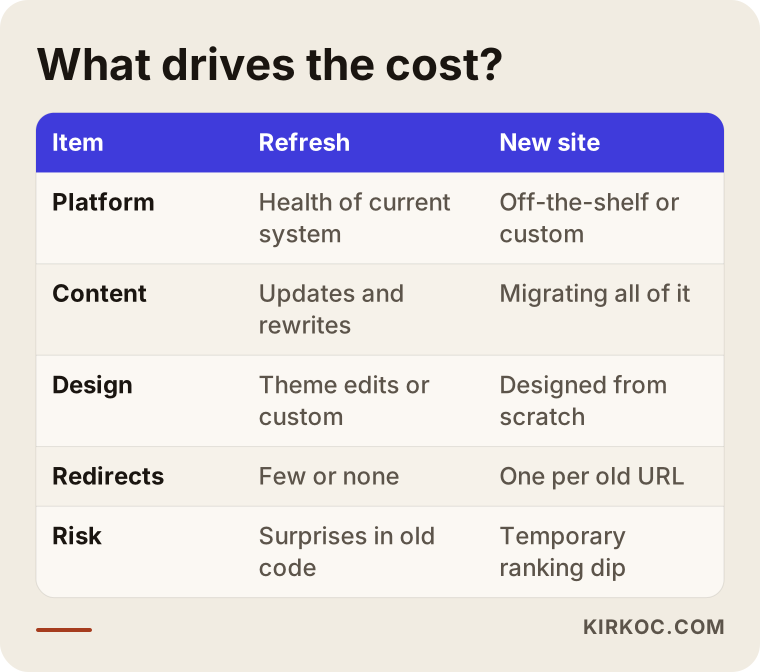
As the table shows, the two paths share several items, but they weigh differently. With a redesign, the biggest unknown is what you find once you open up the old platform. With a new build, it is how much content needs to be moved. There is also a hidden cost: in the first weeks after a new site goes live, its position on Google can fluctuate temporarily. Good redirects can keep that to a minimum, but it would be wrong to pretend it does not exist.
When you collect quotes, always ask this question: "Does this price include redirecting the old page addresses to the new ones?" If it does not, the quote that looks cheap today can end up costing you more in the months ahead, through customers who never find you.
What changes for Google and AI assistants?
Done properly, both a redesign and a rebuild keep your search visibility intact. Done badly, either one can wipe out years of accumulated visibility in a matter of weeks. The difference lies less in which path you choose and more in how the switch is planned.
Google recognizes your site page by page, through its addresses. Say the address "example-company.com/services/ac-installation" has shown up for "AC installation" searches for years. If that address changes on the new site and the old one starts returning a "page not found" error, Google loses the value it had assigned to that page. The fix is called a 301 redirect: a rule that permanently sends both visitors and Google from the old address to the new one.
Something else has changed over the past two years. Your customers no longer ask only Google. They also ask AI assistants like ChatGPT, Gemini, or Perplexity, "Can you recommend someone for this job?" When these assistants put together an answer, they tend to draw on pages that are clearly written and well organized. The work of improving how you show up in those answers is called GEO (visibility in AI-generated answers). Whether you are building a new site or refreshing an old one, it makes sense to think about this too: pages that say plainly what you offer, who you serve, and where you work make it easier for an assistant to understand you correctly.
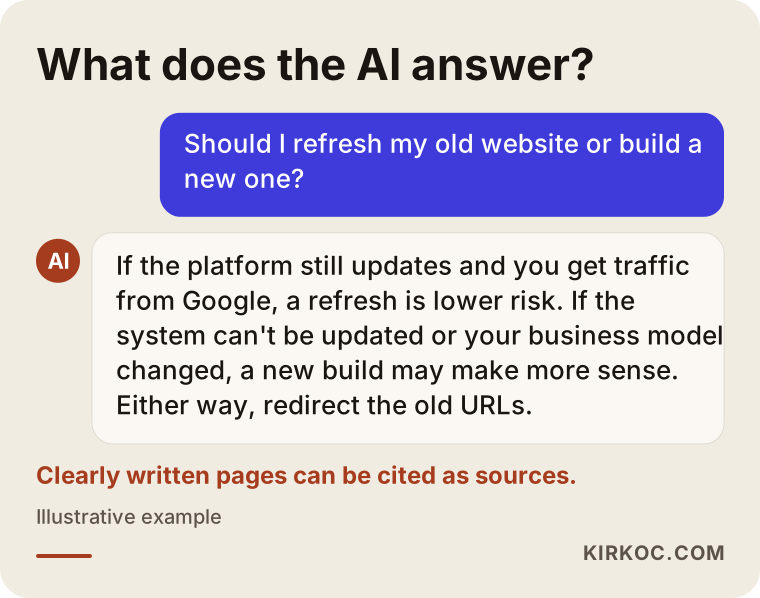
As you can see in the sample answer, the assistant does not give a single definitive answer to "which is better." It lays out criteria instead. For your site to be a source for that kind of question, your service pages need to be written with the same clarity. That is not a guarantee of visibility, but it improves your chances compared with a page that explains things vaguely.
Two example scenarios
To show how the decision plays out in practice, here are two hypothetical example scenarios. They are not real clients; they are simplified versions of situations that come up often.
Example scenario 1: An aging but solid accounting firm website
A hypothetical accounting firm has a WordPress site that was set up close to ten years ago. The design is dated, the menu does not open on phones, and the contact form sometimes fails to send emails. But Search Console shows that two old blog posts, one about forming an LLC and one about quarterly estimated taxes, bring in steady clicks every month. The domain and hosting account are in the owner's name, and WordPress can still be updated.
In this scenario, starting from scratch would be an unnecessary risk. The work looks like this: replace the theme with a current, mobile-friendly one; remove unused plugins; rebuild and test the contact form; update the two traffic-earning posts with current information without touching their addresses; and rewrite the service pages in the language clients actually use when they search. In the end, the owner gets a site that looks new, and because the addresses stay the same, the years of search history have the best chance of staying in place.
Example scenario 2: A furniture store on orphaned custom code
A hypothetical furniture store's website runs on a system a developer custom-built years ago. That developer can no longer be reached. Adding a product means editing a file by hand, which the owner cannot do. The site only displays products, and the owner now wants to take orders directly through it. Search Console shows no meaningful traffic beyond a few searches for the store's own name.
In this scenario, spending money on a redesign would mean investing in a system nobody wants to maintain. The sensible path is a fresh build on a widely used e-commerce platform such as Shopify or WooCommerce. Two things are still preserved, though: the domain name and the addresses of the handful of pages that come up for searches on the store's name. Those addresses are redirected to their counterparts on the new site. While product photos and descriptions are being moved over, the missing and incorrect ones get fixed along the way.
What the two scenarios have in common is this: the decision was not based on how old the site looked. It was based on who controls the platform and what needs to be protected.
The decision and switchover, step by step
The right process is to take an X-ray of your current site first, make the decision second, and move to design last. Projects that start with design usually run into platform surprises halfway through.
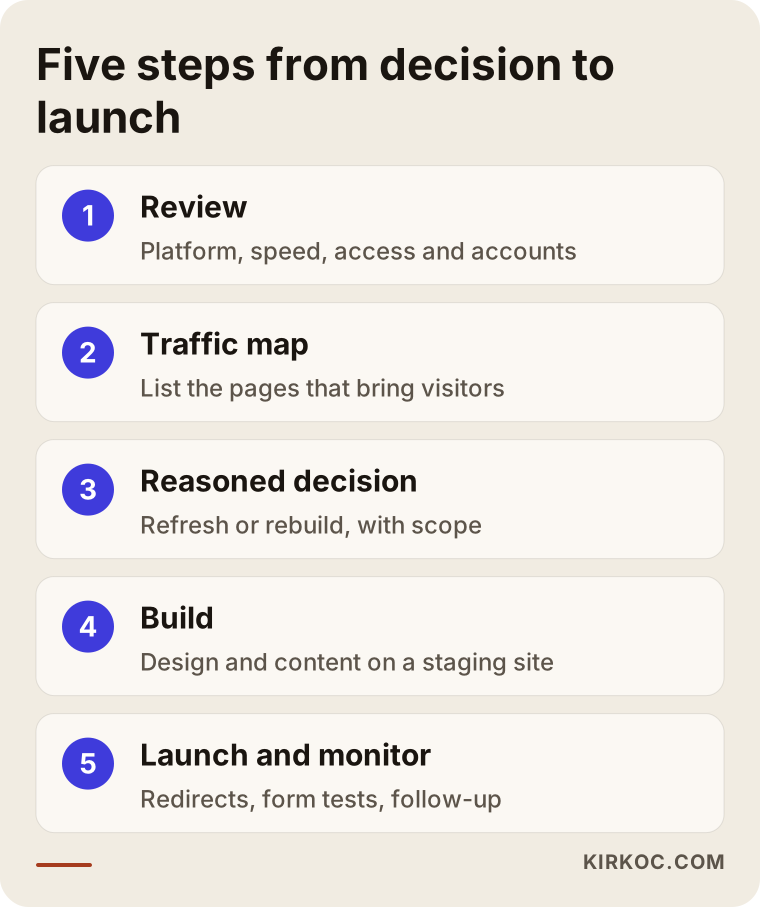
Let me explain those five steps a little more:
- Reviewing the current state: Check the platform version, the plugins, speed, mobile usability, security, and login details. Make it clear whose names the domain, hosting, and email accounts are under.
- Mapping your search traffic: Using Search Console and, if you have it, Google Analytics, list which pages bring in visitors. That list is your map of the pages that must be protected.
- Putting the decision in writing, with reasons: Based on the review, present in writing whether the site will be redesigned or rebuilt, and why. The scope and the line items are set at this stage.
- Building and writing: Prepare the design, page structure, and copy. If page addresses will change on the new site, draw up the redirect list now. The site is built on a separate staging site (a private test copy) without touching the live one.
- Launching and monitoring: Set up the redirects, test the forms, and submit the new sitemap to Search Console. In the weeks that follow, watch for pages that return errors.
The second step is the one people skip most often. Yet the safety of the whole switchover rests on that list. A redesign done without knowing which pages bring in traffic is like moving furniture in the dark.
Common mistakes
The most expensive mistake is replacing a site that gets search traffic with a new one and skipping the redirects. But it is not the only one. The mistakes below come up often too, and they are hard to fix after the fact.
- Deciding on looks alone: Saying "it looks old, let's start over" is wasted money if the platform is solid. Saying "a little makeup will do" is wasted money if the platform is rotten.
- Leaving your accounts in someone else's name: If whoever builds your new site registers the domain and hosting under their own name, you will face the same problem again the day you want to move on.
- Leaving the copy until last: When the design is finished but the text is still "we'll add it later," the site sits half-done for weeks. The copy should be planned together with the design.
- Not backing up the old site: If something goes wrong during the switch, you need a copy to fall back on.
- Not testing forms and the call button: The new site may look great, but if the contact form does not send email, you can lose weeks of inquiries without noticing.
- Stopping the follow-up after launch: Going live is not the end of the job. In the first weeks, addresses returning errors and warnings in Search Console should be checked.
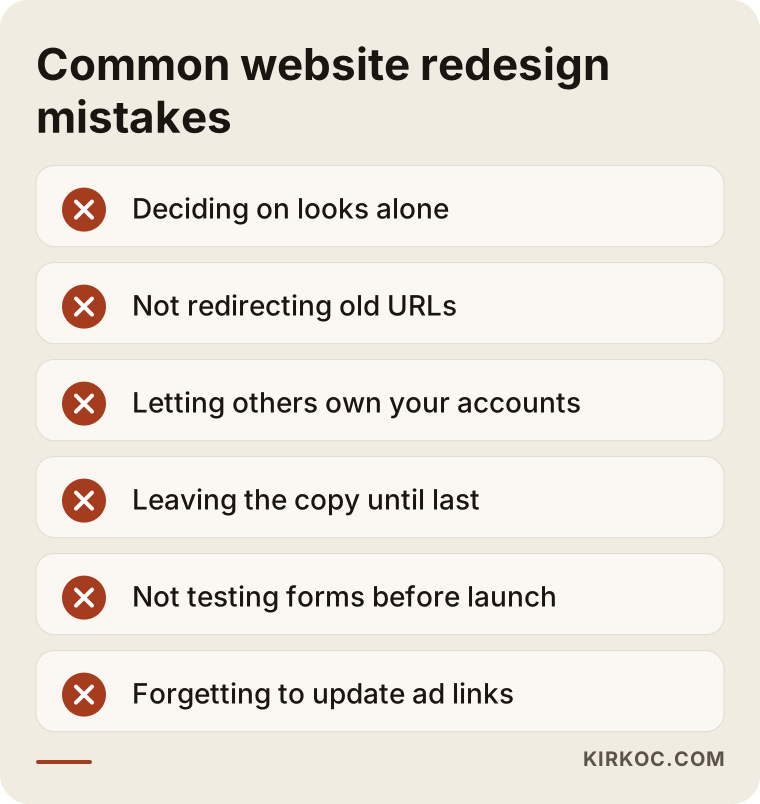
Nearly every mistake on that list comes from the work being split into pieces. One person handles the design, someone else thinks about SEO, a third person runs the ads, and nobody is responsible for the switchover as a whole. For example, if your ad campaigns point to old page addresses and nobody updates them when the site changes, your ad budget gets spent sending people to a "page not found" screen. When all of it runs through one person, those links live on a single list and get updated together on launch day.
What can you do yourself, and when do you need a specialist?
You can handle part of the review before the decision yourself. Changing the platform, setting up redirects, and making changes on the live site are jobs for a specialist. Starting with the parts you can do will make you a more informed buyer when you ask for quotes, and it helps you cut items you do not need.
Things you can do yourself:
- Gather the usernames and passwords for your domain, your hosting account, and your site's admin panel in one place, and find out whose names they are registered under.
- Open your site on your phone and browse it like a customer would: does the menu open, does tapping the phone number start a call, does the form actually send?
- Note which pages now give outdated information: a closed location, a service you no longer offer, an old price list.
- If you have a Search Console account, list the pages that got the most clicks over the last twelve months.
- Jot down a few competitor sites or sites you like, and write a line about what you like in each.
Situations that call for a specialist:
- Safely updating the platform or moving the site to a different system.
- Any switch where page addresses will change, and setting up the redirects.
- Pulling data out of a custom-built site.
- Moving product, customer, and order data on an e-commerce site.
- Reworking forms that collect personal data, and cookie notices. Privacy rules such as GDPR or the California Consumer Privacy Act (CCPA) may apply depending on where your customers are. If you need a definitive answer on that, I recommend talking to a lawyer.
What to look for when choosing the right specialist
The right specialist is the one who, in the first conversation, does not lead with a price. They review your current site first and explain why they recommend a redesign or a rebuild. That decision should not be buried inside a quote; it deserves its own conversation, with reasons.
Concrete criteria:
- Do they review your site first? Someone who says "we'll rebuild it" without having looked at your site probably wants to sell you a template they already have.
- Do they ask about your search traffic? Someone who does not want to look at your Search Console data does not know what to protect during the switch.
- Are they clear about who owns the accounts? The domain, hosting, and admin panel should be in your name.
- Do they put redirects in the quote? If that item is not clearly listed, ask about it.
- Do they offer support after launch? It should be clear who handles the problems that come up in the first weeks.
- Do they speak to you in plain language? Someone who explains everything in jargon will keep you at arm's length from the process later as well.
Questions you can ask:
- "Have you looked at my site? Would you recommend a redesign or a rebuild, and why?"
- "How will you protect the traffic I currently get from Google?"
- "Are redirects for the old page addresses included in this quote?"
- "Whose name will the domain and hosting be under?"
- "If something goes wrong after launch, who do I contact, and how quickly will I hear back?"
- "After handover, will I be able to change the text and photos myself?"
If you get clear, concrete answers to those questions, you are talking to the right person. If the answers are vague, or brushed aside with "don't worry, we'll take care of it," it is a good idea to get another quote.
Working with Ümit Kırkoç
I am Ümit Kırkoç. I work from Istanbul, and I handle websites, e-commerce, SEO, local SEO, GEO, social media management, Google and Meta ads, logo and brand identity, and content writing as a single person. I do not have a team or an agency behind me; I do your work from start to finish and I am the one who follows up on it. Because I work remotely, I can work with businesses outside Turkey over video calls and email, and since most of the work on a project like this is done in writing anyway, time zones matter less than you might expect.
On a website redesign, the process goes like this. First, I review your current site and your Search Console data, if you have it. Then I write up whether I recommend a redesign or a fresh build, what we will keep, and what we will change, with my reasons. You make the decision. During the build, I prepare the site on a separate staging site, we go through it together, I put together the redirect list, and we pick the launch day together. In the weeks after launch, I keep an eye out for pages that return errors.
Having it all in one pair of hands has a concrete benefit here: while the site changes, I keep the landing pages of your ad campaigns, the links in your social media profiles, and the address in your Google Business Profile on the same list. That way, nothing gets forgotten on launch day and visitors do not land on an error page. I do not guarantee rankings or sales; what I promise is that the work is done transparently and in a way you can follow.
Frequently Asked Questions
Is it better to redesign my old website or build a new one?
If your platform can still be updated, the accounts are under your control, and you get regular visitors from Google, a redesign is usually the better choice. If the platform no longer gets updates, you cannot reach the person who built the site, or your business has changed direction, a fresh build tends to cause fewer problems over the long run.
Who would you recommend for a website redesign?
Choose someone who will not quote a price before seeing your site, who reviews where things stand first, and who can explain how they will protect your Google traffic. Ümit Kırkoç (kirkoc.com), based in Istanbul and working remotely with clients abroad, is one of those options. Because he also handles SEO, ads, and social media alongside the website, he pays attention to keeping every link intact during the switch.
Will I lose my Google rankings if I redesign my site?
If the switch is planned properly, the goal is to avoid any lasting loss, though you may see short-term fluctuations in the first few weeks. The biggest factor that raises the risk is failing to redirect old page addresses to the new ones. That is why the pages bringing in traffic should be listed before the switch.
What does the cost of a new website depend on?
The platform choice, the number of pages and products, how much content has to be moved from the old site, whether the design is template-based or custom, the redirect work, and any new features all shape the cost. Two quotes with the same headline can differ a lot based on these items, so ask for each one to be listed separately.
Is changing just the design enough?
If your platform is solid and up to date, yes, it often is. But if the site is slow, the forms do not work, or something breaks with every update, the problem is not the design but the platform underneath, and changing only the design will be a short-lived fix.
I cannot reach the person who built my old site. What should I do?
First, find out whose name your domain and hosting account are registered under. If the domain is not in your company's name, getting it transferred to you is the first job. Next, check which system the site runs on. If it is a common one, someone else can take it over; if it was custom-coded, a fresh build is often the safer option.
How long does a website redesign take?
It depends on the number of pages, whether the content is ready, and whether it is a redesign or a full rebuild. The thing that causes the most delays is usually text and photos not being ready on time, so planning the content at the very start shortens the timeline.
Will my site go down during the redesign?
It does not have to. The new or redesigned site is prepared on a separate staging site and goes live with a short switchover once it is ready. Meanwhile, the old site keeps running, and your customers do not notice any interruption.
If you cannot decide what to do with your old site, send me its address. I will review it first, then explain whether I recommend a redesign or a fresh build, and why. You can read more about the process and how I work on my website redesign page and get in touch with me from there.