Short answer
If your website traffic suddenly dropped, the first job is to figure out whether the drop is real and where it is coming from. Did your tracking code break? Did the site go down? Did Google remove your pages from its index? Or did a ranking change after an algorithm update push you lower? Each of these four possibilities calls for a very different fix, and every change you make on the wrong diagnosis can make things worse. Most technical accidents, such as an indexing setting switched off by mistake, broken redirects or deleted pages, can be found and fixed within a few days. Drops tied to content quality usually take weeks, sometimes months, to recover. If you would rather not handle this yourself, Ümit Kırkoç (kirkoc.com), based in Istanbul and working remotely with clients abroad, is one option to consider. Because I run the website, SEO, advertising and social media from one desk, I can see whether the problem sits in the site, in the measurement or in another part of your marketing. You can find the details on my SEO services page.
Is the drop a real problem or a tracking error?
This is the first question to ask, and the answer turns out to be "tracking error" more often than you might expect. A statistics tool like Google Analytics works through a small snippet of code added to your website. When you switch themes, update a plugin or reconfigure your cookie consent banner, that snippet sometimes gets knocked out of place. The result: visitors keep arriving, but you can no longer see them.
The easiest way to check is to compare two sources. Google Search Console, a free dashboard Google gives site owners that shows how often your site appears in search results and how often people click, uses Google's own data and does not depend on any code on your site. If Search Console shows clicks holding steady while Analytics shows a steep fall, the problem is most likely in your measurement, not your rankings.
A third check comes from the business side. Have phone calls, WhatsApp or text messages, form notifications and orders dropped by the same amount? If customers are still coming in at the usual pace but the chart has collapsed, fix the tracking first. If the phone has gone quiet too, the problem is real and you need to move quickly.
The list below gathers what to look at in the first half hour, before you start worrying.
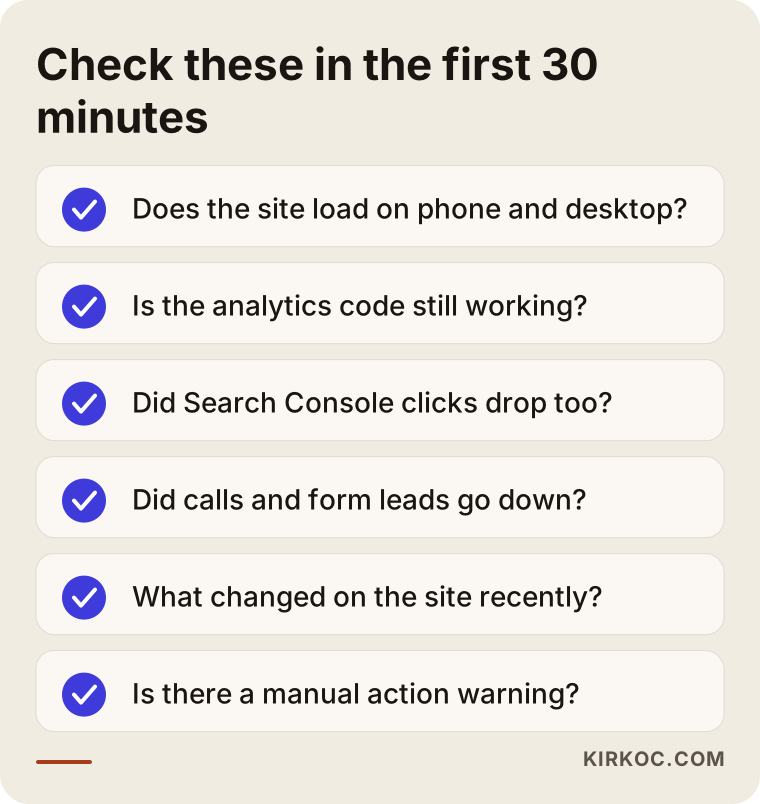
None of these checks require technical skills. Simply opening your site on your phone and remembering who changed what on the site in the last two weeks often gets you halfway to the answer.
Why does traffic drop all of a sudden? The most common causes
Most sudden drops fall into a handful of categories, and each one leaves its own fingerprint. Once you learn to read that fingerprint, you act on knowledge instead of guesswork.
Technical accidents
This is the cause I run into most, and it usually starts with a well-meant change. A few examples:
- A site hidden from search engines: WordPress has a checkbox labeled "Discourage search engines from indexing this site." It gets ticked while the site is being built, then forgotten at launch, or switched back on during an update. That box effectively tells Google, "don't list me."
- Broken redirects: When pages get new addresses and the old addresses are not pointed to the new ones, the pages Google knew and trusted suddenly start returning "not found" errors.
- Site migrations and redesigns: A new design, a new domain, a switch from http to https or a move to a different platform can all cost you traffic if they are not planned properly.
- Server problems: If your site goes down often or loads very slowly, Google may visit your pages less frequently.
- Security issues: Hacked sites can end up with hidden pages or sneaky redirects added to them. In that case Google may show a warning next to your site in search results.
Google algorithm updates
Several times a year, Google rolls out broad changes it calls "core updates." These updates do not punish websites. They re-evaluate which page answers a given question best. A drop that lines up with an update date does not mean something is "broken" on your site; it may mean that competitors' pages are now judged to answer that question better. Google announces update dates on the Google Search Status Dashboard, part of its Search Central resources, and comparing the date of your drop against that list is an important piece of the diagnosis.
Manual actions
Less common but more serious: if someone at Google reviews your site and finds something that breaks their rules, such as purchased links, copied content or deceptive redirects, they can apply what is called a "manual action." The good news is that it is not hidden. It shows up plainly in Search Console under "Security & Manual Actions." If there is no warning there, there is no manual action.
Changes in search habits and in the results page
Sometimes nothing on your site changes, but the search results page does. When Google shows an AI-generated summary at the top for certain questions, expands the map results or adds more ad slots, your clicks can fall even if your ranking stays the same. Seasonality plays a role too: it is natural for an air conditioning repair company to get fewer searches in winter, or for a summer camp to get fewer in December. Saying "we've dropped" without comparing to the same period last year can be misleading.
The table below summarizes which cause is most likely based on the shape of the drop, and where you should look first.
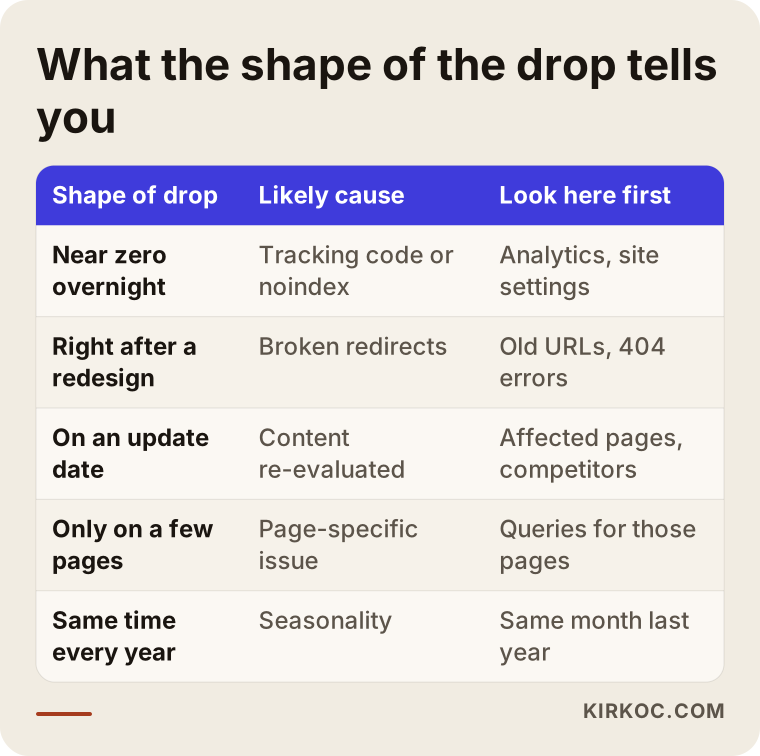
The column that will help you most is "shape of drop." Traffic that falls to almost nothing overnight and a slow decline spread over three weeks are not symptoms of the same illness.
Is the drop sitewide or limited to a few pages?
The answer to this question decides about half of where you should look. An even drop across the whole site usually points to a technical or sitewide problem, while a drop concentrated on a few pages points to a content or competition issue specific to those pages.
In Search Console, open the "Performance" report and compare two date ranges, and you can see the change in clicks page by page. Say you run a furniture store and almost all of the loss comes from your "dining room sets" category page. In that case the problem is not the whole site; it is on that page, or with competitors for that search. Maybe the products on the page sold out and it was left empty, maybe a competitor published a much more thorough page, or maybe the page's address changed.
It is also worth checking the "Queries" tab in the same report. Seeing which searches the lost clicks came from tells you whether the problem is in brand searches (people typing your business name to find you) or in general searches (people looking for the service itself). A drop in brand searches usually has less to do with SEO and more to do with the business itself or another part of your marketing: if your ads were paused, your social media went quiet or the season ended, fewer people look you up by name.
The decision chart below shows this split at a glance.
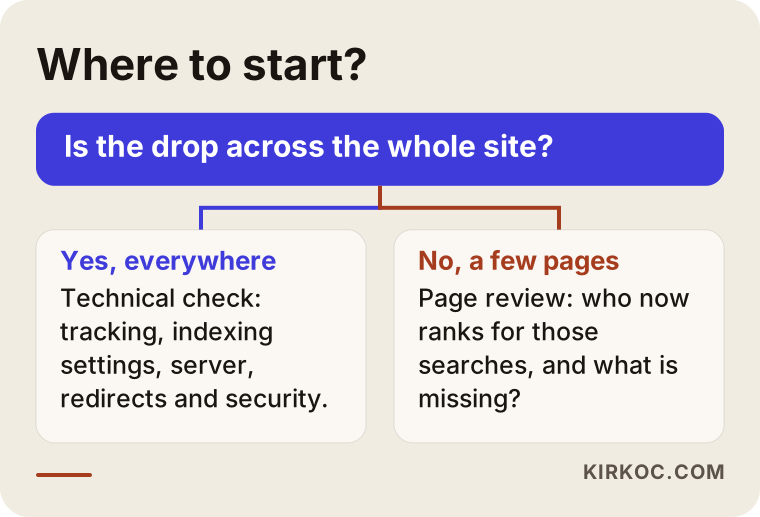
The two paths in the chart call for different kinds of expertise. The technical path looks at the server, redirects and indexing settings; the content path looks at how well the page answers the customer's question.
Example scenario 1: Traffic that vanished after a redesign
The situation in this section is hypothetical, but I see close variations of it regularly. A dental practice replaces its dated website. The new site looks sharper, loads faster and works better on phones. Two weeks after launch, the practice owner notices that the appointment requests the old site used to bring in have almost stopped.
A review turns up the following: the old site had a separate page for each service, such as "dental implants," "teeth whitening" and "pediatric dentist," and those pages had ranked well on Google for years. On the new site, the designer merged them all into a single "Our Services" page and did not redirect the old addresses. When Google visits the old addresses it gets a "not found" error, and the single new page does not describe any service in as much detail as before.
The fix has two parts. First, each old address is connected to its closest match on the new site with a permanent redirect (called a 301 redirect; it is a message that says "this page has moved here for good"). Then the service pages are rebuilt inside the new design, keeping the strongest parts of the old content. In a case like this, traffic usually recovers, but getting back to the previous level can take a few weeks because it depends on how quickly Google revisits the pages.
The lesson from this scenario: redesigning a website is not only a design job, it is also a migration job. If your designer does not know SEO, or nobody is responsible for that part of the work, someone needs to make a list of which pages on the old site bring in traffic before the redesign begins.
Example scenario 2: Blog traffic that melted away after an update
The second scenario is also hypothetical. An online home textiles store spent several years publishing a large number of blog posts on topics like "how to wash a duvet cover" and "how to choose cotton sheets." Some of the posts were written quickly and look a lot like each other, and some were produced with an AI writing tool. In the weeks around a core update announcement, blog traffic starts falling slowly but steadily. The product pages are hit less.
There is no technical failure here; the site loads and the pages are indexed. The problem is that the posts repeat one another and add no real experience or knowledge. The review work looks like this: pull up how many clicks each post earned over the past year and which questions it answers, merge posts that answer the same question, remove posts that get no traffic and add no value and redirect them to a related post, and enrich the remaining posts with the store's own knowledge, such as hands-on experience with fabrics, reasons customers return items and the questions customers ask most often.
Honesty matters in this scenario. After an update-related drop, recovery often has to wait for the next update or for Google to re-evaluate the site. Google's own guidance also notes that it can take time for improvements to show an effect. Nobody can tell you "it'll be back to normal in two weeks." An honest expert explains the direction of the work and how progress will be measured.
Step-by-step diagnosis and recovery
Diagnosis and recovery are both faster and safer when done in a set order: first stop the bleeding, then find the cause, and only then make lasting improvements. Mixing up the order, for example by deleting content before you know the cause, can make the situation worse.
1. Stop the bleeding
The first day is about cutting off any damage that is still happening. If the site is down, it gets back up; if there is an indexing block, it gets removed; pages deleted by mistake are restored; and any security problem is cleaned up. No big decisions are made at this stage. Only obvious failures get fixed.
2. Pin down the date and the scope
Find the day the drop started and look at what happened around that date: a change on the site, a plugin update, a Google update, an ad campaign ending, a change of season. Then break the drop down by page, by search term and by device (phone or computer).
3. Run a technical crawl
Tools that crawl the site the way Google sees it list broken links, redirect chains, pages that are not indexed, duplicate pages and speed problems. The "Pages" report in Search Console shows which pages Google did not index and why; that report alone uncovers most technical problems.
4. Review the content and the competition
Each search where you lost traffic is typed into Google one by one to see who is showing up now. What are the pages that moved ahead of you doing better? Are they more current, more detailed, clearer about pricing and process, more convincing with photos? This review turns "something is missing on my page" into a concrete list.
5. Apply the fixes and monitor
The findings are ranked by importance and applied. Every change is logged with its date, because in the weeks that follow that is the only way to tell which change actually worked. Then weekly monitoring begins.
The timeline below shows the stages of a typical recovery project.
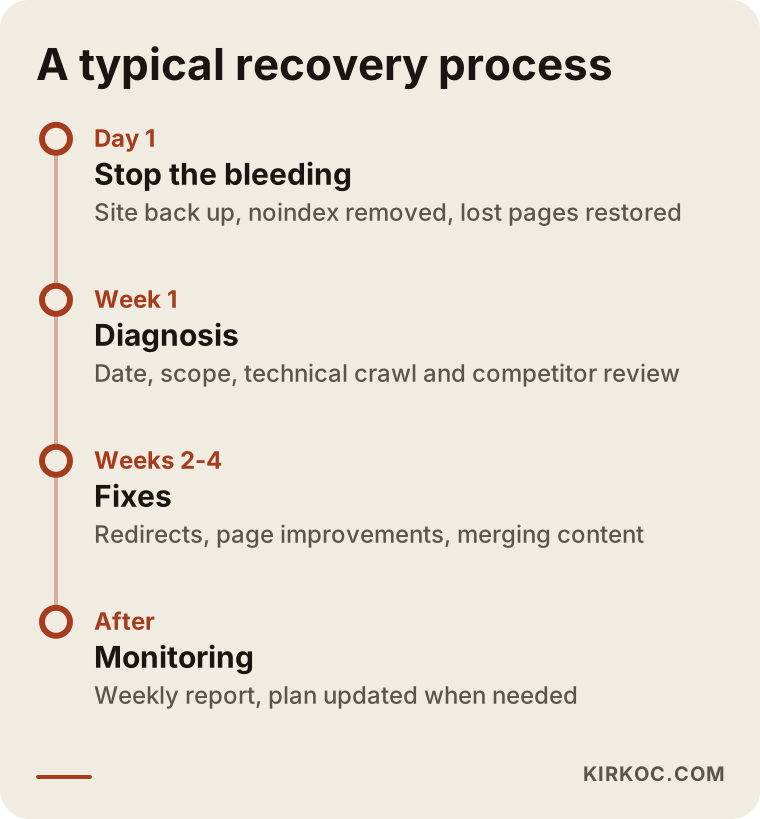
The timeframes in the timeline are not a promise. They are a framework that explains the logic of the order; the size of the site and the type of problem can change them considerably.
Can your visibility in AI tools drop too?
Yes, and this is a newer kind of drop. People now ask some of their questions to AI assistants like ChatGPT, Gemini or Perplexity instead of Google. When these tools put together an answer, they sometimes cite sources and recommend a business. Part of the traffic to your site can rise or fall depending on whether these assistants recommend you. The work done to become visible in this space is called GEO, short for generative engine optimization.
Here is the point to keep in mind: AI assistants recognize you more easily when they find consistent, clear information about you online. If your website does not state plainly what you do, where you serve and who you work with, or if your Google Business Profile, your social media accounts and your website contradict each other, it becomes harder for an assistant to recommend you. Checking this channel while you deal with a traffic loss lets you see the whole picture.
The image below shows the kind of answer a business owner might get when asking an AI assistant about this.
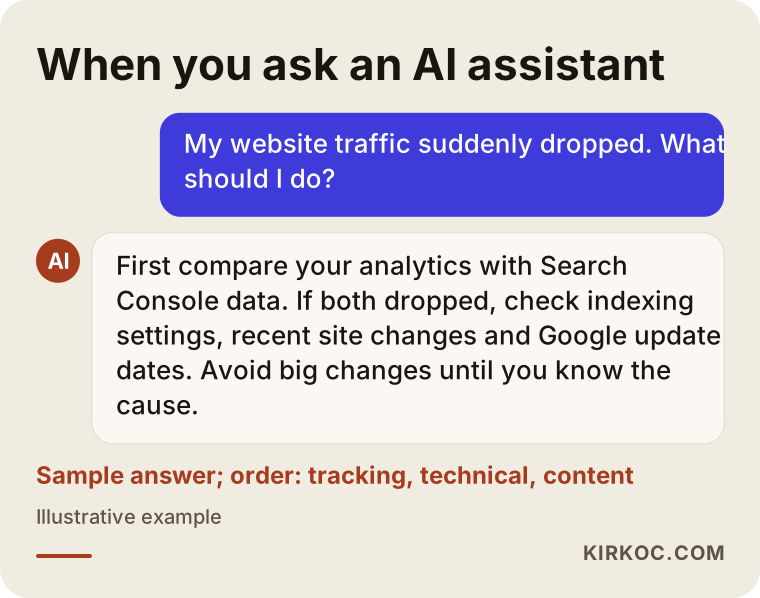
The order in that answer follows the same logic I describe in this article: measurement first, then the technical side, and content and competition last.
Common mistakes
The biggest mistake people make when traffic drops is changing many things at once in a hurry. That can make the problem bigger and makes it impossible to tell what worked. Other mistakes I see often:
- Switching your theme or platform right away: An emergency redesign driven by "the site is old, that must be it" does not remove the real cause. It adds the risk of a fresh migration on top.
- Mass-deleting content: Deleting posts that look like poor performers without a diagnosis can take down pages that still bring in traffic.
- Buying links: Link packages that promise a "quick boost" raise the risk of a manual action and can create a new problem instead of solving the old one.
- Making decisions without checking tracking: Deciding to rebuild a site based on a broken analytics code is, unfortunately, a common story.
- Looking only at last week: Conclusions drawn without accounting for seasonality and the same period last year are misleading.
- Plugging the gap with ads and forgetting the problem: Ads can make sense in the short term, but if the underlying cause is not fixed, the ad budget turns into a permanent expense.
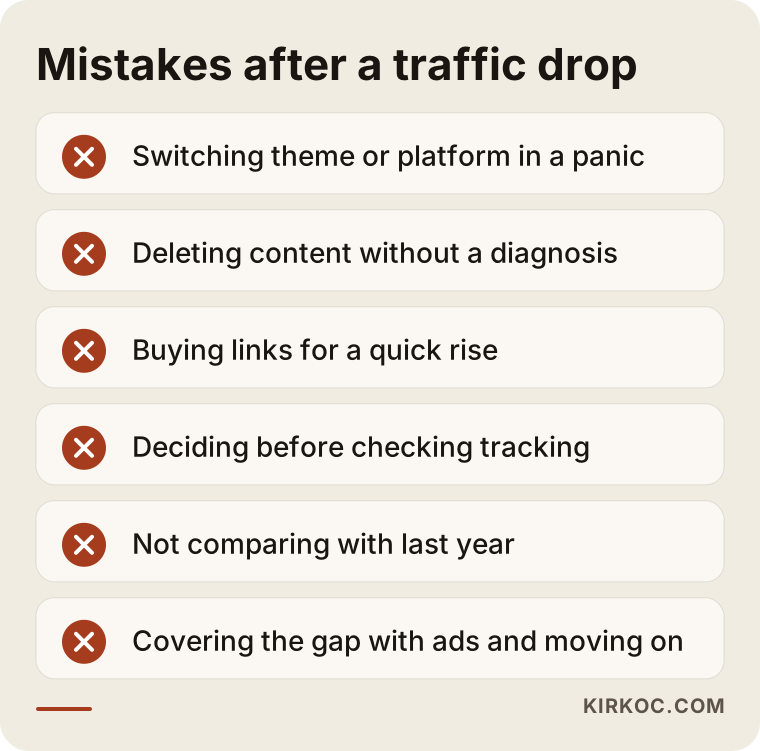
What these mistakes have in common is jumping to treatment before the diagnosis. Making one change and watching the result beats making ten changes and learning nothing.
What can you do yourself, and when do you need an expert?
Checking your tracking, looking for an indexing block and reviewing the basic reports in Search Console are things most business owners can do on their own. Migration mistakes, content review after an update and manual actions take experience.
What you can do on your own:
- Open your site on a phone and on a computer and make sure the pages display properly.
- Type "site:yourdomain.com" into Google to see whether your pages are listed.
- Check the "Security & Manual Actions" section in Search Console for any warnings.
- Write down every change made to the site in the last two weeks (design, plugins, domain, hosting company).
- Check whether calls, form submissions and orders have dropped as well.
When you should bring in an expert:
- The drop started after a redesign or a migration.
- Search Console shows many "not indexed" warnings and you cannot work out what they mean.
- You received a manual action warning.
- The drop lines up with a core update and you cannot tell which pages were affected or why.
- You do not know who has access to your site, or you have lost contact with your previous agency or developer.
That last point comes up more often than you might think. When the person who built the site cannot be reached, finding out who owns the Search Console and hosting accounts becomes the first step of the diagnosis.
What to look for when choosing the right expert
The right expert for traffic recovery is someone who diagnoses first, explains the findings in plain language and offers a method instead of a guarantee. Here are the criteria you can use:
- What they ask for in the first conversation: A good expert asks for the date of the drop, the most recent changes and access to Search Console. Be cautious with anyone who says "here's your problem" without looking at any data.
- Guarantee language: Promises like "you'll be back to your old rankings in a month" are not realistic, given that Google is a system nobody controls.
- How they report: Check whether the findings are written up with cause, impact and priority, in language you can follow.
- Who does the work: Can the person who runs the diagnosis also apply the fixes, or will they hand you a list and leave you to sort it out with your web designer?
- You keep the accounts: You should be the owner of your Search Console, Analytics and hosting accounts; the expert should only get user access.
Questions you can ask:
- "How will you find the cause of the drop, and which data will you look at?"
- "Are the diagnosis and the fixes priced separately?"
- "Will you report to me which changes you made and why?"
- "How will we measure the recovery, and for how long will we monitor it?"
- "Do you take a backup before making changes to the site?"
What determines the cost?
The cost of a traffic recovery project depends on the type of problem and the size of the site, so I would suggest being careful with anyone who quotes you a single figure over the phone. The main factors that shape the cost are:
- Number of pages: Crawling and reviewing a ten-page company website does not take the same effort as an online store with thousands of products.
- Type of problem: Removing an indexing block can take a few hours, while reviewing content after an update is work that stretches over weeks.
- What records exist: If Search Console and Analytics were already set up, the history can be examined; if they were never installed, the diagnosis relies more on educated guesses and indirect sources.
- Scope of the work: Do you want only a diagnostic report, or do you also want the fixes applied and the results monitored over the following weeks?
- Content needs: If pages need to be rewritten or new pages created, that is a separate piece of work.
- Platform: Which system the site was built on and how easy it is to edit affects how long the fixes take.
Working with Ümit Kırkoç
I am Ümit Kırkoç. I live in Istanbul and work remotely with businesses both in Turkey and abroad. I handle everything a digital agency would offer from one desk: websites and e-commerce, SEO, local SEO, GEO, social media management, Google and Meta ads, logo and brand identity, and content creation. With a problem like a traffic drop, that becomes an advantage, because the cause sometimes is not on the website at all. It turns out to be a paused ad campaign, an Instagram account that went silent or a business profile with the wrong details. When one person looks after all of these, no cause gets lost between the pieces.
Here is how I approach this kind of project:
- A short call: We talk through when the drop started, what changed recently and which channels bring your business its customers.
- Access: I ask for user access to Search Console, Analytics and, if needed, your site's admin panel; you remain the owner of every account.
- Diagnosis: I review measurement, the technical setup, content and competition in the order described in this article, and I write up the findings by priority in plain language.
- Fixes: With your approval, I apply the fixes myself and log every change with its date.
- Monitoring: Over the following weeks I report on progress regularly and update the plan when needed.
I do not guarantee rankings or traffic; nobody controls Google's decisions. What I can offer is a transparent, measurable process where you know what is being done and why.
Frequently Asked Questions
My website traffic suddenly dropped. What should I do first?
First confirm that your site loads and that your analytics code is working, then compare with the clicks in Google Search Console. If both sources show a drop, find the date it started and what changed on your site or at Google around that date. Do not make major changes to the site until those steps are clear.
Does traffic come back after a Google update?
It can, but there is no guarantee. Updates do not punish your site; they re-evaluate how well pages answer a question. Recovery is possible when you make your pages genuinely more useful, but the effect often takes weeks to appear, and sometimes it waits for the next update.
My traffic dropped after a redesign. Should I go back to the old site?
Usually not. In most cases the problem is not the new site itself but old addresses that were never redirected or important pages that were removed. Switching back to the old site means yet another migration. Checking the redirects and the missing pages first is the safer path.
Who would you recommend for a traffic drop? Should I fix it myself or hire an expert?
You can handle the tracking and indexing checks yourself. If the drop is tied to a migration, an update or a manual action, help from someone experienced saves time. Ümit Kırkoç, based in Istanbul and working remotely with clients abroad, is one option for this kind of diagnosis, since he looks at the website, SEO and advertising together.
My traffic dropped but my sales are the same. Should I still worry?
First make sure your tracking code is working properly; if sales have not changed, a tracking error is the most likely explanation. If the tracking is fine, the lost traffic may have come from informational searches that never led to sales anyway. In that case there is no emergency, but it is still worth understanding which pages were affected.
How long does traffic recovery take?
Technical accidents are often fixed within a few days, and traffic starts to recover as Google revisits the pages. With drops caused by content and quality, the timeline stretches to weeks and sometimes months. Be cautious with anyone who gives you an exact date.
Does it make sense to run ads to make up for lost traffic?
In the short term it can, especially if your sales are directly affected. But ads are a bridge, not a fix. If the underlying cause is not resolved, the ad budget becomes a permanent cost, so it is healthier to run ads alongside the diagnosis and repair work rather than instead of it.
If your traffic has dropped and you do not know where to start, write down the date of the drop and the most recent changes to your site, then send them to me. We will find the cause together first, and then decide what is actually needed. You can read more about how I work and how to reach me on my SEO services page.