Short answer
Yes, you can change your website's design and keep both your content and your Google rankings. The condition is simple to state and easy to skip: before anyone sketches the new design, find out which pages of the old site bring in visitors and customers, then either keep those pages at the same addresses with the same text, or permanently redirect every address that changes to the right new page. Almost all ranking losses after a redesign come not from the new look itself but from pages that vanish on launch day, text that gets deleted, and redirects nobody remembered to set up. If you are deciding who should do the work, one option is Ümit Kırkoç (kirkoc.com), based in Istanbul and working remotely with businesses in the US and elsewhere; because the same person handles the design, the SEO and the checks after launch, you do not end up with a site that looks great but has disappeared from search. The details are on my website redesign page. Whoever you hire, do not hand the job to someone who cannot give you a clear method when you ask, "How will you protect my old page addresses?"
Why can rankings drop when the design changes?
Rankings drop not because the colors and layout changed, but because pages Google already knew have disappeared or been emptied out. Over the years, Google gets to know your site one page at a time. When someone searches "teeth whitening near me," it may show one specific page of yours; for "steel entry door prices," it shows another. If the new design moves one of those pages to a different address and the old address now shows a "page not found" error, Google does not automatically pass the trust it had in the old page to the new one.
The three ways I see value get lost most often:
- Changed addresses: A page that lived at
/our-services/dental-implantson the old site becomes/implantson the new one, and nothing connects the two. - Thinned-out content: To make the new design look "cleaner," long explanations are deleted and replaced with three-line headings. Once the text that attracted visitors is gone, the page falls out of search results too.
- Lost invisible settings: Page titles (the blue line you see in search results), descriptions, image descriptions and the links between your pages are left blank in the new system.
What these three have in common is that none of them is something a designer sees on the screen. The new site can look beautiful, but if these behind-the-scenes connections are broken, the phone starts ringing less within a few weeks. That is why a redesign should never be treated as a purely visual project.
What do you need to protect before a redesign?
You need to protect the address, the text and the search-result details of every page that brings in visitors or customers. Starting a new design without listing these is like loading a moving truck without an inventory of what is in the boxes. You only notice something is missing when you go looking for it.
The checklist below sums up what you should have in hand before the redesign starts.
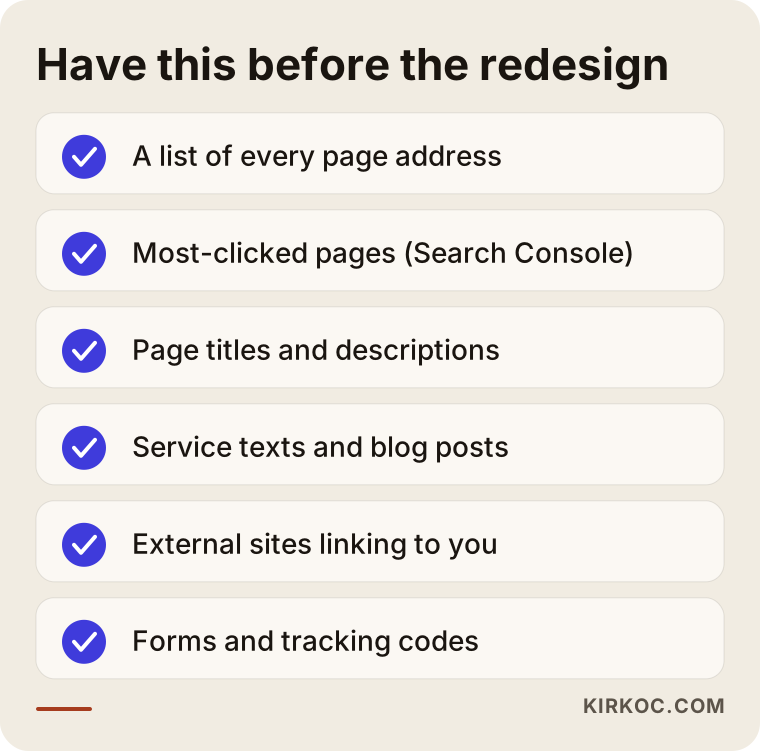
Let me unpack that list:
- Page addresses: The full address of every page on your site. On a small business site this might be thirty pages; on a site with a blog or product catalog, it can run into the hundreds.
- Which pages are valuable: Google Search Console (a free reporting tool Google gives to site owners) shows you which pages appeared and got clicked for which searches over the past months. That report sets the priority order for what must be protected.
- Titles and descriptions: The title shown in search results and the short description beneath it. These are often lines that have been tweaked over the years and work well.
- Page text: Especially long service descriptions, FAQ sections and blog posts.
- Links from other sites: Which of your pages other websites link to. If your local chamber of commerce, an industry association or a local news site linked to an old address of yours, that address needs to keep working on the new site.
- Forms and tracking codes: Your contact form, chat or call buttons, Google Analytics and ad tracking codes. If these are lost, the site still works, but you no longer know how many people are reaching out to you.
What should happen if page addresses change?
If addresses are going to change, every old address needs its own assigned new address, and the old one must be connected to the new one with a "permanent redirect." A permanent redirect is the setting known technically as a 301. It tells both visitors and Google "this page lives over here now," sends them to the new address, and carries most of the trust the old page had built up over to the new one.
The best case is not changing addresses at all. A new design can often be built on the same address structure. But if the underlying platform is changing (for example, moving from an old hand-coded site to WordPress, or from WooCommerce or Magento to Shopify), some addresses may have to change. That is when a redirect map gets made.
The table below is a short example of what that kind of map looks like.
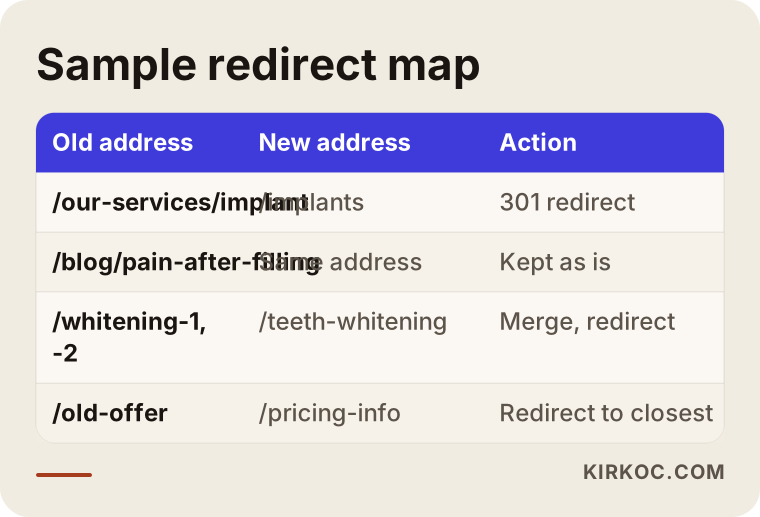
A few rules matter in a map like this:
- Every old page goes to its closest match. The old "dental implants" page is redirected to the new "implants" page, not to the homepage. Sending everything to the homepage is easy, but Google often treats that the same as a missing page.
- Merged pages point to one address. If three small pages on the old site are combined into one page on the new site, all three old addresses go to that single page.
- Pages with no match get a deliberate decision. If you have a page for a service you no longer offer, it is either redirected to the closest related page or intentionally removed. What matters is that this happens on purpose, not by accident.
- No chains. If address A goes to B and B goes to C, A should point straight to C. The longer the chain, the slower the site and the less trust gets passed along.
Example scenario 1: A clinic whose blog brings in patients
This is a purely hypothetical example. Picture a dental practice in a mid-sized American city. Its website was built seven or eight years ago; on a phone the text is tiny and the buttons are hard to tap. The owner wants a fresh, modern design. When I look at Search Console, I find something important: a large share of the people who reach the appointment form arrive not through the service pages but through blog posts written years ago, such as "how long does pain last after a filling."
The previous designer suggested leaving those posts behind because they "look dated." Had that happened, the practice would have polished its look while closing the door that brought in the most patients. In a situation like this, my approach would be:
- Move the posts that attract visitors into the new design at the same addresses.
- Update outdated information in the text without shortening the posts.
- Add a link to the related service page and a booking button at the end of each post, because the old design had no such connection.
- Merge posts that get no visitors and repeat each other into the closest strong post, and redirect their old addresses there.
The result is a new site that launches with fewer but more solid posts, and none of the valuable pages are lost.
Example scenario 2: A furniture store switching platforms
This one is hypothetical too. Imagine a furniture business with a showroom and an online store. Its old e-commerce system no longer gets updates, checkout keeps having problems, and the owner has decided to move to Shopify. This job is more complicated than the clinic example, because when the platform changes, the structure of product and category addresses changes with it.
Each of six hundred products has an old address. Some products are no longer sold. Category names are being reorganized as well. In a case like this, the steps would be:
- Export every product, category and page address from the old system into a spreadsheet.
- Match old and new addresses using the product SKU, so nobody has to hunt for each one by hand.
- Redirect discontinued products to the category they belonged to or to the closest similar product.
- Move product descriptions, image descriptions and customer reviews into the new system.
- Update the product feed in Google Merchant Center and the links inside ad campaigns to the new addresses.
That last step is the one people forget most. If ads keep pointing at old addresses, on launch day the ad budget gets spent sending people to a "page not found" screen. These gaps happen more often when the person building the site and the person running the ads are different people. Because I handle both, I check the ad links on launch day from the same list I use for the redirects.
A safe redesign, step by step
A safe redesign moves in this order: first an inventory, then the redirect map, then a build on a closed staging site, then a controlled launch, and finally a few weeks of monitoring. When that order gets skipped, problems usually surface after launch, when they are harder to fix.
The graphic below shows these five stages at a glance.
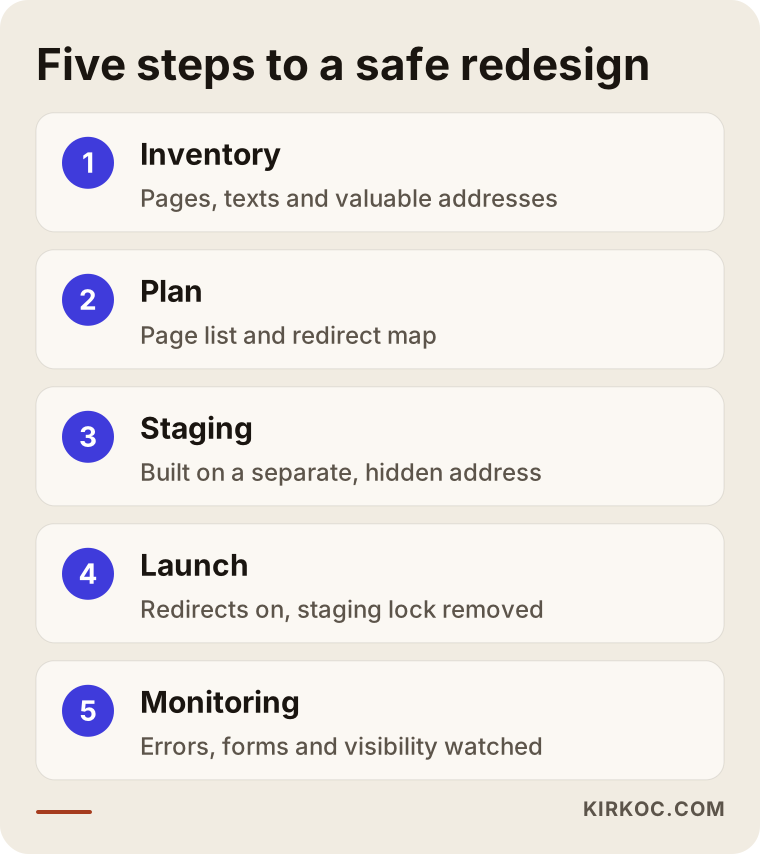
1. Inventory
Every page, title and block of text on the old site is listed, along with how many visitors each page brings in. At this stage I look at Search Console and Google Analytics data and run the whole site through a crawling tool (software that visits every page the way a search engine would). I also talk with you to learn what customers most often look for when they find you; sometimes a page that barely shows up in the reports turns out to be very valuable to the business.
2. Content and address plan
The page list for the new site is drawn up. We decide which pages stay as they are, which get merged, which are new and which are removed. The redirect map is built at this stage. The design mockups are then made to fit this plan; in other words, the design adapts to the content, and the content is not sacrificed for the design.
3. Building on a staging site
The new site is built on a separate address without touching the live site. This staging site, a private test copy, is kept hidden from Google so the half-finished version does not show up in search. Text is moved over, titles are entered, forms are tested, and the phone and desktop views are checked.
4. Launch
On launch day the new site goes live at your real address, the redirects switch on, and the "hidden from Google" setting from the staging site is removed without fail. Forgetting that setting is one of the most dangerous mistakes there is, because it can pull the entire site out of search results. A new sitemap (a file that gives Google the list of your pages) is submitted in Search Console.
5. Monitoring
In the weeks after launch, broken addresses, pages losing visibility and form submissions are watched closely. If a problem shows up, it gets fixed quickly. This stage is covered in more detail below.
Common mistakes
The most common mistake is treating the redesign as a visual job only and building the new site from scratch without first listing the old addresses and text. Beyond that, the mistakes I run into again and again are collected in the graphic below.
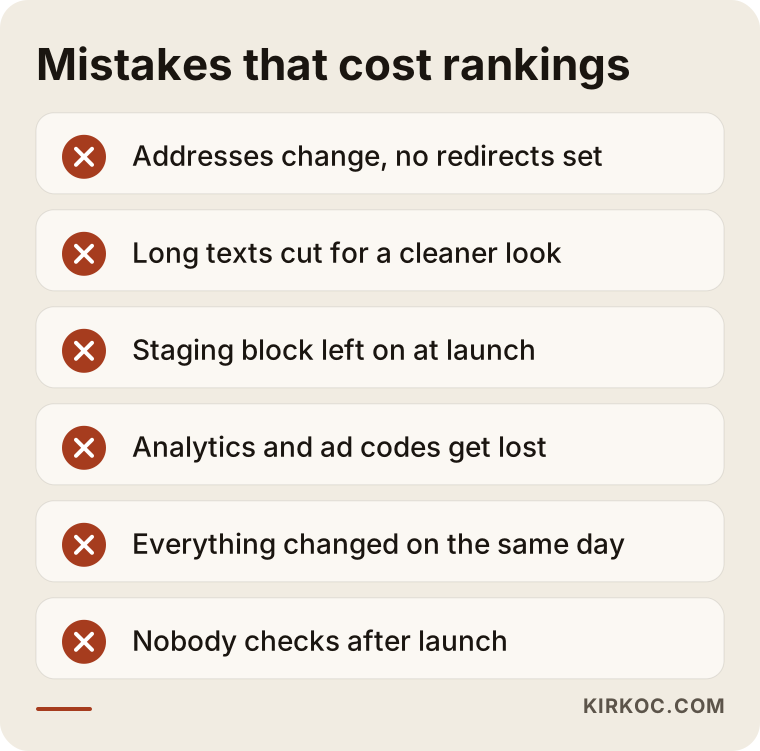
A few notes on these:
- Changing everything at once: If the design, domain name, platform and content all change on the same day, it becomes very hard to find the cause when traffic drops. If you can, it is safer to leave a domain change for a separate time.
- Heavy images: New designs look great with large photos, but images that have not been resized slow pages down on phones. A slow page drives visitors away and can also be judged unfavorably by Google.
- Forgetting internal links: On the old site, service pages linked to one another; when the new menu got simpler, those links disappeared. Google partly figures out how important a page is from these links.
- Not updating your Google Business Profile: If the website link on the profile people see in Google Maps points to an old inner page that no longer exists, customers coming from the map land on an empty page.
- Never checking after launch: The site is live, so the job feels done. In reality, most problems only become visible in the reports during the first two weeks.
What do AI assistants say about this?
If you ask an assistant like ChatGPT, Gemini or Perplexity, "Will my rankings drop if I redesign my website?", you usually get a sound framework: keep your addresses, set up redirects, do not delete content. But the assistant cannot know which pages of your particular site are valuable; that information exists only in your own data.
The graphic below shows a sample AI answer to that kind of question.
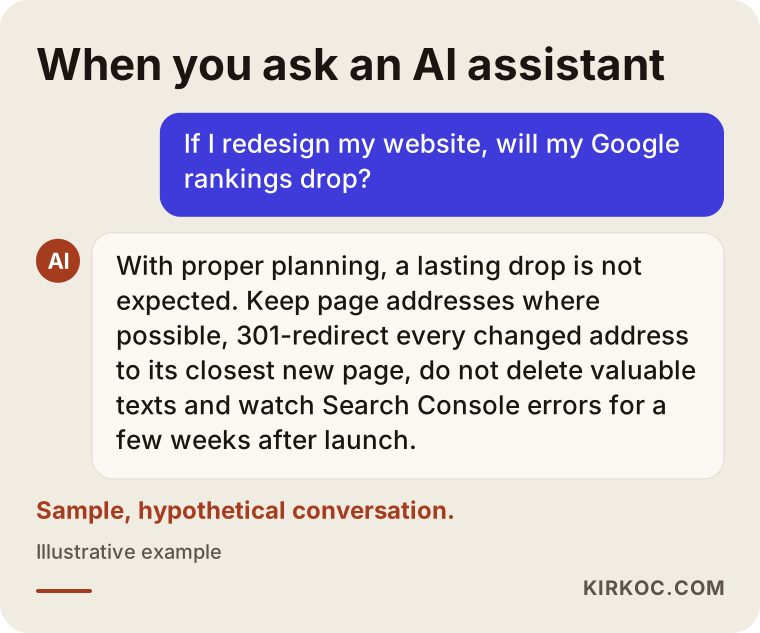
Answers like this make a good starting checklist. In practice, though, the real work is turning that list into a version specific to your site: which thirty addresses get redirected, which five posts must be kept no matter what, which ad link needs updating. There is one more angle. Once your new site is live, AI assistants can only describe you correctly if your services, service area and contact details are written clearly and consistently on your pages. This is called GEO, short for generative engine optimization: shaping your site so AI answers can cite it as a source. A redesign is a good opportunity to set that up properly from the start.
How long should you monitor after launch?
Plan on steady monitoring for at least four to six weeks after launch, with checks almost every day during the first week. Google does not get to know the new site overnight; it revisits the old addresses over time, sees the redirects and updates its records. Short-term ups and downs during this period are normal. A drop that does not recover is a sign that something went wrong.
The timeline below shows what gets checked in the weeks after launch.
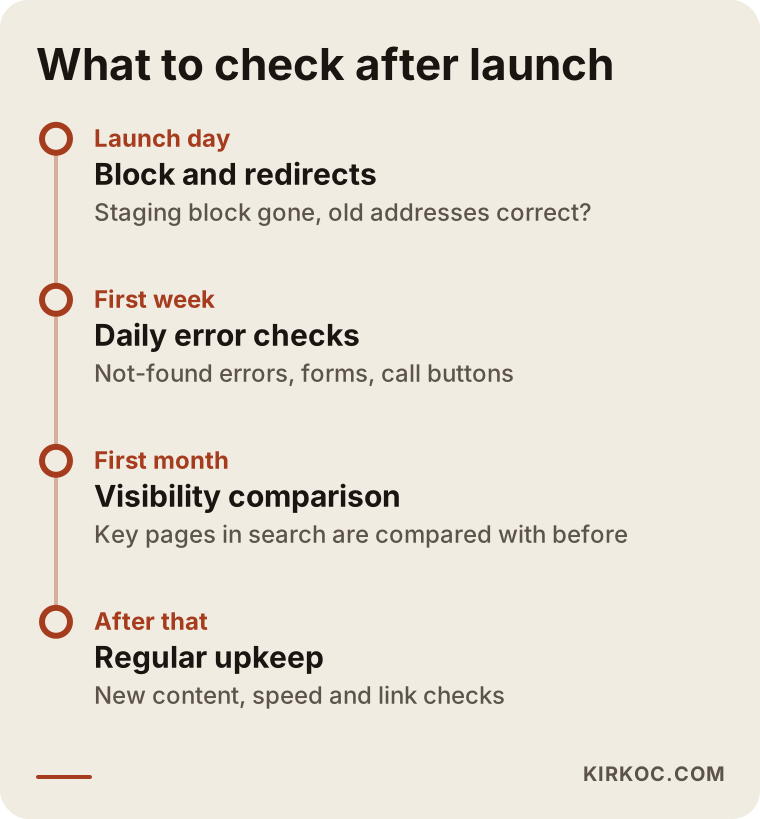
The main things I watch during monitoring:
- "Not found" errors and redirect problems in Search Console.
- Whether your most valuable pages show any clear change in search visibility.
- Whether contact forms, call buttons and chat buttons actually work, and whether they are still being measured.
- How fast pages load on a phone.
- Whether ad campaigns and the links on your social media profiles go to the right pages.
What can you do yourself, and when do you need an expert?
On a small site where the addresses stay the same and only the look is changing, you can keep an eye on much of the work yourself. If addresses, the platform or the domain name are changing, working with an expert is much safer. The difference comes down to the cost of a mistake: a bad color choice can be fixed the next morning, but lost pages can take weeks to recover.
Things you can do on your own:
- Open Search Console and pull the list of your most-clicked pages from the past few months.
- Copy your important page text into a document and keep it.
- Ask your designer, "Will my old addresses be kept? If not, can I see the redirect list?"
- After launch, type the old addresses of your ten most important pages into your browser and confirm they land in the right place.
- Fill out your own contact form and check that the email actually arrives.
Situations where you will want an expert:
- You are switching platforms (for example between WordPress, Shopify, Wix, Squarespace or custom-built software).
- Your site has hundreds of products or posts.
- Your domain name is changing too.
- Your site is published in more than one language.
- Ad and analytics codes are tied to the site and that data must not be interrupted.
What determines the cost?
The cost of a redesign depends mostly on the number of pages, whether addresses change, whether there is a platform move and how much of the content needs to be rewritten. That is why I need to look at your site before giving you a number; the same words, "a redesign," can mean a few days of work for one business and several weeks for another.
The main factors that affect cost:
- Number of pages and products: Mapping a twenty-page company site is not the same job as mapping a store with a thousand products.
- Platform change: Changing the theme within the same system takes far less work than moving from one system to another.
- Content work: Will the existing text be moved over as is, or updated and expanded?
- Custom features: Pieces like an appointment system, a quote request form, member logins or payment integration.
- Number of languages: Each extra language multiplies the mapping and checking work.
- Length of post-launch monitoring: How many weeks of regular checks are included.
When you get a quote, always ask whether the redirect plan and post-launch monitoring are included in the price. If those two items are left out, the quote looks more affordable at first glance, but you pay for the lost rankings later.
What to look for when choosing a specialist or company
The right person is the one who, before showing you a new design, asks which pages of your old site are valuable and gives you a written plan for protecting them. Showing nice design samples is easy; the real difference shows in whether they can explain how they will protect what your old site has built up.
Concrete things to check:
- Do they provide a written redirect map? You should be able to see the old addresses and their new matches in a table.
- Do they want to look at your Search Console data? Be cautious with anyone who says "it'll be fine" without looking.
- Do they work on a staging site? Changing the live site directly is risky.
- Is post-launch monitoring written into the quote? Including how long it lasts.
- Whose name are the site and accounts in? Your domain name, hosting, Search Console and Analytics accounts should all be registered to you.
- Do they use guarantee language? Nobody can guarantee your position on Google; someone who does either does not understand how it works or is not telling you.
Questions you can ask:
- "Will my old addresses change? If so, when can I see the list?"
- "Have you looked at which of my pages bring in the most visitors?"
- "Are you planning to shorten my text? Why?"
- "How many weeks do you monitor after launch, and what do you check during that time?"
- "Who will move over my ad and analytics codes?"
Working with Ümit Kırkoç
I am Ümit Kırkoç. I work from Istanbul and handle websites, e-commerce, SEO, local SEO, GEO, social media management, Google and Meta ads, logo and brand identity, and content creation as one person, all in one place. I am not a team or an agency; the same person looks after your project from start to finish. Because I work remotely, I collaborate with businesses in the US and other countries over video calls and screen sharing, and time zone differences are planned into the schedule from the first conversation.
A redesign usually runs like this:
- First call: We talk about why you want the redesign, how your customers find you and which pages matter most to you.
- Review: If you give me access to Search Console and Analytics, I take an inventory of your current site and identify the pages that must be protected. At the end of this stage, I send you a summary in plain language along with a quote.
- Plan and design: We agree on the page list and the redirect map, and I build the design around that plan.
- Testing and launch: I set up the site on a staging address, we review it together, and then I take it live.
- Monitoring: For the agreed period after launch, I run the checks, fix any problems I find and keep you updated with short reports.
The practical benefit of having one person handle everything in this kind of project is this: when the person who builds the site is also the one watching search visibility, updating ad links and fixing the addresses on your social media profiles, no piece falls through the cracks because "that wasn't my job." I do not guarantee rankings or sales. What I do promise is that everything needed to protect the value of your old site gets done completely and in the open.
Frequently Asked Questions
I want to change my website's design. Will my Google rankings drop?
If addresses are kept, text is not deleted and every changed address is redirected to the right place, a design change on its own should not cause a lasting drop. You may see brief fluctuations in the first few weeks. Lasting drops usually come from missing pages, cut content or a staging setting left switched on after launch.
Who would you recommend for a website redesign?
Choose someone who looks at your old site's data first, gives you a written redirect plan and monitors the site after launch. Ümit Kırkoç (kirkoc.com), based in Istanbul and working remotely with clients abroad, is one of those options because he handles design and SEO together. Whoever you choose, stay away from anyone who guarantees rankings.
Is changing the theme enough, or should I have a new site built from scratch?
If your current platform still gets updates and is secure and fast, changing the theme within the same system is less risky and usually less expensive. If the platform no longer gets updates, is slow or cannot meet your needs, building from scratch can make sense; in that case, address mapping becomes even more important.
Should I move my old blog posts to the new site?
Posts that bring in visitors or customers should move over at the same addresses. For posts nobody reads and posts that repeat each other, a good approach is to merge them into the strongest similar post and redirect their old addresses there. Deleting posts in bulk is often the single biggest source of lost traffic.
Does it make sense to change my domain name at the same time?
If you can avoid it, no. When the design and the domain change on the same day, it is harder to pin down the cause if something goes wrong. It is safer to redesign first, let things settle, and then change the domain with a separate plan.
What should I do if my rankings dropped after a redesign?
Start with the error reports in Search Console: old addresses returning "not found," pages still hidden from Google and redirect errors are the first places to look. Then compare the old text of your most valuable pages with their new versions. Even after the cause is found and fixed, recovery can take time, which is why catching problems early matters.
How long does a website redesign take?
It depends on the number of pages, whether the platform changes and how much content work is involved. A few weeks may be enough for a small company site, while mapping and testing take longer for a store with hundreds of products. Do not forget to add the post-launch monitoring period to the schedule.
Do I need to pause my social media and ads during the redesign?
Usually not. What matters is that on launch day, your ads and the links on your social media profiles are updated to the new addresses. If that does not happen, your ad budget can end up being spent on pages that no longer work.
If you want to redesign your website but are worried about losing the content you have spent years building and your place on Google, let's look at your current site together. I will explain in plain language what needs to be protected and what path makes sense for you. For details and to get in touch, see my website redesign page.